
NI-GSD051 - Steam cleaner PANASONIC - Free user manual and instructions
Find the device manual for free NI-GSD051 PANASONIC in PDF.


| Product Type | Steam Cleaner |
| Brand | Panasonic |
| Model | NI-GSD051 |
| Dimensions (Approx.) | 30 x 25 x 20 cm |
| Weight | 2.0 kg |
| Power Supply | Corded, 220-240 V ~ 50/60 Hz |
| Power Consumption | 1500 W |
| Water Tank Capacity | 300 ml |
| Heating Time | Approx. 30 seconds |
| Steam Output | Continuous steam up to 20 g/min |
| Floor Cleaning | Suitable for sealed hard floors |
| Accessories Included | Microfiber pad, measuring cup, funnel |
| Safety Features | Auto shut-off, boil-dry protection |
| Maintenance | Descale periodically with vinegar solution |
| Spare Parts Availability | Replacement pads and descaling kits available |
| Color | White/Blue |
| Package Contents | Steam cleaner, instruction manual, warranty card |
Frequently Asked Questions - NI-GSD051 PANASONIC
User questions about NI-GSD051 PANASONIC
0 question about this device. Answer the ones you know or ask your own.
Ask a new question about this device
Download the instructions for your Steam cleaner in PDF format for free! Find your manual NI-GSD051 - PANASONIC and take your electronic device back in hand. On this page are published all the documents necessary for the use of your device. NI-GSD051 by PANASONIC.
USER MANUAL NI-GSD051 PANASONIC
natural_image
Line drawing of a simple stand with a vertical pole and base, no text or symbols presentPanasonic
تطيات التخلي
natural_image
Line drawing of a vintage floor-mounted stand with adjustable arm and base (no text or symbols)Panasonic
Operating Instructions
Steam Iron
Household Use Only
Arahan Penggunaan
Model No. | NI-GSD071
Model | NI-GSD051
English 02-15
Melayu 16-28
Thank you for buying a Panasonic Iron.
Before operating this unit, please read these instructions completely
and save them for future use.
Terima kasin kerana membell produk Panasonic ini.
Operating Instructions
Steam Iron
Household Use Only
Model No. NI-GSD071
NI-GSD051
Contents
SAFETY PRECAUTION----04-07
PARTS IDENTIFICATION----08
HOW TO ASSEMBLE 05 HOW TO FILL WATER 09
HOW TO THE ELEW WATER 65 USING THE STEAM IRON 10-11
HOW TO CARE FOR AND STORE YOUR
PRODUCT 12
HOW TO USE THE CLEANER----13 HOW TO CLEAN THE FILTER----12
TROUBLE-SHOOTING GUIDE----14-15
SPECIFICATION----15
Thank you for purchasing this Panasonic product.
Before operating this unit, please read these instructions completely and save them for future use.
SAFETY PRECAUTIONS
To reduce the risk of injury, loss of life, electric shock, fire, malfunction, and damage to equipment or property, always observe the following safety precautions.
The following symbols are used to classify and describe the level of hazard, injury, and property damage caused when the denotation is disregarded and improper use is performed.
WARNING
Denotes a potential hazard that could result in serious injury or death.
CAUTION
Denotes a hazard that could result in minor injury or damage your belongings.
The following symbols are used to classify and describe the type of instructions to be observed.
∅
This symbol is used to alert users to a specific
0
This symbol is used to alert users to a specific operating procedure that must be followed in order to operate the unit safely.
WARNING

Never use the product if the Power cord or Power plug is damaged or if the Power plug fits loosely in a household outlet.
- Doing so may cause electric shock, or fire due to a short circuit.

Do not connect or disconnect the Power plug to a household outlet with a wet hand. - Doing so may cause electric shock or injury.

Do not damage, modify, or forcibly bend, pull, or twist the Power cord. Also, do not place anything heavy on or pinch the Power code.
- Doing so may cause electric shock or fire due to a short circuit.

Do not wrap the Power cord around the product when storing.
- Doing so may cause breakage to the wire of the cord, and may cause electric shock or fire due to a short circuit.

Do not use with the Power cord bundled.
- Doing so may cause fire of electric shock.

Never modify, disassemble, or repair the appliance by yourself.
- Doing so may cause ignition or injury due to abnormal operation. Contact an authorized service agent for repair.

Do not immerse the main body in water or other liquids.
- Doing so may cause electric shock or fire due to a short circuit.

Do not use the main body with a wet hand.
- Doing so may cause electric shock or fire due to a short circuit.

Do not use in proximity of flammable materials (such as benzine).
- Doing so may cause an explosion or fire.
WARNING

Regularly clean the Power plug to prevent dust from accumulating.
- Failure to do so may cause fire due to insulation failure caused by humidity. Disconnect the plug and wipe with a dry cloth.

The iron must not be left unattended while it is connected to the supply mains.
- Doing so may cause fire.

Immediately stop using and remove the Power plug If there is an abnormality or malfunction.
- Using it in such conditions may cause fire, electric shock, or injury.
- The main body stops occasionally, or the Power cord or the Power plug is abnormally hot, or discoloration.
- The main body is deformed or smells of burning. - Immediately request inspection or repair at an authorized service agent.

This appliance is not intended for use by persons (including children) with reduced physical, sensory or mental capabilities, or lack of experience and knowledge, unless they have been given supervision or instruction concerning use of the appliance by a person responsible for their safety. Children should be supervised to ensure that they do not play with the appliance.
- Failure to do so may cause an accident or injury.

Always ensure the appliance is operated on an electric power source matched to the rated voltage indicated on the product. Fully insert the Power plug.
- Failure to do so may cause fire, electric shock.

The Iron head must be firmly rested on the Iron holder, and the Power base must be placed on a flat and stable floor. When this product is used as a horizontal steam iron, the Iron must be used on a stable surface.
- Failure to do so may cause the Soleplate may be scratched, or even injury or scald if the Iron head falls over.

Independently use a household outlet, and do not use extension cord.
- Failure to do so may cause electric shock or fire.

If the Power cord is damaged, it must be replaced by the manufacturer, its service center, or similarly qualified persons in order to avoid a hazard.

- Failure to do so may cause an accident or injury. This product must use the electrical outlet with earth connection.
- Failure to do so may cause fire or electric shock.

The iron is not to be used if it or the Water tank and other parts has been dropped, If there are visible signs of damage or If It is leaking.
- Do not repair by yourself; it should be repaired by the designated service center.

m = 311
- Failure to do so may cause suffocation of infants
from happening
The plug must be removed from the socket outlet
before the water reservoir is filled with water.
- Failure to do so may cause fire, electric shock or
injury

CAUTION

Do not store the cord in a twisted state.
- Doing so may cause breakage to the wire of the
cord, and may cause electric shock or fire due to a
short circuit.

Don't touch the hot surface (such as Soleplate,
Iron holder and the hot surface around it)
- Doing so may cause scalds.
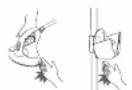

Do not touch the steam during use.
- Doing so may cause scalds.
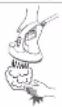

Do not place the Power base sidelong.
Doing so may cause water leakage, and then
damage floors and carpets.


Do not place the Iron head directly on the Power
base and floor
Doing so may cause damage
the product, floors and carpets.


Do not turn the Iron head upside-down or incline
t, put the Iron head back correctly as instructed.
Doing so may cause the product to fall, injury or
buma
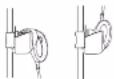

Do not use the product with Corded hose or
Power cord entangled
Doing so may cause the Corded steam hose damage, electric shock and fire.

CAUTION

Do not insert pins into the Soleplate.
- Doing so may cause fire, electric shock, or burn.

Do not add perfume, vinegar, starch, descaling
agents, ironing aids or other chemicals in the Water
tank.
- They can stain fabrics; instead, use room temperature

Do not put the Soleplate too close to you or others
since steam may unexpectedly erupt from it.
- Doing so may cause scald.

Do not move the product by pulling the Corded hose.
- Doing so may cause the Corded steam hose damage,
electric shock and fire.

When moving the product, do not come to bring the
product through the hanger
- Otherwise it may cause the product to fall, injury.

Do not set the Steam selector to the steam position
until the Thermostat indicator light
pressing the Power button down.
- Otherwise hot water will come out from the
soleplate, so may cause injury.

Do not use the appliance with the exception of fabric
(e.g. leather).
- Doing so may cause damage it

When attach the clothes to the Fixing hook, do
not allow the fabric touch the Soleplate.
- Otherwise, the hot Soleplate may burn and damage the fabric. So may cause damage it.

Do not move the Power base until it have fully cooled
down.

Do not operate the Cleaner repeatedly in quick
succession.
- If repeating operation over an interval of less than
2 seconds, burns due to hot water leaks may result.

Unplug the Power plug to disconnect from a
household outlet by grasping the Power plug.
- Failure to do so may cause fire, electric shock or
Injury.

Use the product only for its intended purpose, for
Ironing fabrics. To protect against burns or in
to persons, do not iron or steam fabrics while being on the body.
- Failure to do so may cause injury

Care should be taken when using the appliance
due to the emission of steam
- It may cause scald.

Test on an Inconspicuous area when using with
high-end or specially processed items.
- Failure to do so may cause damage fabric

Always unplug the Power plug during filling,
emptying, cleaning and not in use.
- Failure to do so may cause fire, electric shock or
Injury.
PARTS IDENTIFICATION Iron head
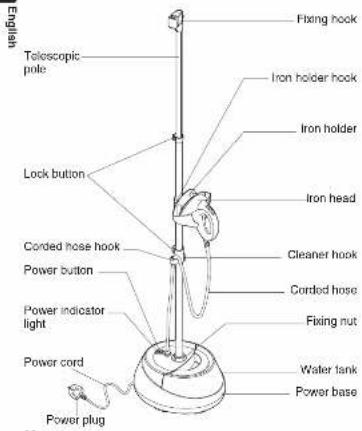
08
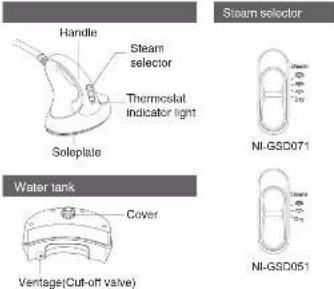
Accessories

Insulated glove
(NI-GSD071 only)
(Use for pulling the garment
tight with one hand while
ironing with the other hand.)

(For the first use or use after a long period, and every two weeks of normal use, please use the Cleaner.)
HOW TO ASSEMBLE HOW TO FILL WATER
Be sure to assemble the product on a flat and stable floor.
Take the Product out of the package.
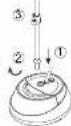
- ① Insert the larger end of the Telescopic
pole into the Power base correctly.
21 Turn the Fixing nut clockwise to tighten.
Telescopic pole, pull the Telescopic pole upward to a proper height, and then lock the Lock button.
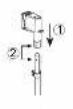
- ① Attach the Fixing hook onto the
Telescopic pole. (2) Align the small hole of the Fixing hook with the small pad on the Telescopic pole, and then push with force the Fixing hook into the Telescopic pole.
-
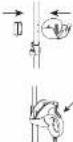
Install the iron holder at the small hole of Telescopic pole, and then fixed it with the iron holder hook.
-
Place the iron head into the iron holder on the Telescopic pole.
-
Place the assembled product on a level and stable place.
-
Remove the Water tank from Power base.
Invert the Water tank.
- ① Open the Cover on the bottom of the Water tank.
(2) Put the water tank under a faucet and fill it with proper amount of water. Do not overfill the may mark surface.
③ Close the Cover correctly.


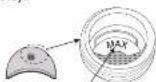
Max mark surface
- Attach the Water tank back to the Power base until they are interlocked.
Note:
a) The Water tank capacity is approx. 1.6 L, and it is
available for about 100 minutes of high steam usage.
Fill it with proper amount of water according to your need.
by When filling water, avoid accumulating water in the groove around the water inlet. Before installing the Water tank.
back, clean any water in the groove.
c) To prevent water leakage, do not remove Cut-off valve in
the Vantage
d) When fill hard water and continue to use, hot water may
be come out.
e) Please fill the water tank with tap water. If water of high hardness is used, the life of the product may be shortened.
For the first use, please use the Cleaner.(Refer to page 13)
-
Set the Steam selector to the *D r y *position, put the iron head into the Iron holder. Plug the Power plug into the household outlet.
-
Press the Power button to light the Power indicator up. At the same time, the Thermostat indicator light also lights up and the Soleplate begins to heat up.
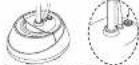
- Wait about 1 minute until the Thermostat indicator light goes off when the product is ready to use. After that, set the Steam selector according to the required steam amount.
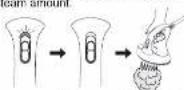
- To close steam, set the Steam selector to the 'Dry' position. NI-GSD051NI-GSD071
Note:
a) When the Soleplate has finished heating up, the
Thermostat indicator light will go off automatically. b) During ironing, the Thermostat indicator light lights on
and off alternately to indicate that the Soleplate is
heating up or has heated up
c) Close the steam before placing the iron head into the
Iron holder.
b) For the first use, you may need to wait for nearly 3 minutes before steam comes out since no water is
5 minutes before steam stored in the main body
e) Before each use, please spray the steam on the items
such as towel for a short lime to prevent scale spray on
cibu
1 Care should be taken when the Water tank runs out due to the emission of hot water, vapor inact clean water in
to the emission of hot water, please inject clean water in a timely manner.
ni: When the
g, When the Steam selector set to position and the amount of steam is not enough, please set the Steam
selector to "×" or "≡" position.
→ FABRIC AND IRONING RECOMMENDATIONS
| Fabric | Steam selector |
| ACRYLIC, ACETATE | Level "###";For thin or delicate fabrics requiring a small amount of steam. |
| NYLON, SILK | |
| POLYESTER, RAYON | |
| WOOL | Level "###" or "###";For fabrics requiring a lot of steam.(i.e. thick materials, items with stubborn wrinkles). |
| COTTON, LINEN |
Note:
When ironing not high-temperature resistant fabrics(e.g. acrylic fibers, cellulose fiber, nylon, silk, polyester, rayon)
a) Do not set the Steam selector to the "Dry" position.
b) Use a press cloth on top of fabrics, or keep the soleplate
away from the garment
-Otherwise the fabrics may be ruined, damaged or burned.
-- HOW TO USE AS A VERTICAL STEAM IRON
-
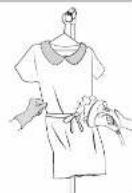
Hang the garment on a hanger, and then attach the hanger to the Fixing hook.
-
Wait until the Thermostat indicator light goes off, and set the Steam selector according to the required steam amount.
-
To get better results, pull the garment tight with one hand while ironing with the other hand.
Note:
a) It may take some time to jet out steam when you use the product for the first time.
It may take a shorter time to jet out steam if you set the Steam selector to the High steam level. After steam erupts, set the Steam selector to an appropriate level as required.
b) After steam has been coming out for a period of time, the jet of steam tends to slow down. This is normal. We recommend to turn off the steam when you sort out or change your clothes.
c) When attach the clothes to the Fixing hook, do not allow the fabric touch the soleplate.
d) Insulated glove can be worn on the hand taking the cloth in order to smooth wrinkles when ironing. (NI-GSD071 only)
E) Do not put over a kg on the fixing block
→ HOW TO USE AS A HORIZONTAL STEAM IRON
-
Keep the garment flat on the ironing board.
-
Wait until the Thermostat indicate light goes off, and set the Steam selector according to the required steam amount.
-
Select a proper ironing method according to the fabric type. (Refer to the section "FABRIC AND IRONING RECOMMENDATIONS".)
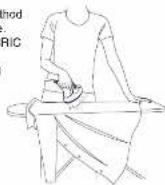
Note:
The Soleplate can get pretty hot in use. Be careful do not stay in the same position of clothes for too long time while ironing them on an ironing board.
HOW TO CARE FOR AND STORE YOUR PRODUCT
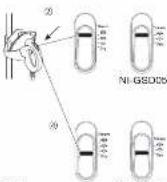
2 • AFTER EACH USE
Please clean and maintain the product as the following.
- Drainage, Cleaning and Maintenance of the Water tank
1) Turn off the Power button, unplug the Power plug.
2 Take out the Water tank from
the Power base, open the Cover, shake the Water tank to close its
shake the water tank to clean its inner wall with the remaining water.
and then drain the Water tank.
2. Handling method of the remained
water in the Power base.
① After emptied the water tank.
Insert the Power plug
and press down the
Power button.
: Place the iron head into
the Iron holder, set the
Steam selector to the
High steam position.
: The remained water in
the Power base will be
transported to the hot
Soleplate and become
steam elected from the
Soleplate.
Wait until the steam has come
out completely from the
Soleplate, and then set the
Steam selector to the
("Dry") position.
12
NI-GSD051NI-GSD071
(1)
(1)
C
|
1
M.
N. GEDDING, 2021
NI-GSOLISTM-GE507
Turn off the Power button, unplug the Power plug
(No text)
Note:
Care should be taken about the risk of hot water emissions,
- Cleaning and Maintenance of the Iron head and Power
base.
① Unplug the Power plug, wait until the Iron head.
Iron holder and Power base have fully cooled down.
(2) Wipe the surface of the Soleplate and the Power base
with a soft cloth. For stubborn stains, use a soft cloth dipped with neutral detergent to clean.
clipped with neutral detergent to clean
Note
Never use such cleaning products as the thinner, cleanser
and volatile solvent to wash the iron head or the Power base;
otherwise damages may be caused.
(No text)
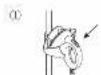
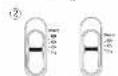
- Storage
① Place the iron head into
the iron holder
② Set the Steam selector
to the "Dry" position.
30 Turn off the Power button
unplus the Power plug.
④ Store the product in a safe
place.
- 本次股东大会的召集和召开程序
NI-GSD051NI-GSD071
HOW TO USE THE CLEANER
For the first use or use after a long period, and every two weeks of normal use, please use the Cleaner.
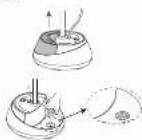
① Remove the Water tank.
② Fill it with water to the position as illustrated.
③ Use the Cleaner to fully cover the position filled with water as illustrated.
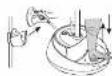
4 Plug the Power plug into the household outlet. Press the Power button to light the Power indicator up. Wall about 1 minute until the Thermostat Indicator light goes off. Take the iron head from the iron holder, and set the Steam selector to the High steam position. Open the palm of your hand, place on top of the Cleaner as illustrated, then press down the Cleaner till steam comes out.
⑤ Hang the Cleaner on the
Cleaner Hook of Telescopic
pole to prevent losing.

广力云
m - 1 0 ;
(1)
Note:
a) After completing the above procedures, steam or hot
water may suddenly come out from the surface of
Soleplate. Keep the soleplate away from you or
others; Otherwise it may cause scald.
b) Do not operate the Cleaner repeatedly in quick
succession. If repeating operation over an interval of
less than 2 seconds, burns due to hot water leaks
ma
How To Clean The Filter
When the product has been used for a long period of time, the Filter in the Power base may be clogged by dirt, thus reducing steam or preventing steam from coming out. If the Filter is clogged, use a cotton swab or fine cotton cloth to clean the Filter.
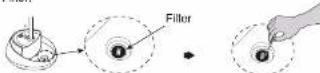
Note: When cleaning the Filter, please do not push hard the
Filter.
TROUBLE-SHOOTING
| No heating No light up | The Power plug has not been plugged in or the Power button has not been pressed down. | Insert the Power plug and be sure to press the Power button. |
| The product circuit falls or the fuse is broken down. | Have your product repaired by the specified service agent. | |
| No steam | The Steam selector is not turned on. | Set the Steam selector to the proper level of steam. |
| The Water pipe is bent and thus the water cannot smoothly run through it. | Fill the Water tank with water.The Water tank is em | |
| The Water tank is not be installed correctly to the Power base. | Ensure the Water pipe is not bent. | |
| Water leaks out from the Power base | The Water tank is broken. | Attach the Water tank to the Power base correctly. |
| The Water pipe is loose or damaged. | Have the Water tank replaced by the specified service agent. | |
| The cover is loose or damaged. | Have your product repaired by the specified service agent. | |
| The Telescopic pole slips down unexpectedly | The Lock button is damaged. | Close the cover correctly or have your product repaired by the specified service agent. |
| The garment on the Fixing hook is too heavy. | Have the Telescopic pole replaced by the specified service agent. | |
| Scale appears on the Soleplate | Tap water may be polluted by the rusted iron water pipe, so the steam ejected from the soleplate may have rust which like scale. | Lighten the weight loaded to the Fixing hook (less than 3 kg). |
| Prolonged use of hard water may cause scale on the soleplate. | Inject clean water, and after the Iron is powered on and switched to the steam function. Press and rub the soleplate hard with wet cloth placed on flat surface until the scale is cleaned. |

TROUBLE-SHOOTING
| Problem Causes Solution | ||
| The Power base makes a noise | The Water Tank is empty, causing the racing of the water pump, thus making a noise. | Fill water again (according to HOW TO FILL WATER). |
| The Water tank is not be installed correctly to the Power base. | Attach the Water tank to the Power base correctly. | |
SPECIFICATION
| Model NI-GSD071 N-I-GSD051 | ||
| Rated voltage | 230-240 V 50-60 Hz(Malaysia/Oman/UAE/Kuwait) | |
| 220 V ~ 50-60 Hz (Saudi Arabia) | ||
| Power | 1 380-1 500 W(Malaysia/Oman/UAE/Kuwait) | |
| 1 500 W (Saudi Arabia) | ||
| Weight Approx. 2.7 kg | ||
| Steam selector 3-Level steam 2-Level steam | ||
| Dimensions(assembly) | (WxDxH) Approx. 34 x 29.3 x 165 cm | |
| Plug / Cord length | Single-phase three core plug /Approx. 1.5 m | |
| Corded steamhose length | Approx. 1.4 m | |
| Iron surface Approx. | 74 cm | |
| Water tank capacity | Approx. 1.6 L | |
| Max time ofcontinuous steam | Approx. 100 - 178 min.(Vary with the steam levels) | |
| Light indicator | Thermostat indicator light | |
| Thermostat system | Temperature fuse | |
This product is intended for household use only.
Panasonic
Arahan Penggunaan
Seterika Wap
on booklet dimension
• Household is the largest in the country, and it is a great opportunity to be a large deal.
Brand : PANASONIC
Model : NI-GSD051
Category : Steam cleaner