
NI-GHF025 - Steam cleaner PANASONIC - Free user manual and instructions
Find the device manual for free NI-GHF025 PANASONIC in PDF.


| Product Type | Handheld Steam Iron |
| Model | NI-GHF025 |
| Brand | Panasonic |
| Power Source | 220-240 V ~ 50-60 Hz |
| Power Consumption | 1300 - 1570 W |
| Weight (approx.) | 0.8 kg |
| Dimensions (approx.) | 76 x 302 x 50 mm |
| Water Tank Capacity | 120 mL |
| Cord Length | 1.8 m |
| Continuous Steam Time | Approx. 7 minutes |
| Heat-up Time | Approx. 30 seconds |
| Functions | Dry ironing, Steam ironing, Adjustable steam level |
| Soleplate Material | Metal (not specified, typical for steam irons) |
| Intended Use | Household use only |
| Water Type | Distilled or pure water (no tap water or mineral water) |
| Safety Features | Thermal fuse, automatic shut-off not specified |
| Cleaning | Wipe soleplate with damp cloth; clean steam vents by service center if blocked |
| Storage | Cool down fully before storing; do not wrap cord around appliance |
| Warranty Registration | Online via QR code (Malaysia only) |
| Repairability | Contact authorized service center; do not disassemble |
Frequently Asked Questions - NI-GHF025 PANASONIC
User questions about NI-GHF025 PANASONIC
0 question about this device. Answer the ones you know or ask your own.
Ask a new question about this device
Download the instructions for your Steam cleaner in PDF format for free! Find your manual NI-GHF025 - PANASONIC and take your electronic device back in hand. On this page are published all the documents necessary for the use of your device. NI-GHF025 by PANASONIC.
USER MANUAL NI-GHF025 PANASONIC
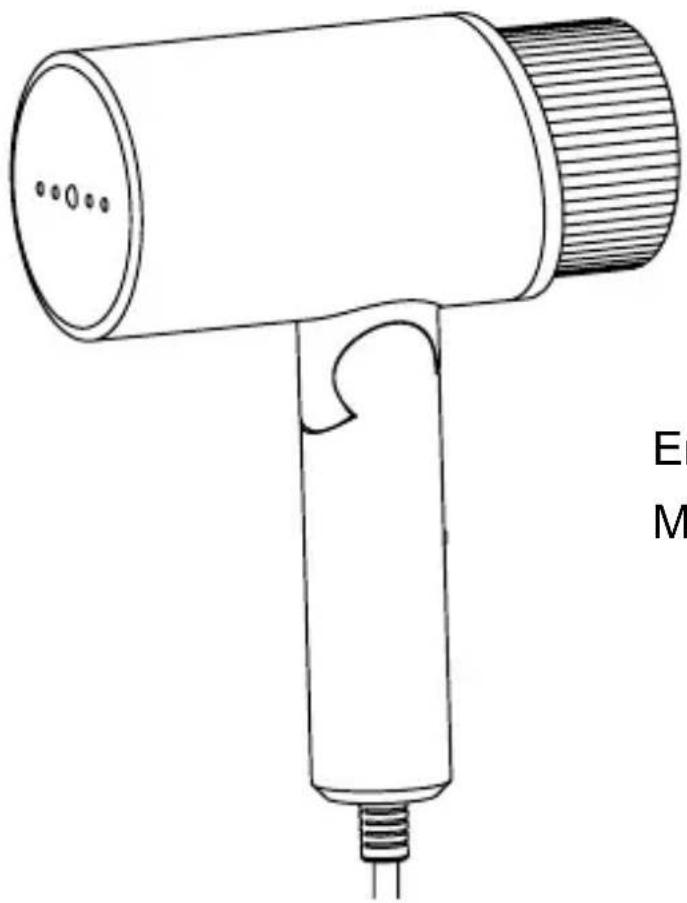
Model No. / Model NI-GHF025
natural_image
Line drawing of a handheld hair dryer with a cylindrical body and threaded handle (no text or symbols)English----03-24
Melayu 27-48
Warranty registration
The warranty can be registered online. Please visit the website by scanning the QR code.

Only Malaysia Only Sir
Panasonic
Operating Instructions (Household Use Only) Steame Iron
Model No. NI-GHF025
Contents
Safety precautions----04-14
Parts identification 15
How to use---- 16-19
After use---- 20
Cleaning----21
Specifications 22
Trouble-shooting 23-24
Thank you for purchasing this Panasonic appliance. Before operating this unit, please read these instructions completely and save them for future use.
Safety precautions
To reduce the risk of electric shock, injury, fire, loss of life, and damage to equipment or property, always observe the following safety precautions.
Explanation of symbols
The following symbols are used to classify and describe the level of hazard, injury, and property damage caused when the denotation is disregarded and improper use is performed.

WARNING
Denotes a potential hazard that could result in serious injury or death.

CAUTION
Denotes a hazard that could result in minor injury or damage your belongings.
The following symbols are used to classify and describe the type of instructions to be observed.
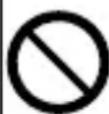
This symbol is used to alert users to a specific operating procedure that must not be performed.
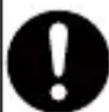
This symbol is used to alert users to a specific operating procedure that must be followed in order to operate the unit safely.

WARNING
Do not use when the power plug or power cord is damaged or hot.
Never use the appliance if the power plug fits loosely in socket-outlet.
- Doing so may cause electric shock, or fire due to a short circuit.

Do not leave the appliance unattended while it is connected to socket-outlet.
- Doing so may cause fire.

Do not connect or disconnect the power plug to socket-outlet with wet hands.
- Doing so may cause electric shock or injury.

Do not damage, modify, forcibly bend, pull, or twist the power cord.
Do not place anything heavy on or pinch the power cord.
- Doing so may cause electric shock or fire due to a short circuit.

Do not allow the power cord to touch hot surfaces of the steamer head.
- Doing so may cause electric shock or injury.

WARNING
Do not use with the power cord bundled.
- Doing so may cause electric shock or fire due to a short circuit.

Never modify, disassemble, or repair the appliance by yourself.
- Doing so may cause ignition or injury due to abnormal operation. Contact an authorized service agent for repair.

Do not use the appliance with wet hands.
- Doing so may cause electric shock or fire due to a short circuit.

Do not use in proximity of flammable materials (such as benzine or the like).
- Doing so may cause an explosion or fire.

Do not wrap the power cord around the appliance for storage.
- Doing so may cause breakage to the wire of the power cord, and may cause electric shock or fire due to a short circuit.

Do not immerse the appliance in water or other liquids.
- Doing so may cause burns, electric shock or fire due to a short circuit.

WARNING
The appliance is not to be used if it has been dropped, if there are visible signs of damage or if it is leaking.
- Refer servicing to authorized service personnel.

Do not use in a way exceeding the rating of the socket-outlet or the wiring.
- Exceeding the rating by connecting too many plugs to one socket-outlet may cause fire due to overheating.

Always ensure the appliance is operated on an electric power source matched to the rated voltage indicated on the appliance.
Fully insert the power plug.
- Failure to do so may cause injury, electric shock or fire.

Regularly clean the power plug to prevent dust from accumulating.
- Disconnect the power plug and wipe with a dry cloth.
- Failure to do so may cause an accident or injury.

Independently use socket-outlet, and do not use extension cord.
- Failure to do so may cause electric shock or fire.

WARNING

This appliance is not intended for use by persons (including children) with reduced physical, sensory or mental capabilities, or lack of experience and knowledge, unless they have been given supervision or instruction concerning use of the appliance by a person responsible for their safety. Children should be supervised to ensure that they do not play with the appliance.
- Failure to do so may cause an accident or injury.

Immediately stop using and remove the power plug if there is an abnormality or malfunction.
- Using it in such conditions may cause fire, electric shock, or injury.
- The power cord is damaged (like it cracks, or the core wire is exposed).
- The main body, power cord or power plug is abnormally hot, deformed or discolored.
- The appliance cannot power on occasionally after the power cord is moved.
• The power plug or power cord smells of burning.
- Immediately request inspection or repair at an authorized service center.

WARNING

If the power cord is damaged, it must be replaced by the manufacturer, its service center, or similarly qualified persons in order to avoid a hazard.
- Failure to do so may cause an accident or injury.

Be sure to place or use the product on a flat and stable surface.
- Failure to do so may scratch the steamer head or cause the product to fall over, thus resulting in injury or scalds.

This appliance must use socket-outlet with earth connection.
- Failure to do so may cause fire or electric shock.

CAUTION

Do not insert pins or needles into the appliance or use the appliance on clothes with sewing needles or the like inserted.
- Doing so may cause electric shock or injury.
Do not put the soleplate too close to you or others since steam may unexpectedly erupt from it.
- Doing so may cause scalds or injury.
Do not use the appliance with the exception of fabric.
- Failure to do so may cause damage it.
Do not store the appliance until it has fully cooled down.
- Doing so may cause scalds.
Do not store the appliance while the power cord is twisted.
- Doing so may cause breakage to the wire of the power cord, and may result in scalds, electric shock or fire due to a short circuit.
Do not add perfume, vinegar, starch, descaling agents, ironing aids or other chemicals in the water tank. Please only use room-temperature pure water or distilled water in this appliance.
- Otherwise the clothes may be stained or discolored.

CAUTION
Do not use any ironing accessories available on the market.
- Doing so may cause burns or damage to cloth due to incorrect operation.

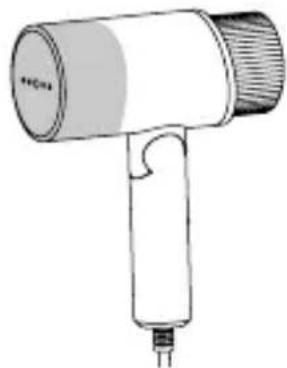
Do not touch the hot surface (such as the surface of the soleplate, any side of the iron and the hot area around it) during use.
- Do not place your hands, feet, etc. under the ironing board.
- Do not place the appliance on your hand, knee or any other part of the body.
- Do not use steam when the iron is partially sticking out from the ironing board.
- Doing so may cause scalds.
natural_image
Line drawing of a handheld hair dryer with handle and spout (no text or symbols)
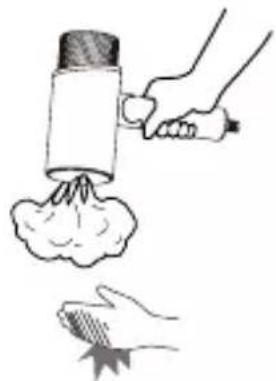
Do not touch the steam during use.
- Do not aim the steam towards your hand, knee, or any other part of the body.
- Do not iron the clothes that you are wearing.
- Doing so may cause scalds.
natural_image
Illustration of a hand using a spray gun to lift a cloud, with another hand holding a leaf (no text or symbols)
Do not put the steamer head on a carpet or the floor.
- Doing so may damage the product, carpet or floor.

CAUTION
Do not use the product with the power cord entwisted.
- Doing so may damage the power cord, or cause electric shock or fire.
Do not carry the product by the power cord.
- Doing so may damage the power cord, or cause electric shock or fire.

Do not use the product in the following places.
- Near walls or furniture that cannot withstand high temperature or humidity
- Doing so may damage the wall or furniture.
- With high temperature, high humidity and too much dust
- Doing so may cause fire or electric shock.
- With oily smoke, like kitchens
- Otherwise, the product may be corroded by oily smoke, thus resulting in injury or electric shock, and fire may be caused due to a short circuit.
• Where flammable gases are present - Doing so may cause smoking or ignition.

Do not use steam when wearing gloves through which steam can penetrate.
- Doing so may cause scalds.

After turning on the power, wait about 30 seconds before using the product.
- Failure to do so may cause scalds or injury.

CAUTION

Disconnect the power plug by holding the power plug instead of pulling the power cord.
- Failure to do so may break the power cord, and may cause burns, electric shock, or fire due to a short circuit.

Care should be taken when using the appliance.
- Steam emission may cause burns.

The plug must be removed from the socket-outlet before the water tank is filled with water.
Also, disconnect the power plug during emptying, cleaning and not in use.
- Failure to do so may cause electric shock or fire due to electrical leakage resulting from insulation deterioration.

When using with following fabric, test on an inconspicuous area, or place a cloth over the fabric to prevent the fabric from marking.
- Expensive or specially processed fabrics (velvet, acrylic, nylon, cashmere, etc.)
- Fabrics that are labeled as "low heat" or "medium heat", or dark colored fabrics.
- Failure to do so may cause damage fabric.

CAUTION

Use the appliance only for its intended purpose, for ironing fabrics.
- Failure to do so may cause injury.

Do not store the product in the following places.
- With high temperature or high humidity, or where firework is present
- With water spray.
- Doing so may cause product deterioration or malfunction, or result in an accident or injury.

Ensure fill the water tank following the instructions (See Page 16 «HOW TO FILL WATER»).

Ensure clean and descale the appliance following instructions (See Page 21 «CLEANING»).
Parts identification
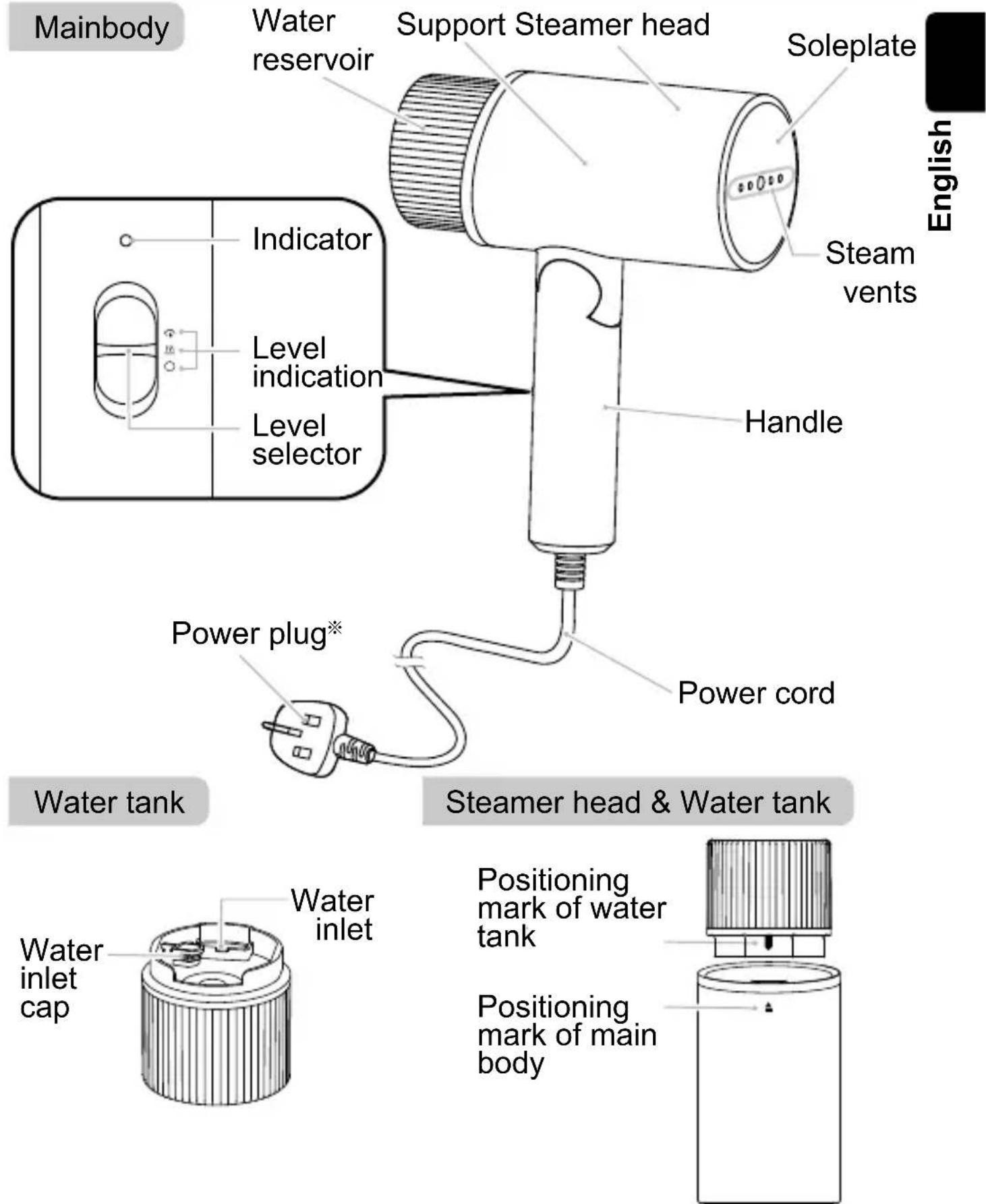
※ Power plug type may vary comply with respective country or region requirement.
How to use
Be sure to disconnect the power plug from the power outlet before filling the water resevoir with water.
How to fill water
Notes: a. Do not use tap water or high mineral content of "mineral water". Otherwise, it will impact the service life of product.
b. Please fill the water resevoir with distilled water or pure water.
- Unfold the handle to the fixed position. Remove the water tank, flip it over, and open the water inlet cap. Then, add an appropriate amount of water into the water tank (with a capacity of about 120 ml).
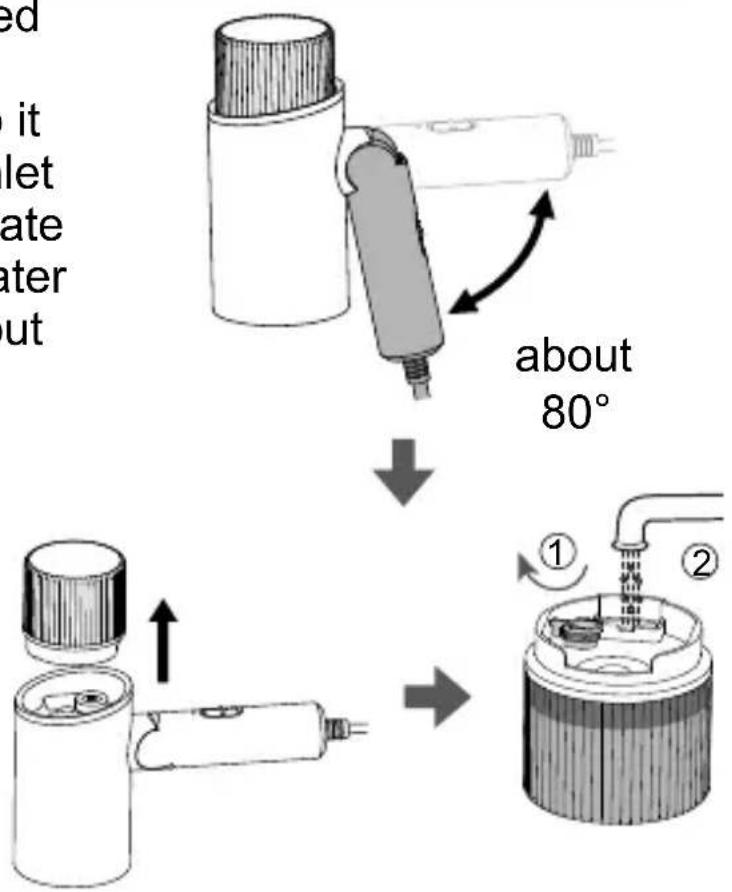
Note: The maximum opening angle of the handle is 80^ . Do not bend the handle excessively. Otherwise, the product may be damaged.
- Close the water inlet cap, flip over the water tank, and install the water tank properly into the main body. Be sure to align the positioning mark of the water tank with the positioning mark of the main body until a "click" sound is heard, indicating that the water tank is locked into position.
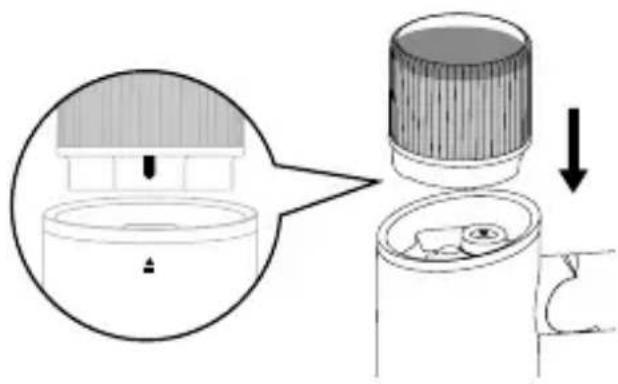
English
Notes:
a. When adding water to the water resevoir, make sure that no water overflows from the water resevoir. Wipe water drops off the main body if any.
b. Be sure to close the water inlet cap securely after adding water.
c. The water resevoir has a capacity of about 120 ~mL , with which the product can be used continuously for about 7 minutes.
Using the steam iron
- Check that the level selector is set to "O" and insert the power plug into a suitable household outlet.
-
Turn the level selector to " \\\\". The indicator lights up in red, indicating that heating starts.
-
Wait for about 30 seconds until heating of the soleplate is completed and the indicator turns off. Now you can start dry ironing.
Note: Do not select the Steam Iron level before heating is completed. Otherwise, water leakage may occur.
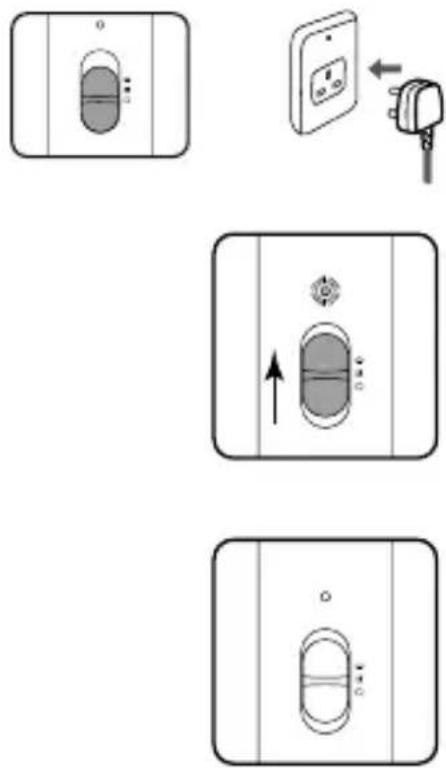
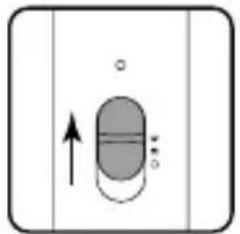
- Turn the level selector to " 🔊". Now you can start steam ironing.
natural_image
Simple diagram of a capsule-shaped object with an upward arrow and small circles, enclosed in a rectangular frame (no text or symbols)- In the ironing process, the indicator may light up for a while to indicate that the iron is heating.
- Steam may not come out immediately after the product is powered on. A sound may be heard. This is normal.
• To add water during use, disconnect the power plug first. - Put the product on its side while the product is heating, or when you are changing the garment during use.
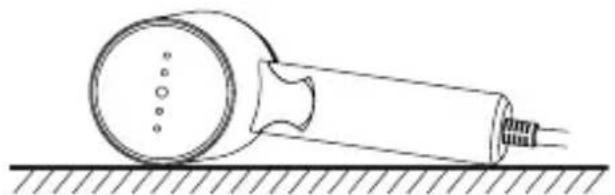
natural_image
Simple line drawing of a tool on a surface with a circular component and a handle (no text or symbols)- After use, turn the level selector to "O" and disconnect the power plug to cut off the power supply.
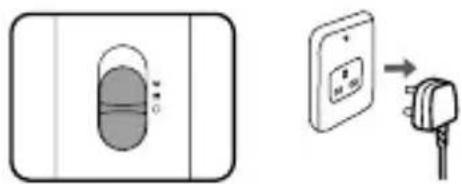
natural_image
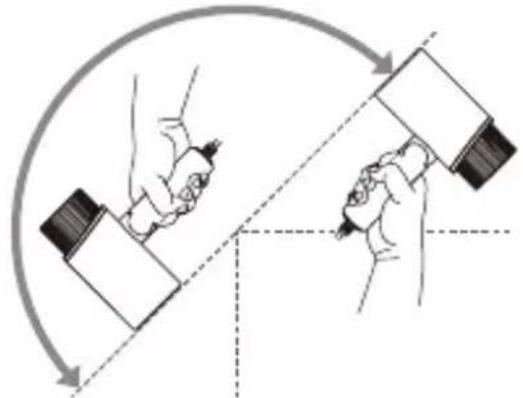
Diagram showing a device with a circular component and an electrical outlet connected to a plug (no text or symbols present)- Depending on the direction in which the main body is held, water may not be supplied from the water resevoir or steam may not come out.
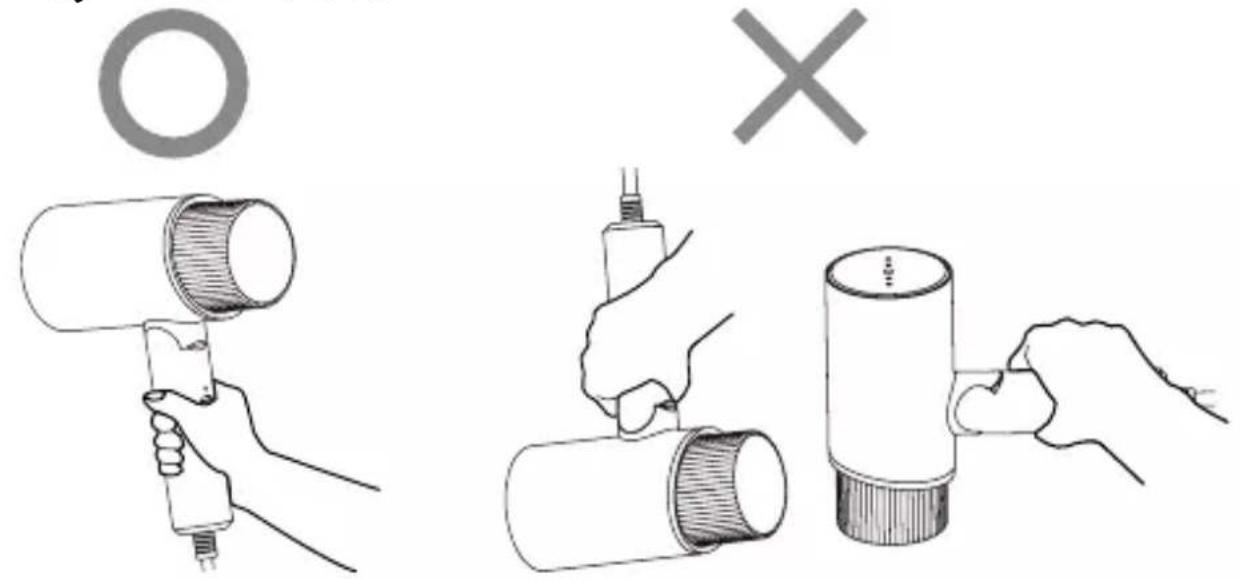
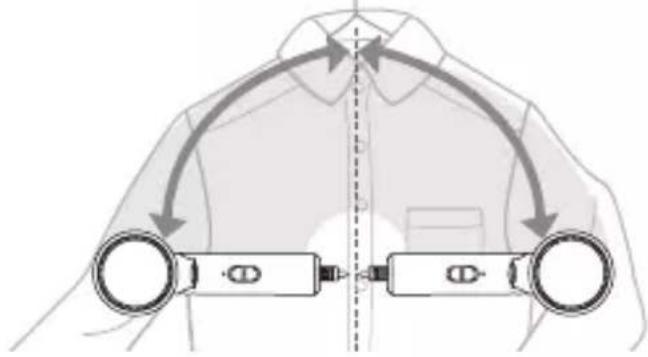
Steam spraying angle
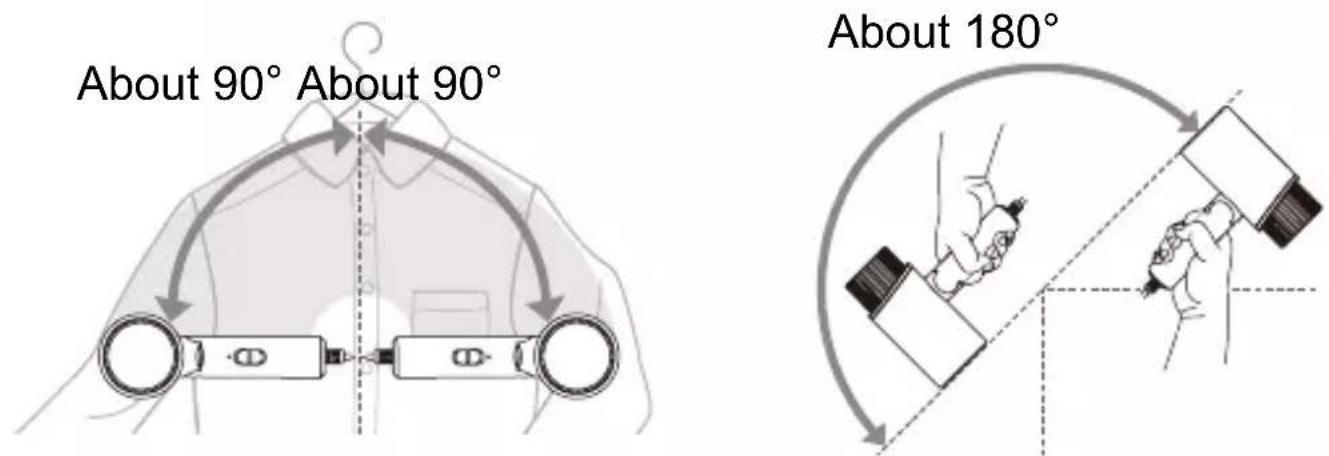
- When water leakage occurs or the steam is weak, wait about one minute instead of pressing the steam button.
Notes:
a. If you turn the level selector to “ 🎨 ” from “ 🐘”, the steam will be stopped in about 5 seconds. During this period, keep the product away from your body.
b. After the power plug is disconnected, a small amount of steam may be ejected. This is not a sign of malfunction. (This is because there is residual water in the main body.)
c. During use, the steam may be invisible due to the room temperature or indoor brightness.
After use
After each use
Please follow the procedure below for cleaning and maintenance.
(1) Drainage of the water resevoir
-
Unplug the power plug to cut off the power supply.
-
Remove the water tank, pour out the remaining water, and close the water inlet cap.
(2) Treatment of residual water
-
Insert the power plug into a suitable socket outlet to connect the power supply.
-
Turn the level selector to “ ..., ”, wait for about 30 seconds until the indicator turns off, and turn the level selector to “ 🎨” to turn on the steam.
-
Wait until no more steam comes out from the steamer head, turn the level selector to turn off the iron, and disconnect the power plug.
Fold the handle and keep the product in a safe place after it has fully cooled down.
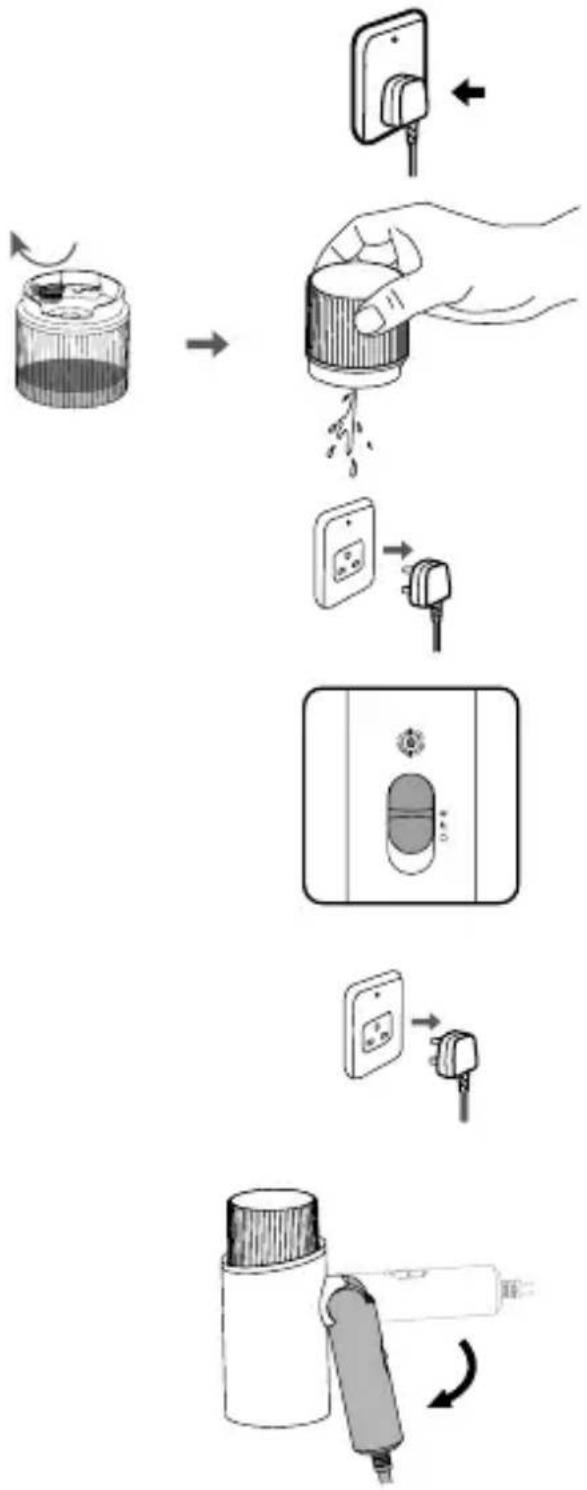
flowchart
graph TD
    A["Electricity Pump"] --> B["Switching Battery"]
    B --> C["Plug Installation"]
    C --> D["Internal Control Panel"]
    D --> E["Plug Plugter"]
    E --> F["Final Device with Internal Control Panel"]
Note:
Store this product in a stable place.
- Wait until the product has fully cooled down before storing it in a wardrobe or drawer.
Cleaning
Notes:
a. After use, leave the product to cool down for more than 60 minutes before any cleaning or maintenance.
b. Never use such cleaning products as the thinner, cleanser and volatile solvent to wash the product. Doing so may damage the product.
- Clean the main body
For stubborn stains, use a soft cloth dipped with neutral detergent to clean the surface of the main body.
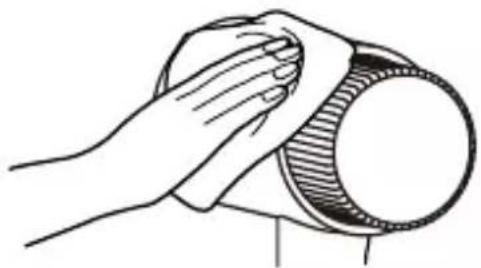
natural_image
Line drawing of a hand cleaning a circular object with a cloth (no text or symbols)- Clean the soleplate
If glue or the like sticks to the surface of the steamer head, wipe it with a wet cloth.
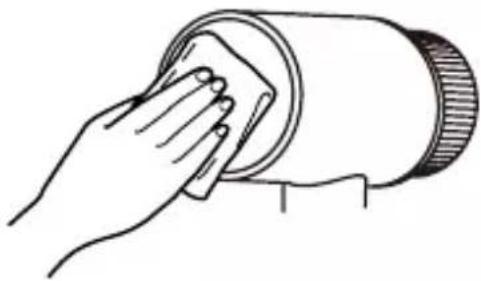
natural_image
Line drawing of a hand cleaning a cylindrical object with a cloth (no text or symbols)- Cleaning the steam vents
If the steam vents are blocked, have the product repaired by the specified service agent.
Specifications
| Model No. | NI-GHF025 |
| Power source 220-240 V | ~ 50-60 Hz |
| Power consumption | 1 300-1 570 W |
| Weight (approx.) | 0.8 kg |
| Dimension (approx.) | 76 x 302 x 50 mm |
| Water tank capacity (approx.) | 120 mL |
| Cord length (approx.) | 1.8 m |
This appliance is intended for household use only.
Trouble-shooting
| Problem Causes Solution | ||
| No steam or irregular steam | The product is not fully heated. | Wait about 30 seconds before using the product. |
| The power plug is not connected or the steam button is not pressed. | Connect the power plug and press the steam button. | |
| There is no or insufficient water in the water resevoir. | Fill the water resevoir (by referring to "How to fill water" on Page 16). | |
| The product is used in a wrong direction (e.g. the product is upside down, the product is placed horizontally, or the steamer head faces upward). | Use the product in the correct direction. | |
| The air vent on the water inlet cap is blocked. | Unblock the air vent with a wooden or bamboo toothpick. | |
| The circuit fails or the fuse is burned out. | Send your product to an authorized service center for inspection and repair. | |
Trouble-shooting
| Problem Causes Solution | ||
| Water leakage occurs | The inner pipe is loose or damaged. | Send your product to an authorized service center for inspection and repair. |
| The product is not fully heated. | Wait about 30 seconds before using the product. | |
| The product makes a noise | When the water resevoir is empty, the water pump will run idle, thus making a noise. | Fill the water resevoir (by referring to "How to fill water" on Page 16). |
| The product is used in a wrong direction (e.g. the product is upside down, the product is placed horizontally, or the steamer head faces upward). | Use the product in the correct direction. | |
| The inner pipe is loose or blocked. | Send your product to an authorized service center for inspection and repair. | |
| The problem persists even after you have followed the above solutions. | ||
Panasonic
natural_image
Illustration of a handheld hairdryer with a handle and spout (no text or symbols)
natural_image
Illustration of a hand using a spray gun to lift a cloud-shaped object, with another hand holding a textured object below (no text or symbols)
Jangan letakkan kepala penstim di atas karpet atau lantai.
natural_image
Simple line drawing of a cylindrical container with a lid and internal structure (no text or symbols)
Nota:
natural_image
Simple diagram with a pill-shaped object and directional arrows, no text or symbols present.natural_image
Simple line drawing of a door handle with no text or symbolsnatural_image
Simple diagram of a capsule-shaped object with an upward arrow and circular base, enclosed in a rectangular frame (no text or symbols)natural_image
Diagram of a mechanical device with a circular component and threaded rod, resting on a surface (no text or symbols)
Melayu
Sudut semburan stim
Kira-kira 90° Kira-kira 90°
natural_image
Diagram of a person's shoulder joint with two arms and directional arrows indicating movement or force (no text or symbols)Kira-kira 180^
natural_image
Diagram showing two hands holding a tool with a ruler, connected by curved arrows indicating rotation or movement (no text or symbols present)flowchart
graph TD
    A["Electricity Pump"] --> B["Plug Installation"]
    B --> C["Transfer to 2.5V DC socket"]
    C --> D["Switch to 1.5V DC socket"]
    D --> E["Switch to 1.5V DC socket"]
    E --> F["Switch to 1.5V DC socket"]
    F --> G["Final Gasifier"]
Nota:
natural_image
Line drawing of a hand cleaning a circular object with a cloth (no text or symbols)natural_image
Line drawing of a hand cleaning a cylindrical object with a sponge (no text or symbols)• Membersihkan lubang stim
- Warranty registration
- Panasonic
- Contents
- Safety precautions
- Explanation of symbols
- WARNING
- CAUTION
- Do not use with the power cord bundled.
- Never modify, disassemble, or repair the appliance by yourself.
- Do not use the appliance with wet hands.
- Do not use in proximity of flammable materials (such as benzine or the like).
- Do not wrap the power cord around the appliance for storage.
- Do not immerse the appliance in water or other liquids.
- Do not use any ironing accessories available on the market.
- Do not touch the hot surface (such as the surface of the soleplate, any side of the iron and the hot area around it) during use.
- Do not touch the steam during use.
- Do not put the steamer head on a carpet or the floor.
- Parts identification
- How to use
- How to fill water
- Notes:
- Using the steam iron
- Steam spraying angle
- After use
- After each use
- Note:
- Cleaning
- - Clean the main body
- - Clean the soleplate
- - Cleaning the steam vents
- Trouble-shooting
- Nota:
- Sudut semburan stim
- • Membersihkan lubang stim
Brand : PANASONIC
Model : NI-GHF025
Category : Steam cleaner