
5537 - Weather Station Taylor - Free user manual and instructions
Find the device manual for free 5537 Taylor in PDF.


| Product Type | Wireless Weather Station |
| Model | Taylor 5537 |
| Brand | Taylor |
| Indoor Temperature Range | 32°F to 122°F (0°C to 50°C) |
| Outdoor Temperature Range | -40°F to 158°F (-40°C to 70°C) |
| Indoor Humidity Range | 20% to 95% RH |
| Outdoor Humidity Range | 20% to 95% RH |
| Wireless Range | Up to 100 feet (30 meters) open air |
| Display Type | LCD with backlight |
| Clock Function | Radio-controlled or manual setting |
| Weather Forecast | Icon-based (sunny, cloudy, rainy, stormy) |
| Power Source | Main unit: 2 AA batteries; Sensor: 2 AAA batteries |
| Dimensions (Main Unit) | 5.5 x 3.5 x 1.5 inches (140 x 89 x 38 mm) |
| Weight (Main Unit) | 6.5 oz (184 g) without batteries |
| Outdoor Sensor Dimensions | 2.5 x 1.5 x 0.8 inches (64 x 38 x 20 mm) |
| Outdoor Sensor Weight | 2.1 oz (60 g) without batteries |
| Mounting Options | Table stand or wall mount for main unit; bracket for sensor |
| Cleaning and Maintenance | Wipe with dry soft cloth; avoid solvents |
| Battery Life | Approximately 12 months for main unit; 24 months for sensor |
| Repairability | Battery replacement only; no user-serviceable parts |
| Safety Information | Keep away from children; do not immerse in water |
Frequently Asked Questions - 5537 Taylor
User questions about 5537 Taylor
0 question about this device. Answer the ones you know or ask your own.
Ask a new question about this device
Download the instructions for your Weather Station in PDF format for free! Find your manual 5537 - Taylor and take your electronic device back in hand. On this page are published all the documents necessary for the use of your device. 5537 by Taylor.
USER MANUAL 5537 Taylor
THERMOMETER WITH HYGROMETER

■ Built-in hanger for easy mounting
■ Temperature range: 0°F to 120°F / -20°C to 50°C
■ Humidity range: 10% to 100%
EXPOSURE:

Do not mount in direct sunlight, near a heat source, or near a large body of water as these situations could affect the proper air temperature reading. Ultraviolet light from sunlight can prematurely weather the product.
INDOOR HUMIDITY READINGS:
If this instrument is used indoors, the humidity readings should not be compared to humidity conditions stated by the Weather Bureau that reflect outdoor humidity conditions. A range of 45% to 60% indoor humidity is generally considered the most comfortable. If the humidity meter consistently displays low humidity (10% to 30%), using a humidifier will help increase indoor humidity levels. If the humidity meter consistently displays high humidity (76% to 80%), using an air conditioner or dehumidifier will help decrease humidity levels.
SEPARATED FLUID:
Occasionally, rough handling in shipment or improper storage may cause the red liquid to separate slightly. This is not a defect. The liquid can be reunited easily before installation. First, remove from the card. Tap the side of the thermometer, bulb end down against the palm of the hand. Pause between taps to permit liquid to run down tube. Continue until liquid is completely joined.
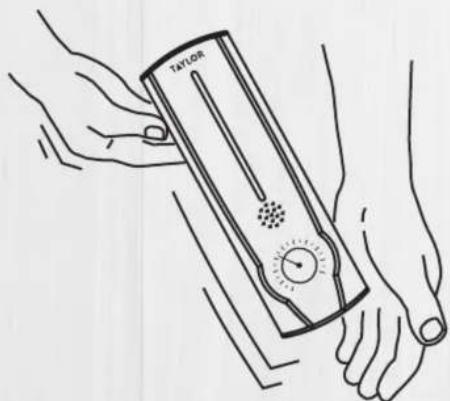
REJOINING SEPARATED FLUID

COMPLETE ONE YEAR LIMITED WARRANTY
# 5537
©2018 Taylor Precision Products Oak Brook, IL 60523
www.taylorusa.com

5537_5.03.18


Made in China

Brand : Taylor
Model : 5537
Category : Weather Station