X15 - Router Totolink - Free user manual and instructions
Find the device manual for free X15 Totolink in PDF.


| Product Type | Wireless Router |
| Brand | Totolink |
| Model | X15 |
| Color | White / Black |
| Wireless Standard | IEEE 802.11 b/g/n/ac |
| Frequency Bands | 2.4 GHz / 5 GHz |
| Maximum Data Rate | Up to 1200 Mbps (2.4 GHz: 300 Mbps, 5 GHz: 867 Mbps) |
| Ports | 1 x 10/100/1000 Mbps WAN, 4 x 10/100/1000 Mbps LAN |
| Antennas | 4 x External omnidirectional antennas (2 for 2.4 GHz, 2 for 5 GHz) |
| Power Supply | DC 12V / 1A |
| Dimensions (W x D x H) | Approx. 190 x 120 x 30 mm |
| Weight | Approx. 300 g (without accessories) |
| Security | WPA/WPA2/WPA3, WEP, MAC Address Filter, SPI Firewall |
| Special Features | MU-MIMO, Beamforming, VPN Server/Client, Guest Network, Parental Control |
| Package Contents | 1 x Router, 1 x Power Adapter, 1 x Ethernet Cable, 1 x Quick Installation Guide |
| Operating Temperature | 0°C to 40°C |
| Operations | Setup via Web interface or App |
| Maintenance | Keep clean, avoid moisture, restart periodically |
Frequently Asked Questions - X15 Totolink
User questions about X15 Totolink
0 question about this device. Answer the ones you know or ask your own.
Ask a new question about this device
Download the instructions for your Router in PDF format for free! Find your manual X15 - Totolink and take your electronic device back in hand. On this page are published all the documents necessary for the use of your device. X15 by Totolink.
USER MANUAL X15 Totolink
X15 is a AX1500 Wi-Fi 6 Gigabit smart home Wi-Fi system, built with the latest generation Wi-Fi 6 technology.
X15

Mesh Wi-Fi System

Seamless Roaming

Wired Backhaul

Gigabit Ethernet

Phone APP

natural_image
Two black rectangular devices with circular buttons and green indicator lights, no visible text or symbols.
Parental Control
Overview
X15 is a AX1500 Wi-Fi 6 Gigabit smart home Wi-Fi system, built with the latest generation Wi-Fi 6 technology.
Equipped with OFDMA, X15 delivers Wi-Fi speed up to 1501Mbps, offering a faster Internet speed and a more stable Internet connection with other wireless devices. Meanwhile, full gigabit WAN port and LAN ports offer a larger capability for data streaming via cable connection.
With the mesh wireless network technology, X15 supports to deliver wireless signal to a wider coverage and achieves the seamless roaming easily.

natural_image
Office scene with employees using laptops and a WiFi-branded electronic device on the table (no visible text or symbols)Features
- Complies with the next generation Wi-Fi 6 (IEEE 802.11ax) standard.
- Simultaneous 300Mbps on 2.4GHz and 1201Mbps on 5GHz for a total of 1501Mbps.
- Create smart Mesh network with one touch.
- Support multiple devices extension for wide Wi-Fi coverage.
- Seamless roaming helps users automatically switch to a stronger signal source.
- OFDMA to improve capacity and efficiency of your network, so more devices can connect without slowing down your Wi-Fi.
- TWT (Target Wake Time) technology reduces your devices' power consumption to extend their battery life.
- MU-MIMO technology improves Wi-Fi experience for the users.
- Beamforming technology improves directional signal transmission and increases bandwidth efficiency.
- The full Gigabit port provides greater functions for data forwarding connected by cable.
- Supports DHCP, static IP, PPPoE PPTP and L2TP broadband functions.
- Supports WPA3 wireless security protocol to ensure network security.
- Supports VPN server, guest network, smart QoS, Wi-Fi scheduler.
- Parental control enables to create a safe & healthy Internet environment for your children.
- Easy setup and management through mobile UI and TOTOLINK APP.
Highlights

bar
| Wi-Fi | Value (%) | |---|---| | Wi-Fi 6 | 38 | | Wi-Fi 5 | (no label) |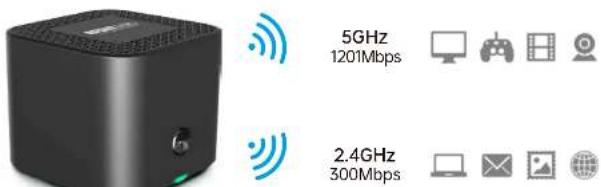

The Next Generation --- Wi-Fi 6
Wi-Fi 6 (IEEE802.11ax) delivers a huge boost in speed and total capacity and takes your Wi-Fi to the next level while being backwards compatible with IEEE802.11a/b/g/n/ac Wi-Fi standards.
X15 equips with the latest wireless technology, Wi-Fi 6, for faster speeds, greater capacity, and reduced network congestion.
1501Mbps Ultra-Fast Wi-Fi Speed
X15 delivers Wi-Fi speeds of up to 1201Mbps on the 5GHz band and 300Mbps on the 2.4GHz band. It is able to work on 2.4GHz and 5GHz band simultaneously and delivers speeds up to 1501Mbps. Every application feels more fluid with drastically improved Wi-Fi speeds.
Quick Setup by Using Phone UI & APP
You can setup your router in minutes by using the specific phone UI or TOTOLINK Router App. The App allows you to manage network settings from any Android or iOS device.
Easy Mesh, Wider Coverage
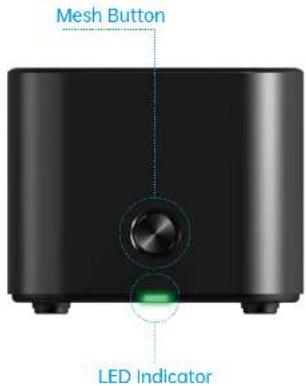
Support one-key EasyMesh networking, press the "Mesh" button on the device to automatically connect to establish a wide-covered intelligent wireless network to meet your wireless connection needs on multiple terminals.
Highlights


natural_image
Interior scene with a cartoon character on a beach near a large screen, and decorative white objects on a table (no visible text or symbols)Keep You Connected Throughout Your Home
X15 supports wireless roaming function, all the Wi-Fi devices will auto change to stronger signal source when you are moving, keeping you connected and enjoy seamless Wi-Fi at any corner of your house.
Full Gigabit WAN and LAN Ports
Equipped with full gigabit ports, X15 offers a larger capability for data streaming via cable connection, making the best use of your Internet bandwidth, and compatible with your 100M/1000M network card.
More Energy-efficient Wi-Fi 6
The IEEE802.11 AX technology—Target Wake Time—helps your devices to communicate more while consuming less power. The devices that support TWT negotiate when and how often they will wake up to send or receive data, increasing sleep time and substantially prolonging battery life.
IPTV Helps to Catch the Latest Teleplay
Enjoy the popular movies and the latest teleplay with your families. X15 is your ideal cost-effective solution to enjoy the Streaming Media at home.
Specifications
| Hardware | |
| Interface | - 2 *1000Mbps LAN Ports- 1 *1000Mbps WAN Port |
| Power Supply | - 12VDC/1A |
| Button | - 1 *Mesh/RST Button |
| LED Indicators | - 1 *System (Red/Green) |
| Antenna | - 2 *Internal Dual Band Antennas |
| Dimensions (L x W x H) | - 105 x 105 x 87mm |
  | |
| Wireless | |
| Standards | - IEEE 802.11ax, IEEE 802.11ac,- IEEE 802.11a, IEEE 802.11b, IEEE 802.11g ,- IEEE 802.11n, IEEE 802.11s |
| RF Frequency | - 2.4GHz/5GHz |
| Data Rate | - 2.4GHz: Up to 300Mbps (2*2 40MHz)- 5GHz: Up to 1201Mbps (2*2 80MHz) |
| EIRP | - 2.4GHz < 20dBm- 5GHz < 20dBm |
| Wireless Security | - WPA2/WPA Mixed- WPA3 |
| Reception Sensitivity | - 2.4G: 11b: <-81dbm;11g: <-68dbm;11n HT20: <-65dbm HT40: <-62dbm11ax HE40: -48dB- 5G: 11a:<-68dbm;11n: HT20<-65dbm HT40: <-62dbm11ac VHT80: <-51dbm11ax HE40: <-48dbm 11ax HE80: <-46dbm |
| Software | |
| Tools | - Upgrade Firmware - Time Setup- Remote management - Password Settings- Reboot Schedule - System Log and so on |
Specifications
| Software | |||
| Operation Mode | - Mesh Mode | -Bridge Mode | |
| Home | - Quick Setup | - Basic setup | - Advanced setup |
| - Logout | - Reboot | - Language Auto | |
| Mesh setting | - Mesh Networking | - Mesh Topology | - Roaming |
| Network | - WAN Setting | - LAN Setting | - IP/MAC Binding |
| - DDNS Setting | - IPTV Setting | - IPv6 | |
| WAN Type | - Static IP, DHCP, PPPoE/Russia PPPoE, PPTP/Russia PPTP, L2TP/Russia L2TP | ||
| Wireless | - Basic setup | - Parental Control | |
| QoS | - Up/Down speed control on WAN,Bandwidth control based on IP address | ||
| Security | - MAC Filtering | - IP/Port Filtering | - URL Filtering |
| NAT | - Virtual Server(Port Forwarding) | ||
| - DMZ | - VPN passthrough | ||
| VPN | - L2TP/PPTP VPN | ||
| Others | |
| Package Contents | - X15 Wireless Router *1- Power Adapter *1- Ethernet Cable *1- Quick Installation Guide *1Remark: Take Unit pack as an example.(This product also has 2 in 1 and 3 in 1 package,the above list is only for reference.) |
| Environment | - Operating Temperature: 0°C~40°C (32°F ~104°F)- Storage Temperature: -40°C~70 °C (-40 °F~158°F)- Operating Humidity: 10%~90% non-condensing- Storage Humidity: 5%~90% non-condensing |
ZIONCOM ( HK ) TECHNOLOGY LIMITED
Copyright©ZIONCOM (HK) TECHNOLOGY CO., LTD. All Rights Reserved.
Headquarter & R&D Center
7/F, Unit D, 4 Building Shenzhen Software Industry Base, Xuefu Road, Nanshan District, Shenzhen, Guangdong, China
Building A1 & A2 Lantian Technology Park, Xinyu Road, Xinqiao Henggang Block, Shajing Street, Baoan District, Shenzhen, Guangdong, China
Tel: +86-755-3686-1188 | FAX: +86-755-3686-1133
- X15
- Overview
- Features
- Highlights
- The Next Generation --- Wi-Fi 6
- 1501Mbps Ultra-Fast Wi-Fi Speed
- Quick Setup by Using Phone UI & APP
- Easy Mesh, Wider Coverage
- Keep You Connected Throughout Your Home
- Full Gigabit WAN and LAN Ports
- More Energy-efficient Wi-Fi 6
- IPTV Helps to Catch the Latest Teleplay
- Specifications
- ZIONCOM ( HK ) TECHNOLOGY LIMITED
Brand : Totolink
Model : X15
Category : Router