
SWM300 - Wall mount MACKIE - Free user manual and instructions
Find the device manual for free SWM300 MACKIE in PDF.


| Product Type | Swivel Wall Mount |
| Brand | Mackie |
| Model | SWM300 |
| Part Number | 2034990 |
| Maximum Load (Working Load Limit) | 60 lb / 27.2 kg |
| Horizontal Swivel | ±30° |
| Tilt Angle Range | 90° to 30° |
| Material | Steel (stress rated hex nut and bolt, solid steel pin, 9mm steel bolt) |
| Safety Features | 90 interlocking teeth for solid pivot point; solid steel pin as safety stop |
| Compatible Loudspeakers | Mackie DLM8, DLM12 (one per mount) |
| Mounting Hardware Included | Swivel wall mount bracket, instruction sheet |
| Required Installation Tools | Hand wrench or 3/8" socket wrench, drill and drill bit, four 3/8" lag bolts or inflation screws (not included) |
| Installation Method | Wall mount with four bolts |
| Usage | Indoor use |
| Manufacturer | LOUD Technologies Inc. |
Frequently Asked Questions - SWM300 MACKIE
User questions about SWM300 MACKIE
0 question about this device. Answer the ones you know or ask your own.
Ask a new question about this device
Download the instructions for your Wall mount in PDF format for free! Find your manual SWM300 - MACKIE and take your electronic device back in hand. On this page are published all the documents necessary for the use of your device. SWM300 by MACKIE.
USER MANUAL SWM300 MACKIE
The contents of the SWM300 Swivel Wall Mount Kit allow you to mount either a DLM8 or a DLM12 loudspeaker on the wall. Only one DLM loudspeaker may be mounted per SWM300 Wall Mount Kit.
SWM300 Swivel Wall Mount Kit (Part No. 2034990) contents:
Part No. Quantity Description
2034995 1 Swivel Wall Mount
2040541-00 1 Instruction Sheet
Required Tools (not included):
Hand wrench or 3/8" socket wrench
Drill and drill bit
Four (4) 3/8" lag bolts or inflation screws
Safety First!
Before installing and using this product, please read these instructions carefully and keep them on hand for future reference. Failure to follow the precautions may result in damage, injury, or even death.

WARNING: When installing this product, always respect the safety standard. Do not install the product in any way that is not described in these instructions.

WARNING: The SWM300 Swivel Wall Mount has been tested to a Working Load Limit (WLL) of 60 lb / 27.2 kg. Never apply a load that exceeds the Working Load Limit.
Before mounting the speaker, make all of the necessary calculations to ensure that all of the components are used within their nominal work load range. Remember that the weakest component determines the safety level of the entire installation.
Be sure to select the appropriate lag bolts or inflation screws for the type of wall to which the SWM300 and DLM loudspeaker will be mounted.
LOUD Technologies Inc. • 16220 Wood-Red Road NE
Woodinville • WA • 98072 • 800/258-6883
Outside the U.S. call 425/487-4333 • FAX 425/487-4337
Disclaimer:
LOUD Technologies Inc. continually engages in research related to product improvement. New material, production methods, and design refinements are introduced into existing products without notice as a routine expression of that philosophy. For this reason, any current LOUD Technologies Inc. product may differ in some respect from its published description, but will always equal or exceed the original design specifications unless otherwise stated.
Part No. SW0941 Rev A 09/12
© 2012 LOUD Technologies Inc. All Rights Reserved.
Wall Mount Installation
Only one DLM loudspeaker may be mounted per SWM300 Wall Mount Kit. Follow the steps below once you have found a suitable position for the speaker.
- With the bracket held in place, use a pencil to mark the four holes of the back plate. Once marked, put the bracket down.
- Using a drill bit that is smaller in diameter than the lag bolt or inflation screw, drill each of the four marked holes.
- Put the bracket back in place where you just drilled the holes. Using the hand wrench or 3/8" socket wrench, fully screw each of the four lag bolts or inflation screws through the wall mount bracket into the wall until they are firmly against the bracket.
- Place the DLM loudspeaker on to the vertical sleeve of the wall mount via the DLM's built-in pole receptacle. Be sure the loudspeaker is secure before releasing it.
VERY IMPORTANT: Test the installation with the loudspeaker in vertical and tilted positions to ensure that the bracket stays firmly secured to the wall.
Angle Adjustments
The stress rated steel hex nut and bolt is strong enough to support up to 60 lb / 27.2 kg and also allows for horizontal swivel adjustments up to ±30^ .

natural_image
Close-up of a mechanical component with a cylindrical part attached to a vertical support (no visible text or symbols)The ergonomic 2" knob adjusts the tilt angle from 90° to 30°.

natural_image
Close-up of a mechanical component with a visible crack or seam, labeled 'A)' in the corner (no text or symbols on the object itself)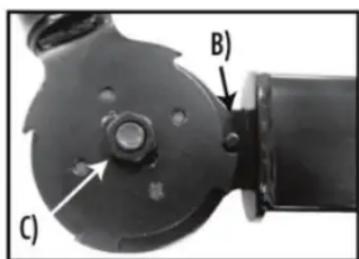
A) 90 interlocking teeth mesh together to form a solid, adjustable pivot point for tilting the speakers.
B) Solid steel pin serves as a safety stop.
C) 9mm steel bolt and nut.


Brand : MACKIE
Model : SWM300
Category : Wall mount