
VPC15-WP-4 - Uncategorized VIEWSONIC - Free user manual and instructions
Find the device manual for free VPC15-WP-4 VIEWSONIC in PDF.


| Product Type | All-in-One PC |
| Brand | ViewSonic |
| Model | VPC15-WP-4 |
| Display Size | 15.6 inches |
| Display Resolution | 1366 x 768 pixels |
| Processor | Intel Celeron N3350 |
| RAM | 4 GB DDR3L |
| Storage | 64 GB eMMC |
| Operating System | Windows 10 Pro |
| Network | Wi-Fi 5 (802.11ac), Bluetooth 4.2, Gigabit Ethernet |
| Ports | 2x USB 3.0, 2x USB 2.0, HDMI, VGA, headphone/mic combo, RJ-45, DC-in |
| Power Supply | 12V DC, 3.33A (40W) |
| Dimensions (W x H x D) | 380 x 310 x 45 mm |
| Weight | 2.5 kg |
| VESA Mount | 75 x 75 mm |
| Camera | 0.3 MP webcam with microphone |
| Audio | Built-in stereo speakers (2 x 2W) |
| Input Device | Optional keyboard and mouse (not included) |
| Cleaning | Wipe with dry soft cloth; do not use liquid cleaners |
| Safety | Use only provided power adapter; keep away from heat sources |
| Repairability | RAM and storage upgradeable; refer to manual for disassembly |
Frequently Asked Questions - VPC15-WP-4 VIEWSONIC
User questions about VPC15-WP-4 VIEWSONIC
0 question about this device. Answer the ones you know or ask your own.
Ask a new question about this device
Download the instructions for your Uncategorized in PDF format for free! Find your manual VPC15-WP-4 - VIEWSONIC and take your electronic device back in hand. On this page are published all the documents necessary for the use of your device. VPC15-WP-4 by VIEWSONIC.
USER MANUAL VPC15-WP-4 VIEWSONIC
NOTE: This section addresses all connected requirements and statements regarding regulations. Confirmed corresponding applications shall refer to nameplate labels and relevant markings on unit.
FCC Compliance Statement
This device complies with part 15 of FCC Rules. Operation is subject to the following two conditions: (1) this device may not cause harmful interference, and (2) this device must accept any interference received, including interference that may cause undesired operation.
This equipment has been tested and found to comply with the limits for a Class B digital device, pursuant to part 15 of the FCC Rules. These limits are designed to provide reasonable protection against harmful interference in a residential installation. This equipment generates, uses, and can radiate radio frequency energy, and if not installed and used in accordance with the instructions, may cause harmful interference to radio communications. However, there is no guarantee that interference will not occur in a particular installation. If this equipment does cause harmful interference to radio or television reception, which can be determined by turning the equipment off and on, the user is encouraged to try to correct the interference by one or more of the following measures:
• Reorient or relocate the receiving antenna.
- Increase the separation between the equipment and receiver.
- Connect the equipment into an outlet on a circuit different from that to which the receiver is connected.
- Consult the dealer or an experienced radio/TV technician for help.
Warning: You are cautioned that changes or modifications not expressly approved by the party responsible for compliance could void your authority to operate the equipment.
Industry Canada Statement
CAN ICES-3 (B)/NMB-3(B)
Contains FCC ID: PD93165NG
IC ID: 1000M-3165NG
CE Conformity for European Countries
CE The device complies with the EMC Directive 2014/30/EU and Low Voltage Directive 2014/35/EU and Radio Equipment Directive (RED) 2014/53/EU.
Following information is only for EU-member states:
The mark shown to the right is in compliance with the Waste Electrical and Electronic Equipment Directive 2012/19/EU (WEEE). The mark indicates the requirement NOT to dispose the equipment as unsorted municipal waste, but use the return and collection systems according to local law. In all EU member states, operation of 5150-5350MHz is restricted to indoor use only. This device should be installed and operated with a minimum distance of 20cm between the radiator and your body.

Indian Restriction of Hazardous Substances
Restriction on Hazardous Substances statement (India) This product complies with the “India E-waste Rule 2011” and prohibits use of lead, mercury, hexavalent chromium, polybrominated biphenyls or polybrominated diphenyl ethers in concentrations exceeding 0.1 weight % and 0.01 weight % for cadmium, except for the exemptions set in Schedule 2 of the Rule.
Declaration of RoHS2 Compliance
This product has been designed and manufactured in compliance with Directive 2011/65/EU of the European Parliament and the Council on restriction of the use of certain hazardous substances in electrical and electronic equipment (RoHS2 Directive) and is deemed to comply with the maximum concentration values issued by the European Technical Adaptation Committee (TAC) as shown below:
| Substance | Proposed Maximum Concentration | Actual Concentration |
| Lead (Pb) 0.1% < 0.1% | ||
| Mercury (Hg) 0.1% < 0.1% | ||
| Cadmium (Cd) 0.01% < 0.01% | ||
| Hexavalent Chromium ( Cr^6+ ) 0.1% < 0.1% | ||
| Polybrominated biphenyls (PBB) 0.1% < 0.1% | ||
| Polybrominated diphenyl ethers (PBDE) 0.1% < 0.1% |
**Certain components of products as stated above are exempted under the Annex III of the RoHS2 Directives as noted below:
Examples of exempted components are:
- Lead in glass of cathode ray tubes
- Lead in glass of fluorescent tubes not exceeding 0.2% by weight
- Lead as an alloying element in aluminium containing up to 0.4% lead by weight
- Copper alloy containing up to 4% lead by weight
- Lead in high melting temperature type solders (i.e. lead-based alloys containing 85% by weight or more lead)
- Electrical and electronic components containing lead in a glass or ceramic other than dielectric ceramic in capacitors, e.g. piezoelectronic devices, or in a glass or ceramic matrix compound.
- Lead as an alloying element in steel for machining purposes and in galvanized steel containing up to 0.35% lead by weight.
- Lead in dielectric ceramic in capacitors for a rated voltage of 125V AC or 250V DC or higher.
- Cadmium and its compounds in electrical contacts.
1. Interface
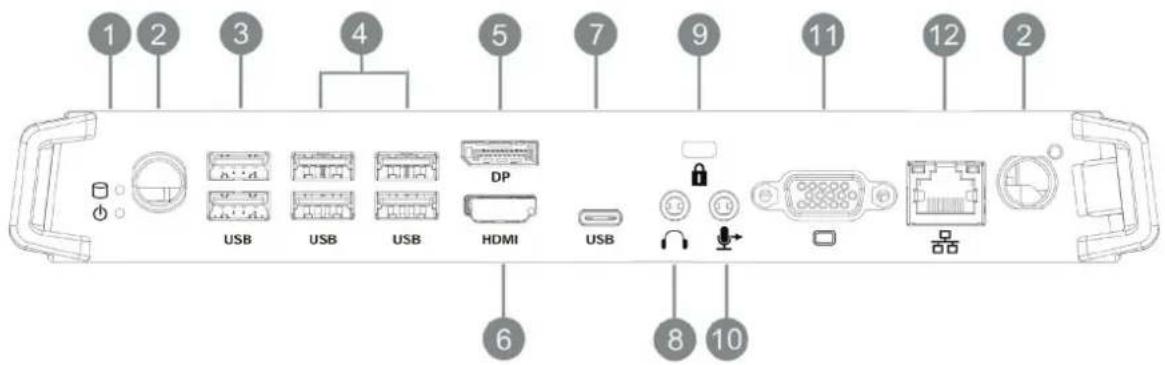
| Item Description | |
| 1 | Working indicator light |
| 2 | WIFI antenna interface |
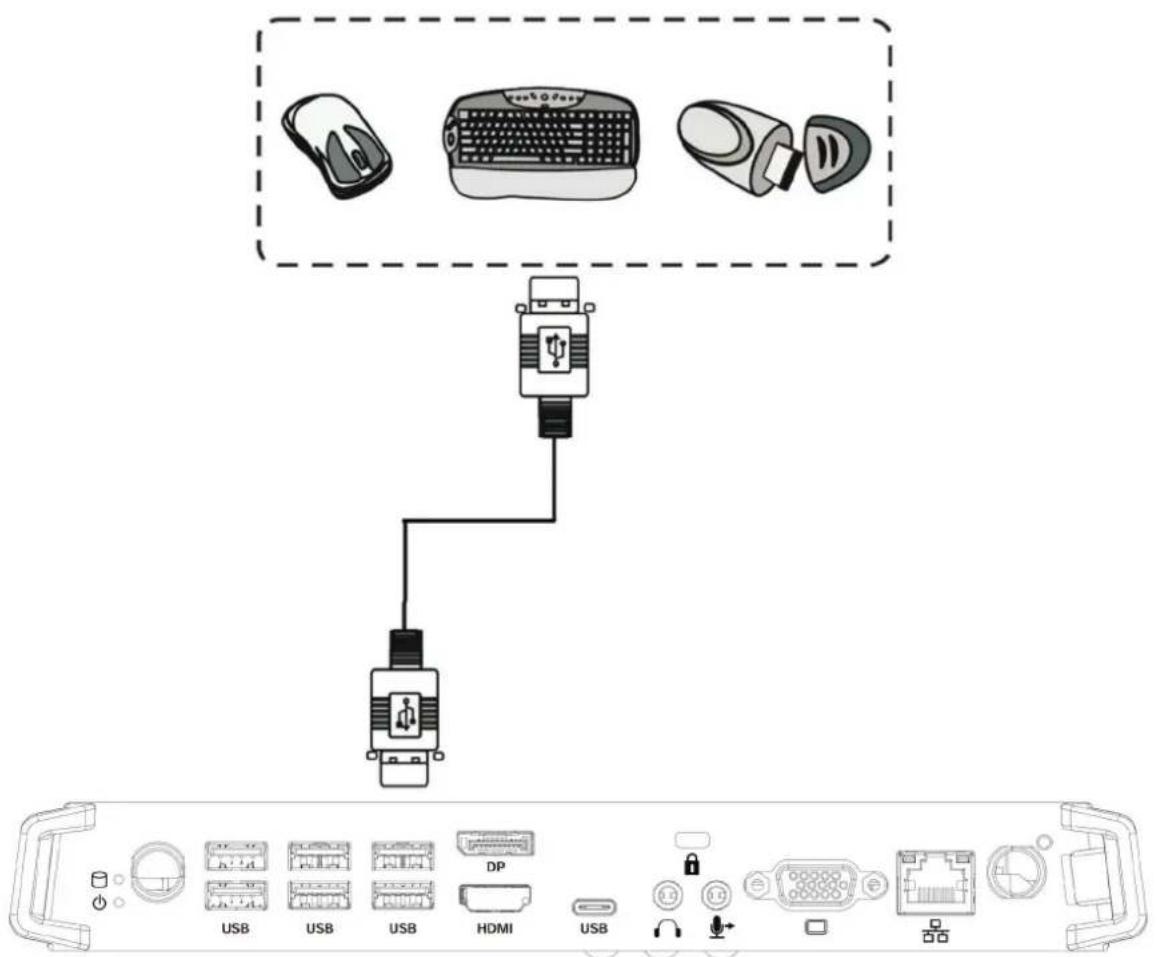
| 3 | USB 2.0 interface |
| 4 | USB 3.0 interface |
| 5 | Connect the display to a DisplayPort connector |
| 6 | Connected to device with HDMI input function |
| 7 | USB type C interface |
| 8 | Connects the device to headphones or speakers |
| 9 | Anti-theft lock |
| 10 | Connects to a microphone |
| 11 | Connects the display to a VGA-IN connector |
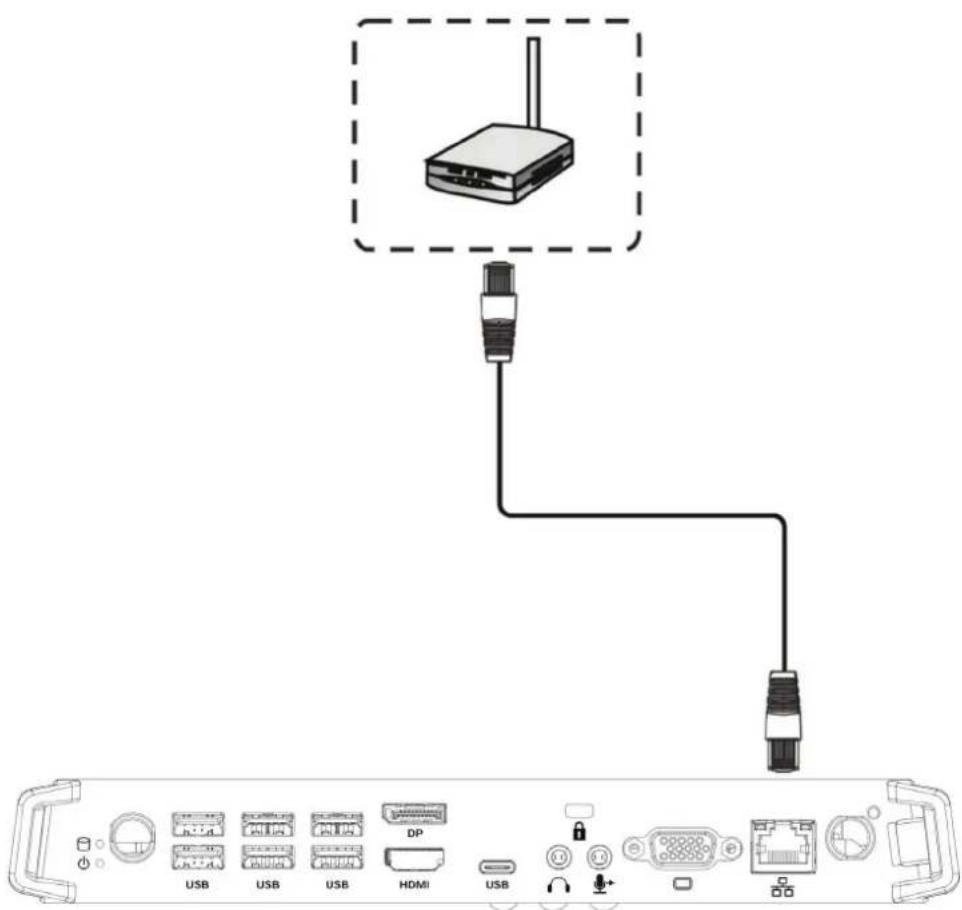
| 12 | Standard RJ45 (10M/100M/1G) Internet connection interface (This network port is only used for PC) |
2. Installation
2-1
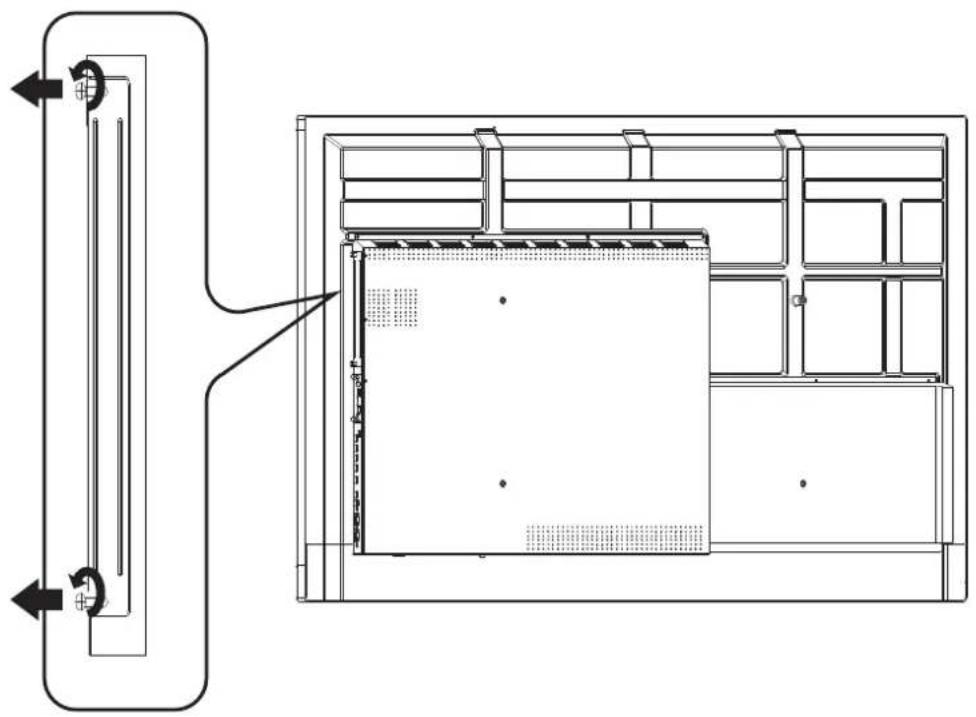
natural_image
Technical line drawing of a mechanical or electrical enclosure with internal components and directional arrows (no text or symbols)2-2
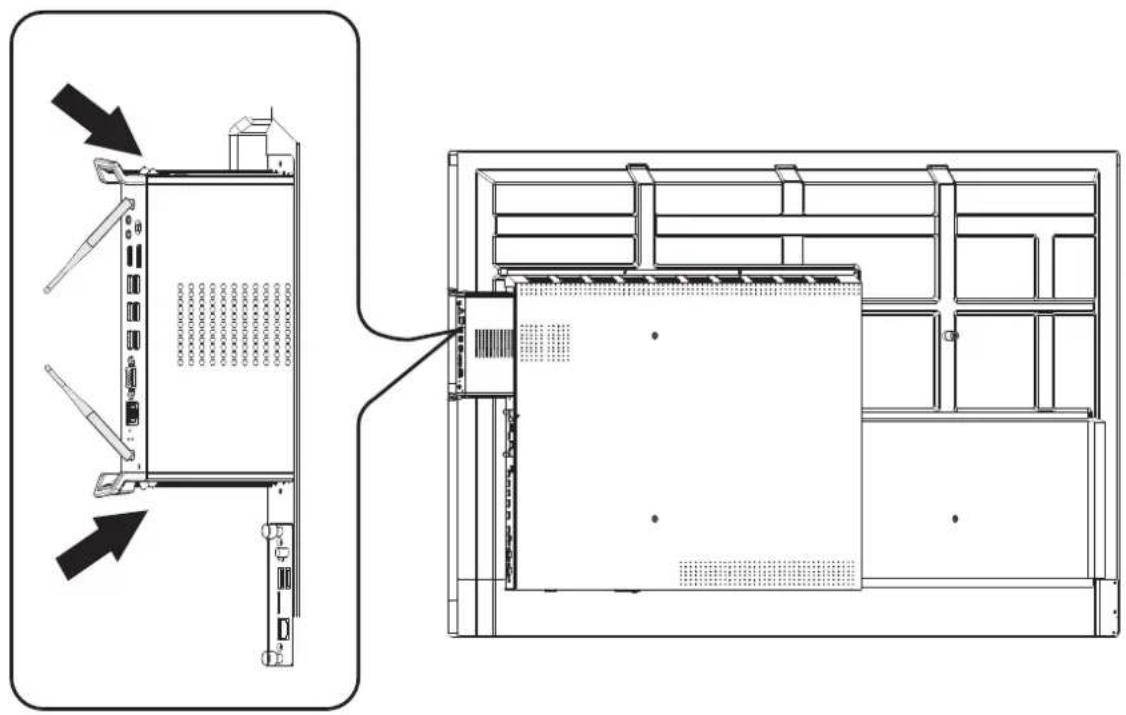
natural_image
Technical line drawing of a server rack with two views showing internal components and directional arrows (no text or symbols)2-3
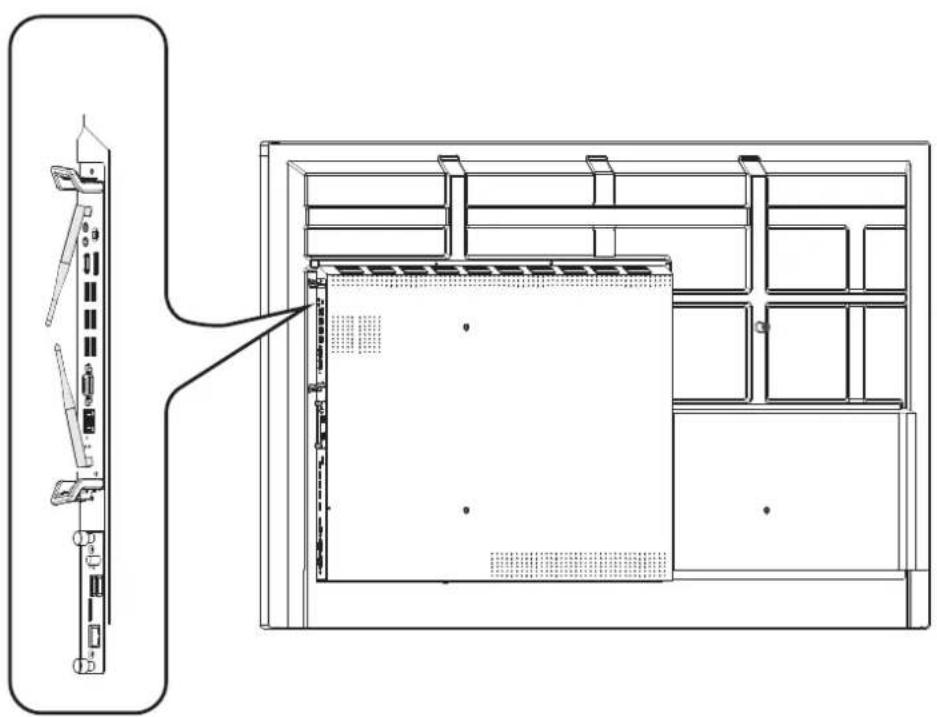
natural_image
Technical line drawing of a server rack with front panel and internal storage unit (no text or symbols)- Internet Connection
4. Input Selection
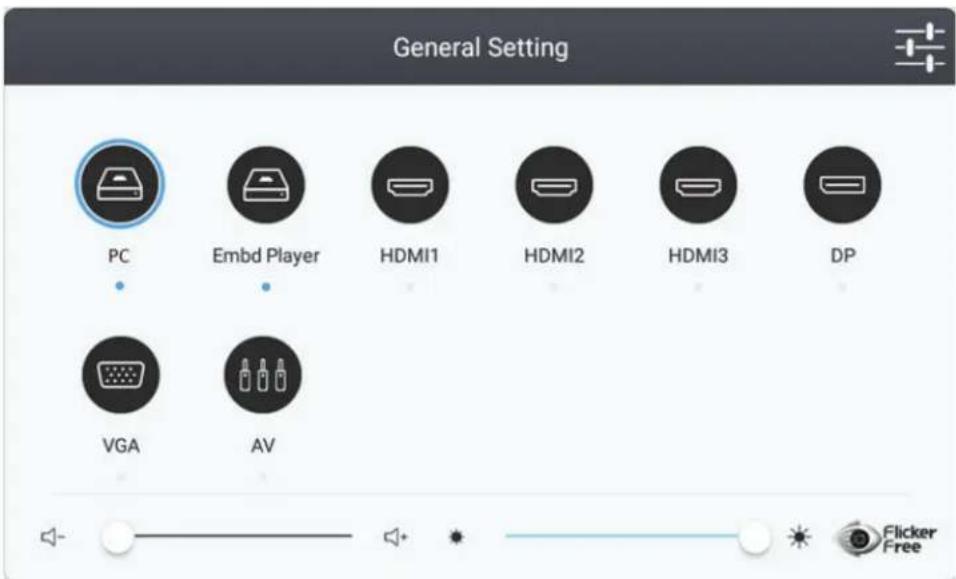
- Press INPUT button on remote control to display the input setting menu, then press DOWN to enter the input source menu.
- Press DOWN / UP / LEFT/ RIGHT to select PC.
- Press Enter button on remote control or click with touch pen to select the input source.
-
Press EXIT key on remote control or click blank area outside menu with touch pen to quit the on-screen menu.
-
USB Connection
6. Specifications
| IO ports | 1 x Display Port1 x HDMI1 x VGA1 x LAN2 x USB 2.0 (5V/0.5A)4 x USB 3.0 (5V/0.9A)1 x USB type C1 x Earphone1 x Microphone | |
| Power 100V-240V AC 50/60HZ | ||
| Operation Conditions | Temperature Humidity Altitude | 32°F to 113°F (0°C to 45°C)10% ~ 90% non-condensing0 meter to +5000 meters above sea level |
| Storage Conditions | Temperature Humidity Altitude | -4°F to 140°F (-20°C to 60°C)10% ~ 90% non-condensing0 meter to +5000 meters above sea level |
| Dimensions Physical(mm) 246.1 x 263.4 x 32.2 | ||
| Weight Physical(kg) 1.95 | ||
| Power consumption 95W | ||
| Frequency Range and Output Power (Max.) | 2402 to 2480 MHz(BT) 2.0 dBm2402 to 2480 MHz(LE) 3.73 dBm2412 to 2472 MHz 17.41 dBm5150 to 5250 MHz 18.94 dBm5250 to 5350 MHz 18.94 dBm5470 to 5725 MHz 18.94 dBm | |
7. Customer Support
For technical support or product service, see the table below or contact your reseller.
NOTE: You will need the product serial number.
| Country/Region | Website | T= TelephoneC = CHAT ONLINE | |
| AustraliaNew Zealand | www.viewsonic.com.au | AUS= 1800 880 818NZ= 0800 008 822 | service@au.viewsonic.com |
| Canada www.viewsonic.com | T = 1-866-463-4775 | service.ca@viewsonic.com | |
| Europe | www.viewsoniceurope.com | http://www.viewsoniceurope.com/eu/support/call-desk/ | |
| Hong Kong www.hk.viewsonic.com | T= 852 3102 2900 | service@hk.viewsonic.com | |
| India www.in.viewsonic.com | T= 1800 419 0959 | service@in.viewsonic.com | |
| Korea ap.viewsonic.com | T= 080 333 2131 | service@kr.viewsonic.com | |
| Latin America www.viewsonic.com | la/ | C=http://www.viewsonic.com/la/soporte/servicio-tecnico | soporte@viewsonic.com |
| Macau www.hk.viewsonic.com | T= 853-2840-3687 | service@hk.viewsonic.com | |
| Middle East ap.viewsonic.com | me/ Contact your reseller | service@ap.viewsonic.com | |
| Puerto Rico & Virgin Islands | www.viewsonic.com | T= 1-800-688-6688 (English)C= http://www.viewsonic.com/la/soporte/servicio-tecnico | service.us@viewsonic.comsoporte@viewsonic.com |
| Singapore/Malaysia/Thailand | www.ap.viewsonic.com T= | 65 6461 6044 | service@sg.viewsonic.com |
| South Africa | ap.viewsonic.com/za/ | Contact your reseller | service@ap.viewsonic.com |
| United States | www.viewsonic.com T = 1-800-688-6688 | service.us@viewsonic.com | |

natural_image
Three colorful bird illustrations perched on a branch against a red background (no text or symbols)ViewSonic®
Brand : VIEWSONIC
Model : VPC15-WP-4
Category : Uncategorized