
VPC12-WPO-16 - Uncategorized VIEWSONIC - Free user manual and instructions
Find the device manual for free VPC12-WPO-16 VIEWSONIC in PDF.


| Product Type | Professional LCD Monitor |
| Model | VPC12-WPO-16 |
| Brand | ViewSonic |
| Screen Size | 21.5 inches |
| Resolution | 1920 x 1080 (Full HD) |
| Aspect Ratio | 16:9 |
| Brightness | 250 cd/m² |
| Contrast Ratio | 1000:1 (static) |
| Response Time | 5 ms |
| Viewing Angles | 178° / 178° |
| Inputs | VGA, HDMI, DisplayPort |
| Power Consumption | 28 W (typical) |
| Standby Power | <0.5 W |
| VESA Mount | 100 x 100 mm |
| Dimensions (with stand) | 20.0 x 15.2 x 7.8 inches |
| Weight (with stand) | 8.6 lbs |
| Color | Black |
| Energy Star | Certified |
| Included Accessories | Power cord, VGA cable, Quick Start Guide |
Frequently Asked Questions - VPC12-WPO-16 VIEWSONIC
User questions about VPC12-WPO-16 VIEWSONIC
0 question about this device. Answer the ones you know or ask your own.
Ask a new question about this device
Download the instructions for your Uncategorized in PDF format for free! Find your manual VPC12-WPO-16 - VIEWSONIC and take your electronic device back in hand. On this page are published all the documents necessary for the use of your device. VPC12-WPO-16 by VIEWSONIC.
USER MANUAL VPC12-WPO-16 VIEWSONIC
VPC12-WPO-15/16/17/18
Slot in PC module
Quick Start Guide
Thank you for choosing ViewSonic®
As a world-leading provider of visual solutions, ViewSonic® is dedicated to exceeding the world's expectations for technological evolution, innovation, and simplicity. At ViewSonic®, we believe that our products have the potential to make a positive impact in the world, and we are confident that the ViewSonic® product you have chosen will serve you well.
Once again, thank you for choosing ViewSonic®!
Package Contents
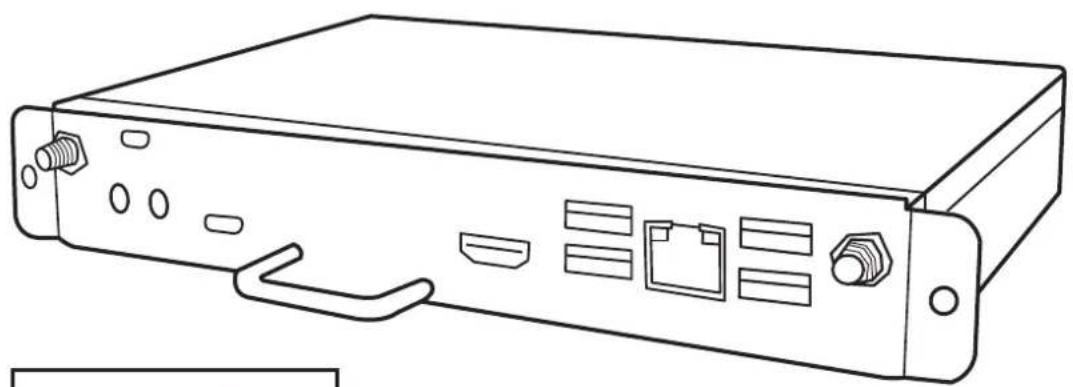
natural_image
Line drawing of a server rack with ports and connectors (no text or symbols)
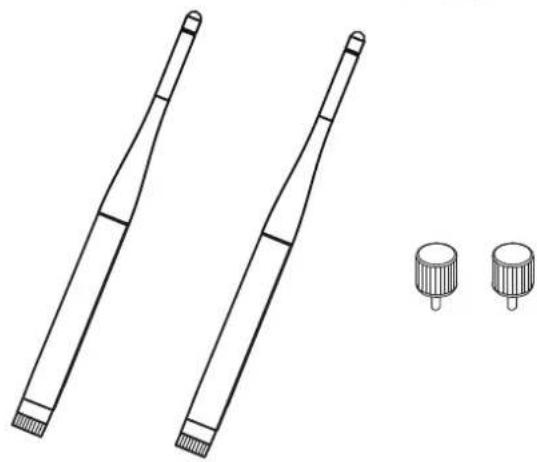
natural_image
Technical line drawing of two cylindrical mechanical components with end caps, plus two separate cylindrical base components (no text or symbols)1. Interface
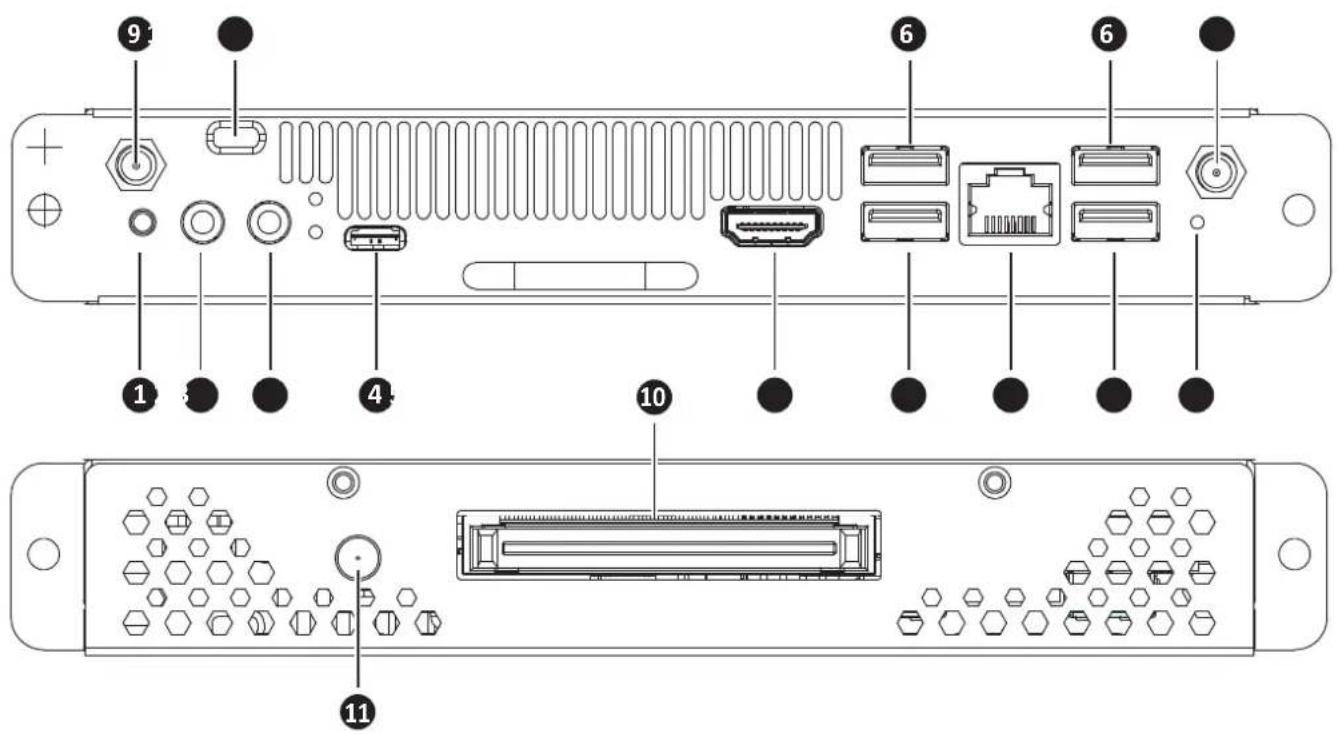
| Item Description | |
| 1 POWER BUTTON | |
| 2 MIC IN | |
| 3 LINE OUT | |
| 4 USB 2.0 / TYPE-C | |
| 5 HDMI 1.4 | |
| 6 USB 3.0 | |
| 7 RJ45 | |
| 8 RESET | |
| 9 SMA Connector (for WiFi Antenna) | |
| 10 80 Pin Con. (ops) | |
| 11 DC jack | |
| 12 Kensington Lock |
2. Installation
2-1
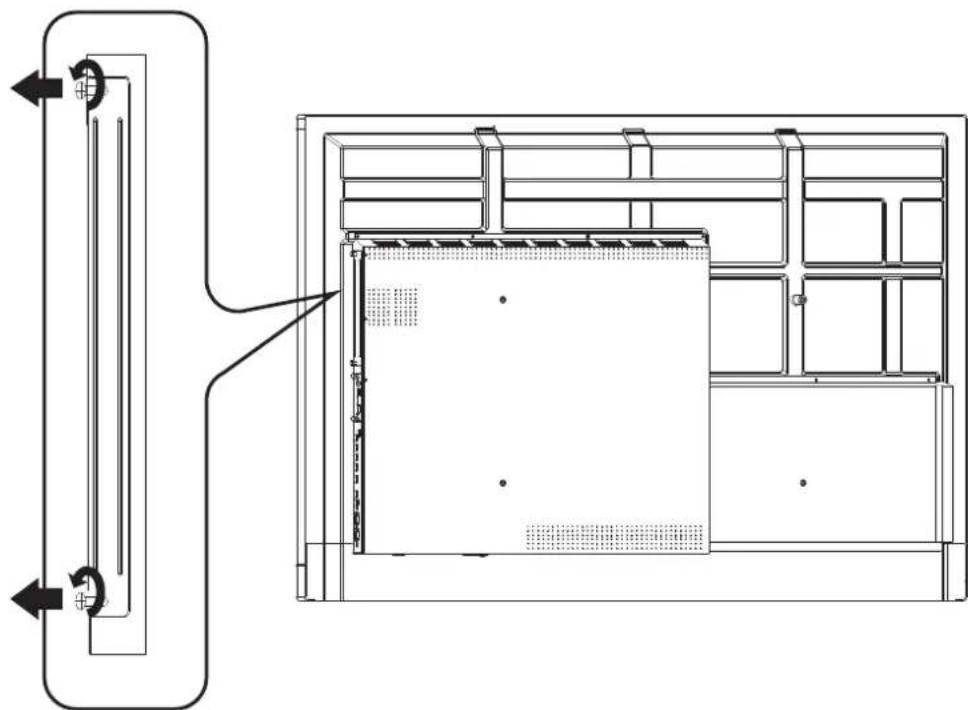
natural_image
Technical line drawing of a modular HVAC unit with internal components and directional arrows (no text or symbols)2-2
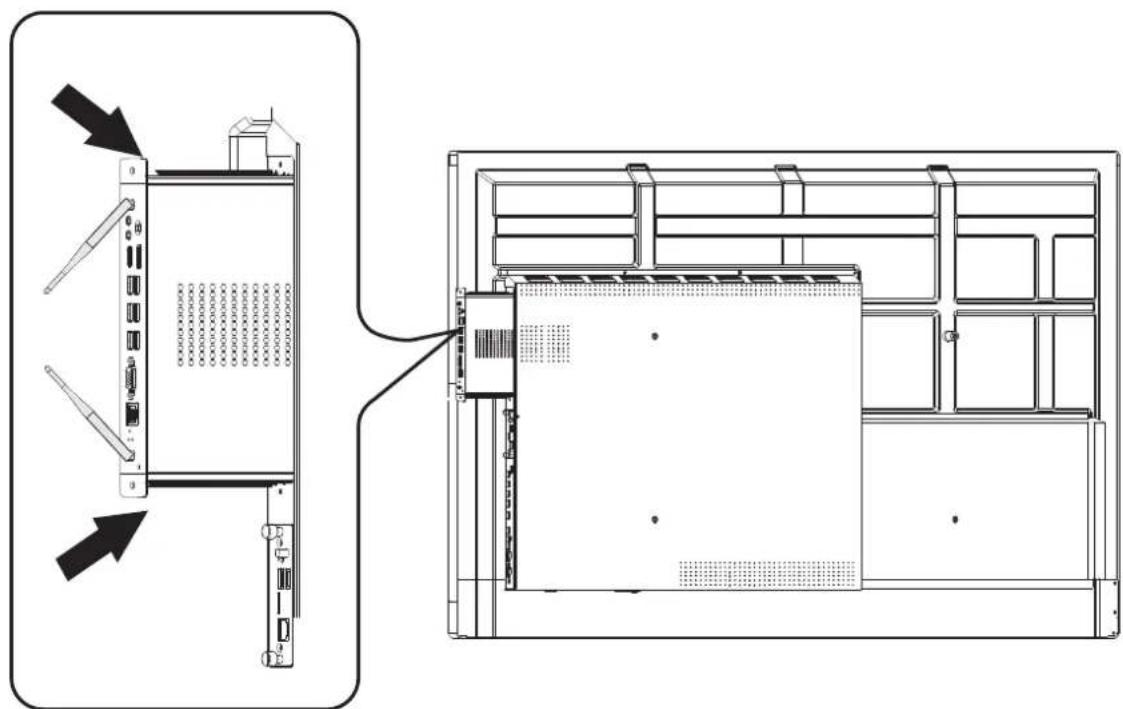
natural_image
Technical line drawing of a server rack with two views showing internal components and connection (no text or symbols)2-3
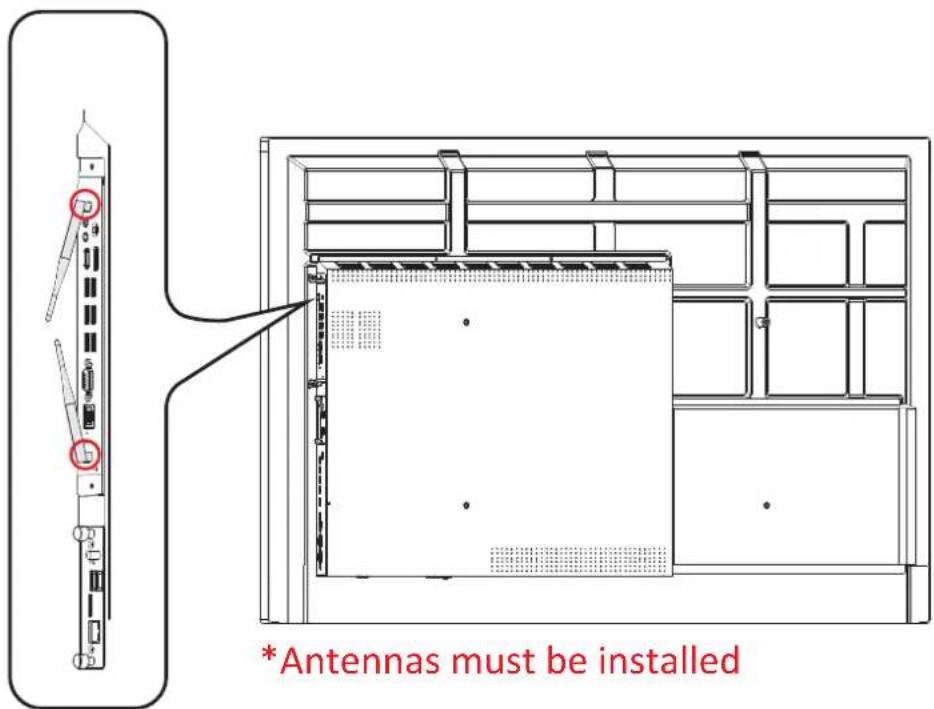
3. Internet Connection
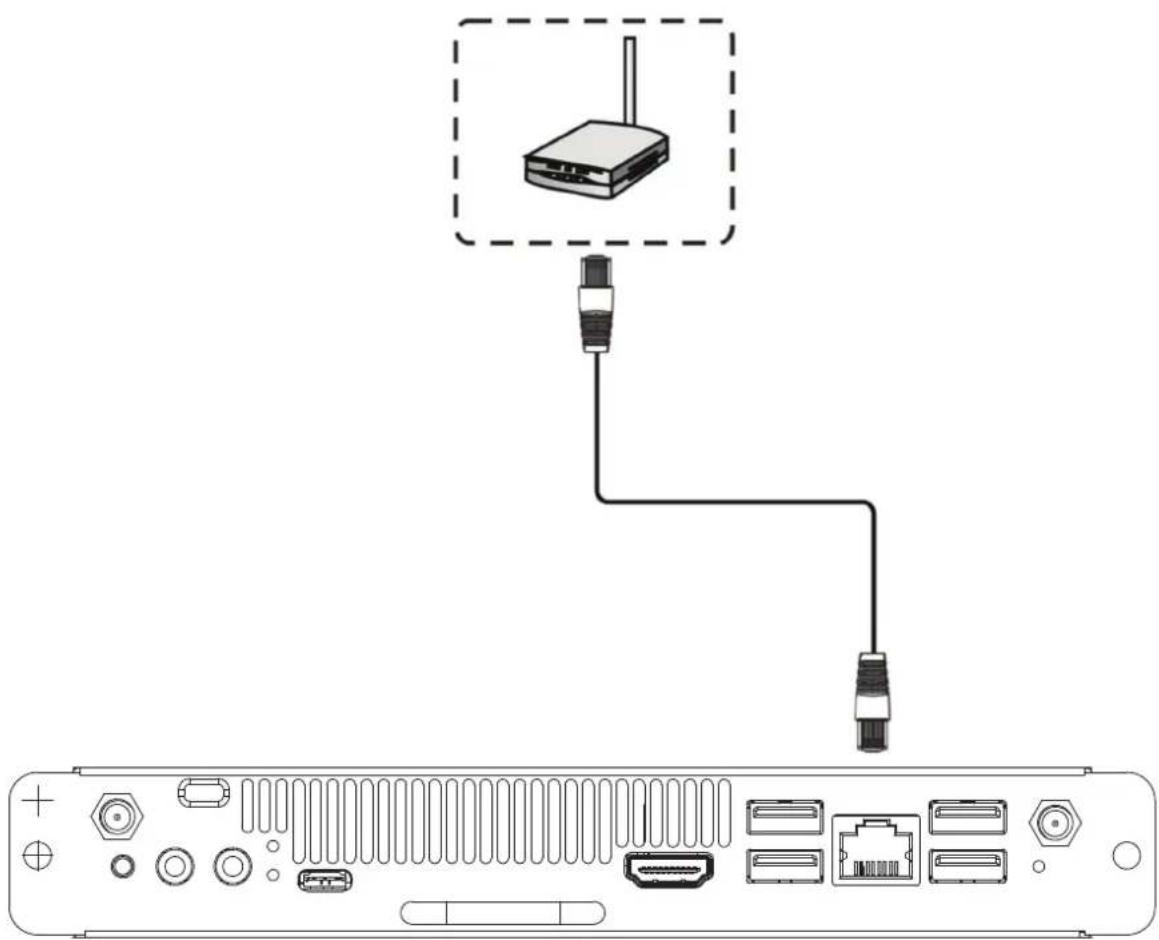
natural_image
Diagram of a network device showing an Ethernet connection with ports and connectors (no text or labels)4. Input Selection
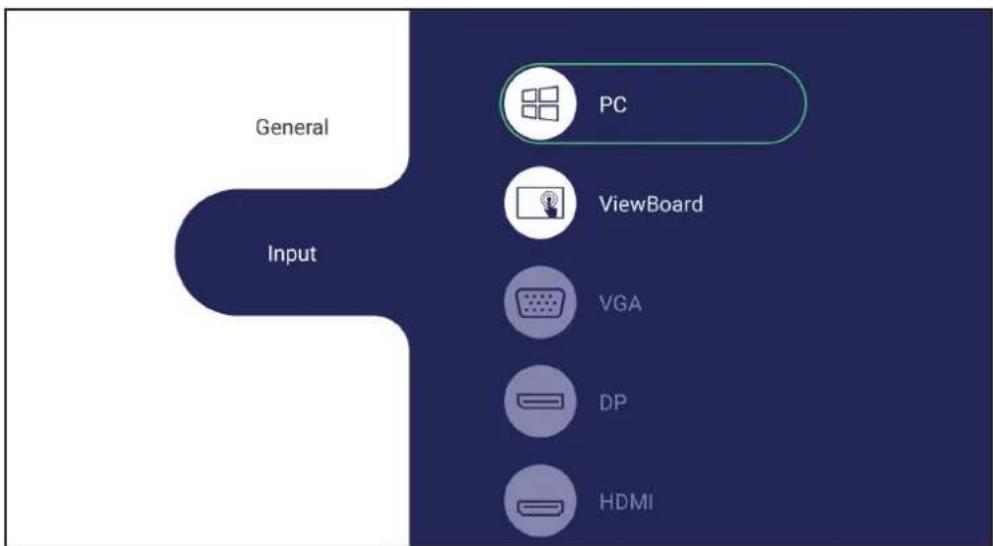
flowchart
graph TD
    A["Input"] --> B["PC"]
    A --> C["ViewBoard"]
    A --> D["VGA"]
    A --> E["DP"]
    A --> F["HDMI"]
To select an Input Source:
- Press INPUT on the remote control, press the setting button ☐ on the front panel, or press the ⚙️ setting icon from the toolbar to display the Input Settings menu.
- Press ▼ / ▲ / ◀ / ▶ to select PC.
- Press OK on the remote control, or touch the input source.
- Press ↩ on the remote control, or touch a blank area outside of the menu to exit.
5. USB Connection
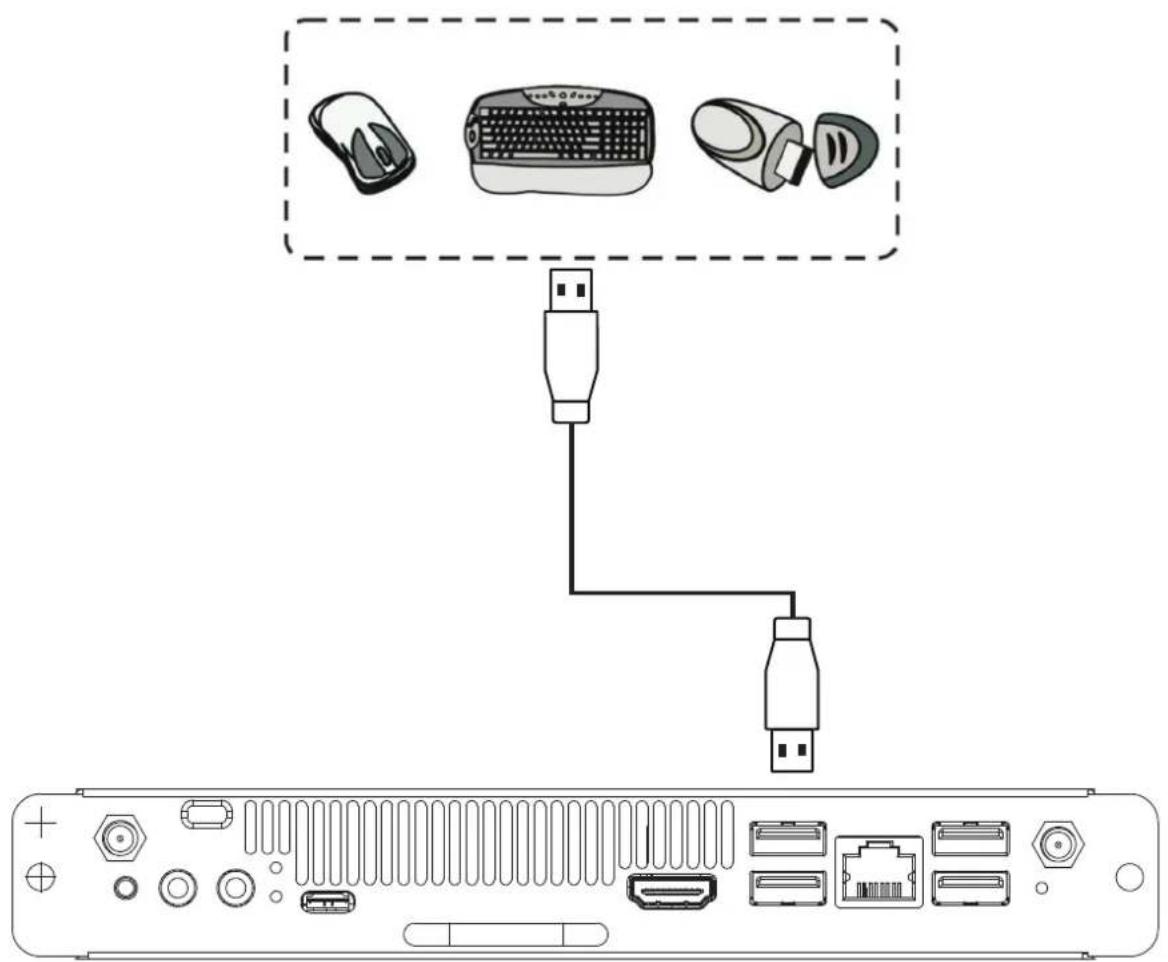
- Specifications
| Processor Intel® | Coffeelake U SOC, i5-8259U (VPC12-WPO-15/16)Intel® Coffeelake U SOC, i5-8279U (VPC12-WPO-17/18) |
| Graphic Intel® Iris® | Plus Graphics 655 |
| RAM 2 x DDR4 SO- | DIMM, 64GB (Max) |
| Storage 1 x NVMe | M.2 2280 SATAIII SSD |
| IO ports 4 x USB 3.0 | 1 x USB 2.0 Type-C1 x HDMI 1.4 out1 x RJ45 Ethernet (with Realtek 8111H)1 x Microphone/Line out2 x External antenna Holes1 x Power On/ Off Button1 x Reset Button1 x Power LED1 x HDD LED1 x 80 Pin JAE OPS connector |
| WIFI/BT 1 x M.2 2230 (with Intel® Dual Band Wireless-AC 3165) | |
| vPro/AMT No | |
| BIOS AMI UEFI BIOS | |
| Power DC in +19V | @ 4.74A65 W (Typical) |
| Operating Conditions | -5 °C to +45 °C20% RH ~ 80% RH non-condensing |
| Storage Conditions | -20 °C to +70 °C10% ~ 80% R.H. non-condensing |
Regulatory and Service Information
Compliance Information
This section addresses all connected requirements and statements regarding regulations. Confirmed corresponding applications shall refer to nameplate labels and relevant markings on the unit.
CE Conformity for European Countries

The device complies with the EMC Directive 2014/30/EU and Low Voltage Directive 2014/35/EU and Radio Equipment Directive (RED) 2014/53/EU.
The following information is only for EU-member states:
The mark shown to the right is in compliance with the Waste Electrical and Electronic Equipment Directive 2012/19/EU (WEEE). The mark indicates the requirement NOT to dispose the equipment as unsorted municipal waste, but use the return and collection systems according to local law. In all EU member states, operation of 5150-5350MHz is restricted to indoor use only. This device should be installed and operated with a minimum distance of 20cm between the radiator and your body.

Declaration of RoHS2 Compliance
This product has been designed and manufactured in compliance with Directive 2011/65/EU of the European Parliament and the Council on restriction of the use of certain hazardous substances in electrical and electronic equipment (RoHS2 Directive) and is deemed to comply with the maximum concentration values issued by the European Technical Adaptation Committee (TAC) as shown below:
| Substance Proposed Maximum Concentration Actual Concentration | ||
| Lead (Pb) 0.1% < 0.1% | ||
| Mercury (Hg) 0.1% < 0.1% | ||
| Cadmium (Cd) 0.01% < 0.01% | ||
| Hexavalent Chromium ( Cr6^+ ) 0.1% < 0.1% | ||
| Polybrominated biphenyls (PBB) 0.1% < 0.1% | ||
| Polybrominated diphenyl ethers (PBDE) 0.1% < 0.1% | ||
| Bis (2-ethylhexyl) phthalate (DEHP) 0.1% < 0.1% | ||
| Butyl benzyl phthalate (BBP) 0.1% < 0.1% | ||
| Dibutyl phthalate (DBP) 0.1% < 0.1% | ||
| Diisobutyl phthalate (DIBP) 0.1% < 0.1% | ||
Certain components of products as stated above are exempted under the Annex III of the RoHS2 Directives as noted below:
• Copper alloy containing up to 4% lead by weight.
- Lead in high melting temperature type solders (i.e. lead-based alloys containing 85% by weight or more lead).
- Electrical and electronic components containing lead in a glass or ceramic other than dielectric ceramic in capacitors, e.g. piezoelectronic devices, or in a glass or ceramic matrix compound.
- Lead in dielectric ceramic in capacitors for a rated voltage of 125V AC or 250V DC or higher.
Indian Restriction of Hazardous Substances
Restriction on Hazardous Substances statement (India). This product complies with the “India E-waste Rule 2011” and prohibits use of lead, mercury, hexavalent chromium, polybrominated biphenyls or polybrominated diphenyl ethers in concentrations exceeding 0.1 weight % and 0.01 weight % for cadmium, except for the exemptions set in Schedule 2 of the Rule.
Product Disposal at End of Product Life
ViewSonic ^® respects the environment and is committed to working and living green. Thank you for being part of Smarter, Greener Computing. Please visit the ViewSonic ^® website to learn more.
Europe:
http://www.viewsoniceurope.com/eu/support/call-desk/
Customer Service


natural_image
Illustration of three colorful bird figurines on a grassy ground (no text or symbols)ViewSonic®
- VPC12-WPO-15/16/17/18
- Thank you for choosing ViewSonic®
- Package Contents
- Interface
- Installation
- Internet Connection
- Input Selection
- To select an Input Source:
- USB Connection
- Regulatory and Service Information
- Compliance Information
- CE Conformity for European Countries
- The following information is only for EU-member states:
- Declaration of RoHS2 Compliance
- Certain components of products as stated above are exempted under the Annex III of the RoHS2 Directives as noted below:
- Indian Restriction of Hazardous Substances
- Product Disposal at End of Product Life
- Europe:
- Customer Service
Brand : VIEWSONIC
Model : VPC12-WPO-16
Category : Uncategorized