Smart control e-plug 51150 - Home Automation STABO - Free user manual and instructions
Find the device manual for free Smart control e-plug 51150 STABO in PDF.


| Product Type | Smart Wi-Fi Plug |
| Brand | Stabo |
| Model | Smart Control e-Plug 51150 |
| Category | Home Automation |
| Dimensions | Approx. 5.3 x 5.3 x 5.8 cm |
| Weight | Approx. 50 g |
| Power Supply | 230 V AC, 50/60 Hz |
| Maximum Load | 16 A (resistive), 3680 W |
| Connectivity | Wi-Fi 2.4 GHz IEEE 802.11 b/g/n |
| Compatible Systems | iOS 9.0+, Android 4.4+ |
| Voice Control | Amazon Alexa, Google Assistant |
| Key Functions | Remote on/off, scheduling, timer, energy monitoring, scenes |
| Energy Monitoring | Real-time power consumption and history |
| Safety Features | Overload protection, fire-resistant ABS housing |
| Operating Temperature | 0°C to 40°C |
| Wireless Range | Up to 30 m indoors (depending on walls) |
| Maintenance | Wipe with a dry cloth; do not use liquids |
| Spare Parts | Not applicable; no user-serviceable parts |
| Repairability | Non-repairable; replace if defective |
| Package Contents | Smart plug, user manual |
Frequently Asked Questions - Smart control e-plug 51150 STABO
User questions about Smart control e-plug 51150 STABO
0 question about this device. Answer the ones you know or ask your own.
Ask a new question about this device
Download the instructions for your Home Automation in PDF format for free! Find your manual Smart control e-plug 51150 - STABO and take your electronic device back in hand. On this page are published all the documents necessary for the use of your device. Smart control e-plug 51150 by STABO.
USER MANUAL Smart control e-plug 51150 STABO
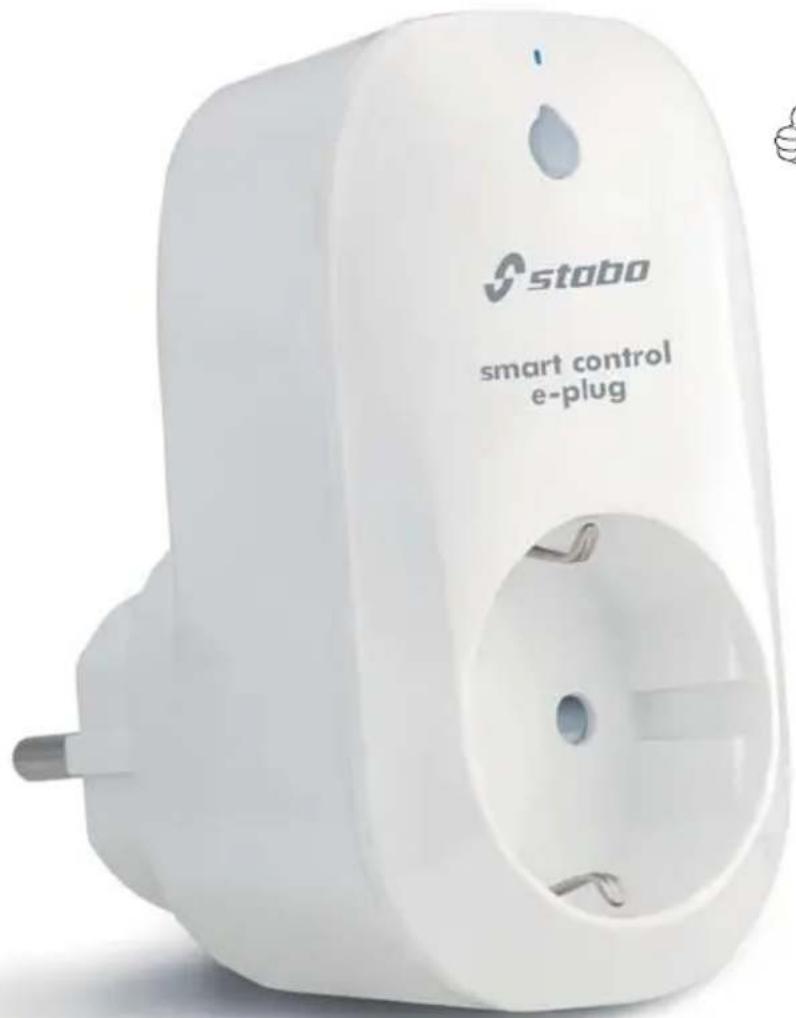
smart control e-plug
with energy measurement function
Art.-Nr. 51150

natural_image
Cartoon illustration of a smiling yellow house character giving a thumbs-up (no text or symbols)flowchart
graph LR
    A["Mobile Device"] --> B["Global Internet"]
    C["Home Icon"] --> B
    B --> D["Blue Dot Link to Mobile"]
Wichtig/Important
Prior to using the device for the first time, carefully and completely read through all operating
instructions. Keep these operating instructions in a safe place;
it contains important hints for operating the device.
Lieferumfang

bar
Verbrauchsstatistik Festlegen | Month | Verbrauch (€/kWh) | | :--- | :--- | | Jan | 0.252 | | Feb | 1.455 | | Mar | 0.319 | | Apr | 0.362 | | May | 0 | | Jun | 0 | | Jul | 0 | | Aug | 0 | | Sep | 0 | | Oct | 0 | | Nov | 0 | | Dec | 0 | Gesamt: 1,455KWh FEB: 0,000KWh Gesamt: 1,455KWh FEB: 0,000KWhbar
Verbrauchsstatistik Festlegen | Month | Verbrauch (GWh) | | :--- | :--- | | Jan | 6,751 | | Feb | 1,148 | | Mar | 1,736 | | Apr | 0 | | May | 0 | | Jun | 0 | | Jul | 0 | | Aug | 0 | | Sep | 0 | | Oct | 0 | | Nov | 0 | | Dec | 0 |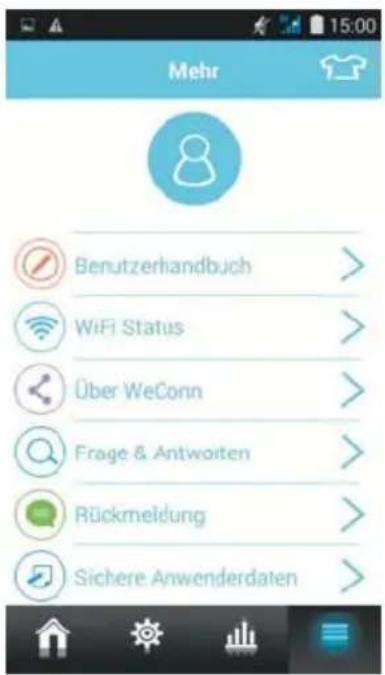
Brief operating instructions (German/English)
Please check the contents of the package for completeness.
Prior to using the device examine it with respect to any external damage. In case of an external damage, do not put the product into operation, but contact your specialist dealer immediately.
Product description / intended use
stabo smart control e-plug is a WLAN switching plug which can be used for switching every connected electronic device from any place in the world providing a mobile data access with the help of your smartphone/tablet PC. The switching plug can be switched on/off either manually (using the switching button) or automatically (using the timer function).
stabo smart control e-plug determines the power consumption of the connected device in real time and creates statistics. When using several WLAN switching plugs (up to 20), the group function (scenario) can be used to administer different consumers through the app and to compile groups in case of need.
The corresponding app WeConn can either be downloaded for free as iOS version from the App Store or as Android version via Google Play.

Safety notes and warnings
Do not expose the system to the weather in the open! smart control e-plug is exclusively designed for indoor operation.
Consider the power limit! Do not overload the smart control e-plug (max. 3500 W/16 A), otherwise you risk electric accidents.
Make sure to avoid any fire hazard! Do not remotely activate electrical devices bearing a potential fire risk (e.g. radiant heaters, electric flat iron)! Never leave switched on electrical devices unattended!
Consider the resistance to switching! Make sure that devices to be switched on/off frequently have a corresponding resistance to switching. We do not assume any liability for any corresponding damage to connected devices.
Keep out of the reach of children! Prevent children from playing with the device or the packing material!
Do not open the devices or make any modifications to them! Never open parts of the housing and do not make any modifications. Otherwise, no further guarantee claim can be accepted and the devices could lose their approval for use!
If the housing is damaged, disconnect the power plug! Immediately disconnect the device from the mains, if damage on the housing is found. Ensure that possibly required repairs are performed by a qualified person only.
Please note:
Always plug the WLAN switching plug into a socket near the connected electrical device.
Make sure that connected switching plugs
are freely accessible and not covered by objects.
Do not plug WLAN switching plugs into each other.
The plug at a glance
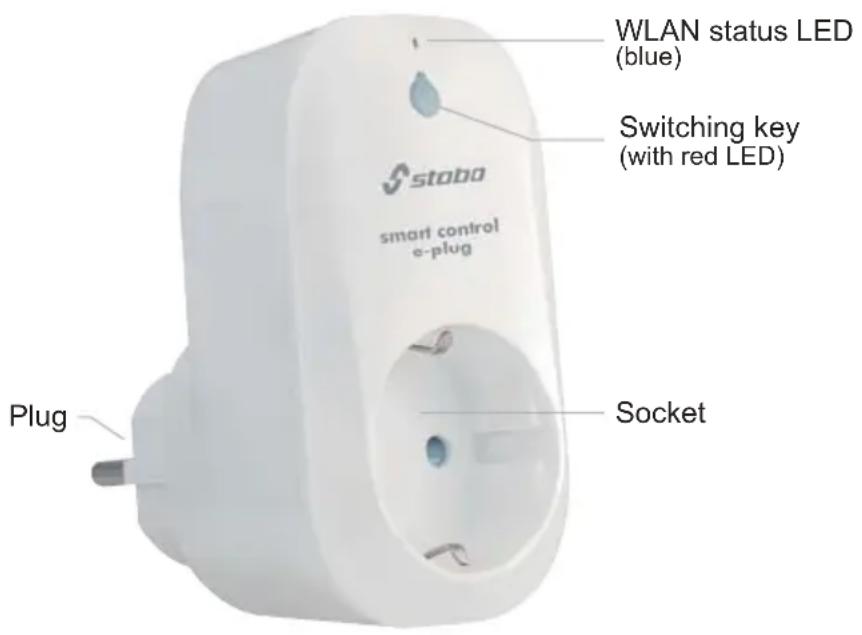
Key functions and LED status
WLAN status
slowly blinking LED: switching plug is connected to WLAN
rapidly flashing LED: configuration mode is active or no WLAN connection
Switching key
Switching the unit on/off manually
LED lights permanently when power is on
Reset to factory setting (pressing the key for approx. 5 sec.)
rapidly flashing LED
Activating the direct mode between smart control e-plug and smartphone (pressing the key for approx. 10 sec.)
The LED flashes rapidly, then slowly
Commissioning/installation
First download the iOS or Android version of the app WeConn from the App Store or Google Play Store according to the operating system of your mobile device. To do so, enter WeConn into the search bar, highlight the app, download and install it.
Note: In these operating instructions, all operational steps are described for the Android version of the app.
Connecting smart control e-plug using the mobile device
Plug the WLAN switching plug in to a 230 V socket.
Make sure that your mobile device is connected with your WLAN router.
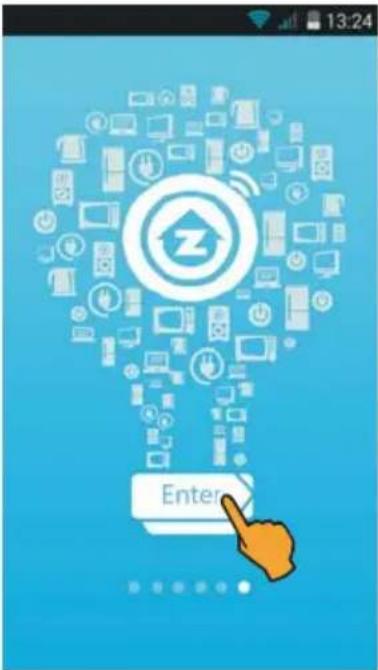
Open the app WeConn.
Tap the WeConn logo, scroll to the last screen page and tap Enter.
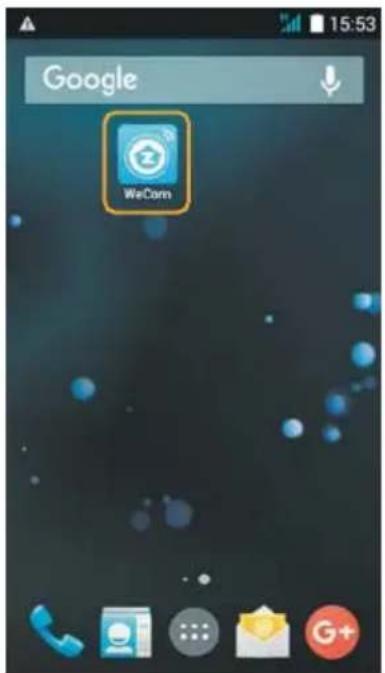
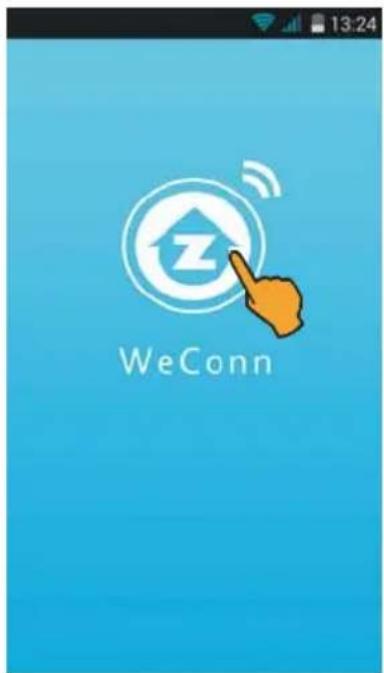
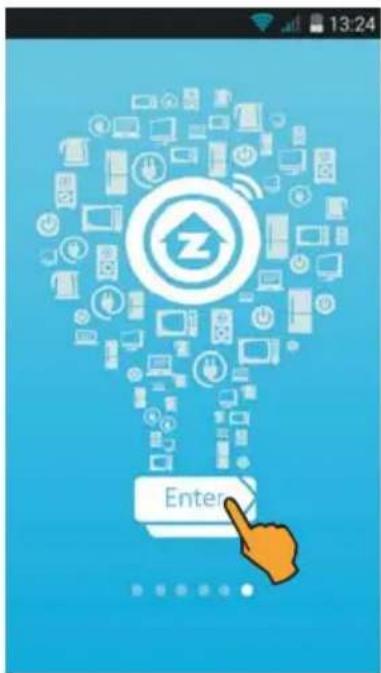
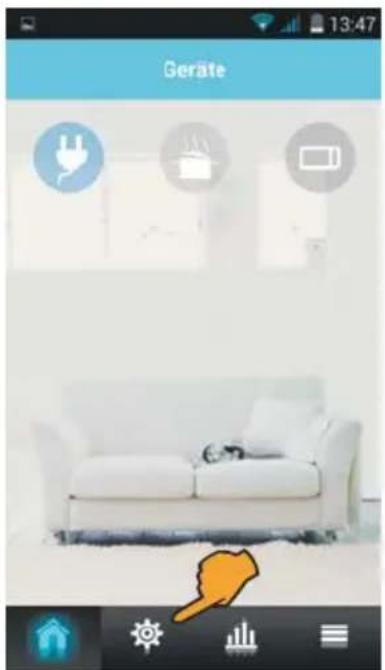
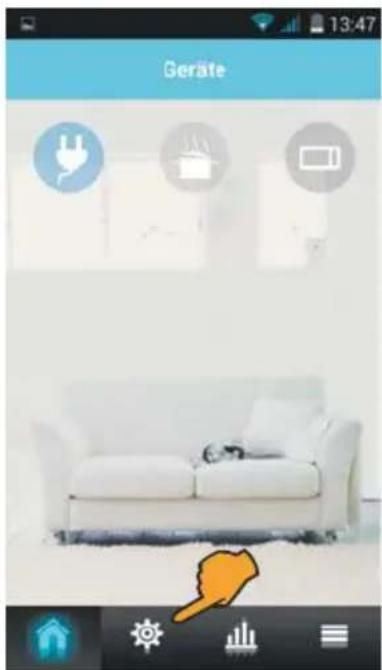
Now tap ⚙️ (settings).

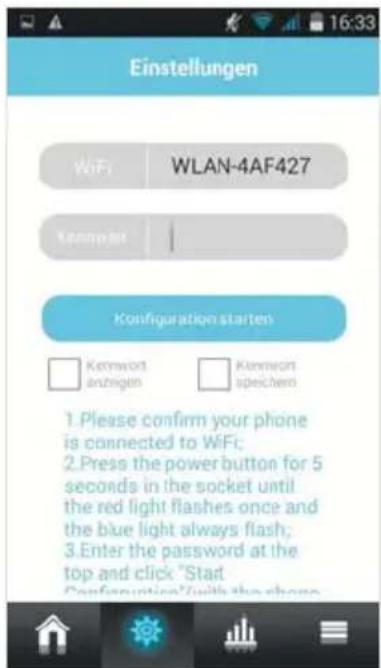
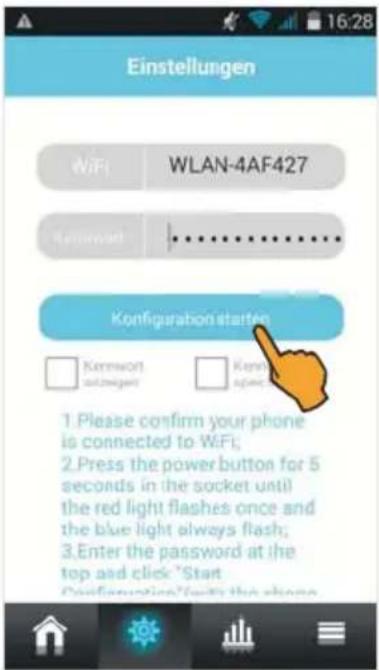
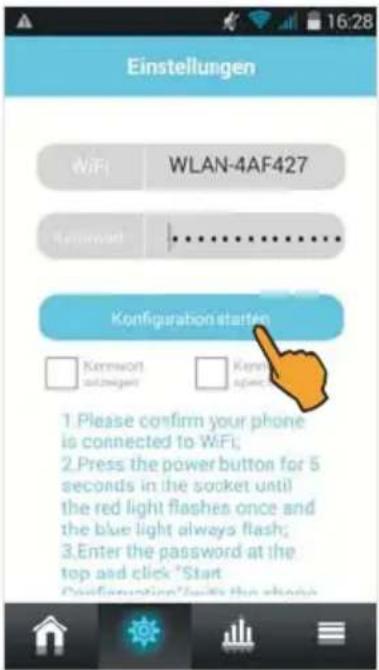
Use Kennwort (Password) to enter the WPA encryption code of your WLAN router. Check whether the blue WLAN status LED flashes rapidly. If not so, push the switching key for approx. 5 sec. The red LED briefly lights up and the blue LED flashes rapidly.
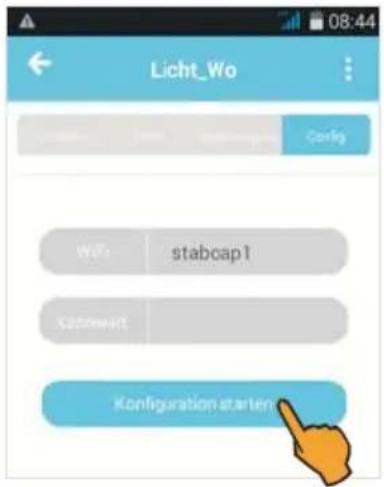
Afterwards tap Konfiguration starten (Start configuration).
Wait until the configuration completes - this can take up to 30 sec.!
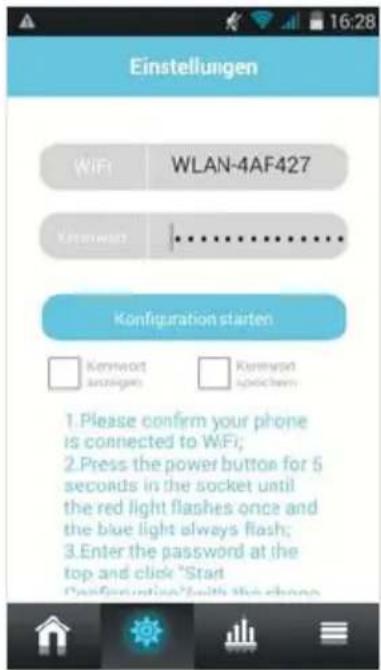
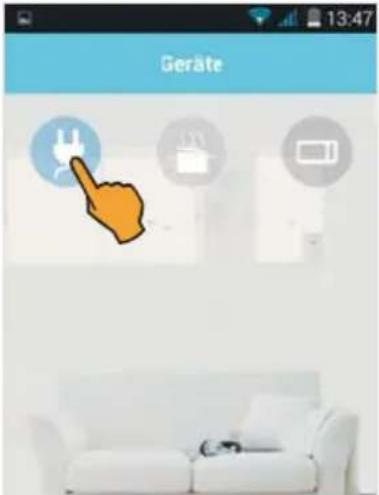
After successful configuration the start screen appears. The smart control e-plug is now connected to your WLAN router and you can switch the device via the app.
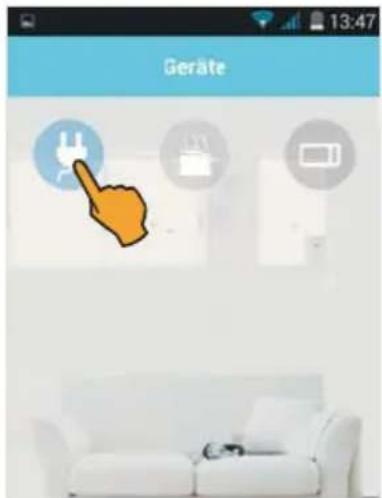
Tap the plug symbol to switch on the smart control e-plug. Afterwards tap the lamp symbol.
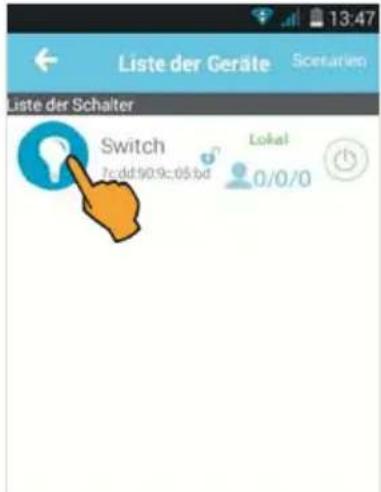
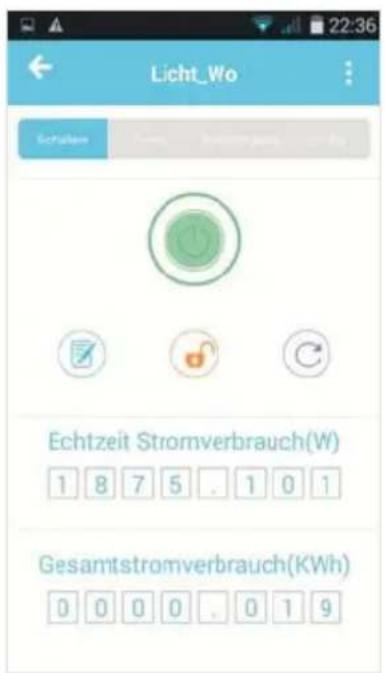
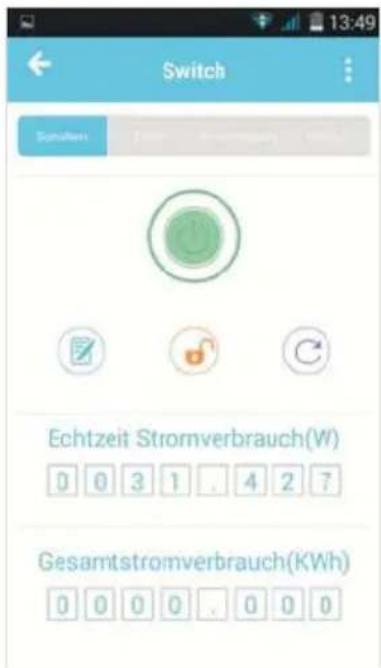
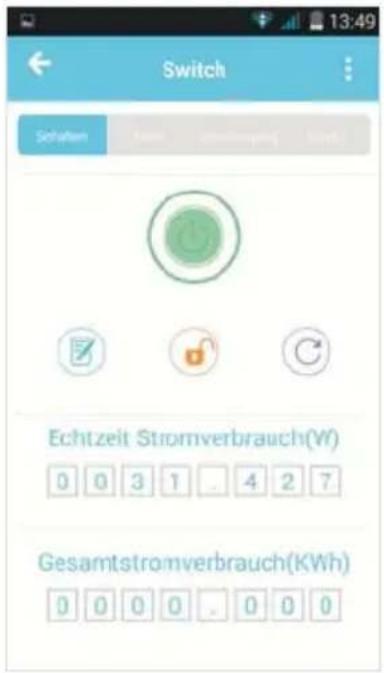
Tap the on/off button: The button lights green and the power consumption value of the connected device is displayed.
In this way, you can register up to 20 smart control e-plugs at your mobile device.
The start screen can be used to adjust all device settings.
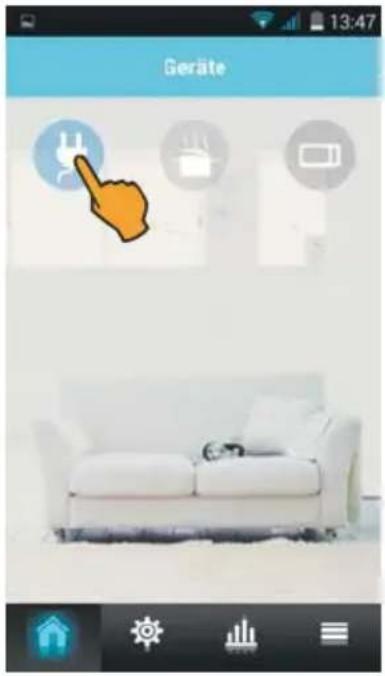
Tap the plug symbol: A list containing the registered WLAN switching plug(s) appears including the following information:
Switch (= name of switching plug)
ID no. of switching plug (MAC address)
Lock symbol: Indicates the access authorization
Connection indicator:
Local: Connection via WLAN router
Internet: Connection via mobile data
Offline: no Internet connection
Access indicator: Registered users/current users/access to switching plug
Status indicator: Switching plug switched on or off.
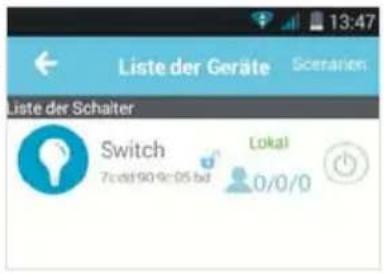
Furthermore, this option can be used to compile several WLAN switching plugs in a group. To do so, tap Scenarien (Scenarios).
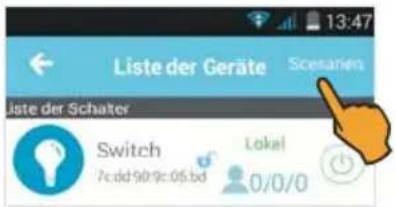
Functions and settings
Tap the lamp symbol to make individual settings.
1) Switching on/off: Tap the on/off button.
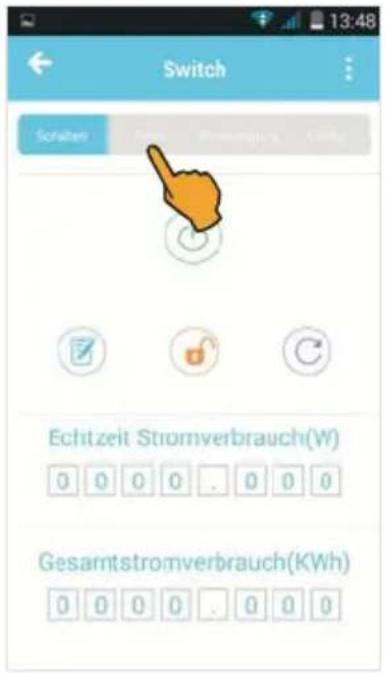
2) Timer: Automatically switching smart control e-plug on/off (time-controlled).
3) Authorization: Changing the name of the smartphone, registering the administrator, assigning access authorizations.
4) Config: Performing new configuration after off line message.
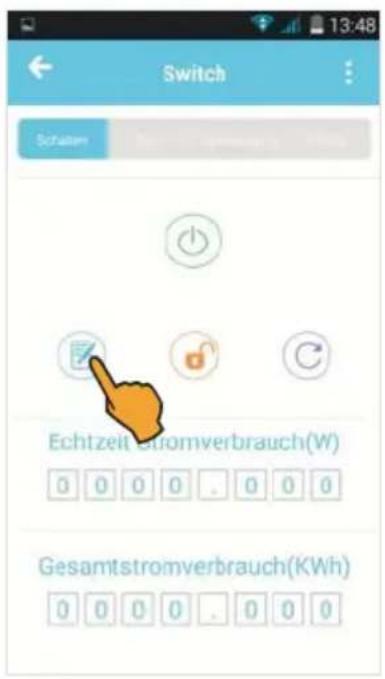
5) ☑ Notepad: Changing the name of the switching plug.
6) Lock symbol: Locking the access for other users (administrator rights)
7) Circle symbol: Updating the settings
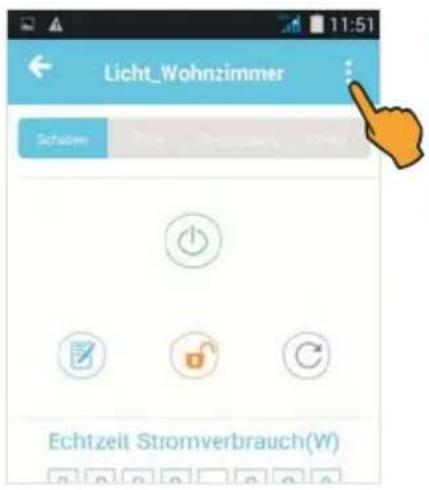
8) Three dots: Checking the hardware for updates
9) Energy measurement function: Indicating the real-time power consumption (W) and total power consumption (kWh) of the connected device
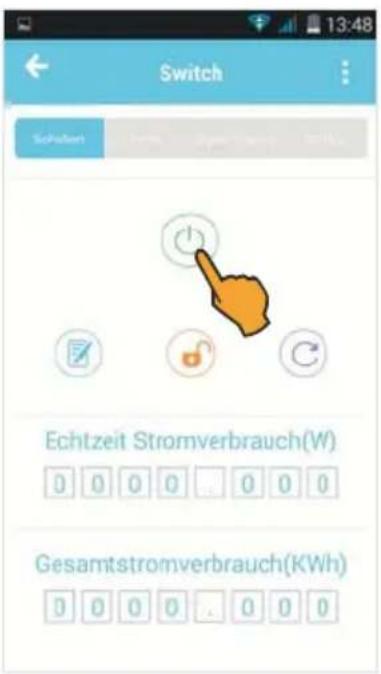
Tap the on/off button: The button lights green when switching on and the current power consumption is displayed.
Adjust the desired switch-on and switch-off times and select the days of the week on which the time shall switch automatically.
If you wish to assign a name to your timer setting (e.g. Licht_Wohnzimmer (lamp living room)), tap Notizen (Notes), enter the desired name and confirm by tapping OK. Now tap Speichern (Save) to activate the timer function.
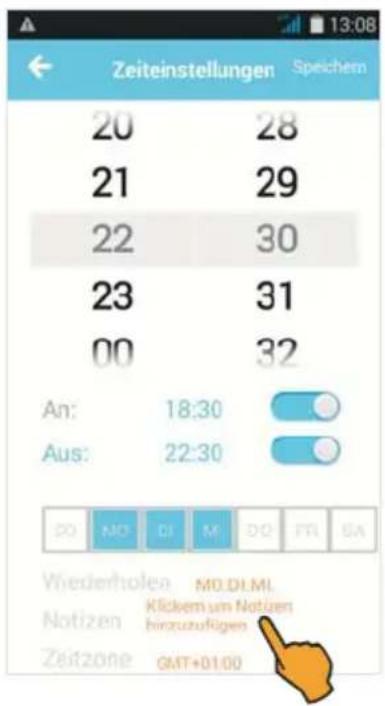
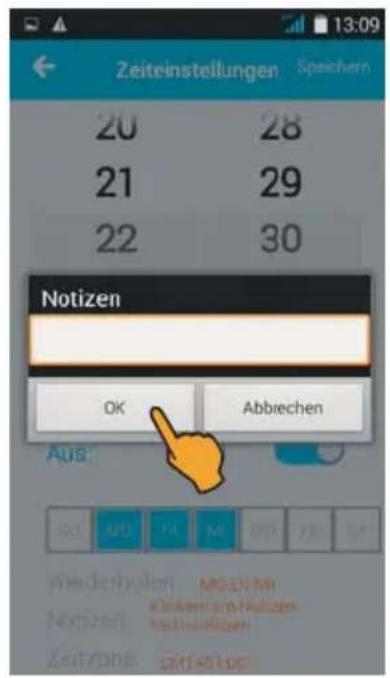
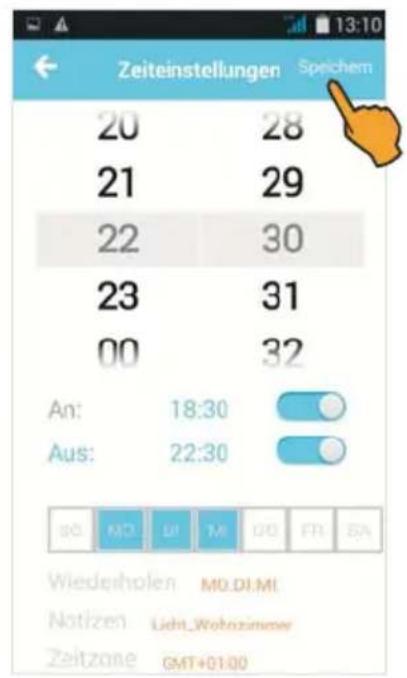
After successful saving, the start screen with the selected timer settings is shown. If required, further timers can be added.
For deactivating the timer, move the key to the left.
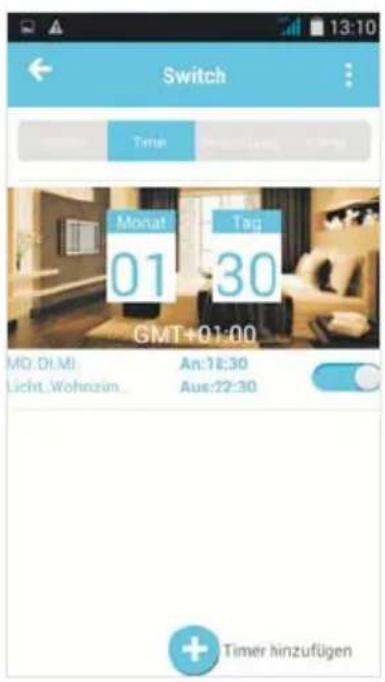
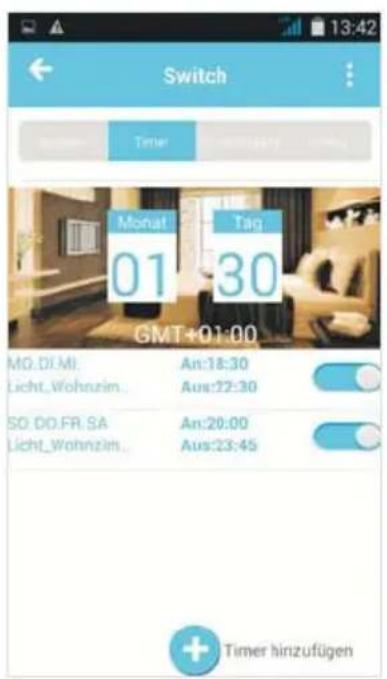
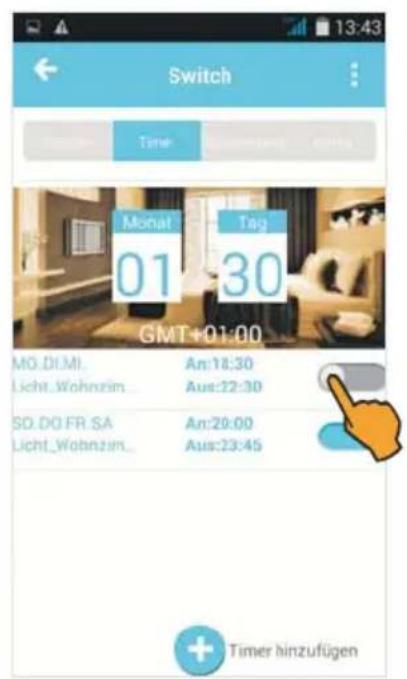
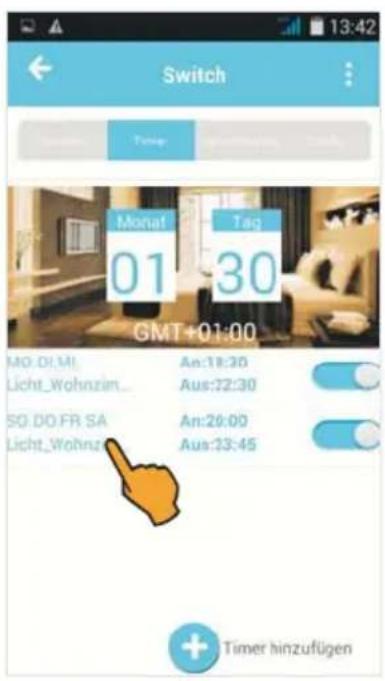
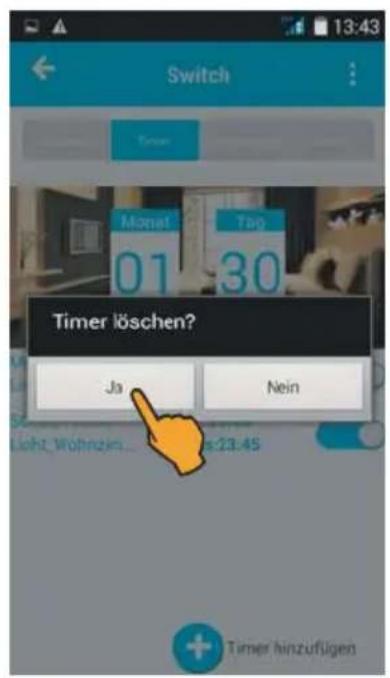
For deleting a timer, press the timer for 2 sec., the message Timer löschen (Delete timer) is displayed. Confirm by tapping Ja (Yes) (or cancel deleting by tapping Nein (No)).
3) Authorization assignment
You can assign a name to each mobile device connected to the switching plug and specify the access authorization.
Changing the name of smartphone/tablet PC
Tap Berechtigung (Authorization) and afterwards Phone name. Now enter the new name and confirm by tapping OK. In this way, an individual name can be assigned to each mobile device accessing the switching plug.
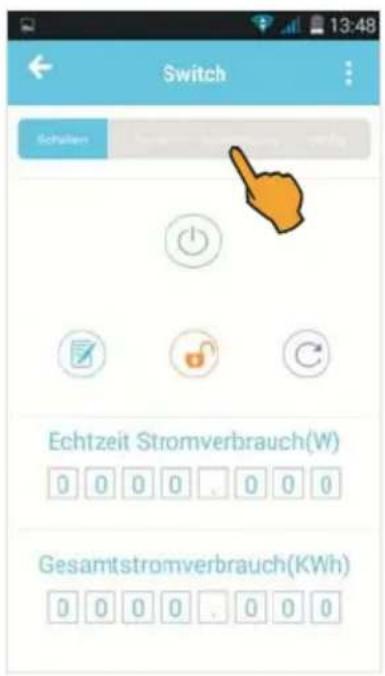
Access authorization (registration as administrator)
If you wish to restrict the access of some of the registered mobile devices to the switching plug, a specific mobile device can be registered as administrator and assign user authorizations.
For registering as administrator, tap Berechtigung (Authorization) and afterwards 8. Confirm the registration by tapping Ja (Yes).
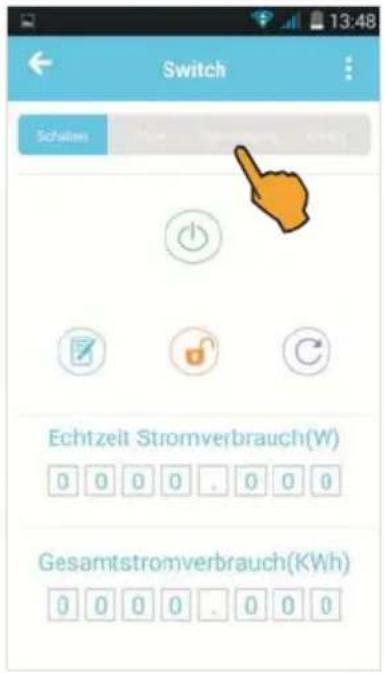
4) Configuration (Config.) After having received the off line message, perform a new configuration or connect your WLAN switching plug to a different network, if necessary.
Tap Config (Konfigurieren), use Kennwort (Password) to enter the WPA encryption code of the (other) network and start the configuration.
5) Changing the name of the WLAN switching plugs
Tap the notepad. Enter the new name and confirm by tapping OK. The new name is shown in the blue field.
6) Locking the access for other users
Tap the lock for locking/releasing the device access for other users.
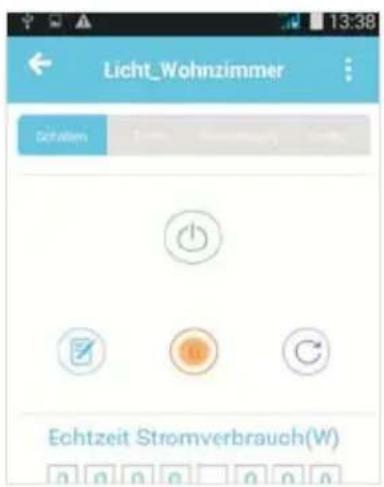
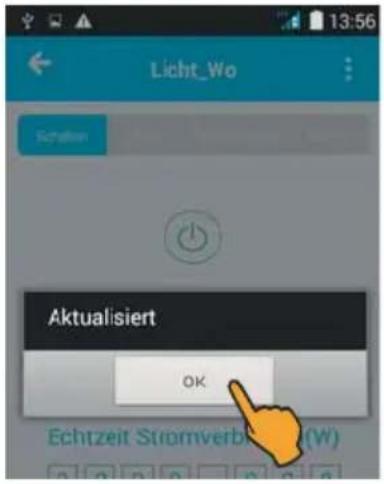
7) Updating the settings Tap the . The message Aktualisiert (Updated) is shown. Confirm by tapping OK for accepting all modified settings for the switching plug.
Tap the ☐. The message Hardware update is shown. Tap Hardware update in order to check whether an update is necessary.
After having activated the switching plug, you can read the current power consumption in Watts and the total power consumption in kWh.
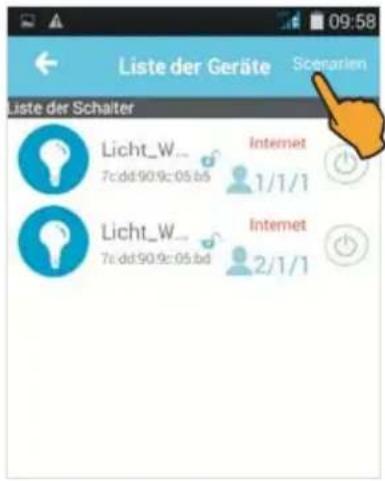
10) Combining several WLAN switching plugs in a group (scenarios)
Tap Scenarien (Scenarios) and afterwards Hinzufügen (Add).
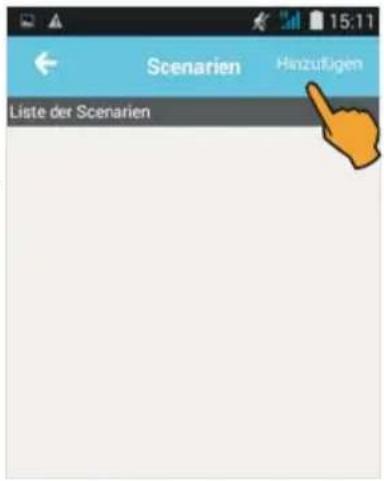
Now tap the photo and afterwards the + sign (to add a device).
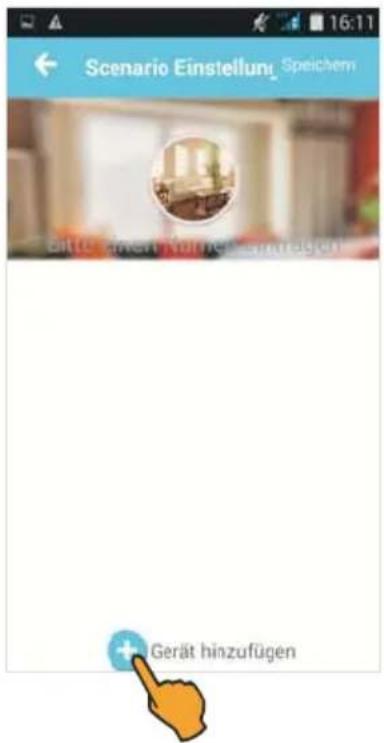
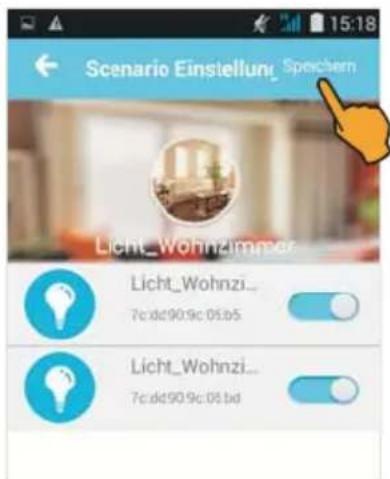
Highlight the WLAN switching plugs to be combined in a group and tap Speichern (Save) afterwards.
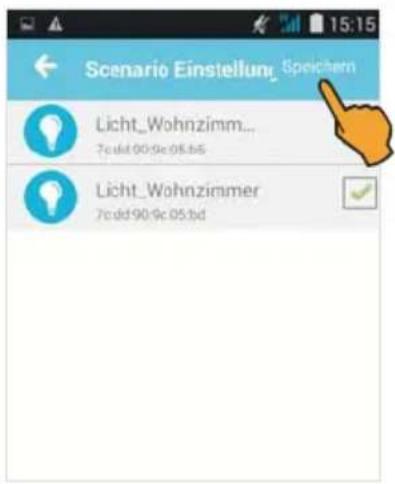
You can also assign a name to the group: To do so, tap Namen vergeben (Assign name). Enter the name and confirm by tapping OK. You can also change the image: To do so, tap the photo and select the desired image or select a photo from your album.
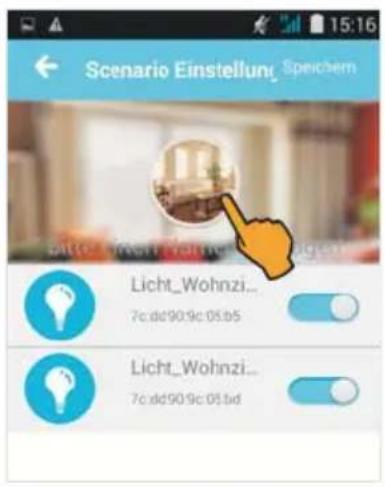
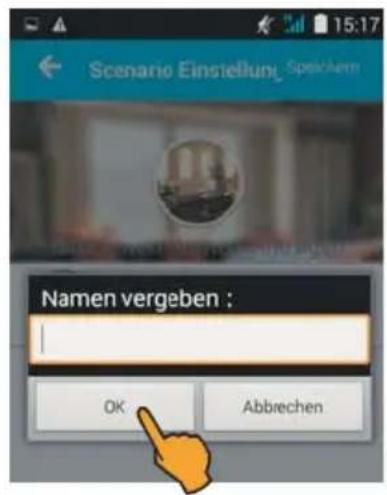
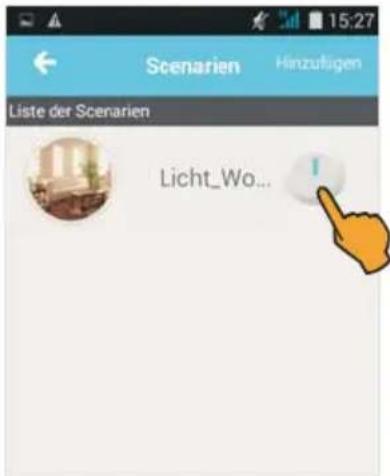
Tap Speichern (Save) to confirm your settings. For activating the switching plugs belonging to the group, tap Scenarien (Scenarios) and afterwards.
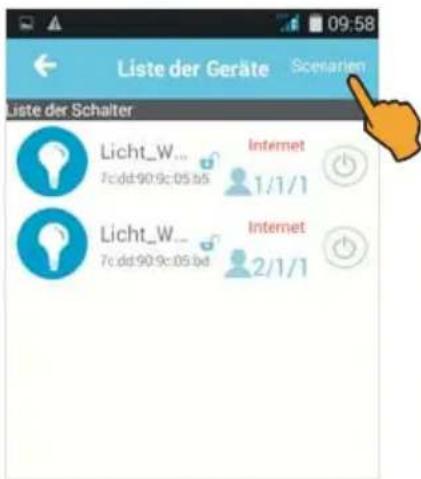
The message Scenaria aktiviert (Scenario activated) is shown. Confirm by pressing OK.
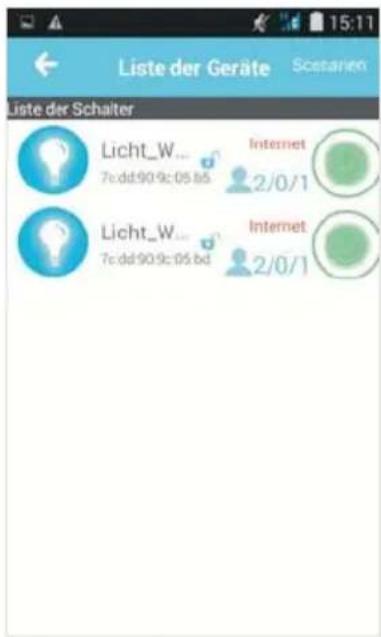
For switching off all switching plugs of the group again, first move the key to the left and tap the on/off button afterwards.
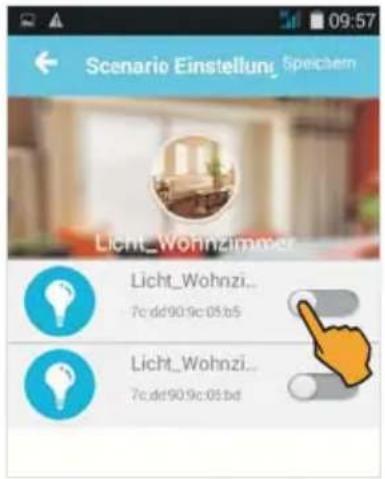
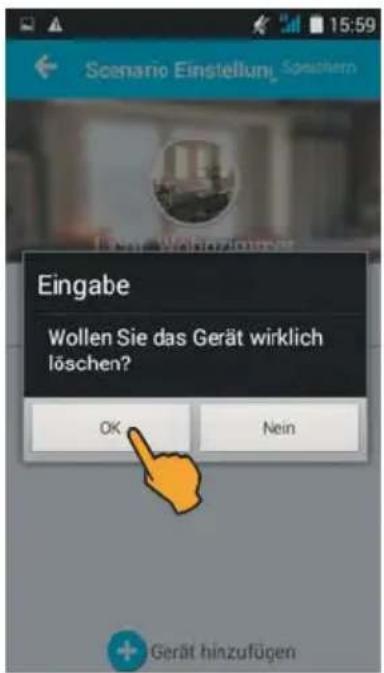
For deleting a switching plug from the group, press the lamp symbol: The message Wollen Sie das Gerät wirklich löschen? (Do you really want to delete the device?) is shown. Now tap OK (or cancel deleting by pressing Nein (No)).
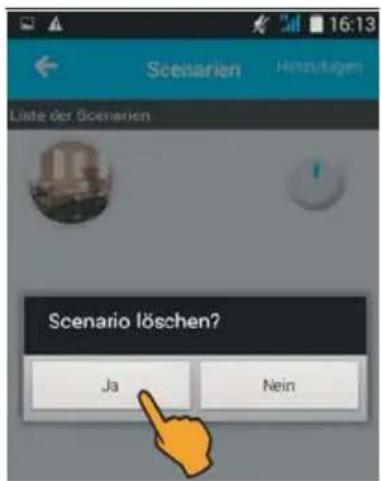
For deleting a scenario (= all WLAN switching plugs of a group) tap the photo. The message Scenario löschen? (Delete scenario?) is shown (or cancel deleting by pressing Nein (No)).
11) Consumption statistics
Tap the bar symbol to display the consumption statistics of the consumers connected to the switching plug. The power consumption (in kWh) of the last 10 months is displayed. If you have entered your electricity rate per kilowatt hour, the accumulated overall electricity costs are displayed as well.
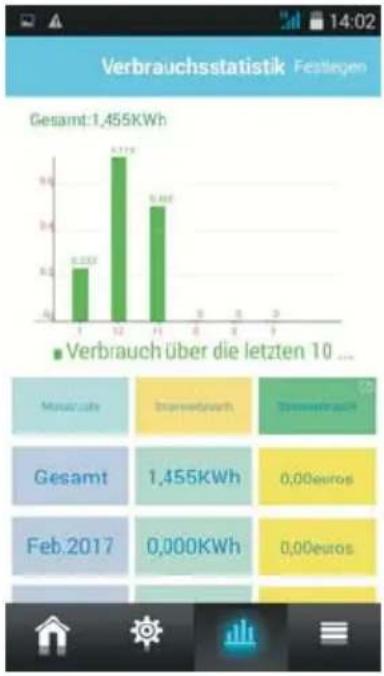
bar
Verbrauchsstatistik Festlegen | Month | Verbrauch (Gesamt) | Verbrauch über die letzten 10 | |---|---|---| | 1 | 6.235X | 8.272X | | 2 | 9.46X | 11.71X | | 3 | 0.00€ | 0.00€ | | 4 | 0.00€ | 0.00€ | | 5 | 0.00€ | 0.00€ | | 6 | 0.00€ | 0.00€ | | 7 | 0.00€ | 0.00€ | | 8 | 0.00€ | 0.00€ | | 9 | 0.00€ | 0.00€ | | 10 | 0.00€ | 0.00€ |If you use several WLAN switching plugs, these can be combined in the consumption statistics. Tap Festlegen (Specify) and highlight the corresponding switching plugs by placing a tick mark. Now, the total power consumption of the switching plugs is displayed.
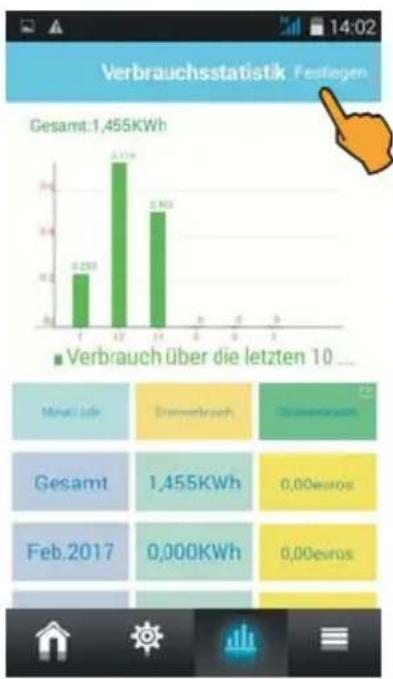
bar
Verbrauchsstatistik Festlegen | Month | Verbrauch (€) | | :--- | :--- | | Jan | 0.238 | | Feb | 0.379 | | Mar | 0.462 | | Apr | 0 | | May | 0 | | Jun | 0 | | Jul | 0 | | Aug | 0 | | Sep | 0 | | Oct | 0 | | Nov | 0 | | Dec | 0 | Minnell Jahr: Drennerbrauch Gesamt: 1,455KWh Feb.2017: 0,000KWh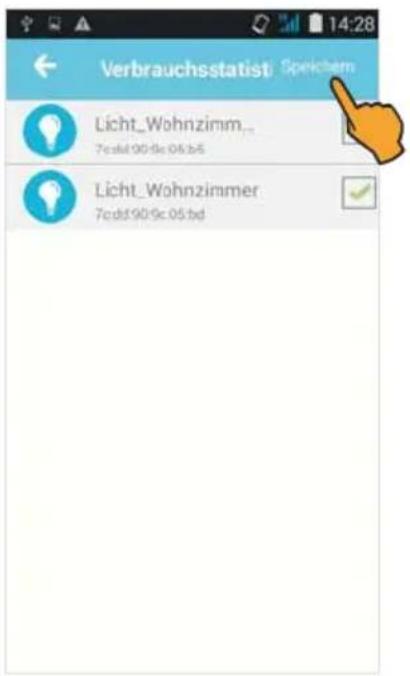
For determining the electricity costs, first enter your electricity rate per kilowatt hour: To do so, tap the green field Stromverbrauch (Power consumption), enter your value and save the entry. The electricity costs for the connected device(s) are automatically calculated.
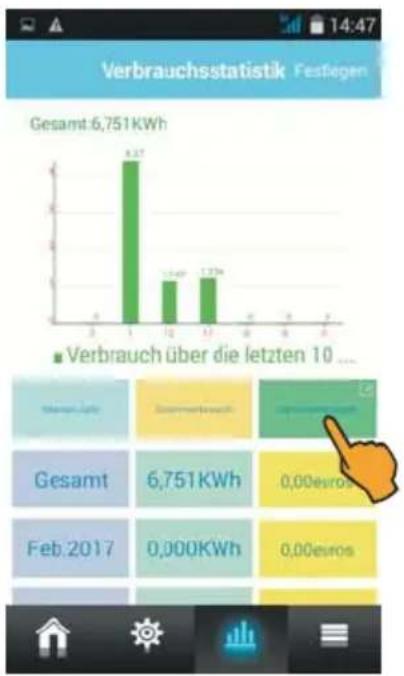
bar
Verbrauchsstatistik Festlegen | Month | Verbrauch (€KWh) | | :--- | :--- | | Jan | 8.37 | | Feb | 1.49 | | Mar | 1.79 | | Apr | 0.00 | | May | 0.00 | | Jun | 0.00 | | Jul | 0.00 | | Aug | 0.00 | | Sep | 0.00 | | Oct | 0.00 | | Nov | 0.00 | | Dec | 0.00 |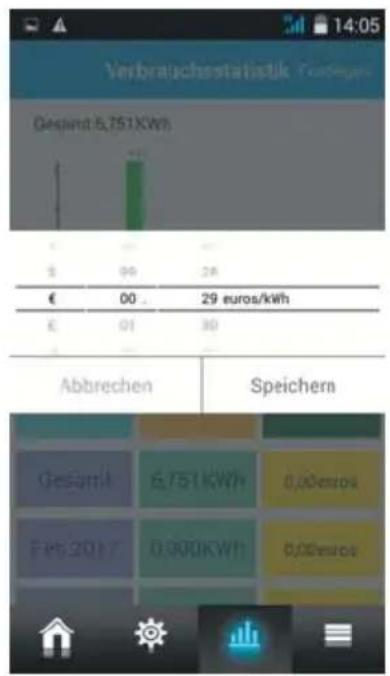
bar
| Category | Value | |---|---| | Gaspint | 6,751 KWh | | € | 00 . | | € | 01 | | € | 29 euros/kWh | | Abbrechen | Speichern | | Gesamä | 6,751 KWh | | Feb 2017 | 0,000 KWh | | Speichern | 0,000 euro |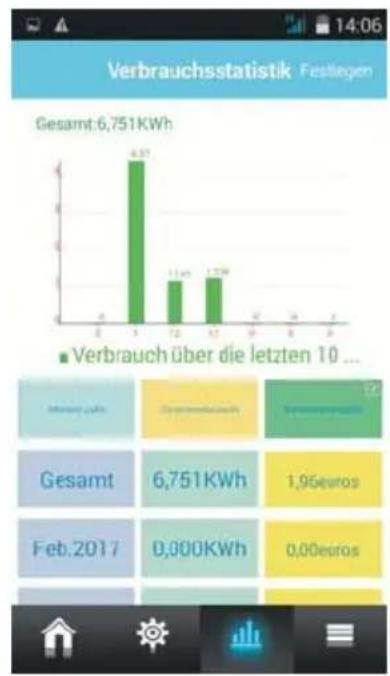
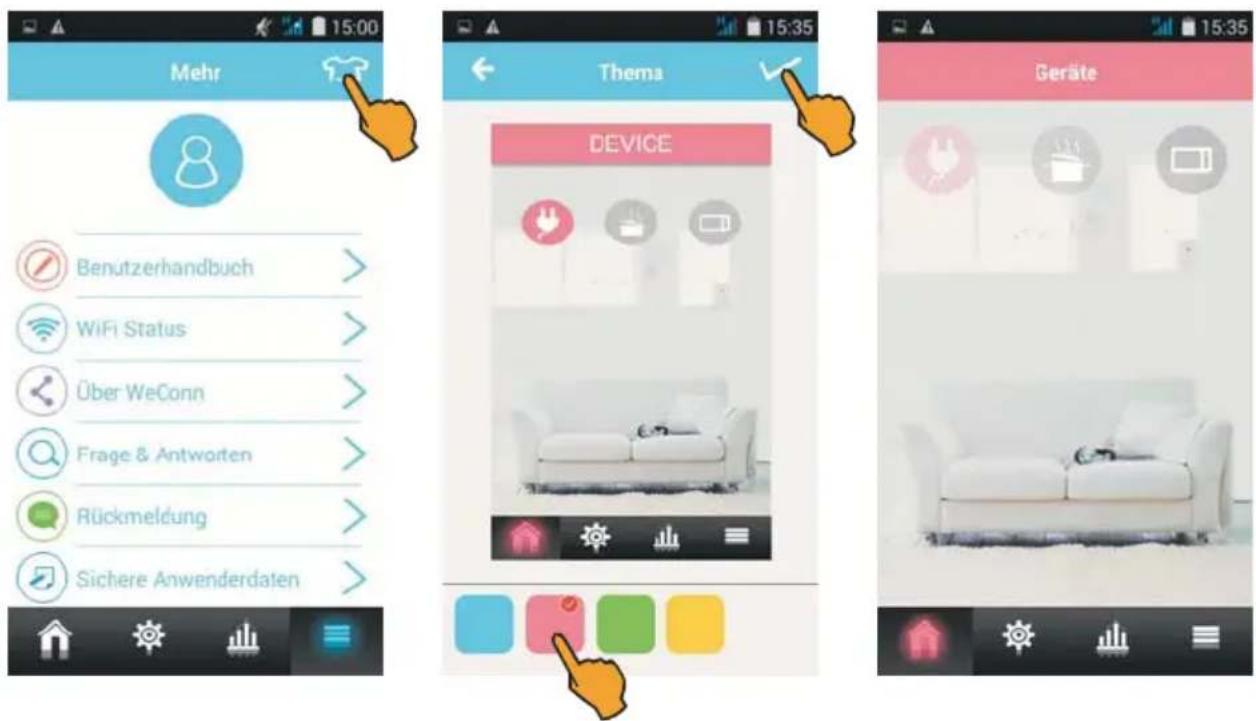
In the start screen tap the ≡, to open the menu Mehr (More). The following information and functions are available in this menu:
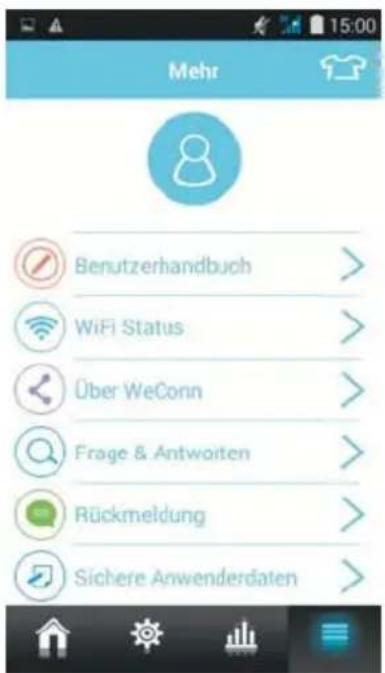
■Registering at WeConn and creating an account
■Activating the English user manual
■Inquiry of WLAN status
■Questions and answers (in English)
Feedback
Secured user data
■Restoring the user data
Note: These functions can be used only after previous registration and after having created an account in advance!
■Current version number
■Selecting the server
13) Selecting the color of the menu items
Use Mehr (More) to tap the T-shirt symbol and select one of the 4 colors. Confirm your color selection by placing a tick mark.
smart control e-plug does not require any maintenance – never open the housing.
For cleaning, disconnect the smart control e-plug from the socket and remove the connected device. Clean the housing by means of a slightly damp, lint-free cloth, do not at all use aggressive detergents.

Disposal instructions
Electric and electronic devices are not to be thrown into the domestic waste. Deliver devices that are out of order/used with a corresponding collecting point. Please contact your local authorities for corresponding information.
Technical data
Supply voltage 230 V / AC / 50 Hz Nominal current 16 A Max. switching capacity 3500 W Degree of protection IP20 WiFi frequency 2.412 - 2.463 GHz WiFi security WPA-PSK, WPA2-PSK, WEP, TKIP, AES WiFi standard IEEE 802.11b/g/n Dimensions (H x W x D) 56 x 98 x 48 mm (without SCHUKO plug) Weight 145 g
SIMPLIFIED EU DECLARATION OF CONFORMITY
Hereby, stabo Elektronik GmbH declares that the radio equipment type stabo smart control e-plug
is in compliance with Directive 2014/53/EU.
The full text of the EU declaration of conformity is available at the following internet address:
http://stabo.de/fileadmin/BdA/BdA_stabo_smart_control_e-plug_DE_EN.pdf
Herstellergarantie
Transmitting power: 100 mW b mode, 32 mW g/n mode
Product description: WiFi switching plug controlled via App
This declaration of conformity is issued under the sole responsibility of the manufacturer.
natural_image
Abstract wavy line drawing with no text or symbolsHildesheim, 23.05.2017 Helmuth Bormann, Managing Director
This declaration is an attestation of conformity with the indicated Directive(s) but does not imply any guarantee of quality or durability. The safety instructions of the accompanying product documentation shall be observed.