PG-100 Plus - Trousse de toilettage Izzy - Free user manual and instructions
Find the device manual for free PG-100 Plus Izzy in PDF.


User questions about PG-100 Plus Izzy
0 question about this device. Answer the ones you know or ask your own.
Ask a new question about this device
Download the instructions for your Trousse de toilettage in PDF format for free! Find your manual PG-100 Plus - Izzy and take your electronic device back in hand. On this page are published all the documents necessary for the use of your device. PG-100 Plus by Izzy.
USER MANUAL PG-100 Plus Izzy
natural_image
Black and white photo of a hairbrush with a 'izzy' brand mark on the base (no text or symbols on the device itself)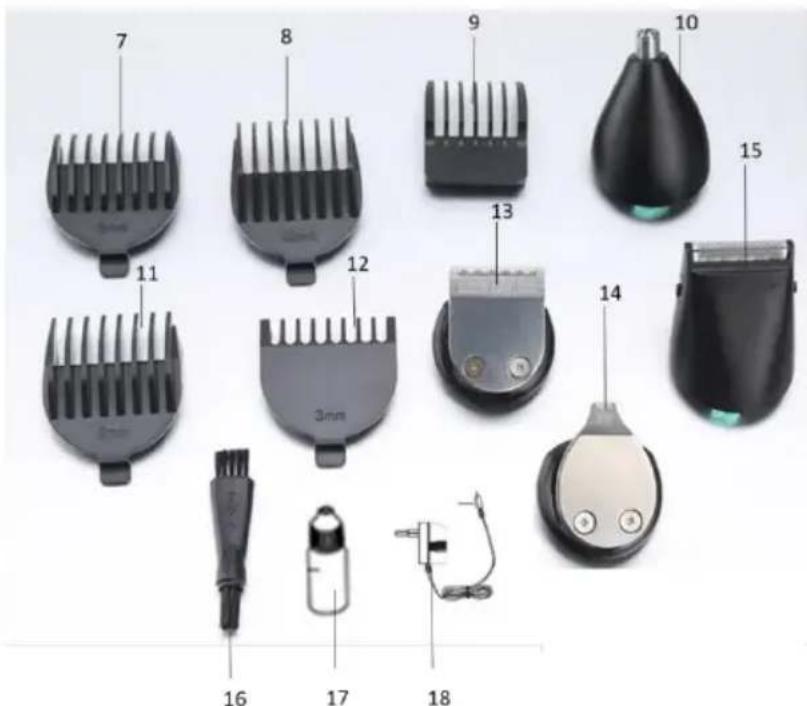
natural_image
Simple line drawing of a U-shaped tube and a plug with a curved arrow indicating rotation (no text or symbols)natural_image
Side profile illustration of a person's head and neck with a curved arrow indicating motion (no text or symbols)Thank you for choosing a device of IZZY range.
Safety Interlocks
Please read these instructions carefully before using the appliance and save them for future reference. Please keep the sales receipt for guarantee purposes (please see below “Guarantee and Customer Service”). IZZY is not responsible for non-compliance of the instructions.
When using electrical appliances, basic safety precautions should always be followed:
• Make sure your electricity supply is the same as the one shown on the underside of the device.
- Close supervision is necessary when your device is being used near children or infirm people. Ensure that they do not play with the device.
- This device is not intended for use by people with reduced physical, sensory or mental capabilities, children or those with lack of experience and knowledge, unless they have been given supervision or instruction concerning use of the device by a person responsible for their safety.
- Switch off and unplug:
- If a disturbance occurs
- After use and if no recharge is needed
- If the device is out of use for a prolonged period of time
- Before removing or inserting accessories
- Before cleaning
- Never use the device for any other use than indicated.
- Do not use the device on animals. The device is intended for use only in humans.
- The device is intended only for domestic use. Any other use will cancel the warranty.
To avoid any risk of burns, fire, electric shock or injury, alwa follow the instructions below:
- Do not use the device when you bathe.
- Do not install in a place from which the device can easily fall or be
pulled into a tub.
- Do not immerse the device and the charger in water or any other liquid
- Never leave the device unattended when the charger is plugged in, except when charging.
• Always unplug the power cord before cleaning. - Never expose the device to direct sunlight or temperatures above 60^ .
- Keep the body of the device always dry.
- Check the power cord periodically for possible damages. If the power cord or the plug of the device has been damaged, do not use the device and contact an authorized BENRUBI Service Center.
IMPORTANT: Do not cut the power cord of the charger at any case
- Do not use / do not charge the device outdoors or in areas where it is carried out using various cleaning agents, insecticides, etc. in spray form or in places where they carried oxygen administration.
- To avoid injury, do not use the device with cut or damaged blades, or damaged parts. Ensure that the blades are properly aligned before use.
- Always turn off the device by pressing the power switch before unplugging the power cord.
- No liability is accepted for any damage resulting from use for other purposes than those indicated in the instructions for use, faulty operation and repairs made from unauthorized technicians. Guarantee service are excluded in such cases.
- Use only attachments recommended by the manufacturer. Otherwise, may cause danger to the user and damage to the device.
- Do not move the device by pulling from the power cord. Make sure the power cord is not jammed in any way. Do not wrap the cord around the body of the device and do not tilt.
- Do not use an extension cord or voltage converter with this device.
- Never disconnect the device from the mains by pulling the cord. Disconnect always by pulling the plug.
- If the device falls into water or any other liquid:
- Take off the power cord.
- Do not put your hands into the liquid.
- Contact with one of the authorized BENRUBI repair centers and do no use the device.
- Do not use corrosive, abrasive detergents or hard brushes as they can scratch and cause damage to the device.
- In case of a possible damage, do not attempt to repair the device by yourself. Please contact one of the authorized BENRUBI service
centers. Any repair made by an unauthorized BENRUBI Service Center CANCELS THE GUARANTEE.
- Any misuse of the device cancels the warranty.
- Use only original spare parts.
• The device conforms to EU directive 2014/30/EU on Electromagnetic Compatibility, the 2014/35/EU Low Voltage Directive, the 2011/65/E RoHS Directive, and the directive 2009/125/EC for eco-design.
SAVE THESE INSTRUCTIONS
Parts of the Appliance
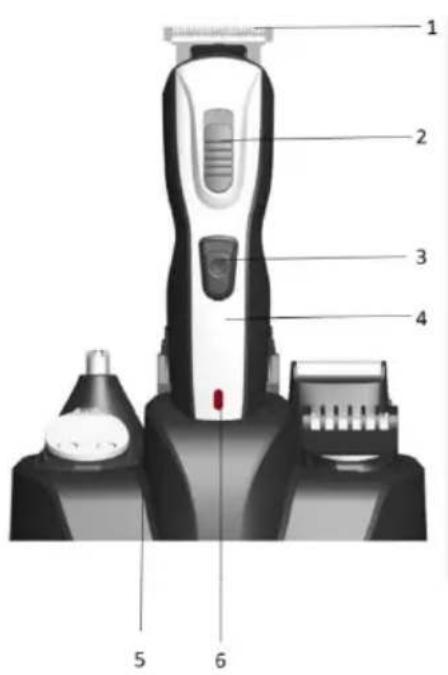
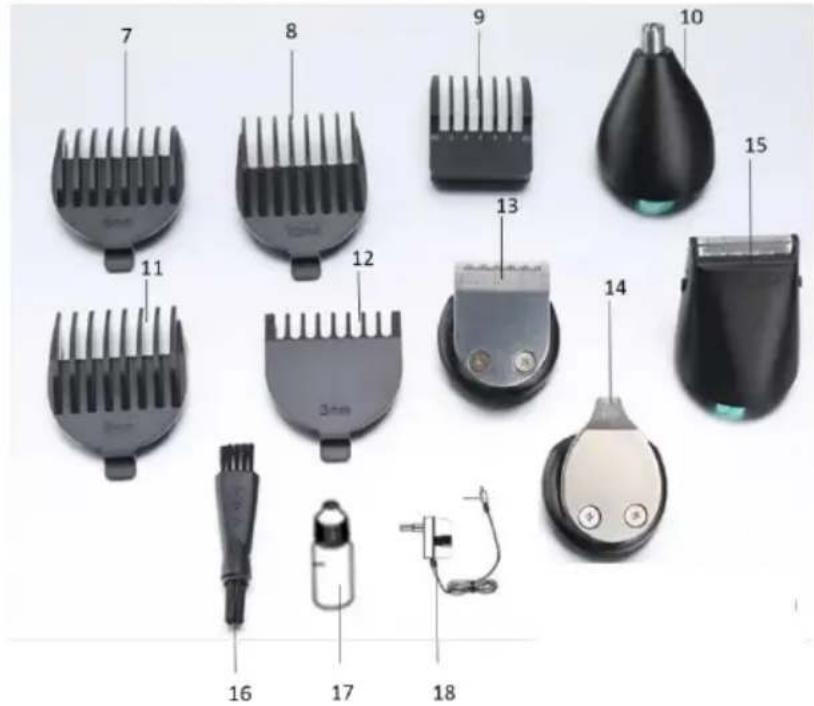
- Full size trimmer T-Blade
- Blade adjustment button
- On/Off button
- Body
- Storage/charge base
- Power/charge indication light
- Cutting guide for full size trimmer 6mm
- Cutting guide for full size trimmer 12mm
- Cutting guide for precision trimmer
- Nose/ear/eyebrow trimmer
- Cutting guide for full size trimmer 9mm
- Cutting guide for full size trimmer 3mm
- Precision trimmer
- Trimmer for details
- Micro-shaver
- Cleaning brush
- Lubricating oil
- Charger
Charging the Device
Caution: Do not charge the appliance outdoors where it comes into direct contact with the sun or in a very warm room.
- It takes about 8 hours to fully charge the battery for the first time or if it has not been used for a long time.
Make sure the device is switched off during charging!
You can charge the device in two different ways:
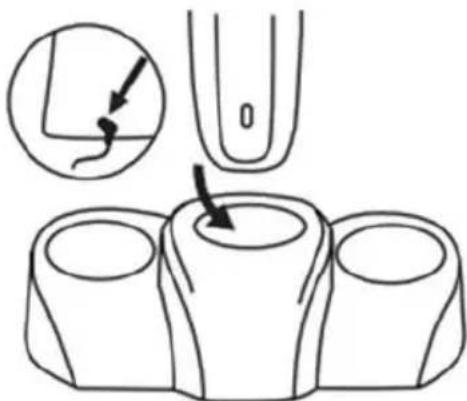
A. On the storage & charging basis
- Insert the charger connector into the socket at the back of the base (5).
- Place the device on the base pin (Fig.1)
B. Directly into the socket
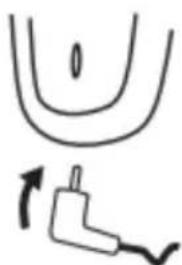
- Insert the charger into the socket at the bottom of the appliance (Fig.2).
natural_image
Simple line drawing of a U-shaped tube and a plug with a curved arrow indicating rotation (no text or symbols)- Plug into the socket. The indicator light (6) will turn on.
Notes:
• The full-time operation takes about 45 minutes.
- Do not leave the appliance plugged in for more than 24 hours.
- Fully discharge the battery twice a year by leaving the device running until it stops. T recharge the battery fully for about 14-16 hours.
- Do not overload the appliance. If the device is not going to be used for a long time (2-3 months unplug it and store it. Fully recharge the device when you want to use it again.
Attaching and Detaching Accessories
Attaching/detaching trimmers (1, 10, 13, 14, 15)
To place a head, first place the plastic finger in the head on the body of the device and then sna it until it clicks.
To detach a head, push upwards and remove the head from the body of the device.
Attaching/detaching cutting guides (7, 8, 11 12) of full size trimmer (1)
To attach one of the cutting guides of the full size trimmer, first position the front on the trimmer, and then snap the back.
To remove the cutting guide, lift the rear of the guide and then remove the front head from the head.
Attaching/detaching the cutting guide (9) of precision trimmer (13)
Place the cutting guide from top to bottom until it snaps into the precision trimmer. Select different cutting levels by adjusting the comb up and down.
Remove the cutting guide from the bottom to the top until it detaches from the precision trimmer.
Use of Cutting Guides
| Cutting Guide | Trimmer | Length (mm) |
| No. 12 | Full size trimmer (1) | 3 |
| No. 7 | 6 | |
| No. 11 | 9 | |
| No. 8 | 12 | |
| No. 9 | Precision trimmer (13) | 4 |
| 5 | ||
| 6 | ||
| 7 |
Use of the Device
- Clean the heads and the device after each use, so that it remains clean by bacteria that are created during use.
- Do not give the device to other people in order to avoid transmission of skin infections.
Hair Clipping
Preparing for hair clipping:
- Ensure that the device is fully charged before you start the clipping process.
- Use the device only on clean, dry hair. Do not use it on freshly washed hair.
- Make sure that the head of the person whose hair you intend to cut is at the same level as you chest. This ensures that all parts of the head are visible and easily accessible.
Clipping with full size trimmer and cutting guide
natural_image
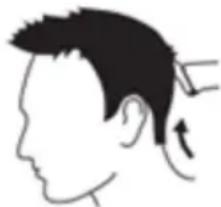
Side profile illustration of a person's head and neck with a hairpin, showing motion direction (no text or symbols)- Comb the hair in the direction of growth.
- Attach the full size trimmer (1) to the body of the device.
- Attach the cutting guide (7, 8, 11, 12) of your choice on the trimmer (see section "Use of cutting guides").
- Turn on the device by pressing the On/Off button (3). The indicator light (6) will turn on.
- Move the device slowly through the hair.
- Remove the cut hair regularly from the cutting guide. If several hairs accumulate, remove the cutting guide from the device and blow and/or shake to clean it from the hairs.
- When you finish clipping, turn off the device by pressing the On/Off button (3). The indicator light (6) will turn off.
- Remove the cutting guide and the full size trimmer.
- Clean the cutting guide, the full size trimmer and the device before storing it (see "Cleaning and care").
Note: You can adjust the blade height of 0.8, 1.1 & 1.4mm by moving the blade adjustment button (2).
Tips for better results:
- When you are trimming for the first time, set the cutting guide to 12mm until you become familiar with it.
- For very short cuts (stubble look), use the cutting guide 3mm.
- For best results, move the device against the direction of hair growth. Since all hair does not grow in the same direction, you need to move the device in different directions (upward downward or across).
- Ensure that the flat part of the cutting guide is in full contact with the scalp to achieve a consistent result.
- Make overlapping passes over the head to ensure that you cut all hair that needs to be cut.
- To achieve a good result on curly, sparse or long hair, use a comb to guide the hair towards the device.
Clipping with full size trimmer (without cutting guide)
You can use the device without a cutting guide to clip hair very short to the skin (0.8mm) or contour the neckline and the area round the ears.
CAUTION: Particular attention is needed when cutting without a cutting guide because the full width trimmer attachment removes any hair it touches.
- Before you start to contour the hairline around the ears, comb the hair ends over the ears.
- Attach the full size trimmer (1) to the body of the device.
- Turn on the device by pressing the On/Off switch (3). The indicator light (6) will turn on.
- Turn the device in such a way that only one end of the cutting head touches the hair ends when shaping the contours around the ears. Cut only hair ends. The hairline should be close to the ear.
- To shape the neckline and the sidebums, turn the device and make downward strokes. Move the device slowly and smoothly following the natural hairline.
- When you finish clipping, turn off the device by pressing the On/Off switch (3). The indicator light (6) will turn off.
- Remove the full size trimmer.
- Clean the full size trimmer and the device before storing it (see "Cleaning and care").
Note: You can adjust the blade height of 0.8, 1.1 & 1.4mm by moving the blade adjustment button (2).
Facial trimming (beard, moustache, sideburns)
Preparing for hair clipping:
- Ensure that the device is fully charged before you start the trimming process.
- Comb the hair to be trimmed with a fine comb.
Facial trimming with precision trimmer & cutting guide
- Attach the precision trimmer (13) to the body of the device.
- Attach the cutting guide (9) on the precision trimmer.
- Adjust the cutting guide to set the desired length (see "Using cutting guides" section).
- Turn on the device by pressing the On/Off switch (3). The indicator light (6) will turn on.
- Move the device slowly through the hair.
- Remove the cut hair regularly from the cutting guide. If several hairs accumulate, remove the cutting guide from the device and blow and / or shake to clean it from the hairs.
- When you finish trimming, turn off the device by pressing the On/Off switch (3). The indicator light (6) will turn off.
- Remove the cutting guide and the precision trimmer.
- Clean the cutting guide, the precision trimmer and the device before storing it (see "Cleaning & Care").
Note: You can adjust the blade height of 0.8, 1.1 & 1.4mm by moving the blade adjustment button (2).
Tips for better results:
- For best results, move the device against the direction of hair growth. Since all hair does not grow in the same direction, you need to move the device in different directions (upward, downward or across).
- When you are trimming for the first time, set the cutting guide to the highest setting until you become familiar with it.
- Ensure that the flat part of the cutting guide is in full contact with the scalp to achieve consistent result.
- For very short cuts (stubble look), set the cutting guide to the lowest setting.
Facial trimming with precision trimmer (without cutting guide)
- Use the precision trimmer without cutting guide to trim the beard, mustache, sideburns and remove individual hairs.
-
Facial care without cutting guide results in very short hair (0.8mm).
-
Attach the precision trimmer (13) to the body of the device.
- Turn on the device by pressing the On/Off switch (3). The indicator light (6) will turn on.
- Gently touch the hair with the full size trimmer and take careful and controlled movements.
- When you finish trimming, turn off the device by pressing the On/Off switch (3). The indicator light (6) will turn off.
- Remove the precision trimmer.
- Clean the precision trimmer and the device before storing it (see "Cleaning & Care").
Note: You can adjust the blade height of 0.8, 1.1 & 1.4mm by moving the blade adjustment button (2).
Facial trimming with trimmer for details
- Use the cutting head for details to trim the beard, mustache, sideburns, details and remove individual hairs.
- Attach the trimmer for details (14) to the body of the device.
- Turn on the device by pressing the On/Off switch (3). The indicator light (6) will turn on.
- Gently touch the hair with the full size trimmer and take careful and controlled movements.
- When you finish trimming, turn off the device by pressing the On/Off switch (3). The indicator light (6) will turn off.
- Remove the trimmer for details.
- Clean the precision trimmer and the device before storing it (see "Cleaning & Care").
Note: You can adjust the blade height of 0.8, 1.1 & 1.4mm by moving the blade adjustment button (2).
Shaving with the micro-shaver
- Use the microshaver to crate smooth, well-defined contours.
-
Before you use the microshaver, always check it for damage or wear. If the foil or cutter is damaged or worn, do not use the microshaver, as injury may occur. Replace the whole attachment before you use the microshaver again.
-
Pre-trim the contours you want to shave with the full size trimmer (1) (without cutting guide) or the precision trimmer (13).
- Attach the micro-shaver 15) on the body of the device.
- Press the On/off switch (3). The indicator light (6) will turn on. Gently press the micro-shaver onto the skin at a 45^ angle and shave along the contours to remove the hairs. Do not press too hard!
- When shaving is complete, press the on/off switch (3) again. The indicator light (6) will turn off.
- Remove the micro-shaver.
- Clean the micro-shaver and the device before storing it (see "Cleaning and care").
Tips for better results:
- Move the device with controlled movements to shave your beard or your mustache.
- Use your free hand to stretch your skin. This helps the hair stand up, making it easier to shave.
- The micro-shaver is designed to shave detail around beard/mustache/sideburns. It was not designed to shave the entire face.
Facial Treatment (Nose, Ears, Eyebrows)
Nose treatment
- Clean your nose before treatment.
- Attach the nose/ear/eyebrow trimmer (10) on the body of the device.
- Insert the tip of the tip of the trimmer into one of your nostrils (not more than 0.5 cm).
- Turn on the device by pressing the On/Off switch (3). The indicator light (6) will turn on.
- Slowly move the tip in and out while rotating it to remove unwanted hair. To reduce the tickling effect, make sure that you firmly press the tip of the head against the skin.
- When the nose treatment is complete, press the on/off switch (3) again. The indicator light (6) will turn off.
- Remove the nose/ear/eyebrow trimmer (10).
- Clean the nose/ear/eyebrow trimmer and the device before storing it (see "Cleaning a care").
Ears treatment
- Clear the outer ear channel.
- Attach the nose/ear/eyebrow trimmer (10) on the body of the device.
- Turn on the device by pressing the On/Off switch (3). The indicator light (6) will turn on.
- Move the tip of the trimmer gently around the ear to remove the hairs. Carefully insert the tip of the trimmer on the outer ear channel.
CAUTION: Do not insert the trimmer more than 0.5cm into the ear canal as this could damage the drum. - When the nose treatment is complete, press the on/off switch (3) again. The indicator light (6) will turn off.
- Remove the nose/ear/eyebrow trimmer (10).
- Clean the nose/ear/eyebrow trimmer and the device before storing it (see "Cleaning a care").
Eyebrows treatment
- Use the device to cut individual eyebrow hairs.
- Do not use the device to define or trim the entire eyebrow.
- Never try to trim your eyelashes.
-
Do not use the device very close to your eyes!
-
Attach the nose/ear/eyebrow trimmer (10) on the body of the device.
- Turn on the device by pressing the On/Off switch (3). The indicator light (6) will turn on.
- Move the tip of the trimmer along the edge of the eyebrow from the base of the nose towards the outer tip of the eyebrow.
- When the eyebrow treatment is complete, press the on/off switch (3) again. The indicator light (6) will turn off.
- Remove the nose/ear/eyebrow trimmer (10).
- Clean the nose/ear/eyebrow trimmer and the device before storing it (see "Cleaning a care").
Cleaning and Care
Make sure the appliance is switched off before cleaning.
After each use:
- Brush the residues from hair.
- Cleaning should be done only with a soft brush, such as the one is provided in the packaging of the device.
- Use the lubricating oil for the blades.
- Do not use abrasive or corrosive cleaners for cleaning the body of the device and accessories.
- Never use compressed air to clean the cutting heads and cutting guides.
Full size trimmer, precision trimmer, trimmer for details, nose/ear/eyebrow trimmer, micro-shaver
- Clean the head and the cutting guide with the brush.
- Keep them in the storage base (5) after each use.
Cutting guides
- Clean the accessories and the cutting guides with the brush.
- Keep them in the storage base (5) after each use.
Device body, charger, storage base
- Clean with a damp cloth. Dry thoroughly.
Technical Characteristics
Model: PG-100 PLUS
Battery: 2xNI-CD 600MAH
Charging time: 8 hours
Autonomy time: 45 minutes
Battery Disposal
- Remove the back cover of the device with a screwdriver to locate the battery.
- Remove the battery from the product and recycle properly.
Safe Appliance Disposal
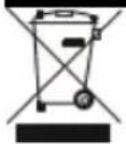
At the end of its working life, the product must not be disposed of as urban waste. It must be taken to a special local authority differentiated waste collection centre or to a dealer providing this service. Disposing of a household device separately avoids possible negative consequences for the environment and health deriving from inappropriate disposal and enables the constituent materials to be recovered to obtain significant savings in energy and resources.
As a reminder of the need to dispose of household devices separately, the product is marked with a crossed-out wheeled dustbin.
Guarantee & Customer Service
- BENRUBI Company guarantees its products for any manufacturing defect or defective materials for a period of two (2) years from the date of purchase or delivery by present purchase receipt. If your product malfunctions or you find any defects, please revert to the retail location you have purchased it from or contact an authorized BENRUBI Service Centre. To find the nearest authorized BENRUBI Service Centre, visit our website www.benrubi.gr. It is in the discretion of BENRUBI Company to replace or repair the defective product.
- The warranty does not cover damages resulting from normal wear, breakage, improper installation or maintenance of the product, mishandling, abnormal working conditions, failure to implement the instructions, conversion or repair of the product by an unauthorized technician who does not belong to the BENRUBI Service Centers.
Also, the warranty does not cover the following indicative factors:
• Stains, discoloration or scratches.
- Burns due to exposure to heat or flame.
- Damage from thermal shock (sudden temperature change or change of voltage).
FOR MORE INFORMATION CONTACT:
H. BENRUBI & FILS SA
27 Aghiou Thoma str, GR15124
Maroussi - Athens
Tel.: 210 6156400, Fax: 210 6199316
e-mail: benrubi-sda@benrubi.gr