CONCEPTRONIC

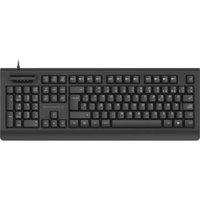
CKBESMARTIDPT - Keyboard CONCEPTRONIC - Free user manual and instructions

Find the device manual for free CKBESMARTIDPT CONCEPTRONIC in PDF.

📄 1 pages English EN Download 💬 AI Question 10 questions ⚙️ Specs
Notice CONCEPTRONIC CKBESMARTIDPT - page 1
Pick your language and provide your email: we'll send you a specifically translated version.
Product TypeKeyboard
BrandConceptronic
ModelCKBESMARTIDPT
ConnectivityUSB wired
LayoutQWERTY (US/International)
Key Count104 keys
Dimensions (L x W x H)440 x 140 x 30 mm
Weight500 g
Cable Length1.5 m
Power SourceUSB bus power
Compatible Operating SystemsWindows, macOS, Linux
Special KeysMultimedia hotkeys (volume, play/pause, mute)
Wrist RestNo
BacklightNo
MaterialPlastic
MaintenanceClean with a soft, dry cloth; avoid liquids
Safety WarningsKeep away from moisture and extreme temperatures
Spare Parts & RepairabilityNot repairable by user; no spare parts available
General InformationStandard wired keyboard for daily use

Frequently Asked Questions - CKBESMARTIDPT CONCEPTRONIC

How do I connect the Conceptronic CKBESMARTIDPT keyboard to my computer?
Simply plug the USB cable into an available USB port on your computer. The keyboard will be automatically recognized and ready to use.
Does this keyboard require batteries?
No, the CKBESMARTIDPT is a wired keyboard that draws power directly from the USB connection, so no batteries are needed.
Is the keyboard compatible with macOS?
Yes, the keyboard works with Windows, macOS, and Linux. However, some multimedia keys may have limited functionality on macOS.
Can I use this keyboard with a tablet or smartphone?
If your device supports USB OTG, you can connect the keyboard via an adapter. Not all mobile devices are compatible.
How do I clean my keyboard?
Unplug the keyboard and clean it with a soft, lint-free cloth slightly dampened with water or isopropyl alcohol. Do not use harsh chemicals or pour liquids directly on the keys.
What is the cable length?
The USB cable is approximately 1.5 meters long, providing ample reach to your computer.
Are there any special function keys?
Yes, the keyboard includes multimedia hotkeys such as volume control, play/pause, and mute for convenient access.
What should I do if some keys stop working?
First, try connecting the keyboard to another USB port. If the issue persists, check for debris under the keys and clean accordingly. If still not working, the keyboard may be defective.
Is the keyboard spill-resistant?
The keyboard is not designed to be spill-resistant. Avoid liquids near the keyboard to prevent damage.
Can I replace the keycaps?
Keycaps are not intended to be removed or replaced. Attempting to do so may damage the keyboard.

User questions about CKBESMARTIDPT CONCEPTRONIC

0 question about this device. Answer the ones you know or ask your own.

Ask a new question about this device

The email remains private: it is only used to notify you if someone responds to your question.

No questions yet. Be the first to ask one.

Download the instructions for your Keyboard in PDF format for free! Find your manual CKBESMARTIDPT - CONCEPTRONIC and take your electronic device back in hand. On this page are published all the documents necessary for the use of your device. CKBESMARTIDPT by CONCEPTRONIC.

USER MANUAL CKBESMARTIDPT CONCEPTRONIC

CKBESMARTID / CKBESMARTIDPT

Installation & usage

1 Installation

• Turn on your computer.
- Connect the USB cable of the CKBESMARTID(PT) to a free USB port on your computer.

The computer will automatically recognize and install the CKBESMARTID(PT). No driver installation is required.

2 Usage

In order to use the smart card reader, you need to install the software from the company or authority which requires the use a smart card. For example:

Belgium : http://eid.belgium.be/

Spain : http://www.dnielectronico.es/

Check with the company of government authority which software you need to use to access their system.

CONCEPTRONIC CKBESMARTIDPT - Usage - 1
CONCEPTRONIC

Multi Language Quick Guide

USB Keyboard with Smart ID Card Reader

CKBESMARTID / CKBESMARTIDPT

CONCEPTRONIC CKBESMARTIDPT - CKBESMARTID / CKBESMARTIDPT - 1

natural_image Stylized grayscale illustration of a city skyline with wind turbines and decorative swirls, no text or symbols present.

ESPAÑOL

CKBESMARTID

Manual assistant
Powered by Anthropic
Waiting for your message
Product information

Brand : CONCEPTRONIC

Model : CKBESMARTIDPT

Category : Keyboard