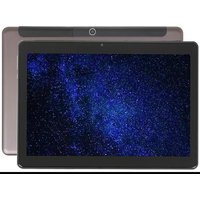
Ursus M210 - Tablet DEXP - Free user manual and instructions
Find the device manual for free Ursus M210 DEXP in PDF.


Pick your language and provide your email: we'll send you a specifically translated version.
| Product Type | Tablet |
| Brand | DEXP |
| Model | Ursus M210 |
| Operating System | Android |
| Display Size | 10.1 inches |
| Display Resolution | 1280 x 800 pixels |
| Processor | Quad-core 1.3 GHz |
| RAM | 2 GB |
| Internal Storage | 32 GB |
| Expandable Storage | microSD up to 128 GB |
| Battery Capacity | 5000 mAh |
| Charging | 5V / 2A via micro USB |
| Dimensions (W x H x D) | 240 x 160 x 10 mm |
| Weight | 500 g |
| Connectivity | Wi-Fi 802.11 b/g/n, Bluetooth 4.0 |
| Cameras | Front: 0.3 MP, Rear: 2 MP |
| Audio | Built-in speaker, 3.5mm headphone jack |
| Sensors | G-sensor |
| Maintenance | Clean with a soft, dry cloth |
| Safety | Do not expose to water or extreme temperatures |
Frequently Asked Questions - Ursus M210 DEXP
How do I turn on the tablet for the first time?
Press and hold the power button located on the side of the device for about 3 seconds until the screen lights up. Follow the on-screen setup wizard to select language, connect to Wi-Fi, and sign in to your Google account.
What should I do if the screen is unresponsive?
Try a forced restart by pressing and holding the power button for 10-15 seconds until the device reboots. If the issue persists, ensure the screen is clean and dry, or consider a factory reset from recovery mode.
How can I extend battery life?
Reduce screen brightness, disable Bluetooth and Wi-Fi when not in use, close background apps, and enable battery saver mode from Settings > Battery. Keep the tablet away from heat sources.
Why won't my tablet connect to Wi-Fi?
Ensure Wi-Fi is enabled in Settings > Wi-Fi. Check that the router is working and within range. Try forgetting the network and re-entering the password. Restart the tablet and router if needed.
How do I update the software?
Go to Settings > System > System Update (or About Tablet > System Updates). If an update is available, download and install it. Ensure the battery is above 50% and connected to Wi-Fi.
Can I expand the storage?
Yes, the tablet supports microSD cards up to 128 GB. Insert the card into the slot on the side (you may need to remove the back cover). Format the card as portable or internal storage when prompted.
How do I factory reset the tablet?
Go to Settings > System > Reset > Factory Data Reset. Confirm the action. Alternatively, boot into recovery mode by holding Power + Volume Up, then select 'Wipe data/factory reset'.
What apps come pre-installed?
The tablet includes Google apps such as Chrome, Gmail, YouTube, Google Play Store, and basic utilities like Calculator and Calendar. Additional DEXP-branded apps may be present.
How do I take a screenshot?
Press and hold the Power button and Volume Down button simultaneously for about 2 seconds. The screen will flash, and the screenshot will be saved in the Gallery app.
The tablet is slow. How can I improve performance?
Close unused apps, clear cache from Settings > Storage > Cached Data, uninstall unnecessary apps, and consider a factory reset if the device is still sluggish. Ensure the software is up to date.
User questions about Ursus M210 DEXP
0 question about this device. Answer the ones you know or ask your own.
Ask a new question about this device
No questions yet. Be the first to ask one.
Download the instructions for your Tablet in PDF format for free! Find your manual Ursus M210 - DEXP and take your electronic device back in hand. On this page are published all the documents necessary for the use of your device. Ursus M210 by DEXP.
USER MANUAL Ursus M210 DEXP
natural_image
Line drawing of a rectangular electronic device rear panel with ports and indicator lights (no text or symbols)ВАЖНО:
LTE, 3G, Wi-Fi, GPS, Bluetooth.
Table of contents
Click a title to access it
Manual assistant
Powered by Anthropic
Waiting for your message
Product information
Brand : DEXP
Model : Ursus M210
Category : Tablet