I-Stubble Pro VSM7896A - Beard trimmer VS Sassoon - Free user manual and instructions
Find the device manual for free I-Stubble Pro VSM7896A VS Sassoon in PDF.


User questions about I-Stubble Pro VSM7896A VS Sassoon
0 question about this device. Answer the ones you know or ask your own.
Ask a new question about this device
Download the instructions for your Beard trimmer in PDF format for free! Find your manual I-Stubble Pro VSM7896A - VS Sassoon and take your electronic device back in hand. On this page are published all the documents necessary for the use of your device. I-Stubble Pro VSM7896A by VS Sassoon.
USER MANUAL I-Stubble Pro VSM7896A VS Sassoon
text_image
VS SASSOONFOR MEN

text_image
VS SASSOUM FOR MCH 80° J-STUBBLE PROTHE
i-STUBBLEPRO
TOOL TIPS
ultimate precision shorter beard & designer stubble trimmer.
HEY YOU!
TAKE A BOW FINE SIR.
THINGS ARE LOOKING UP
& YOU'VE JUST MADE A QUALITY PURCHASE
WITH THIS NEW GROOMING TOOL.
WE KNOW YOU'VE GOT THIS, BUT BEFORE YOU JUMP INTO USING YOUR NEW SIDE KICK, HERE'S A FEW TIPS & TRICKS TO KNOW BEFORE LETTING YOUR CREATIVITY RUN LOOSE.
HIT UP VSFORMEN.COM.AU FOR MORE GROOMING & INSPIRATION OR FOLLOW US ONLINE

natural_image
Black-and-white portrait of a man with short hair and beard, wearing a white shirt and dark trousers, holding a black object (no text or symbols visible)IMPORTANT SAFETY INSTRUCTIONS
- This appliance is not intended for use by persons (including children) with reduced physical, sensory or mental capabilities, or lack of experience and knowledge, unless they have been given supervision or instruction concerning use of the appliance by a person responsible for their safety.
- Children should be supervised to ensure that they do not play with the appliance.
- This appliance is only to be used with the power supply unit provided with the appliance.
- This appliance must only be supplied at safety extra low voltage corresponding to the marking on the appliance.
When using electrical appliances, especially when children are present, basic safety instructions should always be followed, including the following:

Polythene bags over product or package may be dangerous. To avoid danger of suffocation, keep this wrapper away from babies and children. This bag is not a toy.
DANGER: When the unit is used in a bathroom, unplug it after use since the proximity of water presents a hazard even when the appliance is switched off
WARNING: Do not use or leave the AC power adaptor in a position where it can become wet or there is a danger of it falling into a basin or other vessels containing water. Keep the appliance dry, unless it is otherwise specified. Do not use this appliance in or near bathtubs, showers, basins or other vessels containing water.
- Do not immerse appliance in water or other liquids.
- Do not reach for an appliance that has fallen into water. Unplug immediately.
- Take care to avoid contact between the moving blades of the unit and the skin, paying particular attention to the face, neck and hands.
IMPORTANT: Always unplug the appliance when not in use or before cleaning. Do not leave unattended when plugged in or switched on. Do not place on any heat sensitive surface.
- Do not use any attachments other than those supplied by Conair Australia Pty Ltd.
- Use this appliance only for its intended use as described within this instruction booklet.
- Always unplug the appliance when fully charged.
- This appliance is not intended for commercial use.
- Never drop or insert any object into an opening.
- Do not use the appliance with damaged or broken attachment combs or with any teeth missing from the blades, as injury may occur.
- Do not place on any surface while it is operating.
- Keep the cord away from heated surfaces
- Never twist or pull on the power cord.
- Do not use an extension cord with this appliance.
- After use do not wrap the cord around the appliance as in time this may cause the cord to fracture. Coil cord loosely by the side of the appliance in storage.
- Do not use outdoors or operate where aerosol (spray) products are being used or where oxygen is being administered.
- Do not use the appliance if it is damaged. In the event of damage, discontinue use immediately and contact your dealer for instructions on returning it for examination or exchange. If the supply cord is damaged, it must be replaced by the manufacturer, its service agent or similarly qualified person in order to avoid a hazard.
- Always ensure that the voltage to be used corresponds to the voltage marked on the unit.
- For additional protection, the installation of a residual current device (RCD) with a rated operating current not exceeding 30mA is advisable in the electrical current circuit supplying the bathroom. Ask your installer for advice.
- The appliance is only to be used with the power supply unit provided with the appliance.
- The appliance must only be supplied at safety extra low voltage corresponding to the marking on the appliance.
- WARNING: For purposes of recharging battery, only use detachable supply unit CA11 provided with this appliance.
- This appliance contains batteries that are only replaceable by skilled persons.
- This appliance contains batteries that are non-replaceable.
THE i-STUBBLE PRO
BRAVO. YOU'VE MADE A QUALITY PURCHASE.
The i-STUBBLE PRO is the precision beard & stubble trimmer for ultimate control of shorter beard styles and designer stubble.

text_image
PERFECTLY ADJUSTS TO THE COOURS OF YOUR FACE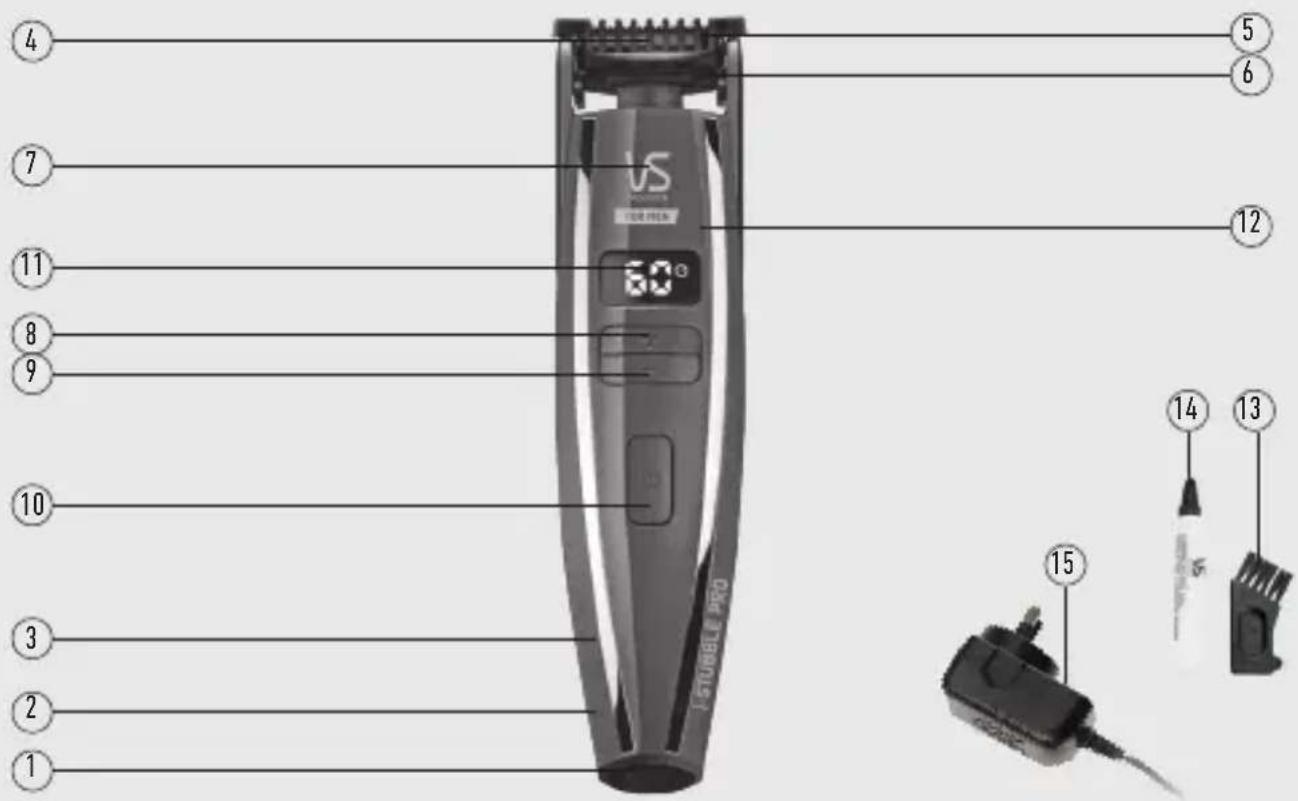
text_image
4 7 11 8 9 10 3 2 1 5 6 VS STUBBLE PRO 60° 12 15 14 13- Cord/cordless use
- 90mins for full charge with 60 run time
- 5 minute quick charge for 3 minutes of trimming, enough for a complete trimming session
-
Diamond sharpened stainless steel blades
-
Ultra-flexing contouring head
- COMB GUIDE - 0.4mm - 5.0mm trimming lengths
-
Ultra-precise motorised adjustments at the touch of a button
-
- up button - increases the trimming length
-
- down button - decreases the trimming length
- On/Off switch
-
LCD display shows cutting length settings and battery charge time remaining
-
Ergonomic design with curved body for easy control & compete comfort in use
- Cleaning brush
- Oil
- Power adaptor
PREPPING YOUR NEW TOOL
CHARGING
The i-STUBBLE PRO is so easy to use. But before you start using your new tool, you must take the time to charge it for 3 hours before its first use.
Your new tool comes with a small amount of charge, but the initial charge will ensure your new tool will have optimum power performance to give you smooth fast cutting, every time.
- Before using for the first time, fully charge your new tool continuously for 3 hours. After the first charge a full charge will only take 90 minutes.
- Maximum battery capacity will only be reached after 3 charging & discharging cycles.
- To charge the trimmer, first ensure your new tool is switched off, then insert the small plug on the charging adaptor into the hole on the base of the trimmer.
- Plug the charging adaptor into a suitable mains power socket and switch on.
- Always check that the charging indicator on the LCD comes on when you have switched the charging adaptor on.
- When the trimmer is charging the LCD display lights up for a few seconds and battery symbol indication will start to flash until the trimmer reaches maximum capacity of 90 minutes.
- A full charge will take 90 minutes and will supply 60 minutes cordless runtime.
- A quick charge of 5 minutes will supply 3 minutes cordless runtime, sufficient for a single instant beard or stubble trim.
- To maintain optimum capacity of the rechargeable battery, it is highly recommended to fully discharge & then recharge your tool for 3 hours every 3 months.
NB - When the trimmer has less than 5 minutes charge left, the battery symbol indication will start to flash. This indicates that the trimmer needs to be recharged, however it may continue to run for a very short while after.
CORDED USE
To use the trimmer connected to mains power:
- Insert the small plug on the charging adaptor into the socket on the bottom of your new tool.
- Plug the charging adaptor into a suitable mains power socket and switch on.
- Switch the trimmer on - NOTE - if the battery is weak and low on battery charge, wait approx. 1min before switching the trimmer on.
HOW TO USE THE i-STUBBLE PRO
BEFORE USING
• Always inspect the trimmer blades for noticeable signs of damage.
- Always inspect the trimmer blades before use to ensure they are free from hair, debris etc.
- Ensure the trimmer is sufficiently charged before use.
- For best performance use on clean, dry hair that has been combed until tangle-free.
- If possible, when using for the first time, try and grow your facial hair for a few days before cutting so you can trim down to a level that is best for you.
SELECTING A CUTTING LENGTH
The i-STUBBLE PRO comes with 15 precision motorised lengths for crafting defined shorter beard & stubble looks.
The motorised settings allow you to change the cutting length of your trimmer. You'll need to experiment to find your preferred length, but as a guide, 0.4mm will give you very short stubble, whilst 4mm will give you a short beard look.
- Depending on the length setting you desire, use the "+" or "-" buttons to adjust the comb guides to the required trimming length.
- The trimming lengths are displayed on the LCD screen in "mm" – scroll through the available length settings with the digital touch controls. The length settings on the LCD screen will change as you adjust the "+" or "-" buttons.
- There are 15 length settings available: 0.4mm–2.0mm in 0.2mm increments, 2.0–5.0mm in 0.5mm increments.
TRAVEL LOCK FEATURE
The i-STUBBLE PRO comes with a travel lock feature which will lock the on/off button from turning on accidentally.
To lock the trimmer, hold the 'On/Off' Button for 3 seconds, the comb guide will return to start position and power will shut off.

A count down of a further 3 seconds will appear on the LCD display.
After the 3 second countdown a pad lock will appear on the screen.
To unlock the Travel lock, hold the 'On/Off' button.
A 3 second countdown will appear on the LCD screen.
After 3 seconds the trimmer will turn on.
When the charging plug is placed into the trimmer, the lock function will deactivate.
TRIMMING TIPS
Hit up www.vsformen.com.au for more grooming tips & inspiration.
USING THE TRIMMING BLADES
- Switch the trimmer on by pressing the On/Off button.
- Based on your desired trimming length, select your desired setting.
- To adjust the cutting length of your trimmer, simply use the "+" or "-" buttons to adjust the comb guides to the required trimming length.
- When trimming, the teeth of the comb guide should be pointing upwards and should be flat against the face.
- Move the trimmer upwards through the hair, a little at a time. It is suggested to trim the hair in the direction of hair growth, as trimming against the direction of growth could cause a rash or irritation.
The ultra-flex contouring head will follow the curves of your face to ensure both accuracy and comfort. - Pull the skin firmly with one hand during the trimming process to ensure the closest trim possible.
- Move the trimmer slowly and carefully, so as not to cut any hair you do not intend to trim.
- Just like shaving, extra time should be given when trimming under the neck area, as again this is where hairs grow in many different directions.
- Trim, shape and define your facial hair as needed.
BE CAREFUL NOT TO APPLY EXCESS PRESSURE TO THE BLADE, AS THIS MAY DAMAGE THE BLADE AND CAN RESULT IN INJURY TO THE SKIN DURING TRIMMING.
USING THE TRIMMER WITHOUT THE COMB GUIDE
The i-STUBBLE PRO can be used without the comb guide. This is ideal for detailing/shaping and general tidying of edges. If you are looking for an ultra-close finish, you can use the trimmer without the comb guide. This will give you an extremely short cut.
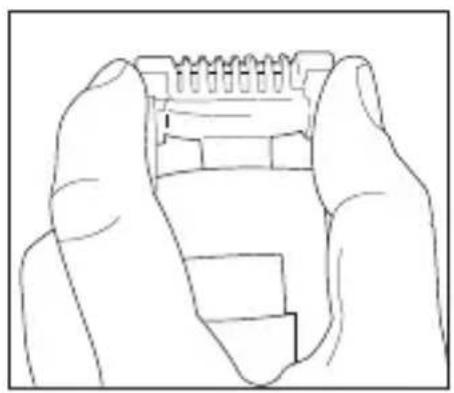
- To detach the comb guide, gently hold the trimmer in one hand and with your thumb and index finger push up on each side of the comb guide (Fig. 1).
- Flip the comb guide to the back of the unit, gently pull down and secure under the latch to lock into place (Fig. 2).
- To release the comb guide, pull down and move away from the latch (Fig. 3).
natural_image
Line drawing of two hands holding a small electronic component (no text or symbols)text_image
Technical diagram of a mechanical device with numbered parts and directional arrows indicating motion or assembly.IMPORTANT: PLEASE NOTE WHEN USING THE TRIMMER WITHOUT THE COMB GUIDE, THE CUTTING LENGTH WILL BE BELOW 0.4MM. THE LENGTH SETTING SHOWN ON THE LED SCREEN WILL NO LONGER BE RELEVANT WHEN THE COMB GUIDE IS DETACHED.
Because the trimmer blades are precision made for a very special use, they should always be handled with care. To ensure long-lasting performance of your trimmer, it is important to clean the blades + the comb guide after every use.
The blades are washable for easy cleaning.
To remove the trimming blade:
- Make sure that the trimmer is switched off
- Detach the comb guide by gently lifting the front of the comb guide from both sides and flipping it over to the back of the trimmer and locking it into position by clicking it securely onto the fastener on the back of the handle.
- To remove the trimming blade hold the handle of the trimmer with one hand, place your thumb underneath the blades and push the blades away from the handle.
To clean the blades:
- First, take the cleaning brush and brush away any loose hairs that have collected in the blades.
- Rinse the trimming blades under running water. The comb guide can also be rinsed separately.
- After cleaning, make sure to shake off excess water and dry the head of the trimming blades + comb guide before replacing onto the handle.
- After rinsing the blades, they will need to be re-oiled.
- Using the oil supplied with your new tool, unscrew the cap & cut off the very end of the plastic tube with a pair of scissors to release the oil.
- Switch your tool on, gently squeeze the oil tube & apply 2 drops of oil onto the blades. Leave the tool on for a further few seconds to allow the oil to thoroughly spread across each of the blades. Switch off the tool & remove any excess oil by gently dabbing with a cloth.
GOOD TO NOTE: BEFORE RE-ATTACHING THE BLADES TO THE TRIMMER, ENSURE THEY ARE DRY AND THE MOVING BLADE IS IN THE CENTRE (FIG. 4)

text_image
Diagram showing two identical mechanical components with checkmark and cross symbols, likely representing a mechanical or electrical assembly.Fig. 4
REPLACING THE COMB GUIDE
If for any reason the stubble comb guide breaks or becomes cracked, you can purchase spare comb guides from Conair Customer Service on 1800 650 263 (in Australia) or 0800 266 247 (in New Zealand).
WORLDWIDE VOLTAGE
This appliance has a multi voltage feature for worldwide use. The voltage automatically converts for ease of use from 100v - 240v. This appliance has an automatic internal converter which will automatically convert the voltage without the need of a switch. A suitable plug adaptor will be required, please refer to the chart below.
| Plug adaptor required | Voltage and plug adaptors | Country Voltage | setting |
 | British plug: 240V | Ireland, Great Britain, Singapore, South America, Hong Kong (parts only), Africa (parts only) | 240V |
 | European plug: 240V | Asia, Europe, Middle East Noumea, Scandinavia, South America, Hong Kong (parts only) | 240V |
 | Australian and New Zealand plug: 240V | Australia, New Zealand 240V | |
  | American plugs: 120V | North America, Japan, Canada (parts of) | 120V |
BATTERY DISPOSAL
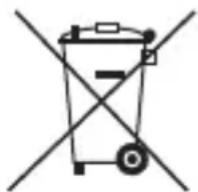
The i-STUBBLE PRO trimmer contains a Nickel Metal-Hydride battery. To protect the environment, the appliance must be disposed of safely at the end of its useful life.
NI-MH
Please take the appliance to a recycling centre, where the internal rechargeable battery should be removed by a professional and recycled separately.
For more information about the recycling of electrical and battery operated appliances, please contact your local council office or your household waste disposal service.
LIMITED THREE YEAR WARRANTY
Our goods come with guarantees that cannot be excluded under the Australian Consumer Law. You are entitled to a replacement or refund for a major failure and for compensation for any other reasonably foreseeable loss or damage. You are also entitled to have the goods repaired or replaced if the goods fail to be of acceptable quality and the failure does not amount to a major failure. In New Zealand our goods come with a guarantee that cannot be excluded under the Consumer Guarantee Act 1993.
Conair Australia Pty Ltd. will repair or replace (at our option) your appliance free of charge for thirty-six months from the date of purchase if the appliance is defective in workmanship or materials.
This warranty is an additional benefit and does not affect your legal rights. To obtain service under this warranty, please read the Warranty Leaflet included or contact Conair Customer Service at aus_info@conair.com.
TO MAKE A WARRANTY CLAIM YOU MUST RETAIN YOUR PROOF OF PURCHASE.
CONAIR
Vidal Sassoon and related logos are trademarks of
The Procter & Gamble Company used under license by Conair.
©2019 Conair Australia Pty. Ltd.
Suite 101, 18 Rodborough Rd
Frenchs Forest NSW 2086
Australia
Conair New Zealand Limited
PO BOX 251159
Pakuranga, Auckland 1706
New Zealand
CONTACT US
For advice & tips on your new VS product email us on:
aus_info@conair.com
CUSTOMER SERVICE
Australia: 1800 650 263
New Zealand: 0800 266 247
Visit VSFORMEN.COM.AU for grooming tips & inspiration or follow us online.


