iBT370 - Uncategorized IHOME - Free user manual and instructions
Find the device manual for free iBT370 IHOME in PDF.


| Product Type | Portable Bluetooth Speaker |
| Brand | iHome |
| Model | iBT370 |
| Dimensions (Approx.) | 6.5 x 2.5 x 2.5 inches |
| Weight | 1.1 lbs |
| Power Source | Built-in rechargeable lithium-ion battery |
| Battery Life | Up to 8 hours |
| Charging Time | 2-3 hours |
| Bluetooth Version | 4.0 |
| Wireless Range | 33 feet (10 meters) |
| Speaker Output | 3W RMS |
| Frequency Response | 150Hz - 20kHz |
| Audio Input | 3.5mm AUX |
| Controls | Power, Volume, Play/Pause, Answer/End Call |
| Microphone | Built-in for hands-free calling |
| Included Accessories | USB charging cable, AUX cable (if applicable), user manual |
| Cleaning Instructions | Wipe with a soft, dry cloth; avoid water and solvents |
| Safety Features | Overcharge protection, automatic power-off when idle |
| Repairability | Not user-serviceable; contact support for battery replacement |
| General Information | Designed for portable use; features a compact, lightweight design |
Frequently Asked Questions - iBT370 IHOME
User questions about iBT370 IHOME
0 question about this device. Answer the ones you know or ask your own.
Ask a new question about this device
Download the instructions for your Uncategorized in PDF format for free! Find your manual iBT370 - IHOME and take your electronic device back in hand. On this page are published all the documents necessary for the use of your device. iBT370 by IHOME.
USER MANUAL iBT370 IHOME
- Many electronics retailers now recycle batteries and other electronic components at no charge. Check to see which ones in your area do so.
CAUTION
The battery used in this device may present a risk of fire, explosion or chemical burn if mistreated. Never use or charge the battery if it appears to be leaking, discolored, deformed, or in any way abnormal.
- Never disassemble the unit or attempt to remove battery as that could cause leakage of alkaline solution or other electrolytic substance.
- Always confirm that the temperature is 5^ - 35^ (41° - 95° Fahrenheit) before you charge the battery. Leakage or deterioration of the battery may occur if this warning is not heeded.
- Never expose the battery to any liquid.
- Never expose the battery to excessive heat such as direct sunlight or fire. Never use the battery pack in an unventilated vehicle where excessive internal temperatures may be encountered.
- Always keep the battery cut of the reach of infants and small children.
Maintenance
- Place the unit on a level surface away from sources of direct sunlight or excessive heat.
- Protect your furniture when placing your unit on a natural wood and lacquered finish. A cloth or other protective material should be placed between it and the furniture.
- Clean your unit with a soft cloth moistened only with mild soap and water. Stronger cleaning agents such as thinner or similar materials can damage the surface of the unit.
Limited 1 Year Warranty Information
Home Products, a division of SDI Technologies Inc. (hereafter referred to as SDI), warrants this product to be free from defects in workmanship and materials, under normal use and conditions, for a period of one (1) year from the date of original purchase.
Should this product fail to function in a satisfactory manner, it is best to first return it to the store where it was originally purchased. Should this fail to resolve the matter and service still be required by reason of any defect or malfunction during the warranty period, SDI will repair or, at its discretion, replace this product without charge. This decision is subject to verification of the defect or malfunction upon delivery of this product to the Factory Service Center authorized by Customer Service.
If service is required, please call Customer Service at 1-200-285-2792 to obtain a Return Authorization Number and shipping Instructions. A copy of the sales receipt is required to validate In-warranty coverage.
Disclaimer of Warranty
NOTE: This warranty is valid only if the product is used for the purpose for which it was designed. It does not cover (i) products which have been damaged by negligence or willful actions, misuse or soldant, or which have been modified or repaired by unauthorized persons; (ii) cracked or broken cabinets, or units damaged by excessive heat; (iii) damage to digital media players, CD's or tape cassettes (if applicable); (iv) the cost of shipping this product to the Factory Service Center and its return to the owner.
This warranty is valid only in the United States of America and does not extend to owners of the product, other than to the original purchaser. In no event will be on or any of its affiliates, contractors, resellers, their officers, directors, shareholders, members or agents to file to you or any third party for any consequential incident damages, any label profits, accrual, exemplary or punitive damages. (Some states do not allow limitations on implied warranties or exclusion of consequential damages, so these restrictions may not apply to you.) This warranty gives your specific legal rights, and you may also have other rights which vary from state to state.
Your acknowledgement and agreement: to fully end completely sbde by the above mentioned disclaimer of warranty is contractually binding to you upon your transfer of currency (money order, cashier's check, or credit card) for purchase of your SGI product.
© 2017 SDI Technologies, Inc. All rights reserved
Questions? Visit www.ihome.com
or call 1-800-288-2792 Toll Free
A Consumer Guide to Product Safety
IMPORTANT SAFETY INSTRUCTIONS
When used in the directed manner, this unit has been designed and manufactured to ensure your personal safety. However, improper use can result in potential electrical shock or fire hazards. Please read all safety and operating instructions carefully before installation and use, and keep these instructions handy for future reference. Take special note of all warnings listed in these instructions and on the unit.
-
Water and Moisture – The unit should not be used near water. For example: near a bathtub, washcowl, kitchen sink, sundry tub, swimming pool or in a wet basement.
-
Ventilation - The unit should be situated so that its location or position does not interfere with its proper ventilation. For example, it should not be situated on a bed, sofa, rug or similar surface that may block ventilation openings. Also, it should not be placed in a built-in installation, such as a bookcase or cabinet, which may impede the flow of air through the ventilation openings.
-
Heat - The unit should be situated away from heat sources such as radiators, heat registers, stoves or other appliances including amplifiers that produce heat.
-
Power Sources - The unit should be connected to a power supply only of the type described in the operating units or as required on the equipment.
-
Power-Cable Protection - Power supply cables should be routed so that they are not likely to be walked on or pinched by items placed upon or against them. It is always best, to have a clear area from where the cable exits the unit to where it is plucked into an AC socket.
-
Cleaning - The unit should be cleaned only as recommended. See the Maintenance section of this manual for cleaning instructions.
-
Objects and Liquid Entry – Care should be taken so that objects do not fall and liquids are not spiled into any openings or vents located on the
-
Attachments – Do not use attachments not recommended by the product manufacturer.
-
Lightning and Power Surge Protection – Unclought the unit from the wall socket and disconnect the entents or cable system during a lightning storm or when it is left unattended and unused for long periods of time. This will prevent damage to the product due to lighting and power-line upgrades.
-
Overloading – Do not overload wall sockets, extension cords, or integral convenience receptacles as this can result in a risk of the or ecode shock.
-
Damage Requiring Service – The unit should be serviced by qualified service personnel when 4. the power supply cable or plug has been damaged
B. objects have fallen into or liquid has been spilled into the enclosure.
C. the unit has been exposed to rain.
D. the unit has been dropped or the enclosure damaged.
E. the unit exhibits a marked change in performance or does not operate normally. 12. Periods of Nonuse – If the unit is to be left unused for an extended period of time, such as a
month or longer, the power cable should be unplugged from the unit to prevent damage or corrosion. 12. Servicing. The user should not attempt to prevent the unit before doing methods described in
- Servicing - The user should not attempt to service the unit beyond those methods described in the user's operating instructions. Service methods not covered in the operating instructions should be referred to qualified service personnel.
Lithium-ion Battery
Internal Rechargeable Lithium-Ion Battery
This device uses an internal rechargeable lithium-ion battery that should last the lifetime of the device. If you suspect your battery may be dead, try charging it several times. If the battery does not recharge, please contact Customer Service at 1-800-288-2792
WARNING/DISPOSAL OF UNIT
Please do NOT attempt to change the battery yourself. Doing so on damage your device and will void your warranty.
- Never dispose of used batteries/electronics with ordinary solid wastes, since they contain toxic substances.
- Always dispose of used batteries/electronics in accordance with the prevailing community regulations that apply to the disposal of batteries/electronics. If there are no local regulations concerning battery/electronics disposal, please dispose of the device in a waste bin for electronic devices.

Model: iBT370
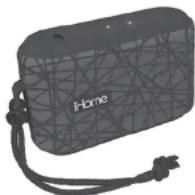
Water Resistant Bluetooth
Speaker
CHARGE
BEFORE
USE
Questions? Visit www.ihome.com

FCC Information
FCC ID: EMOIBT370
IC: 986B-IBT370
FCC Radiation Exposure Statement
This device complies with Part 15 of the FCC Rules, operation is subject to the following two conditions: (1) This device may not cause harmful interference, and (2) this device must accept any interference received, including interference that may cause undesired operation
- Warning: Changes or modifications to this unit not expressly approved by the party responsible for compliance could only file the way's authority to create the equipment.
NOTE: This equipment has been tested and found to comply with the limits for a Glass B digital device pursuant to Part 15 of the FCC Rules.
These limits are designed to provide reasonable protection against harmful interference in a residential hospital. This equipment generates, uses and enables radio frequency energy and front installations and used in accordance with the instructions, may cause harmful interference to reduce communications. However, there is no guarantee that interference will not occur in particular hospital on. If this equipment does cause harmful interference in roads or television reception, which can be determined by turning the equipment off end-on, the user is encouraged to try to correct the interference by one or more of the following measures: Excellent or complete the meeting arena.
- Interest: the separation between the equipment and receiver.
- Connect the equipment into an outlet on a circuit different from that to which the receiver is connected.
- Consult the dealer or an experienced radio/TV technician for help.
CAN ICES-3 (B)NMB-3(B)
Canada Statement
This device complies with Industry Canada's licence-exempt FSGs. Operation is subject to the following two conditions:
(1) This device may not cause interference; and (2) This device must accept any interference, reducing interference that may cause undesired operation of the device.
The device meets the exemption from the routine evaluation limits in section 2.5 of PSS 102 and compliance with PSS-102 BE exposure. Users can obtain Canadian Information on BE exposure and compliance.
Read before proceeding
If you have any question regarding the operation or use of this product, please visit www.ihome.com to view answers to frequently asked questions.
To learn more about this and other iHome products, please visit us online at www.ihome.com
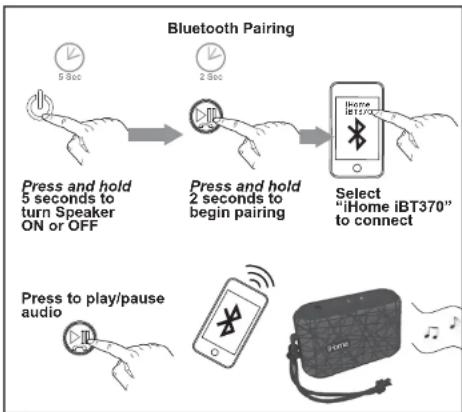
flowchart
graph TD
    A["Press and hold 5 seconds to turn Speaker ON or OFF"] --> B["Press and hold 2 seconds to begin pairing"]
    B --> C["Select "iHome iBT370" to connect"]
    D["Press to play/pause audio"] --> E["Mobile device with Bluetooth icon"]
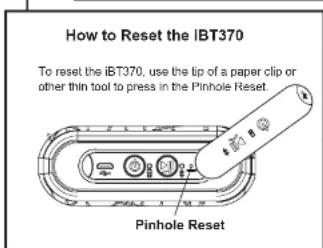
natural_image
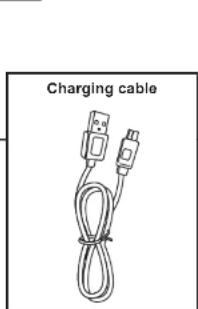
Coiled cable with two USB connectors, labeled 'Charging cable' (no additional text or symbols)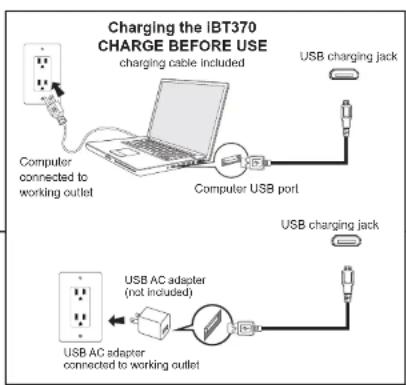
Protecting the iBT370
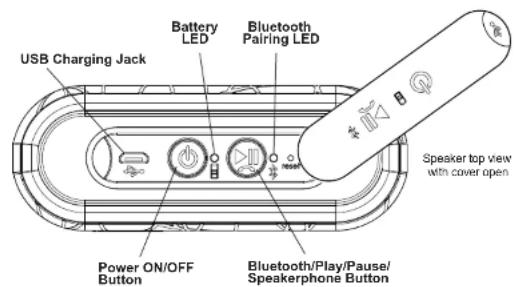
The iBT370 comes equipped with a Weather Tough rubberized cover that protects the buttons and ports. Make sure the rubber cover is sealed shut before operating near water or dust.
Charging the iBT370
The iBT370 is powered by a rechargeable battery in the speaker. Make sure to charge speaker before use.
- Connect the micro-USB plug on the included charging cable to the USB Charging jack on the speaker.
- Connect the larger USB plug to a powered USB port, such as that on a computer. Your computer should be connected to a wall outlet when speaker is charging. The light on the speaker will turn to solid red while charging and turn off when fully charged.
- If the LED flashes red, or you notice sound distortion at higher volumes, or there is no sound at all, it's time to recharge the battery.
Using Bluetooth with the iBT370
- Place your audio device in Bluetooth mode (often found in the device's Settings or Tools menu) and make it "discoverable".
- Press and hold the Power ON/OFF Button for 5 seconds to turn on the iBT370 speaker. The first time unit is powered on it will enter auto-pairing mode.
- "iHome iBT370" should appear on your device's Bluetooth menu. Select it to connect. If your device asks for a passcode, enter '1234'.
- Once paired, the light will glow solid blue and a confirmation tone will sound. You can then stream audio to the speaker. If pairing is not successful, turn the power off on the speaker and repeat pairing procedure.
- To pair a different device or pair at another time, power ON the iBT370, then press and hold the Bluetooth/Play/Pause/Speakerphone Button for 2 seconds. The LEDs will flash blue and red, a tone will sound as the speaker attempts to pair with a Bluetooth device.
- To listen to Bluetooth audio, press the Bluetooth/Play/Pause/Speaker-phone Button on the speaker to cycle between play and pause modes.
- Control audio volume and track navigation from your device. Remember to turn off the speaker (press and hold the Power ON/OFF Button for 5 seconds) after listening.
NOTE: When unit is charging, the blue light will appear solid red.
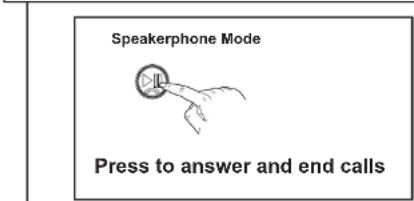
Using the iBT370 Speakerphone Mode
The speaker must be on and connected to a paired Bluetooth phone to receive calls. When a call comes in, any playing audio is paused, the LED will flash blue 2X and the ringtone associated with the caller may sound, depending on Bluetooth device.
- Press the Bluetooth/Play/Pause/Speakerphone Button to answer the call. Press again to end the call.