
Powervalet Quad+ IWW33 - Digital Alarm Clock IHOME - Free user manual and instructions
Find the device manual for free Powervalet Quad+ IWW33 IHOME in PDF.


| Product Type | Multi-Device USB Charging Station |
| Brand | iHome |
| Model | Powervalet Quad+ IWW33 |
| Input Voltage | 100-240V AC, 50/60Hz |
| Output Ports | 4 USB-A Ports |
| Output Per Port | 5V / 2.4A (12W Max) |
| Total Output | 5V / 8A (40W Max) |
| Charging Technology | Smart IC Technology for Fast Charging |
| Dimensions | 10.2 x 6.4 x 2.5 cm (4.0 x 2.5 x 1.0 in) |
| Weight | 180 g (6.3 oz) |
| Power Cord Length | 1.5 m (4.9 ft) |
| LED Indicator | Blue Power LED |
| Safety Features | Overcharge, Overcurrent, Overheat & Short Circuit Protection |
| Materials | Fire-Resistant ABS Plastic |
| Compliance | FCC, CE, RoHS |
| Compatible Devices | Smartphones, Tablets, Bluetooth Headphones, Power Banks, and other USB Devices |
| Warranty | 1 Year Limited |
| Color | Black / White (Varies) |
Frequently Asked Questions - Powervalet Quad+ IWW33 IHOME
User questions about Powervalet Quad+ IWW33 IHOME
0 question about this device. Answer the ones you know or ask your own.
Ask a new question about this device
Download the instructions for your Digital Alarm Clock in PDF format for free! Find your manual Powervalet Quad+ IWW33 - IHOME and take your electronic device back in hand. On this page are published all the documents necessary for the use of your device. Powervalet Quad+ IWW33 by IHOME.
USER MANUAL Powervalet Quad+ IWW33 IHOME
iWW33 - Instruction Sheet - English
Color: Black text on white paper (1C + 1C)
Size: 102 W x 150 H mm
Material: 85 gsm wood free paper
Jun. 25, 2021

Model: iWW33
POWERVALET QUAD+
4-in-1 Fast Wireless Charger

TIME SET
- Press & Hold to Set Clock
- Use +/- to select 12/24 hour mode and press time set to confirm
- Use +/- to set the hour and press time set to confirm. PM Indicator will display for PM time (There is no AM Indicator)
- Use +/- to set the minute and press time set to confirm
ALARM SET
- Press to Arm/Disarm Alarm
- Press & Hold to Set Alarm time
- Use +/- to set hour and press alarm to confirm - Use +/- to set minute and press alarm to confirm
- Use +/- to set schedule (7 days, weekdays,
weekends) and press alarm to confirm (alarm is 7 days until a date is set: See Date Set below).
- When alarm sounds, press alarm to disable and reset for the next day
SET (+/--)
- Press to increase/decrease settings
SNOOZE/DIMMER
- Press to Snooze Alarm
- Press & Hold to Adjust Snooze Duration (adjust 1-29 min with +/- and press Snooze to confirm)
- Press and release to dim display: Aut1, Aut2, Aut0.
Hi, 3, 2, Lo, and OFF

STATUS LEDS
APPLE WATCH CHARGER

AIRPODS CHARGER (5W)
REAR CONTROLS
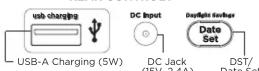
Connect AC adapter to DC Jack, and plug into outlet.
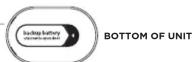
Battery Backup Compartment*
(remove pull tab from bottom of unit before use) *When Low Backup Battery icon appears
When Low Backup Battery Icon appears on the display, install a new CR2450 battery
DATE SET/DST (DAYLIGHT SAVINGS)
- Press & Hold to Set Date
- Use +/- to select year and press date set to confirm
- Use +/- to set the month and press date set to confirm - Use +/- to set the day and press date set to confirm
- Short press will show DST status on display.
Short press toggles Auto/OFF
WIRELESS CHARGING
• Qi compatible phones (also works with plastic cases up to 3mm thick)
• AirPods with wireless charging case
Place Qi compatible device face up on the charging rest. LED Status Indicators will show charging status:
Rapid blinking LED: Device is not charging (reposition device)
Solid Amber LED: Device is charging
LED OFF: Device is fully charged
WARNING: Remove phone's metal protective case before charging. Do not place magnetic or metal objects
on charger during charging. Qi compatible phones with metallic looking finishes will charge normally.
For questions and additional information, please
scan the QR code or visit:
www.ihome.com/help/iWW33


- Do not ingest the battery, Chemical Burn Hazard. This product contains a coin/button cell battery. If the coin/button cell battery is swallowed, it can cause severe internal burns in just 2 hours and can lead to death.
- Keep new and used batteries away from children. If the battery compartment does not close securely, stop using the product and keep it away from children. If you think batteries might have been swallowed or placed inside any part of the body, seek immediate medical attention.
- CAUTION - RISK OF EXPLOSION IF BATTERY IS REPLACED BY AN INCORRECT TYPE. REPLACE ONLY WITH THE SAME OR EQUIVALENT TYPE. DISPOSE OF USED BATTERIES ACCORDING TO THE INSTRUCTIONS.
IMPORTANT SAFETY INSTRUCTIONS
Please heed all warnings, read and follow all instructions and keep these instructions handy for future reference. 1. Do not use this product near water.
-
Unplug unit and clean only with damp cloth. Stronger cleaning agents, such as Benzene, thinner or similar materials can damage the surface of the unit.
-
Do not block any ventilation openings. Install in accordance with the manufacturer's instructions.
-
Heat - This product should be situated away from heat sources such as radiators, heat registers, stoves or other appliances (including amplifiers) that produce heat.
-
Only use attachments/accessories specified by the manufacturer.
-
Onplag this product during lightning storms or when unused for long periods of time.
- Damage Requiring Service - This product should be serviced by qualified service personnel when:
- Plug has been damaged. - Objects have fallen into
- Objects have fallen into or liquid has been spilled into the enclosure. - The unit has been exposed to rain. The unit has been dropped or the e
- The unit exhibits a marked change in performance or does not operate normally.
- No naked flame sources, such as lighted candles, should be placed on this product.
- Attention should be drawn to the environmental aspects of battery disposal.
batteries and other electronic components at no charge. To find a drop-off location near you, visit www.call2recycle.com
- This product is suitable for use in tropical and/or moderate climates. WARNING:
WARNING. - To reduce
- Do not dispose of batteries in the household trash or fire.
- The mains plug of power adaptor is used as the disconnect device, it shall remain readily operable.
FCC Information
This equipment complies with FCC RF radiation exposure limits set forth for an uncontrolled environment. This device complies with Part 15 of the FCC Rules, operation is subject to the following two conditions:
(1) This device may not cause harmful interference, and (2) this device must accept any interference received, including interference that may cause undesired operation.
- Warning: Changes or modifications to this unit not expressly approved by the party responsible for compliance could void the user's authority to operate the equipment.
• NOTE: This equipment has been tested and found to comply with the limits for a Class B digital device, pursuant to Part 15 of the FCC Rules. These limits are designed to provide reasonable protection against harmful interference in a residential installation. This equipment generates, uses and can radiate radio frequency energy and, if not installed and used in accordance with the instructions, may cause harmful interference to radio communications.
However, there is no guarantee that interference will not occur in a particular installation. If this equipment does cause harmful interference to radio or television reception, which can be determined by turning the equipment off and on, the user is encouraged to try to correct the interference by one or more of the following measures:
- Reorient or relocate the receiving antenna.
- Increase the separation between the equipment and receiver - Connect the equipment into an outlet on a circuit different from
- Consult the equipment into an outlet on a circuit different from that to which the receiver is connected. - Consult the dealer or an experienced radio/TV technician for help.
This equipment should be installed and operated with minimum distance 20cm (8 inches) between the radiator & your body.
ISED Information
This equipment complies with IC RSS-102 radiation exposure limits set forth for an uncontrolled environment. This device contains license exempt transmitter(s) (receiver(s)) that comply with Innovation, Science and Economy
This device contains licence-exempt transmitter(s)/Receiver(s) that comply with innovation, science and Economic Development Canada's licence-exempt RSS(s). Operation is subject to the following two conditions:
(1) This device may not cause interference.
(2) This device must accept any interference, including interference that may cause undesired operation of the device. The device comply with ISED RE exposure requirement, users can obtain Canadian information on RE exposure
This device comply with ISO2.10-Exposure Requirement, users can obtain standard information on IR-Exposure and compliance. This equipment should be installed and operated with a minimum distance of 20 cm between the radiator and your body.
Any Changes or modifications not expressly approved by the party responsible for compliance could void the user's authority to operate the equipment.
© 2021 SDI Technologies, Inc. All rights reserved
Printed in China
Brand : IHOME
Model : Powervalet Quad+ IWW33
Category : Digital Alarm Clock