
iZM100 - Uncategorized IHOME - Free user manual and instructions
Find the device manual for free iZM100 IHOME in PDF.


| Product Type | Meditative Sound & Light Therapy Candle |
| Brand | iHome |
| Model | iZM100 |
| Power Supply | 100-240V Universal AC power adapter, DC 5V 1A |
| Light Therapy Modes | Breath, Candle, Glow, Favorite Color, Off |
| Sound Therapy Modes | 4-7-8 Breathing Guide, Calming Meditation, Zen, Ocean, Storm, Air, Focus, Quiet, Off |
| Timer Mode | Adjustable duration: 5 hours, 90, 60, 30, 20, 10, 5, or 2 minutes |
| Breathing Coach | Guided breathing with light and sound synchronization |
| Brightness Control | Adjustable light brightness via - and + buttons |
| Volume Control | Adjustable sound volume via - and + buttons |
| Cleaning Instructions | Clean with soft cloth moistened with mild soap and water only |
| Placement | Place on level surface away from direct sunlight or excessive heat |
| Safety Warnings | Keep away from water, heat sources, and do not overload outlets |
| Warranty | Limited 1-year warranty from date of original purchase |
| Customer Support | 1-800-288-2792 or www.ihome.com |
| Compliance | FCC Part 15 Class B, IC RSS, CAN ICES-3 (B)/NMB-3(B) |
Frequently Asked Questions - iZM100 IHOME
User questions about iZM100 IHOME
0 question about this device. Answer the ones you know or ask your own.
Ask a new question about this device
Download the instructions for your Uncategorized in PDF format for free! Find your manual iZM100 - IHOME and take your electronic device back in hand. On this page are published all the documents necessary for the use of your device. iZM100 by IHOME.
USER MANUAL iZM100 IHOME
natural_image
Close-up of a cylindrical electronic device with horizontal wavy lines and a 'iHome' logo at the bottom (no readable text or symbols on body)Model iZM100GFT
Meditative Sound & Light Therapy Candle
WELCOME
Thank you for choosing the iZM100 Zenergy Candle from iHome. This user guide will get you up and running quickly. For more information about this and other iHome products, please visit www.ihome.com
GETTING STARTED
This unit ships with the following items. Please check to see that all items are present.
- iZM100 speaker
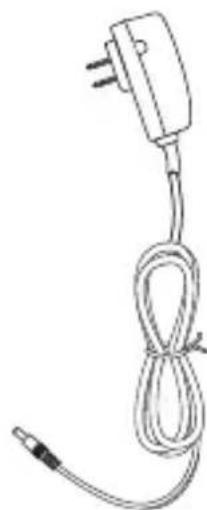
- 100-240V Universal AC power adapter
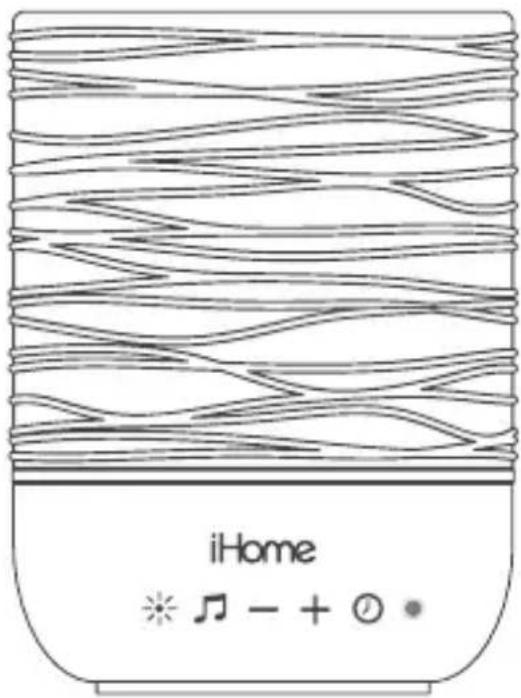
- iZM100 speaker
natural_image
Simple line drawing of a cable with a plug and cord (no text or symbols)- AC adapter
FEATURES & FUNCTIONS
FRONT PANEL
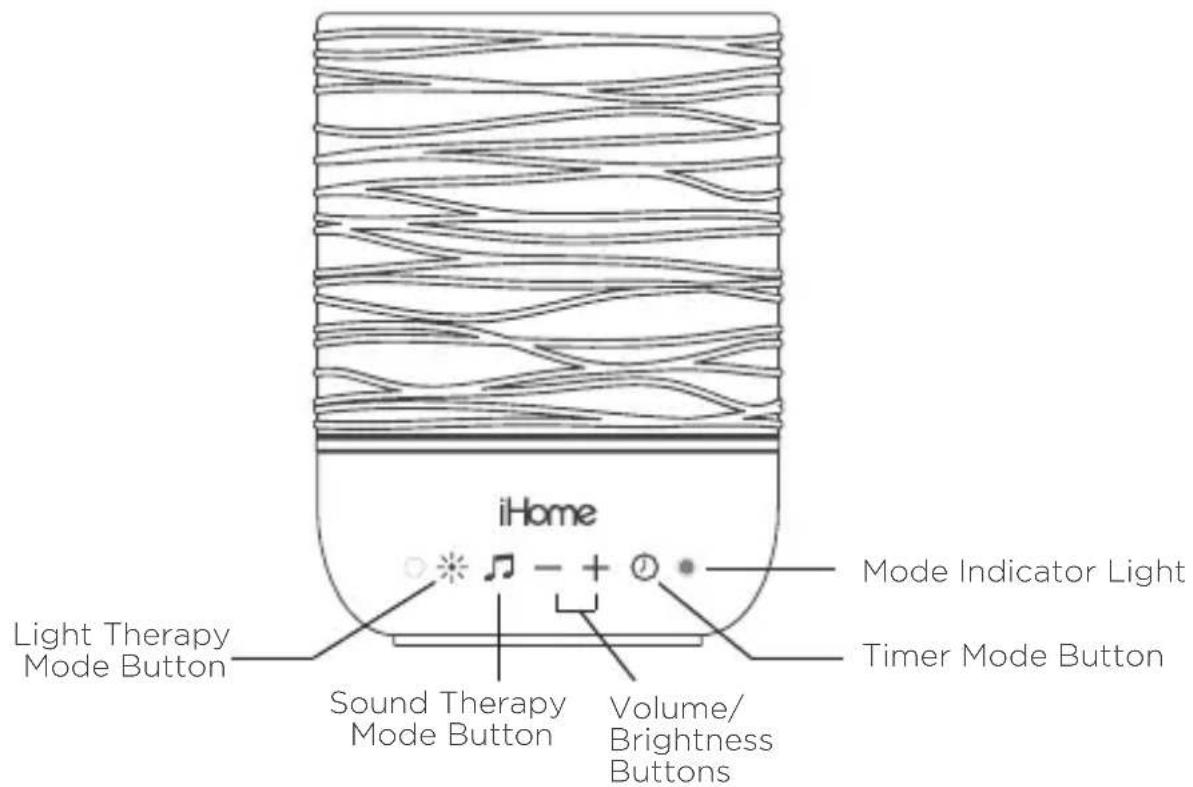
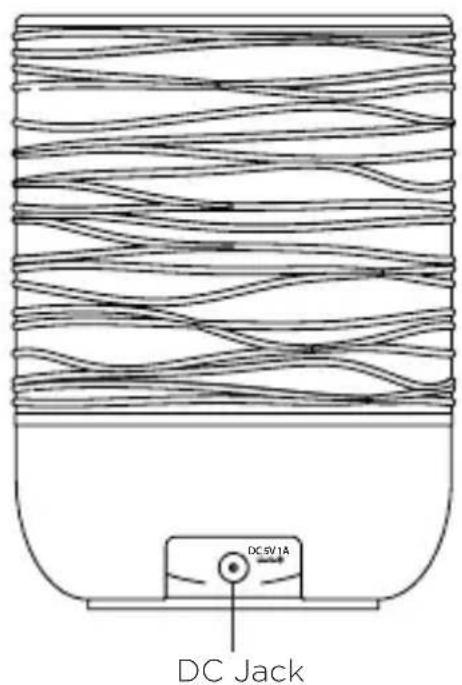
BACK PANEL
CONNECTING THE IZM100
Plug the include AC adapter intothe DC jack on the back of the unitand connect the plug to a workingoutlet not controlled by a lightswitch.
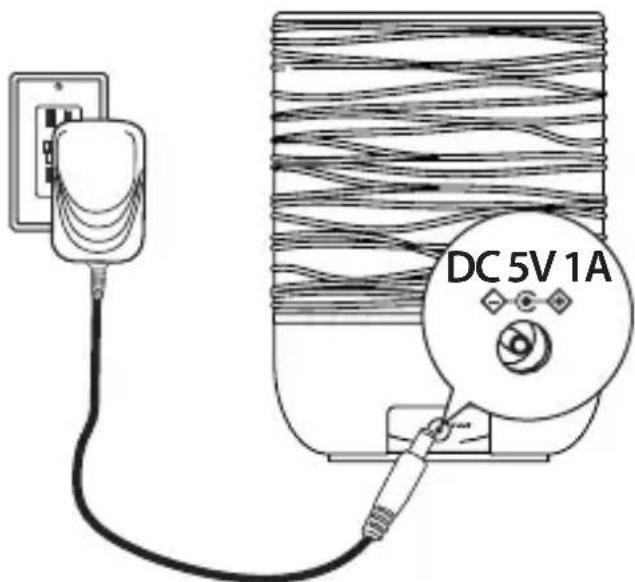
Note: When unit is first plugged in, pressing either the Light Therapy Button OR the Sound Therapy Button will start the breathing coach mode with both light and sound.
LIGHT THERAPY MODE
Color light therapy can enhance the home through ambient or night-time lighting to help improve mood, energy and sleep.
- Press the Light Therapy Button to access Light Therapy mode. Continue to press as needed to cycle to each mode:
| Breath | Inhale and hold with the amber light and exhale with the red, matching your breath to this timed pattern can lower your heart rate and calm your mind |
| Candle | Provides the ambiance of a calming candle flicker without the safety risks posed by a real flame |
| Glow | A gentle fading spectrum of solid colors creates a beautiful atmosphere for day or night mood lighting (not recommended for sleep) |
| Favorite Color | Select the current color |
| Off | Turn Light Therapy OFF |
-
Press and release both the - and + Buttons at the same time to step through brightness settings and adjust the intensity of the light to suit your mood and room conditions.
-
Press and hold the Light Therapy Button for 2 seconds to exit light therapy mode. Press the Light Therapy Mode Button again to resume mode at the last used light pattern.
Note: Except when using timer, during Light Mode the status indicator LED is disabled.
SOUND THERAPY MODE
Distracting noises or a racing mind can make it hard to sleep at night or focus during the day. Sound Therapy uses specially recorded andengineered sounds to cancel out these distractions and allow your mind to calm.
- Press the 🎯 Sound Therapy Button to access Sound Therapy mode. Continue to press to cycle to each mode:
| 4-7-8 Breathing Guide | 4-7-8 breathing meditation features a soothing voice guide and resonating tones to help slow your breath, lower your heart rate, and calm your body and mind |
| Calming Meditation | Deep, resonating tones and continuous flowing waves mimic the mind and breath of relaxing meditation. |
| Zen | A tonal melody in frequencies that mimic the Delta brainwaves of a mind in meditation or healing |
| Ocean | Authentic, digitally recorded ocean sounds |
| Storm | Authentic, digitally recorded storm and rainfall sounds |
| Air | A low-toned noise frequency, like a fan, which helps to muffle background noises to promote relaxation and sleep |
| Focus | A medium-toned pink noise frequency, like a waterfall, which helps to promote concentration |
| Quiet | A high toned white noise frequency, like radio static, which helps to negate distracting environmental noises |
| Off | Turn Sound Therapy OFF |
-
Press and release the - or + Volume Buttons to adjust speaker volume.
-
Press and hold the Sound Therapy Button for 2 seconds to exit sound therapy mode. Press the Sound Therapy Button again to resume at the last used sound preset.
MEDITATION & BREATHING
Research has shown that active breathing can calm the nervous system thereby reducing your heart rate and activating the parasympathic (calming) nervous system to improve memory, positively impact emotional behaviors to help cope with stress, anxiety and make it easier to fall asleep.

4-7-8 BREATHING GUIDE
4-7-8 breathing meditation features a soothing voiced guide that fades and synchronizes with pulsing lighting effects to control your breath, lower your heart rate and soothe the body and mind.
4 sec Breathe in through your nose, filling the belly.
7 sec Hold breath.
8 sec Slowly exhale through your mouth.
Repeat.

CALMING BREATHING
Frequencies mimicking the delta brainwaves along with a calming breathing sound effect can help coax our minds into a deep meditative state. This is a great alternative and easier exercise to the 4-7-8 method.
5 sec Breathe in slowly through your nose.
5 sec Exhale slowly through your mouth.
Repeat.
TIMER MODE
The programmable timer mode lets you set any combination of light and sound therapy for a set duration. The light and sound levels will gradually decrease over the last 15 minutes (fade begins right away if timer is set to 10 minutes or less) until the unit shuts off.
Press the Timer Button as needed to cycle to the desired timer duration: 5 hours, 90, 60, 30, 20, 10, 5 or 2 minutes. Timer mode is first indicated by a voice guide and the timer indicator light next to the Timer button. Blue indicates more than 1 hour remaining, green indicates less than 30-60 minutes remaining, yellow indicates less than 10-30 minutes remaining and red indicates 10 minutes or less remaining.
Press and hold the Timer Button for 2 seconds to cancel timer mode. Timer mode is inactive when no timer indicator is lit.
MAINTENANCE
- Place the unit on a level surface away from sources of direct sunlight or excessive heat.
- Protect your furniture when placing your unit on a natural wood and lacquered finish. A cloth or other protective material should be placed between it and the furniture.
- Clean your unit with a soft cloth moistened only with mild soap and water. Stronger cleaning agents such as thinner or similar materials can damage the surface of the unit.
FCC Information
FCC Radiation Exposure Statement
This equipment complies with FCC radiation exposure limits set forth for an uncontrolled environment.
This device complies with Industry Canada's licence-exempt RSSs. Operation is subject to the following two conditions:
(1) This device may not cause interference; and
(2) This device must accept any interference, including interference that may cause undesired operation of the device.
This device complies with Part 15 of the FCC Rules, operation is subject to the following two conditions: (1) This device may not cause harmful interference, and (2) this device must accept any interference received, including interference that may cause undesired operation.
- Warning: Changes or modifications to this unit not expressly approved by the party responsible for compliance could void the user's authority to operate the equipment.
- NOTE: This equipment has been tested and found to comply with the limits for a Class B digital device, pursuant to Part 15 of the FCC Rules.
These limits are designed to provide reasonable protection against harmful interference in a residential installation. This equipment generates, uses and can radiate radio frequency energy and, if not installed and used in accordance with the instructions, may cause harmful interference to radio communications.
However, there is no guarantee that interference will not occur in a particular installation. If this equipment does cause harmful interference to radio or television reception, which can be determined by turning the equipment off and on, the user is encouraged to try to correct the interference by one or more of the following measures:
- Reorient or relocate the receiving antenna.
- Increase the separation between the equipment and receiver.
- Connect the equipment into an outlet on a circuit different from that to which the receiver is connected.
- Consult the dealer or an experienced radio/TV technician for help.
CAN ICES-3 (B)/NMB-3(B)
IMPORTANT SAFETY TIPS
When used in the directed manner, this unit has been designed and manufactured to ensure your personal safety. However, improper use can result in potential electrical shock or fire hazards. Please read all safety and operating instructions carefully before installation and use, and keep these instructions handy for future reference. Take special note of all warnings listed in these instructions and on the unit.
- Water and Moisture - The unit should not be used near water. For example: near a bathtub, washbowl, kitchen sink, laundry tub, swimming pool or in a wet basement.
- Ventilation - The unit should be situated so that its location or position does not interfere with its proper ventilation. For example, it should not be situated on a bed, sofa, rug or similar surface that may block ventilation openings. Also, it should not be placed in a built-in installation, such as a bookcase or cabinet, which may impede the flow of air through the ventilation openings.
- Heat - The unit should be situated away from heat sources such as radiators, heat registers, stoves or other appliances (including amplifiers) that produce heat.
- Power Sources - The unit should be connected to a power supply only of the type described in the operating instructions or as marked on the appliance. Only use the AC adapter that came with the unit.
- Power-Cable Protection - Power supply cables should be routed so that they are not likely to be walked on or pinched by items placed upon or against them. It is always best to have a clear area from where the cable exits the unit to where it is plugged into an AC socket.
- Cleaning - The unit should be cleaned only as recommended. See the Maintenance section of this manual for cleaning instructions.
- Objects and Liquid Entry – Care should be taken so that objects do not fall and liquids are not spilled into any openings or vents located on the product.
- Attachments – Do not use attachments not recommended by the product manufacturer.
- Lightning and Power Surge Protection - Unplug the unit from the wall socket and disconnect the antenna or cable system during a lightning storm or when it is left unattended and unused for long periods of time. This will prevent damage to the product due to lightning and power-line surges.
- Overloading - Do not overload wall sockets, extension cords, or integral convenience receptacles as this can result in a risk of fire or electric shock.
- Damage Requiring Service - The unit should be serviced by qualified service personnel when:
A. the power supply cable or plug has been damaged.
B. objects have fallen into or liquid has been spilled into the enclosure.
C. the unit has been exposed to rain.
D. the unit has been dropped or the enclosure damaged.
E. the unit exhibits a marked change in performance or does not operate normally. - Periods of Nonuse - If the unit is to be left unused for an extended period of time, such as a month or longer, charge the unit fully before storage
- Servicing - The user should not attempt to service the unit beyond those methods described in the user's operating instructions. Service methods not covered in the operating instructions should be referred to qualified service personnel.
- Magnetic Interference: This product's speakers contain powerful magnets which could cause interference or damage to sensitive equipment such as hard drives, CRT televisions and monitors, as well as medical, scientific, and navigational devices. Keep this unit away from these products at all times.
LIMITED 1 YEAR WARRANTY
iHome Products, a division of SDI Technologies Inc. (hereafter referred to as SDI), warrants this product to be free from defects in workmanship and materials, under normal use and conditions, for a period of one (1) year from the date of original purchase.
Should this product fail to function in a satisfactory manner, it is best to first return it to the store where it was originally purchased. Should this fail to resolve the matter and service still be required by reason of any defect or malfunction during the warranty period, SDI will repair or, at its discretion, replace this product without charge. This decision is subject to verification of the defect or malfunction upon delivery of this product to the Factory Service Center authorized by Customer Service.
If service is required, please call Customer Service at 1-800-288-2792 to obtain a Return Authorization Number and shipping instructions. A copy of the sales receipt is required to validate in-warranty coverage.
Disclaimer of Warranty
NOTE: This warranty is valid only if the product is used for the purpose for which it was designed. It does not cover (i) products which have been damaged by negligence or willful actions, misuse or accident, or which have been modified or repaired by unauthorized persons; (ii) cracked or broken cabinets, or units damaged by excessive heat; (iii) damage to digital media players, CD's or tape cassettes (if applicable); (iv) the cost of shipping this product to the Factory Service Center and its return to the owner.
This warranty is valid only in the United States of America and does not extend to owners of the product other than to the original purchaser. In no event will SDI or any of its affiliates, contractors, resellers, their officers, directors,
shareholders, members or agents be liable to you or any third party for any consequential or incidental damages, any lost profits, actual, exemplary or punitive damages. (Some states do not allow limitations on implied warranties or exclusion of consequential damages, so these restrictions may not apply to you.) This warranty gives you specific legal rights, and you may also have other rights which vary from state to state.
Your acknowledgment and agreement to fully and completely abide by the above mentioned disclaimer of warranty is contractually binding to you upon your transfer of currency (money order, cashier's check, or credit card) for purchase of your SDI product.
© 2017 SDI Technologies, Inc. All rights reserved
Questions? Visit www.ihome.com
or call 1-800-288-2792 Toll Free
- Model iZM100GFT
- WELCOME
- GETTING STARTED
- FEATURES & FUNCTIONS
- CONNECTING THE IZM100
- LIGHT THERAPY MODE
- SOUND THERAPY MODE
- MEDITATION & BREATHING
- 4-7-8 BREATHING GUIDE
- CALMING BREATHING
- TIMER MODE
- MAINTENANCE
- FCC Information
- FCC Radiation Exposure Statement
- IMPORTANT SAFETY TIPS
- LIMITED 1 YEAR WARRANTY
- Disclaimer of Warranty
Brand : IHOME
Model : iZM100
Category : Uncategorized