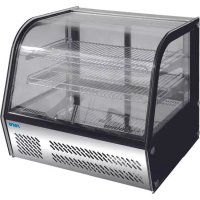
FINN 330-1090 - Heated display case Saro - Free user manual and instructions
Find the device manual for free FINN 330-1090 Saro in PDF.


| Product type | Heated display case |
| Brand | Saro |
| Model | FINN 330-1090 |
| Dimensions (W x D x H) | 900 x 600 x 800 mm |
| Net weight | 45 kg |
| Power supply | 230 V / 50 Hz |
| Power consumption | 1500 W |
| Temperature range | 30°C – 90°C |
| Capacity | 3 adjustable shelves |
| Material | Stainless steel and tempered glass |
| Main functions | Even heat distribution, adjustable thermostat, humidity control, LED lighting |
| Maintenance | Clean with mild detergent and soft cloth; avoid abrasive cleaners |
| Safety features | Overheat protection, grounded power cord, non-slip feet |
| Spare parts available | Thermostat, heating element, shelves, glass panels, thermostat knob |
| Repairability | Service by qualified technician; replaceable parts |
Frequently Asked Questions - FINN 330-1090 Saro
User questions about FINN 330-1090 Saro
0 question about this device. Answer the ones you know or ask your own.
Ask a new question about this device
Download the instructions for your Heated display case in PDF format for free! Find your manual FINN 330-1090 - Saro and take your electronic device back in hand. On this page are published all the documents necessary for the use of your device. FINN 330-1090 by Saro.
USER MANUAL FINN 330-1090 Saro
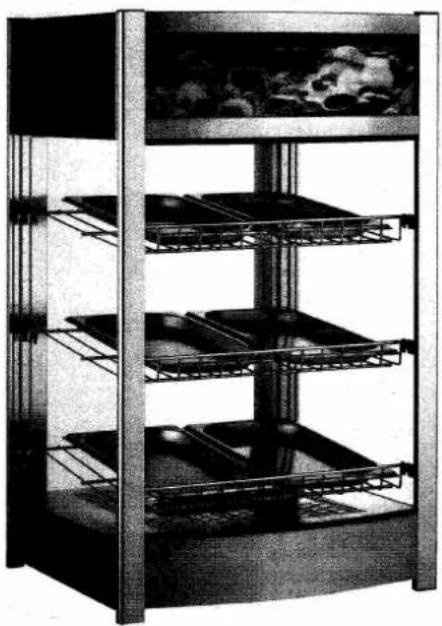
Operating Instructions Heated Display
Model FINN order no. 330-1090
natural_image
Exterior view of a multi-tiered storage cabinet with metal racks and glass panels (no visible text or symbols)CONTENTS
- General Information
- Safety Notes
- Transportation and Placement
- Operation
- Cleaning
- Technical Data and Special Features
- Circuit Diagram
- Waste Disposal
1. General Information
- Carefully read these operating instructions through as they contain important information for the safe and correct use of the appliance.
- It is advisable to keep the operating instructions in a place where you have them always ready to hand.
- If you pass the appliance to a third party, these operating instructions should be handed over.
- Dispose the packing material according to the local regulations. All the packaging items (plastic bags, cardboard, polystyrene foam, nails, etc.) must not be left within reach of children, in that they are potential sources of danger.
- As soon as you have unpacked the heated display, check whether everything is in a faultless condition. Should anything be damaged, do not connect the appliance as such, but inform your dealer.
- The heated display must only be used for the intended purpose, like showing or storage of hot products/food. Improper use can cause damages and lead to the loss of the warranty.
- The plastic-coated grids are adjustable.
- In case of fault and/or malfunction, pull the power plug from the socket and inform your dealer. He will carry out the repair with original spare parts.
- The manufacturer/dealer cannot be made responsible for damages which arise through not observing these operating instructions. Apart from this, if these instructions are not observed, the safety of the heated display is no longer guaranteed.
2. Safety Notes
- Connect the heated display to a properly installed and grounded single power socket. Do not connect any other appliance to the same outlet.
- The outlet must be easily accessible, so that the plug can easily be removed in the case of emergency.
- If you pull the plug from the socket, always pull at the plug and never at the cable.
- The cable must not come into contact with water or hot parts.
- Do not touch the cable and the plug with moist or wet hands.
• Regularly check the cable. If it is damaged, it must be exchanged by a specialist. - Do not block the air intake openings in the heated display. They have to be cleaned from time to time, because dirt and dust can block the slots.
- Do not place any heavy objects on top of the heated display.
- Never put dangerous products (inflammable and explosive) nearby the heated display.
- The heated display is to be used indoors only.
• Repairs may only be undertaken by a qualified specialist using original spare parts. - Do not attempt to repair the heated display by yourself.
- Ensure that children do not play with heated display respectively the door.
• Before each cleaning or repair pull the power plug out of the socket. - Do not use a wet rag (only moist), high pressure cleaner or a jet of water.
- If you do not need the heated display for a long time, pull the plug from the socket and clean everything (see point 5 "Cleaning").
3. Transportation and Placement
- Please be careful during the transportation or moving of the heated display.
• Take good care of the glass panes to prevent breakage. - Dispose the packing material according to the local regulations. All the packaging items (plastic bags, cardboard, polystyrene foam, nails, etc.) should not be left within reach of children, in that they are potential sources of danger.
- Place the heated display on a stable, dry and even surface.
- The distance from both sides and back of the heated display to wall must be at least 10 cm.
- Keep the heated display out of direct sun or other heat sources to ensure correct temperatures can be achieved.
- Do not block the air intake openings in the headed display.
4. Operation
- Clean the heated display and the grids with a moist cloth and a mild cleaning detergent. Dry everything carefully. Do not use aggressive detergents, steel wool or high pressure cleaner or a jet of water. (See also under point 5 “Cleaning”)
- Remove the water bowl and then fill the bowl with water and put it into the appliance.
- Put the grids into the heated display.
- Put the plug into the plug socket.
- The distance of the grids should suit the products height.
- Place the products in a proper way into the heated display, so that nothing falls out, if you open the door.
- Place not too much into the heated display, because of the air circulation.
- Avoid unnecessary opening of the door.
- Ensure the door is properly closed at all times.
- During power failure open the door rarely and for short time only. Do not insert further food.
- The heated display has on the back above an analog temperature display. Here you can see the desired indoor temperature.
- On the back there is a temperature display also, which allows you to set the desired temperature between 30° and 90° C.
5. Cleaning
- Clean the heated display regularly.
- Before each cleaning pull the power plug from the socket.
- Clean the exterior surfaces and the grids with a soft, damp, warm cloth and a commercial detergent. Wipe off and dry everything carefully.
- The water bowl has to be descaled from time to time and the glass panes can be cleaned with a cleaning detergent for windows.
- The glass panes can be cleaned with a cleaning detergent for windows.
- Do not use aggressive detergents, steel wool or abrasive sponges. The heated display may not be hosed down with water.
- Brush off from time to time the dirt from the slots in the interior of the heated display. Use at the same time a vacuum cleaner.
- If you do not need the heated display for a long time, pull the plug from the socket and clean everything as described above.
6. Technical Data and Special Features
Material stainless steel
3 adjustable chromed grids
door on the back
water pan to moisturise the air
Capacity appr. 97 litres
Temperature adjustable + 30° / + 90° C
Power connection
230 V / 1 Ph / 50 Hz / 1,2 kW
Weight 22 kg
Dimensions (exterior)
W 460 x D 448 x H 785 mm
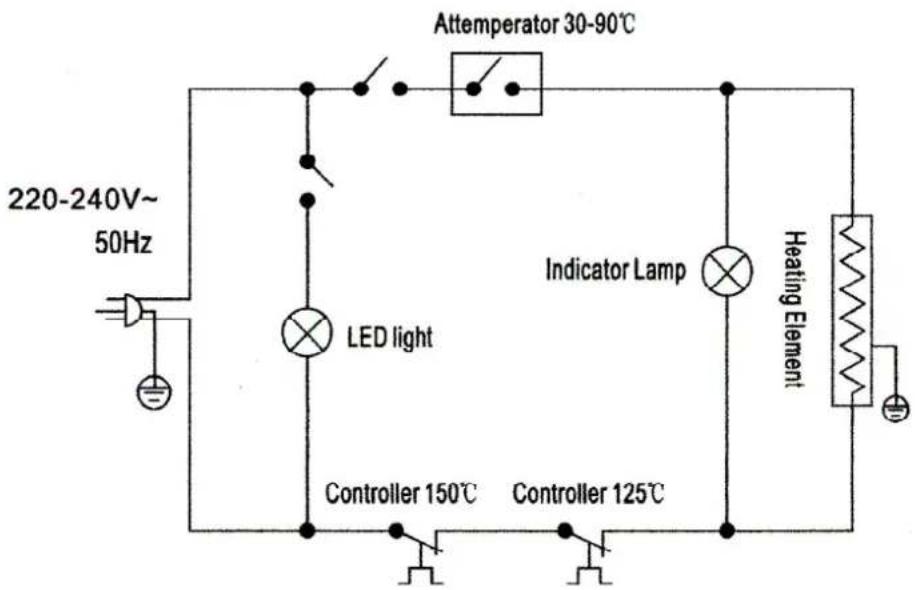
7. Circuit diagram
text_image
220-240V~ 50Hz Attemperator 30-90°C LED light Indicator Lamp Heating Element Controller 150°C Controller 125°C8. Waste Disposal
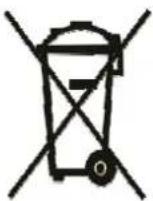
For the disposal of the device follow the regulations applicable in your country.