SSDC-6240 - Air Conditioning Infiniton - Free user manual and instructions
Find the device manual for free SSDC-6240 Infiniton in PDF.


| Product Type | Split Air Conditioner |
| Brand | Infiniton |
| Model | SSDC-6240 |
| Indoor Unit Dimensions (WxHxD) | 800 x 290 x 200 mm |
| Outdoor Unit Dimensions (WxHxD) | 780 x 540 x 290 mm |
| Indoor Unit Weight | 10.5 kg |
| Outdoor Unit Weight | 28.5 kg |
| Power Supply | 220-240 V ~ 50 Hz |
| Cooling Capacity (BTU/h) | 24000 |
| Cooling Capacity (kW) | 7.0 |
| Heating Capacity (BTU/h) | 24000 |
| EER (Energy Efficiency Ratio) | 3.0 |
| Refrigerant Type | R32 |
| Refrigerant Charge | 0.85 kg |
| Airflow (High/Med/Low) | 600 / 480 / 350 m³/h |
| Noise Level Indoor (High/Low) | 45 / 25 dB(A) |
| Noise Level Outdoor | 55 dB(A) |
| Main Functions | Cooling, Heating, Dehumidification, Fan, Turbo, Sleep, Timer, Auto Swing |
| Remote Control | Included (IR) |
| Filter Type | Washable Mesh Filter |
| Maintenance | Clean filter every 2 weeks; professional cleaning annually |
| Safety Features | Overheat Protection, Anti-Icing, Compressor Delay Protection |
| Spare Parts Available | Remote Control, Filters, Fan Motor, PCB Board |
| Repairability Index | 8.0 / 10 |
| Installation Type | Wall-mounted |
Frequently Asked Questions - SSDC-6240 Infiniton
User questions about SSDC-6240 Infiniton
0 question about this device. Answer the ones you know or ask your own.
Ask a new question about this device
Download the instructions for your Air Conditioning in PDF format for free! Find your manual SSDC-6240 - Infiniton and take your electronic device back in hand. On this page are published all the documents necessary for the use of your device. SSDC-6240 by Infiniton.
USER MANUAL SSDC-6240 Infiniton
DC Inverter Duct Type Air-conditioning Unit
Instruction Manual
SSDC-4630
SSDC-6240
SSDC-9580
INFINITON
- Original instructions for use with safety instructions.
- This appliance is intended to be used by expert or trained users in shops, in light industry and on farms, or for commercial use by lay persons.
- GWP: R410A: 2087.5 or GWP: R407C: 1773.9.
- This appliance is not intended for use by persons (including children) with reduced physical, sensory or mental capabilities, or lack of experience and knowledge, unless they have been given supervision or instruction concerning use of the appliance by a person responsible for their safety.
- Children should be supervised to ensure that they do not play with the appliance.
- The appliance shall be installed in accordance with national wiring regulations.
- This appliance can be used by children aged from 8 years and above and persons with reduced physical, sensory or mental capabilities or lack of experience and knowledge if they have been given supervision or instruction concerning use of the appliance in a safe way and understand the hazards involved.
- Children shall not play with the appliance.
- Cleaning and user maintenance shall not be made by children without supervision.
- Disconnect the appliance from its power source during service and when replacing parts.
- The appliance must be installed 2,3m above floor.
- Warning: before obtaining access to terminals, all supply circuits must be disconnected.
- If the supply cord is damaged, it must be replaced by the manufacturer, its service agent or a similarly qualified person in order to avoid a hazard.
- An all-pole disconnection switch having a contact separation of at least 3mm in all poles should be connected in fixed wiring.
- Disconnect the power supply before cleaning and maintenance.
- The appliance shall not be installed in the laundry.
- F-Gas label:
The equipment contains fluorinated greenhouse gas R32
Global Warming Potential(GWP):675
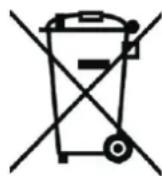
18.

| Correct Disposal of this product | |
| This marking | indicates that this product should not be disposed with other household wastes throughout the EU. To prevent possible harm to the environment or human health from uncontrolled waste disposal, recycle responsibly to promote the sustainable reuse of material resources. I return your used device, please use the return and collection systems contact the retailer where the product was purchased. They can take to product for environmental safe recycling. |
Content
- Safety precautionary measure 1
- Unit Introduction 3
- Introduction for Remote controller and Light Board 5
- Installation Guide 8
5.Electrical Installation 27
Appendix: Unit Packing List
- Please read this manual carefully before using the machine, and operate correctly in accordance with the guidance of the manual.
- You are particularly reminded to pay attention to the significance of the following two identities:

Warning
Note refers to as an identification which indicates that with improper operation, it may cause personal injury or serious damage.

Notice
Note refers to as an identification which indicates that with improper operation, it may cause personal injury or property damage.
Please carefully read the label on the main unit, if an exception occurs, such as abnormal noise, smell, smoke, temperature, leakage, fire and so on, please immediately turn off the power and timely contact our local customer service center or dealer. Never handle on one's own. If necessary, immediately contact the local fire and emergency departments.

Warning
- The appliance shall operate in a room without any continuously operating ignition sources;
-
Have to refer to the safety instruction before installing the appliance.
-
The system should be used in places like offices, hotels, homes and so on.
- The installation should be implemented by commissioned maintenance center. If improperly installed, it may cause water leakage, electric shock or fire accident.
- Install it in a place where the full weight of the machine can be really bear. Insufficient strength can cause device falling and lead to personal injury.
- Drainage pipes should be properly installed in accordance with the installation instructions to ensure proper drainage, and insulation measures should be taken to prevent condensation. If the pipe is not installed correctly, it will cause water leakage and there is a possibility of getting the household items wet.
- Do not use or store inflammable and explosive dangerous goods near the air conditioner.
- In the event of failure (such as burning smell, etc.), immediately turn off the air conditioner's power.
- Keep the room ventilated to avoid hypoxia.
- Never put your fingers or objects into the vents or air intake grille.
- Never start or stop the air conditioner by way of disconnect or plug in the power cord.
- Please always pay attention to whether there is a damage on the mounting bracket and so on after long-term use.
- Never be modified, repaired, and when moving the air conditioning is necessary, please contact your dealer or a professional installer.

Notice
- Before installation, please check that the power used is consistent with the power required on the nameplate, and check the safety of power supply.
- Before use, check and confirm that the connections between wires, pipes and tubing are correct, to prevent leakage, refrigerant leakage, electric shock or fire and other accidents.
- Power outlet must be equipped with ground wire, to ensure that the air conditioner is effectively grounded through the power outlet to avoid the risk of electric shock. Do not connect the ground wire to gas pipe, water pipe, lightning rod or telephone wiring.
- Once the air conditioner turned on, it has to run at least five minutes or more before it can be shut down, otherwise it will affect the compressor oil return.
- Do not let children operate the air conditioner.
- Do not operate the air conditioner when your hands are wet.
- When clean or replace the air conditioner filter, please turn off the air conditioner's power.
- When the main unit has not been used for a long time, please cut off the power supply of the air conditioner.
- Do not step on the air conditioner, or place objects on the air conditioner.
- After installation of electrical appliance, it should be powered to perform current leakage detection.
● Reusable mechanical connectors and flared joints are not allowed indoors.
Indoor unit:
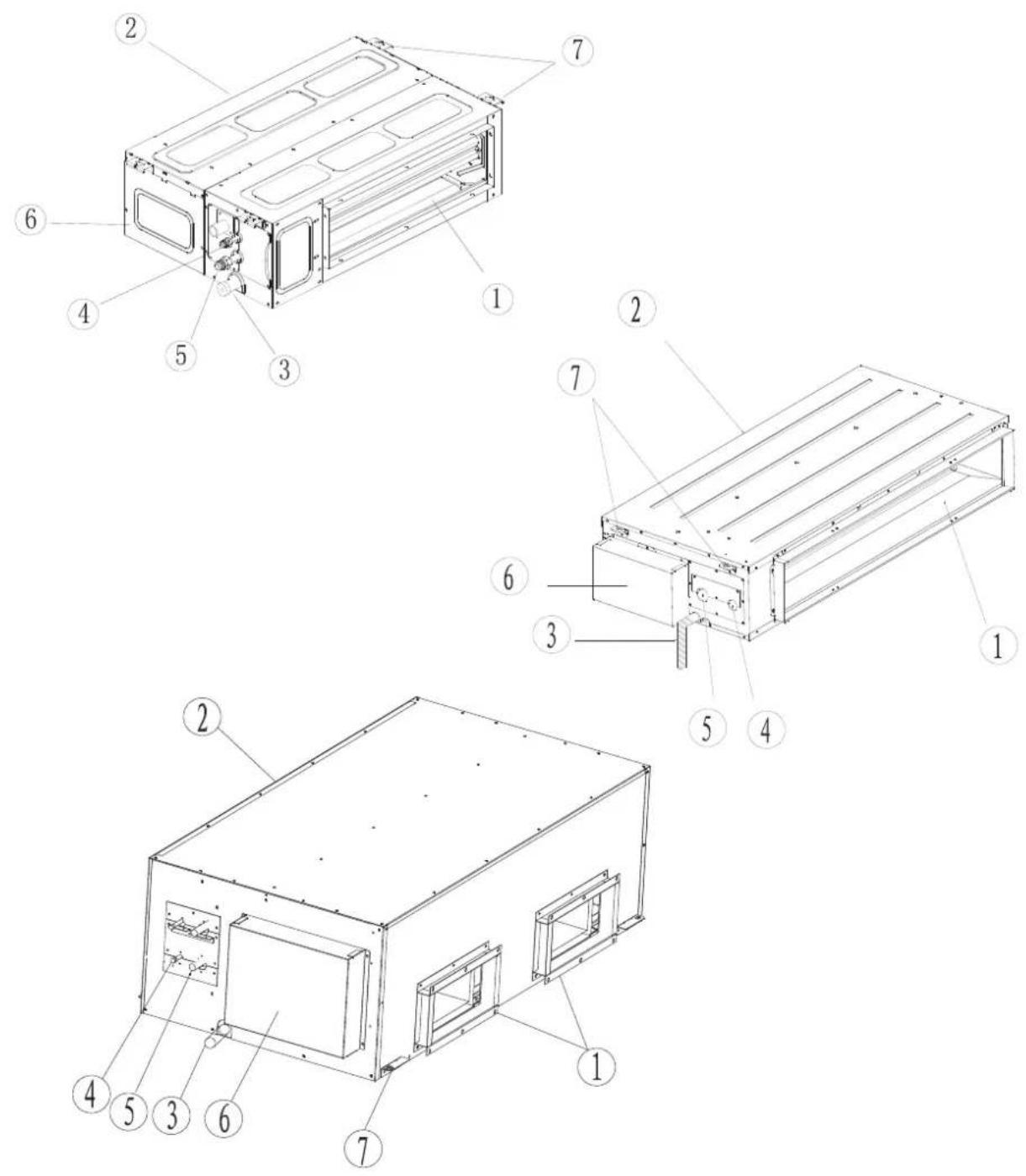
Figure 1
① Air outlet Return air intake Condensate pipe ④ Liquid pipe
⑤ Gas pipe ⑥ Electrical box Hook
Outdoor unit:
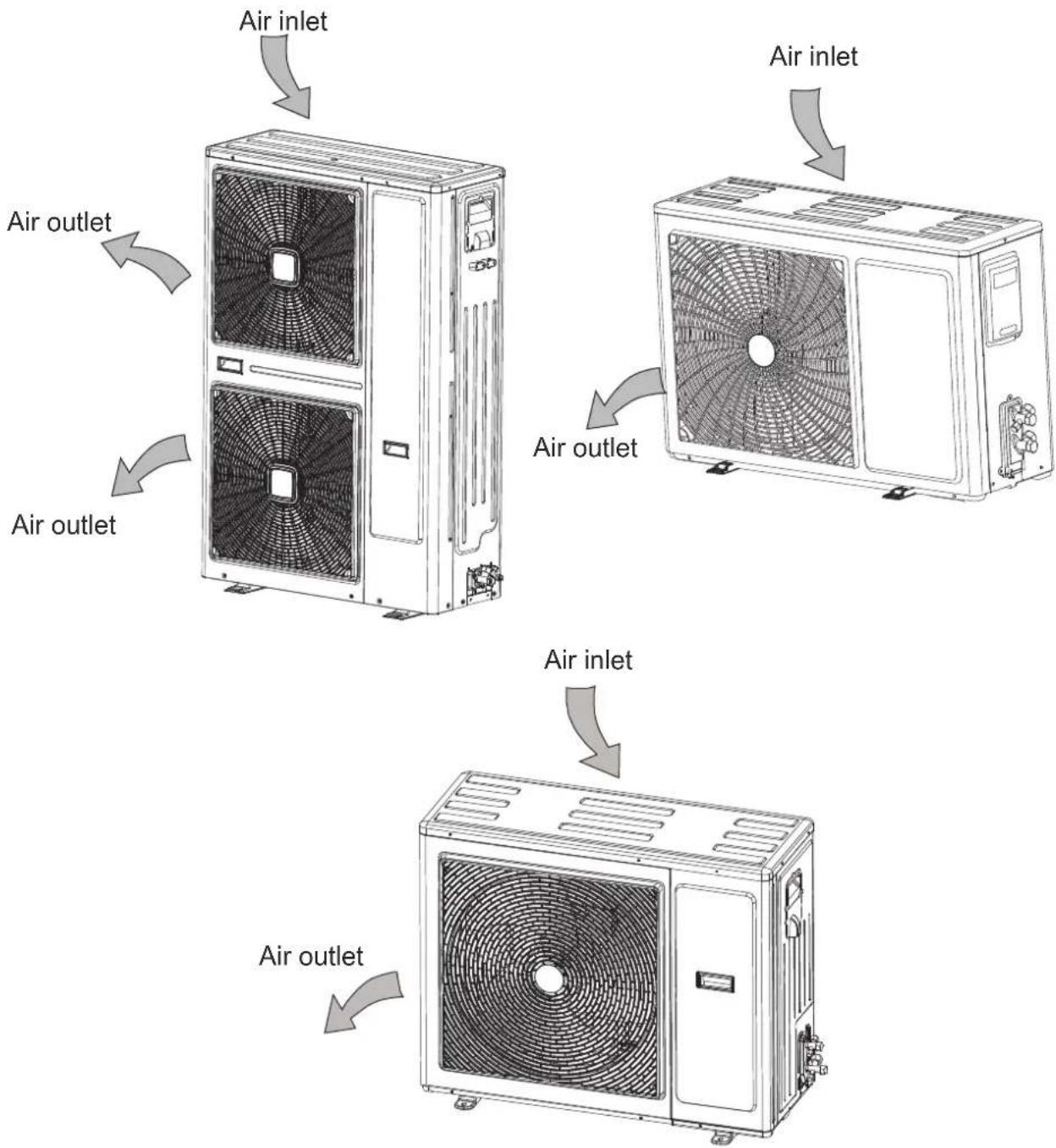
Figure 2
Note: The air conditioner consists of an indoor unit and outdoor unit, excluding air duct of connecting pipe.
Introduction for remote controller and light board (standard)
Indicator plate(light board must be used associated with remote controller)
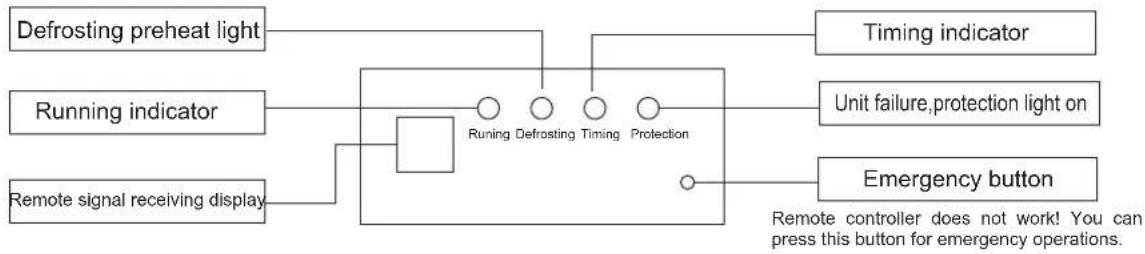
flowchart
graph TD
    A["Defrosting preheat light"] --> B["Running indicator"]
    C["Remote signal receiving display"] --> B
    B --> D["Running Defrosting Timing Protection"]
    E["Timing indicator"] --> D
    F["Unit failure, protection light on"] --> D
    G["Emergency button"] --> D
    H["Remote controller does not work! You can press this button for emergency operations."] --> D
Wizard universal remote controller (They can respectively be used associated with the remote controller or light board)
The following swing button, forced button, light button, purification button on the remote controller applies to new special models, but not applies to ordinary models.
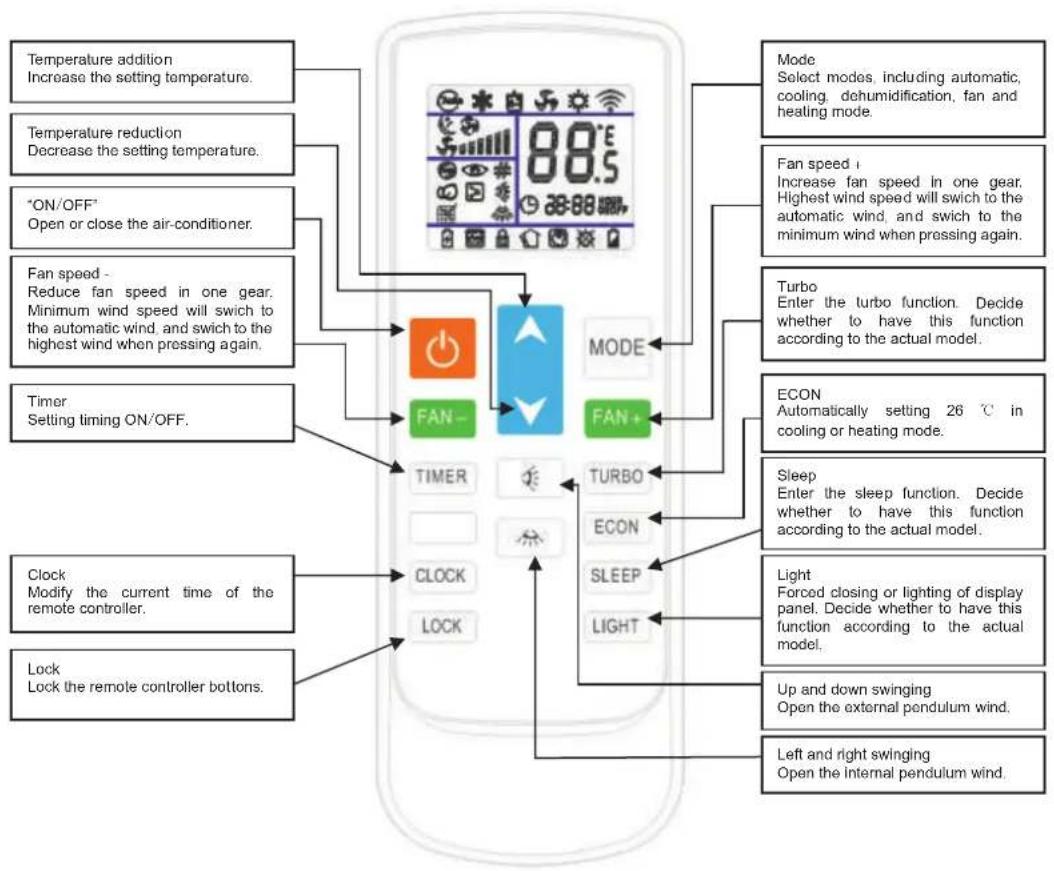
flowchart
graph TD
A["Temperature addition<br>Increase the setting temperature."] --> B["FAN-"]
C["Temperature reduction<br>Decrease the setting temperature."] --> B
D[""*ON/OFF"<br>Open or close the air-conditioner."] --> B
E["Fan speed -<br>Reduce fan speed in one gear.<br>Minimum wind speed will switch to<br>the automatic wind, and switch to the<br>highest wind when pressing again."] --> B
F["Timer<br>Setting timing ON/OFF."] --> B
G["Clock<br>Modify the current time of the<br>remote controller."] --> H["CLOCK"]
I["Lock<br>Lock the remote controller bottoms."] --> H
B --> J["FAN+"]
J --> K["TURBO"]
J --> L["ECON"]
J --> M["SLEEP"]
J --> N["LIGHT"]
K --> O["MODE"]
L --> P["MODE"]
M --> Q["MODE"]
N --> R["MODE"]
S["Mode<br>Select modes, including automatic,<br>cooling, dehumidification, fan and<br>heating mode."] --> T["Fan speed i<br>Increase fan speed in one gear.<br>Highest wind speed will switch to the<br>automatic wind, and switch to the<br>minimum wind when pressing again."]
U["Turbo<br>Enter the turbo function. Decide<br>whether to have this function<br>according to the actual model."] --> V["ECON<br>Automatically setting 26 ℃ in<br>cooling or heating mode."]
W["Sleep<br>Enter the sleep function. Decide<br>whether to have this function<br>according to the actual model."] --> X["Light<br>Forced closing or lighting of display panel. Decide whether to have this<br>function according to the actual<br>model."]
Y["Up and down swinging<br>Open the external pendulum wind."] --> Z["Left and right swinging<br>Open the internal pendulum wind."]
Figure 3
On / Off button: when press the button, the remote controller is cycling switched following "open → closed → open". When you first power up from Off → On, the working status remains on default setting (Temperature setting 25°C, Auto mode, Auto wind speed, Auto swing, Auto throttle, No lights, No strong wind, No purification, No sleep, No timer, No lock button). None-first time when power on from Off → On, the working state remains the state before shutdown. after shutdown functions of lighting, purification, sleep, strong wind and timing will be cancelled.
Mode key: when pressing mode key, the remote control cycling switches according to the "automatic →cooling → dehumidification→ heating→ventilation → automatic".
Increase button: on dehumidification mode and auto mode, the temperature will not change when this button is pressed. In the other mode, each press of this button will plus 1 on the set temperature, increments occur in order of "16°C → 17°C → ... → 31 °C → 32 °C".
Wind direction button: wind direction on the first power on is defaulted for the swing state, when press this button, the unit is cycling switched following "swing → stop → swing".
Wind speed button: on the first power on, wind speed is defaulted for auto wind speed, when in dehumidification mode, wind speed is fixed at low wind, and the wind speed can not be adjusted, when press wind speed button the remote controller does not respond. For the other modes, when you press this button, it is cycling switched following "Auto wind → High wind → Middle wind → Low wind → Auto wind".
Timer button: it is defaulted for no timer state, when press this button, the timer setting is performed in one hour increments, the timer is set in order of 1H 2H 24H cancel 1H cycle. Press the timer button in the Off state to set On, in the power on state, press timer button to set the timer switch. When the timer is set, every one hour minus one, and power on or shut down until the time runs out, while closing the timer display. If the timer is set, when press the mode button, the time setting will not be canceled. If the timer is set, pressing on another button will release the time set on the timer.
Sleep button: press sleep button, it is cycling switched following "sleep → cancel sleep → sleep", when sleep is set, after the conversion of mode, the sleep is not canceled. When press sleep button to set sleep, wind speed is automatically switched to low wind, but by pressing the wind speed button it is possible to adjust the wind speed (except dehumidification mode).
Lock button: it is defaulted for no lock button status, when press this button, the remote controller is cycling switched following "lock button → cancel Lock button →lock button". When there is a lock button, all buttons except the lock button of the remote controller do not work. (Note: When there is a lock button, the button on the remote controller and the air conditioner operate plate of standby unit are automatically locked, when press this button again, the remote controller and the airconditioner will all be automatically unlocked. in discrete unit, only the remote controller is locked, the emergency button will not be locked, but the main plate response.)
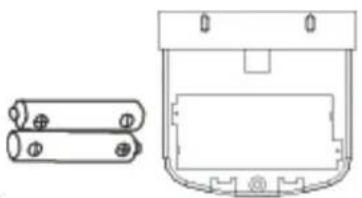
Replacement of the battery of remote controller
After signal being transferred or sending, no receiving sound will be sent out in the air conditioner; indicator get blurred.
From above it indicates the battery is depleted, now you should remove the old battery, and replace with a new battery:
1) Remove the rear cover, and remove the old battery;
2) Replace the battery, note the marking on the battery "+",-" pole;
3) Close the rear cover.
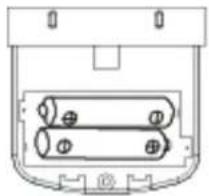
natural_image
Technical line drawing of a mechanical component with two cylindrical pins (no text or symbols)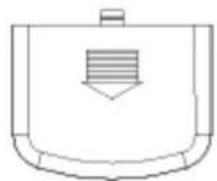
natural_image
Simple line drawing of a container with a handle and internal striped pattern (no text or symbols)Remove the back cover
Note:
- Do not mix old and new batteries.
- If the remote controller has not been used for a long time, please remove the battery.
- Under normal conditions, the service life for batteries which comply with JIS or IEC standards is 6-12 months, if the time limit for using is exceeded, or batteries of non above specifications is adopted, it may produce exudate cells, making it impossible to perform remote control operation.
natural_image
Technical line drawing of a battery pack and its internal casing (no text or symbols)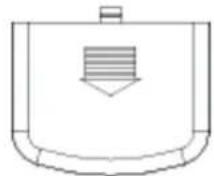
Note the alignment of "+", "-" pole
4.1 Installation of indoor unit
A. Indoor unit outline dimension diagram (applies to low static pressure (F1) models)
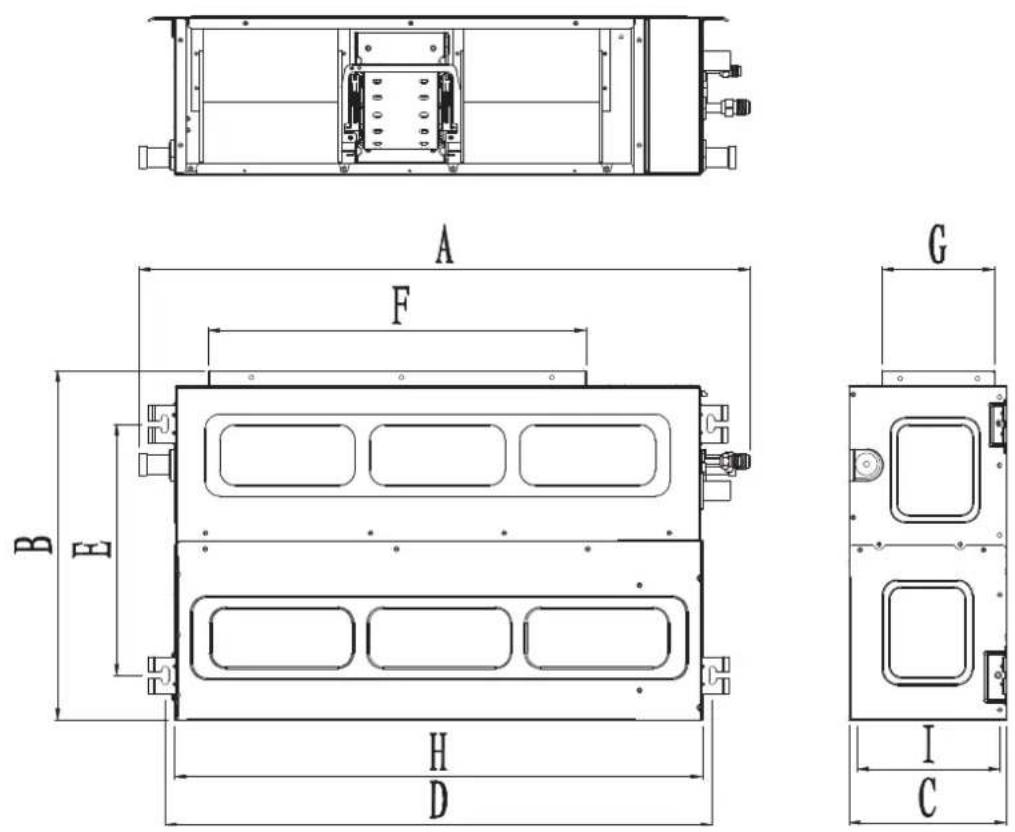
Figure 4
Table 1 Unit: mm
| Indoor unit capacity\Dimension generation | Device body dimension | Installation Device body | Air outlet dimension | Return air intake dimension | |||||
| A | B | C | DEF | GHI | |||||
| 18K | 1214 | 467 | 210 | 1128 | 335 | 905 | 150 | 1011 | 200 |
| Indoor unit capacity\Dimension generation | Device body dimension | Installation Device body | Air outlet dimension | Return air intake dimension | |||||
| A | B | C | DEF | GHI | |||||
| 24K | 1214 | 467 | 210 | 1128 | 335 | 905 | 150 | 1011 | 200 |
B. Overall dimension chart for indoor unit (applies to medium static pressure (F2) models)
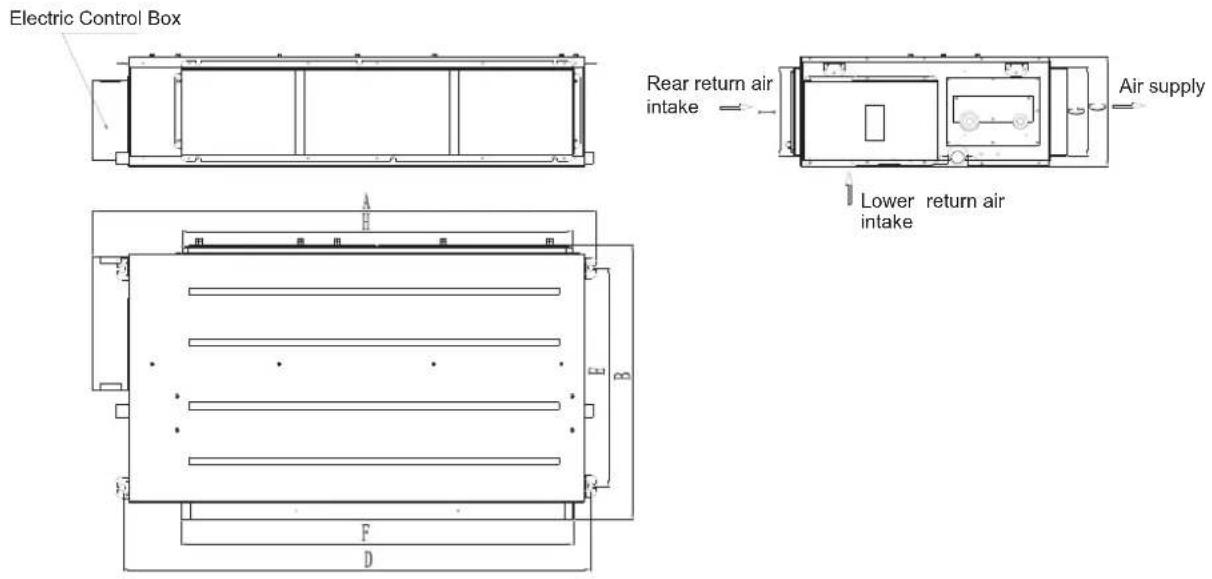
Figure 5
Table 2 Unit: mm
| Indoor unit capacity\Dimension generation | Device body dimension | Installation Device body | Air outlet dimension | Return air intake dimension | |||||
| A | B | C | DEF | GHI | |||||
| 36K | 1425 | 643 | 260 | 1337 | 515 | 1156 | 197 | 1156 | 207 |
C.
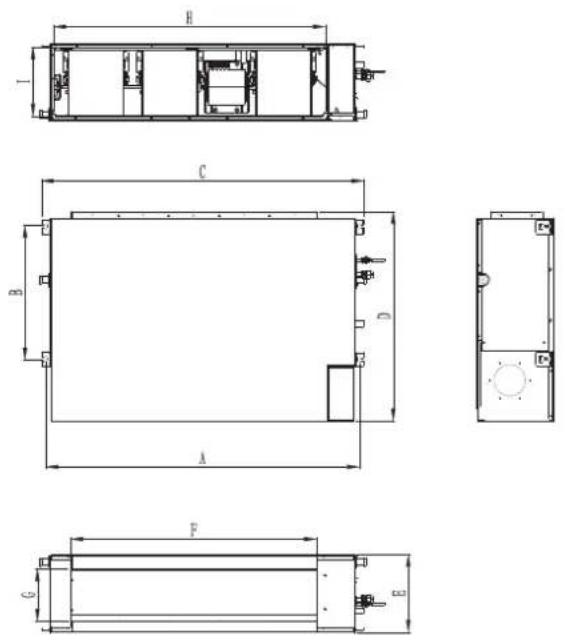
Figure 6
Table 3 Unit: mm
| Dimension generationIndoor unit capacity | A B C | D | E | F G H I | |||||
| 48/55K | 1242 | 535 | 1279 | 830 307 | 973 | 207 1077 | 273 | ||
D. Indoor unit installation space dimension
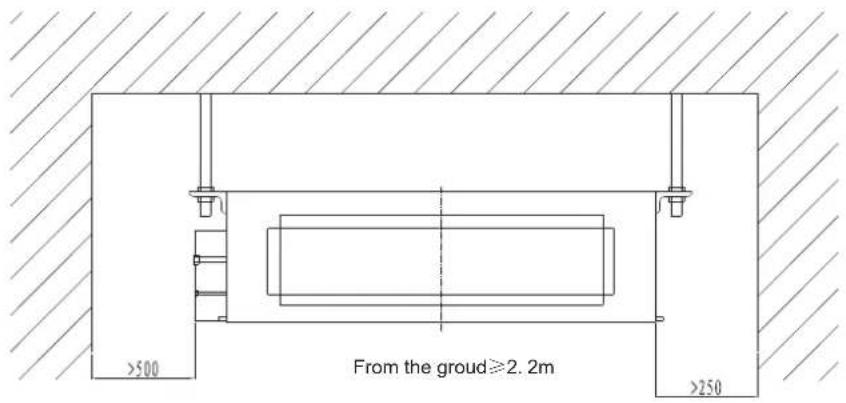
Figure 7
E. Installation of indoor unit
1. The selection of install location
(1) Sufficient strength to ensure that on top hanging parts to bear the weight of the unit.
(2) Water is easily discharged from the drain.
(3) Accessible in import and export, to maintain good air circulation.
(4) In indoor unit, the install distance required in figure 5 must be ensured to make sure the space required by repair and maintenance is kept.
(5) Away from place of heat, flammable gas leakage and smoke.
(6)The machine is ceiling mounted (ceiling built-concealed installation).
(7) Indoor, outdoor, power cord, connecting wires should keep at least 1 m away from the TV, radio. This is to prevent image interference and noise in above mentioned home appliances. (Even with a distance of 1 m, if the generated wave is strong, it may occur noises)
2. The installation of the indoor unit
a. Insert M10 expansion bolt into the hole, then knock the nails into the bolt, for the pitch referring to figure 4, the installation of expansion bolts is shown in figure 6.
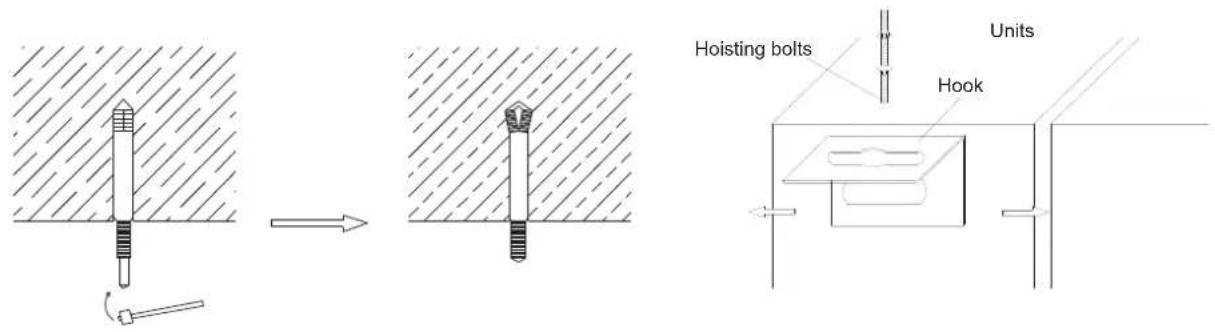
Figure 8
b. Install the hook onto the indoor unit, shown in Figure 7. c. The indoor unit is mounted on the ceiling, See Figure 8.
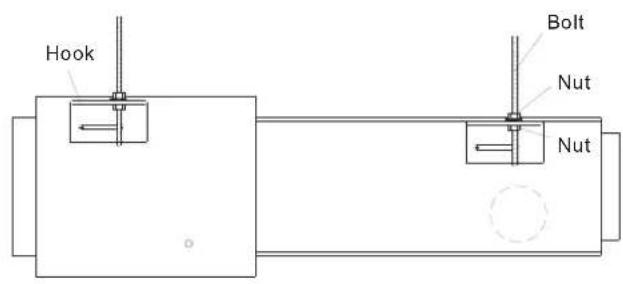
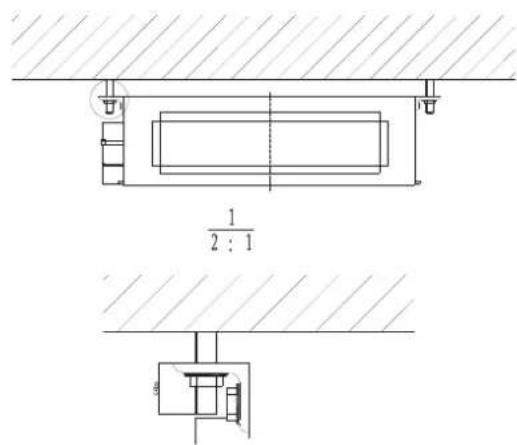
Figure 9

Notice
- Before installation, first complete the preparatory work of all pipes (refrigerant, drainage) and wires (line controller connection, indoor and outdoor unit connecting wire) which need to be connected with the indoor unit to immediately be able to connect with the indoor unit after installation.
- An opening is cut in the ceiling, and the ceiling is possibly to be reinforced to maintain the ceiling level, and prevent vibration of the ceiling. For details, please consult the user or builders.
- If the ceiling is not strong enough, an angle iron can be used to set up a transom bracket, or put the unit on the beam for fixation.
4.2 Installation of outdoor unit
A. Overall dimensions diagram for the outdoor unit
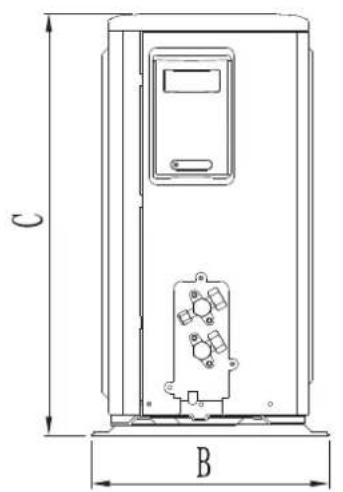
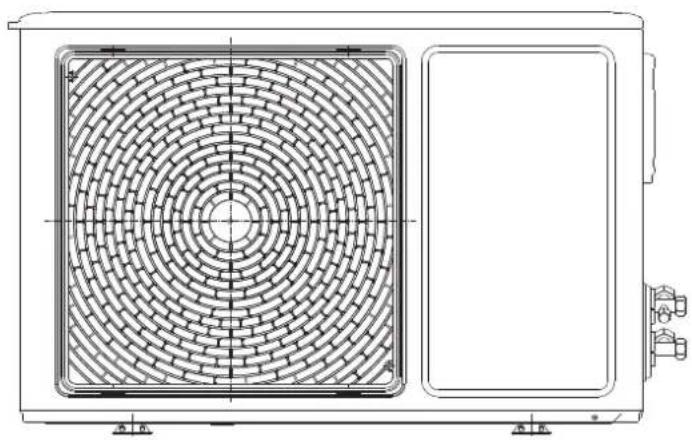
natural_image
Technical line drawing of a dual-panel air conditioning unit with circular vented pattern (no text or symbols)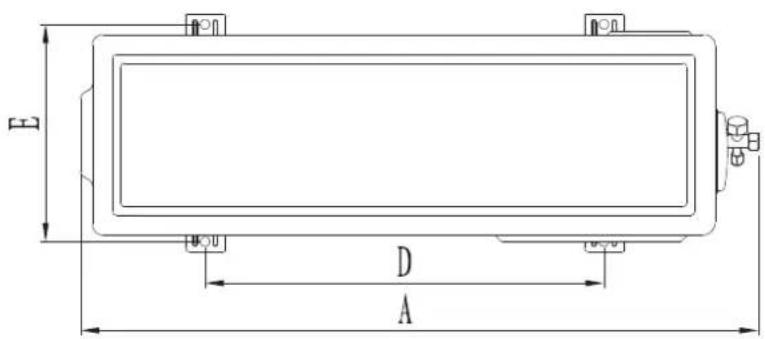
Figure 10
| Machine capacity\Project | A B C | D | E | ||
| 18K | 925 36 | 6 700 590 | 340 |
Unit: mm
B. Overall dimensions diagram for the outdoor unit
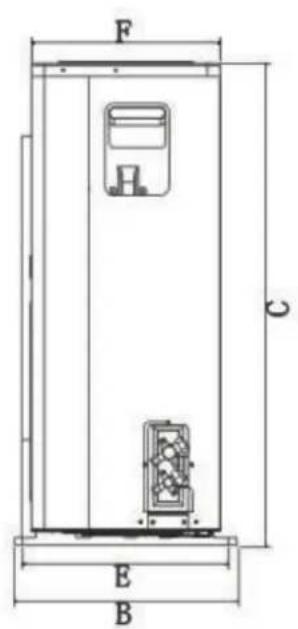
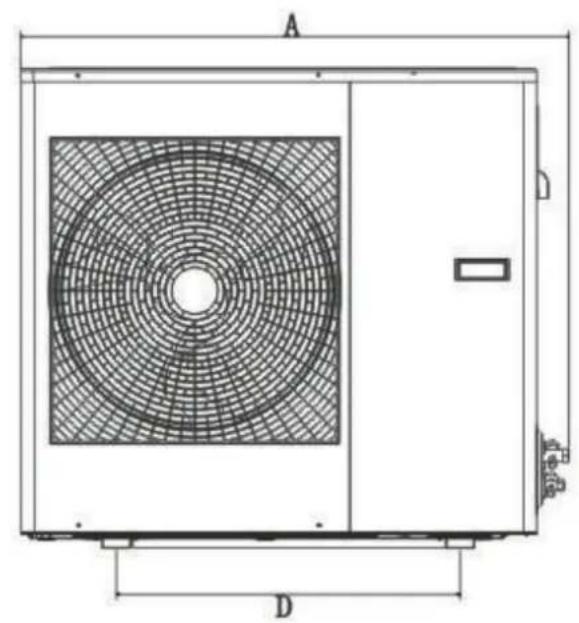
natural_image
Technical line drawing of a rectangular industrial or cooling unit with circular vented pattern and labeled dimensions A and D (no text or symbols beyond labels)Figure 11
Unit: mm
| Machine capacity\Project | A FB C D E | ||||
| 24K | 958 392 843 600 | 360 330 |
C. Overall dimensions diagram for the outdoor unit.
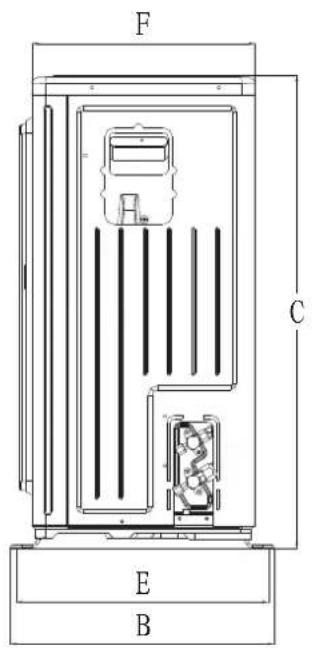
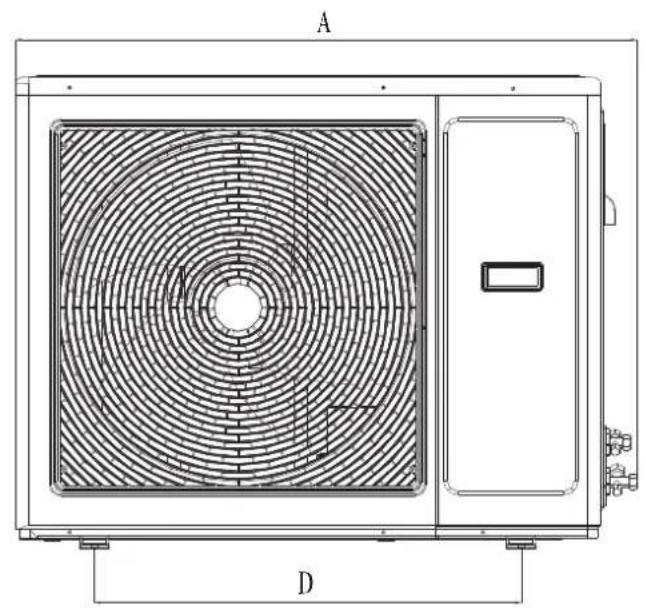
natural_image
Technical line drawing of a large air conditioning unit with circular fan pattern and control panel (no text or symbols)Figure 12.1
Unit: mm
| Machine capacity\Project | A | FB C | ||||
| 36K | 1030 432 788 707 389 370 |
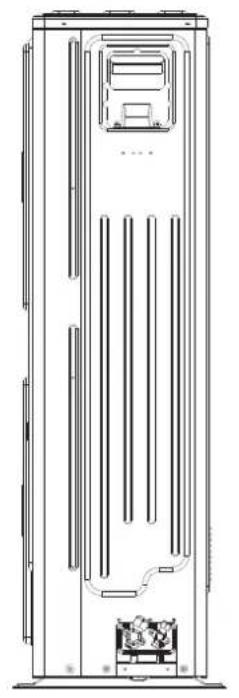
D. Overall dimensions diagram for the outdoor unit
natural_image
Technical line drawing of a vertical industrial or electrical cabinet with internal pipes and control panel (no text or symbols)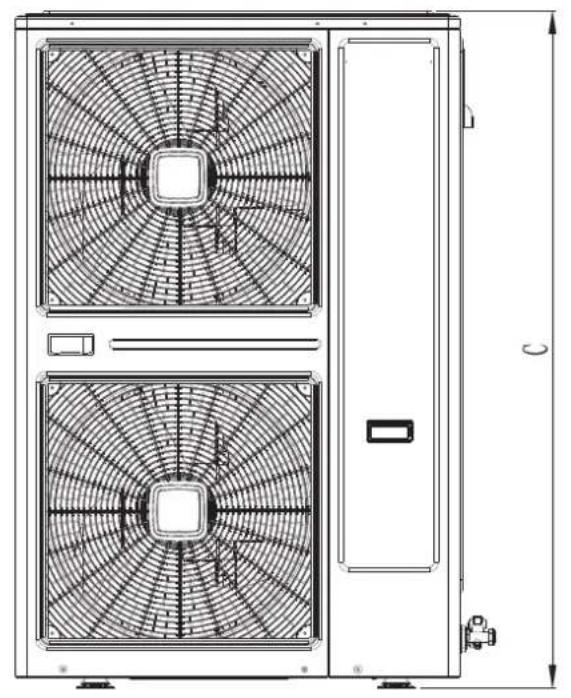
natural_image
Technical line drawing of a dual-panel air conditioning unit with fan patterns and door, showing height dimension (no text or symbols)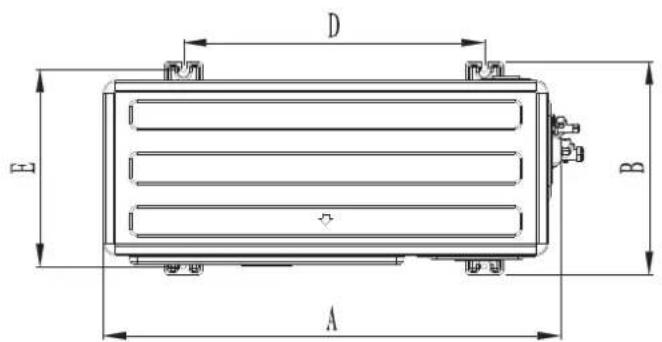
Figure 12.2
Unit: mm
| Machine capacity\Project | A | B | C D E | ||
| 966 450 | 1430 636 | 416 48K | 55K |
E. Install dimension requirements for outdoor unit
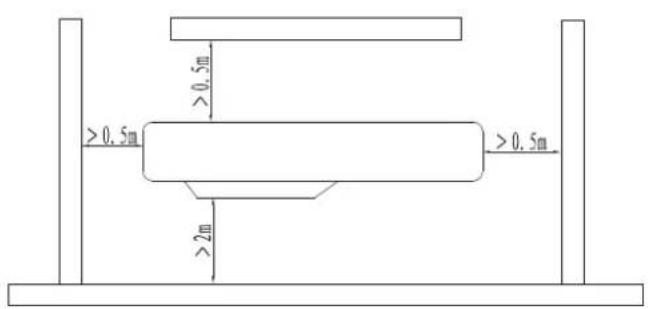
Figure 13
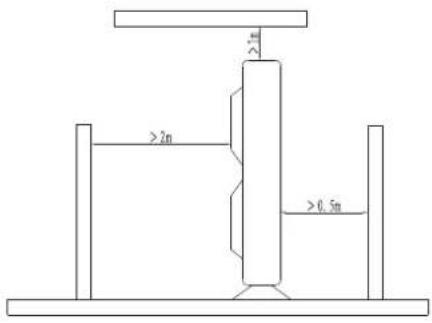
Figure 14
In order to ensure the unit to run well, in the choice of installation location, the following guidelines must be followed:
- Upon installation of the outdoor unit, the air discharged outdoor should not return, and enough space for maintenance must be remained around the machine.
- The ventilation must be excellent in mounting points, so that the machine can intake and discharge sufficient air. Make sure there are no obstacles for air inlet and outlet; if exist, remove obstacles which block the air flow.
- The installation location is strong enough to withstand the weight of the outdoor unit, and has the effect of sound insulation and vibration reduction. And to ensure that outlet air and noise of the unit will not affect the neighbors.
- Avoid direct sunlight, it's best to put up an sunshade for protection.
- In the mounting position, rain and defrost water must be drained.
- In the installation position, it must be ensured that the machine will not be buried in the snow, and not subject to the effects from garbage and mists.
- In the installation position, it must be ensured that the air outlet is not facing the strong wind.
4.3 Lifting of equipment
Before shipping, each air conditioner unit has been a rigorous inspection and testing, to ensure the quality and performance of the unit, and therefore care must be taken during installation of the device, especially not damage the control system and the pipeline.
During on-site installation, there are differences between the left and right in indoor, outdoor unit. With large size or space restrictions in indoor, outdoor unit, and hard to carry, the way of lifting can be considered.
General requirements during lifting:
- Inclination of outdoor unit should not exceed 20 degrees.
- During lifting, force is applied to the device, the device must be separated from hoisting rope with a cloth or other flexible objects to avoid damage to the device.
- During lifting, the equipment must be carefully lifted or lowered, the force on the stress points of the device must be uniform.
During lifting of the equipment, refer to the following methods:
- Manual lifting, forklift lifting.
-
The device can also be moved using the methods of logs (or pipes), labor goes on and so on.
Fixation of equipment. After the completion of equipment lifting, the next step must be carried out: -
When the device is lifted onto the foundation, Equipment levelness is adjusted with a level meter, the error does not exceed 0.1%.
-
When the equipment is put down evenly, the device can be fixed, and the force exerted on the fasteners must be uniform.
4.4. Connection and installation of indoor, outdoor unit refrigerant pipe
1. Pipeline inspection
Before connecting the pipes, they must be checked, and be installed after meeting the following requirements.
1) Inside the tube it must be clean and free of dirt.
2) Bell port and spiral port on both ends must be intact.
2.Pipe connections
On operation of connecting the condenser tubes of the indoor unit, the operation is required to be done quickly.
During field installation, operation time for connecting two tubes should not exceed 5 minutes.
1) When connecting the connector on the bell port, be sure to make two pipes concentric and aligned, and then nested the spiral port, and screwed it in, finally tightened with a wrench, shown in figure 15:
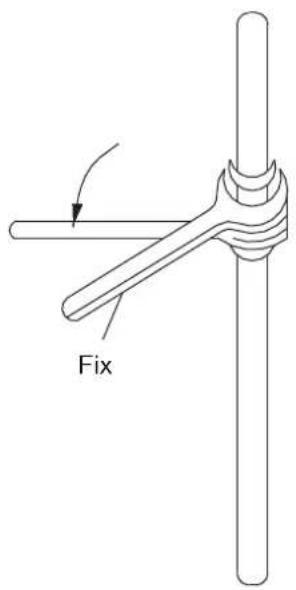
Figure 15
Notes:
Use two wrenches, ordinary wrench, torque wrench each one.
Connect the solid brass, before operation, regulate the torque wrench according to tightening force parameters listed in Table 9.
Table 8
| Pipe diameter(mm) | Tightening force (kgf·m) |
| 6.35 | 1.4 ~1.7 |
| 9.52 | 1.4 ~1.7 |
| 12.7 | 4.8 ~6.2 |
| 15.88 | 4.8 ~6.2 |
| 19.05 | 6.9 ~9.9 |
2) Through the wall: upon the wall penetration, the pipeline for indoor and outdoor unit must be equipped with wall cannula, to avoid damage of pipes and wires, as shown in Figure 16:
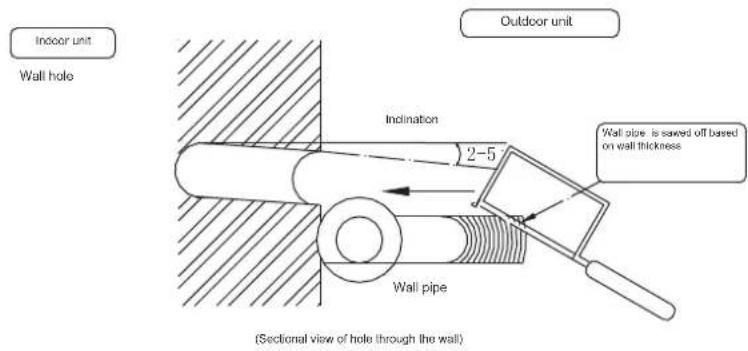
Figure 16
3) Eliminate the negative pressure, evacuation, leaks in the connecting pipe, pipeline of indoor unit: After installation of the unit connecting pipe and the indoor unit, first fill nitrogen into the connecting pipes and the indoor unit pipe up to 2.4-3.0Mpa (absolute pressure); and maintain this pressure for 24 hours, the change of this pressure should not be less than 0.03Mpa; Also check with soap bubbles for any leaks on the connecting head and the welding position, the nitrogen is discharged after confirmation of no leakage, after evacuated, the pressure should reach 130Pa (absolute pressure), and maintain this pressure for 24 hours, the variation of this pressure should not be greater than 20Pa, then open the valve to perform a trial run, if the parameters of the condenser exceeds conventional regulations it needs additional R410A of refrigerant, the following methods can be referred to:
$$ R = \boxed {\left( \begin{array}{l} \text { Total length of } \ \text { liquid pipe for 9.5 } \ \text { diameter(m) } \end{array} \right) \times 0. 0 2 4 \mathrm{kg}} + \boxed {\left( \begin{array}{l} \text { Total length of } \ \text { liquid pipe for 6.4 } \ \text { diameter(m) } \end{array} \right) \times 0. 0 1 2 \mathrm{kg}} $$
Note: Upon sipping of the outdoor unit, the refrigerant has not been emptied, during installation, it should be evacuated with vacuum pump.
4) Thermal insulation. After leak check of the pipeline and completion of the pressure test, and everything is normal, the insulation layer can be wrapped, the requirements of the insulation layer is as following:
a. Piping insulation layer must be tightly wrapped, no crack is allowed.
b. Thickness not less than 8 mm.
c. After wrap of the insulation layer, the outer surface must be treated against rain, moisture (generally wrap outside with cable ties).
d. When the air conditioner system is in cooling run, dew is definitely not allowed to be condensed on the outer surface of the connecting copper pipe.
4.5 Accessory pipe in the pipeline
Because of different mounting positions of the air conditioning, the required accessory pipe can be long or short, to avoid affecting the amount from too long cooling pipe, please select a reasonable tube length according to table 10, try to select the location of the short lines for the installation.
- The maximum allowable operating distance away from the pipe
Table 9
| Value\Rated refrigerating capacity | <6.5kW | 6.5~7.2kW | ≥10, 5kW |
| A Pipeline length (one-way) | Maximum length 15m | Maximum length 20m | Maximum length 50m |
| B Height difference(one-way) | Maximum length 8m | Maximum length 10m | Maximum length 20m |
| C Pipeline bends quantity | Up to 10 | Up to 10 | Up to 15 |
Note: On condition that 80% of the cooling capacity is guaranteed, in the above parameters, the cooling capacity loss and return oil has been fully considered.
2. The use of oil return elbow
When the height difference between the indoor and outdoor unit is greater than 5 m, in order to facilitate oil return of the compressor, oil return elbow must be used. Upon site operations, the following typical installation methods can be referred to (see Figure 7).
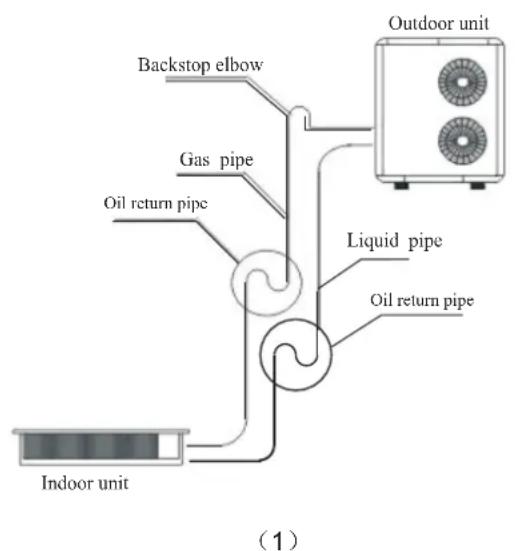
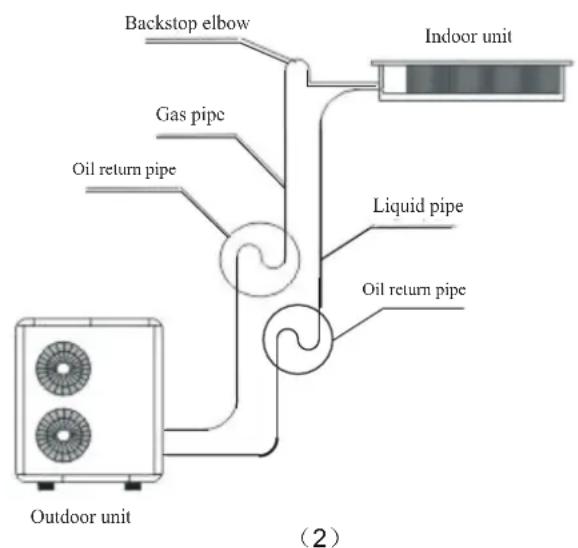
Figure 17
Note: Oil return elbow radius R ≤ 100mm , 10 oil return elbows must be located per 5m as shown above; when the height difference between indoor and outdoor unit exceeds five meters, oil reserve elbow and backstop elbow should be set according to the relative position of outdoor unit and indoor unit.
4.6 Installation of condense pipes
As for the cold condensate pipe of central air conditioning indoor unit, the following factors were considered major:
(1) Displacement of large condensate
(2) Incidental loss of cooling capacity
(3) Maintenance is inconvenient during installation, wind cross can occur from this location.
- The material of condensate pipe can be chosen among U-PVC pipe or galvanization pipes. Health, rust and other issues should be considered, U-PVC pipe is recommended to be adopted.
- The installation requirements:
1) Water seal must be installed at the outdoor drain and be fixed.
2) The slope of drain pipe should be ≥1%.
3) Indoor section of the condensate pipe should put on a pipe insulation or be wrapped with cotton insulation.
4) After condensate pipe installation, irrigation leak test must be performed. Confirm no water leakage in various joints and smooth drainage. The installation can be performed with reference to figure 18:
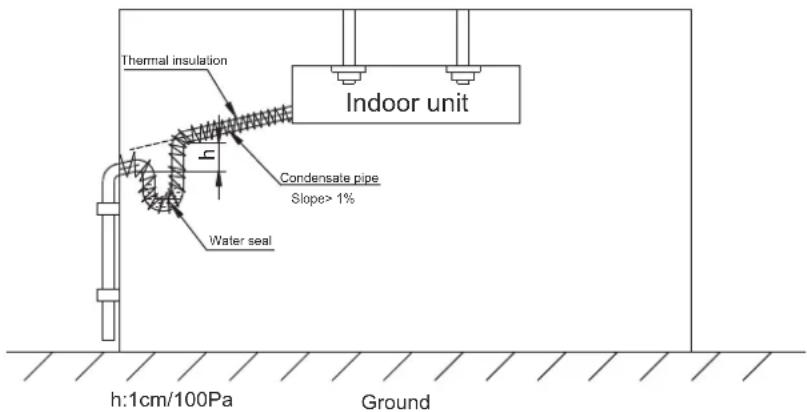
Figure 18
4.7 Production and installation of the air duct
1. Production of the air duct
The air duct can be produced refer to the relevant requirements in metal air duct section of GB50243-97 specification.
2. The installation of new air duct
1) Entry of new air duct can be directly selected at a place of clean, no dust pollution. Rain louver and filter must be installed at the outdoor air intake. Air volume control valve is recommended to be installed at new air duct section; It's appropriate if the fresh air accounts for 0 \~ 15 % of the total air volume, shown in figure 9:
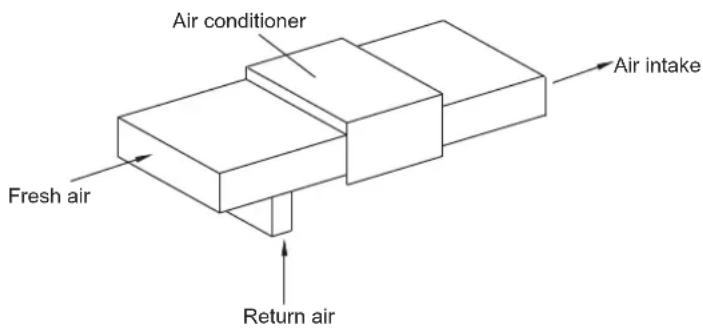
Figure 19
2) Installation of air duct
Rectangular air intake duct can be directly connected with the outlet of the indoor unit, and connected with the diffuser, with a total length no more than 6m. The velocity of each air outlet at diffuser should be adjusted to basically the same in order to meet the indoor air conditioner requirements, shown in figure
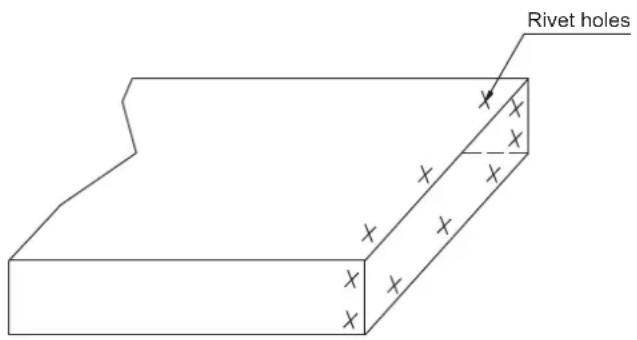
Figure 20
3) Installation of return air duct
Connect the air return duct to the return air intake of indoor unit with a rivet, and the other end is connected to indoor return air intake, a short soft air duct in material of fireproof canvas can be made, and be penetrated and connected with 8 # wire to form a fold shape, which can be freely adjusted according to the indoor ceiling height, as shown in figure 21:
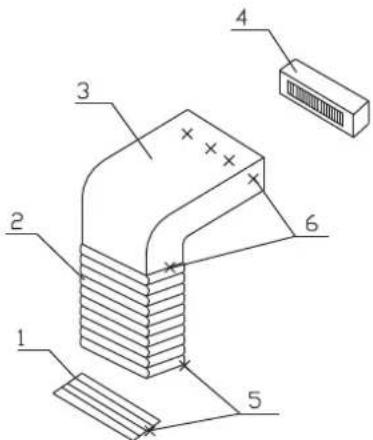
1 - Indoor return air intake 2 - Fireproof canvas air duct 3 - Air return duct
4 - Indoor unit 5 - Wood screws 6 - Rivet
Figure 21
4) Thermal insulation of air duct
Insulation layer should be equipped on both air intake duct and return air duct, there are two kinds of insulation materials as rubber PE and glass wool. Insulation material of rubber PE is adopted, firstly the duct surface should be wiped clean, and then paste PE insulation materials to pipe using associated glue; when glass wool insulation is adopted, firstly the plastic nail is bonded to the air duct, and then attach the cotton insulation with a layer of tin tube paper, cover it with plastic nail, and finally seal the connection port with tin filling tape, as Figure 22 in
Note:
- Bonding density of the retaining plastic nails as shown in table 11;
- Please note when attaching the insulation layer: during cooling running, dew is absolutely not allowed on the outer surface of insulation layer.
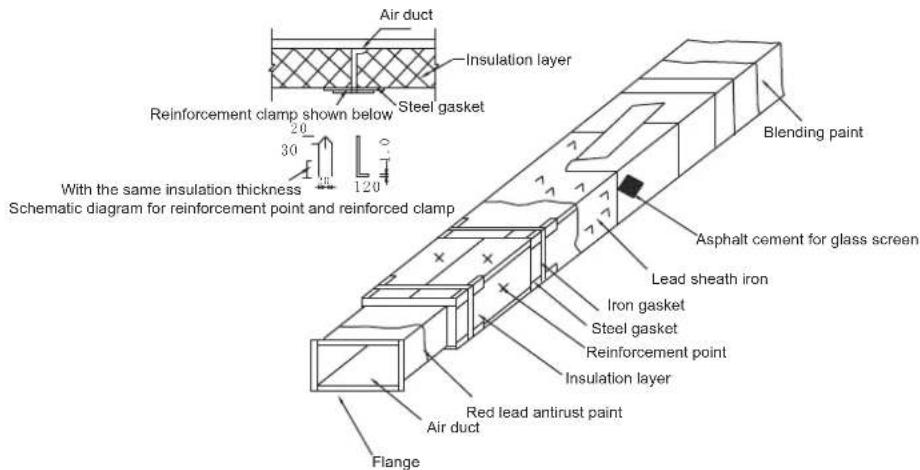
Figure 22: Lashing thermal insulation for rectangular air duct sheet
Table10
| On the side and below of air duct | Above the air duct |
| 12 pieces/ m^2 | 5 pieces/ m^2 |
5) Other The distance from the edge of the return air to the wall is recommended to be 150 mm or more. Figure 23: Lifting diagram for low static pressure air duct unit:
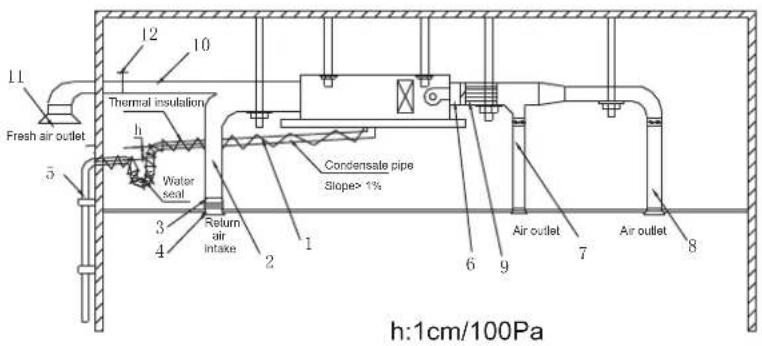
1 - Hook 2 - Air return duct 3 - Canvas air duct 4 - Air return louvers 5 - Drain pipe 6 - Transition air duct 7 - Outlet air duct 8 - Diffuser 9 - Muffler 10 - New air duct 11 - Rain louver 12 - Damp
Figure 23
4.8 Plenum chamber
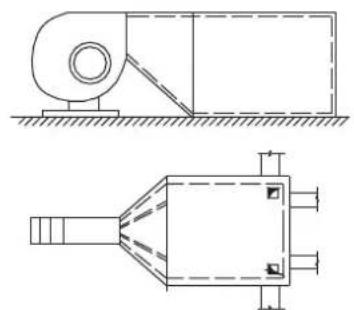
1. The location and function of the plenum chamber
Plenum is set outside the outlet of the unit, and sound-absorbing material is affixed on it, so that it can both stabilize the airflow, but also effectively attenuate the fan noise by using the mutation on the box section and the sound absorption effect of the cabinet inner surface, as shown in figure 24.
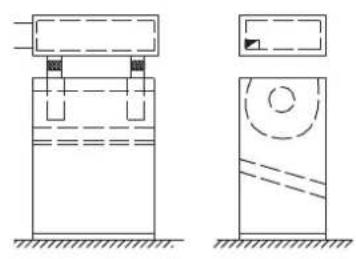
natural_image
Two technical diagrams showing a container with liquid and a circular component, no text or symbols present.(a) Anechoic chamber is mounted on the outlet
natural_image
Technical line drawing of two mechanical components with no visible text or symbols(b) of the air conditioning unit, which also has the functin as sub-wind plenum box
Figure 24 Application of the plenum chamber
2. Installation of the plenum chamber
1) Relevant provisions on equipment static tube
a. For equipment in which air out static pressure is greater than 30Pa, hydrostatic tank must be installed on its wind pipe, for its specifications and installation, please see related provisions in GB50243-2002.
b. Plenum chamber should be located in the pipe section with a smooth flow in air duct system, when the air flow velocity in the air duct system is less than 8 m/s, the plenum chamber should be located on main pipe section; when the airflow speed is more than 8m/s, they should be installed in the respective branch pipes respectively.
c. Plenum chamber is not directly installed in the air conditioner room, nor directly in the outdoors, to avoid being penetrated by the noise outside and into the pipe downstream the plenum chamber. In situations where there may be external noise, the sound insulation capability of the duct should be verified.
d. The flow rate of air passing the plenum chamber shouldn't exceed the following values:
Negative plenum chamber 5-10m/s (in high requirements:4-6 m/s);
Resonance plenum chamber 5 m/s, silencer elbow 6-8 m/s.
e. Plenum chamber is mainly used to reduce the noise from the dynamic air, anti-vibration measures should be taken to solve the noise caused by ventilator vibration.
2) Installation requirements of plenum chamber;
a. Direction of plenum chamber is installed correctly. Pay attention to loss prevention and anti-moisture.
b. The surface of perforated plates remain clean, non-corrosive, no clogging in the hole.
c. Separate brackets should be installed both in plenum chamber and in silencer corners.
d. The screws used to fasten hydrostatic tank must be uniform, smooth, no loosening, shedding in the seams.
e. The glass fiber cloth packed outside the muffler piece should be smooth, without visible scratches and corrosion.
4.9 A variety of measures to prevent cross sound between two rooms
When a main air duct is fed to multiple rooms (Figure 25a), in order to prevent "cross sound" between rooms, each program shown in Figure 25, (a) - (e) can be referred to and adopted to prevent.
1) Expand the distance between the air outlet of two chambers (see figure b):
2) Paste the sound-absorbing material (see figure c);
3) Elbow is added on air manifold in room B (see figure d);
4) Air is sent via two-way (see figure e).
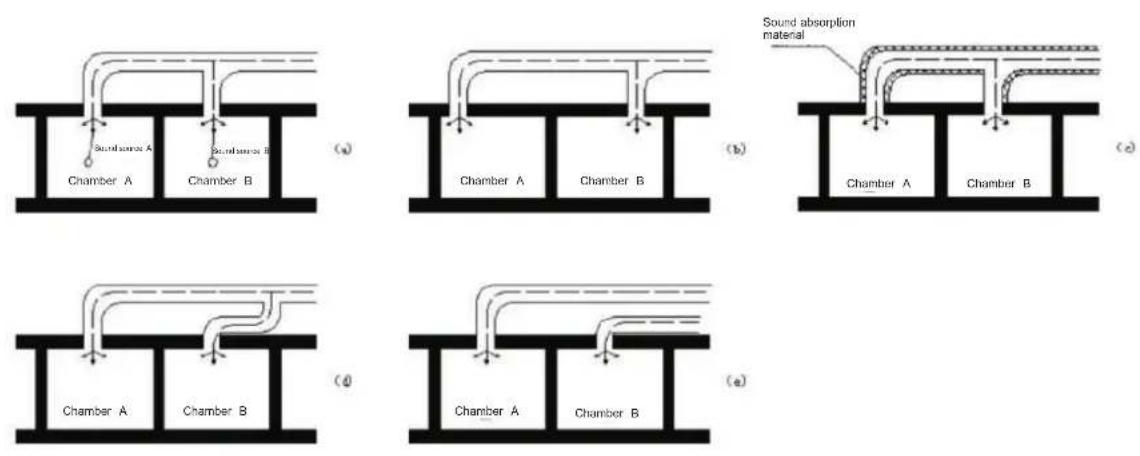
Figure 25
Note:
After completion of the installation of the unit, be sure to notify our sales staff to perform the adjustment, otherwise all the consequences arising therefrom will be borne by the user or installer side.
5.1 Connection of wires and terminal blocks

Notice
Before performing the installation of electrical equipment, our design staffs remind you to note the following:
- Check if the power currently used is consistent with the power supply indicated on the nameplate.
-
To ensure that the power supply capacity is large enough, and the cross-sectional area of the room wiring should be greater than 2.5mm^2 .
-
Lines must be installed by professionals.
-
Leakage protection switch and air switch in which the spacing of the electrode contacts is larger than 3 mm must be installed in fixed lines.
-
Connection of single branch line
(1) The end of the insulating layer of single branch line is stripped of about 25 mm by a stripper.
(2) Remove the screws on the terminal block A of the air conditioner.
(3) Use pliers to bend the end of single branch line to a ring which size matches that of the screw.
(4) Passing the screw through the ring on the single branch line, and fixed it on the terminal blocks.
- Connection of multi-stranded wire
(1) The end insulating layer of multi-stranded wire is stripped about 10mm by a stripper.
(2) After the wire be stripped, put on the number tube which number corresponds with that of the terminal block. (Indoor and outdoor unit should be corresponding with each other)
(3) Terminal which matches the size of the screw is pressed
(4) Remove the screws on the terminal blocks of air conditioner.
(5) Passing the screw through the terminal on the multi-stranded wire, and fixed it on the terminal blocks.
Note: For safety, when the power cord and connecting cable are connected to the terminal block, it is required

Warning
Warning: The air conditioner unit must be securely grounded!
If the power cord or signal cable of the appliance is damaged, it must be replaced with a dedicated cord.
(1) Before wiring, please verify the voltage of the components shown on the nameplate, and then do the wiring operation according to the wiring diagram.
(2) Dedicated power cable should be used on the air conditioner and air leakage switch and the switch should be installed to avoid overload situations.
(3)The air conditioner must be securely grounded to prevent insulation failure and cause harm.
(4) All wiring must be equipped with crimp terminals or single line. If multi-stranded wire is connected directly to the terminal station, it may cause ignition.
(5) All wiring should be connected correctly according to the electrical wiring schematic, incorrect wiring will cause the air conditioner to operate incorrectly or be damaged.
(6) Do not let the cable touch moving parts such as refrigerant pipe of compressor or fan, etc.
Never alter the wiring inside air conditioners freely, the manufacturer will not accept any liability for loss or abnormal operation thus caused.
5.2 Connection of the power cord
- A power cord is connected to the outside of chamber
(1) Remove the front side or the large handle from an outdoor unit.
(2) Connect the wires correspondingly to the "L", "N", and ground terminals or "L1", "L2", "L3", "N" and ground terminals.
(3) Tie the wires and fixed it using a press clamp
- Connect the power cord in the room
(1) Remove the indoor distribution box.
(2) Connect the wires correspondingly to the "L", "N", and ground terminals or "L1", "L2", "L3" and ground terminals.
(3) Tie the power cord and fixed it using a press clamp
5.3 Line controller 9 : Cable connection
(1) Open the electrical appliances box cover on the indoor unit.
(2) Passing signal line of line controller through the rubber ring.
(3) Insert the signal wire of line controller into five needle seat on the electronic control panel of the indoor unit.

Notice
Special attention must be paid when perform wiring operations, to avoid air conditioner malfunction due to electromagnetic interference.
(1) The signal line shall be separated from the power supply line and outdoor and indoor connection line;
(2) If the air conditioner is installed in a place susceptible to interference, it's best to use shielded wire and twisted pair as the signal line of wired remote control
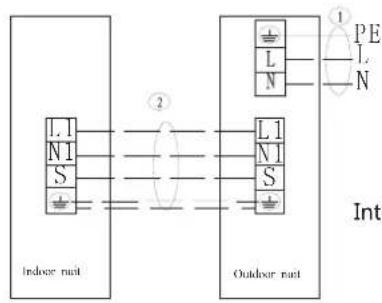
5.4 Installation of connecting cables for indoor unit and outdoor unit
Communication cables for indoor unit and outdoor unit must be connected in strict accordance with the identification. L1, N1, S, ground terminal of the indoor unit and L1, N1, S, ground terminal of the outdoor unit must be connected correspondingly, do not connect wrong.
5.5 Unit wiring diagram
Connections for a variety of indoor and outdoor models, see "Wiring diagram".
Note: The following drawings are for reference only, when comparing, the wiring nameplate will prevail.
flowchart
graph TD
    A["Indoor rail"] --> B["L1 N1 S"]
    A --> C["L1 N1 S"]
    D["Outdoor rail"] --> E["L1 N1 S"]
    D --> F["L1 N1 S"]
    G["Ground"] --> H["PE L N"]
    style A fill:#f9f,stroke:#333
    style D fill:#f9f,stroke:#333
    style G fill:#ccf,stroke:#333
POWER SUPPLY 220-240V/50Hz
Interconnection cords are shielded wire
Applicable for (220-240V/50Hz) single phase model
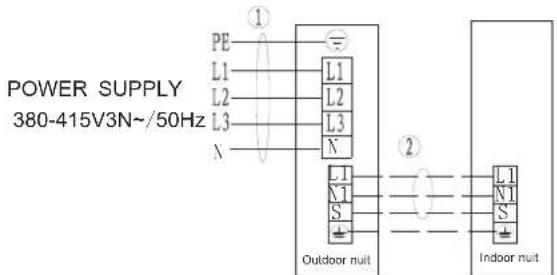
Interconnection cords are shielded wire
Applicable for (380-415V3N-/50Hz) three phase model≥

Notice
- To avoid abnormal operation of the unit caused by electromagnetic interference, attention should be paid to avoid the interference signal source when connecting cables.
- The wiring diagram is for reference only, when wiring, physical objects will prevail!
5.6 Unit wiring
Note: The cross-sectional area of the conductor selected by user must not be less than the specifications listed in the table. If the user's power cord is too far away from the unit, make a corresponding increase in the cross-sectional area of the line group to ensure the normal power supply.
Power supply line specifications
| Model\Name | Outdoor power supply line (quantity, diameter)H05RN-F | Indoor power supply line (quantity, diameter)H05VV-F | Indoor /outdoor connection line (quantity, Diameter) | Power supply method |
| Single phase 18K model | 3 × 1.5mm^2 | / | 4 × 1.0mm^2 | Outdoor Power Supply |
| Single phase 24K model | 3 × 2.5mm^2 | / | 4 × 1.0mm^2 | Outdoor Power Supply |
| Single phase ≥slant 36K model | 3 × 4mm^2 | / | 4 × 1.5mm^2 | Outdoor Power Supply |
| 3-phase ≥slant 36K model | 5 × 2.5mm^2 | / | 4 × 1.5mm^2 | Outdoor Power Supply |
5.7 Fault code
Table 1: Indoor unit fault is displayed
| When unit is standby after first time power on, running light flash slowly, after operation, all the lights off whenthe unit is off or standby.When unit is running, running light flashes, digital tube shows setting temperature in cooling and heating |
Table 1: Indoor unit fault is displayed
| Display | Error description Display Error description | ||
| E0 Phase protection F0 (reserve) | |||
| E1 | Communication error between outdoor unit and indoor unit | F1 (reserve) | |
| E2 Indoor room temperature (T1) sensor error F2 (reserve) | |||
| E3 Indoor coil middle temperature (T2) sensor error | F3 | Outdoor unit current error cannot recoverDisplay P3 error for 3 times within 60 minutes | |
| E4 | Indoor coil outlet temperature (T2B) sensor error | F4 | Outdoor temperature (T4) sensor error |
| E5 | Outdoor unit error | F5 (reserve) | |
| E6 | Zero speed protection | F6 | Outdoor unit condenser outlet (T3) sensor error |
| E7 | EERPOM error | F7 | Secondary side current protection |
| E8 | Indoor fan motor speed lose protection | F8 | Heat T2 temp. protection |
| E9 | Wired controller communication error | F9 | Outdoor unit voltage error |
| EE | Water level alarm error | ||
| EF | EF(reserve) | ||
| Display | Error description | Display | Error description |
| P0 | (reserve) | H0 | Communication error between outdoor unit main board and driver board |
| P1 | (reserve) | H1 | (reserve) |
| P2 | (reserve) | H2 | (reserve) |
| P3 | Primary/secondary overcurrent protection | H3 | (reserve) |
| P4 | Exhaust temperature over-high protection | H4 | 3 times of P6 error within 30 minutes |
| P5 | Outdoor unit condenser outlet (T3) temperature over-high protection | H5 3 times of P2 error within 30 minutes | |
| P6 | Compressor driver error or IPM protection | H6 | 3 times of P4 error within 100 minutes |
| P7 | (reserve) | H7 | (reserve) |
| P8 | (reserve) | H8 | (reserve) |
| P9 | Outdoor unit DC fan motor error | H9 | 2 times of P9 error within 10 minutes |
Table 2: Indoor unit (LED display)
| Error description Display content | |
| Indoor unit waiting for address assignment | LED timer and running flash together |
| (reserve) | LED timer, running, protection, defrost flash together |
| Communication error between outdoor unit and indoor unit | LED timer flash quickly |
| Fan motor stall protection | LED timer flash slowly |
| Indoor unit temperature sensor error LED run flash | |
| Water level alarm | LED protection flash |
| (reserve) LED defrost flash | |
| Outdoor unit error | LED protection flash slowly |
| EEPROM error | LED defrost flash slowly |
Quickly flash is 2.5Hz, slowly flash is 0.5Hz.
| Error type | Running | Defrost | Timer | Protection |
| Outdoor unit condenser outlet (T3) sensor error | OFF | OFF | ON | ON |
| Outdoor temperature (T4) sensor error | OFF | OFF | Flashing | ON |
| AC overvoltage/under voltage protection | OFF | Flashing | OFF | ON |
| P6 protection | OFF | Flashing | ON | ON |
| Compressor protection | OFF | ON | OFF | ON |
| Compressor top temperature (T5) over-high protection | OFF | ON | ON | ON |
| Outdoor DC fan motor error | OFF | ON | Flashing | ON |
| Over current protection | ON | ON | OFF | ON |
Table 3: Wired controller
| Spot check NO. | Content | Spot check NO. | Content |
| 1 | Indoor unit capacity | 11 | Opening of EXV |
| 2 | Indoor unit capacity demand | 12 | Running frequency of compressor |
| 3 | Indoor demand after T4 amendment | 13 | Primary voltage/4 |
| 4 | Indoor demand after T2 amendment | ||
| 5 | Indoor room temperature (T1) temperature | ||
| 6 | Indoor coil middle temperature (T2) temperature | ||
| 7 | Indoor coil outlet temperature (T2B) temperature | ||
| 8 | Outdoor unit condenser outlet (T3) temperature | ||
| 9 | Outdoor temperature (T4) temperature | ||
| 10 | Compressor top temperature (T5) temperature (maximum 99°C) |
Table 3: Wired controller
| Display | Error description | Display | Error description |
| E0 | Phase protection | F0 | (reserve) |
| E1 | Communication error between outdoor unit and indoor unit | F1 | (reserve) |
| E2 | Indoor room temperature (T1) sensor error | F2 | (reserve) |
| E3 | Indoor coil middle temperature (T2) sensor error | F3 | Outdoor unit current error cannot recoverDisplay P3 error for 3 times within 60 minutes |
| E4 | Indoor coil outlet temperature (T2B) sensor error | F4 | Outdoor temperature (T4) sensor error |
| E5 | Outdoor unit error | F5 | (reserve) |
| E6 | Zero speed protection | F6 | Outdoor unit condenser outlet (T3) sensor error |
| E7 | EERPOM error | F7 | Secondary side current protection |
| E8 | Indoor fan motor speed lose protection | F8 | Heat T2 temp. protection |
| E9 | Wired controller communication error | F9 | Outdoor unit voltage error |
| EE | Water level alarm error | ||
| EF | EF(reserve) |
| Display Error description Display Error description | |||
| P0 (reserve) H0 | Communication error between outdoor unit main board and driver board | ||
| P1 (reserve) H1 (reserve) | |||
| P2 (reserve) H2 (reserve) | |||
| P3 | Primary/secondary overcurrent protection | H3 | (reserve) |
| P4 | Exhaust temperature over-high protection | H4 | 3 times of P6 error within 30 minutes |
| P5 | Outdoor unit condenser outlet (T3) temperature over-high protection | H5 | 3 times of P2 error within 30 minutes |
| P6 | Compressor driver error or IPM protection | H6 | 3 times of P4 error within 100 minutes |
| P7 (reserve) H7 (reserve) | |||
| P8 (reserve) H8 (reserve) | |||
| P9 | Outdoor unit DC fan motor error | H9 | 2 times of P9 error within 10 minutes |
| No. | Name Quantity Remark | ||
| 1 | Indoor unit 1 set | ||
| 2 | Installation instructions for the use of air conditioner | 1 page | Includes User Service Guide and product certification. |
| 3 | Remote controller 1 piece | ||
| 4 | Light board 1 piece | ||
| 5 | Light board cable 1 item | ||
| 6 | Lamp panel box cover | 1 piece | |
| 7 | Insulation sleeve | 1 set | |
Packing ____
Inspection
natural_image
Abstract radial gradient pattern with no text or symbolsnatural_image
Simple line drawing of a trash bin with crossed lines indicating no waste or discharge (no text or symbols)18.
natural_image
Technical line drawing of a mechanical component with two cylindrical pins (no text or symbols)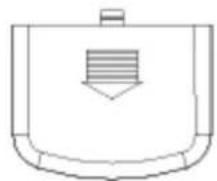
natural_image
Simple line drawing of a container with a handle and internal striped pattern (no text or symbols)natural_image
Technical line drawing of a mechanical component with two cylindrical parts and a rounded rectangular housing (no text or symbols)natural_image
Technical line drawing of a dual-panel air conditioning unit with circular vented pattern (no text or symbols)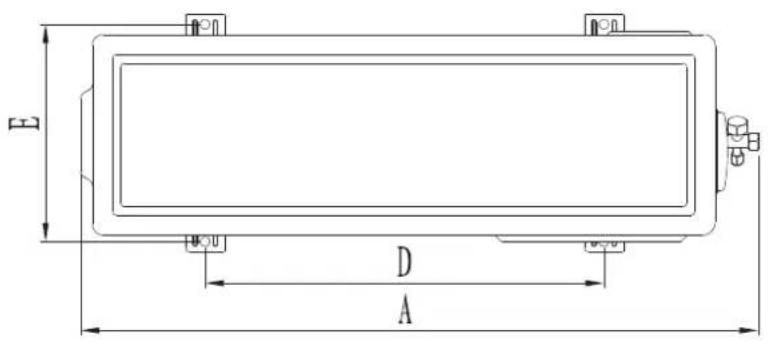
Figura 10
natural_image
Technical line drawing of a rectangular industrial or cooling unit with circular vented pattern and labeled dimensions A and D (no text or symbols beyond labels)Figura 11
Unidad: mm
natural_image
Technical line drawing of a large air conditioning unit with circular fan pattern and control panel (no text or symbols)Figura 12.1
Unidad: mm
natural_image
Technical line drawing of a vertical industrial or storage unit with internal partitions and a small container (no text or symbols)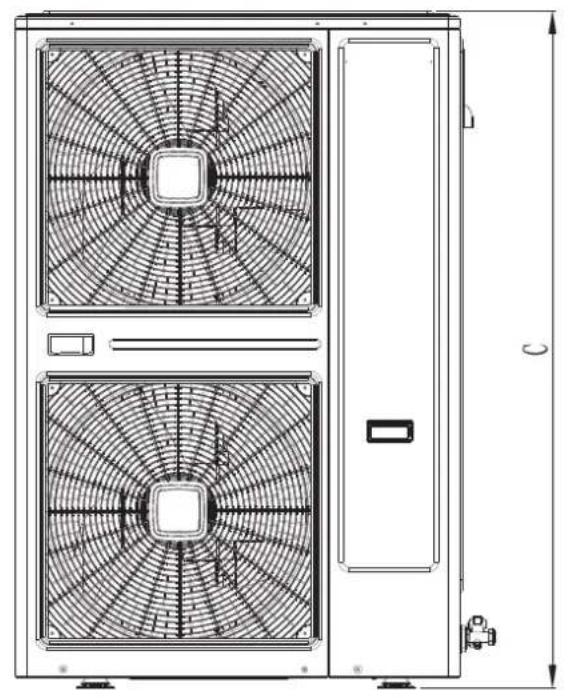
natural_image
Technical line drawing of a dual-panel air conditioning unit with fan patterns and door (no text or symbols)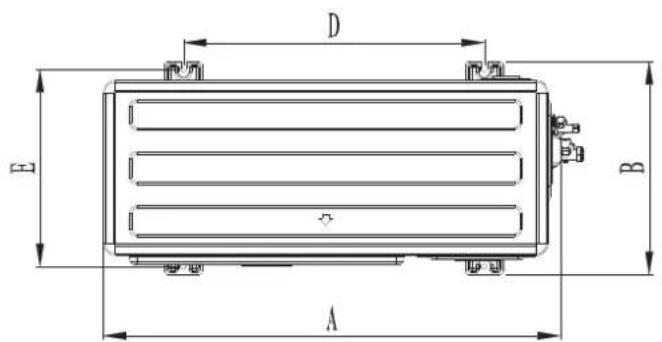
Figura 12.2
Unidad: mm
Figura 13
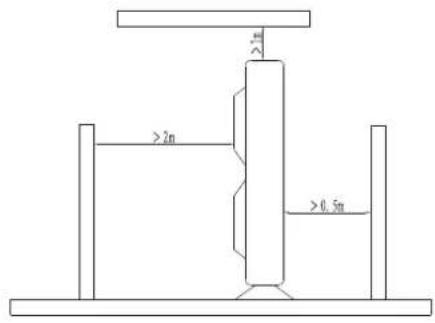
Figura 14