Playmaker - TV antenna Winegard - Free user manual and instructions
Find the device manual for free Playmaker Winegard in PDF.


| Product Type | TV Antenna |
| Model | Playmaker |
| Brand | Winegard |
| Category | Portable Omnidirectional |
| Dimensions | 13.5 x 11.5 x 4.5 inches |
| Weight | 2.5 lbs |
| Power Source | 12V DC (vehicle power) |
| Frequency Range | VHF 174-216 MHz, UHF 470-700 MHz |
| Gain | 2.5 dBi |
| Impedance | 75 Ohm |
| Connector Type | F-type coaxial |
| Mounting | Roof mount or portable base |
| Weather Resistance | UV resistant, weatherproof |
| Color | White / Black |
| Included Accessories | Antenna, mounting hardware, coaxial cable |
| Signal Compatibility | Digital HD (ATSC) |
| Range | Up to 50 miles (terrain dependent) |
| Polarization | Linear |
| Special Features | Omnidirectional, compact design |
Frequently Asked Questions - Playmaker Winegard
User questions about Playmaker Winegard
0 question about this device. Answer the ones you know or ask your own.
Ask a new question about this device
Download the instructions for your TV antenna in PDF format for free! Find your manual Playmaker - Winegard and take your electronic device back in hand. On this page are published all the documents necessary for the use of your device. Playmaker by Winegard.
USER MANUAL Playmaker Winegard
www.winegard.com/playmaker
For receivers and programming, call 1-866-593-0348
For help, email help@winegard.com or call 1-800-788-4417
DO NOT RETURN ANTENNA TO PLACE OF PURCHASE
dish playmaker

SINCE 1953
ANTENNA DESIGNED AND MANUFACTURED
USA
Parts
DISH e Playmaker s Antenna / DISH e Playmaker e Dual Antenna
25 ft Coaxial Cable
Hardware Bag:
1 Handle, 2 screws, 4 Tripod adapters
Specifications
Compatible with DISH programming
Compatible with DISH Solo HD receivers
For stationary use only
Unit weight: 7.24 lbs
Unit height: 12.98 in
Diameter: 16.08 in
Elevation range: 18–70°
UV-protected plastic dome
Black plastic base
Made in USA

WARNINGS

! Do not place the unit in water greater than one inch deep, or water may damage the electronics.
Do not install or operate the antenna in winds of 35 mph or greater. The antenna will roll in winds ≥35 mph.
! Care should be taken when transporting and setting up the antenna. Do not toss or drop the antenna.
! Do not paint the antenna. Painting the antenna may cause signal degradation and will void your warranty.
Do not remove dome cover from base unless specifically instructed by Winegard Technical Service. Interaction with internal parts could make the system inoperable and/or cause injury.
Compatible Receivers
The DISH Playmaker antennas must be used with DISH Solo HD receivers. Examples of DISH Solo HD receivers include DISH 211z, 211k, 211, 411 and Wally ^® receivers.
Compatible Satellites
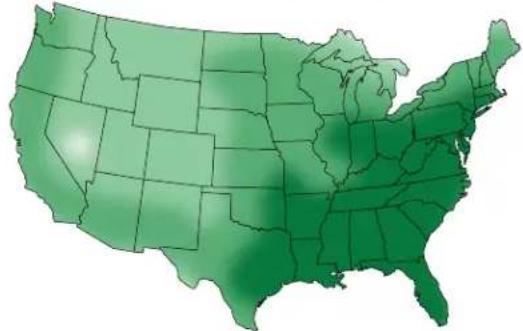
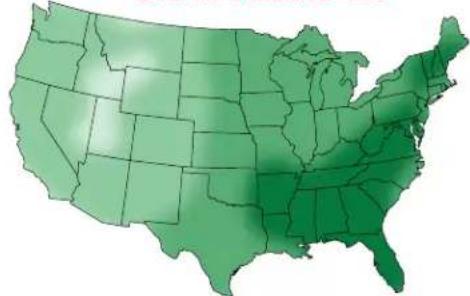
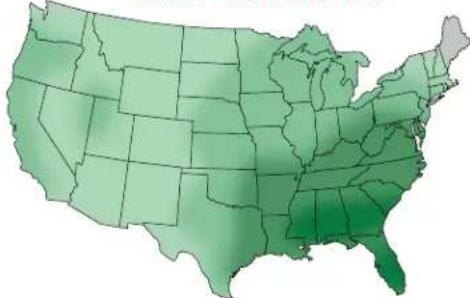
The DISH Playmaker antennas can receive programming from DISH western arc, which includes satellites 110°, 119°, and 129°.
See signal maps* to determine coverage in various areas of the United States. Coverage maps are approximate and do not guarantee coverage.
Good
Signal Strength
Best
DISH® Satellite 110°
natural_image
Map of the United States showing states in a green gradient, no text or labels visibleDISH® Satellite 119°
natural_image
Map of the United States showing states in descending order, with no text or labels visible.DISH® Satellite 129°
natural_image
Map of the United States showing states in descending order, with some states highlighted in green (no text or labels visible)*Source: www.satbeams.com. Coverage maps are approximate and do not guarantee coverage.
Installing the Handle
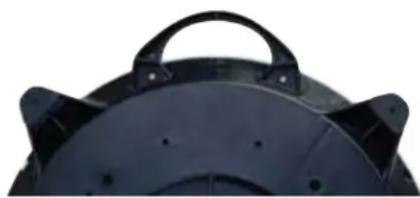
NOTE The two holes for the handle are located on the base under the DISH, | playmaker, name on the front of the dome.
Locate the handle and the two screws in the hardware bag inside the box.
Slide the handle in place, aligning the two holes in the underneath side of the handle with the two holes in the base. Thread the screws through the aligned holes. Tighten the screws using a Phillips screwdriver. Do not overtighten.
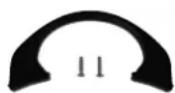
Handle placement
natural_image
Close-up of a black plastic dome-shaped object with a handle and mounting holes (no text or symbols visible)Selecting a Location for the Antenna
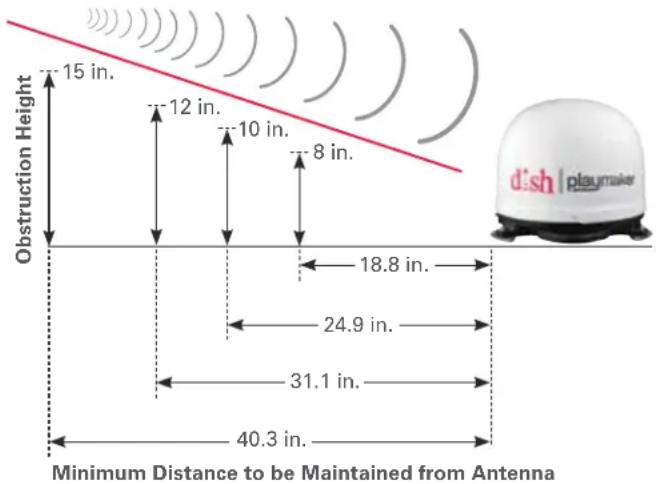
Choose a location with a clear, unobstructed view of the southern sky. Avoid obstructions such as trees, hills, vehicles, or buildings—these can block the signal from the satellite.
NOTE Satellite signal will not pass through solid objects. For this reason, it is vital to select a location with a clear, unobstructed view of the southern sky.
Be sure to place the antenna on a stable surface to prevent wobbling or moving, which could cause loss of signal. Also do not place the antenna in a path of people or vehicles' otherwise, the antenna may be knocked off of the signal if run into, or cables may be disconnected from the unit.
Select a location that will enable the DISH Playmaker or DISH Playmaker Dual antenna to sit within three degrees of level. The antenna may take longer to lock onto signal if the antenna is not level.
NOTE A 25 foot coaxial cable is included and recommended for use with the antenna. If using an alternate cable, all cabling should be RG6 with a maximum length of 50' from Playmaker to Receiver.
Signal Obstruction Chart
Connecting Antenna to the Receiver
TIP Run the coaxial cable directly from the satellite receiver to the DISH Playmaker antenna when searching for signal.
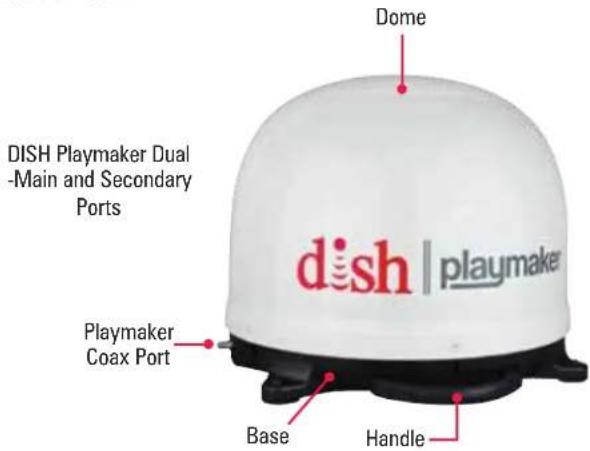
Connect a coax cable from the DISH Playmaker antenna coax port to the "Sat In" port on the side of the receiver. The DISH Playmaker Dual antenna has 2 ports with molded-in text indicating the primary (MAIN) and secondary (SEC) ports. The primary port should always be connected to the receiver when the antenna is in use, or there will be no power to the electronics.
Tighten coax connection until fingertight, and then tighten a quarter turn more with a wrench. Do not overtighten.
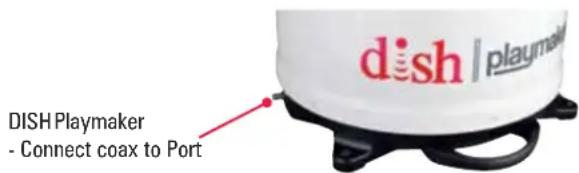
DISH Playmaker Dual - Connect primary receiver coax to Main Port
DISH® Receiver Setup
After connecting the antenna to the receiver, connect the receiver to a power source, and complete receiver setup.
Check out online receiver setup guides for your antenna at www.winegard.com/receivers/setupguide.php.
If using a brand new receiver, follow the steps under "Receiver Setup for new Wally receivers." If using a receiver that is currently active or has been previously used, follow the steps under "Receiver Setup for Currently Active or Previously Used Receivers."
Quick Receiver Setup
- Make sure the DISH Playmaker / DISH Playmaker Dual antenna is in a location with a clear view of the southern sky.
- Connect the receiver to the coaxial port on the base of the Playmaker. Connect the receiver to the MAIN coaxial port on the base of the Playmaker Dual.
- After connecting the receiver to a power source, complete receiver setup. Select the state that you are currently in. Press "Scan" to start scanning for satellites.
- Watch TV!
Receiver Setup for a New Wally® Receiver
If using a new Wally receiver with the DISH • Playmaker • / DISH • Playmaker • Dual antenna, the receiver will go through an Installation Wizard to help with the setup process.
Follow the on-screen instructions to program the remote control.
Step 1 of the Installation Wizard will pair the remote to the receiver. During Step 2, the unit will need to acquire satellites and may update the receiver (figures 1-6).
This step will require a search initiated by the Mobile Setup screen. Fill in the required information, and then select "Scan" to begin the search routine (figures 1-3).
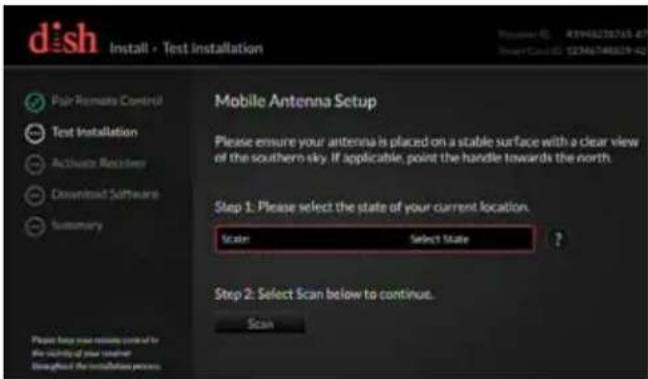
Figure 1
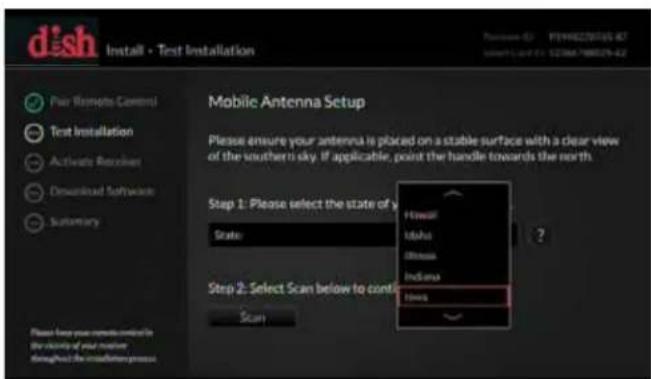
Figure 2
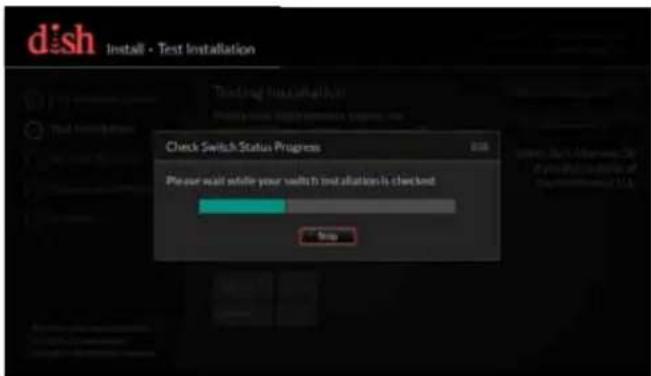
Figure 3
During the search routine, the antenna will scan for satellites. The antenna may make a slight grinding sound when searching for satellites; this is normal and does not harm the unit.
Once the search routine is complete, the receiver may update (figure 4).
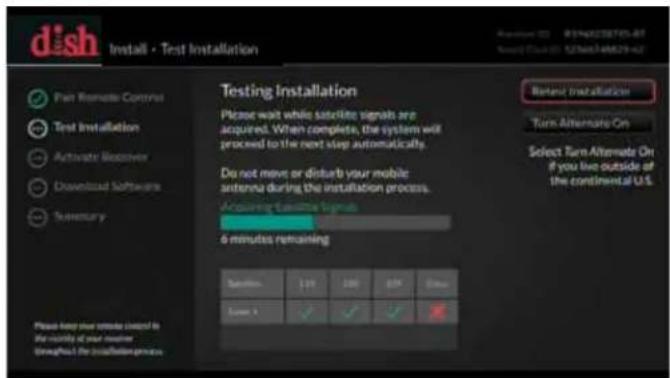
Figure 4
If not already activated, the receiver will need to be activated (figure 5). To activate the receiver, call Winegard Company at 1-866-593-0348.
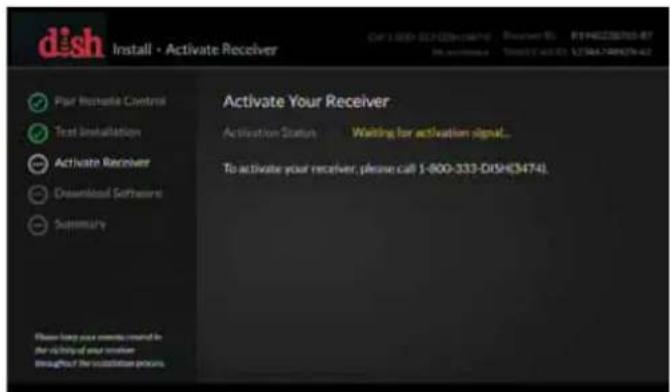
Figure 5
The receiver may reboot automatically as part of the update process (figure 6). If so, select the state of your current location on the Mobile Antenna Setup screen as in figures 1 and 2. Press "Scan" to begin the search routine.
The satellite will search for and acquire satellites.
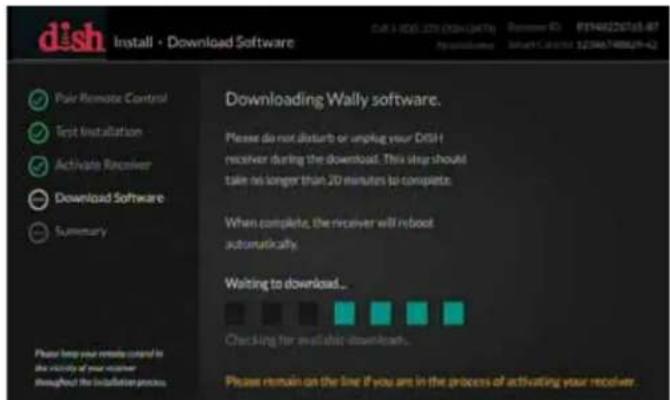
Figure 6
NOTE If the receiver reboots at this time, restart (see figures 1 & 2).
Updating Receiver Software
For optimal performance, update receiver software occasionally. To allow the software to update, leave the satellite on signal, and press the Power button on the remote or front panel of the receiver; this will put the receiver in Standby mode (figure 7). Do not unplug the receiver at this time.
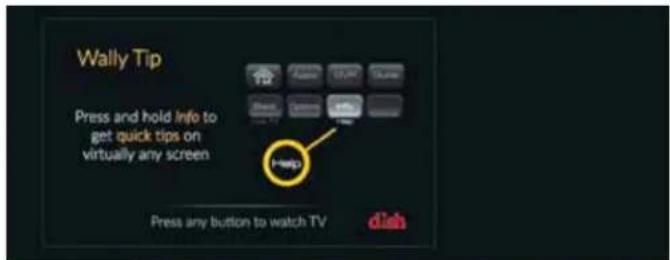
Figure 7
After being in Standby mode for a few minutes, the software will automatically begin to update (figure 8). Upon completion of the update, the receiver will reboot. Return to the beginning of "Receiver Setup for Currently Active or Previously Used Receivers" to re-acquire satellites and complete setup.
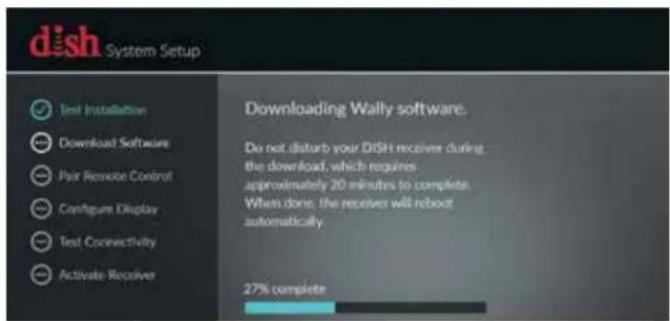
Figure 8
TIP If the receiver is in Standby mode for more than five minutes, no software update is necessary. Turn the receiver back on to resume normal operation
Receiver Setup for Currently Active or Previously Used Wally® Receiver
If the receiver you will be using with the DISH ® Playmaker ® /DISH ® Playmaker ® Dual antenna is an older receiver that has not been used in several years, you may need to connect the receiver to a DISH home satellite to be updated before proceeding with the mobile setup.
After the receiver has been powered on, the receiver will enter the Mobile Setup menu.
NOTE If mobile setup menu does not appear, press and hold power button on the front panel of the receiver for 3 seconds to reset the receiver.
Select the state of your current location, and then select "Scan" to begin the search routine (figure 9).
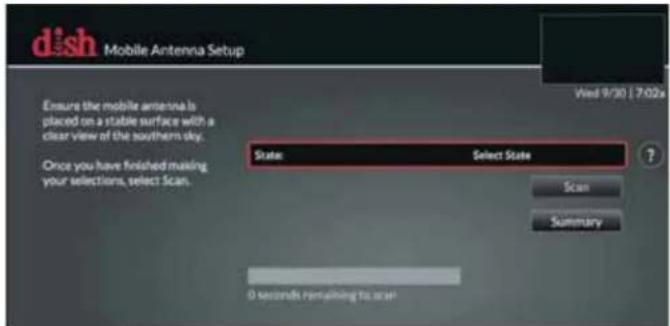
Figure 9
The satellite will begin searching and will locate the desired satellites (figure 10).
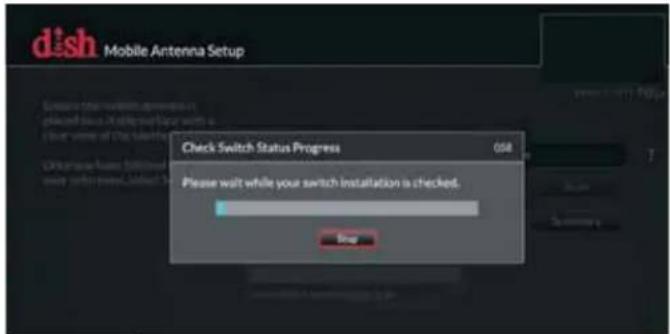
Figure 10
TIP If prompted with a message stating fewer satellites than previously used were found, select SAVE or YES to continue.
After the satellites have been acquired, the Electronic Programming Guide will download (figure 11).
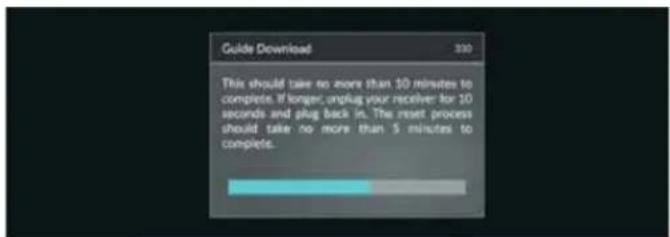
Figure 11
Receiver setup instructions are accurate at time of printing and may change without notice.
Setup for a Secondary Receiver
After completing the setup on the main receiver, power on the secondary receiver. If using a new receiver, you will be guided through the setup by the Installation Wizard; follow the on-screen steps to complete the setup. If using a receiver that is currently active or has been used previously, you will need to complete the setup by doing a Check Switch test. To access the receiver menu for running a Check Switch test, follow the steps under "Accessing the Receiver Menu."
Accessing the Receiver Menu
If you need to access the receiver menu after initial setup, follow the steps below to reach the receiver menu.
Press Home button twice on your remote. On the "Home" tab, select "Settings" (figure 12).
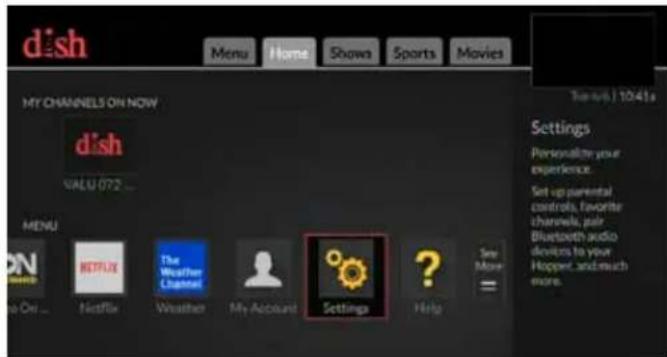
Figure 12
Within the "Settings" menu, select "Diagnostics" (figure 13).
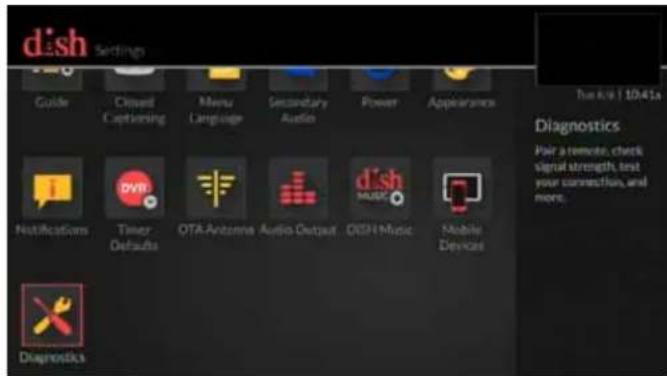
Figure 13
Within the "Diagnostics" menu, select "DISH" on the left side (figure 14).
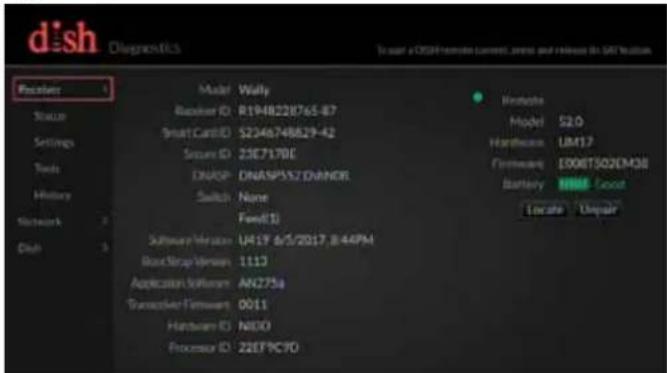
Figure 14
Press "Test Installation 5" to start the Check Switch test (figure 15).
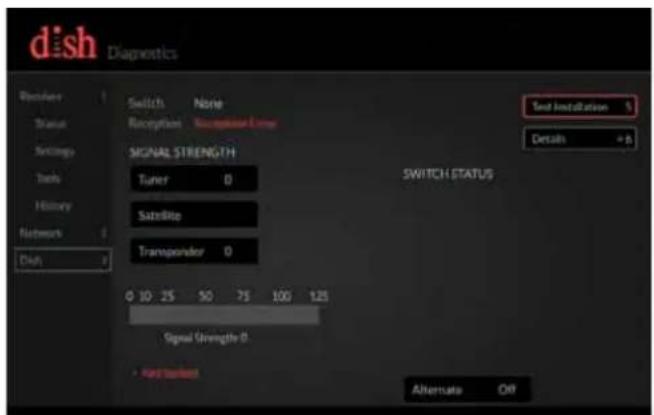
Figure 15
The "Check Switch Status" screen will show the progress (figure 16).
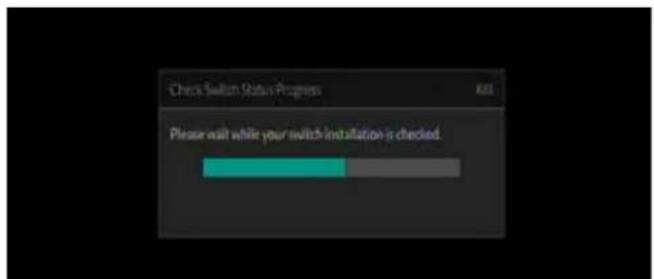
Figure 16
The receiver will acquire the signal (figure 17).
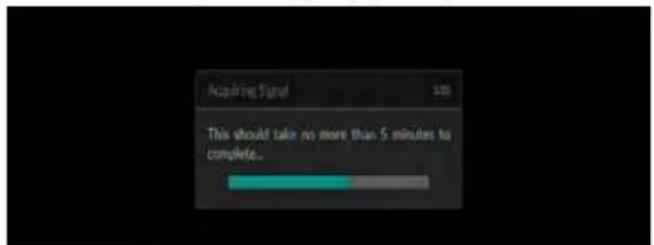
Figure 17
Lastly, the receiver will download the Program Guide (figure 18).
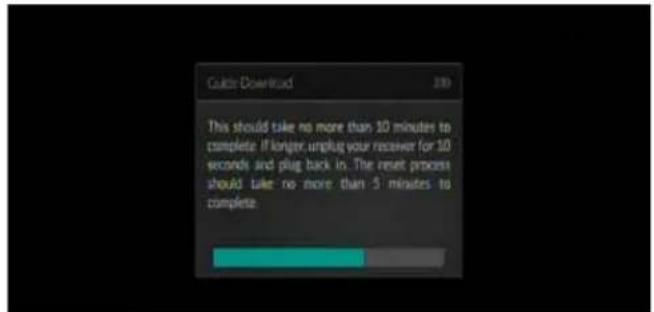
Figure 18
Operation of Secondary Receiver
When using a secondary receiver with the DISH 3 Playmaker n antenna, the secondary receiver does not have the full function of the primary receiver. The primary receiver will determine which satellite is viewed, and the secondary receiver will need to be set up for that satellite.
If the primary receiver changes to a channel on a different satellite, the secondary receiver will lose reception and need to complete setup again on the new satellite.
NOTE
The secondary receiver's program guide will only download and display available channels from the installed satellite.
Using Outside Receptacle
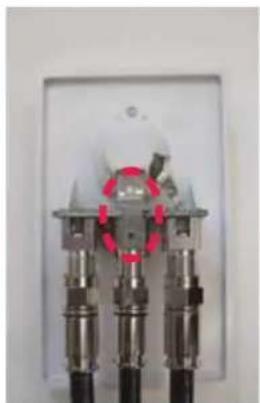
If your outside TV receptacle is wired for satellite, you'll need to locate where that receptacle leads and connect that directly to your satellite receiver.
If the outside TV receptacle is wired for cable, the wiring will have to be modified for use with satellite. The coaxial cable cannot run through any other devices or switches before the satellite receiver.
Typically, if wired for cable, the wiring will either run through a Winegard power supply or video switch. The easiest way to fix this is to disconnect the cable from that device, use a barrel connector, and connect a new cable that runs directly to the receiver, bypassing the power supply or video switch.
natural_image
Close-up of a mechanical or electronic component with metallic rods and a central hub, no visible text or symbols.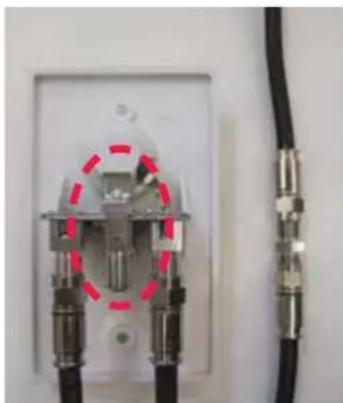
natural_image
Close-up of a mechanical or electrical component with black connectors and red dashed oval highlights (no visible text or symbols)Transporting
Before transporting the antenna, disconnect coax cable from the main port.
Maintenance
The DISH Playmaker and DISH Playmaker Dual antennas are designed to be maintenance free. However, it is a good idea to periodically clean the dome with a soft cloth, water, and dish soap
FCC Guidelines
This device complies with Part 15 of the FCC Rules. Operation is subject to the following two conditions: (1) this device may not cause harmful interference, and (2) this device must accept any interference received, including interference that may cause undesired operation.
Temporary and Permanent Mount Options
Winegard mount options for the DISH Playmaker and DISH Playmaker Dual automatic portable satellite TV antennas raise the antenna off of the ground for better reception and security. These mounts are built to withstand the harsh outdoor environment.
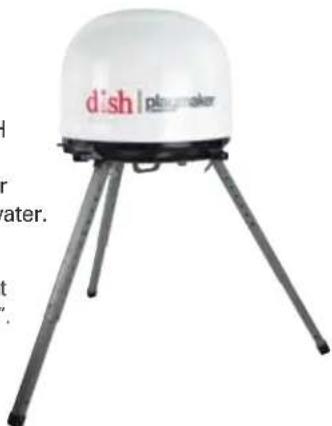
TR-1518 Tripod Mount
Antenna sold separately.
Aluminum tripod elevates the DISH Playmaker / DISH Playmaker Dual portable antenna off the ground for protection from mud and water.
Tripod mount has adjustable height and leveling settings of 14.5" – 22". Quickly disassembles for compact storage.
natural_image
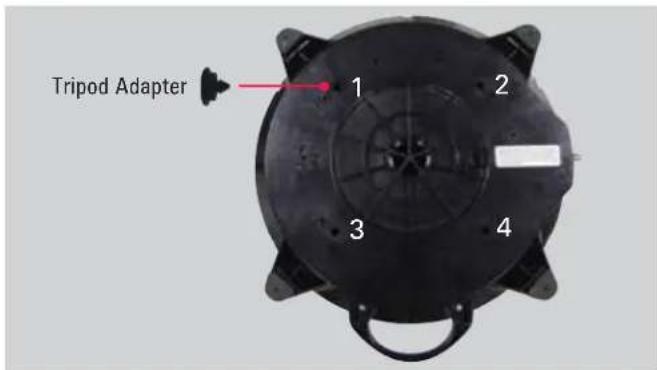
White dish-mounted radio antenna with tripod legs, no visible text or symbols on the device itselfNOTE If using the optional TR-1518 Tripod Mount, it is necessary to install the tripod adapters included in the antenna's hardware bag. Push the adapters into the four largest holes on the bottom of the antenna.
RK-4000 Roof Mount Kit
Antenna sold separately.
Permanently mount your DISH Playmaker / DISH Playmaker Dual portable antenna to your vehicle roof. No need to buy another antenna to replace your portable!

For more information or to purchase accessories contact your local RV dealer or winegard.com
WARNING It is not recommended to mount the antenna directly to a vehicle without using the roof kit accessory. Failure to follow proper installation instructions could cause damage and/or potential injury.
The DISH Playmaker / DISH Playmaker Dual are NOT intended to be mounted onto over-the-road trucks or for marine applications.
Troubleshooting
On Screen Possible Cause Solution
| Mobile Antenna Setup does not appear | No communication between receiver and satellite dish | Check wiring. Verify connection to Main port. Verify good coax. |
| Receiver software not compatible Ensure a compatible DISH Solo HD receiver is being used.Connect receiver to fixed/home satellite dish for software update. | ||
| Error Code 150, “All Satellites Not Found” | Possible obstructions blocking satelliteSatellite coverage issues in extreme Northeast or Northwest | Attempt to move the antenna from any blockages or obstructions.Attempt a re-scan on the receiver. |
| Error Code 151, “No Satellites Found” | Possible obstructions blocking satelliteIntermittent coax connection | Attempt to move the antenna from any blockages or obstructions.Re-check coax connections to make sure coax did not become loose during scan.Attempt a re-scan on the receiver. |
If the above steps do not resolve the error, re-boot the receiver and start the Mobile Antenna Setup again; often, this will resolve the problem. If the problem persists, contact Winegard Technical Services at help@winegard.com or 1-800-788-4417.
WINEGARD MOBILE PRODUCTS LIMITED WARRANTY
(2 YEARS PARTS; 1 YEAR LABOR)
Winegard Company warrants this product against defects in materials or workmanship for a period of two (2) years from the date of original purchase. During year one (1) of such warranty, Winegard Company will also pay authorized labor costs to an authorized Winegard dealer to repair or replace defective products. No warranty claim will be honored unless at the time the claim is made, Customer presents proof of purchase to an authorized Winegard dealer (to locate the nearest authorized Winegard dealer, contact Winegard Company, 3000 Kirkwood Street, Burlington, Iowa 52601, Telephone 800-288-8094 or visit www.winegard.com). Customer must provide proof of purchase with a dated sales receipt for the Winegard product to verify the product is under warranty. If the date of purchase cannot be verified, the warranty period shall be considered to begin thirty (30) days after the date of manufacture.
If a defect in material or workmanship is discovered, Customer may take the product to an authorized Winegard dealer for service. Customer must provide proof of purchase to verify the product is under warranty. If the product is brought to an authorized Winegard dealer for service prior to expiration of year one (1) of the warranty period and a defect in material or workmanship is verified by Winegard Technical Services, Winegard Company will cover the Winegard dealer's labor charges for warranty service. The Winegard dealer must contact Winegard Technical Services in advance for pre-approval of the service. Approval of the service is at the sole discretion of Winegard Company.
Alternatively, Customer may ship the product prepaid to Winegard Technical Services (located at 2736 Mt. Pleasant Street, Burlington, Iowa 52601, Telephone 800-788-4417). Customer must return the product along with a brief description of the problem and provide Winegard Technical Services with Customer's name, address, and phone number. Customer must also provide proof of purchase to verify the product is under warranty. If the product is returned before the expiration of the warranty period, Winegard Company will (at its option) either repair or replace the product.
This Limited Warranty does not apply if the product has been damaged, deteriorates, malfunctions or fails from: improper installation, misuse, abuse, neglect, accident, tampering, modification of the product as originally manufactured by Winegard in any manner whatsoever, removing or defacing any serial number, usage not in accordance with product instructions or acts of nature such as damage caused by wind, lightning, ice or corrosive environments such as salt spray and acid rain. This Limited Warranty also does not apply if the product becomes unable to perform its intended function in any way as a result of the television signal provider making any changes in technology or service.
RETURN AUTHORIZATION POLICY
A Return Material Authorization (RMA) is required prior to returning any product to Winegard Company or Winegard Warranty Services under this warranty policy. Please call our Technical Services Department at 800-788-4417 or send an email to warranty@winegard.com to obtain the RMA number. Please furnish the date of purchase when requesting an RMA number. Enclose the product in a prepaid package and write the RMA number in large, clear letters on the outside of the package. To avoid confusion or misunderstanding, a shipment(s) without an RMA number(s) or an unauthorized return(s) will be refused and returned to Customer freight collect.
WINEGARD COMPANY DOES NOT ASSUME ANY LIABILITIES FOR ANY OTHER WARRANTIES, EXPRESS OR IMPLIED, MADE BY ANY OTHER PERSON.
ALL OTHER WARRANTIES WHETHER EXPRESS, IMPLIED OR STATUTORY INCLUDING WARRANTIES OF FITNESS FOR A PARTICULAR PURPOSE AND MERCHANTABILITY ARE LIMITED TO THE TWO YEAR PERIOD OF THIS WARRANTY.
In states that do not allow limitations on implied warranties, or the exclusion of limitation of incidental or consequential damages, the above limitations or exclusions do not apply.
Some states do not allow limitations on how long an implied warranty lasts, or the exclusion of limitation of incidental or consequential damages, so the above limitations or exclusions may not apply to you.
This warranty gives Customer specific legal rights. Customer may also have other rights that may vary from state to state.
SATELLITE RECEIVER WARRANTY
See manufacturer's limited warranty policy.
WS-MOBWARREV3
Disclaimer: Although every effort has been made to ensure that the information in this manual is correct and complete, no company shall be held liable for any errors or omissions in this manual. Information provided in this manual was accurate at time of printing. If the antenna does not function as expected, please contact Winegard Company at help@winegard.com or 1-800-788-4417, or visit our website at www.winegard.com.
DISH®, Playmaker® and Wally® are registered trademarks of DISH Network L.L.C. Winegard® is a registered trademark of Winegard Company.
Winegard Company • 3000 Kirkwood Street • Burlington, IA 52601 • 1-800-288-8094 • Fax 319-754-0787 • www.winegard.com
Printed in U.S.A. ©2017 Winegard Company
Rev1 8/17 2452389