
TRAV'LER SK-7003 - TV antenna Winegard - Free user manual and instructions
Find the device manual for free TRAV'LER SK-7003 Winegard in PDF.


| Product Type | TV Antenna |
| Brand | Winegard |
| Model | TRAV'LER SK-7003 |
| Compatible Use | Recreational Vehicles (RVs) |
| Antenna Type | Directional, Crank-Up |
| Reception Frequency | VHF/UHF (Channels 2-51) |
| Gain | Up to 11 dBi |
| Rotation | 360° Manual Rotation |
| Elevation | Adjustable, Crank-Up |
| Dimensions (Deployed) | Approx. 28 x 30 x 10 inches |
| Dimensions (Stowed) | Approx. 24 x 20 x 6 inches |
| Weight | 8 lbs |
| Power Source | Passive (No Power Required) |
| Mounting Method | Roof Mount, Flange Included |
| Coax Cable | RG-59, 50 ft Included |
| Material | UV-Resistant ABS Plastic, Aluminum Elements |
| Weather Resistance | Designed for Outdoor Use |
| Maintenance | Clean with Mild Soap and Water; Avoid Abrasives |
| Safety Note | Lower Antenna Before Driving; Avoid Overhead Power Lines |
| Spare Parts & Repairability | Parts Available from Winegard; Repairable by Authorized Technicians |
| Warranty | 1 Year Limited Warranty |
Frequently Asked Questions - TRAV'LER SK-7003 Winegard
User questions about TRAV'LER SK-7003 Winegard
0 question about this device. Answer the ones you know or ask your own.
Ask a new question about this device
Download the instructions for your TV antenna in PDF format for free! Find your manual TRAV'LER SK-7003 - Winegard and take your electronic device back in hand. On this page are published all the documents necessary for the use of your device. TRAV'LER SK-7003 by Winegard.
USER MANUAL TRAV'LER SK-7003 Winegard
Automatic Multi-Satellite TV Antenna

Model SK-7003 Mount
OPERATION MANUAL
Made in the U.S.A.

PRODUCT REGISTRATION
Please register your Winegard product by filling out and returning the Product Registration card provided or by completing the online registration form at http://www.winegard.com/registration
Serial No.
Congratulations!
You have selected the Winegard® TRAV'LER Automatic Multi-Satellite TV Antenna. The TRAV'LER antenna will deliver the ability to view both SHAW DIRECT satellites at the same time with unmatched signal strength, the lowest travel height on the market, maximum HD capabilities and easy to use functionality – just like you get at home. This manual provides important information on the installation and operation of your TRAV'LER Interface Box. Please take time to read the manual in it's entirety before installing or operating your antenna.
Icons appearing in the manual are used for important information and helpful tips.

Alert indicates important information regarding
product use, product specifications or procedures.

Important tip offers helpful suggestions or
refers you to a related topic in the manual.
For Winegard Warranty Information:
Attn: Technical Services
Winegard Company
3000 Kirkwood St
Burlington, IA 52601
800-788-4417
Fax: 319-754-0715
For Shaw Direct Programming Inquiries:
Attn: Administration
Shaw Direct
Suite 100, 2400 32 Ave NE
Calgary, AB T2E 9A7
888-554-7827
Fax: 800-872-8219
Disclaimer
Although every effort has been made to insure the information in this manual is correct and complete, no company shall be held liable for any errors or omissions in this manual. All information contained in this manual is subject to change without notice. No warranty of any kind is made with regard to the information included in this manual. The Satellite Interface is designed specifically for use with motorized recreational vehicles and information contained herein is provided for that purpose only.
Trademarks
*WINEGARD and TRAVLER are trademarks of Winegard Company. Shaw Direct and related designs and indicia are trademarks of Shaw Direct. All trademarks contained in this manual are property of their respective owners. Reference made to products or services provided by companies, other than Winegard Company, does not represent any endorsement of those products or services.
Operation
The TRAV'LER Interface offers a simple one button operation that is also protected from accidental searches by a careful delay. Simply pressing the [Power] button will not start a search.
To start a search:
Press and Hold [Power] for two seconds or until the TRAV'LER interface displays "POWER ON".
WINEGARD COMPANY
POWER ON
Now the power is ON, the button may be released.
CONNECTING
TO ANTENNA
Once the power is on, the TRAV'LER Interface will try to determine the type of dish that it is working with. The TRAV'LER Interface will display the type of satellite dish on the top line and the action it is taking on the bottom. See below.

Many times, the
TRAV'LER will acquire
GPS fast enough that
this screen is not seen.
LG SHAW DIRECT
WAITING FOR GPS
LG SHAW DIRECT
READY MULTI-SAT
The TRAV'LER antenna will enter the search mode as part of its normal operation. The first part of the search is for the TRAV'LER to find its "Home" position. Once it finds it home position, it will begin to look for a satellite.
When the TRAV'LER antenna finds a satellite, it will fine tune or "Peak" on the signal and determine which of the satellites it has found. Once the TRAV'LER knows which satellite it has found, it can move directly to the correct satellite(s).
The TRAV'LER antenna in its automatic search mode will lock onto two different satellites. As it finishes its search, the TRAV'LER will display an * for each of the satellites it found. See below.
LG SHAW DIRECT
*111 *107
Now you are ready to watch TV.
Ready to Travel?
To stow the unit when you are ready to travel:
Press [Power] one time.
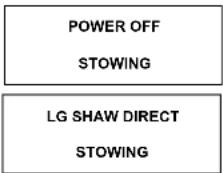
The unit will stop what it is doing and begin to return to the stowed position. The TRAV'LER Interface WILL NOT TURN OFF unless the TRAV'LER mount is successfully stowed.
Manual Mode:
The TRAV'LER antenna is an extremely versatile satellite antenna and can be manually set to find many different satellites individually. NOTE: This function is rarely used.
To enter the Manual Search Mode while the TRAV'LER is stowed:
Press the [Power] button and hold it for two seconds to turn the unit on. While the Trav'ler Interface reads:

Press and hold the [Enter] button for two seconds.
The TRAV'LER Interface will ask if you wish to enter the User Menu:
Press [Select] to choose YES and then press [Enter].

The User Menu consists of four choices:
Search Mode
Diagnostics
Installation
Exit
NOTE: Diagnostic and Installation Menus are not required for normal operation and should only be entered by a trained professional.
OPERATION
4
To use the Manual Search Mode to select a specific satellite, choose Search Mode by pressing the [Enter] button.
Once in the Search Menu you may choose from:
MULTISAT MODE (The normal search mode)
MANUAL 61
MANUAL 72
MANUAL 82
MANUAL 91
MANUAL 10
MANUAL 107
MANUAL 110
MANUAL 111
MANUAL 119
MANUAL 129
MANUAL 148
MAIN MENU (returns to the User Menu)
EXIT (Enters the Search Routine)
Press [Select] to cycle through each of these satellites until the asterisk is next to the satellite you wish to find. Then press [Enter].
The TRAV'LER Interface will ask you to confirm the change:
Press [Select] to move the asterisk to YES.

The Travier Interface will acknowledge your selection and ask:

The SK-7003 will only see the 107° and 111° satellites in manual mode.

The TRAVLER will remain in manual mode until you select multi-sat mode again.

Pressing [Enter] or choosing YES, will slow the TRAV'LER and turn it off.
Pressing [Select] then [Enter] or choosing NO will start a new search for your chosen satellite.
EMERGENCY OFF:
The Winegard TRAV'LER antenna comes with an emergency Power Off feature. To activate it, press and hold [POWER] and then press [SELECT] while still holding [POWER]. The TRAV'LER antenna will stop where it is and turn off.

Emergency Power Off is used, the TRAV'LER antenna may not be in a safe position for DO NOT MOVE THE VEHICLE UNTIL YOU ARE ABLE TO STOW THE UNIT. See Ready to 1, top of page 4, Operation section.
OPERATION
5

Hooking up the Shaw Direct receiver
Connect your Shaw Direct receiver to the TV using the appropriate audio and video cables. (Refer to your television user manual for the best audio/video connections).
If you have not chosen a programming package for your Shaw Direct system or added this receiver to your existing Shaw Direct account, please call 1-888-554-7827 prior to using your Shaw Direct receiver for the first time.
Ensure that your Shaw Direct receiver is connected to power.
Locate the coaxial feed coming from TRAV'LER system.
Connect the satellite feed to the coaxial input labeled with the symbol of a satellite dish.
Power on the Shaw Direct receiver and television.
If your TRAV'LER system is properly tuned and receiving signal, the satellite dish icon on the front of the Shaw Direct receiver will be highlighted in green.
If the TRAV'LER system is stowed or not tuned to the Shaw Direct satellites, the satellite icon on the front of the Shaw Direct receiver will appear in red. Turn on the TRAV'LER unit or troubleshoot as needed to achieve positive signal.
If your Shaw Direct system is disconnected from power for an extended period of time or you has been recently moved from another location, you may need to have your Shaw Direct system reauthorized. This can be determined when you receive a green (positive) signal, but can not receive video on a subscribed channel.
To initiate a signal refresh call 1-888-554-7827, then select "Self-Serve", "Technical Support", followed by "Signal Refresh" from the telephone menu options.
For changes to Shaw Direct programming or to purchase new Shaw Direct equipment visit shawdirect.ca or call 1-888-554-7827.
NOTE: The TRAV'LER antenna will find the satellites without the receiver installed.
TROUBLESHOOTING: ERROR C
POSSIBLE SOLUTION:
| ANTENNA CONNECTION FAILED | Check the data cable connection on the back of the Trav'ler Interface. If may not be connected properly. |
| EL HOME FAILURE | Something is preventing the TRAV'LER Mount from raising as it attempted to find the HOME position. Look for obstructions if unit has recently been manually raised, or the electronics have been replaced. The calibration may need to be reset. Contact Winegard Technical Support 1-(800) 788-4417. |
| AZ MOTOR STALLED | Something is preventing the TRAV'LER mount from rotating, look for obstructions. If no obvious obstruction, contact Winegard Technical Support 1-(800) 788-4417. |
| EL MOTOR STALLED | Something is preventing the TRAV'LER mount from raising or lowering, look for obstructions. If no obvious obstruction, contact Winegard Technical Support 1-(800) 788-4417. |
| SK MOTOR STALLED | Something is preventing the TRAV'LER reflector and LNBF from rotating, look for obstructions. If no obvious obstruction, contact Winegard Technical Support 1-(800) 788-4417. |
| STOW FAILURE ANT NOT STOWED | The TRAV'LER is not stowed. Do not try to move the vehicle. Try to slow the TRAV'LER again. If it fails again, check for obstructions. |
| STOW FAILURE STOW UNKNOWN | Check the data cable connection on the back of the TRAV'LER Interface. It may not be connected properly. |
| AZ MOTOR RUN REVERSE | Contact Winegard Technical Support 1-(800) 788-4417. |
| EL MOTOR RUN REVERSE | Contact Winegard Technical Support 1-(800) 788-4417. |
| SK MOTOR RUN REVERSE | Contact Winegard Technical Support 1-(800) 788-4417. |
| AZ MOTOR RUNAWAY | Contact Winegard Technical Support 1-(800) 788-4417. |
| EL MOTOR RUNAWAY | Contact Winegard Technical Support 1-(800) 788-4417. |
| SK MOTOR RUNAWAY | Contact Winegard Technical Support 1-(800) 788-4417. |
| NO LNB VOLTAGE | The TRAV'LER is not seeing the required 13-18VDC needed to power the LNBF. Check the coax connections. If these are all connected properly, contact Winegard Technical Support 1-(800) 788-4417. |
| UNKNOWN ERROR ⌘WWHW | Contact Winegard Technical Support 1-(800) 788-4417. |
| C MOTOR NOT FOUND | Contact Winegard Technical Support 1-(800) 788-4417. |
| ANTENNA WILL NOT AUTOMATICALLY STOW | See Emergency Manual Slow instructions. See Page 9 of Installation. |
| UNSUPPORTED ODU HARDWARE | Contact Winegard Technical Support 1-(800) 788-4417. |
| UNSUPPORTED ODU SOFTWARE | Contact Winegard Technical Support 1-(800) 788-4417. |
| GPS FAILURE | The GPS has taken longer than 10 min. to acquire. Contact Winegard Technical Support 1-(800) 788-4417 if this happens frequently. |
NOTE: If the TRAVLER antenna is connected to multiple receivers and any one is locked on the satellite, all receivers should be locked on signal. If one or more are not, check the coax connections for 13-18VDC at the LNBF. Without this voltage, the receiver will not get a signal.
Note: Weather and vehicle location can impact the ability of the TRAVLER antenna to locate all of the required satellites.
Obstructions such as buildings or tree limbs can block the satellite signals and prevent the TRAV'LER antenna from successfully
/! locating all of the satellites for Multi-Sat Mode. Make sure you have a clear view of the Southern sky.
Brand : Winegard
Model : TRAV'LER SK-7003
Category : TV antenna