
HLDW165S - Kitchen appliance PANASONIC - Free user manual and instructions
Find the device manual for free HLDW165S PANASONIC in PDF.
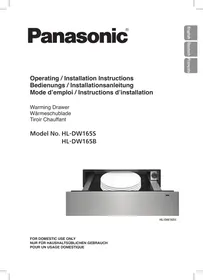


| Product type | Warming drawer |
| Brand | Panasonic |
| Model | HLDW165S |
| Dimensions (W x D x H) | 595 x 570 x 140 mm |
| Net weight | 16 kg |
| Power supply | 220-240 V ~ 50/60 Hz |
| Maximum power | 810 W |
| Capacity | 20.5 L |
| Functions | Preheating dishes and glasses, keeping warm, defrosting, fermentation, reheating |
| Power settings | 0 to 7 |
| Maximum load | 25 kg |
| Front panel material | Stainless steel or glass depending on version |
| Cleaning | Damp cloth and mild detergent; do not use steam cleaner or abrasive products |
| Safety | Earthing required, hot surfaces, use by children aged 8 and above under supervision |
| Installation | Must be installed with a Panasonic oven or on a fixed shelf; minimum rear clearance 45 mm |
| Spare parts | Contact authorized repair center |
| Warranty | Refer to the provided warranty booklet |
Frequently Asked Questions - HLDW165S PANASONIC
User questions about HLDW165S PANASONIC
0 question about this device. Answer the ones you know or ask your own.
Ask a new question about this device
Download the instructions for your Kitchen appliance in PDF format for free! Find your manual HLDW165S - PANASONIC and take your electronic device back in hand. On this page are published all the documents necessary for the use of your device. HLDW165S by PANASONIC.
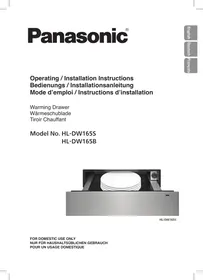
USER MANUAL HLDW165S PANASONIC
HL-DW165S
IMPORTANT SAFETY INSTRUCTIONS: Before operating this appliance, please read these instructions carefully and keep for future reference.
Thank you for purchasing this Panasonic appliance.
Contents
Operating Instructions....2-10
Safety Instructions....2-4
Disposal of Waste Products 4
Features and Functions....5-7
- Outline Diagram 5
- Preheating Crockery and Glassware....6
- Keeping Warm....7
- Defrosting and Proofing....7
Power Setting Guidelines 8
Cleaning 9
Troubleshooting....10
Installation Instructions.... 11-14
Installation and Connection....11
Safety Instructions.... 11-12
Dimensions....13
Installing the Appliance.... 14
Specifications 15
Operating Instructions
Safety instructions
■ This appliance can be used by children aged from 8 years and above and persons with reduced physical, sensory or mental capabilities or lack of experience and knowledge if they have been given supervision or instruction concerning use of the appliance in a safe way and understand the hazards involved. Children shall not play with the appliance. Cleaning and user maintenance shall not be made by children without supervision. ■ WARNING: In case of malfunction or breakdown, immediately stop using the appliance. Turn off the main power switch and the circuit breaker, and then contact the service centre. Failure to do this may cause smoke, burns, and electric shock. ■ If the power cord is damaged, it must be replaced by the manufacturer or a service technician authorised by the manufacturer in order to avoid a hazard. ■ Do not disassemble, repair, or modify the appliance. For repairs, contact the dealer where you purchased the appliance. ■ WARNING: This appliance must be earthed to prevent electric shock or fire.
Safety instructions
■ WARNING: The appliance and its accessible parts become hot during use. Care should be taken to avoid touching heating elements and the heating plate inside the appliance. Children less than 8 years of age shall be kept away unless continuously supervised. ■ Do not use abrasive cleaners or sharp metal scrapers to clean the appliance as they can scratch the surface. ■ A steam cleaner is not to be used for cleaning. ■ When this warming drawer is installed, it should be easy to isolate the appliance from the electricity supply by operating a circuit breaker or disconnecting from the mains. ■ If smoke is emitted or a fire occurs in the appliance, leave the drawer closed in order to stifle any flames. Disconnect the power cord, or shut off power at fuse or circuit breaker panel. ■ Failure to maintain the appliance in a clean condition could lead to deterioration of surfaces that could affect the life of the appliance and may result in a hazardous situation.
Safety instructions
■ Exterior surfaces, including air vents on the cabinet and the appliance will get hot during use. Take care when opening or closing the appliance and when placing or removing food and cookware. ■ Spray canisters, aerosols and other flammable substances can ignite when heated. Do not store or use such item near the appliance. ■ WARNING: The manufacturer cannot be held liable for damage to persons or items caused by failure to observe the safety instructions, by interference with any part of the appliance or by the use of non original spare parts.
Disposal of Waste Products
Information on Disposal for Users of Waste Electrical & Electronic Equipment (private households)
This symbol on the products and/or accompanying documents
means that used electrical and electronic products should not be mixed with general household waste.
For proper treatment, recovery and recycling, please take these products to designated collection points, where they will be accepted on a free of charge basis. Alternatively, in some countries you may be able to return your products to your local retailer upon the purchase of an equivalent new product.
Disposing of this product correctly will help to save valuable resources and prevent any potential negative effects on human health and the environment which could otherwise arise from inappropriate waste handling. Please contact your local authority for further details of your nearest designated collection point.
Penalties may be applicable for incorrect disposal of this waste, in accordance with national legislation.
Information on Disposal in other Countries outside the European Union
This symbol is only valid in the European Union.
If you wish to discard this product, please contact your local authorities or dealer and ask for the correct method of disposal.
Features and Functions
Outline Diagram
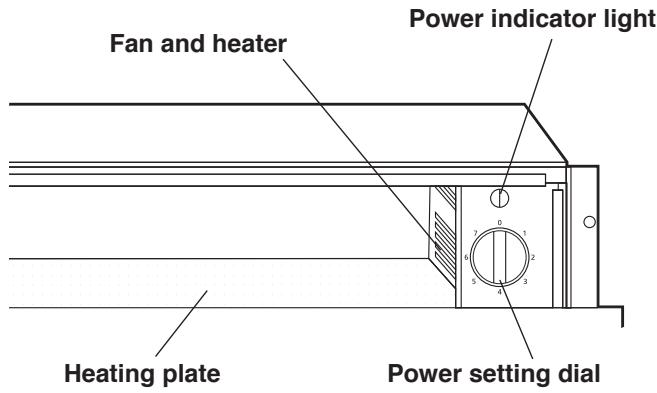
Power indicator light
The indicator light flashes when the appliance is switched on.
It stops flashing when the drawer is closed.
Fan and heater
Operates when the appliance is set at 7.
Power setting dial
Turn the dial to select the required setting. See page 8 for Power Setting Guidelines.
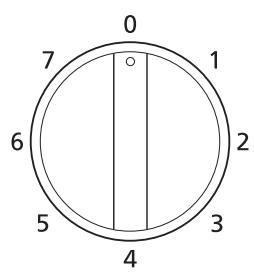
| Setting | Level |
| 0 | Off |
| 1 | Low |
| 2 | |
| 3 | |
| 4 | |
| 5 | |
| 6 | |
| 7 | High |
Opening and closing
Push the middle of the front panel to open and close the drawer.

NOTE
The appliance will heat up only when it is fully closed.
Features and Functions
Preheating Crockery and Glassware
Preheated crockery and glassware ensures food and drinks stay warm longer. See page 8 for Power Setting Guidelines.
■ Maximum load: 25 kg
e.g.
| 6 dinner plates | 24 cm |
| 6 soup bowls | 10 cm |
| 1 serving dish | 17-19 cm |
| 1 meat plate | 32 cm |
■ Spread the cookware over the entire surface for even heating. - Drinks containers must be heated with setting 4.

WARNING
Drinks containers heated with setting 6 or 7 will become very hot, which may cause burning.
Method
- Place the crockery/glassware in the drawer.
- Turn the dial to the required setting. (See page 8 for Power Setting Guidelines.) Power indicator light flashes.
- Close the drawer. Power indicator light stops flashing and the appliance will start heating up. It will take approximately 15-25 minutes to preheat crockery for 6 people.
- To switch off, open the drawer and turn the dial to "0".

NOTE
Preheating time depends on the material and thickness of crockery and glassware.

CAUTION
Preheated crockery and glassware will be hot. Use oven gloves when removing them from the drawer.
Features and Functions
Keeping Warm
Precooked food can be kept warm in the appliance.
See page 8 for Power Setting Guidelines.

WARNING
Do not place hot cookware straight from oven or hob. Heating plate may be damaged.
■ Cover the food with a heat-resistant lid or aluminium foil if stated in the guidelines. ■ Do not keep food warm longer than one hour. ■ DO NOT OVERFILL THE COOKWARE.
Method
- Turn the dial to 7 to preheat for 10 minutes.
- Place the food in the drawer.
- Turn the dial to the required setting. (See page 8 for Power Setting Guidelines.) Power indicator light flashes.
- Close the drawer. Power indicator light stops flashing and the appliance will start heating up.
- To switch off, open the drawer and turn the dial to "0".

CAUTION
Use oven gloves when removing the food from the drawer.
Defrosting and Proofing
■ For defrosting meat, DO NOT cover. ■ For proofing dough, cover with cling film. ■ DO NOT OVERFILL THE COOKWARE.
Method
- Place the food in the drawer.
- Turn the dial to the required setting. (See page 8 for Power Setting Guidelines.)
- Power indicator light flashes.
- Close the drawer. Power indicator light stops flashing and the appliance will start heating up.
- To switch off, open the drawer and turn the dial to "0".
Power Setting Guidelines
| Power setting | Note | |||
| Preheat | ||||
| Proofing | ||||
| Yeast dough | Loaf, rolls | - | 1 | Cover |
| Defrosting | ||||
| Delicate food items | Dairy products e.g. butter, hard cheese Desserts e.g. cream cakes, gateux | - | 2 | Do not cover |
| Meat | Sausages, chops, steaks, minced meat | - | 3 | Do not cover |
| Bread | Sliced bread, rolls, baguette | - | 3 | Cover |
| Reheating | ||||
| Bread | Rolls, baguette | 7* | 4 | Cover |
| Cakes, pastries and wraps - Precooked | Pancakes, taco shells, tortilla wraps, cake, croissant, individual pies | 7* | 6 | Cover |
| Keeping warm | ||||
| Eggs - Precooked | Scrambled, fried, omelette | 7* | 5-6 | Cover |
| Food items - Precooked | Plated meal, vegetables, tinned food, slow cooked food | 7* | 5-6 | Cover |
| Preheating crockery and glassware | ||||
| Drinks container | Espresso cups, mugs | - | 4 | See page 6 |
| Cookware | Tableware, ovenware | - | 7 | See page 6 |
| Baking preparation | ||||
| Melting chocolate | Dark, milk, white | 7* | 6 | Break into small pieces Do not cover |
| Disolving gelatine | Powdered, leaf | - | 6 | Do not cover |
* Preheat for 10 minutes. See Keeping Warm on page 7.
Cleaning

CAUTION
■ Before cleaning, turn off the main power switch. Allow to cool before cleaning the heating plate. ■ Do not use a steam cleaner. Water may get into the electrical components and cause damage.
Always keep the appliance in a clean condition.
Spilled food or oil scorched on the appliance may become difficult to clean.
Exterior
Wipe with a damp cloth and mild detergent.
Do not use abrasive cleaners.
Front panel - Stainless Steel
Clean the surface with a mild cleaner and a soft sponge that will not scratch the material.
Do not use abrasive cleaners.
Greases and remains of food should be removed immediately in order to avoid corrosion.
Front panel - Glass
Clean the surface with glass cleaner and a soft cloth.
Do not use a glass scraper.
Heating plate
Clean with a damp cloth and mild detergent.
Troubleshooting
■ During the warranty period, any repairs may only be performed by service technicians authorised by the appliance manufacturer. ■ Unauthorised repairs may cause electric shock and short circuit; do not attempt this yourself. Consult an authorised service technician. In case of minor faults or problems with the appliance operation, check the following instructions to see whether the causes can be eliminated.

NOTE
A visit by a service technician during the warranty period will be charged if the appliance is not functioning because of improper use. Store these instructions in a place where they are always readily accessible; if passing the appliance on to another person, the instructions should also be included.
Check the following for some advice on rectifying some common problems before calling the service centre.
| Symptom | Possible cause |
| It does not heat up. | Check if the appliance is switched on and that the drawer is fully closed. |
| Food and cookware are not warm enough. | Some items may require longer time to heat up depending on the material and thickness of cookware. The drawer may have been left open for a long time. |
| Power indicator light flashes. | Check if the drawer is fully closed. |
| Power indicator light flashes rapidly when closed. | Contact the service centre. |
| The fuse in the fuse box has blown. | Disconnect the appliance at the mains and contact the service centre. |

NOTE
■ Warranty claims that resulted from improper connection or use of the appliance is not covered by the warranty. In such cases, the costs of repair are borne by the user. ■ For the list of service centres, refer to the guarantee booklet.
Installation Instructions
Installation and Connection
Please fully observe the following safety precautions.

IMPORTANT
■ Unpack the appliance, remove all packing material, and examine for any damage. If the appliance is damaged DO NOT install and notify your dealer immediately. ■ Install the appliance in accordance with the Installation Instructions. Otherwise, the performance of the appliance may be affected. ■ After installation perform a test run and explain to the customer how to operate the appliance. ■ Correct installation is the responsibility of the installer. Any malfunction or accident resulting from the failure to follow the Installation Instructions is not covered by the warranty.
Safety Instructions
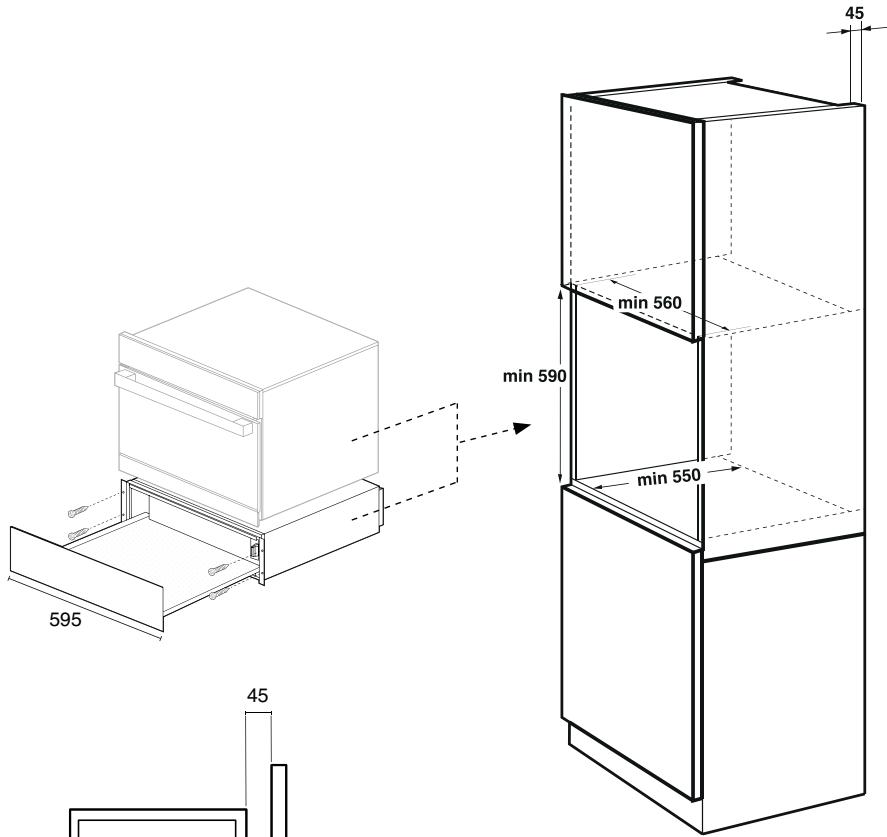
■ The appliance may only be installed with a Panasonic oven. ■ When the appliance is installed with another suitable appliance, it must be fitted above a fixed shelf in the housing unit that is able to support the weight of both appliances. ■ A combined appliance will be placed directly on top of the warming drawer when built in, an interim shelf is not necessary between the two appliances. ■ The appliance must be installed in a position where it can be fully opened and the contents can be clearly viewed. This is to avoid burns and other injuries.
Safety Instructions
■ For the appliance to function correctly, it is important that the base of the drawer is clean and level. A spirit level should be used. ■ The appliance must only be operated when built-in. This is to ensure that all electrical parts are shielded and live parts are not exposed. ■ Ensure power is not supplied to the appliance until after installation work has been carried out. ■ The manufacturer will not be held liable for any damages resulting from incorrect or improper installation.
Dimensions
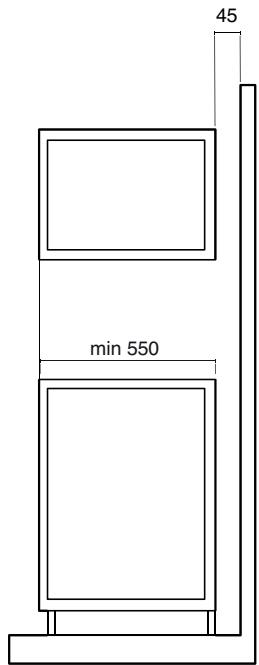
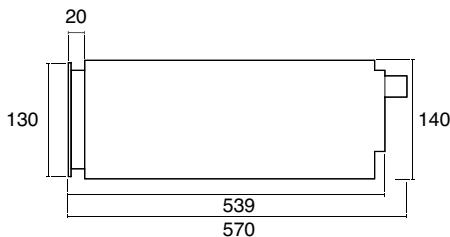
(measurements: mm)
Installing the Appliance
Electrical Connection
- Check that the mains voltage corresponds to that indicated on the rating plate fixed to the inside of the appliance. This data must correspond in order to avoid the risk of damage to the appliance. ■ Check that the domestic power supply guarantees adequate earthing. ■ When the drawer is connected to the mains power supply, the socket and On/Off switch should still be easily accessible. ■ The appliance must only be connected with the power cable provided. ■ Make sure that the power cable has been properly inserted into the unit's socket. ■ DO NOT use multi-plug adaptors, power strips or extension leads. There is a risk of fire in the event of overloading.
Installation
■ There must be no rear wall connected to appliance housing. ■ There must be a gap of at least 45 mm between the wall and the back of the unit. ■ The ventilation slots and air intake points must not be covered. To ensure that they remain uncovered also observe the installation instructions of any appliance installed above the drawer. ■ Align the appliance flush with the units and screw it in place ensuring that the cable does not become trapped or bent.

NOTE
Ensure that the connector lead does not become trapped or bent. After installation, the connector lead must not be in contact with the back or the base of the appliance.
Specifications
| Manufacturer | Panasonic | |
| Model | HL-DW165SEPG | HL-DW165BEPG |
| Power Supply | 220-240 V ~ 50/60 Hz | |
| Maximum Power Consumption | 810 W | |
| External Dimensions (approx.) | 595 mm (W) 570 mm (D) 140 mm (H) | |
| Uncrated Weight (approx.) | 16 kg | 15.5 kg |
| Capacity | 20.5 L | |
Manufactured by: Panasonic Manufacturing U.K Ltd.
Wyncliffe Road, Pentwyn Industrial Estate, Cardiff, S.Glam. CF23 7XB U.K.
REP. EU: Panasonic Testing Centre
Winsbergring 15, 22525 Hamburg, Germany
© Panasonic Corporation 2015
E000343Y0EP
M0215-00215
Printed in Germany
- THANK YOU FOR PURCHASING THIS PANASONIC APPLIANCE
- CONTENTS
- OPERATING INSTRUCTIONS
- INSTALLATION INSTRUCTIONS
- SAFETY INSTRUCTIONS
- DISPOSAL OF WASTE PRODUCTS
- FEATURES AND FUNCTIONS
- OUTLINE DIAGRAM
- POWER INDICATOR LIGHT
- FAN AND HEATER
- POWER SETTING DIAL
- OPENING AND CLOSING
- NOTE
- PREHEATING CROCKERY AND GLASSWARE
- WARNING
- METHOD
- CAUTION
- KEEPING WARM
- DEFROSTING AND PROOFING
- POWER SETTING GUIDELINES
- CLEANING
- EXTERIOR
- FRONT PANEL - STAINLESS STEEL
- FRONT PANEL - GLASS
- HEATING PLATE
- TROUBLESHOOTING
- INSTALLATION AND CONNECTION
- IMPORTANT
- DIMENSIONS
- INSTALLING THE APPLIANCE
- ELECTRICAL CONNECTION
- INSTALLATION
- SPECIFICATIONS
Brand : PANASONIC
Model : HLDW165S
Category : Kitchen appliance