KAHTP15WALA - Heating Kogan - Free user manual and instructions
Find the device manual for free KAHTP15WALA Kogan in PDF.


| Type | Panel Heater |
| Model | KAHTP15WALA |
| Brand | Kogan |
| Power Output | 1500W |
| Voltage | 220-240V |
| Frequency | 50Hz |
| Heating Element | Ceramic |
| Thermostat | Adjustable |
| Overheat Protection | Yes |
| Tip-Over Switch | Yes |
| Dimensions (W x H x D) | 600 x 400 x 80 mm |
| Weight | 4.5 kg |
| Control Type | Dial & Power Switch |
| Mounting | Free-standing or Wall-mountable |
| Cleaning | Wipe with dry cloth; do not use water |
| Maintenance | Check cord and plug regularly |
| Safety Certification | CE, RoHS |
| Noise Level | Silent operation |
Frequently Asked Questions - KAHTP15WALA Kogan
User questions about KAHTP15WALA Kogan
0 question about this device. Answer the ones you know or ask your own.
Ask a new question about this device
Download the instructions for your Heating in PDF format for free! Find your manual KAHTP15WALA - Kogan and take your electronic device back in hand. On this page are published all the documents necessary for the use of your device. KAHTP15WALA by Kogan.
USER MANUAL KAHTP15WALA Kogan
natural_image
Black rectangular electronic device with a digital display and silver base (no visible text or symbols)KOGAN SMARTERHOME™ PANEL HEATER
(1500W)
KAWFHTP15BA, KAHTP15WALA
SAFETY & WARNINGS
- Read all instructions carefully before use.
- Ensure the voltage supplied matches the requirements indicated on the rating plate of the heater.
- Do not operate this appliance if the cable or plug has become damaged.
- Keep the appliance and cable away from other sources of heat, sharp objects or anything else that may cause damage.
- If the cord is damaged, it must be replaced by Kogan.com in order to avoid a hazard.
- Ensure the appliance is turned off before connecting to the mains power supply.
- Turn off the power supply at the switch and remove the plug from the outlet when the heater is not in use, is being cleaned or undergoing any other maintenance.
- To disconnect the heater, turn it off, then remove the plug from the outlet. Do not pull on the cord to disconnect the plug.
- The heater must not be located immediately below its power socket.
- Do not operate in areas where fuel, paint or any other flammable liquids are used or stored.
• This heater is for indoor use only. - Do not cover the heater. This may cause overheating and/or fire hazard.
- To prevent a possible fire, never block the air intakes or exhaust vents in any manner.
• Do not touch any hot surfaces directly. - Do not insert or allow foreign objects to enter into any ventilation or exhaust openings, as this may cause electric shock, fire or damage to the appliance.
- Always ensure that your hands are dry before operating or adjusting any switches on the product or touching the plug and socket-outlet.
- This appliance is not intended for use by persons (including children) with reduced physical, sensory or mental capabilities or lack of experience and knowledge, unless they have been given supervision or instruction concerning use of the appliance by a person responsible for their safety.
- The heater is not a toy. Children should be supervised to ensure that they do not play with the heater.
- Do not leave the heater unattended while it is in use.
-
The most common cause of overheating is deposits of dust or fluff in the appliance. Ensure these deposits are removed regularly by disconnecting the appliance from the power supply, then vacuum cleaning the air vents and grilles.
-
Do not place the heater on carpet and don't place the cable under carpets. Arrange the cord away from traffic areas so that it will not be tripped over.
- Do not use this heater in the immediate surroundings of a bath, a shower or a swimming pool.
- Do not store away until the heater cools down, store the heater in cool dry location when not in use.
- The heater must not be used if the glass panel is damaged. Cease use immediately.
WARNING — KEEP BATTERIES OUT OF REACH OF CHILDREN
- Swallowing may lead to serious injury or death in as little as 2 hours, due to chemical burns and potential perforation of the oesophagus.
- If you suspect your child has swallowed or inserted a button battery immediately call the 24-hour Poisons Information Centre on 13 11 26 (Australia) or 0800 764 766 (New Zealand) for fast, expert advice.
- Examine devices and make sure the battery compartment is correctly secured, e.g. that the screw or other mechanical fastener is tightened. Do not use if compartment is not secure.
- Dispose of used button batteries immediately and safely. Flat batteries can still be dangerous.
- Tell others about the risk associated with button batteries and how to keep their children safe.

natural_image
Prohibition sign showing a person holding a ball with no text or symbols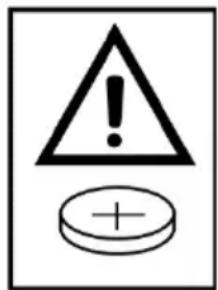
OVERVIEW
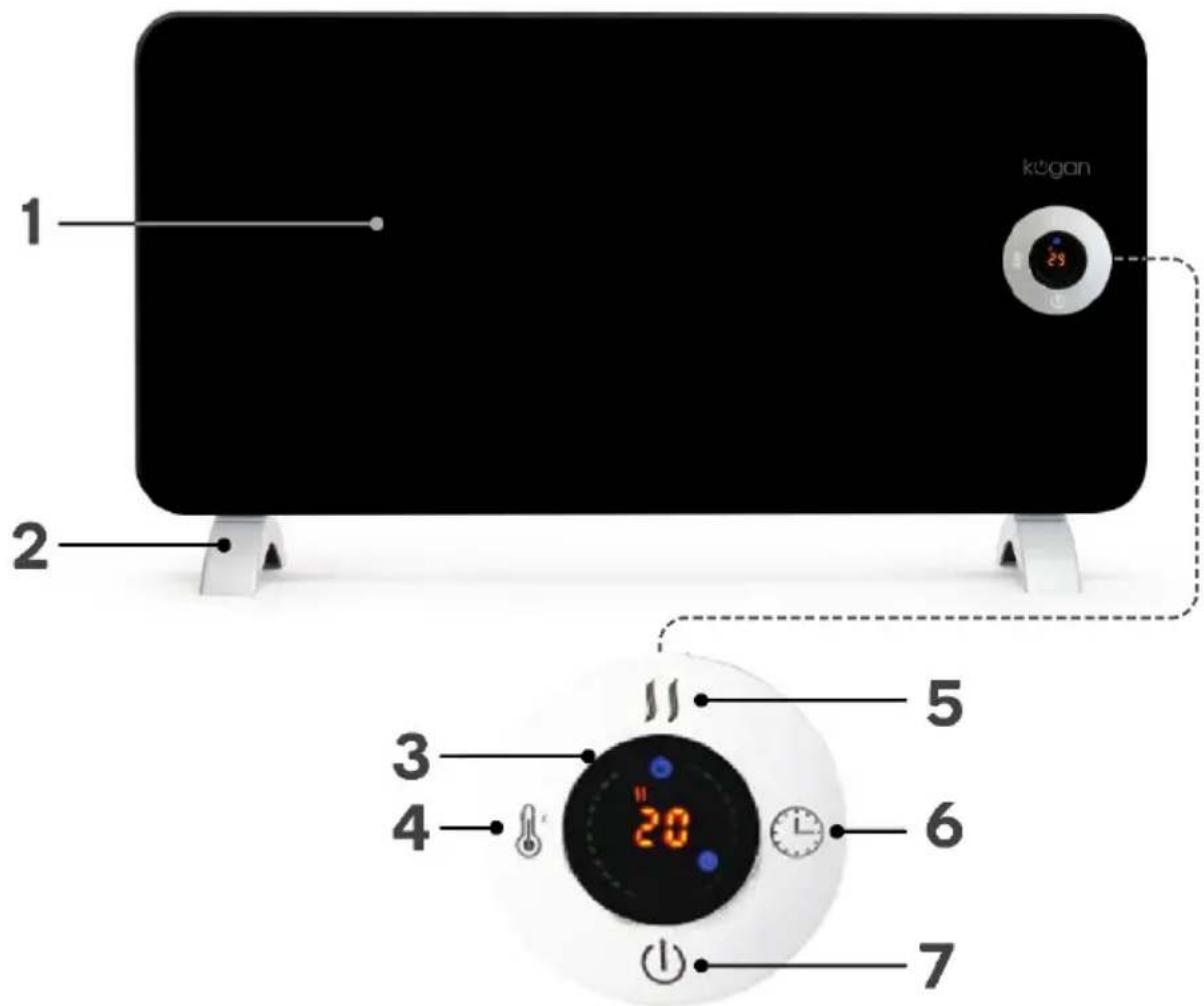
1 Heater body 5 Mode button
2 Feet (x2) 6 Timer button
3 Display screen 7 Power button
4 Temperature button
INSTALLATION
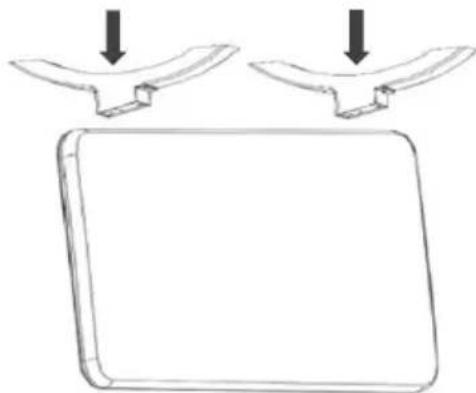
Portable Installation
Attach the feet using the supplied screws (8 x ST4*12mm), screwing each oner into the heater with a Phillips head screwdriver (not supplied).
natural_image
Simple line drawing of a rectangular object with two curved metal clips above it, no text or symbols present.Wall Mounting
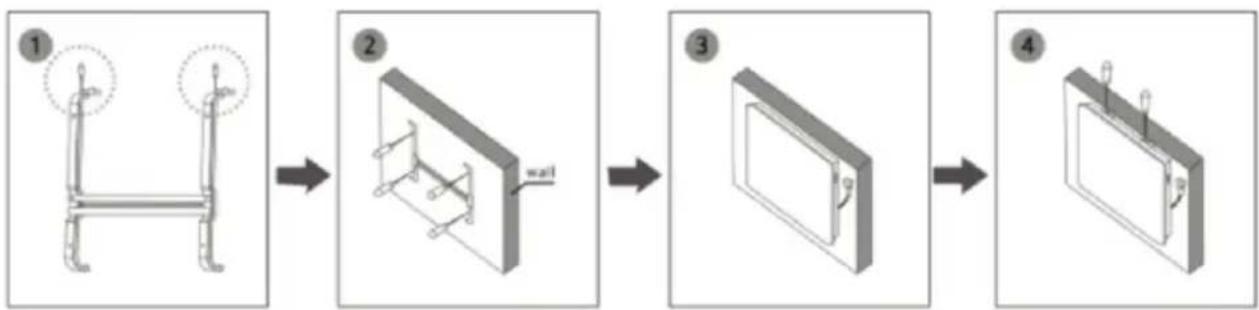
• Do not fit with the feet if wall mounting.
• Prepare the bracket with screws (figure 1).
- Using the bracket as a guide for the holes, drill into the wall and insert the plastic expanded plugs. Attach the bracket to the wall with screws (figure 2).
- Place the heater in a suitable position, ensuing that the holes align with the bracket (figure 3).
• Tighten screw on the top of bracket to secure (figure 4).
flowchart
graph LR
    A["Step 1: Chair with wheels"] --> B["Step 2: Frame with wall-mounted component"]
    B --> C["Step 3: Door switch"]
    C --> D["Step 4: Installed device with rotating arm"]
- Ensure the product is securely installed in the correct position and the power cord is undamaged before its first use.
OPERATION
Connect the power cable into a wall outlet, and turn on the power switch on the side of the heater.
Power Function
Press the Power button ⏻ to set functions. The upper part of the display will show the room temperature. The heater will be working at low power heating conditions.
Mode
Press the Mode button to switch between low or high temperature power.
Temperature Selection
Press ⚠ to select the desired temperature from a range of 15^-35^ . The temperature indicator will remain lit for a while.
Timer
Press the timer button Ⓤ to select the desired range between 1 hour to 24 hours. The display will show the remaining time.
CONNECT TO SMARTERHOME™ APP
Install App
Download the "Kogan SmarterHome" app from the Play Store (Android) or App Store (iOS).
Register
If you do not have a Kogan SmarterHome™ account, register or sign in with a verification code sent by SMS.
To register:
-
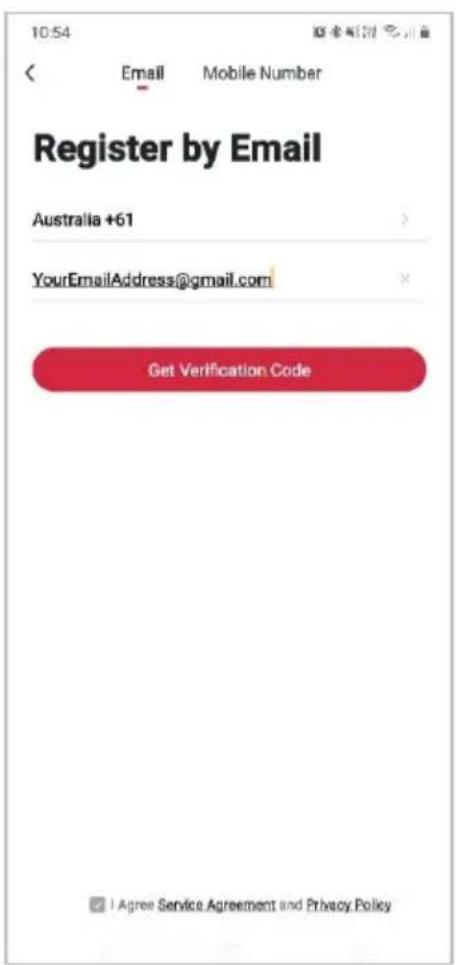
Tap to enter registration page.
-
The system automatically recognises your country/area. You can also select your country code manually. Enter your email address and tap 'Next.'
-
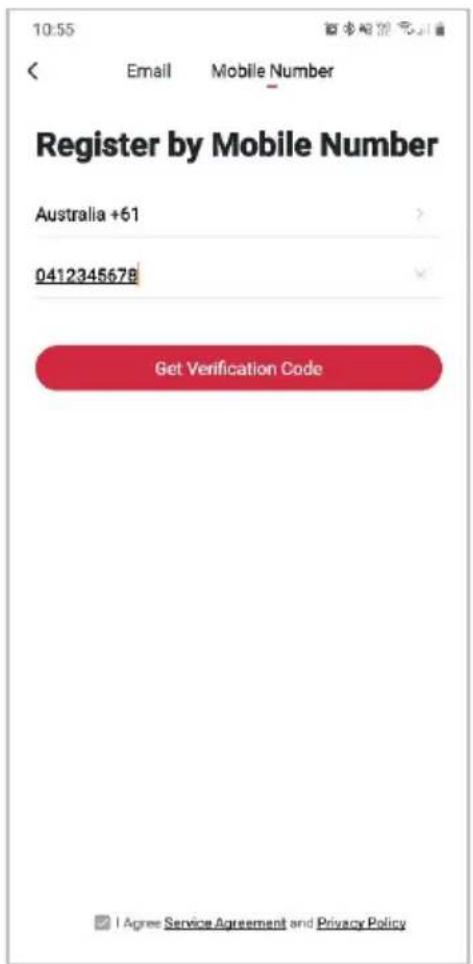
Alternatively, you can select 'Register by mobile number' and enter the verification code sent to you by SMS.
-
Create a profile on the next page to define your location and room.
Set device in pairing mode
When the device is first turned on, it may automatically enter pairing mode (light on the display will be flashing rapidly).
If not automatically in pairing mode when powered on, you can manually set the device in pairing mode by long-pressing the Mode button " for 5 seconds until the light on the display begins flashing rapidly. Alternatively, turn off the power and restart the heater.
Add device through network
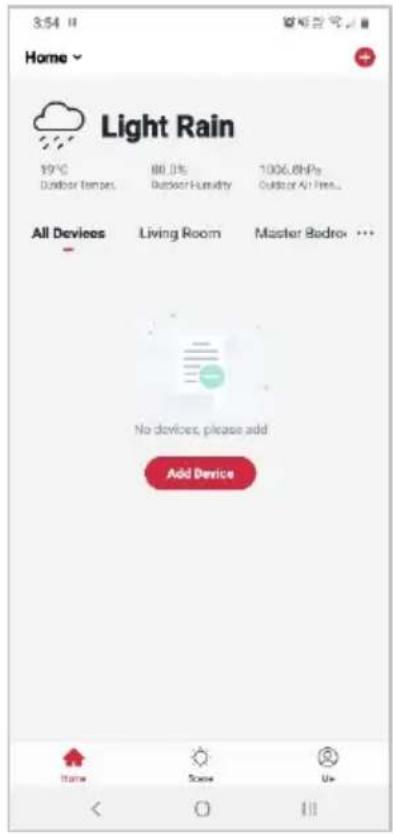
- Once registered, tap "+" in the upper right corner of the app's home page to add a new device through the network.
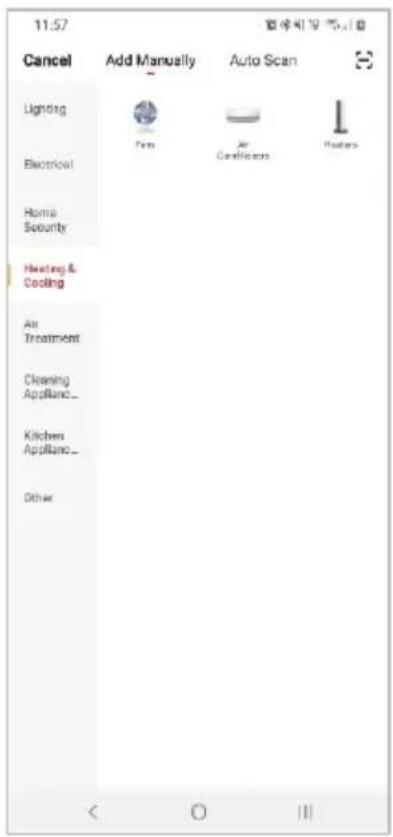
- Select the product type from the list of options in the app (Heating & Cooling > Heaters).
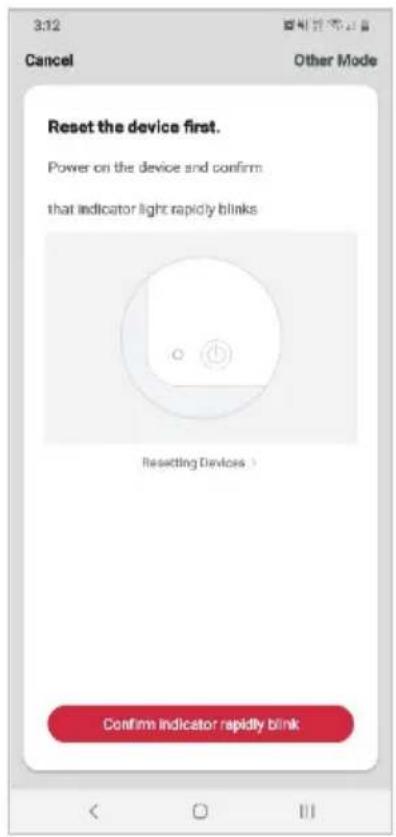
- Ensure that the device is in pairing mode, with the light on the display flashing rapidly, and tap "Confirm light is rapidly flashing".
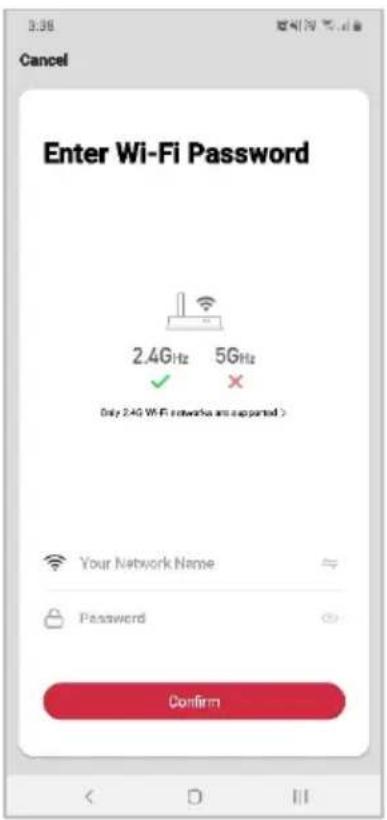
- Upon successfully confirming pairing mode, enter your Wi-Fi details. It is important that your SmarterHome™ device and the app are connected to the same Wi-Fi network during setup.
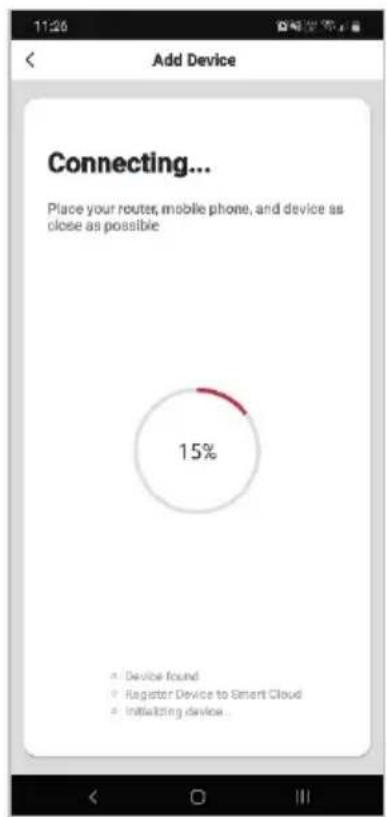
- The device will commence the pairing process and connect to the app. Ensure your Wi-Fi router, mobile phone, and the SmarterHome™ device are kept close until connection is complete.
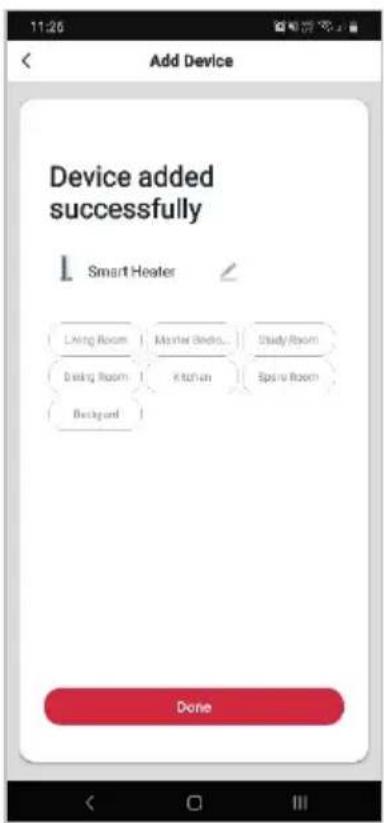
- After successfully being added, you will have the option to rename the device and assign it to a location. It will now be listed on the app's home page. Tap the device listing to enter its control page.
Notes:
• The device and the app have to use the same Wi-Fi network.
• The device is only compatible with 2.4Ghz networks.
GOOGLE HOME CONTROL
Note:
You will need to have set up a Google Home account prior to linking your Kogan SmarterHome™ device.
Adding "SmarterHome" to the Google Home app
- From the home page of the Google Home app, select the “+” icon to access the ‘Add and manage’ page.
- Select 'Set up device', then under the Works with Google banner, select 'Have something already set up?'
- Select the search bar and type 'Smarter Home' to locate the Kogan SmarterHome™ service.
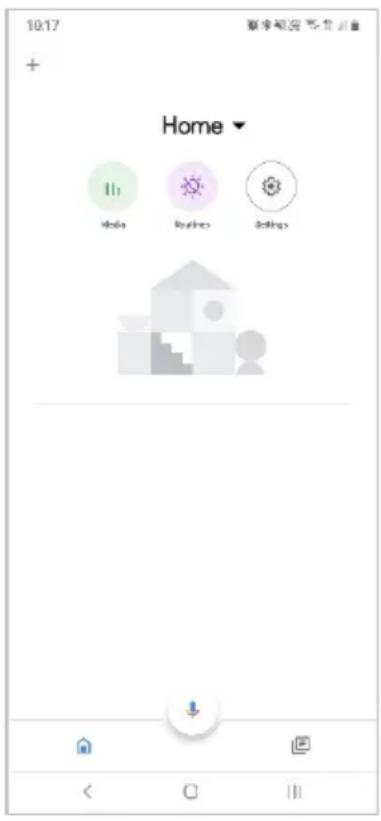
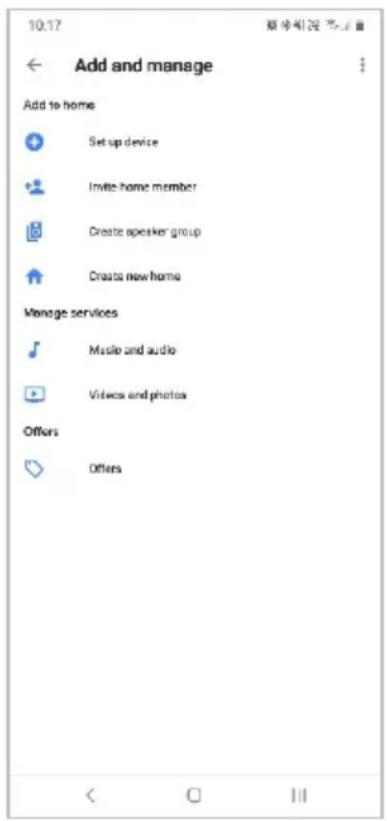
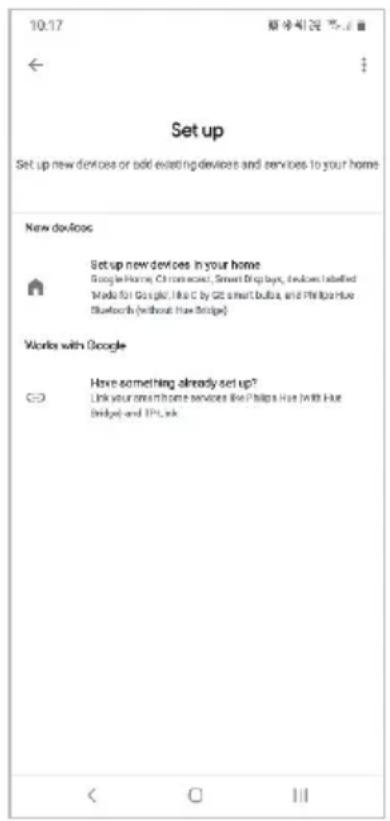
- Tap 'Authorise' to grant Google permission to access the SmarterHome™ app and your devices.
- From here, you will be prompted to sign into your SmarterHome™ account using either your email or mobile phone number, depending on which you registered your account with.
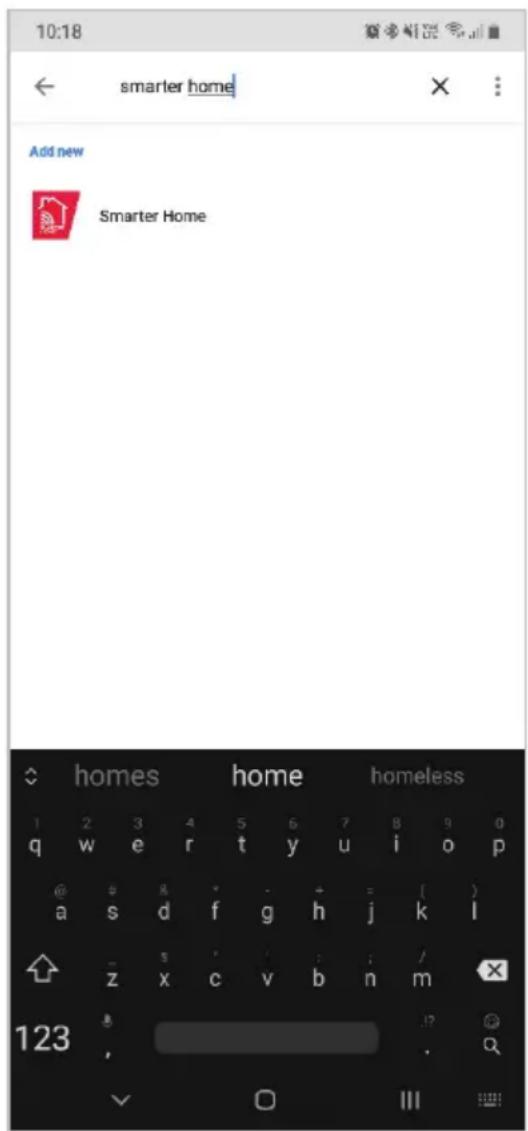
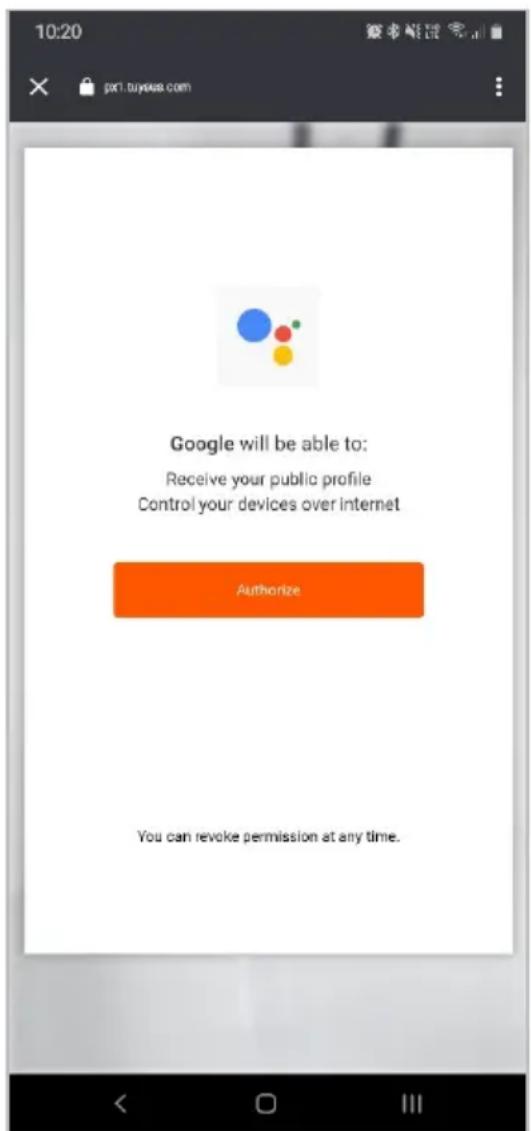
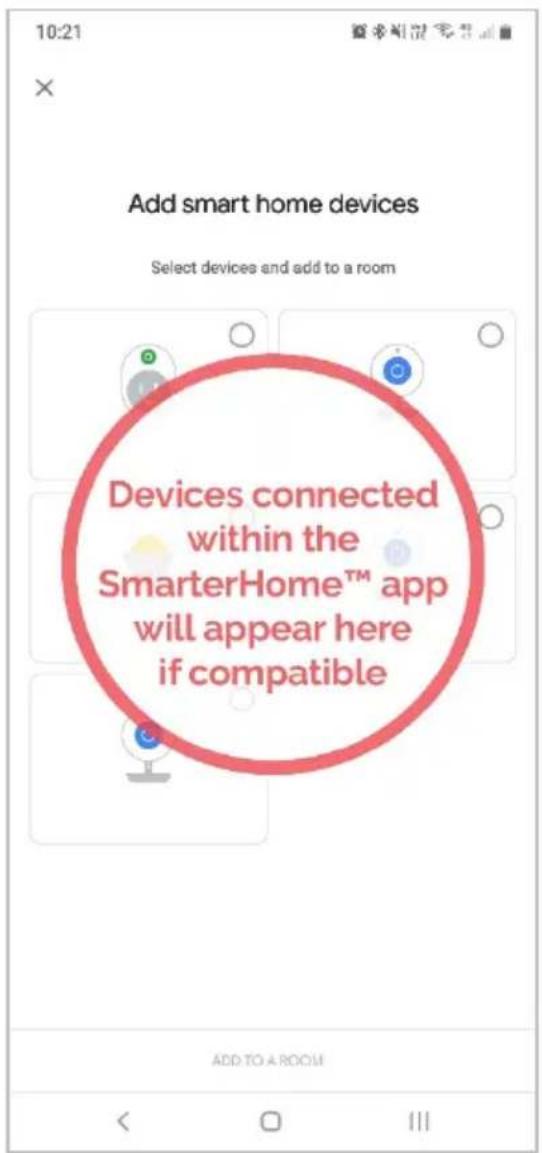
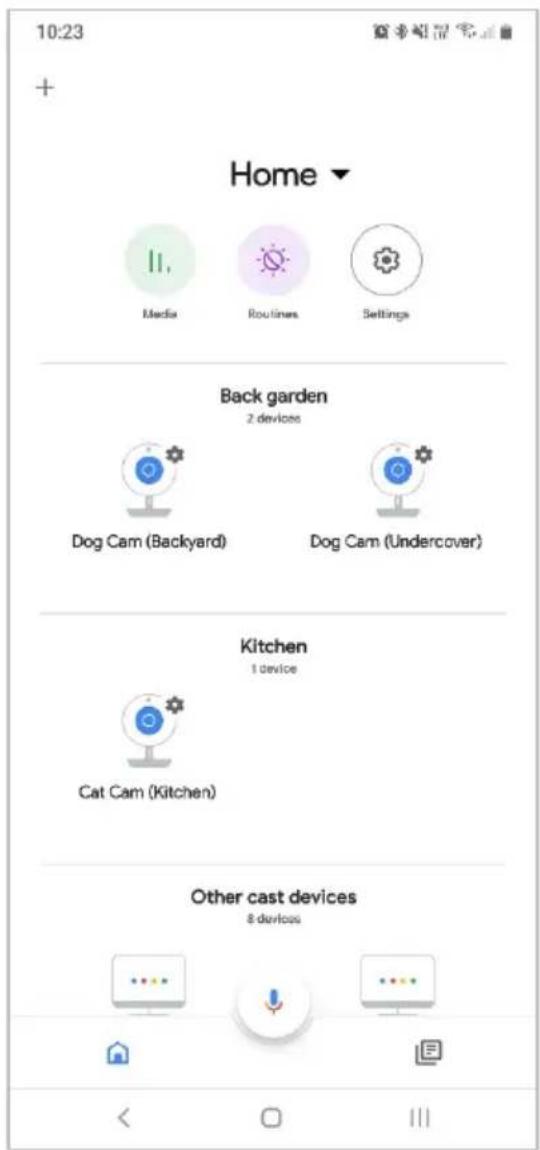
- Once connected, the app will display any compatible devices linked to your SmarterHome™ account. From here you can assign them to rooms and set up any routines.
- Tap on any of the devices to view a list of available commands.
Note:
Please note that Google Home can only control the base/core functions of any compatible SmarterHome™ devices. To make full use of this product's smart functionality, please use the Kogan SmarterHome™ app.
AMAZON ALEXA CONTROL
Note:
You will need to have set up an Alexa account prior to linking your Kogan SmarterHome™ device.
Adding "SmarterHome" to the Alexa app
- From the home page of the Alexa app, select the “≡” icon in the top-right and select Skills & Games from the sidebar.
- Select the search bar and type 'Smarter Home' to locate the Kogan SmarterHome™ skill.
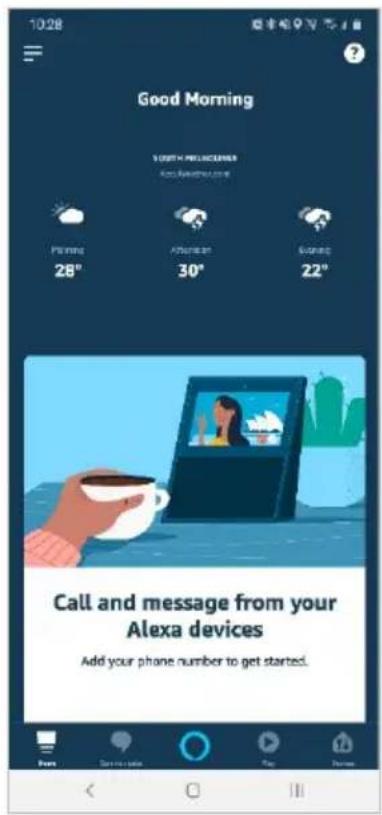
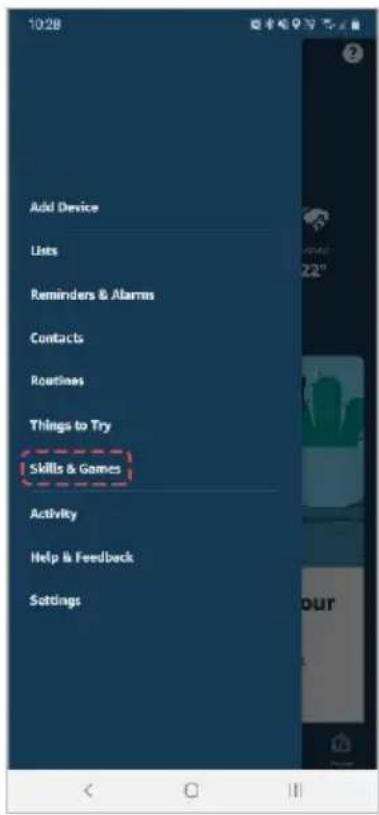
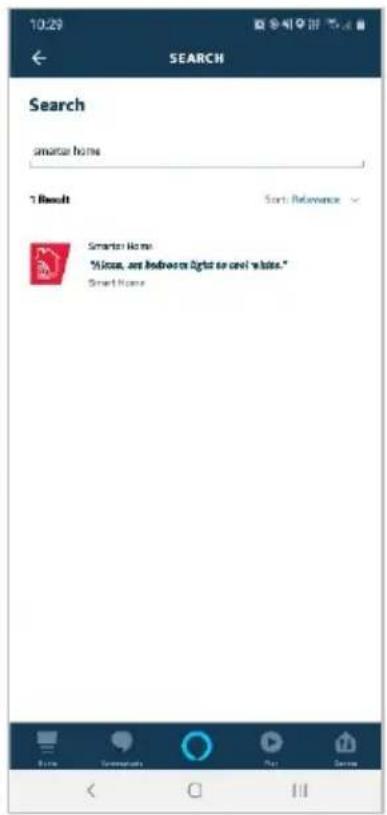
- Tap 'Enable to Use' to add the Kogan SmarterHome™ skill to Alexa.
- From here, you will be prompted to sign into your SmarterHome™ account using either your email or mobile phone number, depending on which you registered your account with.
- Tap 'Authorise' to grant Alexa permission to access the SmarterHome™ app and your devices.
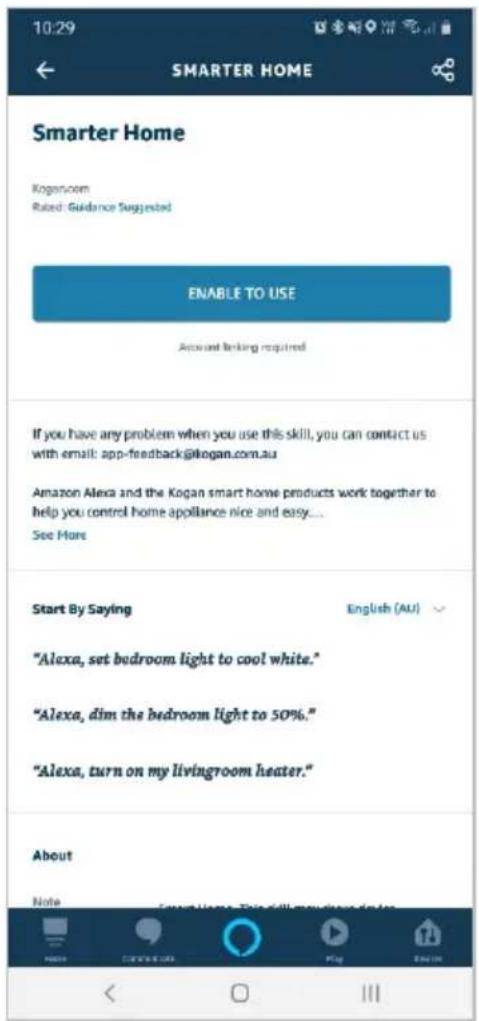
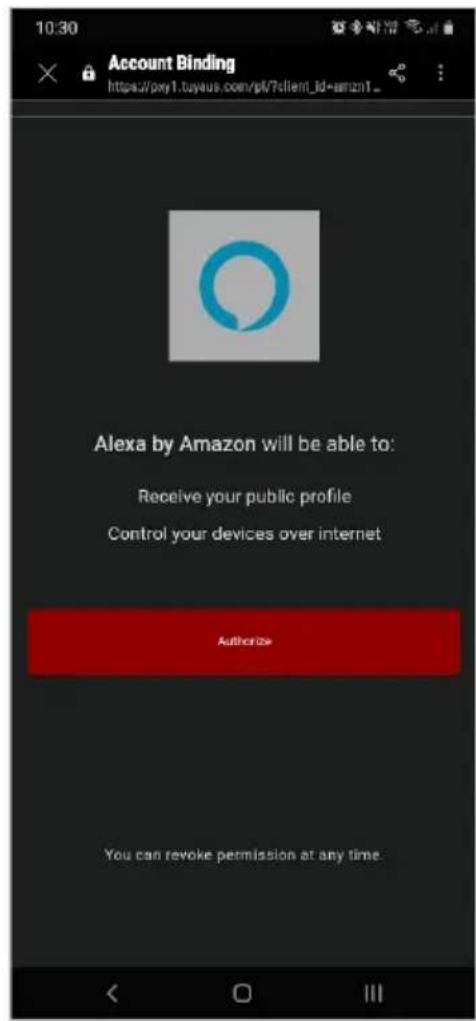
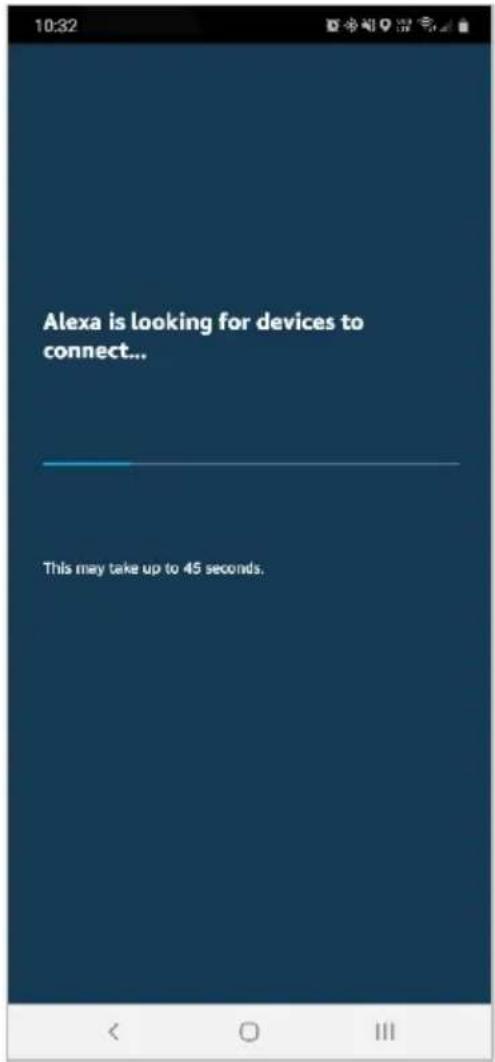
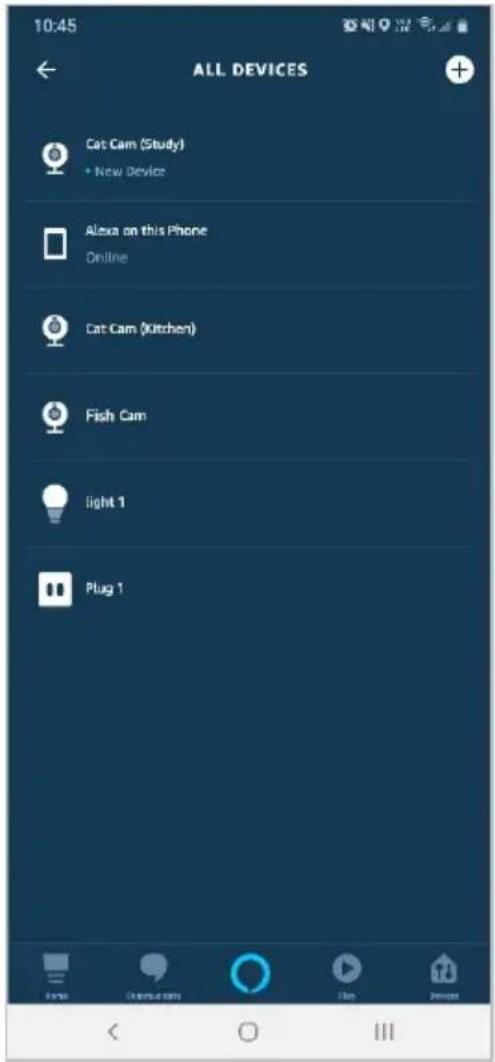
- Once connected, the app will perform a search and display the devices linked to your SmarterHome™ account.
- When your devices have successfully connected to the Alexa app, you will be able to control your Kogan SmarterHome™ devices via Alexa's voice commands.
Note:
Please note that Alexa can only control the base/core functions of any compatible SmarterHome™ devices. To make full use of this product's smart functionality, please use the Kogan SmarterHome™ app.
SPECIFICATIONS
Dimensions 430 x 240 x 760mm
Weight 4.8kg
Output frequency 50/60Hz
Voltage 220-240V
Wattage 750W / 1500W
Colour Black, White
Overheat safety protection Yes
NOTES
Need more information?
We hope that this user guide has given you the assistance needed for a simple set-up.
For the most up-to-date guide for your product, as well as any additional assistance you may require, head online to help.kogan.com
kogan.com
- KOGAN SMARTERHOME™ PANEL HEATER
- SAFETY & WARNINGS
- WARNING — KEEP BATTERIES OUT OF REACH OF CHILDREN
- OVERVIEW
- INSTALLATION
- Portable Installation
- Wall Mounting
- OPERATION
- Power Function
- Mode
- Temperature Selection
- Timer
- CONNECT TO SMARTERHOME™ APP
- Install App
- Register
- To register:
- Set device in pairing mode
- Add device through network
- Notes:
- GOOGLE HOME CONTROL
- Note:
- Adding "SmarterHome" to the Google Home app
- AMAZON ALEXA CONTROL
- Adding "SmarterHome" to the Alexa app
- SPECIFICATIONS
- NOTES
- Need more information?
Brand : Kogan
Model : KAHTP15WALA
Category : Heating