
NR-B32SX1 - Refrigerator PANASONIC - Free user manual and instructions
Find the device manual for free NR-B32SX1 PANASONIC in PDF.
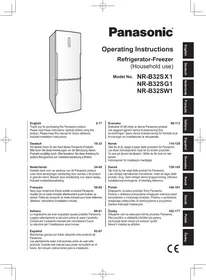


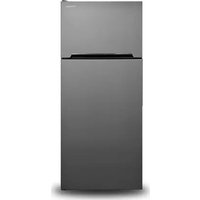
| Product Type | Refrigerator-Freezer |
| Brand | Panasonic |
| Model | NR-B32SX1 |
| Dimensions (W x D x H) | 600 mm x 652 mm x 1866 mm |
| Net Weight | 74 kg |
| Total Net Volume | 321 L |
| Refrigerator Net Volume | 235 L |
| Freezer Net Volume | 86 L |
| Climate Class | T (16 °C to 43 °C) |
| Rated Voltage | 220 V - 230 V |
| Rated Frequency | 50 Hz |
| Annual Energy Consumption | 320 kWh/year |
| Freezing Capacity | 13.5 kg/24 h |
| Noise Level | 46 dB |
| Max Storage Without Power | 18 hours |
| Refrigerant | R600a (58 g) |
| Blowing Agent | Cyclopentane |
| Special Functions | Super Freeze, Super Cool, Eco, Holiday, Bottle, Alarm |
| Maintenance and Cleaning | Clean with a soft cloth and warm water; do not use abrasive products. |
| Safety | Grounded outlet; do not use multiple outlets; do not touch with wet hands. |
| Spare Parts and Repairability | Contact an authorized after-sales service center; do not disassemble yourself. |
| General Information | User manual available in several languages; 180 pages. |
Frequently Asked Questions - NR-B32SX1 PANASONIC
User questions about NR-B32SX1 PANASONIC
0 question about this device. Answer the ones you know or ask your own.
Ask a new question about this device
Download the instructions for your Refrigerator in PDF format for free! Find your manual NR-B32SX1 - PANASONIC and take your electronic device back in hand. On this page are published all the documents necessary for the use of your device. NR-B32SX1 by PANASONIC.
USER MANUAL NR-B32SX1 PANASONIC
Panasonic®
Operating Instructions
Refrigerator-Freezer
(Household use)
Model No. NR-B32SX1
NR-B32SG1
NR-B32SW1
English 2-17 Thank you for purchasing this Panasonic product. Please read these instructions carefully before using this product. Please keep this manual for future reference. Included installation Instructions.
Caring for the environment 2
Safety instructions .... 3
Installation....5
Parts....7
Control panel 8
Setting the temperature 9
Using the handy functions ...... 10
User alert functions....12
Making ice cubes....12
Removing and attaching shelves.... 12
Care and Cleaning instructions .... 13
FAQs 15
Specifications 17

Caring for the environment

Disposing of the packaging
Please recycle where possible (e.g. cardboard, plastic bags, adhesive tape and polystyrene) and make sure you dispose of all other packing materials safely.
Keep the packaging out of the reach of babies and young children, to avoid injury or suffocation.
Information on Disposal for Users of Waste Electrical & Electronic Equipment (private households)
This symbol on the products and/or accompanying documents means that used electrical and electronic products should not be mixed with general household waste.
For proper treatment, recovery and recycling, please take these products to designated collection points, where they will be accepted on a free of charge basis. Alternatively, in some countries you may be able to return your products to your local retailer upon the purchase of an equivalent new product.
Disposing of this product correctly will help to save valuable resources and prevent any potential negative effects on human health and the environment which could otherwise arise from inappropriate waste handling. Please contact your local authority for further details of your nearest designated collection point.
Penalties may be applicable for incorrect disposal of this waste, in accordance with national legislation.
For business users in the European Union
If you wish to discard electrical and electronic equipment, please contact your dealer or supplier for further information.
Information on Disposal in other Countries outside the European Union
This symbol is only valid in the European Union.
If you wish to discard this product, please contact your local authorities or dealer and ask for the correct method of disposal.
Before disposing of your old appliance
Please follow either the disposal instructions from the manufacturer of the old appliance, or local disposal regulations for the appliance. Where this is not available, please follow the three step instructions below.
- Remove the mains plug from the socket.
- Cut the mains lead off, and safely dispose of it with the mains plug still attached.
- Until the old appliance is collected, or you take it to a Recycling Centre, make sure it's out the reach of small children.
- Remove all sealing materials from the door and leave all the shelves and drawers in place. This way, children are less likely to climb in and become trapped.
What the symbols mean:
| Do not |
| Make sure you do this |

Indicates the appliance must be earthed to prevent electric shock

Do not take apart

Indicates risk of death or serious injury.
This appliance is not intended for use by persons (including children) with reduced physical, sensory or mental capabilities, or lack of experience and knowledge, unless they have been given supervision or instruction concerning use of the appliance by a person responsible for their safety. Children should be supervised to ensure that they do not play with the appliance.

Do not use a multiple socket adaptor and plug several appliances into the same socket adaptor.
• This can cause overheating, fire or short circuit. Do not pinch, knot, or bend the mains lead, or place heavy objects on it. - This increases the risk of fire or electric shock. If the mains lead or plug of the appliance is damaged, it must be replaced by the manufacturer, its service agent or similarly qualified person in order to avoid a hazard. Do not unplug the refrigerator by pulling on the mains lead. - This can damage the mains lead. Always grip the mains plug and pull firmly from the socket. Do not place any water container on the top of the refrigerator. • Water can damage insulation of electrical components and cause short circuit, fire or electric shock.
Do not spray inflammable gas near the refrigerator.
• This can cause explosion or fire.
Do not spray water onto or into the refrigerator.
• This can cause fire or electric shock.
Do not touch the mains plug with wet hands.
• This can cause electric shock.
Do not install the refrigerator in a damp place, or where it may come into contact with water.
- Deteriorated insulation of electrical parts can cause short circuit, electric shock or fire.
Do not store volatile or flammable substances in the refrigerator.
- Flammable substances such as benzene, thinners, alcohol, ether and Liquid Petroleum Gas (LPG) can cause explosions.
Do not store pharmaceuticals or other temperature-sensitive products in the refrigerator.
- You should not store products that require strict temperature controls in the refrigerator.
Do not let children climb, swing or hang on the refrigerator door.
• This can cause serious injury, as well as damaging the refrigerator.
Do not operate the refrigerator in the presence of explosive fumes or flammable gas.
• This can cause explosion or fire.
Do not store petrol or other flammable liquids and vapours in the refrigerator, or use them near the appliance.
• This can cause explosion or fire.
-WARNING: Do not use mechanical devices or other means to accelerate the defrosting process, other than those recommended by the manufacturer.
- This can cause damage to the interior of the refrigerator or cause an explosion.
-WARNING: Do not use electrical appliances inside the food storage compartments of the appliance, unless they are of the type recommended by the manufacturer.
• This can cause explosion or fire.
-WARNING: Do not damage the refrigerant circuit.
• This can cause explosion or fire.

Do not try to disassemble, repair or modify the refrigerator yourself.
- You may injure yourself – or others – with burns or electric shock, or damage the refrigerator. If your appliance needs alterations or repair, please consult authorized service centre.

Safety instructions (continued)

Ensure that the refrigerator is plugged into an earthed mains socket. DO NOT plug into an unearthed mains socket.
- A short circuit could cause an electrical shock.

Make sure the mains lead and plug are not squashed or damaged.
- A damaged mains plug or lead can cause short-circuit, fire or electric shock.
- If the mains lead is damaged, it must be replaced by the manufacturer, its service agent or similarly qualified persons in order to avoid a hazard. • DO NOT ATTEMPT TO REPLACE IT YOURSELF.
Remove any dirt or dust from the mains plug's pins before connecting to the power supply.
- Dust build-up on the mains plug can cause insulation failure, especially in humid conditions. This can cause short circuit, fire or electric shock. Unplug the mains lead and wipe it with a dry cloth. Never use a wet or damp cloth.
Plug your appliance into the socket, making sure the connection is secure.
- A loosely connected mains plug can cause fire or electric shock.
Install the refrigerator in a well-ventilated area.
- The more refrigerant there is in an appliance, the larger the room it should be installed in. If there's a refrigerant fluid leak, and the appliance is in a small room, the build up of combustible gases is more likely. This can cause fire or explosion. As a guide, for every 8 g of coolant, you'll need at least 1 cubic metre of space in the room. The data plate inside the appliance tells you how much refrigerant your refrigerator contains.
The refrigerant (R600a) used in the refrigerator and the gases in the insulation material (cyclopentane) are both flammable. They also require special disposal procedures.
- Before you dispose of the appliance, make sure none of the pipes on the back are damaged. Refrigerant or gas leaks can cause fire or explosion.
Unplug the refrigerator before cleaning and servicing.
- Failure to do this can cause electric shock.
If you smell burning or see smoke coming from the refrigerator, disconnect the power immediately and please consult an authorized service center.
- Failure to do this can cause fire or electric shock.
-WARNING:
Keep ventilation openings, in the appliance enclosure or in the built-in structure, clear of obstruction.
- Failure to do this could result in fire or explosion because refrigerant cannot disperse if it leaks.
Indicates risk of injury or damage to property.

Do not put glass bottles or containers in the freezer.
- When the contents freeze, the glass may break.
Do not touch the inside walls of the freezer or items stored in the freezer with wet hands.
- Your skin can become frozen onto the interior wall, or items stored in the freezer.
Do not open or close the doors by taking hold of the door handles with both hands.
• This may cause personal injury.

If there's a power cut, avoid opening the refrigerator frequently or putting unchilled food in it.
- This can cause the temperature in the refrigerator to rise and spoil food stored inside.
If you're not going to use the refrigerator for a long time, unplug it from the mains.
Also, be careful of the gap between the fridge and freezer doors, especially if they are both open at the same time.
• This may cause personal injury.
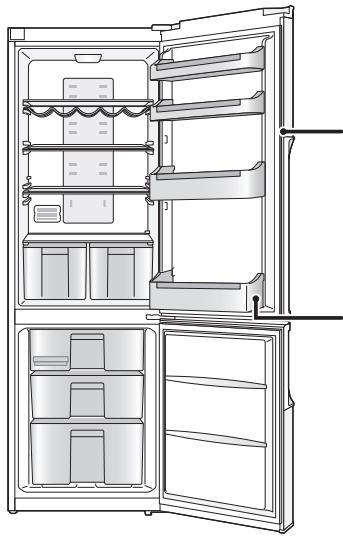
When opening the refrigerator, be careful not to pinch your fingers at the "pinch point" areas. In particular, when opening the fridge door, be careful to avoid the potential pinch point between the fridge and freezer doors.
• This can cause personal injury.
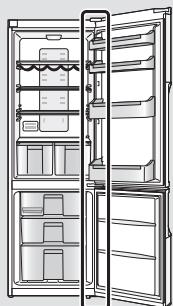
Potential pinch point
This section explains how to install your appliance for the most energy-efficient, safe and quiet operation.
Dimensions
W600 x D652 x H1866 (mm)
Unpacking your appliance
Remove all packaging and tape.
Choosing the right location
Ventilation
As the appliance gives off heat during operation, it should be installed in a well-ventilated, dry room with plenty of space above and behind it, as shown in Figure 1.
If you can hear it vibrating, it needs more space.
Temperature
The room temperature affects the refrigerator's energy efficiency, i.e., how much electricity it uses to chill and freeze foods.
For the best results, install your refrigerator:
• away from direct sunlight • away from radiators, cookers, or other heat sources - where the room temperature corresponds to the climate classification for which the appliance is designed. Refer to the Specifications Section for your appliance's climate classification.
Level
Install on a level floor that's strong enough to support a fully loaded refrigerator.
You can adjust the level of the refrigerator by screwing or unscrewing the two adjustable front legs as shown in Figure 2.
This prevents vibration and noise.
If the appliance is to stand on a carpeted or vinyl floor, put a solid board underneath it first. This will protect your floor against possible colour change due to heat given off by the appliance.
Refrigerator door
The refrigerator's door hinges can be swapped over, from the right side to the left, so that the doors open in the opposite direction. If this is more convenient in your home, please contact our service centre listed on the attached sheet or access our Web site (http://panasonic.net).
We cannot be held responsible if you replace the hinges by yourself.
Parts for switching door opening direction are included in the unit packaging.
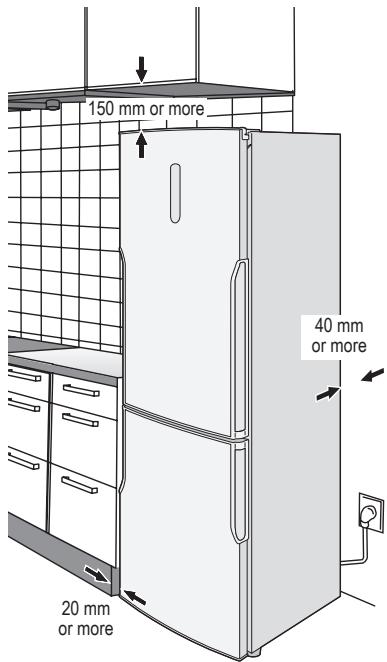
Figure 1
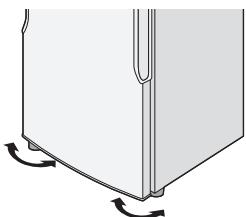
Figure 2

Installation (continued)
Installing the distance guides
To prevent the condenser (the black backside component with fins) from touching the wall, put on two plastic distance guides in its place rotating 90°.
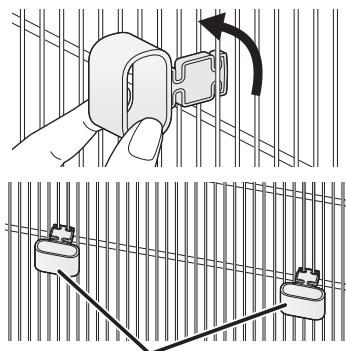
Distance guides (accessories)
Cleaning
After installation, wipe the appliance clean with warm water.
Connecting the mains plug to the household mains socket
You can connect the mains plug immediately after installation.
After the appliance is plugged, all symbols will appear for a moment, and then the startup values will appear as -18 °C on freezer setting indicator and 4 °C on fridge setting indicator.
All buttons on the control panel are touch-operated. (Only press to activate the button you want to operate.)
Notes:
- Cooling may take longer in the summer months or at other times when the room temperature is higher.
- If you need to unplug the refrigerator, wait at least 10 minutes before you plug it back in again. If not, you might damage the compressor.
Ambient room temperature
You'll find your refrigerator's climate classification on the rating plate in the left side of the fridge compartment. It shows the room temperature the appliance is designed to work in.
| Climate classification | Permitted ambient temperature | |
| SN | (Extended Temperate) | +10 °C to 32 °C |
| N | (Temperate) | +16 °C to 32 °C |
| ST | (Subtropical) | +16 °C to 38 °C |
| T | (Tropical) | +16 °C to 43 °C |
For saving energy
- Install the refrigerator in a dry, cool, and well-ventilated location. The colder the ambient temperature, the better the efficiency. (Please refer to Page 5 for dimensions and clearance.)
- The combination of drawers and shelves that results in the largest volume and the most efficient use of energy for the refrigerator.
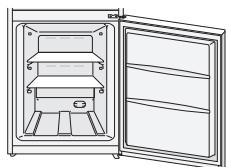
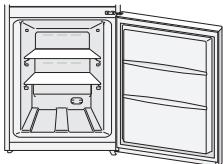
- Remove the top two freezer drawers. (Leave the lowest freezer drawer.)
- Attach the drawers and shelves in the refrigerator to the positions illustrated in the "Parts" section (P.7).
- Do not overfill the refrigerator to allow the air to circulate.
- Open the doors only when necessary and as briefly as possible.
- Occasionally clean the ventilation openings at the bottom of the refrigerator with a vacuum cleaner, etc.
(Take care not to damage the refrigerant pipe inside the cover.)
- When setting to Super Freeze Mode or Super Cool Mode, power consumption will be increased.
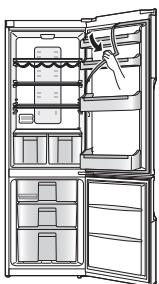
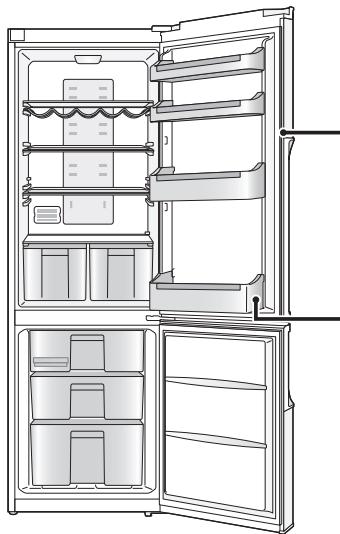
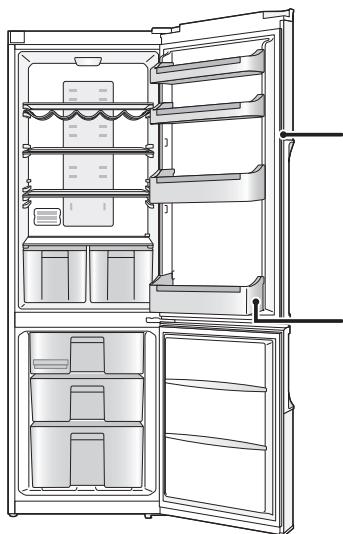
The illustration below is based on model NR-B32SX1, and may be slightly different from your refrigerator.
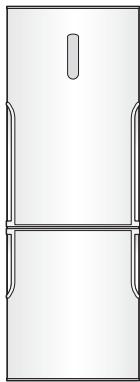
Fridge compartment
The temperature can be set in a range from 2 °C to 8 °C.
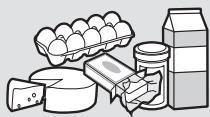
Cooked food, drinks, eggs, cakes, dairy products
Freezer compartment
The temperature can be set in a range from -24 °C to -16 °C.
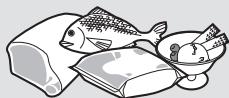
Frozen meat, poultry, fish, ice cream
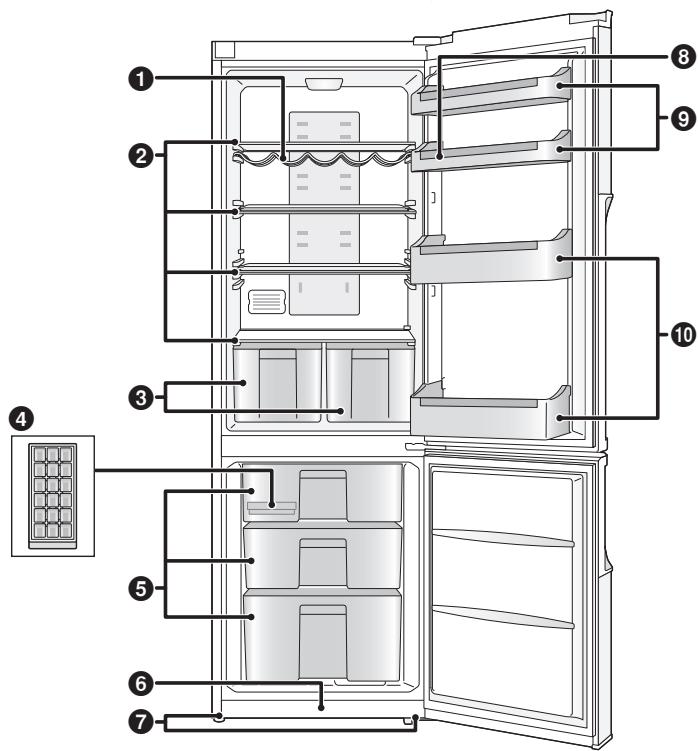
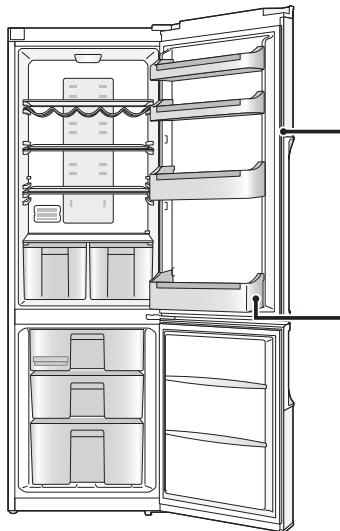
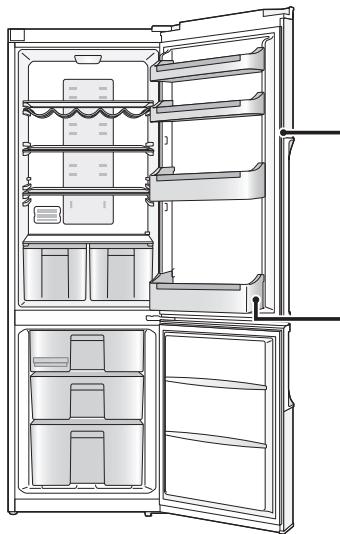
① Wine Rack ② Glass shelves ③ Crispers ④ 2 Ice trays
⑤ Freezer drawers ⑥ Kickplate ⑦ Adjustable legs ⑧ 2 Egg trays
⑨ Door shelves ⑩ Bottle shelves
Note:
- You can change the positions where the door and bottle shelves are installed. Please use caution, however, because stored food and beverages could fall out when the door is opened and closed depending on the shelf positions.
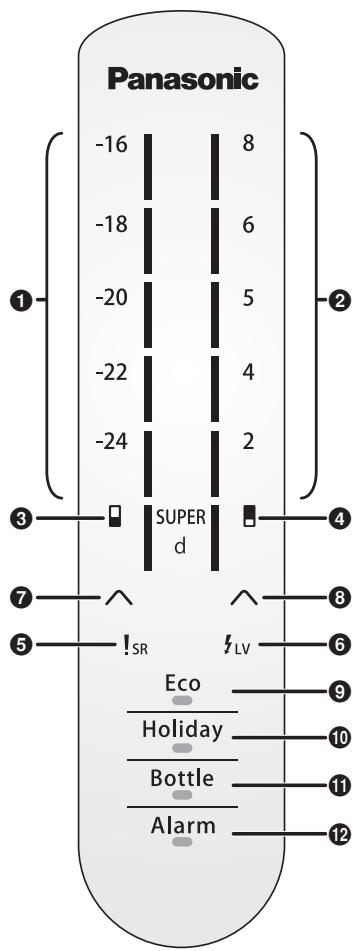
Display area
① Freezer temperature and temperature indicators
- The temperature can be set in a range from -24 °C to -16 °C.
- The higher the temperature is, the more indicators light up.
② Fridge temperature and temperature indicators
- The temperature can be set in a range from 2°C to 8°C.
- The higher the temperature, the more indicators light up.
③ Super Freeze Mode
The lowest indicator lights up.

lights up.
④ Super Cool Mode
The lowest indicator lights up.

lights up.
⑤ SR (Service)
!SR will light up when any problem occurs in the refrigerator.
⑥ LV (Low voltage)
LV will light up when the mains voltage is low.
Control area
⑦ Freezer selection button ⑧ Fridge selection button ⑨ Eco mode button/indicator ⑩ Holiday mode button/indicator ⑪ Bottle mode button/indicator ⑫ Alarm button/indicator
Notes:
- This refrigerator uses a microprocessor to control the temperature. The temperature inside the refrigerator varies depending on such factors as changes in the room temperature, how frequently the doors are opened and closed, and how much food is stored inside and how it is stored.
- When Eco mode, Holiday mode, or Bottle mode is set, the indicator corresponding to the selected mode lights.
- !SR and ≤LV will light along with Alarm indicator and the alarm will be heard at the same time.
Fridge compartment
At the time of purchase, the temperature is set to 4\ °C .
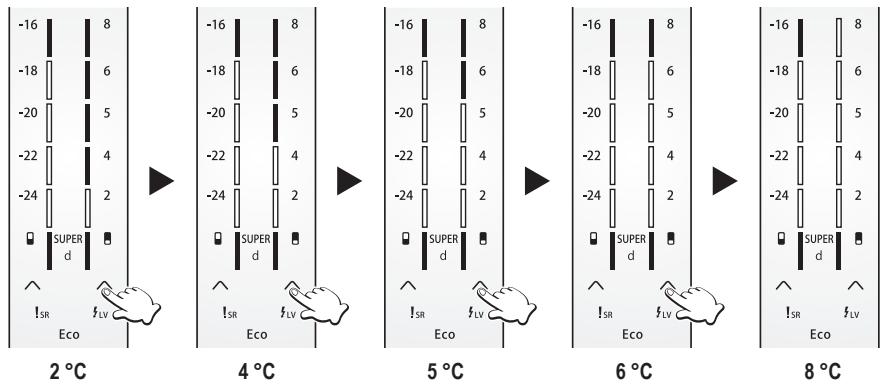
① Press ∧ (right) once and then press it again within 1 second. • The temperature can be set. ② Press ∧ (right) repeatedly until the desired temperature is set. - If no operation is performed for 1 second during the setting process, the indicators will flash and a beep will be heard indicating that the temperature is now set.
Note:
- When Holiday Mode, Super Freeze Mode, Super Cool Mode, or Eco Mode ends or is cancelled, the unit returns to its previous settings.
Freezer compartment
At the time of purchase, the temperature is set to -18°C .
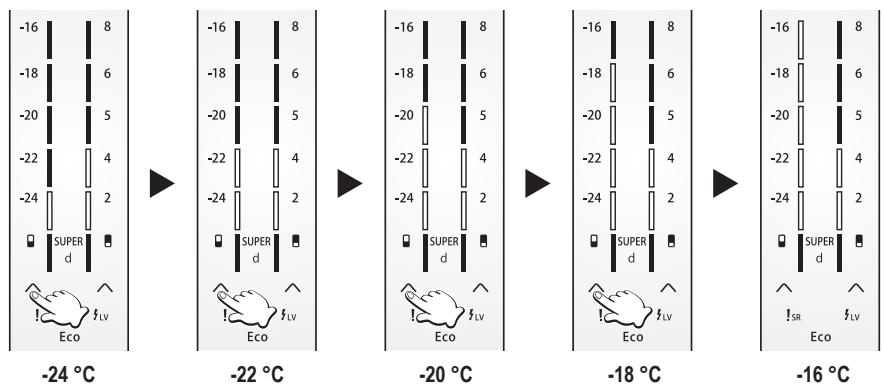
① Press ∧ (left) once and then press it again within 1 second. • The temperature can be set. ② Press ∧ (left) repeatedly until the desired temperature is set. - If no operation is performed for 1 second during the setting process, the indicators will flash and a beep will be heard indicating that the temperature is now set.
Note:
- When Holiday Mode, Super Freeze Mode, Super Cool Mode, or Eco Mode ends or is cancelled, the unit returns to its previous settings.

Using the handy functions
Super Freeze Mode
Features:
- In this mode, the freezer can be cooled rapidly, enabling the fresh foods, etc. which are placed there to be frozen.
- Super Freeze Mode will automatically end after 24 hours or when the freezer sensor temperature becomes lower than -32°C.
Settings:
- Press ∧ (left) until □ and the lowest indicator light.
- If no operation is performed for 1 second during the setting process, ☐ and the indicator will flash and a beep will be heard indicating that Super Freeze Mode is set. • and the indicator both light during this mode.
Notes:
- During this mode: -By pressing ⬆ (left), Super Freeze Mode will be cancelled and the desired temperature can be set. -Eco Mode and Holiday Mode can be selected. If either of these modes is selected, Super Freeze mode will be cancelled and the selected mode will become active. -The fridge temperature can be adjusted.
- The effect on the stored food can be reduced if setting Super Freeze Mode several hours before storing the food in the freezer compartment.
- The following items are recommended in order to exert the maximum freezing capacity.
① Set the freezer temperature to -24 °C 26 hours before storing the food.
② Set Super Freeze Mode 10 hours before storing the food.
③ If you wish to store a large amount of food, remove the two top drawers from the freezer and place the food directly on the glass shelf or put it in the lowest drawer of the freezer.
(A bigger freezing capacity can be exerted if placing the food directly on the top glass shelf.)
- The maximum freezing capacity within 24 hours is written in the rating label.
Super Cool Mode
Features:
- In this mode, fast food can be cooled before eating, a large amount of food can be cooled and stored, and drinks can be cooled quickly.
- Super Cool Mode will automatically end after 8 hours or when the fridge sensor temperature becomes lower than 0°C .
Settings:
- Press ∧ (right) until □ and the lowest indicator light.
- If no operation is performed for 1 second during the setting process, □ and the indicator will flash and a beep will be heard indicating that Super Cool Mode is set.
• and the indicator both light during this mode.
Notes:
- During this mode: -By pressing ∧ (right), Super Cool Mode will be cancelled and the desired temperature can be set. -Eco Mode and Holiday Mode can be selected. If either of these modes is selected, Super Cool mode will be cancelled and the selected mode will become active. -The freezer temperature can be adjusted.
Eco Mode
Features:
- In this mode, the control unit operates the freezer and fridge economically.
Settings:
- Press Eco once and Eco mode indicator lights.
- If no operation is performed for 1 second during the setting process, the Eco mode indicator will flash and a beep will be heard indicating that Eco Mode is set.
- On the control panel, 4 indicators, indicating -18 °C, will light for the freezer and 3 indicators, indicating 5 °C, will light for the fridge. • To end Eco mode, press Eco. The Eco mode indicator flashes and a beep will be heard indicating that Eco mode has been ended.
Notes:
- During this mode:
-The temperature of the fridge and freezer can be adjusted. Eco mode will be cancelled and the selected temperature will be set.
-Super Freeze Mode and Super Cool Mode can be selected.
If either mode is selected, Eco Mode will be cancelled and the selected mode will become active.
-Holiday Mode can be selected.
If it is selected, Eco Mode will be cancelled and Holiday Mode will become active.
Holiday Mode
Features:
- Set this mode when the fridge is not going to be used for a prolonged period such as during a long vacation.
- In this mode, the fridge temperature is automatically set to 12°C and the freezer temperature is automatically set to -18°C . (Fridge temperature indicators turn off.)
Settings:
- Press Holiday once and Holiday mode indicator lights.
- If no operation is performed for 1 second during the setting process, the Holiday mode indicator will flash and a beep will be heard indicating that Holiday Mode is set. • To end Holiday mode, press Holiday. The Holiday mode indicator flashes and a beep will be heard indicating that Holiday mode has been ended.
Notes:
- Before using this mode, empty out the fridge, and close its door.
- When this mode is ended, the fridge will resume operation with its previous settings.
- No adjustment can be made until this mode is cancelled.
Bottle Mode
Features:
- Drinks can be cooled quickly in the freezer.
- This mode has a timer function, and can be set to beep when the timer reaches 5, 10, 15, 20, 25 or 30 minutes.
- Remove the bottles when the beep is heard. If bottles are left in the freezer for a long time, their contents could freeze and the bottles might break.
Settings:
- Press Bottle once and Bottle mode indicator lights.
- Press Bottle again until the desired time is displayed.
The set time is shown as follows by the indicators.
First indicator lights : 5 min
First and second indicators light: 10 min
First to third indicators light: 15 min
First to fourth indicators light: 20 min
First to fifth indicators light: 25 min
First to sixth indicators light: 30 min
One indicator represents five minutes.
- If no operation is performed for 1 second during the setting process, the Bottle mode indicator will flash and a beep will be heard indicating that Bottle Mode is set.
- The top lit indicator blinks for five minutes. Then it becomes unlit and the next highest indicator starts blinking. This repeats until the last indicator has blinked for five minutes.
- When the set time comes, a beep will be heard.
• To end Bottle mode, press Bottle
The Bottle mode indicator flashes and a beep will be heard indicating that Bottle mode has been ended.
Notes:
- When using this mode, check the temperature of the bottles regularly.
- When the bottles have cooled sufficiently, remove them from the freezer.
Alarm Mode
Features:
- An alarm will be heard:
-when any problem occurs in the refrigerator.
-when the voltage is low.
-when the fridge door is left ajar.
Settings:
- Press Alarm to stop the beep.

User alert functions
User alert functions become active in the following situations.
| Situation | Details | Alarm | How to stop the alarm |
| Mode has ended. | The set time has been reached in Bottle Mode. | Beeps continuously | Press Bottle. |
| Problem detected. | Any problem has occurred in sensor, compressor, cooling system, or heater.The voltage is low. | Beeps every 5 seconds | Press Alarm. |
| Door ajar. | The fridge door has been left ajar for more than 2 minutes. | Beeps every 5 seconds | Press Alarm. |

Making ice cubes
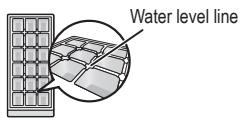
Open the freezer, pull out the upper drawer and take out the ice tray. Fill water in the ice tray to the water level line and then place back the ice tray.
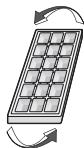
When ice cubes are ready, pull out the upper drawer and take out the ice tray. Slightly twist the ice tray by holding its two sides, the ice cubes will drop from the ice tray. Then, put the ice tray back into its place.

Removing and attaching shelves
Fridge
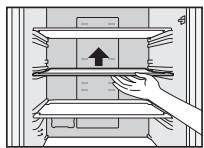
Glass shelves
Lift the inner side of the shelf slightly and pull it out. When removing the glass shelves, before pulling them out, remove the door and bottle shelves first if they are in the way.
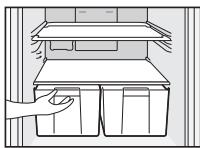
Crispers
Pull the crispers towards you and pull it out.
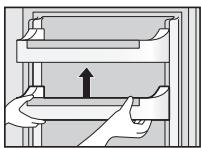
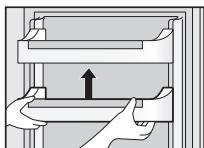
Door shelves and bottle shelves
Lift it slightly and then remove it.
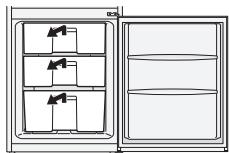
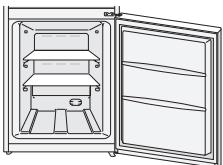
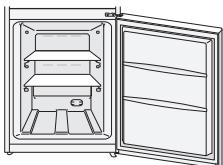
Freezer
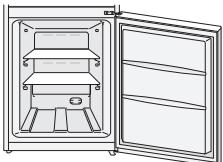
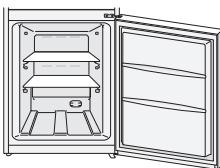
Pull the drawer towards you, lift the front slightly, and pull it out.
Having removed the drawer, you can store food in the empty compartment.
Care and Cleaning instructions

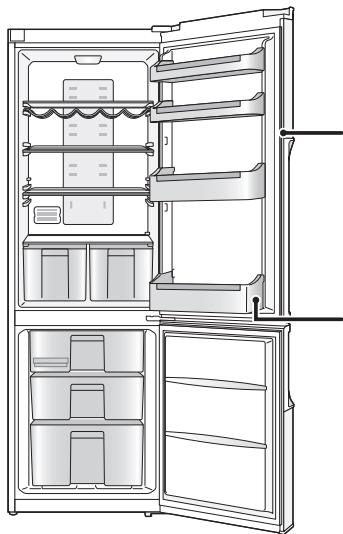
Daily cleaning
Wipe regularly with a dry cloth.
Places to pay particular attention to:
Door opening seal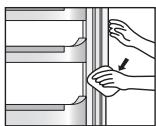
If the seal gets dirty and damaged, cold air is more likely to leak.
Bottle shelf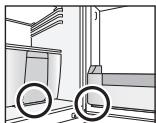
Wipe away any dirt and liquid before it builds up.
Each year, unplug your refrigerator, remove the shelves and give them a thorough clean.
Parts you can wash with water
Fridge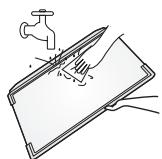
- Glass shelves
- Door shelves
- Bottle shelves
- Egg trays
- Crispers
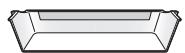
Freezer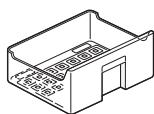
- Freezer drawers
- Ice trays
Note:
- Do not use abrasive cleaners such as Bicarbonate of Soda, as they can damage the plastic.
Cleaning the control panel
The refrigerator's control panel is made of delicate materials. To protect its surfaces, do not clean it with solvent-based chemicals. Simply wipe it with a dry or slightly damp cloth.
Cleaning the outside of the refrigerator
Use a warm, damp, soft cloth to clean the outside of your refrigerator. For more stubborn marks, use a mild kitchen detergent and wipe away with a soft damp cloth. Remove any remaining surface water with a dry cloth.
Notes for cleaning
When cleaning inside or outside your refrigerator, do not use:
- alkaline detergents - they can crack plastic parts.
- grinding dust, soap powder, oil-based cleaners, hot water, brushes, acids, benzenes, solvents or alcohol-based solutions - all can damage the refrigerator's surfaces and plastic parts.
Make sure you wipe off any stains from edible oils, which can also damage plastic parts.

Care and Cleaning instructions (continued)
When replacing the bulb, disconnect the mains plug from the mains socket.
Failure to do this could cause electric shock or injury.
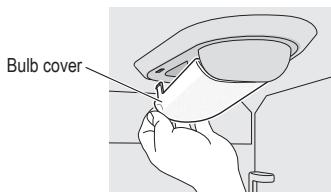
Replacing the bulb
① Disconnect the mains plug from the mains socket. ② Remove the bulb cover. (See image on the right.) ③ Turn the bulb to the left and remove it.
Notes:
- Follow these procedures in reverse to install the replacement bulb.
- The replacement bulb must be maximum 15 W, 230 V and size E14.
Maintenance check
- Is the mains lead damaged?
- Does the mains plug get hot?
- Is the mains plug firmly in the mains socket?
If the mains lead is damaged, please consult an authorized service centre. DO NOT attempt to replace these items yourself.

Extended disuse
If you're not going to use the refrigerator for a long time, unplug it and clean the mains plug as described above. Then leave the doors open for 2-3 days. This lets the interior dry out properly, and prevents odour and the build up of mould.
Do not switch the refrigerator on and off repeatedly. It will last longer if you leave it switched on during normal use.
Before moving or transporting your refrigerator
① Remove all items. ② Unplug it. ③ Raise the adjustable leg. ④ Pull, or ‘walk’ the refrigerator towards you. ⑤ Use a cloth, for example, to absorb the water in the evaporation pan.
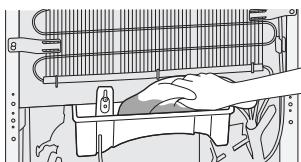
(Lower back of the refrigerator)
Moving and transporting your refrigerator
At least two people are needed to carry the refrigerator safely.
① Tighten the adjustable legs. ② Hold the adjustable legs at one end, and corners at the other, as shown.
Note:
- Do not carry the refrigerator by holding its doors. Always transport the refrigerator in its normal upright position.
Secure the doors with adhesive tape.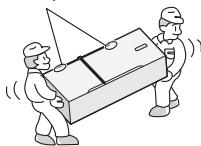
If you feel that the refrigerator is not working properly, check out the following points first.
If the trouble persists, disconnect the mains plug and contact your dealer or an authorized service centre.
General
| You hear unusual sounds from the refrigerator. | Has the refrigerator been installed on a sturdy and level floor?Have sufficient clearances been provided around the refrigerator?Is anything vibrating on the top of the refrigerator?It's normal to hear some noises when the refrigerator starts or stops operation. |
| You hear a sound after the compressor has shut down. | This is normal, and is often caused by refrigerant flowing back to the compressor. |
| You hear a sound after you have opened or closed the door. | This is normal, and is due to the difference in air pressure between the inside and outside of the refrigerator. |
| You hear the sound of air or water flowing after you have opened the door. | This is caused by refrigerant flowing the internal pipework. |
| You hear a continuous whining sound. | This sound is heard while the fan for circulating the cold air is operating.Has the food been packed too tightly together or is the room temperature high?In cases like these, the fan for circulating the cold air runs at high speed so it makes a loud noise. |
| The compressor is quite loud. | Has the food been packed too tightly together or is the room temperature high?In cases like these, the compressor runs at high speed so it's normal for the compressor to be louder. |
| The compressor has been running for a long time. | When the mains plug has been connected for the first time, the compressor runs longer than usual in order to cool down the inside of the refrigerator until the set temperatures are reached.Has Super Freeze Mode or Super Cool Mode been set?Have the doors been opened and closed frequently? Are the doors completely shut?Have the food items been packed too tightly together or is the room temperature high?When many food items are placed in the refrigerator at one time, the compressor will need to run for a longer period. |
| Condensation forms on the outside of the refrigerator. | Condensation may form when the humidity in the room is high and is normal.Wipe it off using a dry cloth. |
| The outside of the refrigerator feels hot to the touch. | After the power of the refrigerator is turned on, the refrigerator may become warm until the interior of the compartment is sufficiently cooled down. The refrigerator may become warm even after the compartments have been cooled down. This is due to the operation of the heat radiation pipe equipped on the refrigerator for the purpose of preventing condensation, and is not malfunction. |
| The controls on the control panel cannot be operated. | Is the power to the refrigerator on? |
| The alarm sounds. | The fridge door has been left ajar. Close the doors. |
Fridge and freezer
| The fridge is not chilling (and the freezer is not freezing). | • Is the power to the refrigerator on? |
| The fridge is not chilling (and the freezer is not freezing) satisfactorily. | • Is the set temperature too high?• Is the refrigerator exposed to direct sunlight or positioned near a heating appliance?• Have sufficient clearances been provided around the refrigerator?• Have the food items been packed too tightly together or is the room temperature high?• Have the doors been opened and closed frequently?Are the doors completely shut?• Has Holiday Mode been set?• When warm food is put inside the refrigerator, the temperature will rise temporarily.• During the cold season or when the room temperature is low, it may feel as if the refrigerator is not chilling. |
| There is a difference between the set temperature and actual temperature. | • When warm food is put inside the refrigerator, the temperature will rise temporarily. |
| Food in the fridge freezes. | • Is the set temperature for the fridge too low?• Has the food been placed at the back of the fridge?The area near the back wall is where the temperatures are coldest so avoid placing food which may freeze easily here. |
| Condensation forms in the fridge and drawers. | • Condensation may form when the door has been opened and closed frequently or when it has not been shut completely, or when the room humidity is high.Wipe off the condensation using a dry cloth. |
| It is hard to open the freezer door. | • The door is sometimes difficult to open just after it has been closed.• The difference in air pressure between the inside and outside of the freezer may sometimes make it hard to open the freezer door. Wait a few moments, and then try opening the door. |
| It smells inside the refrigerator. | • Were any food items with strong odours sealed before they were placed in the fridge?Place the items inside a sealed container and store them.• Odours may stick to the surfaces inside the refrigerator. Wipe the surfaces using a soft cloth which has been dipped in lukewarm water. |
| MODEL | NR-B32SX1-XENR-B32SX1-XF | NR-B32SG1-SENR-B32SG1-SF | NR-B32SW1-WENR-B32SW1-WF |
| CATEGORY | Refrigerator-Freezer | ||
| NO FROST COMPARTMENTS | ALL COMPARTMENTS | ||
| CLIMATE CLASS | T 1 | ||
| TOTAL GROSS VOLUME | 335 L | ||
| TOTAL NET VOLUME | 321 L | ||
| NET FRIDGE VOLUME | 235 L | ||
| NET FREEZER VOLUME | 86 L | ||
| OUTSIDE DIMENSIONSWIDTH x DEPTH x HEIGHT | 600 mm x 652 mm x 1866 mm | ||
| NET WEIGHT | 74 kg | ||
| RATED VOLTAGE | 220 V - 230 V | ||
| RATED FREQUENCY | 50 Hz | ||
| ENERGY CONSUMPTION | 320 kWh/year 2 | ||
| FREEZING CAPACITY | 13.5 kg/24 h | ||
| NOISE LEVEL | 46 dB | ||
| MAX STORAGE WITHOUT ELECTRICITY | 18 hours | ||
| REFRIGERANT/CHARGE | R600a/58 g | ||
| BLOWING AGENT | Cyclo-Pentane | ||
Notes:
*1 Permitted ambient temperature: 16 °C to 43 °C *2 The energy consumption per year is based on the standard test results for 24 hours. Actual energy consumption vary depending on how the appliance is used and where it is located.
When the doors are completely open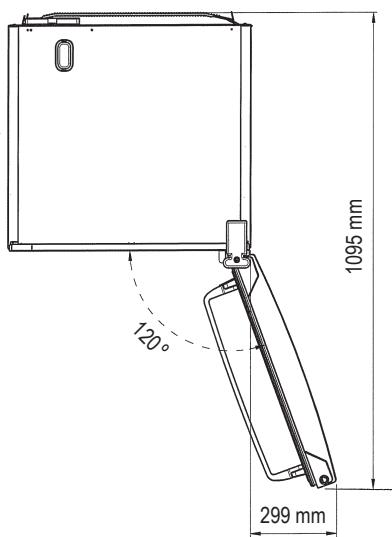


Door compartments and
bottle holders
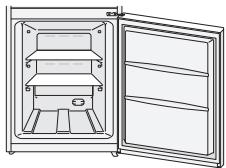
Daily cleaning
Possible pinch point
Figure 2

Refrigerator compartment
Glass shelves
Crisper drawers
Daily cleaning
Maintenance inspection
Figure 2

Installation (continued)
Glass shelves
Crisper drawers
Daily cleaning

Figure 2

Refrigerator compartment
Glass shelves
Daily cleaning
Notes:
Before disposing of your old appliance
Figure 2

Glass shelves
Daily cleaning
Figure 2

Cooling
① Wine rack ② Glass shelves ③ Vegetable drawer 4 2 ice cube trays
Glass shelves
Vegetable drawer
Daily cleaning
Dry the parts with a dry cloth.

Maintenance check
(Lower part of the back side)
Before disposing of your old appliance
Figure 2

Refrigerator compartment
① Wine rack ② Glass shelves ③ Drawers 4 2 ice cube trays
⑤ Freezer drawers 6 Kick plate 7 Adjustable feet ⑧ 2 egg trays
⑨ Door shelves 10 Bottle shelves
Note:
Glass shelves
Drawers
Pull the drawers towards you and take them out.
Daily cleaning
Maintenance check
- Is the power cord damaged?
- Does the plug become hot?
- Is the plug fully inserted into the socket?
(At the bottom on the back)
Figure 2

Installation (continued)
Refrigerator compartment
① Wine racks ② Glass shelves ③ Vegetable drawers 4 2 ice cube trays
Glass shelves
Vegetable drawers
Door shelves and
bottle shelves
Daily cleaning

Refrigerator compartment
Glass shelves
Notes:
Figure 2

Refrigerator compartment
Glass shelves
Daily cleaning
Checks
Refrigerator and freezer
Pursuant to the directive 2004/108/EC, article 9(2)
Panasonic Testing Centre
Panasonic Marketing Europe GmbH
Winsbergring 15, 22525 Hamburg, Germany
©Panasonic Corporation 2011
Y0411-0
AK-155960
Printed in Turkey.

- PANASONIC®
- OPERATING INSTRUCTIONS
- REFRIGERATOR-FREEZER
- (HOUSEHOLD USE)
- CARING FOR THE ENVIRONMENT
- DISPOSING OF THE PACKAGING
- INFORMATION ON DISPOSAL FOR USERS OF WASTE ELECTRICAL & ELECTRONIC EQUIPMENT (PRIVATE HOUSEHOLDS)
- FOR BUSINESS USERS IN THE EUROPEAN UNION
- INFORMATION ON DISPOSAL IN OTHER COUNTRIES OUTSIDE THE EUROPEAN UNION
- BEFORE DISPOSING OF YOUR OLD APPLIANCE
- INDICATES RISK OF DEATH OR SERIOUS INJURY
- SAFETY INSTRUCTIONS (CONTINUED)
- WARNING
- INDICATES RISK OF INJURY OR DAMAGE TO PROPERTY
- DIMENSIONS
- UNPACKING YOUR APPLIANCE
- CHOOSING THE RIGHT LOCATION
- VENTILATION
- TEMPERATURE
- LEVEL
- REFRIGERATOR DOOR
- INSTALLATION (CONTINUED)
- INSTALLING THE DISTANCE GUIDES
- CLEANING
- CONNECTING THE MAINS PLUG TO THE HOUSEHOLD MAINS SOCKET
- NOTES
- AMBIENT ROOM TEMPERATURE
- FOR SAVING ENERGY
- FRIDGE COMPARTMENT
- FREEZER COMPARTMENT
- NOTE
- DISPLAY AREA
- CONTROL AREA
- USING THE HANDY FUNCTIONS
- SUPER FREEZE MODE
- FEATURES
- SETTINGS
- SUPER COOL MODE
- ECO MODE
- HOLIDAY MODE
- BOTTLE MODE
- ALARM MODE
- USER ALERT FUNCTIONS
- MAKING ICE CUBES
- REMOVING AND ATTACHING SHELVES
- FRIDGE
- GLASS SHELVES
- CRISPERS
- DOOR SHELVES AND BOTTLE SHELVES
- FREEZER
- CARE AND CLEANING INSTRUCTIONS
- DAILY CLEANING
- PARTS YOU CAN WASH WITH WATER
- CLEANING THE CONTROL PANEL
- CLEANING THE OUTSIDE OF THE REFRIGERATOR
- NOTES FOR CLEANING
- CARE AND CLEANING INSTRUCTIONS (CONTINUED)
- REPLACING THE BULB
- MAINTENANCE CHECK
- EXTENDED DISUSE
- BEFORE MOVING OR TRANSPORTING YOUR REFRIGERATOR
- MOVING AND TRANSPORTING YOUR REFRIGERATOR
- DOOR COMPARTMENTS AND
- BOTTLE HOLDERS
- REFRIGERATOR COMPARTMENT
- CRISPER DRAWERS
- MAINTENANCE INSPECTION
- COOLING
- VEGETABLE DRAWER
- DRAWERS
- VEGETABLE DRAWERS
- DOOR SHELVES AND
- BOTTLE SHELVES
- CHECKS
Brand : PANASONIC
Model : NR-B32SX1
Category : Refrigerator