MSP 210V - Audio/video converter RGBlink - Free user manual and instructions
Find the device manual for free MSP 210V RGBlink in PDF.


| Product Type | Audio/Video Converter |
| Brand | RGBlink |
| Model | MSP 210V |
| Input Interfaces | HDMI, SDI, Analog Audio |
| Output Interfaces | HDMI, SDI, Analog Audio |
| Max Resolution | 1080p 60Hz |
| Video Scaling | Up/Down Conversion |
| Audio Embedding/De-embedding | Supported |
| Dimensions (W x D x H) | 200 x 150 x 50 mm |
| Weight | 1.0 kg |
| Power Supply | DC 12V, 2A |
| Power Consumption | 15W max |
| Operating Temperature | 0°C to 40°C |
| Storage Temperature | -20°C to 60°C |
| Main Functions | HDMI to SDI conversion, SDI to HDMI conversion, Audio embedding/de-embedding, Video scaling |
| Maintenance and Cleaning | Clean with a soft, dry cloth. Do not use liquid cleaners. |
| Safety Precautions | Keep away from moisture and heat sources. Do not disassemble. |
| Spare Parts and Repairability | Contact RGBlink support for spare parts and repairs. |
| Warranty | 1 year limited warranty |
Frequently Asked Questions - MSP 210V RGBlink
User questions about MSP 210V RGBlink
0 question about this device. Answer the ones you know or ask your own.
Ask a new question about this device
Download the instructions for your Audio/video converter in PDF format for free! Find your manual MSP 210V - RGBlink and take your electronic device back in hand. On this page are published all the documents necessary for the use of your device. MSP 210V by RGBlink.
USER MANUAL MSP 210V RGBlink
MSP 210V - Quick Start
NOTE
For full installation, configuration, and operation details, please refer to MSP 210V user manual, which is available at www.rgblink.com.
This quick start provides basic instructions for an experienced installer to set up and operate MSP 210V.
Interface Description
Input Interface
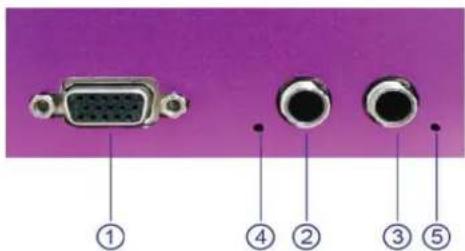
Interfaces
①
②③
VGA Input Port
④ 5
Indicator
Audio Input port
VGA Input
Input the video signal from H D player, DVD, and computer, etc.
Audio Input
Input audio signals from DVD player, set top box, hardware player, etc.

Indicator
When input analog audio signal, LED indicator4, 5 light, when input digital AES/EBU signal, LED indicator4 lights.
Output and Other Interface
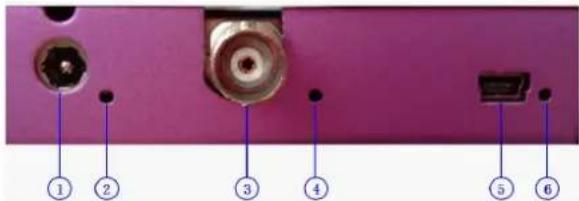
Interfaces
①
Power 2
SDI Output port
◯④⑥
Indicator
⑤USB Interface
SDI Output
Can connect the next level device with SDI interface.

USB Interface
Used to control the computer.
Indicator
Power indicator 2 lights when device has power supply.
LED indicator 4 lights when output SDI signal. LED indicator 6 lights when connect USB to computer.
Power
Connect one end of the power adapter with the device, the other end into a socket. Plug in, power indicator light means the device works normally. The device uses the standard 12V/3A power supply.
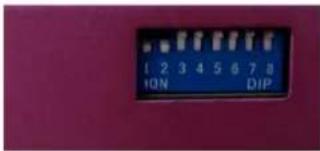
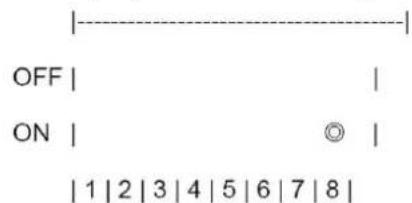
Dial Switch
Functional Description Block Diagram
Instructions
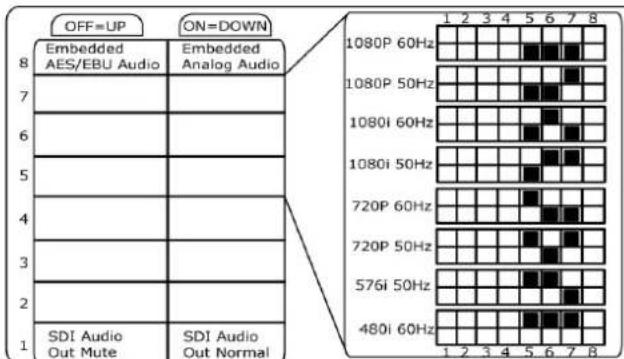
The dial switch upwards is OFF, downwards is ON: 1. Dial switch1 OFF: mute.
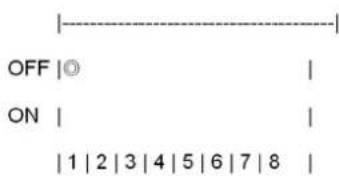
- Dial switch 1 ON: cancel mute.
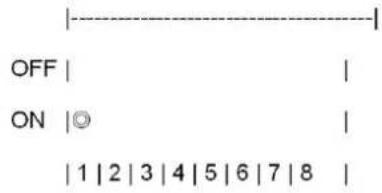
- Dial switch 2 must be set to ON.
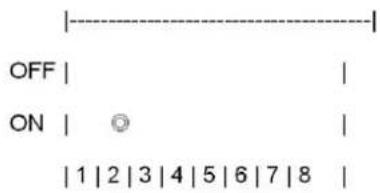
- Dial switch 3 ON: adjust.
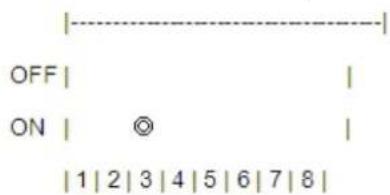
- Dial switch 3 OFF: cancel adjust.
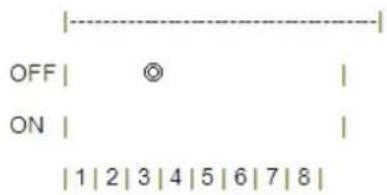
- Dial switch 5, 6, 7 ON: SDI output resolution is 1080p 60Hz.
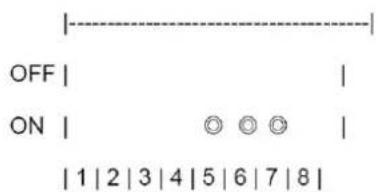
- Dial switch 5, 6 ON, dial switch 7 OFF: SDI output resolution is 1080p 50Hz.
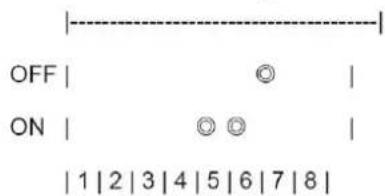
- Dial switch 5, 7 ON, dial switch 6 OFF: SDI output resolution is 1080i 60Hz.
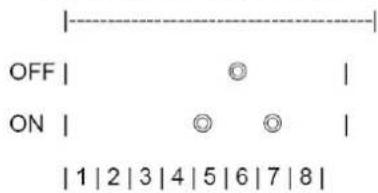
- Dial switch 5 ON, dial switch 6, 7 OFF: SDI output resolution is 1080i 50Hz.
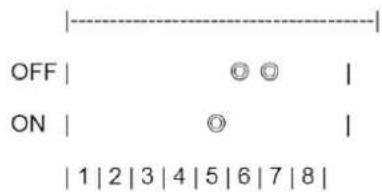
- Dial switch 5 OFF, dial switch 6, 7 ON: SDI output resolution is 720p 60Hz.
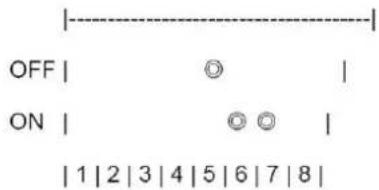
- Dial switch 5, 7 OFF, dial switch 6 ON: SDI output resolution is 720p 50Hz.
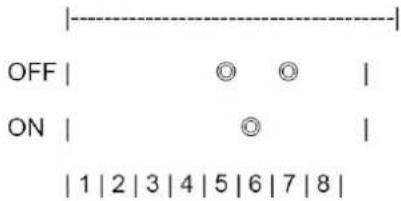
- Dial switch 5, 6 OFF, dial switch 7 ON: SDI output resolution is 576i 50Hz.
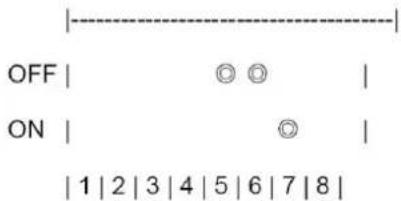
- Dial switch 5, 6 7 OFF: SDI output resolution is 480i 60Hz.
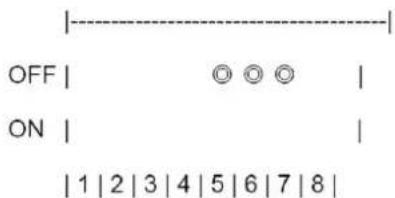
- Dial switch 8 OFF: AES/EBU output, no analog audio output.
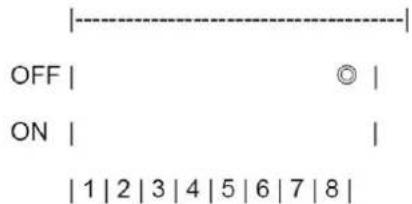
- Dial switch 8 ON: L-analog and R-analog audio output, no AES/EBU output.
Functional Description
Functional Description
- VGA input to SDI output.
-
Support input resolution of VESA: 800*600@60Hz, 1024*768@60Hz, 1280*720@60Hz, 1280*768@60Hz, 1280*800@60Hz, 1280*1024@60Hz, 1360*768@60Hz, 1366*768@60Hz, 1440*900@60Hz, 1400*1050@60Hz, 1600*1200@60Hz, 1680*1050@60Hz, 1920*1080@60Hz.
-
Support output resolution of SMPTE: 480i, 576i, 720p@50Hz, 720p@60Hz, 1080i@50Hz, 1080i@60Hz, 1080p@50Hz, 1080p@60Hz.
-
Support SCALE, left and right analog sound channel input, digital AES/EBU input, CVBS embedded audio input and mute function.
-
The LED indicator beside SDI interface lights when output SDI signal. When input analog audio signal, the LED indicators beside L-ANALOG and R-ANALOG light. When input digital AES/EBU signal, the LED indicator beside L-ANALOG or AES/EBU lights.
Functional Description Block Diagram
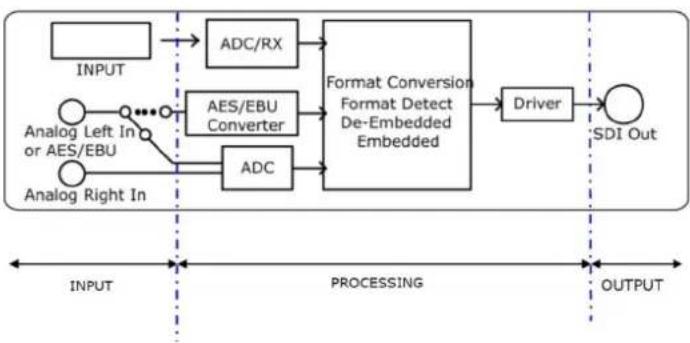
flowchart
graph LR
    A["INPUT"] --> B["ADC/RX"]
    C["Analog Left In or AES/EBU"] --> D["AES/EBU Converter"]
    E["Analog Right In"] --> F["ADC"]
    B --> G["Format Conversion Format Detect De-Embedded Embedded"]
    D --> G
    F --> G
    G --> H["Driver"]
    H --> I["SDI Out"]
    style A fill:#f9f,stroke:#333
    style C fill:#f9f,stroke:#333
    style E fill:#f9f,stroke:#333
    style I fill:#ccf,stroke:#333
Brand : RGBlink
Model : MSP 210V
Category : Audio/video converter