TAO 1tiny - Audio/video converter RGBlink - Free user manual and instructions
Find the device manual for free TAO 1tiny RGBlink in PDF.


| Product Type | Audio/Video Converter (USB-C to HDMI) |
| Brand | RGBlink |
| Model | TAO 1tiny |
| Dimensions | 9 × 5 × 3 cm (3.5 × 2.0 × 1.2 in) |
| Weight | Approx. 50 g (1.8 oz) |
| Power Supply | 5V/2A/10W via USB Type-C Power Port (adapter not included) |
| Power Consumption | ≤10W (including camera power output) |
| Input Ports | USB Type C (UVC 3.0), USB 2.0 COM Port (for remote control) |
| Output Port | HDMI 2.0 |
| Supported Resolutions | Up to 4K@60 (with 4K@30 input); VESA standard resolutions |
| Compatibility | USB cameras (UVC), RGBlink mini series; Windows, macOS (via UVC) |
| Special Features | Inline converter, supplies 5V/1A to USB camera, uncompressed HDMI output |
| Firmware Upgrade | Via USB 2.0 port using USB drive (auto-upgrade on insertion) |
| Warranty | 1 year parts and labor (non-transferable, return to base) |
| Package Contents | TAO 1tiny unit, user manual (online download) |
| Care Instructions | Wipe with dry cloth; avoid moisture and extreme temperatures |
| Safety Precautions | Use only supplied or recommended 5V/2A adapter; do not expose to water |
| Spare Parts / Repairability | Contact RGBlink support; no user-serviceable parts inside |
Frequently Asked Questions - TAO 1tiny RGBlink
User questions about TAO 1tiny RGBlink
0 question about this device. Answer the ones you know or ask your own.
Ask a new question about this device
Download the instructions for your Audio/video converter in PDF format for free! Find your manual TAO 1tiny - RGBlink and take your electronic device back in hand. On this page are published all the documents necessary for the use of your device. TAO 1tiny by RGBlink.
USER MANUAL TAO 1tiny RGBlink
natural_image
Black rectangular electronic device labeled 'OZL' with a circular logo and USB port (no readable text beyond branding)User Manual
RGBlink®

natural_image
Abstract network diagram with interconnected nodes and circles (no text or labels)Overview
About TAO 1tiny
TAO 1tiny is the essential accessory for compact webcam and ePTZ camera users, enabling those cameras to become HDMI native devices connectable almost anywhere.
This tiny inline convertor- measuring at just 9x5x3cm, provides HDMI connectivity for cameras and similar USB-C UVC capture devices, supporting popular VESA standard resolutions up to 4K Video transcoded to HDMI is uncompressed with full fidelity maintained for superior visual performance.
Parts Info
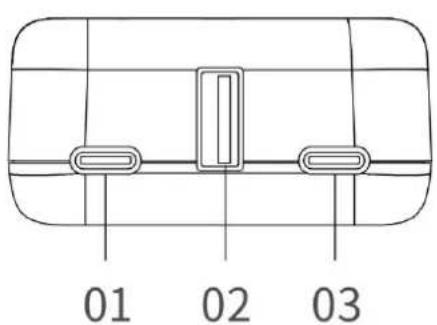
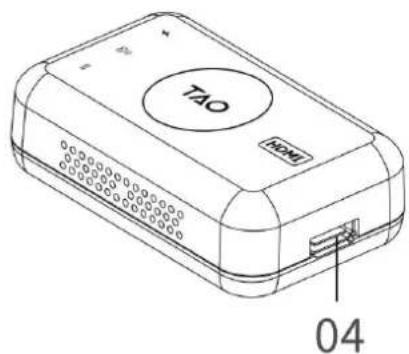
01 Type C Power Port
02 USB 2.0 COM Port
03 USB Type C Input Port
04 HDMI 2.0 Output Port
Note:
(1) If the input UVC signal is 4K@30 and the HDMI OUT connecting to 4K monitor, the output resolution up to 4K@60.
(2) Power of Adapter is not less than: 5V/2A/10W; Do not use the USB port of the computer for power supply.
Connecting TAO 1tiny
Installing TAO 1tiny
TAO 1tiny supports USB 3.0 (UVC compliance) to HDMI 2.0 output. It can work with USB camera and mini series.
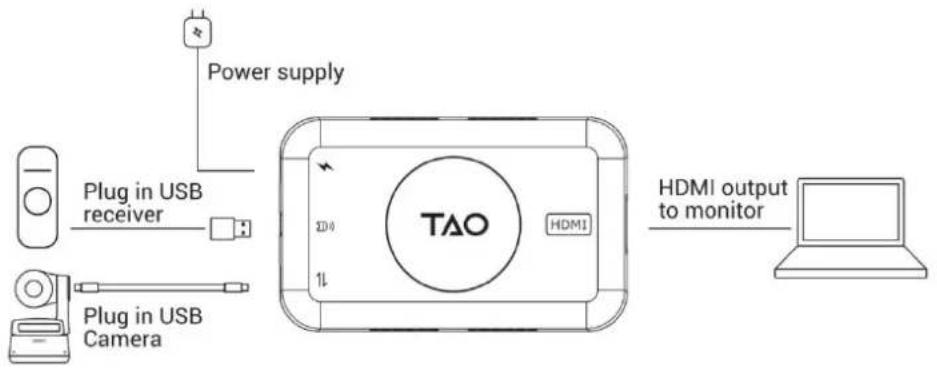
1. How to Work With USB Camera
Please operate as shown in the following figure:
(1) Connecting Power Port with power supply.
(2) Connecting USB-C Input Port with USB Camera via USB-C cable.(TAO 1tiny can supply power to USB camera:5V/1A)
(3) Connecting HDMI 2.0 Output Port with monitor via HDMI cable.
If necessary, you can plug in USB Receiver into USB 2.0 Port to control USB camera via remote control.
flowchart
graph LR
    A["Power supply"] --> B["Plug in USB receiver"]
    B --> C["Plug in USB Camera"]
    C --> D["TAO"]
    D --> E["HDMI"]
    E --> F["HDMI output to monitor"]
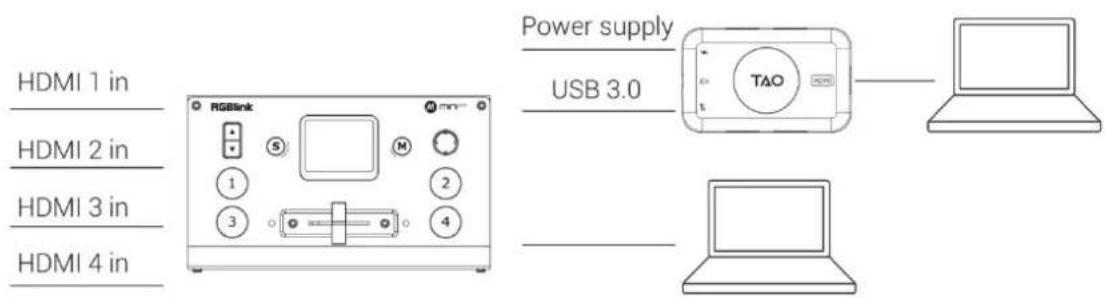
2. How to Work With mini Series
Please operate as shown in the following figure:
(1) Connecting Power Port of TAO 1tiny with power supply.
(2) Connecting mini-pro with USB-C Input Port via USB 3.0 to USB-C cable.
(3) Connecting HDMI 2.0 Output Port with monitor via HDMI cable.
Firmware Upgrade
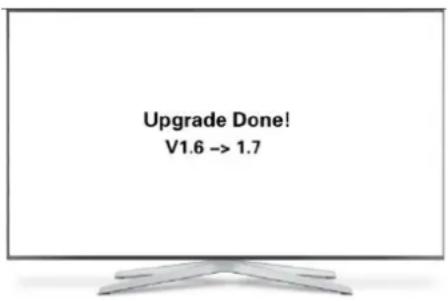
TAO 1tiny can be upgraded via USB disk. The device will auto-upgrade after plugging USB disk (including the latest upgrade firmware) to USB 2.0 port. The device will auto-restart after upgrade and you can find a file of upgrade done in the USB disk. Besides, the HDMI monitor will show the message of "Upgrade Done" and upgrade version.
Do not disconnect the device during firmware upgrade.
Content is subject to change without notice. Users can download latest Manual Book on www.rgblink.com
Warranty
All products are designed and tested to the highest quality standard and backed by 1 years parts and labor warranty. Warranties are effective upon delivery date to customer and are non-transferable. RGBlink warranties are only valid to the original purchase/owner. Warranty related repairs include parts and labor, but do not include faults resulting from user negligence, special modification, lighting strikes, abuse(drop/crush), and/or other unusual damages.Warranty is return to base.Return for repairs are accepted only where shipping charges are prepaid.
Your complete satisfaction is our goal.
According to the after-sale service, please contact our team as soon as possible after the failure occurs to obtain the corresponding after-sale service.
● Headquarter: Room 601A, No. 37-3 Banshang community, Building 3, Xinke Plaza, Torch Hi-Tech Industrial Development Zone, Xiamen, China
Tel: +86-592-5771197
Fax: +86-592-5788216
● Customer Hotline: 4008-592-315
Web:http://www.rgblink.com
E-mail: support@rgblink.com
Brand : RGBlink
Model : TAO 1tiny
Category : Audio/video converter