SmartRig+UC - Hi-Fi System Saramonic - Free user manual and instructions
Find the device manual for free SmartRig+UC Saramonic in PDF.


| Product Type | Portable Audio Interface for iOS Devices |
| Brand | Saramonic |
| Model | SmartRig+UC |
| Category | Hi-Fi System |
| Dimensions | 2.5 x 1.5 x 0.5 inches (approx.) |
| Weight | 0.5 oz (approx.) |
| Power Source | Powered by iOS device via Lightning connector |
| Input Connector | 3.5mm TRS stereo input (mic/line) |
| Output Connector | 3.5mm TRS headphone jack with volume control |
| Compatible Devices | iPhone, iPad, iPod touch with Lightning port |
| Supported Audio | Stereo 24-bit/96kHz high-resolution audio |
| Integrated Features | Headphone monitoring, passthrough charging |
| Maintenance | Wipe with a soft, dry cloth; avoid liquids |
| Safety Precautions | Do not expose to moisture or extreme temperatures |
| Spare Parts Available | None; unit is non-serviceable |
| Repair Information | Contact Saramonic support for issues |
| Warranty | Limited 1-year warranty |
Frequently Asked Questions - SmartRig+UC Saramonic
User questions about SmartRig+UC Saramonic
0 question about this device. Answer the ones you know or ask your own.
Ask a new question about this device
Download the instructions for your Hi-Fi System in PDF format for free! Find your manual SmartRig+UC - Saramonic and take your electronic device back in hand. On this page are published all the documents necessary for the use of your device. SmartRig+UC by Saramonic.
USER MANUAL SmartRig+UC Saramonic
Mic & Guitar Interface
For USB Type-C Devices
Product Introduction
1 General Introductions
The Saramonic SmartRig+ UC is a two channel audio interface. It allows you to connect professional microphones/guitars to record quality sound or create music with your USB Type-C devices.
The USB Type-C connector allows you to record great stereo sound to your devices.
The SmartRig+ UC makes your recording work much easier. It provides 48V phantom power for microphones and 3.5mm headphone output for real-time monitoring. The two gain control thumbwheels make it easy to set levels of each channel separately.
2 Highlights
- Two XLR mic inputs
- Two 1/4" (6.35mm) guitar inputs
- Two 1/8" (3.5mm) inputs
• Mono/Stereo switch (M/S) - REC/PLAY switch
• +48V phantom power
• 3.5mm headphone output for monitoring - Gain control
- USB Type-C connector for output
3 Specifications
| Frequency Response | 20 Hz to 20 Khz, +/-0.5 dB |
| THD less than 0.01% @ 1 kHz, -30 dBu input | |
| SNR 80 dB @ 1 kHz, -30 dBu input | |
| Input1 | 1x XLR mic input |
| 1 x 1/4" (6.35mm) guitar input | |
| 1 x 1/8" (3.5mm) input | |
| Input2 | 1 x XLR mic input |
| 1 x 1/4" (6.35mm) guitar input | |
| 1 x 1/8" (3.5mm) input | |
| Output USB Type-C connector output cable | |
| Phone OUT 1 x 1/8" (3.5mm) headphone jack | |
| Gain +20 dB to -∞ | |
| Phantom Power 48V power supplies | |
| Power Requirements 9V alkaline or lithium battery | |
| Dimensions L 120 x W 40 x H 40 mm | |
| Weight 130g (excluding battery) | |
4 Product Structure
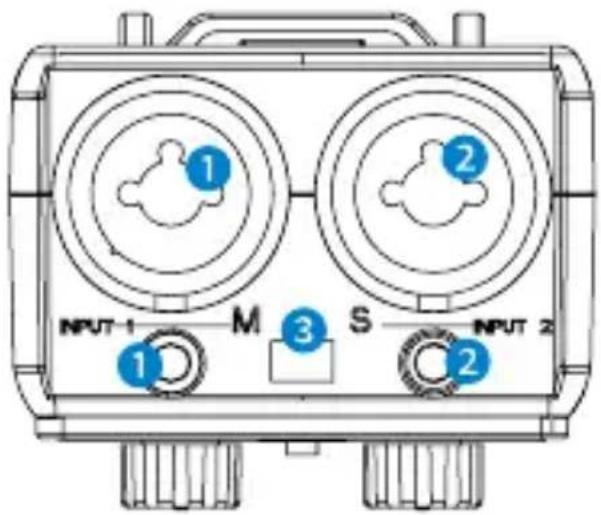
1 Input1:
For Microphone:
One balanced XLR input
One 1/8" (3.5mm) mono input
For Guitar:
One 1/4" (6.35mm) mono standard input
② Input2:
For Microphone:
One balanced XLR input
One 1/8" (3.5mm) mono input
For Guitar:
One 1/4" (6.35mm) mono standard input
Note: Other instruments with 1/4" (6.35mm) input connector can also be used with the SmartRig+ UC.
③ M/S switch
Select mono/stereo output mode
When recording on one channel, use the mono (M) setting. The signal will be sent to both left and right channels.
When recording on two channels, use the stereo (S) setting. The level of each channel can be controlled individually.
4 ① and ② Control Knobs
Adjust the signal level of each channel to the optimum recording levels.
Knob ① controls the volume of input group 1 and knob ② is for input group 2.
5 REC/PLAY Switch
Select REC to monitor audio directly from the microphone or audio sources while recording.
Select PLAY to monitor playback audio from the USB Type-C devices.
6 LED Indicator
When turn on the SmartRig+, the green indicator is on.
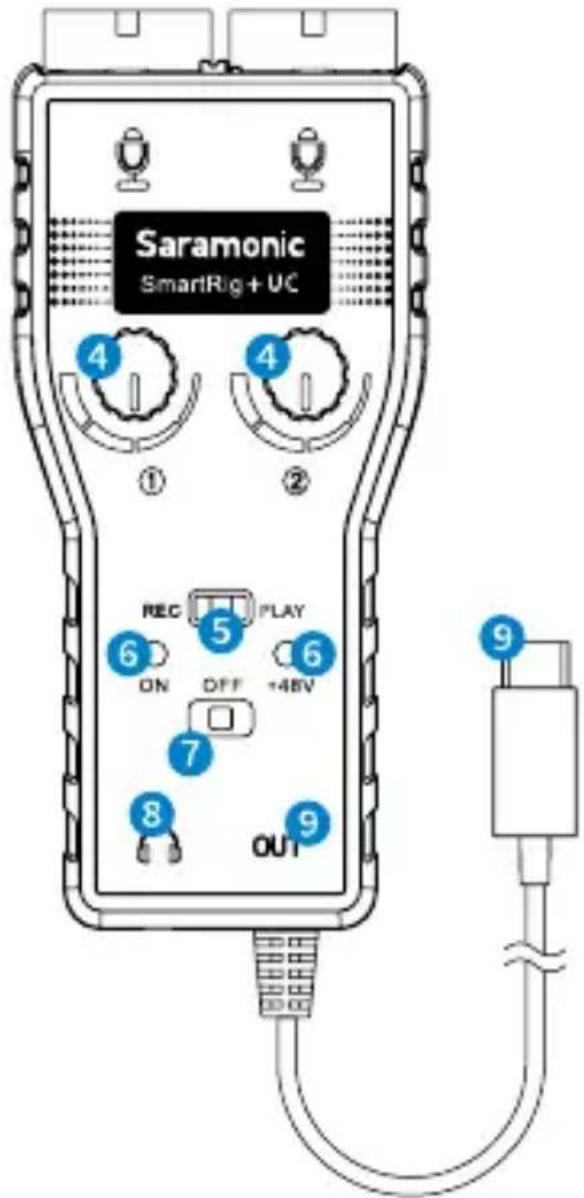
When choose +48V phantom power, the red and green indicators are both on.
When it is low battery, the red and green indicators will be dim.
7 ON/OFF/+48V Switch
Select the ON/OFF switch to turn on/off the SmartRig+ UC.
Select +48V phantom power for microphones that require phantom power to operate.
Please notice that only the XLR inputs offer +48V phantom power, the 1/8" (3.5mm) mic inputs do not offer +48V phantom power.
8 Headphone Jack
Monitor the audio (this feature depends on the application you are using).
9 Output
USB Type-C output cable.
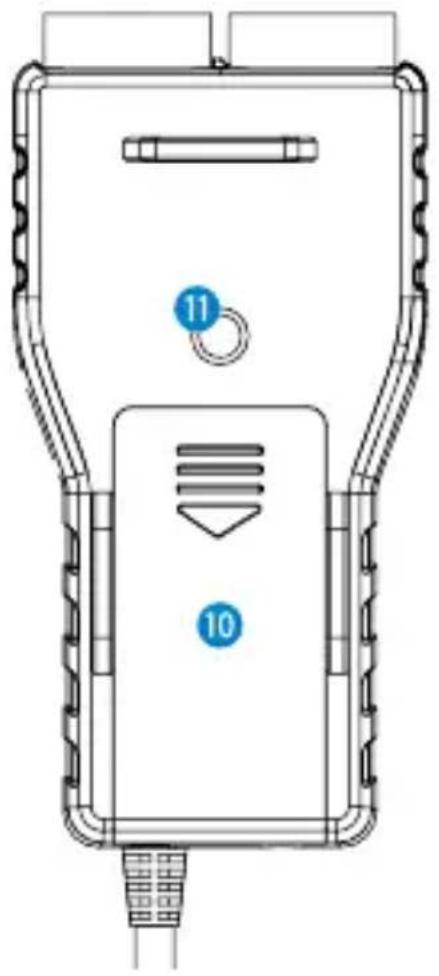
10 Battery Compartment
Operates on one 9V alkaline or lithium battery (not included).
11 1/4" Female Screw
5 Quick Start Guide
a. Install a 9V battery. Gently slide out the battery cover in the direction of the arrow at the back of unit. Insert the battery with the "+" positive terminal lined up with the "+" indicator on the battery compartment.
b. Connect your microphones to the XLR inputs or 3.5mm inputs, or connect guitars to the 1/4" (6.35mm) inputs.
c. Set the M/S switch
When recording on one channel, switch to the mono (M) setting. The signal will be sent to both left and right channels.
When recording on two channels, switch to the stereo (S) setting. The level of each channel can be controlled individually.
d. Connect the SmartRig+ UC to the USB Type-C interface of your devices.
e. When connect to USB Type-C device, please download professional recording APP which support real-time input/output pass-through and install them on your USB Type-C device.
f. Turn on the SmartRig+ UC. Slide the power switch to the ON position and the green indicator is on.
g. If your microphone needs phantom power, please slide the power switch to the +48V position.
The red and green indicators are both on.
h. Connect your headphone to headphone jack to monitor the recording.
Set the REC/PLAY switch
When you need to monitor audio directly from the microphone or audio sources when recording, slide to REC. When you need to monitor playback audio from the USB Type-C devices, slide to PLAY.
i. You are now ready to record. Adjust the two gain controls flexibly to get the optimum signal levels.
6 Tips
- Be careful not to turn the phantom power ON when recording with microphones that do not operate on phantom power, as the current may damage it.
- Please set the GAIN properly during recording. Audio recording will be distorted if the GAIN is too high or too low.
- If you hear echoes when using high GAIN settings, please lower the device volume with the volume button.
- If you can't hear audio when monitoring, please make sure the applications you choose can support real-time input/output pass-through.
7 Compatibility
Compatible with USB Type-C devices (Except GoPro USB Type-C).
Any types of microphones: Dynamic, Ribbon, or Condenser.
Musical instrument: Guitars or other musical instruments with a 6.35mm input.
8 Packing List
The SmartRig+ UC ×1
Velcro Strip ×1
User Manual ×1
Warranty Card ×1
www.saramonic.com
The Saramonic logo is trademark which is registered and owned by Saramonic International.
COPYRIGHT 2011-2021 SARAMONIC INTERNATIONAL (A brand of DSQN)
Email: info@saramonic.com