
SHDX1200 - Audio System PANASONIC - Free user manual and instructions
Find the device manual for free SHDX1200 PANASONIC in PDF.

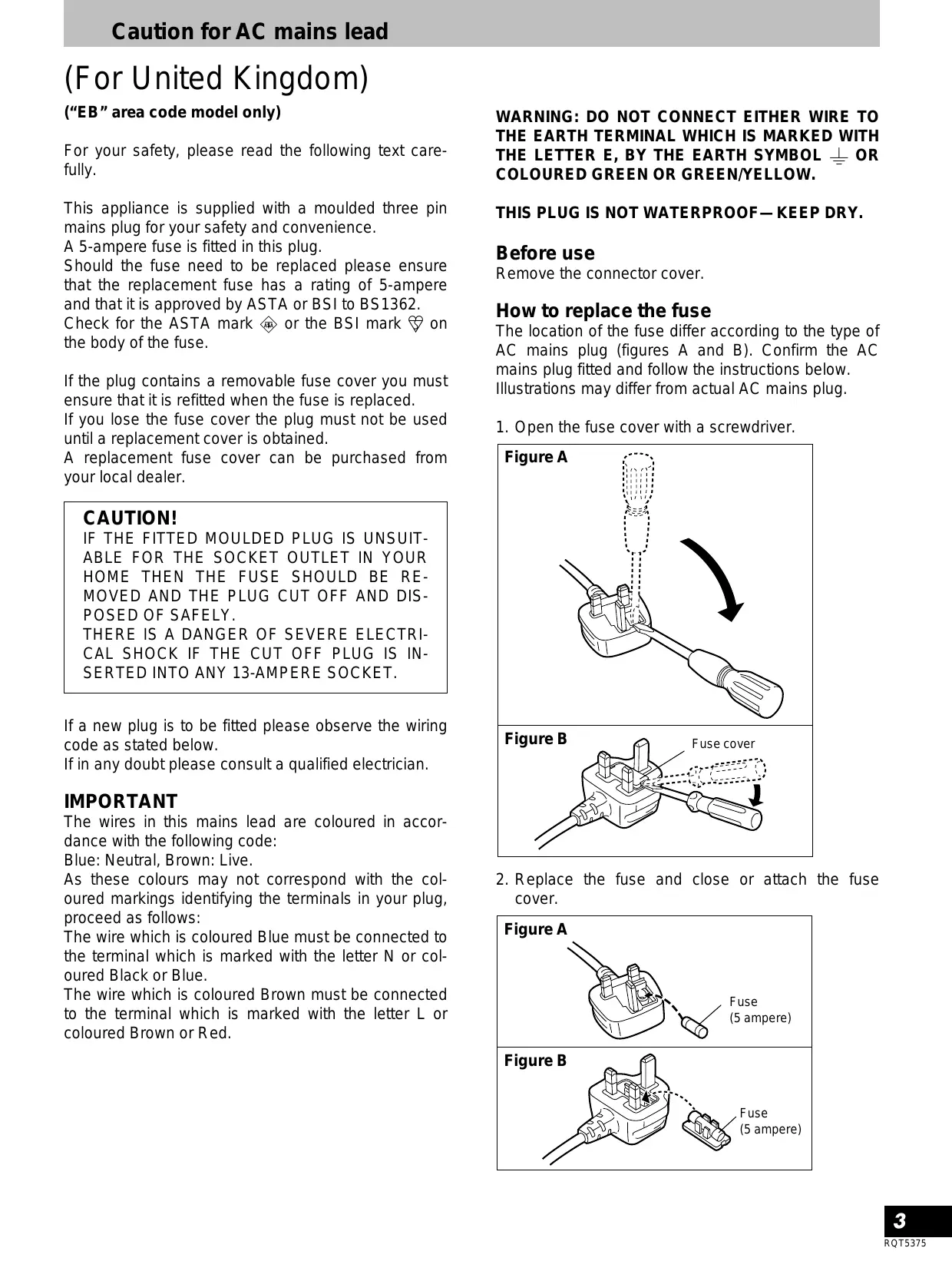

| Product type | Professional DJ audio mixer |
| Model | SH-DX1200 (SHDX1200) |
| Brand | PANASONIC (Technics) |
| Dimensions (W x H x D) | 260 x 102 x 305 mm |
| Weight | 3.5 kg |
| Power supply | AC 230-240 V, 50/60 Hz, 16 W |
| Audio inputs | 2x PHONO (RCA), 2x LINE (RCA), 1x AUX (RCA), 1x MIC (6.35 mm jack) |
| Audio outputs | LINE OUT (RCA), MONITOR OUT (RCA), REC OUT (RCA), PHONES (6.35 mm jack) |
| Equalization | 2 bands (HIGH and LOW) with attenuation -24 dB (12 dB/oct) |
| TRIM adjustment | ±10 dB per channel |
| Faders | 2 channel faders (45 mm) and 1 crossfader, lifespan 100,000 cycles |
| Included spare parts | 1 channel fader and 1 spare crossfader in the bottom panel |
| Level display | 12-dot, 3 columns (LINE OUT L/R and MONITOR) |
| Monitor functions | Pre-fader (CUE) with A/B selection, mixable with master output |
| Headphone output | 1x 6.35 mm jack, level and balance control |
| Cleaning and maintenance | Soft, dry cloth; avoid alcohol, thinner, benzene |
| Safety | Ventilation required; do not expose to moisture or shocks |
| Included accessories | Power cord, sticker, spare faders |
Frequently Asked Questions - SHDX1200 PANASONIC
User questions about SHDX1200 PANASONIC
0 question about this device. Answer the ones you know or ask your own.
Ask a new question about this device
Download the instructions for your Audio System in PDF format for free! Find your manual SHDX1200 - PANASONIC and take your electronic device back in hand. On this page are published all the documents necessary for the use of your device. SHDX1200 by PANASONIC.
USER MANUAL SHDX1200 PANASONIC
Operating Instructions
Model No. SH-DX1200
EB GN
Technics®
Note:
The "EB" indication shown on the packing case indicates United Kingdom.
Before connecting, operating or adjusting this product, please read these instructions completely.
Please keep this manual for future reference.
Dear customer
Thank you for purchasing this product.
For optimum performance and safety, please read these instructions carefully.
Contents
Caution for AC mains lead. 3
Suggestions for safety 4
Features 5
Connections 6
Names of the parts 8
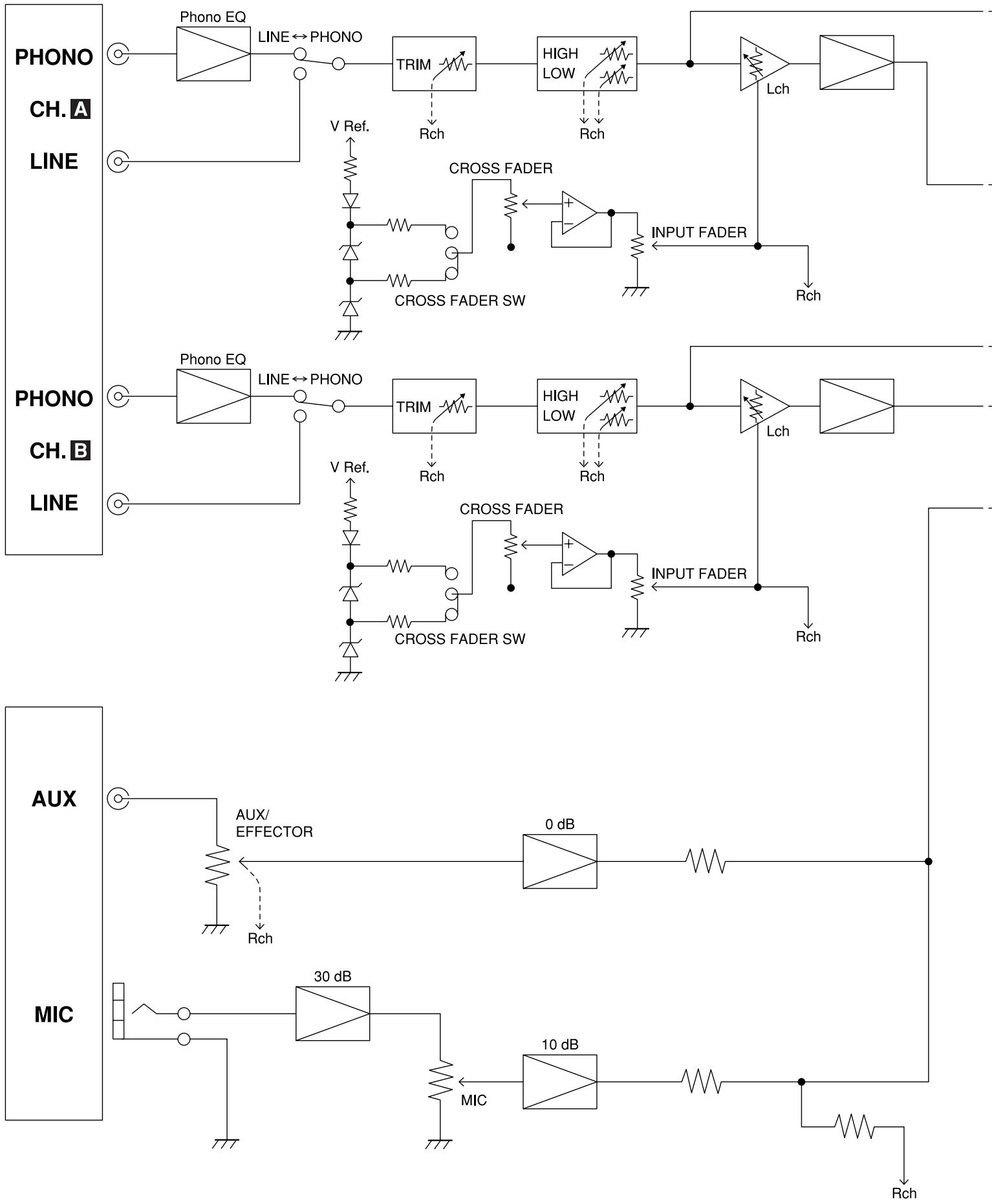
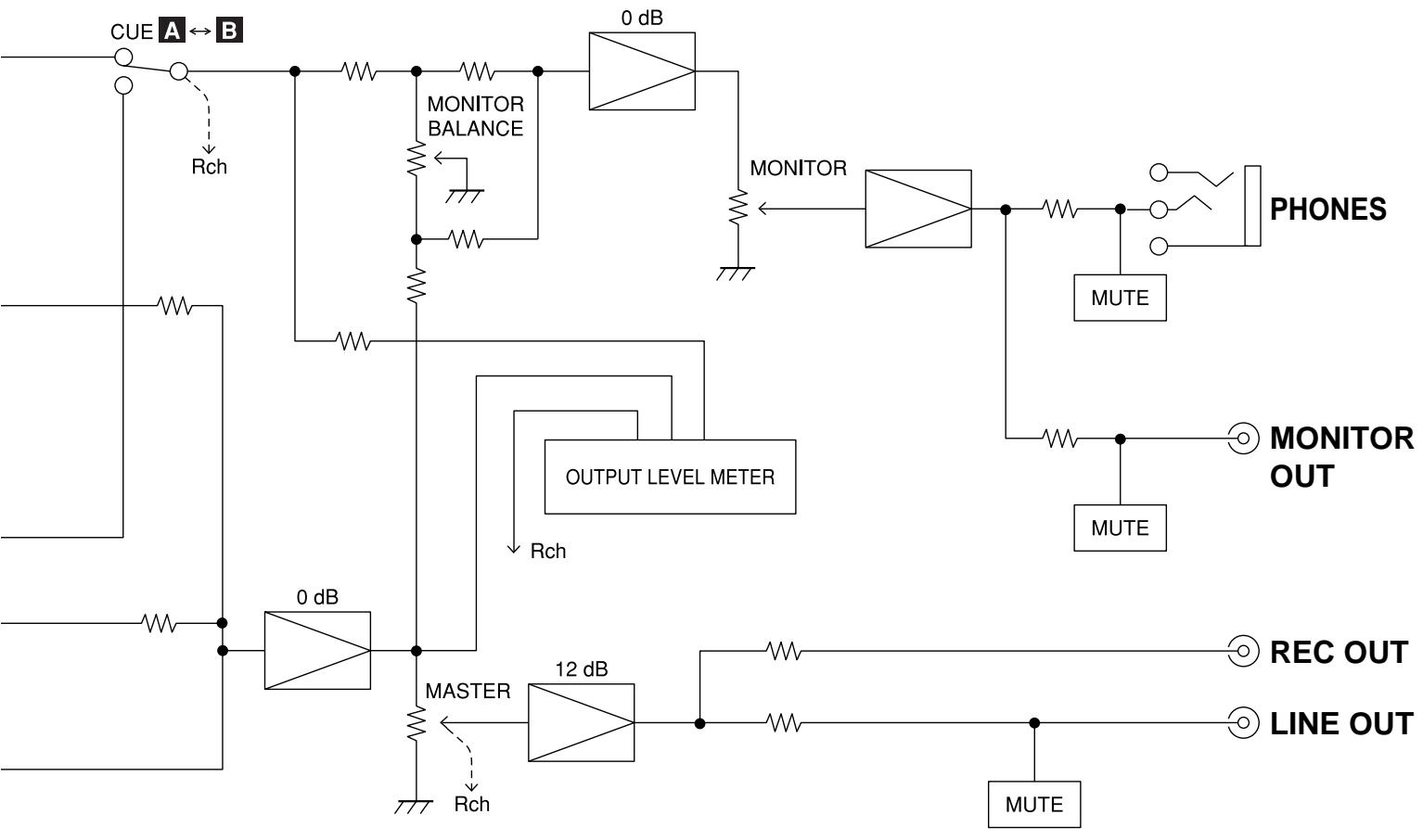
Block diagram 10
Maintenance 11
Troubleshooting guide Back cover
Specifications Back cover
Supplied accessories
Please check and identify the supplied accessories.
Use numbers indicated in parentheses when asking for replacement parts.
Sticker 1pc.

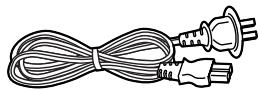
□ AC mains lead . 1pc. For United Kingdom (VJA0733)
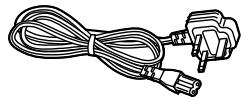
For Australia and New Zealand (RJA0035-K)
Note
The included AC mains lead is for use with this unit only. Do not use it with other equipment.
(For United Kingdom)
("EB" area code model only)
For your safety, please read the following text carefully.
This appliance is supplied with a moulded three pin mains plug for your safety and convenience.
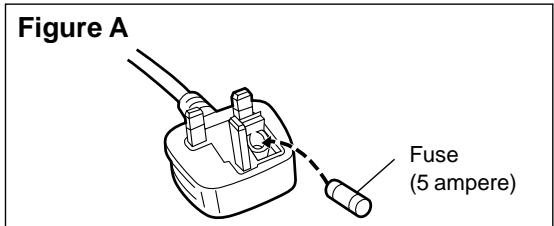
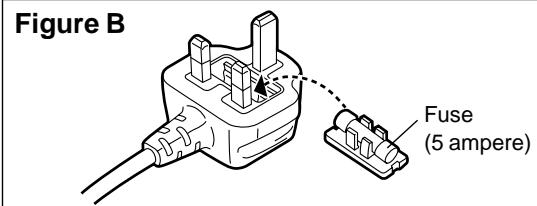
A 5-ampere fuse is fitted in this plug.
Should the fuse need to be replaced please ensure that the replacement fuse has a rating of 5-ampere and that it is approved by ASTA or BSI to BS1362.
Check for the ASTA mark or the BSI mark on the body of the fuse.
If the plug contains a removable fuse cover you must ensure that it is refitted when the fuse is replaced.
If you lose the fuse cover the plug must not be used until a replacement cover is obtained.
A replacement fuse cover can be purchased from your local dealer.
CAUTION!
IF THE FITTED MOULDED PLUG IS UNSUITABLE FOR THE SOCKET OUTLET IN YOUR HOME THEN THE FUSE SHOULD BE REMOVED AND THE PLUG CUT OFF AND DISPOSED OF SAFELY.
THERE IS A DANGER OF SEVERE ELECTRICAL SHOCK IF THE CUT OFF PLUG IS INSERTED INTO ANY 13-AMPERE SOCKET.
If a new plug is to be fitted please observe the wiring code as stated below.
If in any doubt please consult a qualified electrician.
IMPORTANT
The wires in this mains lead are coloured in accordance with the following code:
Blue: Neutral, Brown: Live.
As these colours may not correspond with the coloured markings identifying the terminals in your plug, proceed as follows:
The wire which is coloured Blue must be connected to the terminal which is marked with the letter N or coloured Black or Blue.
The wire which is coloured Brown must be connected to the terminal which is marked with the letter L or coloured Brown or Red.
WARNING: DO NOT CONNECT EITHER WIRE TO THE EARTH TERMINAL WHICH IS MARKED WITH THE LETTER E, BY THE EARTH SYMBOL 1一 OR COLOURED GREEN OR GREEN/YELLOW.
THIS PLUG IS NOT WATERPROOF—KEEP DRY.
Before use
Remove the connector cover.
How to replace the fuse
The location of the fuse differ according to the type of AC mains plug (figures A and B). Confirm the AC mains plug fitted and follow the instructions below. Illustrations may differ from actual AC mains plug.
- Open the fuse cover with a screwdriver.
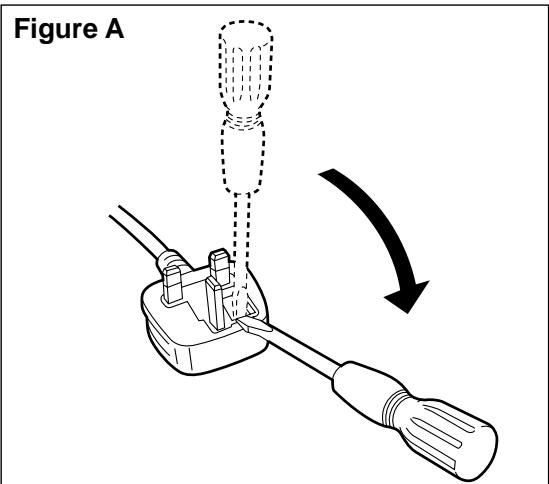
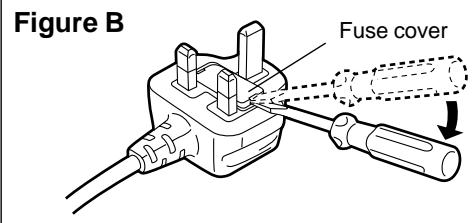
- Replace the fuse and close or attach the fuse cover.
Placement
Avoid placing the unit in areas of:
- direct sunlight
high temperature
high humidity
excessive vibration - uneven surfaces (Place the unit on a flat level surface.)
Such conditions might damage the cabinet and/or other component parts and thereby shorten the unit's service life.
To protect the unit against sound distortion and acoustical effects, please place the unit at least 15 cm away from wall surfaces etc.
Stacking
Never place heavy items on top of the unit or the AC mains lead.
Voltage
- It is very dangerous to use an AC power source of high voltage such as for an air conditioner.
A fire might be caused by such a connection. - A DC power source can not be used.
Be sure to check the power source carefully, especially if on a ship or other place where DC is used.
AC mains lead protection
- Avoid cuts, scratches or poor connection of the AC mains lead, as this may result in fire or electric shock.
Excessive bending, pulling or slicing of the AC mains lead should also be avoided. - Do not pull on the AC mains lead when you are disconnecting the power, as this could cause an electric shock. Grasp the plug firmly when you disconnect the AC mains lead.
- Never touch the plug with wet hands or a serious electric shock could result.
Foreign materials
- Ensure that no foreign objects, such as needles, coins, screwdrivers etc., accidentally fall into the unit.
Otherwise, a serious electric shock or malfunction could occur. - Be extremely careful about spilling water or liquid on/into the unit, as a fire or electric shock could occur.
(Disconnect the power plug and contact your dealer immediately if this occurs.) - Avoid spraying insecticides onto the unit as they contain flammable gases which can be ignited.
- Insecticides, alcohol, paint thinner and similar chemicals should never be used to clean the unit as they can cause flaking or cloudiness to the cabinet finish.
Service
- Never attempt to repair, disassemble or reconstruct the unit if there seems to be a problem.
A serious electric shock could result if you ignore this precautionary measure. - If a problem occurs during operation (the sound is interrupted, indicators fail to light up, smoke is detected, etc.) contact your dealer or Authorized Service Center immediately.
- Disconnect the power supply if the unit will not be used for a long time. Otherwise the operation life could be shortened.
CAUTION!
DO NOT INSTALL OR PLACE THIS UNIT IN A BOOKCASE, BUILT IN CABINET OR IN ANOTHER CONFINED SPACE. ENSURE THE UNIT IS WELL VENTILATED. ENSURE THAT CURTAINS AND ANY OTHER MATERIALS DO NOT OBSTRUCT THE VENTILATION TO PREVENT RISK OF ELECTRIC SHOCK OR FIRE HAZARD DUE TO OVERHEATING.
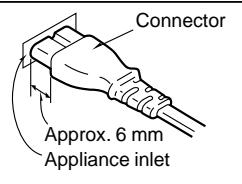
Insertion of connector
Even when the connector is perfectly inserted, depending on the type of inlet used, the front part of the connector may jut out as shown in the drawing.
However there is no problem using the unit.
This model is the official audio mixer for the DMC-sponsored World DJ Championship, an event held annually since 1997 that brings together professional disc jockeys from all over the world. It is a top-of-the-line audio mixer with the kind of outstanding design, functions, and sound quality that suits the requirements of disc jockeys accustomed to giving scratch-mixing performances in a variety of ways.
Operating ease
- This audio mixer is the same height as SL-1200M3D for operating ease.
- By providing adequate space in the panel layout around the channel faders and cross fader and by eliminating protruding parts, full rein can be given to individual technique which exactly reflects the mood of the moment even when it comes to high-powered scratch-mixing.
Functions
- The model comes with both high and low equalizers so that all manner of sound sources can be accommodated to generate a highly creative style of sound. A wide margin of creativity in producing sound is provided since the attenuation is set to a high -24 dB (12 dB/oct).
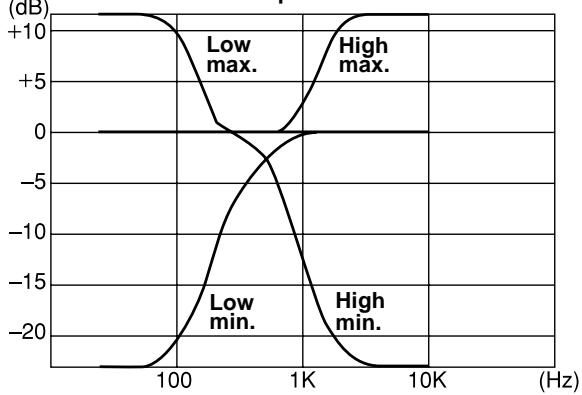
Equalization characteristics
- The model is equipped with [TRIM] controls (±10 dB) which compensate for differences in the source level.
- By adding a pre-fader monitor, the channels selected by [MONITOR CUE] controls can be monitored regardless of the positions of the faders.
It is also possible to mix and monitor the line-out sources.
- The model comes with line-out connectors for monitoring so that sound can be monitored not only with headphones but through the speakers inside the booth.
- The line-out source L and R levels as well as the monitor source levels can be checked out on the 12-point, 3-column level meter.
- An [AUX IN] connector is provided to enable a sampler, keyboard, etc. to become part of the disc jockey scene.
Construction and materials
- New 45mm stroke faders with an excellent durability and smooth operating touch have been developed for this model. The service life of the channel faders and cross fader has been improved by a quantum leap.
- A spare channel fader and a spare cross fader have been provided on the bottom panel just in case, and the faders themselves are designed to enable easy replacement.
- Lever switches are employed for the input selector controls (LINE, PHONO) and, by providing adequate space around them, they can also be used for operations involving transformer scratching.
What is DMC?
Web site (http://www.dmcworld.com)
DMC is the world's largest disc jockey organization whose members include the world's top disc jockeys, musicians and producers. Its objective is to contribute to improvements in the creation of music by its members. With main offices in England (London) and the United States (New York), it has branches in 32 countries throughout the world. Through its many activities which include the publication of "MIX MAG", the world's bestselling dance music trade magazine, DMC has sponsored the world DJ Championship for the last ten years with the support of "Technics". At this venue, the disc jockeys from 32 nations around the globe who have won top honors in the Championships held in their respective countries put on their most impressive shows and compete to determine who will be crowned as world champion.
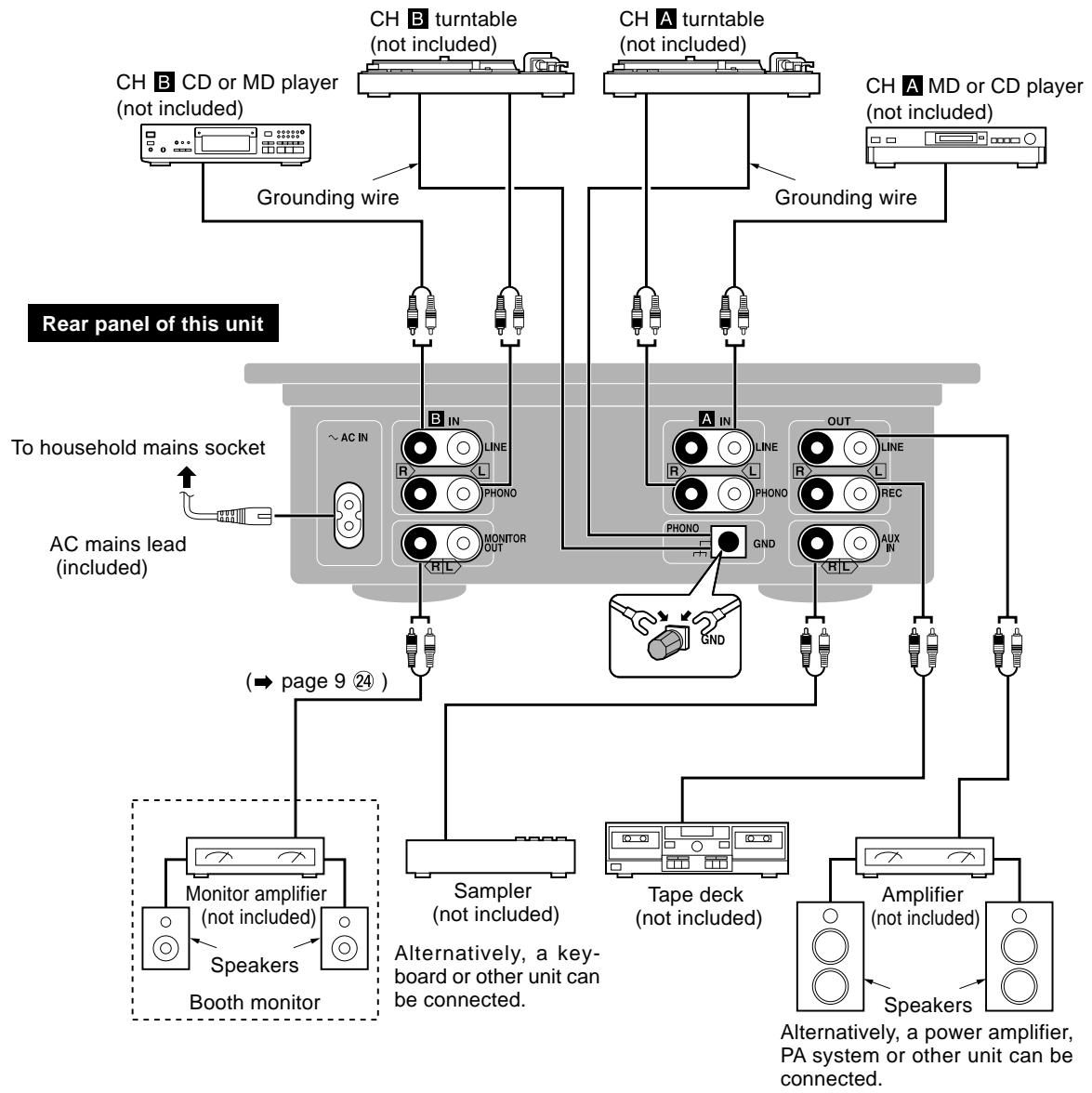
Rear panel connections
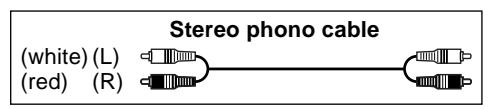
This model is connected with the other equipment using stereo phono cables (not included). Before proceeding with the connections, make absolutely sure that the power is turned off to the units concerned.
Connect the AC mains lead after all the other connections have been completed.
For your reference:
The grounding wire need not be connected if the turntable does not have a [GND] terminal.
A
B

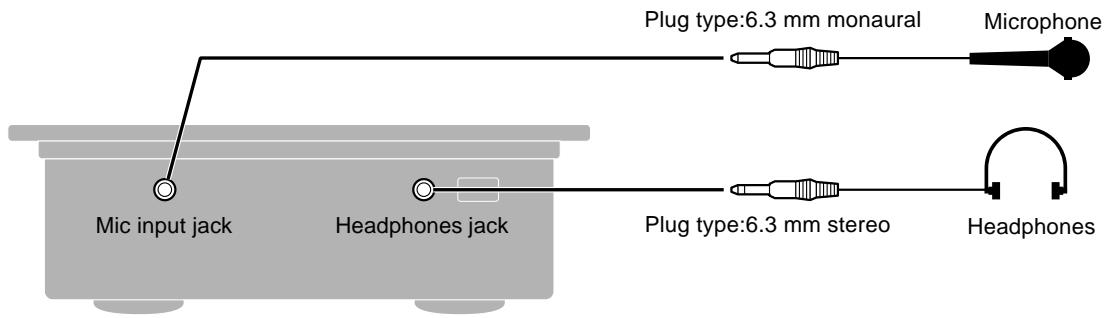
Front panel connections
To listen with the headphones:
- Before connecting headphones, turn down the volume with [MONITOR LEVEL], etc.
- Avoid listening for prolonged periods of time to prevent hearing damage.

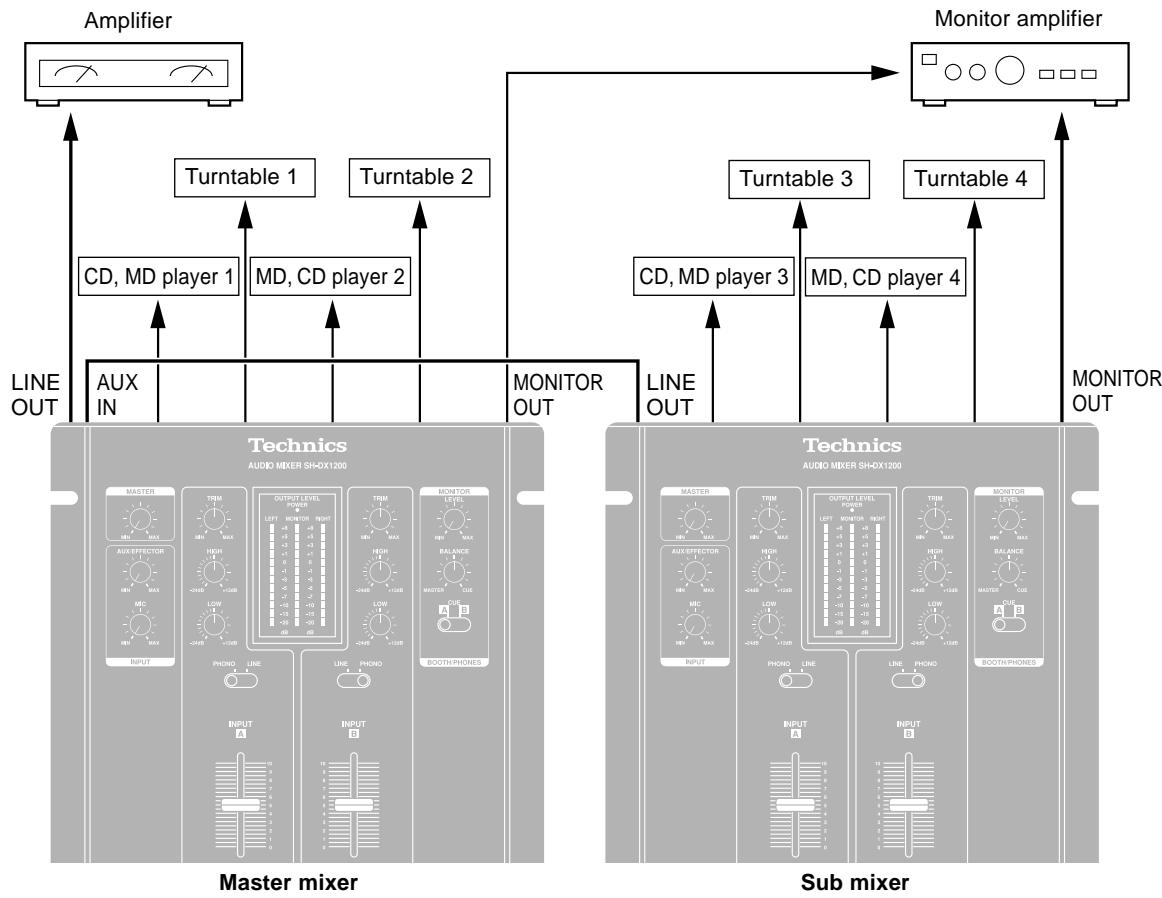
Connecting two audio mixers side by side
Connect the [LINE OUT] connector of the sub mixer to the [AUX IN] connector on the master mixer.
How to align the volume levels of the master and sub mixers:
Adjust [AUX/EFFECTOR] volume on the master mixer and [MASTER] volume on the sub mixer so the levels are identical.
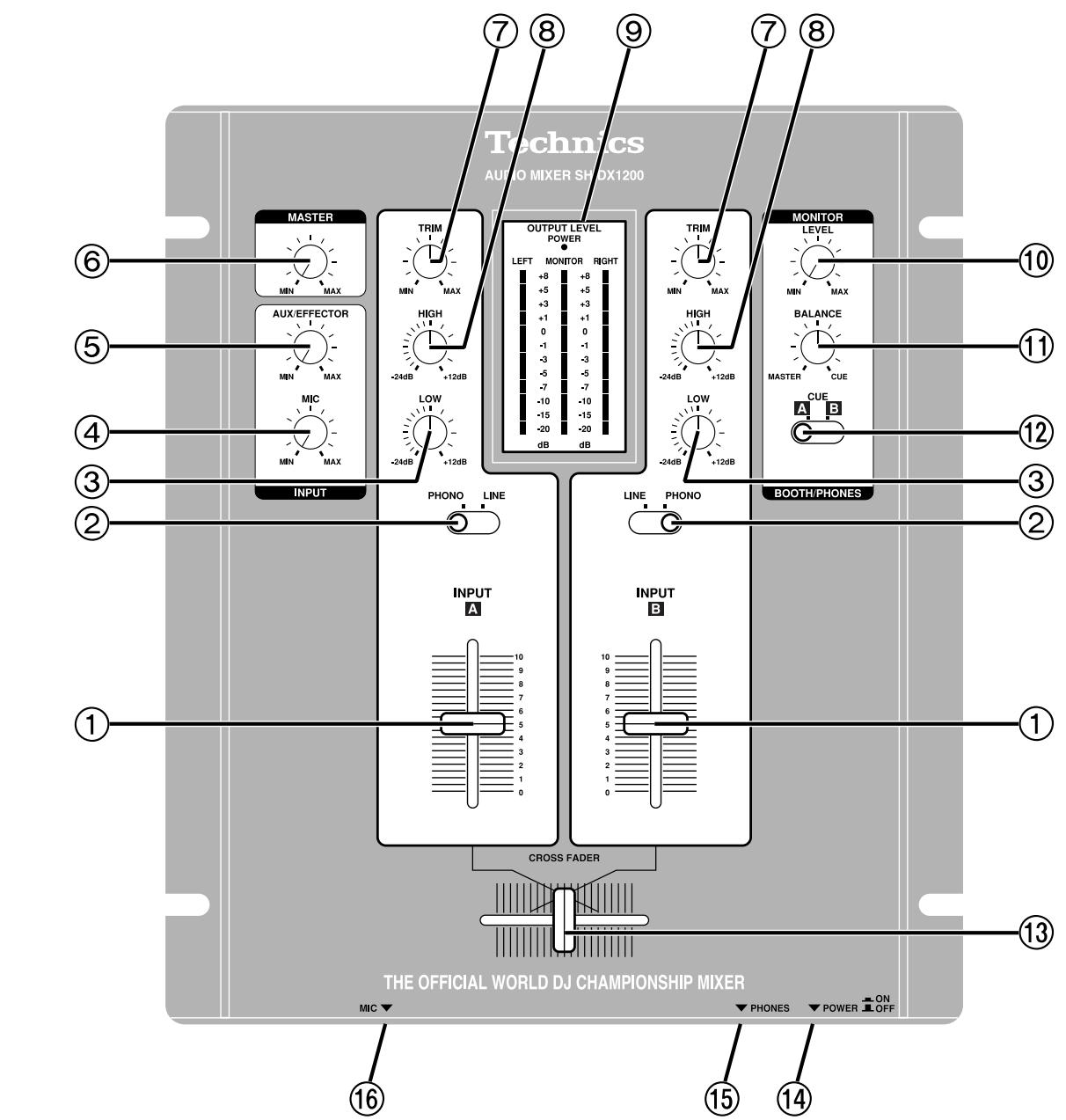
① A (B) INPUT control (INPUT)
② A (B) Input selector (LINE, PHONO)
③ A (B) LOW-range level control (LOW)
MIC volume level control (MIC)
⑤ AUX/EFFECTOR volume level control (AUX/EFFECTOR)
⑥ MASTER volume level control (MASTER)
⑦ A (B) Input sensitivity control (TRIM)
8 A (B) HIGH-range level control (HIGH)
(9) OUTPUT LEVEL meter (OUTPUT LEVEL)
This indicates the [LINE OUT] (L and R channels) and [MONITOR OUT] output levels.
10 MONITOR volume level control (MONITOR LEVEL)
⑪ MONITOR BALANCE control (MONITOR BALANCE)
This adjusts the balance between the [LINE OUT] source and source selected by the [MONITOR CUE] selector.
12 MONITOR source selector (MONITOR CUE)
Channels A and B can be selected as the output for headphones or monitor speakers regardless of the position of the faders.
13 CROSS FADER control (CROSS FADER)
This enables the balance between the CH A and CH B input levels to be adjusted.
14 Power button (ON, OFF POWER)
15 Headphones jack (PHONES)
MIC input jack (MIC)
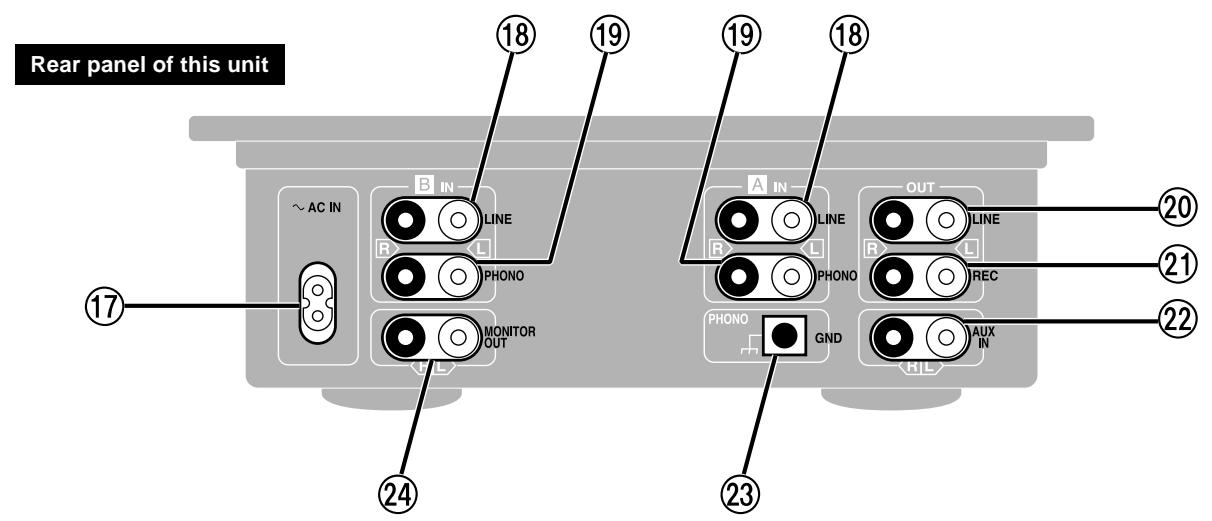
⑦ Power input socket (~ AC IN)
18 A (B) LINE IN connector (LINE IN)
19 A (B) PHONO IN connector (PHONO IN)
20 LINE OUT connector (LINE OUT)
② REC OUT connector (REC OUT)
22 AUX IN connector (AUX IN)
23 PHONO GND terminal (PHONO GND)
The grounding wire of the turntable must be secured to the [PHONO GND] terminal in order to prevent hum and noise.
24 MONITOR OUT connector (MONITOR OUT)
Outputs the same signal as the headphones. Connect a monitor amplifier when monitoring from the speakers without headphones as in independent DJ booths. Connect the general output amplifier to the [LINE OUT] connector 20.
[MONITOR BALANCE] control ⑪
Select [CUE] (completely to the right)
- Works as past general DJ mixer monitors.
- Allows the CH (A, B) input selected with the [MONITOR CUE] control ⑫ to be monitored regardless of the position of the [INPUT] and [CROSS FADER].
Select [MASTER] (completely to the left)
- Disregards the source selected with [MONITOR CUE] (A, B).
- Allows monitoring of the output from the [LINE OUT] connector ②
Select the center
- Allows the CH (A, B) input selected with the [MONITOR CUE] control 12 and the output from the [LINE OUT] connector 20 to be mixed and monitored.
Note:
The fader controls used in this product have a service life of 100,000 cycles. Service life will be shortened if the controls are used in a situation that requires rapid movement of the control lever such as during Hip-Hop transfer play. The controls may need to be replaced frequently if they are used this way.
Two spare controls (one cross fader and one channel fader) are provided inside the bottom panel of the unit. Please refer to the additional instructions.
Fader replacement
Use numbers indicated in parentheses when asking for replacement parts.
Cross fader (RFKVHDX1200A)
- Channel fader (RFKVHDX1200B)
Maintenance
To clean this unit, wipe with a soft, dry cloth.
If the surfaces are extremely dirty, use a soft cloth dipped in a soap-and-water solution or a weak detergent solution.
- Never use alcohol, paint thinner, or benzine to clean this unit.
- Before using chemically treated cloth, read the instructions that came with the cloth carefully.
Before requesting service for this unit, check the chart below for a possible cause of the problem you are experiencing. Some simple checks or a minor adjustment on your part may eliminate the problem and restore proper operation.
If you are in doubt about some of the check points, or if the remedies indicated in the chart do not solve the problem, refer to the directory of Authorized Service Centers (enclosed with this unit) to locate a convenient service center, or consult your dealer for instructions.
Reference pages are shown as black circled numbers 6
| Symptom | Checkpoint | Remedial action |
| No power. | Has the power plug been disconnected? | Connect the power plug securely. ⑥ |
| No sound even when power is supplied. | Has the input selector control been set to another source? | Check the source and set the control to the proper position. ③ ⑨ |
| Have any of the units been wrongly connected? | Connect the units properly. ⑥ ⑦ | |
| Is the master level control or another volume level control at the [MIN] position? | Adjust the volume level controls correctly. ③ ⑨ | |
| Left and right sound is reversed. | Have any of the units been connected with the left and right channels reversed? | Connect the channels correctly. ⑥ ⑦ |
| Low hum or buzz is heard during play. | Is there a fluorescent light or other electrical appliance or its AC mains lead near any of the connecting cords? | Place the fluorescent light, other appliances or their AC mains leads as far away from the audio mixer as possible. |
| Has the turntable's grounding wire been disconnected? | Connect the grounding wire securely. ⑥ | |
| Fader (slide volume control) fails to move smoothly. | Is one of the faders worn? | Replace with a new fader. (Refer to the additional instructions provided separately.) ⑨ |
Specifications
■ Input sensitivity/input impedance
PHONO 1.5 to 15mV / 47kΩ
LINE 100 to 1000mV /more than 10kΩ
AUX/EFFECTOR 150 mV/47 kΩ
MIC 0.7mV / 1kΩ
Rated output voltage
LINE 1 V/600Ω
MONITOR 2 V/2.2 kΩ
PHONES 1.5 V/100 Ω (100 Ω load)
REC 1 V/2.2 kΩ
Maximum output voltage
(10 kΩ load excluding headphones)
LINE 8V
MONITOR 8 V (headphones open)
PHONES 1.5 V (100 Ω load)
REC 8V
Applicable load impedance
LINE More than 600 Ω
MONITOR More than 10 kΩ
PHONES More than 47 Ω
REC More than 10kΩ
■ Residual hum and noise Less than 0.2mV
Frequency response
PHONO 30 Hz to 15 kHz (RIAA ±1 dB)
LINE 10 Hz to 70 kHz(-3 dB)
AUX/EFFECTOR 10 Hz to 100 kHz(-3 dB)
MIC 100 Hz to 15 kHz(-3 dB)
■ Tone control characteristics 12 dB/oc
LOW +12dB, - 24dB(63Hz)
HIGH +12dB, - 24dB(10kHz)
General
Power supply AC 230 - 240 V, 50/60 Hz
Power consumption 16 W
Dimensions(WxHxD) 260 x 102 x 305 mm
Mass 3.5 kg
Note
Specifications are subject to change without notice.
Mass and dimensions are approximate.
- Technics®
- Dear customer
- Contents
- Supplied accessories
- Note
- (For United Kingdom)
- CAUTION!
- IMPORTANT
- THIS PLUG IS NOT WATERPROOF—KEEP DRY.
- Before use
- How to replace the fuse
- Placement
- Stacking
- Voltage
- AC mains lead protection
- Foreign materials
- Service
- Insertion of connector
- Operating ease
- Functions
- Construction and materials
- Rear panel connections
- For your reference:
- Front panel connections
- To listen with the headphones:
- Connecting two audio mixers side by side
- How to align the volume levels of the master and sub mixers:
- [MONITOR BALANCE] control ⑪
- Select [CUE] (completely to the right)
- Select [MASTER] (completely to the left)
- Select the center
- Note:
- Fader replacement
- Maintenance
- Specifications
Brand : PANASONIC
Model : SHDX1200
Category : Audio System