NF-S12A FLX - CPU cooler Noctua - Free user manual and instructions
Find the device manual for free NF-S12A FLX Noctua in PDF.


| Product Type | CPU Cooler Fan |
| Brand | Noctua |
| Model | NF-S12A FLX |
| Fan Dimensions | 120 x 120 x 25 mm |
| Weight | 158 g |
| Rated Voltage | 12 V DC |
| Current | 0.12 A |
| Maximum Speed | 1200 RPM |
| Maximum Airflow | 107.5 m³/h |
| Maximum Noise Level | 18.1 dB(A) (with L.N.A.) |
| Bearing Type | SSO2 (Self-Stabilising Oil-pressure) |
| Connector | 3-pin |
| Cable Length | 40 cm |
| Scope of Delivery | Fan, L.N.A., U.L.N.A., 4 anti-vibration mounts, 4 screws, 4 rubber contact surfaces |
| Main Functions | CPU cooling with low noise and high efficiency |
| Safety Instructions | Do not insert objects into fan; keep away from liquids; ensure secure mounting |
| Cleaning | Use compressed air or soft brush; do not use liquids |
| Repairability | Not user-serviceable; contact Noctua support for issues |
| Warranty | 6 years (refer to official Noctua warranty policy) |
Frequently Asked Questions - NF-S12A FLX Noctua
User questions about NF-S12A FLX Noctua
0 question about this device. Answer the ones you know or ask your own.
Ask a new question about this device
Download the instructions for your CPU cooler in PDF format for free! Find your manual NF-S12A FLX - Noctua and take your electronic device back in hand. On this page are published all the documents necessary for the use of your device. NF-S12A FLX by Noctua.
USER MANUAL NF-S12A FLX Noctua
natural_image
Abstract graphic with a stylized eye and arrow shape, no text or symbols presentnoctua
DESIGNED IN AUSTRIA
www.noctua.at
sound-optimised premium components
Designed in Austria, Noctuo's premium cooling components are internationally renowned for their superb quietness, exceptional performance and thoroughgoing quality. Having received more than 1000 awards and recommendations from leading hydrovate websites and magazines, Noctuo's fans and heat sinks are chosen by more than a hundred thousand satisfied customers around the globe. sales@noctuo.it www.noctuo.at

Dear customer,
Congratulations on choosing the Noctua NF-S12A FLX. Our fans are renowned for their impeccable quality and outstanding longevity and like all Noctua fans, the NF-S12A FLX features an MTBF rating of more than 150.000 hours that's backed up with our 6 years manufacturer's warranty. Each Noctua fan is double checked for flawless operation by our quality control team before it leaves the factory and I'm confident that you will be able to sense some of the research, attention and care we've put into making this product.
Enjoy your NF-S12A FLX!
Yours sincerely,
This document includes some instructions for installing, running and cleaning your NF-S12A FLX. Should you have any further questions, our support team (support@nochua.at) will be glad to assist you at any time.
Please also have a look at the regularly updated FAQs on our website: http://www.noctva.at/faqs
This document is also available in other languages at the following URL: http://www.noctua.at/manuals
Scan this code to display multi-lingual
manuals on your mobile phone:
Installation
When installing the NF-S12A FLX on a heatsink, radiator or other devices that use a custom mechanism for fan installation (fan clips, proprietary screws, etc.) please use this mechanism for installation.
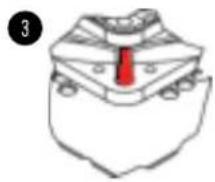
When installing the NF-S12A FLX as a case fan, you can either use proprietary clip systems (if your case features a clip system for fan installation) or the supplied mounting screws and silicone anti-vibration mounts. In order to install the fan using the silicone mounts, please first pull the silicone mounts through the mounting holes of the case. Then put the fan onto the silicone mounts and pull them through the mounting holes of the fan:

natural_image
Illustration of a red tool inserted into a grid of metallic components (no text or symbols)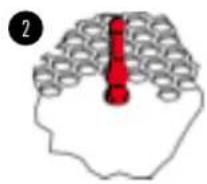
natural_image
Simple line drawing of a stylized hat with a red tie on the chest (no text or symbols)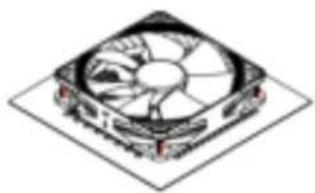
natural_image
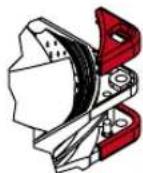
Isometric illustration of a computer fan with visible blades and mounting holes (no text or symbols)If necessary, you can easily remove the NF-S12A FLX's integrated anti-vibration pads:
Connection
The NF-S12A FLX features a standard 3-pin fan connector. Please note that the fan can also be connected to 4-pin mainboard fan headers though. If you would like to connect the fan directly to your power supply, please use the supplied a 3:4-pin adaptor (NA-AC1).
The NF-S12A FLX features a short 20cm primary cable in order to help you minimise cable clutter in typical applications. If you need a longer cable, please add the supplied 30cm extension (NA-EC2).
The NF-S12A FLX comes with Low-Noise (NA-RC10) and Ultra-Noise Adaptors (NA-RC12) that allow you reduce the fan speed from 1200 to 900rpm (NA-RC10) and 700rpm (NA-RC12) in order to achieve even quieter operation.
Cleaning and Maintenance
Fans inside computer cases tend to accumulate dust over longer periods of usage. In order to maintain maximum performance, please clean your fans regularly using a duster, slightly moist tissue or canned air. Please be careful not to use too much force in order to prevent any damage to the fan. Please don't use a vacuum cleaner as this may apply excessive force to the fan.
In order to ensure flawless operation over many years of usage, the NF-S12A FLX's premium grade SS02 bearing is fully sealed to prevent the entering of fine dust particles. Please note that the fan is not designed to be taken apart by the user. Removing the impeller from the frame will break the sealing of the bearing and results in a loss of warranty.
Warranty and Support
Even with high-grade products and strict quality control, the possibility of defects cannot be eliminated entirely. Therefore, we aim at providing the highest possible level of reliability and convenience by offering a warranty period of 6 years and direct, fast and straightforward RMA service.
Should you encounter any problems with your NF-S12A FLX, please don't hesitate to contact our support team (support@noctua.at).