
NF-A8 FLX - CPU cooler Noctua - Free user manual and instructions
Find the device manual for free NF-A8 FLX Noctua in PDF.


| Type | CPU Cooler Fan (80mm) |
| Model | NF-A8 FLX |
| Brand | Noctua |
| Dimensions (mm) | 80 x 80 x 25 |
| Weight (g) | 70 |
| Voltage | 12 V |
| Connector | 3-pin |
| Max. Rotational Speed (rpm) | 2200 |
| Airflow (CFM) | 32.67 |
| Noise Level (dB(A)) | 17.7 |
| Bearing Type | SSO2 (Self-Stabilising Oil Pressure) |
| MTBF (hours) | >150,000 |
| Included Accessories | Low-Noise Adaptor (L.N.A.), Ultra-Low-Noise Adaptor (U.L.N.A.), 4x Anti-Vibration Mounts, 4x Fan Screws |
| Colour | Beige / Brown |
| Main Features | Flow Acceleration Channels, Stepped Inlet Design, Inner Surface Microstructures, AAO Frame |
| Cleaning Instructions | Use compressed air or a soft brush; avoid liquids. Unplug before cleaning. |
| Safety Precautions | Disconnect power before handling. Do not immerse in water. Keep away from children. |
| Repairability / Spare Parts | Fan is not intended to be repaired. Spare parts not available; replace entire unit. |
| Compatibility | For CPU coolers with 80mm fan mounts; also case ventilation |
Frequently Asked Questions - NF-A8 FLX Noctua
User questions about NF-A8 FLX Noctua
0 question about this device. Answer the ones you know or ask your own.
Ask a new question about this device
Download the instructions for your CPU cooler in PDF format for free! Find your manual NF-A8 FLX - Noctua and take your electronic device back in hand. On this page are published all the documents necessary for the use of your device. NF-A8 FLX by Noctua.
USER MANUAL NF-A8 FLX Noctua
natural_image
Abstract graphic with a stylized eye and arrow shape, no text or symbols presentnoctua
DESIGNED IN AUSTRIA
www.noctua.at
Designed in Austria, Noctuo's premium cooling components are internationally renowned for their superb quietness, exceptional performance and thoroughgoing quality. Having received more than 1000 awards and recommendations from leading hardware websites and magazines, Noctuo's fans and heat sinks are chosen by more than a hundred thousand satisfied customers around the globe. sales@noctuo.at | www.noctuo.at

Dear customer,
Congratulations on choosing the Noctua NF-A8 FLX. Our fans are renowned for their impeccable quality and outstanding longevity and like all Noctua fans, the NF-A8 FLX features an MTBF rating of more than 150.000 hours that's backed up with our 6 years manufacturer's warranty. Each Noctua fan is double checked for flawless operation by our quality control team before it leaves the factory and I'm confident that you will be able to sense some of the research, attention and care we've put into making this product.
Enjoy your NF-A8 FLX!
Yours sincerely,
This document includes some instructions for installing, running and cleaning your WF-48 FLX. Should you have any further questions, our support team (support@noctua.at) will be glad to assist you of any time.
Please also have a look at the regularly updated FAQs on our website: http://www.noctva.at/foqs
This document is also available in other languages at the following URL: http://www.noctva.at/manuals
Scan this code to display multi-jinguol
manuals on your
mobile phone:
Installation
When installing the NF-AB on a heatsink, radiator or other devices that use a custom mechanism for fan installation (fan clips, proprietary screws, etc.) please use this mechanism for installation.
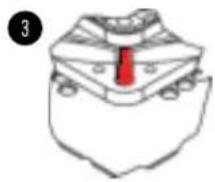
When installing the NF-A8 as a case fan, you can either use proprietary clip systems (if your case features a clip system for fan installation) or the supplied mounting screws and silicone anti-vibration mounts. In order to install the fan using the silicone mounts, please first pull the silicone mounts through the mounting holes of the case. Then put the fan onto the silicone mounts and pull them through the mounting holes of the fan:

natural_image
Illustration of a red tool inserted into a grid of metallic components (no text or symbols)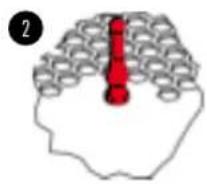
natural_image
Simple line drawing of a stylized hat with a red tie on the chest (no text or symbols)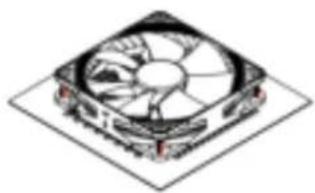
natural_image
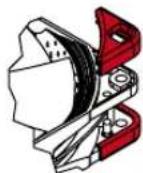
Isometric illustration of a computer fan with visible blades and mounting points (no text or symbols)If necessary, you can easily remove the NF-A8's integrated anti-vibration pads:
Connection
The NF-A8 features a standard 3-pin fan connector. Please note that the fan can also be connected to 4-pin main-board fan headers though. If you would like to connect the fan directly to your power supply, please use the supplied 3:4-pin adaptor (NA-AC1).
The NF-A8 features a short 20cm primary cable in order to help you minimise cable clutter in typical applications. If you need a longer cable, please add the supplied 30cm extension (NA-EC2).
The NF-A8 comes with Low-Noise (NA-RC10) and Ultra-Noise Adaptors (NA-RC12) that allow you to reduce the fan speed from 2000 to 1650rpm (NA-RC10) and 1200rpm (NA-RC12) in order to achieve even quieter operation.
Cleaning and Maintenance
Fans inside computer cases tend to accumulate dust over longer periods of usage. In order to maintain maximum performance, please clean your fans regularly using a duster, slightly moist tissue or canned air. Please be careful not to use too much force in order to prevent any damage to the fan. Please don't use a vacuum cleaner as this may apply excessive force to the fan.
In order to ensure flawless operation over many years of usage, the NF-A8's premium grade SS02 bearing is fully sealed to prevent the entering of fine dust particles. Please note that the fan is not designed to be taken apart by the user. Removing the impeller from the frame will break the sealing of the bearing and results in a loss of warranty.
Warranty and Support
Even with high-grade products and strict quality control, the possibility of defects cannot be eliminated entirely. Therefore, we aim at providing the highest possible level of reliability and convenience by offering a warranty period of 6 years and direct, fast and straightforward RMA service.
Should you encounter any problems with your NF-A8, please don't hesitate to contact our support team (support@noctua.at).
Brand : Noctua
Model : NF-A8 FLX
Category : CPU cooler