Indigo IS-AH988E02 - Humidifier Scarlett - Free user manual and instructions
Find the device manual for free Indigo IS-AH988E02 Scarlett in PDF.


| Product Type | Humidifier |
| Brand | Scarlett |
| Model | Indigo IS-AH988E02 |
| Dimensions (approx.) | 20 x 20 x 30 cm |
| Weight (approx.) | 2 kg |
| Power Supply | 220-240 V, 50 Hz |
| Power Consumption (approx.) | 25 W |
| Water Tank Capacity (approx.) | 4 L |
| Humidification Type | Ultrasonic |
| Humidity Control | Adjustable |
| Timer Function | Yes, up to 8 hours |
| Auto Shut-off | When water tank is empty |
| Noise Level (approx.) | < 35 dB |
| Coverage Area (approx.) | Up to 30 m² |
| Filter Type | Replaceable ceramic filter |
| Cleaning | Regular descaling with vinegar or citric acid |
| Maintenance | Clean water tank weekly, replace filter every 3 months |
| Safety Features | Auto shut-off, overload protection |
| Accessories Included | User manual, filter (pre-installed) |
| Spare Parts Availability | Filter available separately |
Frequently Asked Questions - Indigo IS-AH988E02 Scarlett
User questions about Indigo IS-AH988E02 Scarlett
0 question about this device. Answer the ones you know or ask your own.
Ask a new question about this device
Download the instructions for your Humidifier in PDF format for free! Find your manual Indigo IS-AH988E02 - Scarlett and take your electronic device back in hand. On this page are published all the documents necessary for the use of your device. Indigo IS-AH988E02 by Scarlett.
USER MANUAL Indigo IS-AH988E02 Scarlett
natural_image
White industrial water heater with digital display and control buttons (no readable text or symbols)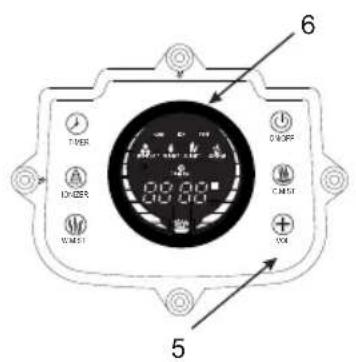
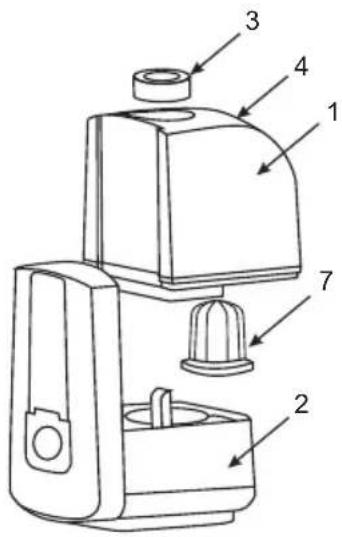
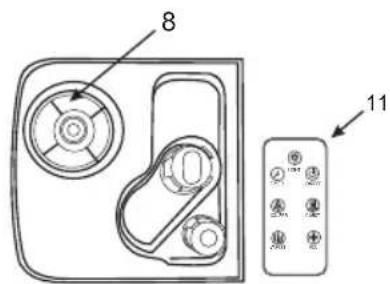
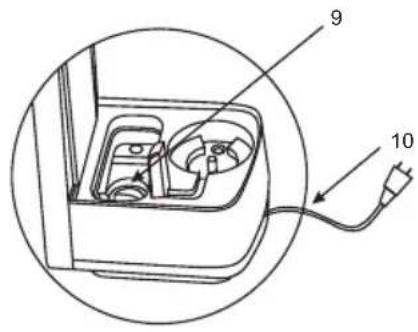
GB
- Water tank
- Base unit
- Steam outlet (360 °)
- Carving handle
- Control Panel
- Display
- Ceramic filter
- Water filling hole
- Ultrasound membrane
- Power cord and plug
- Remote control unit
RUS
- Please read this instruction manual carefully before use and keep in a safe place for future reference.
- Before the first connecting of the appliance check that voltage indicated on the rating label corresponds to the mains voltage in your home.
- For home use only. Do not use for industrial purposes. Do not use the appliance for any other purposes than described in this instruction manual.
- Do not use outdoors.
- Always unplug the appliance from the power supply before cleaning and when not in use.
- To prevent risk of electric shock and fire, do not immerse the appliance in water or in any other liquids. If it was happened DO NOT TOUCH the appliance, unplug it immediately and check in service center.
- Do not take this product into a bathroom or use near water.
- This appliance is not intended for use by persons (including children) with reduced physical, sensory or mental capabilities, or lack of experience and knowledge, unless they have been given supervision or instruction concerning use of the appliances by a person responsible for their safety.
- Children should be supervised to ensure that they do not play with the appliance.
- Do not use other attachments than those supplied.
- Do not operate after malfunction or cord damage.
- Do not attempt to repair, adjust or replace parts in the appliance. Check and repair the malfunctioning appliance in the nearest service center only.
- Keep the cord away from sharp edges and hot surfaces.
-
Do not pull, twist, or wrap the power cord around appliance.
-
Do not pour the rest water from the gullet when humidifier connected to power supply.
- When wash humidifier, avoid leaking the water into the inner parts of humidifier otherwise the spare part will be humid and cause problem.
- When switch on the appliance, do not touch the energy-exchanger.
- Operate the appliance only with water in the tank. Do not add water over 40^ C into the water tank, or use it for cleaning, to avoid possible deformation or discoloring.
- Take the humidifier under bottom and support water tank when handle.
- Do not add metals or chemicals into the water tank and the water channel on the base.
- Avoid water freezing in the humidifier.
- Do not lift the water tank while the humidifier is working.
- Do not pour water from the water channel when humidifier connected to power supply. Otherwise the energy exchanger will immediately break.
- Do not add foreign substances (aromatic oils, cosmetic and hygiene products) to water, as this may lead to premature failure of the ultrasonic membrane.
- Do not place humidifier close to the ventilating hole and keep away from the furniture and other electrical appliances.
- If the unit was got from the environment with temperature < 0^ , keep it under the room conditions at least 2 hours.
- ATTENTION: unplug the device from the socket before filling or cleaning.
- The manufacturer reserves the right to introduce minor changes into the product design without prior notice, unless such changes influence significantly the product safety, performance, and functions.
PREPARATION
- Place the appliance on dry and level surface.
- Remove the tank and unscrew the filter, pour clean water at temperature below 40 ^ and tighten the filter retainer firmly.
• Water tank capacity: 6 l. - Wipe dry the tank surface using soft cloth.
- Place the tank on the base unit.
- Connect the appliance to mains.
DISPLAY INDICATION
• 1-8 - Steam Intensity levels.
- Ionization function
• 1-8h -Operation time (in hours)
• -Water level indicator
- Cold steam
- Warm steam
CONTROL BUTTONS
- To control functions of the humidifier, use the control panel or the remote control unit. The remote control unit is equipped with CR2025 battery cell (supplied with the unit).
- ON/OFF Button This button is used for switching the backlight on and off.
- Steam intensity adjustment and operation time selection button
- Timer setting button
- Ionization function on/off button
• Cold steam on/off button - Warm steam on/off button
- Press the "On/Off" button to switch the humidifier on or off.
- Press the "C. MIST" button to activate the humidifier. In this mode, cold steam will be generated.
OPERATION
- Press the "W. MIST" button to select warm steam generation mode. The warm steam generation mode creates antiseptic protection and kills all waterborne bacteria, thus providing hygienically clean humidified air.
- Power at "Cold Steam" mode is 30 W; power at "Warm Steam" mode is 85 W.
- To select steam intensity level, press the "VOL" button as many times as needed. This is used to set eight steam intensity levels (1 to 8).
- To set operation time of the humidifier, press the "TIMER" button once, then use the "VOL" button to set the time within the interval from 1 to 8 hours.
- Press the "IONIZER" button to switch ionization function on or off.
Ionization Function
- The built-in ionizer saturates air with ions and creates the effect of "Forest Air", which contributes to the prevention of chronic diseases and positively influences on patients with asthma, allergy, blind headache, hypertension, diseases of digestive system, respiratory system, and cardiovascular system. It also eliminates electrostatic charge.
Water Level Indicator
- The water level indicator appears on the display when it is necessary to refill the tank with water. When the water runs out, the humidifier will stop operation automatically.
- During operation, the formation of white residues on surface of surrounding objects is possible and allowed. This is due to very high content of salt in the water. It is recommended to perform additional filtration of water before filling the humidifier tank.
Backlight Function
- The air humidifier is equipped with backlight function, which switches on automatically, when the appliance is
switched on. To switch the backlight on or off, use the button on the remote control unit.
CLEANING AND MAINTENANCE
- Do not forget to unplug the appliance from the power supply before cleaning.
- WASH WATER TANK AND WATER VALVE (EVERY TWO OR THREE WEEKS)
• Take off the water tank and turn it up. - Unscrew the filter.
- Wipe with a soft cloth and rinse water valve.
- Wash water tank with warm water (<40°C)
- CLEAN THE WATER CHANNEL AND THE ENERGY EXCHANGER (ONCE A WEEK).
- If there is scale in the gullet, clean it with soapy water then rinse with water.
- If there is any stain on the energy exchange, wipe them off with the soft cloth. Then rinse the appliance with clean water.
• I WASH THE EXTERNAL SURFACE OF HUMIDIFIER - First rub the scale and then wash with soft cloth and warm water ( <40^ ).
- Wash the head of sprayer with water directly.
- IMPORTANT: Do not use chemicals, organic solvents or aggressive liquids and abrasives.
STORAGE
- Switch off and unplug the appliance.
- Complete all requirements of chapter CLEAN AND CARE.
- Keep assembled appliance in a dry cool place.
TROUBLESHOOTING
Indicator light does not glow
• The plug is not in use and the power is off.
- Put the plug in the socket correctly and turn the humidifier on
Indicator light is on, air comes, but no mist out
- No water in the tank.
• Fill the water tank with water
The mist is smelling.
-
- The appliance is new. Wash the tank and change the water Open the water tank and ventilate it for 12 hours
-
- Water is dirty. Wash the tank and change the water The Indicator light is on, no mist out and no air coming
• The water level is excessive high
• 1.Switch off the appliance and unplug it
- 2. Take the water tank off and unscrew the water inlet lid. Pour off some water and close the lid tightly. Wipe the tank dry with a soft cloth. Place water tank back on the base
• 3. Plug the humidifier in. Turn it on The mist is poor
- The energy-changeable appliance has scale or the water is dirty
- Wash the energy-changeable appliance and change water
Water is not comming
• The water valve is blocked
- Clean the water valve out and rinse it with water
МЕРЫ БЕЗОПАСНОСТИ
Brand : Scarlett
Model : Indigo IS-AH988E02
Category : Humidifier