PB09 - Mobile Device Charger Valore - Free user manual and instructions
Find the device manual for free PB09 Valore in PDF.


| Product Type | Power Bank |
| Brand | Valore |
| Model | PB09 |
| Battery Type | Built-in Polymer Lithium-ion |
| Battery Capacity | 12000mAh |
| Input | 5V/2.0A (max) |
| Output | 5V/2.1A (max) |
| Charging Time | 7 hours (with 5V/2.0A adapter) |
| Recharging Cycle | 500 times |
| Operating Temperature | -10°C to 40°C |
| Material | PC + ABS |
| Dimensions (H x W x D) | 142 x 74 x 14 mm |
| Weight | 265g |
| LED Indicator | 4 blue LEDs; shake to activate |
| Built-in Cable | Micro USB with detachable 8-pin and Type-C adaptors |
| Package Contents | Power Bank, 8-pin adaptor, Type-C adaptor, soft pouch |
| Warranty | Warranty registration available at www.valore.sg |
Frequently Asked Questions - PB09 Valore
User questions about PB09 Valore
0 question about this device. Answer the ones you know or ask your own.
Ask a new question about this device
Download the instructions for your Mobile Device Charger in PDF format for free! Find your manual PB09 - Valore and take your electronic device back in hand. On this page are published all the documents necessary for the use of your device. PB09 by Valore.
USER MANUAL PB09 Valore
Thank you for purchasing the Valore 12000mAh Power Bank.
Huge in capacity yet expediently-sized for maximum portability. Charge different types of mobile devices with the built-in micro USB cable with detachable 8-pin and Type-C adaptors. Keep track of the battery level by gently shaking the power bank to activate the LED indicator.
Important: Please read the user manual thoroughly before using your 12000mAh Power Bank.
Specifications:
- Battery type: Built-in Polymer Lithium-ion
- Battery capacity: 12000mAh
- Input: 5V/2.0A (max)
• Output: 5V2.1A (max) - Charging time: 7 hours (5V/2.0A USB adaptor)
- Recharging cycle: 500 times cycle
- Operating temperature: -10^ - 40^
- Material: PC + ABS
- Dimensions (H x W x D): 142 x 74 x 14mm
- Weight: 265g
Package Contents:
• 12000mAh Power Bank
- 8-Pin adaptor
- Type-C adaptor
- Soft pouch
UNDERSTANDING THE PRODUCT

① USB charging connector (5V/2.0A)
② Micro USB charging connector (5V/2.1A)
③ Detachable 8-pin charging adaptor (5V/2.1A)
④ LED indicator
START USING THE 12000MAH POWER BANK
1) Charging the power bank (2.0A USB adapter to wall plug)
Connect your power bank to the USB adapter (2.0A) using the built-in charging cable.
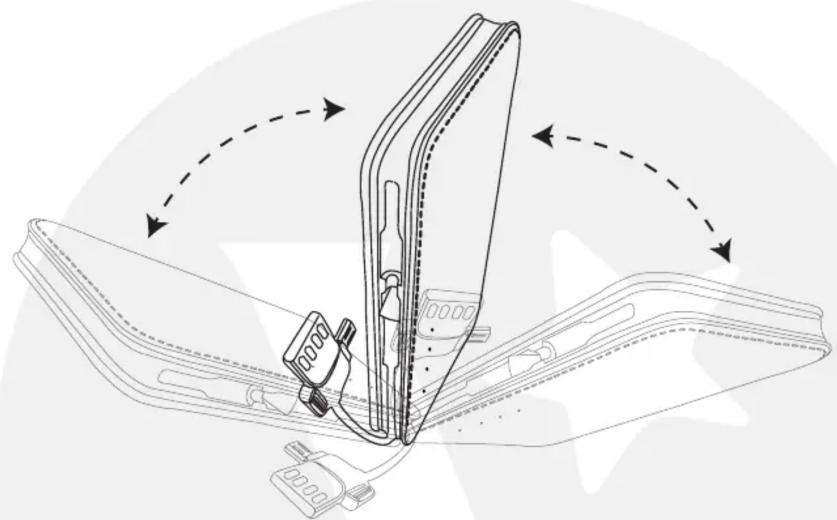
When the LED indicator displays 4 blue LED lights, it indicates that the
battery is fully charged. Gently shake the power bank forward and backwards 90^ for awhile, and the LED indicators will light up.
natural_image
Technical line drawing of a mechanical assembly with no visible text or symbolsPower level:
One LED: <25%
Two LED: <50%
Three LED: <75%
Four LED: < 100%
*The above mentioned is for reference only
Note: Fully charge the power bank for at least 14-16 hours before first use. This is to maximise the battery performance and prolonging the life of lithium ion batteries.
Recharge your power bank once every three months when not in use or seldom used.
2) Charging of micro usb devices
Connect your power bank to your mobile device's micro usb port, using the built-in charging cable.

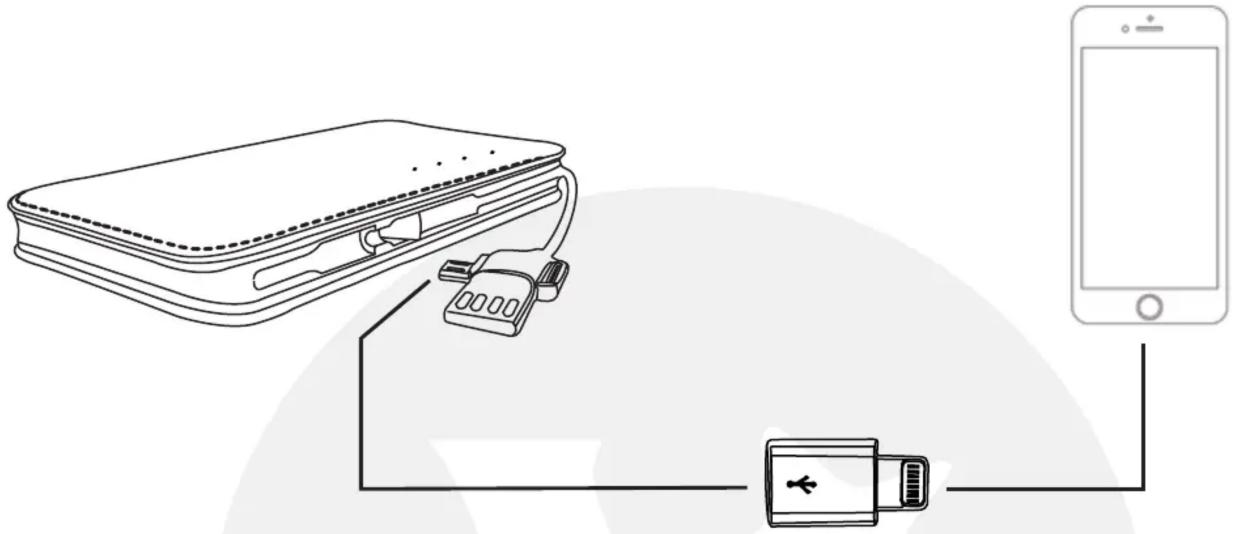
3) Charging of iOS devices
Connect your power bank to your iOS device's charging port, using the built-in charging cable and 8-pin adaptor provided.
natural_image
Diagram showing a device connected to a smartphone via battery and cable (no text or symbols)*IOS is a trademark or registered trademark of Cisco in the U.S. and other countries and is used under license.
TROUBLESHOOTING
Issue 1:
Power bank is unable to charge your mobile device
Problem 1: Power bank battery is flat
Solution: Fully charge the power bank and resume charging your mobile device.
Issue 2:
Power bank drains off quickly
Problem: Running multiple applications on your mobile device
Solution: Turn off all running applications on the mobile device and leave it to charge till full.
Extra consumption of energy would be due to heat produced during the charging of your mobile device.
Issue 3:
Unable to charge (power indicator is not flashing)
Problem 1: The voltage of the power adapter is too low.
Solution: Use 5V supply with at least 800mAh for charging.
Problem 2: Faulty cable
Solution: Check the cable to ensure that it is well connected or replace damaged cables.
TECHNICAL SUPPORT & WARRANTY
- For Technical Support, email us at v.info@valore.sg.
- For Warranty Registration, visit www.valore.sg.
Cautions:
Read all the instructions and warnings carefully prior to using this product.
- Do not dismantle or open the power bank
- Do not subject the power bank to mechanical shock such as crushing, bending, puncturing or shredding. Avoid dropping or placing heavy object on the power bank.
- Do not expose the power bank to water or other liquids
- Do not expose the power bank to hear and/or fire. Avoid storage in direct sunlight.
- Do not attempt to insert foreign objects into the power bank. Do not short-circuit the power bank by storing it haphazardly in receptacle where it may be short-circuited by other metallic or conductive objects.
- Do not use any charger* other than that specifically provided for use with the power bank. Battery usage by children should be supervised.
*The charger may also be known as the adaptor, and is used to charge the power bank
DISCLAIMER & TRADEMARKS
All information, trademarks, logos, graphics, and images (“Materials”) provided on this user manual are copyrighted or trademarked and are the property of Valore Lifestyle Pte Ltd. Any unauthorized use of any material contained on the instruction manual may violate copyright laws, trademark laws, laws of privacy and communications statutes. The trademarks, service marks and logos used and displayed in the Materials are registered and unregistered
trademarks and service marks of Valore and others. All other registered and unregistered company names, product names and marks mentioned herein the (“Materials”) are the property of their respective owners and may be trademarks or registered trademarks.
- Specifications:
- Package Contents:
- UNDERSTANDING THE PRODUCT
- START USING THE 12000MAH POWER BANK
- 1) Charging the power bank (2.0A USB adapter to wall plug)
- 2) Charging of micro usb devices
- 3) Charging of iOS devices
- TROUBLESHOOTING
- Issue 1:
- Issue 2:
- Issue 3:
- Problem 2: Faulty cable
- TECHNICAL SUPPORT & WARRANTY
- Cautions:
- DISCLAIMER & TRADEMARKS
Brand : Valore
Model : PB09
Category : Mobile Device Charger