DVP-SR101P - DVD player SONY - Free user manual and instructions
Find the device manual for free DVP-SR101P SONY in PDF.


| Product Type | DVD Player |
| Brand | Sony |
| Model | DVP-SR101P |
| Dimensions (Approx.) | 430 x 250 x 49 mm (16.9 x 9.8 x 1.9 in) |
| Weight (Approx.) | 1.5 kg (3.3 lb) |
| Power Supply | AC 120 V, 60 Hz (or AC 230 V, 50 Hz depending on region) |
| Power Consumption | Approx. 10 W (Standby: < 0.5 W) |
| Disc Playback | DVD Video, DVD-R/RW, CD, CD-R/RW |
| Video Output | Composite video (RCA), Component video (YUV) |
| Audio Output | Stereo analog (RCA), Coaxial digital |
| USB Playback | USB 2.0 (for music and photo) |
| Playback Formats | MP3, JPEG, DivX (depending on region) |
| Remote Control | Supplied (RMT-D195A or similar) |
| Region Code | Region 1 (US) or Region 2 (EU), depending on model variant |
| Maintenance | Clean with soft cloth; use lens cleaner if playback issues |
| Safety | Do not disassemble; avoid moisture; read manual before use |
| Spare Parts | Contact Sony authorized service for remote, AC adapter |
| Reparability | Serviceable only by qualified personnel |
Frequently Asked Questions - DVP-SR101P SONY
User questions about DVP-SR101P SONY
0 question about this device. Answer the ones you know or ask your own.
Ask a new question about this device
Download the instructions for your DVD player in PDF format for free! Find your manual DVP-SR101P - SONY and take your electronic device back in hand. On this page are published all the documents necessary for the use of your device. DVP-SR101P by SONY.
USER MANUAL DVP-SR101P SONY
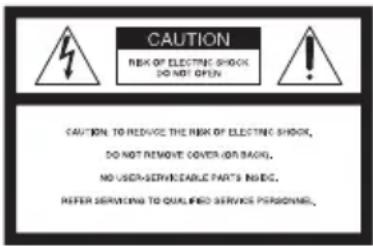
To reduce the risk of fire or electric shock, do not expose this apparatus to rain or moisture.
To avoid electrical shock, do not open the cabinet. Refer servicing to qualified personnel only.
The AC power cord must be changed only at a qualified service shop.
Batteries or batteries installed apparatus shall not be exposed to excessive heat such as sunshine, fire or the like.
CAUTION
The use of optical instruments with this product will increase eye hazard. As the laser beam used in this CD/DVD player is harmful to eyes, do not attempt to disassemble the cabinet.
Refer servicing to qualified personnel only.
text_image
CAUTION RISK OF ELECTRIC SHOCK DO NOT OPEN CAUTION TO REMOVE THE RISK OF ELECTRIC SHOCK, DO NOT REMOVE COVER ON BACK. NO USED-SERVICEABLE PART'S INSIDE. REFER SERVICING TO QUALIFIED SERVICE PERSONNEL,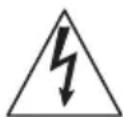
This symbol is intended to alert the user to the presence of uninsulated “dangerous voltage”
within the product's enclosure that may be of sufficient magnitude to constitute a risk of electric shock to persons.

This symbol is intended to alert the user to the presence of important operating and
maintenance (servicing) instructions in the literature accompanying the appliance.
Precautions
• To prevent fire or shock hazard, do not place objects filled with liquids, such as vases, on the apparatus.
- The player is not disconnected from the AC power source as long as it is connected to the wall
outlet, even if the player itself has been turned off.
- Do not install this player in a confined space, such as a bookshelf or similar unit.
• Install the player so that the AC power cord can be unplugged from the wall socket immediately in the event of trouble. - If the player is brought directly from a cold to a warm location, or is placed in a very damp room, moisture may condense on the lenses inside the player. Should this occur, the player may not operate properly. In this case, remove the disc and leave the player turned on for about half an hour until the moisture evaporates.
For customers in the U.S.A Owner's Record
The model and serial numbers are located at the rear of the unit. Record the serial number in the space provided below. Refer to them whenever you call upon your Sony dealer regarding this product.
Model No. DVP-SR101P Serial No.
CAUTION
You are cautioned that any changes or modifications not expressly approved in this manual could void your authority to operate this equipment.
[NO TEXT]
This equipment has been tested and found to comply with the limits for a Class B digital device, pursuant to Part 15 of the FCC Rules. These limits are designed to provide reasonable protection against harmful interference in a residential installation. This equipment generates, uses, and can radiate radio frequency energy and, if not installed and used in accordance with the instructions, may cause harmful interference to radio communications. However, there is no guarantee that interference will not occur in a particular installation. If this equipment does cause harmful interference to radio or television reception, which can be determined by turning the equipment off and on, the user is encouraged to try to correct the interference by one or more of the following measures:
– Reorient or relocate the receiving antenna.
- Increase the separation between the equipment and receiver.
- Connect the equipment into an outlet on a circuit different from that to which the receiver is connected.
- Consult the dealer or an experienced radio/TV technician for help.
Important Safety Instructions
1) Read these instructions.
2) Keep these instructions.
3) Heed all warnings.
4) Follow all instructions.
5) Do not use this apparatus near water.
6) Clean only with dry cloth.
7) Do not block any ventilation openings. Install in accordance with the manufacturer's instructions.
8) Do not install near any heat sources such as radiators, heat registers, stoves, or other apparatus (including amplifiers) that produce heat.
9) Do not defeat the safety purpose of the polarized or grounding-type plug. A polarized plug has two blades with one wider than the other. A grounding type plug has two blades and a third grounding prong. The wide blade or the third prong are provided for your safety. If the provided plug does not fit into your outlet, consult an electrician for replacement of the obsolete outlet.
10) Protect the power cord from being walked on or pinched particularly at plugs, convenience receptacles, and the point where they exit from the apparatus.
11) Only use attachments/ accessories specified by the manufacturer.
12) Use only with the cart, stand, tripod, bracket, or table specified by the manufacturer, or sold with the apparatus. When a cart is used, use caution when moving the cart/
apparatus combination to avoid injury from tip-over.

13) Unplug this apparatus during lightning storms or when unused for long periods of time.
14) Refer all servicing to qualified service personnel. Servicing is required when the apparatus has been damaged in any way, such as power-supply cord or plug is damaged, liquid has been spilled or objects have fallen into the apparatus, the apparatus has been exposed to rain or moisture, does not operate normally, or has been dropped.
Note about the discs
Do not use the following discs:
– A disc recorded in a color system other than NTSC, such as PAL or SECAM (this player conforms to the NTSC color system).
- A disc that has a non-standard shape (e.g., card, heart).
- A disc with a label or sticker on it.
Region code
Your player has a region code printed on the back of the unit and only will play commercial DVDs (playback only) labeled with identical region codes. This system is used to protect copyrights.
Commercial DVDs labeled will also play on this player

Depending on the commercial DVD, there may be no region code indication, even though playing the commercial DVD is prohibited by area restrictions.
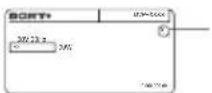
Region code
Copyrights
• Manufactured under license from Dolby Laboratories. Dolby and the double-D symbol are trademarks of Dolby Laboratories.
- "DVD+RW," "DVD-RW," "DVD+R," "DVD+R DL," "DVD-R," "DVD VIDEO," and "CD" logos are trademarks.
- MPEG Layer-3 audio coding technology and patents licensed from Fraunhofer IIS and Thomson.
- This product meets ENERGY STAR® guidelines for energy efficiency. ENERGY STAR and the ENERGY STAR mark are registered U.S. marks. ENERGY STAR is a registered mark owned by the U.S. government.
About this manual
“DVD” may be used as a general term for commercial DVDs, DVD+RWs/DVD+Rs/DVD+R DLs (+VR mode) and DVD-RWs/DVD-Rs/DVD-R DLs (VR mode, video mode).
Playback
Control Menu display
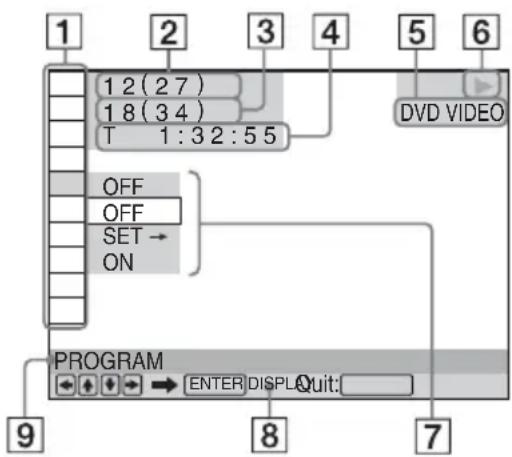
Use the Control Menu to select a function and to view related information.
Press DISPLAY.
To change the Control Menu display, press DISPLAY again.
flowchart
graph TD
    A["1 2 (2 7)"] --> B["1 8 (3 4)"]
    B --> C["T 1:3 2:5 5"]
    C --> D["OFF"]
    C --> E["OFF"]
    C --> F["SET → ON"]
    G["DVD VIDEO"] --> H["PROGRAM"]
    H --> I["ENTER DISPLAY Quit:"]
    I --> J["7"]
    K["9"] --> H
1 Control Menu items
② Currently playing title/Total number of titles
③ Currently playing chapter/Total number of chapters
4 Playing time
5 Selected disc type
6Playback status
7 Selected item icon/menu options
8Operation message
9 Selected Control Menu item
Menu list
Item Item Name, Function

TITLE/SCENE/TRACK

CHAPTER/INDEX

TRACK
Selects the title, scene, track, chapter, or index to be played.
TIME/TEXT
Checks the elapsed time and the remaining playback time.
Input the time code for picture and music search (DVD only).

TOP MENU/MENU
(DVD VIDEO only)
TOP MENU: Displays the top menu.
MENU: Displays the menu.

ORIGINAL/PLAY LIST
Selects the type of title (DVD-VR mode) to be played: ORIGINAL, or edited PLAY LIST.
PROGRAM ^1,2
Selects the title, chapter, or track to play in the order you want.
1 Select “SET →,” then press ENTER and select the title (T), chapter (C), or track (T) you want to program, and press ENTER.
2 Repeat selecting the title, chapter, or track.
3 Press ▶.
SHUFFLE ^1,2
Plays the title, chapter, or track in random order.
REPEAT*1, *2
Plays all titles/tracks/albums or a single title/chapter/track/album/file repeatedly.
A-B REPEAT ^1,2
Specifies the parts you want to play repeatedly.
1 During playback, select “SET →,” then press ENTER. The “A-B REPEAT” setting bar appears
2 When you find the starting point (point A), press ENTER.
3 When you reach the ending point (point B), press ENTER again.

PARENTAL CONTROL
Set to prohibit playback on this player.
PLAYER →: Playback of some DVD VIDEOS can be limited according to a predetermined level such as the age of the users. Scenes may be blocked or replaced with different scenes (Parental Control).
PASSWORD →: Enter a 4-digit password using the number buttons. Also use this menu to change the password.
Parental Control (limited playback)
You can set a playback limitation level.
1 Select "PLAYER →," then press ENTER. Enter or re-enter your 4-digit password, then press ENTER.
2 Press ↑/↓ to select "STANDARD," then press ENTER.
Press ↑/↓ to select an area, then press ENTER.
When you select “OTHERS →,” select and enter a standard code. See “PARENTAL CONTROL AREA CODE LIST” at the end of this manual.
3 Press ↑/↓ to select “LEVEL,” then press ENTER.
Press ↑/↓ to select the level, then press ENTER.
Parental Control setting is complete.
The lower the value, the stricter the limitation.
To turn off the Parental Control function, set "LEVEL" to "OFF."
If you forget your password, enter “199703” in the password box, press ENTER, and then enter a new 4-digit password.

SETUP
QUICK: Use Quick Setup to choose the desired language of the on-screen display, the aspect ratio of the TV and the audio output signal.
CUSTOM: In addition to the Quick Setup setting, you can adjust various other settings (page 7).
RESET: Returns the settings in "SETUP" to the default setting.

ZOOM\*1
Magnifies the image up to four times the original size, scroll using /// .

ANGLE
Changes the angle.

CUSTOM PICTURE MODE
Selects the picture quality that best suits the program you are watching.
STANDARD: Displays a standard picture.
DYNAMIC: Produces a bold dynamic picture by increasing the picture contrast and the color intensity.
CINEMA: Enhances details in dark areas by increasing the black level.
MEMORY →: Adjusts the picture in greater detail.

SHARPNESS
Exaggerates the outline of the image to produce a sharper picture.
OFF: Cancels this option.
1: Enhances the outline.
2: Enhances the outline more than 1.
*1 To return to normal play, select "OFF" or press CLEAR.
^*2 The play mode is canceled when:
- you open the disc tray.
- you turn off the player.
◆Items for DATA discs
Item Item Name, Function
ALBUM
Selects the album that contains music and photo files to be played.

FILE
Selects the photo file to be played.
ALBUM
Selects the album that contains the video file to be played.

FILE
Selects the video file to be played.
DATE
Displays the date the picture was taken by a digital camera.

INTERVAL\*
Specifies the duration for which the slides are displayed on the screen.
EFFECT\*
Selects the effects to be used for changing slides during a slide show.
MODE 1: The images randomly cycle through the effects.
MODE 2: The image sweeps in from top left to bottom right.
MODE 3: The image sweeps in from top to bottom.
MODE 4: The image sweeps in from left to right.
MODE 5: The image stretches out from the center of the screen.
OFF: Turns off this function.

MEDIA
Selects the media type you want to play.
VIDEO: Plays video files.
PHOTO (MUSIC): Plays photo and music files as a slide show. You can view a slide show with sound when music and photo files are placed in the same album. If the playing time of either music or photos is longer, the longer one continues without sound or image.
PHOTO: Plays photo files.
MUSIC: Plays music files. Press SUBTITLE while playing music files that contain unsynchronized lyric information. The player supports MP3 ID3 Lyrics only.
The player automatically returns to standby mode
If any button on the player or remote is not pressed for more than 25 minutes, the player automatically returns to standby mode.
To play VIDEO CDs with PBC functions
When you start playing a VIDEO CD with PBC (Playback control) functions, the menu for your selection appears.
To play without using PBC
Press ◀◀◀/▶◀ or the number buttons while the player is stopped to select a track, then press ▶ or ENTER. To return to PBC playback, press ■ twice, then press ▶.
To lock the disc tray (Child Lock)
You can lock the disc tray to prevent it being opened by mistake.
When the player is in standby mode, press in order, RETURN, ENTER, and I/① on the remote.
The player turns on and “” (LOCKED) appears on the front panel display. The ▲ button does not work while the Child Lock is set.
To unlock the disc tray
When the player is in standby mode, press in order, ⬇ RETURN, ENTER, and ⏻/⏻ on the remote again.
Controlling TVs with the remote
You can control the sound level, input source, and power switch of your Sony TV with the supplied remote.
CUSTOM Menu
You can adjust various settings. Press DISPLAY when the player is in stop mode, select (SETUP), and then select “CUSTOM.” The CUSTOM menu appears.
Menu list
Item Item Name, Function

LANGUAGE SETUP
OSD (On-Screen Display): Switches the display language on the screen. MENU*1: Selects the desired language for the disc's menu. (DVD VIDEO only) AUDIO*1: Switches the language of the sound track. When you select "ORIGINAL," the language given priority in the disc is selected. (DVD VIDEO only) SUBTITLE*1: Switches the language of the subtitle recorded on the DVD VIDEO. When you select "AUDIO FOLLOW," the language for the subtitles changes according to the language you selected for the sound track. (DVD VIDEO only)

SCREEN SETUP
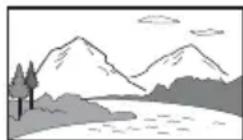
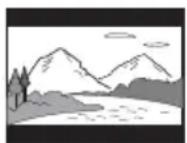
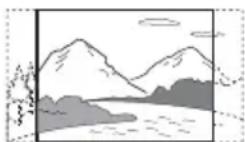
TV TYPE: Selects the aspect ratio of the connected TV.
16:9
4:3 LETTER BOX
4:3 PAN SCAN
SCREEN SAVER: When set to “ON,” the screen saver appears when the player is in pause or stop mode for 15 minutes. Press ▶ to turn off the screen saver. BACKGROUND: Selects the background color or picture on the TV screen. If you set “JACKET PICTURE,” even though the disc does not contain a jacket picture, the “GRAPHICS” picture appears.
BLACK LEVEL: Selects the black level (setup level) for video signals output from the jacks other than COMPONENT VIDEO OUT. BLACK LEVEL (COMPONENT OUT): Selects the black level (setup level) for video signals output from the COMPONENT VIDEO OUT jacks.
PROGRESSIVE (COMPONENT OUT ONLY)*2: Set to “ON” if your TV accepts progressive format signals. When you select “ON,” set also the following “MODE (PROGRESSIVE)” and “4:3 OUTPUT.”
MODE (PROGRESSIVE): If you select "AUTO," the player detects the format (film-based or video-based), and converts to the appropriate version.
4:3 OUTPUT: This setting is effective only when you set “TV TYPE” to “16:9.” Select “FULL” when you can change the aspect ratio on your TV.

CUSTOM SETUP
AUTO PLAY: When set to "ON," the player automatically starts playback when the player is turned on by a timer (not supplied).
PAUSE MODE: Selects the picture in pause mode. Normally select “AUTO.” When the picture is output in high resolution, set to “FRAME.” (DVD only)
TRACK SELECTION: Gives the sound track which contains the highest number of channels priority when you play a DVD VIDEO on which multiple audio formats (PCM, DTS, or Dolby Digital format) are recorded. If you select “AUTO,” priority is given. (DVD VIDEO only)
MULTI-DISC RESUME: Switches the Multi-disc Resume setting on or off. Resume playback can be stored in memory for up to 6 different DVD VIDEOS/VIDEO CDs. If you start the settings again, the resume point is cleared. (DVD VIDEO/VIDEO CD only)

AUDIO SETUP
AUDIO DRC (Dynamic Range Control) ^*3 :
Set according the surrounding environment. Set to “TV MODE” when the smallest sounds are indiscernible, or set to “WIDE RANGE” when the listening environment is good, for example, in a home movie theater.
DOWNMIX ^*3 : Switches the method for mixing down to 2 channels when you play a DVD which has rear sound elements (channels), or is recorded in Dolby Digital format. Normally select “DOLBY SURROUND.”
DIGITAL OUT: Selects if audio signals are output via the DIGITAL OUT (COAXIAL) jack. When you select “ON,” set also the following “DOLBY DIGITAL,” “DTS,” or “48kHz/96kHz PCM.”
DOLBY DIGITAL: Selects the type of Dolby Digital signal. Set to “D-PCM” when the player is connected to an audio component without a built-in Dolby Digital decoder.
DTS: Selects the type of DTS audio signal. Set to “ON” when you play a DVD VIDEO with DTS sound tracks. Do not set to “ON” when you connect the player to an audio component without a DTS decoder.
48kHz/96kHz PCM: Selects the sampling frequency of the digital audio output signal. (DVD VIDEO only)
*1 When you select “OTHERS →,” select and enter a language code. See “LANGUAGE CODE LIST” at the end of this manual.
*2 If the picture does not appear normally or goes blank, reset the setting. Press I/⏻ to turn off, enter “369,” and then press I/⏻ to turn on the player again.
*3 This function affects the output from the following jacks:
- AUDIO OUT L/R jacks.
- DIGITAL OUT (COAXIAL) jack only when "DOLBY DIGITAL" is set to "D-PCM."
Information
Troubleshooting
If you experience any of the following difficulties while using the player, use this troubleshooting guide to help remedy the problem before requesting repairs. Should any problem persist, consult your nearest Sony dealer.
The power is not turned on.
→Check that the power cord is connected securely.
There is no picture/picture noise appears.
→Re-connect the connecting cord securely.
→The connecting cords are damaged.
→Check the connection to your TV and switch the input selector on your TV so that the signal from the player appears on the TV screen.
→The disc is dirty or flawed.
→ Press I/⏻ to turn off the player, and enter “369” using the number buttons on the remote, then press I/⏻ to turn on the player again.
There is no sound.
→Re-connect the connecting cord securely.
→The connecting cord is damaged.
→The player is in pause mode or in Slow-motion Play mode.
→The player is in fast forward or fast reverse mode.
The remote does not function.
→The batteries in the remote are weak.
→The remote is not pointed at the remote sensor ☐ on the player.
→When you operate the player by pressing buttons on the remote in sequence, press the buttons within 5 seconds of each other.
The disc does not play.
→The disc is turned over.
Insert the disc with the playback side facing down.
→The disc is skewed.
→The player cannot play certain discs.
→The region code on the DVD does not match the player.
→Moisture has condensed inside the player.
→The player cannot play a recorded disc that is not correctly finalized.
The player does not operate properly.
→When static electricity, etc., causes the player to operate abnormally, unplug the player.
The disc tray does not open and "LOCK (LOCKED) appears on the front panel display.
→Child Lock is set (page 6).
The disc tray does not open and "E" (TRAY LOCKED) appears on the front panel display.
→Contact your Sony dealer or local authorized Sony service facility.
"C13" appears on the front panel display.
→Clean the disc with a cleaning cloth or check its format.
“C31” appears on the front panel display.
→Re-insert the disc correctly.
playable file format
Video: MPEG-1 (Cyber-shot data)
Photo: JPEG (DCF format)
Music: MP3 (except for mp3PRO)/WMA (except for WMA Pro)* ^1,2 /AAC* ^1,2 /LPCM/WAVE
*1 Files with copyright protection (Digital Right Management) cannot be played.
*2 The player does not play coded files such as Lossless.
Supported extensions: “.mpg”, “.mpeg”, “.jpg”, “.mp3”, “.wma”, “.m4a”, “.wav” Supported discs: DVD, DVD±RW/±R/±R DL, Music CD/Super VCD, CD-R/-RW
- DATA CDs recorded according to ISO 9660 Level 1/Level 2, or its extended format, Joliet.
• DATA DVDs recorded according to UDF.
- The player will play any file in the above, even if the file format differs. Playing such data may generate noise that can result in speaker damage.
- To play a complex hierarchy of folders may take some time. Create albums with no more than two hierarchies.
- Some video, photo, and music files may not play, depending on the encoding/recording condition.
- To start playback and proceed to the next or another album/file may take some time.
- The player will recognize a maximum of 200 albums and 600 files. It can recognize up to 300 music files and 300 photo files when “PHOTO (MUSIC)” is selected.
- The player may not play a combination of two or more video files.
- The player cannot play a video file of size more than 720 (width) × 576 (height)/2 GB.
- Depending on the file, playback may not be smooth. You are recommended to create the file at a lower bit rate.
- The player may not play back the high bit rate video file on the DATA CD smoothly. You are recommended to play back using DATA DVD.
Note about recordable media
Some recordable media cannot be played on this player due to the recording quality or physical condition of the disc, or the characteristics of the recording device and authoring software. The disc will not play if it has not been correctly finalized. Also some DATA discs created in Packet Write format cannot be played.
For player that cannot play images that contain a copy protection only
Images in DVD-VR mode with CPRM (Content Protection for Recordable Media) protection may not be played.
Note on playback operations of DVDs and VIDEO CDs
Some playback operations of DVDs and VIDEO CDs may be intentionally set by software producers. Since this player plays DVDs and VIDEO CDs according to the disc contents the software producers designed, some playback features may not be available. Also, refer to the operating instructions supplied with the DVDs or VIDEO CDs.
Note on discs
This unit is designed to playback discs that conform to the Compact Disc (CD) standard. DualDiscs and some music discs encoded with copyright protection technologies do not conform to the Compact Disc (CD) standard. Therefore, these discs may not be compatible with this unit.
Specifications
System
Laser: Semiconductor laser
Outputs
• AUDIO OUT (L/R): Phono jack
• DIGITAL OUT (COAXIAL): Phono jack
- COMPONENT VIDEO OUT(Y, P_B , P_R ): Phono jack
• VIDEO OUT: Phono jack
General
• Power requirements: 120 V AC, 60 Hz
• Power consumption: 6 W
- Dimensions (approx.): 320 × 38 × 209 ~mm ( 12^5/8 × 1^1/2 × 8^1/4 in.) (width/height/depth) incl. projecting parts
• Mass (approx.): 1.1 kg (2 lb 7 oz)
- Operating temperature: 5 °C to 35 °C (41 °F to 95 °F)
- Operating humidity: 25% to 80%
Supplied accessories
- Audio/Video cord (phono plug × 3 ↔ phono plug × 3) (1)
- Remote commander (remote) (1)
- Size AA (R6) batteries (2)
Specifications and design are subject to change without notice.
LANGUAGE CODE LIST
Code Language Code Language Code Language Code Language
| 1027 Afar | 1183 Irish | 1347 Maori | 1507 Samoan |
| 1028 Abkhazian | 1186 Scots Gaelic | 1349 Macedonian | 1508 Shona |
| 1032 Afrikaans | 1194 Galician | 1350 Malayalam | 1509 Somali |
| 1039 Amharic | 1196 Guarani | 1352 Mongolian | 1511 Albanian |
| 1044 Arabic | 1203 Gujarati | 1353 Moldavian | 1512 Serbian |
| 1045 Assamese | 1209 Hausa | 1356 Marathi | 1513 Siswati |
| 1051 Aymara | 1217 Hindi | 1357 Malay | 1514 Sesotho |
| 1052 Azerbaijani | 1226 Croatian | 1358 Maltese | 1515 Sundanese |
| 1053 Bashkir | 1229 Hungarian | 1363 Burmese | 1516 Swedish |
| 1057 Byelorussian | 1233 Armenian | 1365 Nauru | 1517 Swahili |
| 1059 Bulgarian | 1235 Interlingua | 1369 Nepali | 1521 Tamil |
| 1060 Bihari | 1239 Interlingue | 1376 Dutch | 1525 Telugu |
| 1061 Bislama | 1245 Inupiak | 1379 Norwegian | 1527 Tajik |
| 1066 Bengali; Bangla | 1248 Indonesian | 1393 Occitan | 1528 Thai |
| 1253 Icelandic | 1403 (Afan)Oromo | 1529 Tigrinya | |
| 1067 Tibetan | 1254 Italian | 1408 Oriya | 1531 Turkmen |
| 1070 Breton | 1257 Hebrew | 1417 Punjabi | 1532 Tagalog |
| 1079 Catalan | 1261 Japanese | 1428 Polish | 1534 Setswana |
| 1093 Corsican | 1269 Yiddish | 1435 Pashto; | 1535 Tonga |
| 1097 Czech | 1283 Javanese | Pushto | 1538 Turkish |
| 1103 Welsh | 1287 Georgian | 1436 Portuguese | 1539 Tsonga |
| 1105 Danish | 1297 Kazakh | 1463 Quechua | 1540 Tatar |
| 1109 German | 1298 Greenlandic | 1481 Rhaeto- | 1543 Twi |
| 1130 Bhutani | 1299 Cambodian | Romance | 1557 Ukrainian |
| 1142 Greek | 1300 Kannada | 1482 Kirundi | 1564 Urdu |
| 1144 English | 1301 Korean | 1483 Romanian | 1572 Uzbek |
| 1145 Esperanto | 1305 Kashmiri | 1489 Russian | 1581 Vietnamese |
| 1149 Spanish | 1307 Kurdish | 1491 Kinyarwanda | 1587 Volapük |
| 1150 Estonian | 1311 Kirghiz | 1495 Sanskrit | 1613 Wolof |
| 1151 Basque | 1313 Latin | 1498 Sindhi | 1632 Xhosa |
| 1157 Persian | 1326 Lingala | 1501 Sangho | 1665 Yoruba |
| 1165 Finnish | 1327 Laothian | 1502 Serbo- | 1684 Chinese |
| 1166 Fiji | 1332 Lithuanian | Croatian | 1697 Zulu |
| 1171 Faroese | 1334 Latvian; | 1503 Singhalese | |
| 1174 French | Lettish | 1505 Slovak | |
| 1181 Frisian | 1345 Malagasy | 1506 Slovenian | 1703 Not specified |
ISO 639: 1988 (E/F) standard
PARENTAL CONTROL AREA CODE LIST
Code Area Code Area Code Area Code Area
| 2044 Argentina | 2165 Finland | 2362 Mexico | 2149 Spain |
| 2047 Australia | 2174 France | 2376 Netherlands | 2499 Sweden |
| 2046 Austria | 2109 Germany | 2390 New Zealand | 2086 Switzerland |
| 2057 Belgium | 2248 India | 2379 Norway | 2528 Thailand |
| 2070 Brazil | 2238 Indonesia | 2427 Pakistan | 2184 United Kingdom |
| 2079 Canada | 2254 Italy | 2424 Philippines | |
| 2090 Chile | 2276 Japan | 2436 Portugal | |
| 2092 China | 2304 Korea | 2489 Russia | |
| 2115 Denmark | 2363 Malaysia | 2501 Singapore |

text_image
* | - 4 2 6 6 0 2 1 3 3 *4-266-021-33(1)