24F22P-HD/DVD - Television Technika - Free user manual and instructions
Find the device manual for free 24F22P-HD/DVD Technika in PDF.


| Brand | Technika |
| Model | 24F22P-HD/DVD |
| Product Type | LED TV with built-in DVD player |
| Screen Size | 24 inches (61 cm) |
| Resolution | 1366 x 768 (HD Ready) |
| Aspect Ratio | 16:9 |
| Dimensions (with stand) | Approx. 55.6 x 33.5 x 17.8 cm (21.9 x 13.2 x 7.0 in) |
| Weight (with stand) | Approx. 3.7 kg (8.2 lbs) |
| Power Supply | AC 100-240V, 50/60Hz |
| Power Consumption (typical) | 30 W |
| Standby Power Consumption | < 0.5 W |
| Built-in DVD Player | Yes, plays DVD, CD, and MP3/JPEG discs |
| Inputs | HDMI, USB, VGA (PC), AV (composite), SCART, Coaxial RF |
| Outputs | Headphone jack, Audio out (RCA) |
| Tuner | DVB-T/T2, DVB-C, DVB-S/S2 (depending on region) |
| Remote Control | Included (batteries not included) |
| Wall Mountable | Yes, VESA 100x100 mm |
| Cleaning | Wipe with a soft, dry cloth. Do not use harsh chemicals. |
| Safety | Do not block ventilation openings. Keep away from moisture. |
| Spare Parts & Repairability | Contact Technika support for service; typical lifetime 7-10 years. |
Frequently Asked Questions - 24F22P-HD/DVD Technika
User questions about 24F22P-HD/DVD Technika
0 question about this device. Answer the ones you know or ask your own.
Ask a new question about this device
Download the instructions for your Television in PDF format for free! Find your manual 24F22P-HD/DVD - Technika and take your electronic device back in hand. On this page are published all the documents necessary for the use of your device. 24F22P-HD/DVD by Technika.
USER MANUAL 24F22P-HD/DVD Technika
LED TV with Freeview & USB Media Player
User Guide

natural_image
Line drawing of a flat-screen computer monitor with no text or symbolsModel No
22F22B-FHD
24F22P-FHD/DVD
22F22B-FHD/DVD
24F22P-HD/DVD
24F22B-FHD
24F22W-FHD/DVD
24F22B-HD
24F22W-HD/DVD
24F22B-FHD/DVD
24F22S-FHD/DVD
24F22B-HD/DVD
24F22S-HD/DVD
Important safety instruction

Please read these instructions. All the safety and operating instructions should be read before the appliance is operated.
Warnings
- Television sets with 40" screens or more must be lifted and carried by at least 2 people.
- This television does not contain any parts that are serviceable by the user. In case of a fault, contact the manufacturer or authorised service department.
Exposing the internal parts inside the TV may endanger your life. The manufacturers guarantee does not extend to faults caused by repairs carried out by unauthorised third parties.

To prevent spread of fi re, keep candles or other open fl ames away from this product at all times
- Do not use the TV set immediately after unpacking. Wait until the TV warms up to room temperature before using it.
- To reduce the risk of fi re, electric shock or damage to the TV, do not expose it to dust, rain or moisture. Never expose the TV to dripping or splashing and do not place objects fi lled with liquids on or near the TV.
- Do not connect any external devices (DVD player, games console etc) when the TV is switched on. Disconnect both the TV and device from the mains before connecting. Only switch appliances on when the connection process is complete.
- Do not place the television in a confined space and do not obstruct the ventilation openings at the rear of the television.
- When installing on a wall, ensure the TV is at least 5cm from the wall for ventilation.
- Always ensure that the TV's ventilation openings are not covered with items such as newspapers, table-cloths, curtains, etc.
- Dispose of this television and any components including batteries in an environmentally friendly manner. If in doubt, please contact your local authority for details of recycling.
- Ensure this TV is used in moderate climates only.
- In case of electrostatic discharge (ESD) the TV may display incorrect functions. In such case, switch the TV off and switch the TV back on. The TV will work normally.
WARNING: Never place a television set on an unstable location. A television set may fall, causing serious personal injury or death. Many injuries, particularly to children, can be avoided by taking simple precautions such as:
- Use cabinets or stands recommended by the manufacturer of the television set.
- Only use furniture that can safely support the television set.
- Ensure the television set is not overhanging the edge of the supporting furniture.
- Do not place the television set on tall furniture (for example, cupboards or bookcases) without anchoring both the furniture and the television set to a suitable support.
- Do not place the television set on cloth or other materials that may be located between the television set and supporting furniture.
- Please educate children about the dangers of climbing on furniture to reach the television set or its controls.
- If your existing television set is being retained and relocated, the same considerations as above should be applied.
Safety
- For your safety, this appliance is fitted with a fused 3 pin mains plug. Should the fuse need to be replaced, ensure that any replacement is of the same amperage and approved with the BSI mark.
- Never try and replace the mains plug unless you have adequate qualifications and are legally authorised to do so. In the event that a replacement mains cable is required, contact the manufacturer for a suitable replacement.
- Never use the television if it is damaged in any way.
• Always place the television on a fl at level surface avoiding anywhere which may be subject to strong vibration. - The ideal distance to watch the television is approximately five times the length of the diagonal measurements of the TV screen.
- Ensure the television is not placed on top of the power cable as the weight of the television may damage the cable and cause a safety hazard.
- Never place mobile phones, speakers or any other device which may cause magnetic or radio interference, near the television. If interference is apparent, move the device causing the interference away from the television.
- To disconnect the set from the mains, remove the mains plug from the socket.
- Ensure that the mains plug is always easily accessible.
WARNING: Excessive volume when using earphones and headphones can cause loss of hearing.
Important safety instruction

Maintenance
- To clean your TV, wipe with a soft, dry cloth. If the surfaces are extremely dirty, use a soft cloth dipped in a soap and water solution or a weak detergent solution.
- Never use alcohol, paint thinner or benzene to clean this unit.
- Before using a chemically treated cloth, read the instructions that came with the cloth carefully.
CAUTION: If water or other liquid enters the television through the display panel surface, a malfunction may occur.

Packaging
- The safest way to transport your item is in the original box/packaging - please save your packaging for this.
- You will need the original box/packaging in the event of warranty/service repair or support. We are unable to carry out warranty/service if you are unable to package the item correctly.
Important information regarding use of video games, computers, captions or other fixed image displays
The extended use of fixed image program material can cause a permanent "shadow image" on the LCD/LED panel, also known as "screen burn".
This "shadow image" can appear in the background during normal viewing. This type of irreversible LCD/LED panel deterioration can be limited by observing the following steps:
- Reduce the brightness/contrast setting to a minimum suitable viewing level.
- Do not display the fixed image for extended periods of time.
- Turn the power off when not in use.
Examples of images that are more likely to cause "screen burn" are as follows (this is not an exhaustive list):
- TV channel logos: e.g. shopping channel logos and pricing displays - especially if they are bright and stationary. Moving or low-contrast graphics are less likely to cause ageing of the screen.
• Time displays.
- Teletext: Do not view a stationary page for a long period of time
• TV/DVD menus: e.g. listings of DVD disc content.
- Pause mode: Do not leave the TV in pause mode for long periods of time, e.g. when watching DVDs or videos.
Important: Once 'shadow image/screen burn' occurs, it will never disappear and is not repairable under warranty.
How do I dispose of this product?
UK: Waste electrical products should not be disposed of with household waste. Please dispose of the product at a designated collection point for recycling of WEEE. For your nearest facilities, please see www.recycle-more.co.uk or in store for details.
ROI: Waste electrical products should not be disposed of with household waste. Separate disposal facilities exist. Check with your local authority or retailer for recycling advice.


Batteries
- Do not expose batteries to high temperatures, excessive heat, prolonged sunshine or fire as this may cause leakage, explosion or ignition.
Observe the correct polarity when inserting batteries.
- Do not use different types of batteries together or mix old and new batteries.
- Dispose of batteries in an environmentally friendly way.
- Certain regions may regulate the disposal of batteries. Please consult your local authority.
Trademarks
HDMI®
The terms HDMI and HDMI High-Definition Multimedia Interface, and the HDMI Logo are trademarks or registered trademarks of HDMI Licensing, LLC in the United States and other countries.
HDTV
The "HD TV" Logo is a trademark of DIGITALEUROPE.
HDTV 1080p
The "HD TV 1080p" Logo is a trademark of DIGITALEUROPE.
DVB
The DVB logo is the registered trademark of the Digital Video Broadcasting (DVB) project.
FREEVIEW HD
The FREEVIEW HD words and logos are trade marks of DTV Services LTD. © DTV Services Ltd.
SAORVIEW
SAORVIEW is a registered trademark owned by RTÉ.

DOLBY
AUDIO
Manufactured under license from Dolby Laboratories. Dolby, Dolby Audio and the double-D symbol are trademarks of Dolby Laboratories.


TruSurround
For DTS patents, see http://patents.dts.com. Manufactured under license from DTS Licensing Limited. DTS, the Symbol, & DTS and the Symbol together are registered trademarks. DTS TruSurround is a trademark of DTS, Inc. © DTS, Inc. All Rights Reserved.
CE Statement:
Hereby, Universal Media Corporation l.t.d. declares that this LED TV is in compliance with the essential requirements and other relevant provisions of RED Directive 2014/53/EU.
CAUTION:
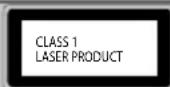
This caution label is located on the rear panel of the unit
THIS UNIT IS A CLASS 1 LASER PRODUCT. THIS UNIT USES A VISIBLE LASER BEAM WHICH COULD CAUSE HAZARDOUS RADIATION EXPOSURE IF DIRECTED. BE SURE TO OPERATE THE PLAYER CORRECTLY AS INSTRUCTED. WHEN THIS UNIT IS PLUGGED INTO THE WALL OUTLET, DO NOT PLACE YOUR EYES CLOSE TO THE OPENINGS TO LOOK INTO THE INSIDE OF THIS UNIT. USE OF CONTROLS OR ADJUSTMENTS OR PERFORMANCE OF PROCEDURES OTHER THAN THOSE SPECIFIED HEREIN MAY RESULT IN HAZARDOUS RADIATION EXPOSURE. DO NOT OPEN COVERS AND DO NOT REPAIR YOURSELF. REFER SERVICING TO QUALIFIED PERSONNEL.
CONTENTS
Manufacturers Guarantee Information....3
Important Safety Instructions....4-5
Trademarks 6
What is included in the box 8
Attaching/Detaching the Stand 9
Securing the TV to a Wall/ Wall mounting 10
Remote Control....11
TV Buttons and Input Source Menu....12
Connections....13-15
First Time Installation and Information Banner 16
7 Day TV Guide .... 17
TV Menu Operation 19-27
Channel Menu .... 19 Picture Menu .... 20-21
Sound Menu 22-23 Time Menu 24
Lock Menu 25
Settings Menu 26
Network 27
USB Mode / Media Player 28
USB Record - Digital / Freeview 29
DVD Setup Menu....30
General Information....31-37
Using your TV with a Sky digital set top box....31
Frequently Asked Questions .... 32-33 Technical Specifications .... 34-37
WHAT IS INCLUDED IN THE BOX
Accessories
Included with this TV are the following accessories
1 x User Guide

1 x Quick Start Guide

1 x TV

natural_image
Front view of a blank computer monitor with a stand (no text or symbols visible)1 x RF Cable

natural_image
Coiled black cable with two connectors (no text or symbols visible)1 x Remote Control
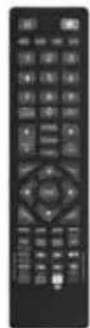
2 x AAA Batteries

1 x Mini Component / YPbPr

natural_image
Close-up of a black USB cable with multiple connectors (no text or symbols visible)1 x Mini Composite / Video
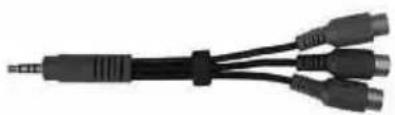
natural_image
Close-up of a black USB cable with multiple connectors (no text or symbols visible)1 x Stand plus screws

natural_image
Technical illustration of a screw with a pin and mounting bracket (no text or symbols)Please save your box/packaging as you will need this in the event of warranty/service repair or support. We are unable to carry out warranty/service if you are unable to package it correctly. The safest way to package your item in the event of warranty/service repair is in it's original box/packaging.
ATTACHING/DETACHING THE STAND
Attaching the stand
To complete the stand installation you will require a cross head screw driver
There are two types of screws provided as shown below.
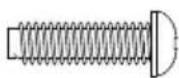
3 x M (4x12)
Used for attaching the stand neck to the TV (fi g.1)
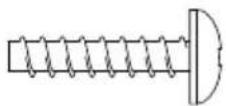
3 x ST (4x12)
Used for attaching the stand base to the stand neck (fi g.3)

(fi g.1) Attach the stand neck to the rear of the TV set using the 3 x M(4x12) screws provided.

(fi g.2) Peel off the protective plastic cover then attach the stand base to the stand neck.
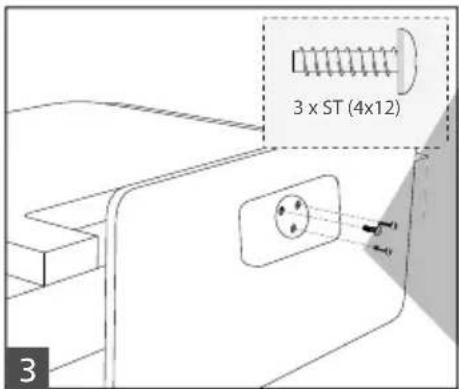
(fi g.3) Secure the base to the neck by using the 3 x ST(4x12) screws provided.
HELPFUL ADVICE FOR FIRST TIME STAND INSTALLATION
When securing the self-tapping screw/s into the base of the TV (on first installation) the screw/s may be naturally tight as they create a thread in the plastic.
a) Ensure the cross head screw driver tip fi ts correctly into the head of the screw and that it is not too big or small.
b) Screw in all screws individually and partially before tightening all of the screws fully.
c) If the screws become very tight try loosening and re-tightening, this will continue the process of creating the thread.
Detaching the stand
Remove the screws highlighted then remove the stand base and neck from the rear of the TV set.

natural_image
Diagram showing two setups: one with a monitor displaying a small object, the other with a monitor displaying a container and an arrow pointing to it (no text or symbols)SECURING THE TV TO A WALL
Securing the TV to a wall with anti-tip straps
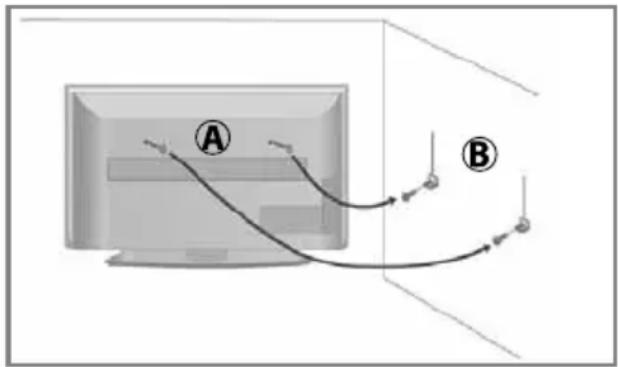
For maximum security in the home when using a TV with its stand anti-tip straps should be fitted. These are available from supermarket websites and other websites and are an easy, inexpensive and effective way of ensuring your TV stays safely upright. Straps are designed to be attached to the rear of the TV and then tethered to the wall or the furniture the TV is stood on.
Note - Please ensure that children do not climb on the TV set.
A) Using one or both of the top wall-mounting holes and screws (the screws are already supplied in the wall mounting holes) fasten one end of the fastening cord/s to the TV.
B) Secure the other end of the fastening cord/s to your wall. (you will need screws/fi xings suitable for your wall type - available separately from most DIY stores).

natural_image
Diagram of a vertical computer monitor with a stand, showing front and side views (no text or symbols)The Royal Society for the Prevention of Accidents is urging people to take care with flat-screen televisions.
RoSPA stated in 2010 that "Toddlers are particularly at risk of pulling fl at-screen televisions on to themselves. They are unsteady on their feet and are attracted by colourful television images."
The risk is increased as televisions become lighter.
Wall Mounting
IMPORTANT - Before drilling any holes in the wall ensure you are not drilling where there could be any electrical wires, water or gas pipes.
TV wall mounting brackets are available to purchase separately from Tesco - please visit www.tesco.com/direct.
natural_image
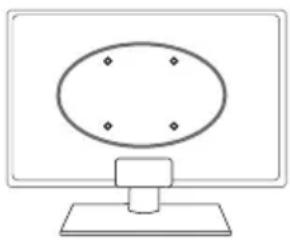
Simple line drawing of a computer monitor with an oval on top and a base (no text or symbols)1) Remove the four screws highlighted that are supplied in the wall mounting holes.
2) The wall mount can now be easily attached to the mounting holes on the rear of the TV.
For VESA wall mounting information please refer to the Technical Specification page.
For optimum viewing, if wall mounting the TV higher than eye level, the TV should be tilted downwards so that the TV's screen is 'face on'. See fig 1 and 2.

Important – If wall mounting this TV, only use the screws already provided in the wall mounting holes. Using other screws which are longer could cause irreparable damage to internal parts. When using a wall bracket, please ensure the screws in the back of the TV set are not over tightened.
REMOTE CONTROL
1
STANDBY - Switch on TV when in standby or vice versa
MUTE - Mute the sound or vice versa
DTV - Switch to Freeview source
RADIO - Switch to radio whilst in Freeview source
USB - Switch to USB source
DVD - Switch to DVD source
2 NUMBER BUTTONS - 0 – 9 to select a TV channel directly.
TV GUIDE - Opens the 7 Day TV Guide (Freeview mode)
- To return to the previous channel viewed
3
VOL (+/-) - To increase / decrease the sound level
P.MODE - Scrolls through picture mode options
S.MODE - Scrolls through sound mode options
FAV - To display favourites menu
CH (+/-) - To increase or decrease the channel being watched
MENU - To display OSD menu
EXIT - To exit all menus
(▲/▼/◄/►/OK) - Allows you to navigate the on-screen menus and adjust the system settings to your preference
SOURCE - To display the input/source menu
INFO - Press once for now/next channel information
Press twice for programme information about current programme
ASPECT - To switch the screen between the different picture formats
SLEEP - Press repeatedly to cycle through the sleep options
AUDIO - To change the audio language (if available)
SUBTITLE - To switch the dialogue at the bottom of the screen (on/off)
TEXT - To enter/exit Teletext
TEXT HOLD - Teletext mode - Hold current page which is displayed (Analogue TV)
DISPLAY - To switch off the screen when listening to radio
DVD MENU/RECORD - Access the DVD root menu and USB record function
DVD SETUP/REC LIST - Opens up DVD Menu or Opens the list of what has been previously recorded
- To restart the current chapter
- To advance forward to the next chapter
■/▲ - To stop the playback/Eject Disc
(To EJECT the disc press/hold the □/▲ ton for 4 seconds)
- To play in fast rewind mode
- To play in fast forward mode
- To play/pause
- TEXT/DVD ZOOM - Zoom function for Teletext and DVD
- GOTO - To go to a specifi c chapter
- A-B - Press once to set point, press a second time to return to point
- ANGLE - Select different angle of DVD
- REPEAT - To repeat playback

For Models with Integrated DVD players
For Models with PVR Function
For Models with USB Playback

TV BUTTONS AND INPUT SOURCE MENU
This information is for models without built in DVD players
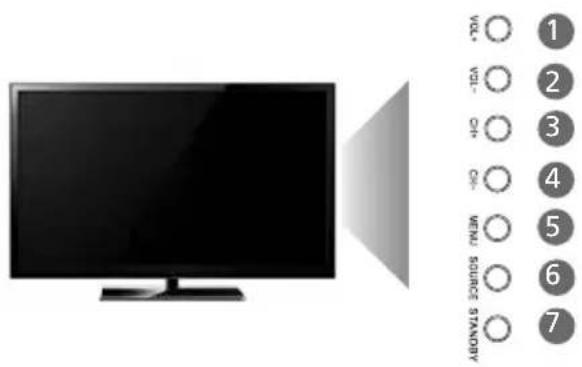
1 Volume up
2 Volume down
3 Programme/Channel up and menu up
4 Programme/Channel down and menu down
5 Displays Menu/Back
6 Displays the input source menu
7 Standby Power On/Off
This information is for models with built in DVD players

1 Stop/Eject Disc
2 Play/Pause Disc
3 Volume up
4 Volume down
5 Programme/Channel up and menu up
6 Programme/Channel down and menu down
7 Displays Menu/Back
8 Displays the input source menu
9 Standby Power On/Off
Choosing Mode Input/Source
To switch between the different input/ connections.
A) Using the buttons on the remote control:
1) Press [SOURCE] - The source menu will appear.
2) Press [V] or [A] to select the input you require.
3) Press [OK].
B) Using the buttons on the Television:
1) Press [SOURCE].
2) Scroll up / down using CH+/CH- buttons to the input/source you require.
3) Press [SOURCE] to change input/source to the one selected.
For further information on input/connections please view 'Connections' pages.
![Input Source Freeview TV Analogue TV Composite / AV Component / YPbPr HDMI 1 Press [V] or [A] to highlight the input you require. Then press [OK] to select](/content/2026/05/1049359/images/c7a356ccc0d4011822f7244f291faa7eee8e96526d17e0491669520fbf18c57c.jpg)
Example of Source menu depending on the TV model
CONNECTIONS
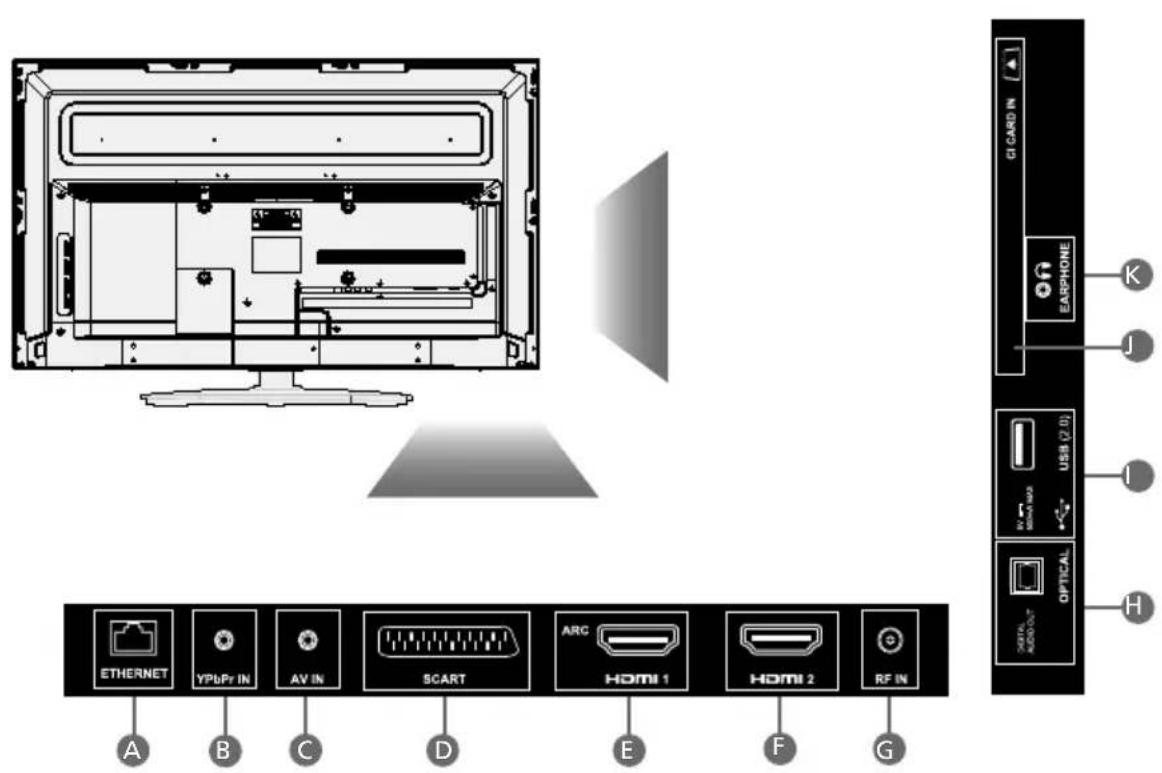
Ethernet/LAN* Network Connection
YPbIB IN Component HD input (YPbPr)
AV II Audio/Video input
SCART SCART input
HDM51 (ARC) HDMI input
HDMI 2 HDMI input
RF IN RF / TV Aerial Input
Optical audio Digital optical audio output
USB USB port
CI CARD IN Common Interface module
Earphones Earphone Output
*The Ethernet/LAN port is used for Freeview HD services only. (Freeview services are only available in the UK). It is not intended to be used for internet/network use.
CONNECTIONS
Note: Connecting cables are shown for example only and may not be included. Please check 'What Is Included In The Box' page.
Connecting to a device with Composite AV/Video output
TV Source should be set to Composite/AV

flowchart
graph LR
    A["Computer"] --> B["AV in"]
    B --> C["Residential Audio Components"]
    C --> D["Video (yellow)"]
    D --> E["L (white)"]
    D --> F["R (red)"]
    D --> G["Video"]
Connecting to a device with SCART output
TV Source should be set to SCART
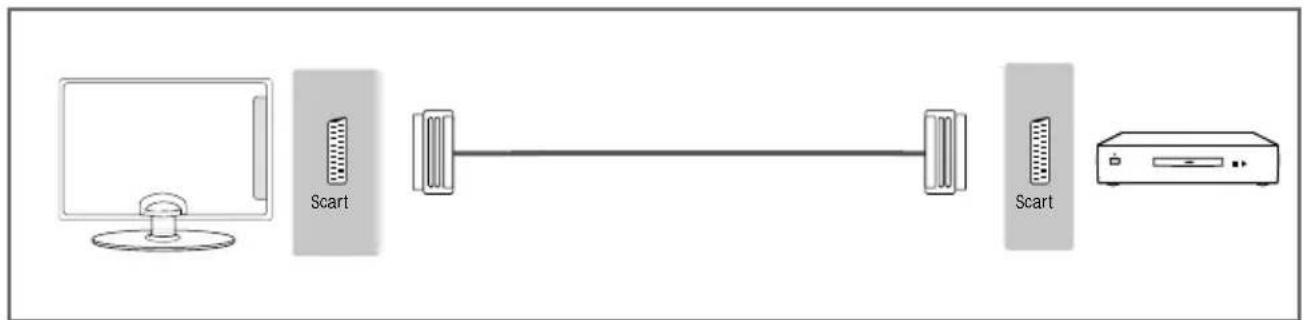
Connecting to a device with HDMI output
A HDMI cable can output both video and audio and enables you to enjoy digital-quality video and audio with minimal loss of quality.
TV Source should be set to the corresponding HDMI port (HDMI 1, HDMI 2 etc)

CONNECTIONS
Connecting to a device with Component/YPbPr output
If you are supplied with a cable from the device which has RED, GREEN, BLUE, RED & WHITE connectors you must connect via Component (for picture) and by phono cable (for sound).
TV Source should be set to Component/YPbPr
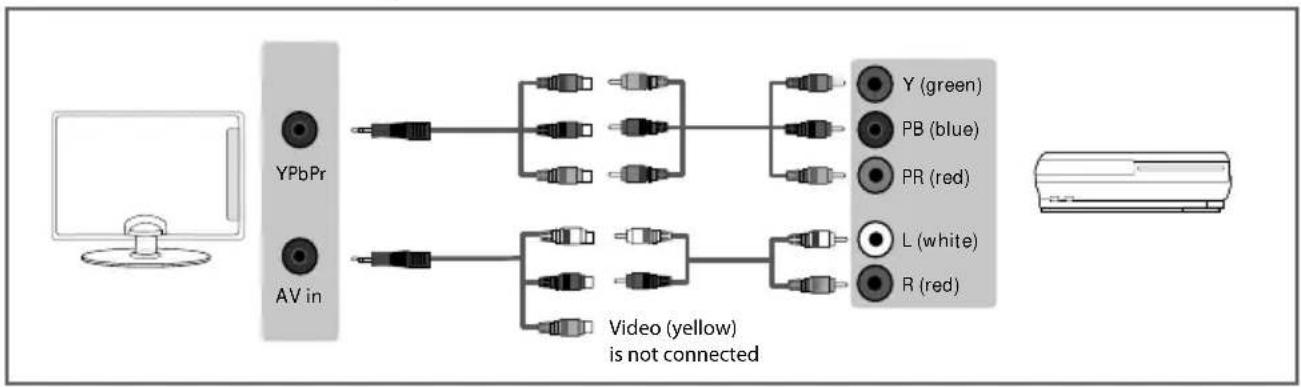
flowchart
graph LR
    A["Computer"] --> B["YPbPr"]
    A --> C["AV in"]
    B --> D["Video (yellow) is not connected"]
    C --> D
    D --> E["Y (green)"]
    D --> F["PB (blue)"]
    D --> G["PR (red)"]
    D --> H["L (white)"]
    D --> I["R (red)"]
Connecting to an external audio device (Amplifi ers, Surround Sound, Sound Bars etc)
When connecting via the TV's 3.5mm Earphone output, this will disable the TV speakers.
There are two options when connecting a device via the 3.5mm Earphone Output and the Digital Optical Audio Output

flowchart
graph LR
    A["3.5mm earphone"] --> B["OPTION 1 for 3.5mm EARPHONE OUTPUT"]
    B --> C["3.5mm audio in"]
    D["Digital audio out optical"] --> E["OPTION 2 for Digital Optical Audio Output"]
    E --> F["Digital audio in (optical)"]
Connecting an Ethernet/Network cable
The Ethernet port is used only for Freeview HD services only.
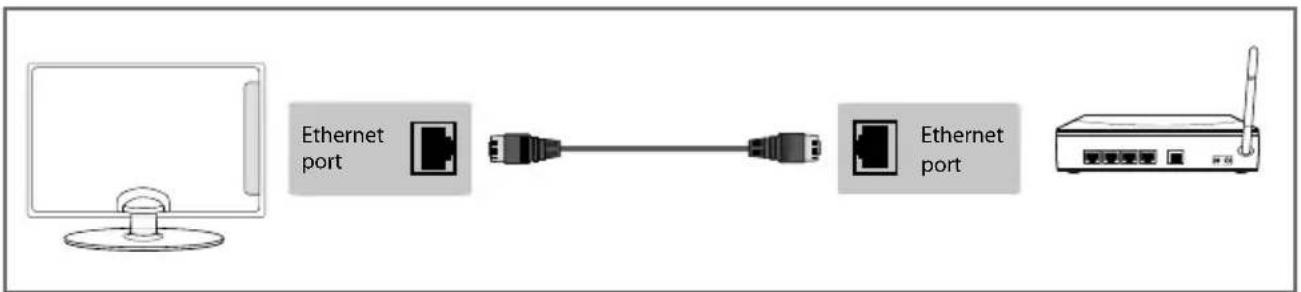
flowchart
graph LR
    A["Computer"] --> B["Ethernet port"]
    B --> C["Switch"]
    C --> D["Ethernet port"]
    D --> E["Router"]
FIRST TIME INSTALLATION
When the TV is first set up and switched on you will be welcomed with the First Time Installation screen.
In the event the First Time Installation screen does not appear, press the MENU button on the remote control, when the menu appears press 8-8-8-8 and then the First Time Installation menu will appear.

Language - Confirm the language of the TV's On Screen Display menu.
Country - Confirm the Country where the TV is being tuned.
Default Viewing Source - Please select the default Input source, the TV will switch to this Input Source once the First Time Installation process is completed.
Environment - Please select the following presets:
• Home Mode - The default TV picture settings will be set to Economy, this is the recommended power saving mode which reduces the energy used by up to 25% (by reducing the power to the LED/LCD panel). The auto standby setting is set to 4 hours.
- Store Mode - The default TV picture settings will be set to dynamic, which is a brighter picture setting. The auto standby setting is set to OFF.
Continue with TV Installation - Press the OK button on the remote control to confirm your selections and complete the First Time Installation process.
Note: we recommend the use of an outdoor aerial. If you are missing channels, please ensure the RF cable is connected securely. If there is a low signal strength, you should consider connecting a signal booster and re-tuning the TV.
Information Banner
The Information Banner is available in the Freeview/Saorview input source. When watching a Freeview/Saorview channel press the INFO button on the remote control (fi g.1) and the Information Banner will appear at the bottom of the screen (fi g.2). The Information Banner will also provide information on the current TV channel and TV programme as well as the time and date. Please see below.
Press the INFO button once to view the Information Banner.
You can now:
Use the ▲▼ buttons to scroll through the Freeview/Saorview TV channels Press the RED button to record Press the GREEN button to set a reminder Press the OK to watch the programme highlighted Press the INFO button to view the TV programme description
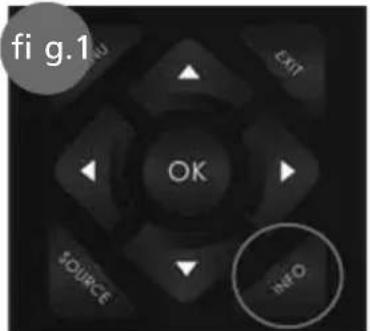

(Example of the Information Banner and a TV programme description).
7 DAY TV GUIDE
TV Guide is available in Freeview/Saorview TV mode. It provides information about forthcoming programmes (where supported by the Freeview/Saorview channel). You can view the start and end time of all programmes and on all channels for the next 7 days and set reminders.
1) Press the TV GUIDE button on the remote control and the following 7 Day TV Guide will appear:

2) Navigate through the menu using ▲▼▶◀.
You can now:
Record a programme by pressing RED (USB device must be connected)
Set a reminder by pressing GREEN
View a previous day by pressing YELLOW
View the next day by pressing BLUE
View further information about the programme by pressing INFO
3) Press [EXIT] to exit the 7 day TV Guide
Channel List
To view the channel list, please ensure that the TV is set to either the analogue or digital source and no menus or TV notifications are displayed.

1) Press [OK] on the remote control and the channel list menu will appear.
2) Scroll through the channel list by using ▲buttons then press [OK] to view the channel that is currently highlighted.
3) Scroll through different types of channels such as Freeview/ALL/Digital TV/Radio/data and HD channels by using ▶ buttons.
4) Press [EXIT] to exit the channel list.
CHANNEL MENU


To access this menu, press [MENU] button on the remote control. To select a sub menu press [OK].
If you wish to make changes to any of the default settings, use the scroll buttons. To confirm any settings press [OK] button. To exit this menu at anytime, press [EXIT] button.
Auto Tuning - Allows you to retune the television for all digital channels, digital radio stations and analogue devices.
Analogue Manual Tuning - Allows you to manually tune your analogue signal.
Freeview Manual Tuning - Allows you to manually tune your digital signal.
Channel Edit - Allows you to delete, move, skip and favourite channels.
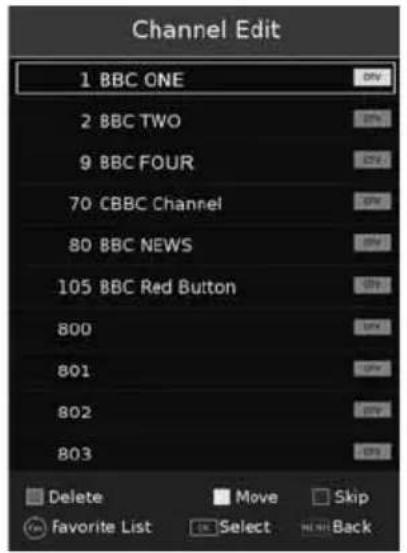
Important: To receive Freeview channels, in particular Freeview HD channels, you will need a Digital TV aerial and be in a good Freeview coverage area. You can check coverage for your postcode at www.freeview.co.uk
Please note that any Freeview HD channels found during tuning will be placed in channel positions above 100. For example, 101 (BBC1 HD) 102 (BBC2 HD) etc.
Signal Information - Allows you to view signal frequency, signal quality and signal strength.
Recorded List - Shows a list of recorded TV programmes.
CI Information - Pay per view services require a "smartcard" to be inserted into the TV. If you subscribe to a pay per view service the provider will issue you with a 'CAM' and a "smartcard". The CAM can then be inserted into the COMMON INTERFACE PORT (CI Card In).
Schedule List - Lists your programme reminders.
Software Update (OAD) - Switch on/off OAD (over air download) updates.
Tip: If you do not press any buttons for 30 seconds, the menu will automatically exit. You can change the length of time before the menu exits automatically - see 'OSD Timer' in the Time Menu
PICTURE MENU

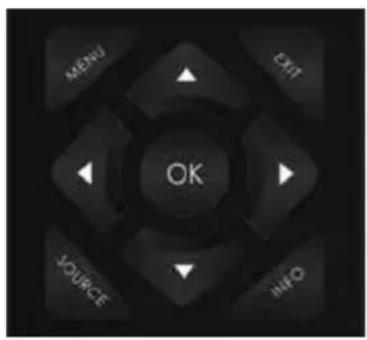
To access this menu, press [MENU] button on the remote control and scroll up/down. To select a sub menu press [OK].
If you wish to make changes to any of the default settings, use the scroll buttons. To confirm any settings press [OK] button. To exit this menu at anytime, press [EXIT] button.
Picture Mode - Choose from the following presets:
| Dynamic Recommended settings for fast moving pictures | |
| Standard | Standard settings |
| Movie Set to be lighter in colour and less bright | |
| Personal Lets you manually alter all the settings | |
| Economy Power saving mode which reduces the energy used by up to 25% (by reducing the power to the LED/LCD panel).In Economy mode, the TV will switch itself to Standby mode after 3-5 hours in the event that the TV buttons or remote control buttons are not pressed (change the picture mode to another setting to de-activate this function) | |
You can make the following adjustments in Personal mode:
Contrast - Switch the balance between black and white.
Brightness - Increase or decrease the brightness of the picture.
Colour - Increases the colour from black and white.
Tint - Lets you increase or decrease the level of tint within the picture (only available for NTSC source signal).
Sharpness - Increase or decrease the sharpness of the picture.
Colour Temperature Choose from the following presets:
| Normal | Default | settings |
| Warm | Increases red within the picture | |
| Cold | Increases blue within the picture | |
PICTURE MENU

Aspect Ratio - Within the UK the picture format varies depending on the channel/broadcast. There are a number of different options to best meet your needs
Auto
Automatically displays the best picture format so the picture is in the correct position. Black lines may appear at the top/bottom and/or sides.
Dot by dot
Will display the picture from the broadcaster without any change, only available in HDMI input source.
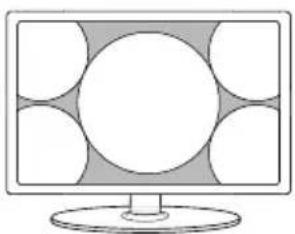
16:9

natural_image
Computer monitor with five circular design elements on a gray background (no text or symbols)Fills the screen with a regular 16:9 signal and 4:3 picture format will be stretched to fi ll the screen
Full Screen

natural_image
Illustration of a computer monitor with five circular windows on the screen (no text or symbols)Displays a picture in the full screen mode with out overscan. 16:9 signal will be displayed in original proportion. Other picture format will be stretched to fi ll the screen.
Zoom1 and Zoom2
natural_image
Illustration of a computer monitor with a blank screen and circular design on the left (no text or symbols)The picture is the correct proportion but zoomed in to fill the screen
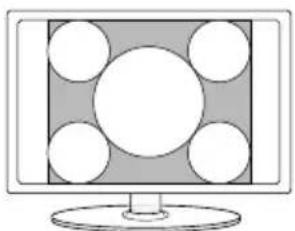
4:3
natural_image
Computer monitor with a central screen and surrounding circular elements (no text or symbols visible)Displays the 4:3 picture in its original size. Side bars are shown to fi ll the 16:9 screen
Expert Settings: Please choose from the following options.
- Noise Reduction - Allows you to turn Noise Reduction ON or OFF.
• Active Contrast - Automatically optimises the 'backlight' and 'contrast' of the picture according to the brightness of the screen. Choose one of the following options, ON or OFF.
SOUND MENU


To access this menu, press [MENU] button on the remote control and scroll up/down. To select a sub menu press [OK].
If you wish to make changes to any of the default settings, use the scroll buttons. To confirm any settings press [OK] button. To exit this menu at anytime, press [EXIT] button.
Sound Mode - Choose from the following presets
| Standard | Default | settings |
| Music | Emphasises music over voices | |
| Movie | Provides live and full sound for movies | |
| Sports | Emphasises sound for sports | |
| Personal | Selects your personal sound settings | |
Treble - To adjust the amount of high frequency within the sound.
Bass - To adjust the amount of low frequency within the sound.
Balance - To switch the sound between the left and right speakers.
Auto Volume Level (AVL) - When 'on' is selected, the volume will attempt to stay at a constant level regardless of TV programme and advertisements.
DTS TruSurround - Choose from the following options:
| Off Off | |
| TruSurround | TruSurroundTM creates an immersive, feature-rich surround sound experience from two speakers, complete with rich bass, high frequency detail and clear dialog |

dts®
TruSurround
For DTS patents, see http://patents.dts.com. Manufactured under license from DTS Licensing Limited. DTS, the Symbol, & DTS and the Symbol together are registered trademarks. DTS TruSurround is a trademark of DTS, Inc. © DTS, Inc. All Rights Reserved.
SOUND MENU


Digital Output - This is the digital optical audio output. Choose from the following options:
Off To turn off Digital Output
Auto Selects the best settings automatically
PCM Select this option if you are connecting to a Stereo Hi-fi via digital audio cable
(Pulse-code modulation (PCM) is a digital representation of an analogue signal)
Audio Description - This allows the user to increase and decrease the AD (Audio Description) volume level. (Audio Description is a service available on certain programmes. It provides a description of what is happening during the selected programme for a person who is visually impaired).
AD Volume - This allows the user to increase and decrease the AD (Audio Description) volume level. Audio Delay - Enables the user to adjust setting to sync picture and audio.
SPDIF Delay - Enables the user to adjust sound setting to sync picture and audio for external speakers connected via digital audio output.
TIME MENU

To access this menu, press [MENU] button on the remote control and scroll up/down. To select a sub menu press [OK].
If you wish to make changes to any of the default settings, use the scroll buttons. To confirm any settings press [OK] button. To exit this menu at anytime, press [EXIT] button.
Auto Sync - Automatically syncs time and date.
Clock - Shows the date and time.
Off Time - Allows you to set a specific time for your TV to turn off.
On Time - Allows you to set a specific time for your TV to turn on, the channel it will then display, the source it will be on and also the volume. This function can then be toggled to repeat every day or a certain day.
Sleep Timer - Lets you set the sleep timer so the television automatically switches off after a set amount of time. Off -> 10min -> 20min -> 30min -> 60min -> 90min -> 120min -> 180min -> 240min.
OSD Timer - Lets you adjust the amount of time the On Screen Menu stays on the screen before disappearing.
Auto standby - Set Auto standby between Off, 3 hours, 4 hours and 5 hours.
Time Zone - Change your current time zone.
LOCK MENU
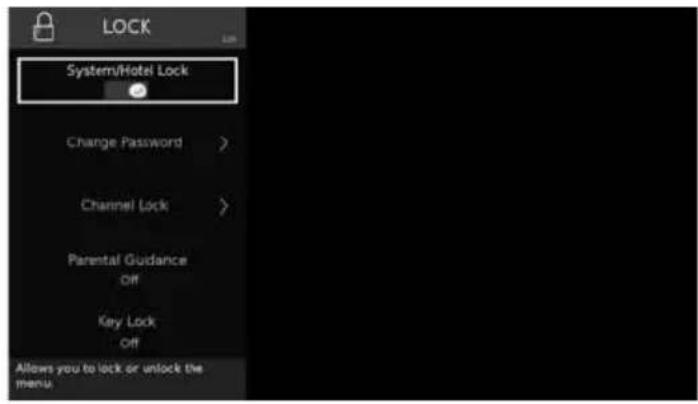

To access this menu, press [MENU] button on the remote control and scroll up/down. To select a sub menu press [OK].
If you wish to make changes to any of the default settings, use the scroll buttons. To confirm any settings press [OK] button. To exit this menu at anytime, press [EXIT] button.
System/Hotel Lock - Allows you to lock or unlock the menu. You will be asked to enter a 4 digit password Use the ◀ button to quit the password input or use the ▶ button to clear. Default password is 0000.
Change Password - Allows you to change the password.
Channel Lock - Allows you to lock certain channels manually.
Parental Guidance - Allows you to set the rating to block certain content based on age information.
Key Lock - Allows you to lock the buttons on the side of the TV set.
Default Source - Allows the user to set the default source. The default source is the source the TV starts on when first switched on.
Default Volume - Allows you to set the default volume on the TV. When the TV is put into standby mode it will automatically be set that volume when the TV is switched on.
Default Channel - Allows the user to set a channel as the default channel on the Digital source. The default channel is the channel the TV starts on when first switched on.
Max Volume - Allows you to adjust and set the maximum volume.
Source Lock - Allows you to lock the source menu.
SETTINGS MENU

Setup - Enter the 'Setup' menu to access and adjust one the following settings:
• Language - Allows you to change the language of the menu.
• Audio Language 1 - Set the primary audio language.
• Audio Language 2 - Set the secondary audio language.
- Subtitle Language 1 - Set the primary subtitle language.
- Subtitle Language 2 - Set the secondary subtitle language.
- Hearing Impaired - This allows the user to turn on the Hearing Impaired function, this produces subtitles on the screen which provide a description of what is happening during the selected program.
- Blue Screen - Changes the background when there is no input between clear and a blue background (Only available on some sources).
- LED Status - Allows the user to switch the LED power indicator light ON or OFF when the TV is being operated. (When this option is set to OFF the LED power indicator light will flash when the remote control is used and will flash red during the normal start up process).
• First Time Installation - Allows you to access the First Time Installation menu and retune the TV set.
- Reset TV - This resets the menus to factory settings and clears all the TV channels from the television.
Network - Allows you to manually set your network settings on the TV (for more information please see the 'Network' menu page).
PVR File System - Allows you to view the format and performance of a USB key.
HDMI CEC (Consumer Electronic Control) - Allows HDMI devices to control each other and allows the user to operate multiple devices with one remote control (only available with compatible devices). Choose from the following settings:
- Auto Standby - When the TV is put into standby mode, connected devices which support CEC will also be put into standby mode.
• HDMI ARC - Sends audio signal from terrestrial/satellite broadcast via HDMI to an Audio receiver without using any additional audio cables, this functions is only available via HDMI ARC port.
Software Update (USB) - From time to time we may release new firmware to improve the operation of the television (available to download). This menu lets you install the new software/fi rmware onto the television. Further details of how to do this will be issued with the fi rmware. Contact the helpline or refer to the 'product support' section of the website.
Software Update (NET) - Allows you to update your TV with the newest software via your internet connection.
Version info - Allows you to view the version/information of the software installed on the TV set.
NETWORK MENU


To access this menu you must first access the Settings menu and select Network.
If you wish to make changes to any of the default settings, use the scroll ▲▼▶◀ buttons. To confirm any settings press [OK] button. To exit this menu at anytime, press [EXIT] button.
For the network configuration to work the TV will need to be connected to your home network via an ethernet cable, with these requirements in place the TV will connect to the network automatically.
The Network connection is used for Freeview HD services only. (Freeview services are only available in the UK). It is not intended to be used for internet/network use.
IP Config - Allows you to access LAN network connection settings. Choose from the following modes:

Auto - The auto mode will automatically connect the TV to your home network (this is the default setting and is highly recommended). Manual - If the Manual mode is chosen you will able to scroll down and manually change the IP, Netmask, Gateway and DNS information.
Network Info - Allows you to view Information about network settings.
Network Test - Allows you to test the network connection.
USB MODE/MEDIA PLAYER
USB mode offers playback of various different types of content that you have saved on your USB Memory Stick.
On switching to USB source the below menu screen will appear. The content will be divided into Photo, Music, Movie and Text based on file type.
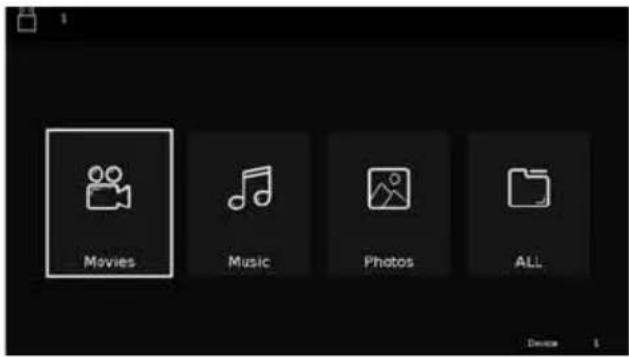
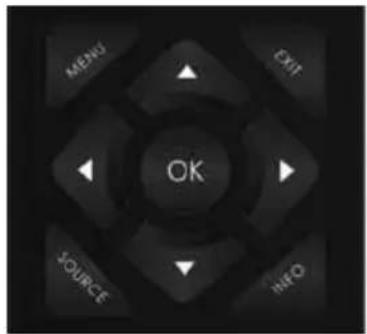
1) You can navigate through the menus using the scroll ▲▼▶◀buttons. To confirm the file type you wish to play/view press [OK] button.
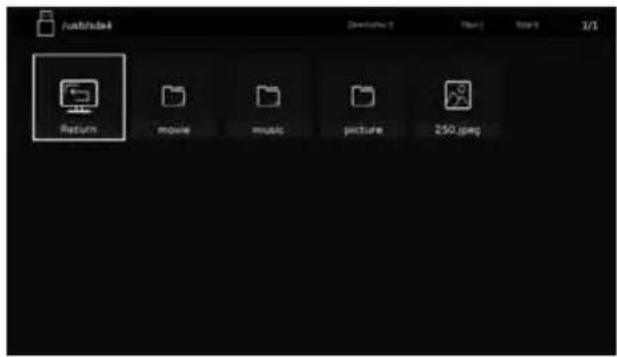
2) Select the drive you require. (If your drive only has 1 partition you will only see 1 item). Once the correct device has been selected you can now access the fi le, press OK to view.

3) Whilst viewing your media, you can control the item by using the remote control buttons (below) or by pressing (Info) to access the on-screen playback menu, you can now make your selection by using the ▲▼▶◀ and (OK) buttons on the remote control.

Tip: If you experience a playback issue, please ensure the files being used are the correct format (example - the picture plays but no sound) See technical specification page for compatible file types
USB RECORD - FREEVIEW/SOARVIEW MODE
USB RECORD – FREEVIEW/SAORVIEW MODE
Built into this television is a USB record facility. This function is available in Freeview/Soarview mode when used in conjunction with a compatible USB memory stick or USB hard drive. The benefits of this are as follows:
- Pause live TV and then playback, fast forward and rewind (up to live TV)
- One button record, if you decide you want to record the current programme
- Easy programmable recording from the 7 day TV Guide
Due to the nature of the product, it is necessary to use a high speed USB memory stick (as the TV reads from and writes to the memory stick at the same time, some memory sticks may not be suitable).
You can purchase high speed memory sticks from some computer stores, alternatively, we have a selection of tested and compatible memory sticks available to purchase directly from the helpline/web site.
Recommended Minimum Specification - USB Memory Stick
Read Speed 20 Mb/s (MegaBit Per Second)
Write Speed 6 Mb/s (MegaBit Per Second)
If you wish to use a USB portable hard drive larger than 32GB, please refer to the FAQ section at the rear of this user guide.
Pause Live TV (Time Shift)
Pausing Live TV is very simple.
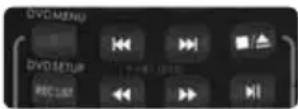
- Press the play/pause button and the television will pause and the live content will be recorded. To resume watching press play/pause again.
- Press fast forward to go forward in a recording (i.e. to skip adverts).
- Press fast rewind to go back in a recording (i.e. if you fast forwarded too far).
Tip: When you switch the TV to standby or change channel the Time Shift memory is wiped. To restart time shift you must press play/pause button.
One Button Record
At any point in time you may decide to record the current programme that you are watching. To do this you need to press the red button highlighted below.

Playback fi les from Record list
To playback recorded fi les you will be required to have the TV set to the Freeview/Saorview source mode. Once set to the correct source, access the recorded list by pressing the REC LIST (Recorded List) button on the remote control, the recorded list should now appear on the screen, press OK on the chosen fi le to start.
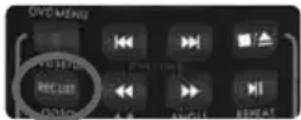
Tip: This television contains one TV tuner, therefore it can only record the channel you are watching or record one channel while the television is in standby mode.
Note: USB record function is only available in Digital/Freeview TV mode. Due to copyright laws and illegal copying/recording it is not possible to record to/from any other input/output source.
DVD SETUP
Applies to models with built-in DVD players only


To enter this menu please ensure the TV is in DVD source & press [DVD SETUP]
If you wish to make changes to any of the default settings, use the scroll ▲▲▲▲ buttons. To confirm any settings press [OK] button. To exit this menu at anytime, press [DVD SETUP] button.
TV Display - Choose from the following options
4:3 Pan scan PS Traditional picture format, often used on old fi lm
4:3 Letter box LB Traditional picture which has been adapted for widescreen
Wide 16:9 Widescreen picture format
Speaker Setup - Choose from the following options
LT/RT Converts from multi-channel sound to mono
Stereo Converts from multi-channel sound to stereo
Dual Mono - Choose from the following options
| Stereo | Outputs 2 channels of sound both left and right |
| Mono L | Outputs left side sound |
| Mono R | Outputs right side sound |
| Mix Mono | Outputs a single channel of sound but mix between right and left |
Dynamic Range - This is the difference between the quietest and loudest sounds. This setting works only with DVD discs recorded in Dolby digital.
Full Set this to listen with the range recorded on the disc
3/4 Set this to listen with a range equivalent to a normal television
1/2 Set this to listen with a smaller difference between the maximum and minimum volume
1/4 Set this to listen with a smaller difference between the maximum and minimum volume
Off Set dynamic range to off
TV Type - Choose from the following options
PAL For discs from UK/Europe, Asia, Australia etc
Multi For both NTSC and PAL
NTSC For discs from North America, Japan etc
Default - Choose from the following options
Reset Resets all options in the 'DVD setup' menu back to the default settings
Tip: This TV/DVD player is pre-set to play Region 2 DVDs. In the event you wish to use the TV/DVD in another country that uses different region discs, please visit www.umc-uk.co.uk. Select 'Product Support', 'Changing Region'.
USING YOUR TV WITH A SKY DIGITAL SET TOP BOX
Option 1) Connecting your TV to your Sky box (when both the TV and Sky Box are located in the same room)
Depending on your Sky Box & TV model, connect either by SCART or HDMI cables (available separately).
If connecting by SCART, select the 'Input source' on the TV as SCART. If your TV does not have SCART, please refer to 'Connections' pages in this user guide for alternative ways to connect.
If connecting by HDMI, select the 'Input source' on the TV as HDMI (if the TV has more than 1 HDMI port, ensure you select the input source to match the HDMI numbered port on the rear of the TV).
If you wish to use your Sky remote to operate the TV's functions, you will need a Sky remote control (Revision 9 or later) and you will need to program a 4 digit code into it. See bottom of this page.

Option 2) Connecting your TV to your Sky box (when your Sky box is located in a different room to the TV)
Please note, if you are adding a 'Magic Eye/TV Link' to your system so that you can use your Sky remote control to change the Sky channel in the room where the 2nd TV is located, please refer to the instructions included with the TV link/magic eye in order to ensure the RF or RF2 output on your Sky box is powered on. (The red LED light on the TV link/magic eye will light up if the RF / RF2 output is correctly set up) If you do not have the instructions that came with the TV link/magic eye, instructions on how to do it can be found on our web site.

flowchart
graph LR
    A["2nd TV in another room"] --> B["TV Link/Magic Eye (optional)"]
    B --> C["RF/COAX cable from Sky Box to 2nd TV"]
    C --> D["Connect to RF or RF2 output on the Sky box"]
    D --> E["HDMI or SCART cable"]
    E --> F["Sky Box"]
1) To tune the TV to the Sky box, on the 2nd TV, select the 'Analogue' input source.
2) Select the channel that you wish to store the Sky box/channel on. (If you do not use channels 1-5 because you no longer have analogue terrestrial channels after digital switchover, you may choose to select channel 1 to store the Sky box/channel, if you still have and use analogue channels 1-5, you may for example decide that channel 6 is the best option for you)
3) Press the corresponding number on the remote control to select the desired analogue channel chosen as per point 2 above.
4) On the TV remote control, press Menu. Now navigate through the menus to select Manual Tuning or Analogue Manual tuning (refer to the Tuning/Channel menu section of this user guide if necessary)
5) Manually tune in the channel (usually, the Sky box is at a frequency between 800Mhz and 850Mhz) once the Sky box/channel is found, press 'OK' to store it.
If you wish to use your Sky remote to operate the TV's functions, you will need a Sky remote control (Revision 9 or later) and you will need to programme a 4 digit code into it. See below.
Using a Sky remote or a universal remote to operate your TV
Sky remote control - If you wish to use your Sky remote to operate the basic functions of your TV, you need to program a 4 digit code into it. Please note - you will need a Sky Revision 9 remote control (or later). The code required for this television is 2134. If you wish to upgrade/replace your existing Sky remote control to the latest version, you can do so on our website.
Universal remote control - If you wish to use a Universal remote control to operate your TV, please refer to the website for a full list of codes. (Please note we only have codes for One for All branded remote controls, if you have an alternative brand of Universal remote, please refer to the manufacturer for the code.)
FREQUENTLY ASKED QUESTIONS
| General I would like to | have louder sound by connecting additional speakers. | option 1) Use the 3.5mm headphone output and a 3.5mm to phono cable (available separately) to connect to an amplifi er/surround sound system. Please note this will deactivate the TV's built in speakers option 2) Connect a digital optical audio output cable from the TV's digital optical audio output to your amplifi er/surround systems digital optical audio input. |
| General Why are some | options in the menu unavailable and greyed out. | Some options are only available in certain sources, i.e. HDMI. They are unavailable in the other sources where they have no eff ect. |
| General Can I stop my | TV automatically turning off after 4hrs? | Yes, in the 'Time' menu settings, scroll down to Auto standby and select OFF. |
| TV I have tuned in Digital TV but I am not receiving any or all of the channels and/or the channels I receive are breaking up. | 1) Check you are in an area that can receive Freeview/Saorview, visit www.freeview.co.uk or www.saorview.ie2) Check you are using an aerial that is able to receive a good digital signal. In most cases, you will need an outdoor digital hi-gain/wideband aerial. In areas that have excellent digital coverage, you may be able to use a loft type aerial but it is highly likely that you will also need to connect a booster between the back of the TV and the TV aerial wall socket. Unfortunately, to receive a good enough digital signal, it is not possible to use a portable/ indoor type aerial. | |
| TV I have re-tuned my | television but when I switch it off it is not storing the channels. | If the TV does not save the channels when you power it off, it's likely the channel database has become corrupt.1) Turn off the TV.2) Remove the RF/Aerial cable from the rear of the TV and then turn the TV back on again.3) Using the remote control, press Menu followed by 8-8-8-8 to enter the initial setup/first time installation menu.4) Press OK (let the TV run the full tuning process).5) Once completed, turn off the TV, reconnect the RF/Aerial cable then turn the TV back on again.6) Repeat steps 3 & 4. |
| VCR/DVD Recorder | I have connected the TV to my VCR or DVD Recorder via SCART but it is not recording. | In addition to connecting via SCART, you should connect the aerial cable from the wall socket to your VCR/DVD Recorder and another aerial cable from the VCR/DVD Recorder to the TV. |
| Game Consoles I have | connected my Playstation/Xbox to the TV via HDMI, but I am not receiving any pictures or sound on my Television. | 1) Ensure the TV is set to on the correct HDMI source.2) Check your settings on your Playstation/Xbox are as per the Playstation/Xbox instruction manual. |
| Game Consoles I have | connected my Playstation/Xbox to the TV via Component cables (red, green & blue) but I am not receiving any sound. | Component cables only provide HD pictures. For the sound you will need to connect the red & white audio cables on the Playstation/Xbox to the red & white phono inputs (or mini AV input where fitted) on the rear of the TV. Please refer to the 'Connections' pages. |
| System Lock I have changed the password on the television and now forgotten it. | There is a master password of 4711, to gain access to the TV menu and reset the normal password. | |
FREQUENTLY ASKED QUESTIONS
| USB Mode I have inserted a USB Memory Key, but the TV does not recognise it. | Ensure the USB Memory Key is formatted to type FAT32. |
| USB Mode Using a USB portable hard drive larger than 32GB. | If you wish to use a portable hard drive larger than 32GB, please note that it must be formatted to the FAT32 fi le system in order to operate on this TV. Windows XP/Vista computers are only capable of formatting up to 32GB, therefore, you will need a software programme/utility to format larger hard drives.Please refer to the website, www.umc-uk.co.uk, for more information. |
| DVD (For TV models with DVD only) | I have inserted a disc but it is not playing.1) Ensure you have inserted the disc facing the correct way.2) Ensure the disc is clean and is not scratched.3) Some copied discs will not play.4) Check the DVD is a region 2 disc – to change the region of the DVD player, refer to www.umc-uk.co.uk, select ‘Changing DVD Region’ in the ‘Product Support’ section |
| DVD (For TV models with DVD only) | I have pressed the eject button but the disc is not coming out. To eject the disc hold the stop/eject button for 4 seconds. |
| USB Record I cannot change the channel, access the menu or use the red button. | During time shift (pause live TV) you cannot change the channel, access the menu or use the red button. |
| USB Record When using the USB to record the picture ‘breaks up’ or experience loss of sound. | Check the USB memory stick meets the minimum read speed requirements. Standard definition channels require a read speed of 20 MB/s (Mega Byte per second) and a write Speed of 6 MB/s (Mega Byte per second) HD channels require the read speed of 80 MB/s (Mega Byte per second) and a write speed of 40 MB/s (Mega Byte per second). USB 3.0 sticks should be used where possible. |
| Freeview HD I cannot access all Freeview channels. | Some data channels for Freeview can only be obtained when the TV’s ethernet port is connected to your router. |
| Freeview HD I cannot find the Freeview HD channels. | Freeview HD channels found during tuning will be placed in channel positions above 100. For example, 101 (BBC1 HD), 102 (BBC2 HD) etc. |
TECHNICAL SPECIFICATION
Product fiche (22" Full HD Models)
| Trademark | Technika | |
| Model ID | 22F22B-FHD | 22F22B-FHD/DVD (Models with inbuilt DVD player) |
| Energy efficiency class A | ||
| Visible screen size (diagonal) 55 cm / 21.5 inches | ||
| On mode power consumption 20.0 W | ||
| Annual energy consumption *1 30 kWh | ||
| Standby power consumption *2 <0.50 W | ||
| Off mode power consumption | 0 W | |
| Screen resolution | 1920 (H) x 1080 (V) | |
| *1: Energy consumption XYZ kWh per year, based on the power consumption of the television operating 4 hours per day for 365 days. The actual energy consumption will depend on how the television is used.*2: When the TV is turned off with the remote control/standby button and no function is active. | ||
Additional Technical Information
| RF 75 ohm Antenna / Analog / DVB | ||
| Inputs 2 x HDMI, 1 x USB, 1 x SCART, 1x RJ45 LAN/Ethernet,1 x Mini Composite/Video & L/R Audio sharedfor Composite/Video & Component/YPbPr,1 x Mini Component/YPbPr | ||
| Sound Outputs 1 x 3.5mm Headphone/Audio out,1 x Digital Optical Audio Out | ||
| Speaker / Sound Watts (RMS) 2 x 5 / 2 x 3 | ||
| Voltage and power consumption 110-240V 50 / 60Hz | 20/40W (ecomode/max)(<0,5W in Standby)(0W in OFF mode) | 110-240V 50 / 60Hz20/50W (ecomode/max)(<0,5W in Standby)(0W in OFF mode) |
| Dimensions including stand (mm) | 510W x 355H x 140D | |
| Net weight (Kgs) 4.1 4.4 | ||
| Wall Mounting VESA 100 x 100 (mm) | ||
TECHNICAL SPECIFICATION
Product fi che (24" HD Ready Models)
| Trademark | Technika | |
| Model ID | 24F22B-HD | 24F22B-HD/DVD24F22W-HD/DVD24F22P-HD/DVD24F22S-HD/DVD (Models with inbuilt DVD player) |
| Energy efficiency class A | ||
| Visible screen size (diagonal) 60 cm / 23.6 inches | ||
| On mode power consumption | 25.0 W | |
| Annual energy consumption *1 | 37 kWh | |
| Standby power consumption *2 | <0.50 W | |
| Off mode power consumption 0 W | ||
| Screen resolution | 1366 (H) x 768 (V) | |
| *1: Energy consumption XYZ kWh per year, based on the power consumption of the television operating 4 hours per day for 365 days. The actual energy consumption will depend on how the television is used.*2: When the TV is turned off with the remote control/standby button and no function is active. | ||
Additional Technical Information
| RF 75 ohm Antenna / Analog / DVB | ||
| Inputs 2 x HDMI, 1 x USB, 1 x SCART, 1x RJ45 LAN/Ethernet,1 x Mini Composite/Video & L/R Audio sharedfor Composite/Video & Component/YPbPr,1 x Mini Component/YPbPr | ||
| Sound Outputs 1 x 3.5mm Headphone/Audio out,1 x Digital Optical Audio Out | ||
| Speaker / Sound Watts (RMS) 2 x 5 / 2 x 3 | ||
| Voltage and power consumption 110-240V 50 / 60Hz25/40W (ecomode/max)(<0,5W in Standby)(0W in OFF mode) | 110-240V 50 / 60Hz25/50W (ecomode/max)(<0,5W in Standby)(0W in OFF mode) | |
| Dimensions including stand (mm) | 560W x 386H x 140D | |
| Net weight (Kgs) 4.5 4.9 | ||
| Wall Mounting VESA 100 x 100 (mm) | ||
TECHNICAL SPECIFICATION
| Trademark | Technika | |
| Model ID | 24F22B-FHD | 24F22B-FHD/DVD24F22W-FHD/DVD24F22P-FHD/DVD24F22S-FHD/DVD (Models with inbuilt DVD player) |
| Energy efficiency class A | ||
| Visible screen size (diagonal) 60 cm / 23.6 inches | ||
| On mode power consumption 25.0 W | ||
| Annual energy consumption *1 | 37 kWh | |
| Standby power consumption *2 | <0.50 W | |
| Off mode power consumption | 0 W | |
| Screen resolution | 1920 (H) x 1080 (V) | |
| *1: Energy consumption XYZ kWh per year, based on the power consumption of the television operating 4 hours per day for 365 days. The actual energy consumption will depend on how the television is used.*2: When the TV is turned off with the remote control/standby button and no function is active. | ||
Additional Technical Information
| RF 75 ohm Antenna / Analog / DVB | ||
| Inputs 2 x HDMI, 1 x USB, 1 x SCART, 1x RJ45 LAN/Ethernet,1 x Mini Composite/Video & L/R Audio sharedfor Composite/Video & Component/YPbPr,1 x Mini Component/YPbPr | ||
| Sound Outputs 1 x 3.5mm Headphone/Audio out,1 x Digital Optical Audio Out | ||
| Speaker / Sound Watts (RMS) 2 x 5 / 2 x 3 | ||
| Voltage and power consumption 110-240V 50 / 60Hz | 25/40W (ecomode/max)(<0,5W in Standby)(0W in OFF mode) | 110-240V 50 / 60Hz25/50W (ecomode/max)(<0,5W in Standby)(0W in OFF mode) |
| Dimensions including stand (mm) | 560W x 386H x 140D | |
| Net weight (Kgs) 4.5 4.9 | ||
| Wall Mounting VESA 100 x 100 (mm) | ||
TECHNICAL SPECIFICATION
Compatible fi les in USB Mode
| Media | File Ext. | Codec | Remark | |
| Video | Audio | |||
| MOVIE | .mpg | MPEG-1, MPEG-2 | MP3, AAC, AC3, PCM, | Max Resolution: 1920x1080 |
| Max Data Rate: 40 Mbps | ||||
| .avi | Xvid, MJPEG | Max Resolution: 1920x1080Max Data Rate: 20 Mbps | ||
| MPEG-4 SP/ASP, H.263/H.264 | ||||
| .ts | MPEG-2, H.264, HEVC | |||
| .mov.mkv | MPEG-4 SP/ASP, H.263/H.264, HEVC | |||
| .dat MPEG-1 | ||||
| .mp4 | MPEG-4 SP/ASP, H.263/H.264, HEVC | |||
| MPEG-1, MPEG-2 | Max Resolution: 720x576Max Data Rate: 40 Mbps | |||
| .vob MPEG-2 | ||||
| MUSIC | .mp3 -- MP3 | Sample Rate: 8K~48KHzBit Rate: 32K~320Kbps | ||
| .m4a/.aac -- | AAC | Sample Rate: 16K~48KHzBit Rate: 32K~442KbpsChannel: Mono/Stereo | ||
| PHOTO | .jpg/ | Progressive JPEG | Max Resolution: 1024x768 | |
| .jpeg | Baseline JPEG | Max Resolution: 15360x8640 | ||
| .bmp | BMP | Max Resolution: 9600x6400 | ||
| Pixel Depth: 1/4/8/16/24/32 bpp | ||||
| .png | Non-Interlaced | Max Resolution: 9600x6400 | ||
| Interlaced | Max Resolution: 1280x800 | |||
| SUBTITLE | .srt | SubRip | ||
| .ssa/.ass | SubStation Alpha | |||
| .smi | SAMI | |||
| .sub | SubViewerMicroDVDDVDSubtitleSystemSubIdx(VobSub) | SubViewer 1.0 & 2.0 Only | ||
| .txt | TMPlayer | |||
- Important safety instruction
- Please read these instructions. All the safety and operating instructions should be read before the appliance is operated.
- Warnings
- WARNING: Never place a television set on an unstable location. A television set may fall, causing serious personal injury or death. Many injuries, particularly to children, can be avoided by taking simple precautions such as:
- Safety
- WARNING: Excessive volume when using earphones and headphones can cause loss of hearing.
- Maintenance
- CAUTION: If water or other liquid enters the television through the display panel surface, a malfunction may occur.
- Packaging
- Important information regarding use of video games, computers, captions or other fixed image displays
- Important: Once 'shadow image/screen burn' occurs, it will never disappear and is not repairable under warranty.
- How do I dispose of this product?
- Batteries
- Trademarks
- HDMI®
- HDTV
- HDTV 1080p
- DVB
- FREEVIEW HD
- SAORVIEW
- DOLBY
- CE Statement:
- CAUTION:
- This caution label is located on the rear panel of the unit
- CONTENTS
- WHAT IS INCLUDED IN THE BOX
- Accessories
- ATTACHING/DETACHING THE STAND
- Attaching the stand
- HELPFUL ADVICE FOR FIRST TIME STAND INSTALLATION
- Detaching the stand
- SECURING THE TV TO A WALL
- Securing the TV to a wall with anti-tip straps
- Wall Mounting
- REMOTE CONTROL
- TV BUTTONS AND INPUT SOURCE MENU
- Choosing Mode Input/Source
- CONNECTIONS
- Connecting to a device with Component/YPbPr output
- FIRST TIME INSTALLATION
- Information Banner
- DAY TV GUIDE
- Channel List
- CHANNEL MENU
- PICTURE MENU
- Auto
- Dot by dot
- SOUND MENU
- TIME MENU
- LOCK MENU
- SETTINGS MENU
- NETWORK MENU
- USB MODE/MEDIA PLAYER
- USB RECORD - FREEVIEW/SOARVIEW MODE
- USB RECORD – FREEVIEW/SAORVIEW MODE
- Pause Live TV (Time Shift)
- One Button Record
- Playback fi les from Record list
- DVD SETUP
- Applies to models with built-in DVD players only
- TV Display - Choose from the following options
- Speaker Setup - Choose from the following options
- Dual Mono - Choose from the following options
- TV Type - Choose from the following options
- Default - Choose from the following options
- USING YOUR TV WITH A SKY DIGITAL SET TOP BOX
- Option 1) Connecting your TV to your Sky box (when both the TV and Sky Box are located in the same room)
- Option 2) Connecting your TV to your Sky box (when your Sky box is located in a different room to the TV)
- Using a Sky remote or a universal remote to operate your TV
- TECHNICAL SPECIFICATION
Brand : Technika
Model : 24F22P-HD/DVD
Category : Television