MMI24CDBWCAAXM8 - Air Conditioning Mabe - Free user manual and instructions
Find the device manual for free MMI24CDBWCAAXM8 Mabe in PDF.


User questions about MMI24CDBWCAAXM8 Mabe
0 question about this device. Answer the ones you know or ask your own.
Ask a new question about this device
Download the instructions for your Air Conditioning in PDF format for free! Find your manual MMI24CDBWCAAXM8 - Mabe and take your electronic device back in hand. On this page are published all the documents necessary for the use of your device. MMI24CDBWCAAXM8 by Mabe.
USER MANUAL MMI24CDBWCAAXM8 Mabe
mini-split type air conditioners
for the English version, go to page 37
lea este instructivo antes de instalar su aire acondicionado read this manual before installing your new air conditioner
modelo
MMI12CABWCAAXM8 MMT12HABWCAAXM8 MMT18HDBWCAAXM8
MMI12CDBWCAAXM8 MMT12CDBWCAAXM8 MMT18CDBWCAAXM8
MMI12HABWCAAXM8 MMT12HDBWCAAXM8 MMI24CDBWCAAXM8
MMI12HDBWCAAXM8 MMI18CDBWCAAXM8 MMI24HDBWCAAXM8
MMT12CABWCAAXM8 MMI18HDBWCAAXM8 MMT24HDBWCAAXM8
MMT24CDBWCAAXM8
NOM
PM01

mabe
bar
| Category | Value | |---|---| | Category 1 | 0.5 | | Category 2 | 0.6 | | Category 3 | 0.7 | | Category 4 | 0.8 | | Category 5 | 0.9 | | Category 6 | 1.0 | | Category 7 | 0.9 | | Category 8 | 0.8 | | Category 9 | 0.7 | | Category 10 | 0.6 |índice
natural_image
Line drawing of two hands pulling a cylindrical object on a surface (no text or symbols)natural_image
Line drawing of a hand using a sponge to clean or brush the next page of a rectangular object (no text or symbols)limpieza del filtro
natural_image
Diagram showing two views of a car air conditioner unit with cooling arrows indicating airflow direction (no text or labels)natural_image
Illustration showing a car being cleaned with a tape and another bottle filled with cloth (no text or symbols)natural_image
Two technical line drawings of a mechanical component with internal components and a pull-up arrow (no text or symbols)natural_image
Diagram showing two mechanical or structural states with arrows indicating movement, no text or symbols presentOperation and maintenance Safety precautions 38
Notices for use ....43
Names of each part ....45
Controller instructions ....46
Buttons description....49
Usage 50
Clean and care 52
Troubleshooting....54
Installation service Notices for installation....56
Install indoor unit....59
Install outdoor unit.... 63
Check after installation and test operation 68
Technical specifications....69
welcome
To get the full benefit from your new air conditioner, please read this use & care manual carefully before operating the unit.
Thank your for choosing a MABE air conditioner. Please keep this manual for future consultation.
Please read these instructions carefully before installing and operating the air conditioner.
safety precautions
Incorrect installation or operation by not following these instructions may cause harm or damage to people, properties, etc.
The seriousness is classified by the following indications:

WARNING:
This symbol indicates the possibility of death or serious injury.

CAUTION:
This symbol indicates the possibility of injury or damage to properties.

WARNING:
THIS APPLIANCE CAN BE USED BY CHILDREN AGED FROM 8 YEARS ABOVE AND PERSONS WITH REDUCED PHYSICAL, SENSORY OR MENTAL CAPABILITIES OR LACK OF EXPERIENCE AND KNOWLEDGE IF THEY HAVE BEEN GIVEN SUPERVISION OR INSTRUCTION CONCERNING USED OF THE APPLIANCE IN A SAFE WAY AND UNDERSTAND THE HAZARDS INVOLVE. CHILDREM SHALL NOT PLAY WITH THE APPLIANCE. CLEANING AND USER MAINTENANCE SHALL NOT BE MADE BY CHILDREN WITHOUT SUPERVISION. (Only for the AC with CE-MARKING)E-MARKING).
THIS APPLIANCE IS NOR INTENDED FOR USE BY PERSONS (INCLUDING CHILDREN) WITH REDUCED PHYSICAL, SENSORY OR MENTAL CAPABILITIES, OR LACK OF EXPERIENCE AND KNOWLEDGE, UNLESS THEY HAVE BEEN GIVEN SUPERVISION OR INSTRUCTION CONCERNING USE OF THE APPLIANCE BY A PERSON RESPONSIBLE FOR THEIR SAFETY. CHILDREN SHOULD BE SUPERVISION TO ENSURE THAT THEY DO NOR PLAY WITH THE APPLIANCE. (Except for the AC with CE-MARKING).
The air conditioner must be grounded. Incomplete grounding may result in electric shocks.

Do not connect the earth wire to the gas pipeline, water pipeline, lightning rod, or telephone earth wire.
Pull out the plug (or cut off the main power switch) when the unit is not in use for long time so as to ensure safety.
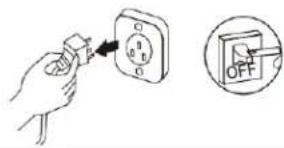
Before the connector is plugged in, please make sure that there is no dust on it and that it is plugged fully in place.
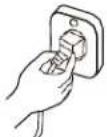
If the power supply cord is damaged, it must be replaced by the manufacture or its service agent or a similar qualified person.
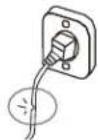
Don't pull out the power plug during operating or with wet hands.

It may cause electric shock or fire.
Take care not let the remote control and the indoor unit watered or being too wet.
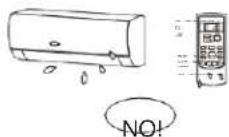
Otherwise, it may cause short circuit even fire.
Always switch off the device and cut the power supply before performing any maintenance or cleaning.
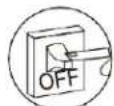
Otherwise, it may cause electric shock or damage.
Don't pull the power cord when pull out the power plug.
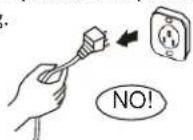
The damage of pulling power cord will cause serious electric shock.
Don't share the socket with other electric appliance.
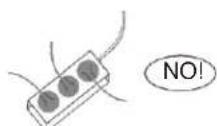
Otherwise, it may cause electric shock even fire.
Don't install air conditioner in a place where there is flammable gas or liquid. The distance between them should above 1m.
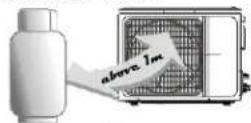
It may cause fire.
Don't use liquid or corrosive cleaning agent wipe the air conditioner and sprinkle water or other liquid either.
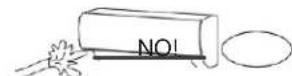
Doing this may case electric shock or damage to the unit.
Don't attempt to repair the air conditioner by yourself.
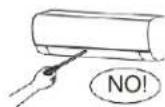
Incorrect repairs may cause electric or fire. Contact a qualified service technician for all service requirement.
Don't use air conditioner in lightning strom weather.
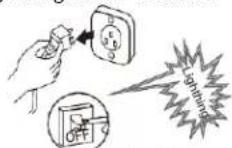
Power supply should be cut in time to prevent the occurrence of danger.
Don't put hands or any objects into the air inlets or outlets.
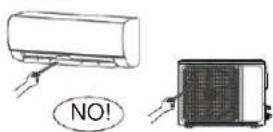
This may cause personal injury or damage to the unit.
Please note whether the installed stand is firm enough or not.
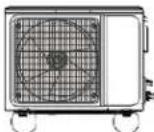
If it is damaged, it may lead to the fall of the unit and cause the injury.
Don't block air inlet or air outlet.
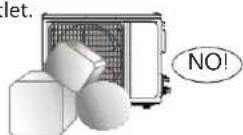
Otherwise, the cooling or heating capacity will be weakened, even cause system stop operating.
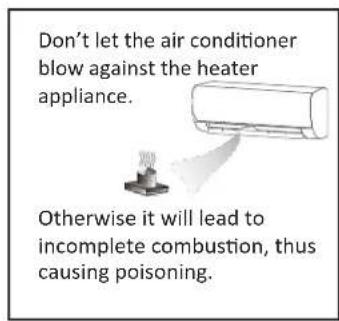
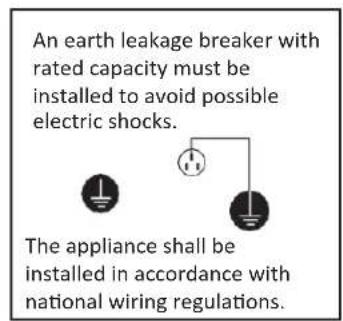
This product contains fluorinated greenhouse gases.
Refrigerant leakage contributes to climate change. Refrigerant with lower global warming potential (GWP) would contribute less to global warming that a refrigerant with higher GWP, if leaked to the atmosphere. This appliance contains a refrigerant fluid a GWP equal to 2088. This means that if 1kg of this refrigerant fluid would be leaked to the atmosphere, the impact on global warming would be 2088 times higher than 1kg of CO cover a period of 100 years. Never try to interfere with the refrigerant circuit yourself or desassemble the product yourself and always ask a professional.
The specification of the fuse are printed on the circuit bord, such as: 3.15A/250V AC, etc. como por ejemplo: 3.15 A/250 V AC, etc.
WARNING:
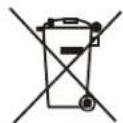
MEANING OF CROSSED OUT WHEELED DUSTBIN: DO NOT DISPOSE OF ELECTRICAL APPLIANCES AS INSORTED MUNICIPAL WASTE, USE SEPARATE COLLECTION FACILITIES. CONTACT YOU LOCAL GOVERNMENT FOR INFORMATION REGARDING THE COLLECTION SYSTEMS AVAILABLE. IF ELECTRICAL APPLIANCES ARE DISPOSED OF IN LANDFILLS OR DUMPS, HAZARDOUS SUBSTANCES CAN LEAK INTO THE GROUNDWATER AND GET INTO THE FOOD CHAIN, DAMAGING YOUR HEALTH AND WELL-BEING. WHEN REPLACING OLD APPLIANCES WITH NEW ONES, THE RETAILER IS LEGALLY OBLIGATED TO TAKE BACK YOUR OLD APPLIANCE FOR DISPOSALS AT LEAST FREE OF CHANGE.
Don't open the windows and doors for long time when the air conditioner is running.
Otherwise, the cooling or heating capacity will be weakened.
Don't stand on the top of the outdoor unit or place heavy things on it.

This cloud cause personal injuries or damage the unit.
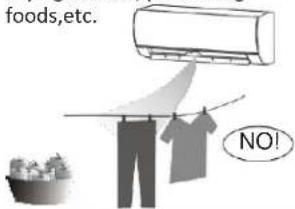
Don't use the air conditioner for other purposes, such as drying clothes, preserving foods, etc.
Don't apply the cold air to the body for a long time.
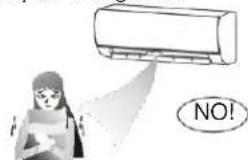
It will deteriorate your physical conditions and cause health problems.
Set the suitable temperature. It is recommended that the temperature difference between indoor and outdoor temperature should not be too large.
Appropriate adjustments of the setting temperature can prevent the waste of electricity.
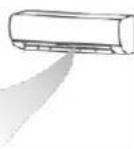
If your air conditioner is not fitted with a supply cord and a plug, an all-pole switch must be installed in the fixed wiring and the distance between contacts should be no less than 3.0 mm.
CAUTION:
IF YOUR AIR CONDITIONER IS PERMANENTLY CONNECTED TO THE FIXED WIRING, A RESIDUAL CURRENT DEVICE (RCD) HAVING RATED RESIDUAL OPERATING CURRENT NOT EXCEEDING 30 M A SHOULD NE INSTALLED IN THE FIXED WIRING.
THE POWER SUPPLY CIRCUIT SHOULD HAVE LEAKAGE PROTECTOR AND AIR SWITCH OF WHICH THE CAPACITY SHOULD BE MORE THAN 1.5 TIMES OF THE MAXIMUM CURRENT.
REGARDING THE INSTALLATION OF THE AIR CONDITIONERS, PLEASE REFER TO THE BELOW PARAGRAPHS IN THIS MANUAL.
notices for use
the conditions of unit can't normally run
t Within the temperature range provided in following table, the air conditioner may stop running and other anomalies may arise.
| cooling | outdoor | >43°C (apply to T1) |
| >52°C (apply to T3) | ||
| indoor | <18°C | |
| heating | outdoor | >24°C |
| >-7°C | ||
| indoor | >27°C |
t When the temperature is too high, the air conditioner may activate the automatic protection device, so that the air conditioner could be shut down.
t When the temperature is too low, the heat exchanger of the air conditioner may freeze, leading to water leakage or other malfunction.
In long-term cooling or dehumidification with a relative humidity of above 80% (doors and windows are open), there may be water condenses or dripping near the air outlet.
t T1 and T3 refer to ISO 5151.
notes for heating
t The fan of the indoor unit will not start running immediately after the heating is started to avoid blowing out cool air.
t When it is cold and wet outside, the outdoor unit will develop frost over the heat exchanger which will compromise the heating capacity. This is when the air conditioner will start defrost.
t During defrost, the air conditioner will stop heating for about 5-12 minutes.
t Vapor may come out from the outdoor unit during defrost. This is not a malfunction, but a result of fast defrost.
t Heating will resume after defrost is complete.
notes for turning off
When the air conditioner is turned off, the main controller will automatically decide whether to stop immediately or after running for dozens of seconds with lower frequency and lower air speed.
emergency operation
- If the remote controller is lost or broken, use force switch button to operate the air conditioner.
- If this button is pushed with the unit OFF, the air conditioner will operate in Auto mode.
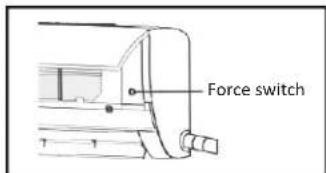
3.. If this button is pushed with the unit ON, the air conditioner will stop running.
airflow direction adjustment
- Use up-down swing and left-right swing buttons on the remote controller to adjust the airflow direction. Refer to the operation manual of the remote controller for detail.
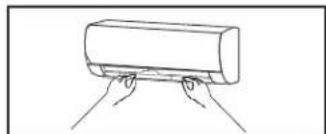
- For models without left-right swing function, the fins has to be moved manually.
note:
Move the fins before the unit is in operation, or your finger might be injured.
Never place your hand into the air inlet or outlet when the air conditioner is in operation.
natural_image
Simple line drawing of two hands pulling a cylindrical object on a surface (no text or symbols)attention
If the equipment emissions cannot meet the technical requirement of IEC 61000-3-3, following Attention should be take care.
Attention: This appliance can be connected only to a supply with system impedance no more than Zmax. In case necessary, please consult your supply authority for system impedance information.
product type Zmax product type Zmax
ASTW-H30Q4/#-IQ 0.021 ASW-H28G5A4/#R1-C5 0.296
names of each part
indoor unit
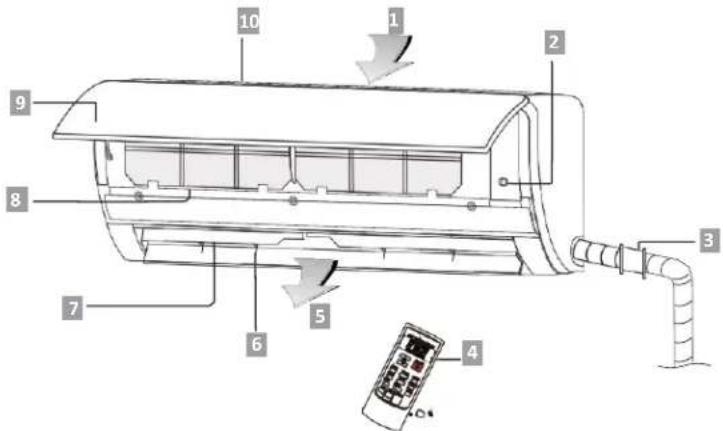
- Air inlet
- Force switch
- Pipe protection ring
-
Remoter controller
-
Air outlet
- Air vent
- Air louver
- Air filter
- Panel
- Air inlet grille
outdoor unit
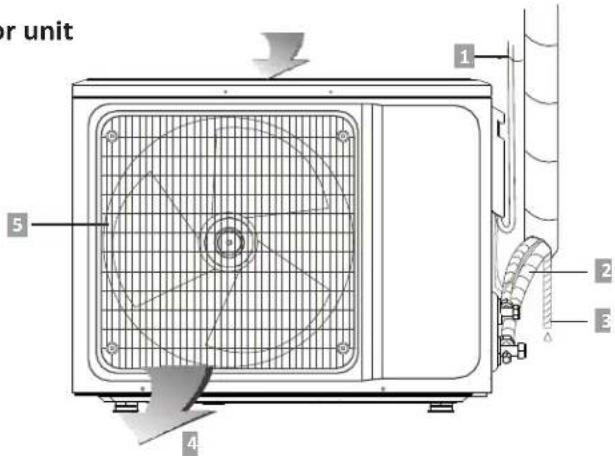
- Power cord
- Connecting pipe
-
Drain hose
-
Air outlet
- Air outlet grille
note:
All the pictures in this manual are just schematic diagrams, the actual is the standard.
air-conditioner remote controlled instructions
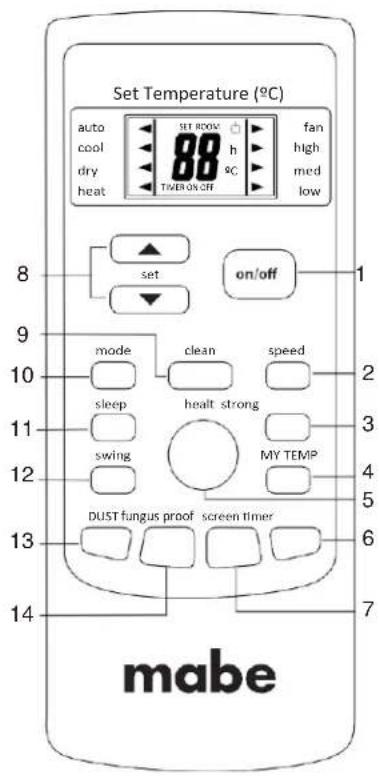
t Read this "instructions" carefully so that you can use the air-conditioner safely and correctly.
tTank good care of the "instructions" so that it can be referred to at any time.
note:
The picture is general remote controller, contains almost all of the function buttons. They may be slightly different from material abject (depend on model).
1. on/off button
You can start or stop the air-conditioner by pressing this button.
2. speed button
You can select fan speed as the following:

3. strong button
Only under the state of cooling or heating mode, press this button, the fan speed is adjusted to strong auto-matically and the LCD displays "high fan", the "strong" function is started to reach the highest cooling or heating.
4. my temp button
When it displays "my temp" button: Press this button can be used to set the my temp function.
The LCD shows the actual room temperature when the function set and it shows the setting temperature when the function cancelled. This function is invalid when the appliance at the Fan mode.
5.health button
You can start or stop "health" function by pressing this button. According to environment temperature, the air conditioner can run intelligently, and choose speed auto-maticly. It can create a comfortable surroundings auto-maticly to get the most suitable temperature for body.
6. timer button
setting the "ON" timer time :
a. When remote controller is at off state, press "timer" button, the LCD displays "timer on" and the timer time, the range of setting time is 0.5h to 24h.
b. You can press the “ ” or “ ” button to adjust the timer time, each touch will be set time to increase or reduce 0.5h before 10 hours ago, after ten hours will be set time to increase or reduce 1h per pressing, to enables your required timer.
c. Press "timer" button again, to set the timer on function.
d. You can set another function to insure the suitable state after air conditioner turn on (including mode, temperature, swing, fan speed and etc). The LCD will display all your setting and keep it, when the timer reach to the set time, the air conditioner will be working according to your set automatically.
setting the "OFF" timer time :
a. When remote controller is at on state, press "timer" button, the LCD displays "timer off" and the timer time, the range of setting time is 0.5h to 24h.
b. You can press the “Δ or “▼button to adjust the timer time, each touch will be set time to increase or reduce 0.5h before 10 hours ago, after ten hours will be set time to increase or reduce 1h per pressing, to enable your required timer.
c. Press "timer" button again, to set the timer off function.
7. screen button
You can let the LCD display working or not by pressing this button.
8. "Δ or " " ∇
Press the "+" or "-" button, you can set the temperature range from 16 to 32, Display will change when you touch the button.
9. clean button
a. When remote controller is at the off state, press "clean" button, the wind guiding bars turn to initial postions for cooling, the A/C runs clean function with max duration 35mins. The purpose of this function is to clean dust on evaporator and dry the inside water of evaporator and to prevent the evaporator going moldy due to water deposition and boasting strange smell.
b. After setting clean function, press "clean" button again to cancel "clean" function or press "on/off" button to cancel "clean" function and start A/C.
c. The clean function will be stop working after 35 minutes running working without any operation.
note:
"clean" function can be set in parallel with time start function; in this case, time start function will be executed after "clean" function.
10. mode button
Which enables you to select different operation mode, after each pressing, the operation mode will be changed. It shows in the following display.
AUTOèCOOLèDRYèHEATèFANèAUTO
Remark: cold wind type has no heating function.
11. sleep button
a Press the "sleep" button, the sleeping indicator light of indoor unit flashes on.
b. After the setting of sleeping mode, the cooling operation enables the set temperature to increase 1^ C after 1 hour and another 1^ C automatically after 1 hour.
c. After the setting of sleeping mode, the heating operation enables the set temperature to drop 2^ C after 1 hour and another 2^ C automatically after 1 hour.
d. The air-conditioner runs in sleeping mode for 7 hours and stops automatically.
Remark: press the MODE or ON/OFF button, the remote controller clears sleeping mode away.
12. swing button
Press this button, the horizontal wind direction vanes can swing automatically, when you have the desired vertical wind direction, press it again, the horizontal wind direction vanes will be stopped at the situation of your choice.
13. dust button
This button is invalid.
14. fungus proof button
This A/C has special dry and anti-mold function which has "yes" or "no" two selections. This function is controlled by the remote controller under cooling, dry and auto (cooling and dry) modes, the horizontal wind guiding bars are at the initial position for
cooling. The A/C runs under heating mode (the cooling only A/C only runs under fan mode), the internal fan runs for three minutes with weak wind before stop. The purpose of this function is to dry the inside of the evaporator and to prevent the evaporator from going mouldy due to water deposition and thus dispersing strange smell.
note:
- This function has not been set in the factory. You may freely set and cancel this function. The setting method is: under off status of the A/C and the remote controller, point the remote controller toward the A/C and continuously press "fungus proof" pushbutton for one time, the buzzer keep beeping five times again after five times beep, indicating that this function is ready. In case this function has been set, unless the whole A/C is powered off or the function is manually cancelled, the A/C then has this function as default;
- To cancel the function: 1. Power off the whole A/C; 2. Under off status of the A/C and the remote controller, point the remote controller toward the A/C and continuously press "fungus proof" pushbutton for one time, the buzzer keep beeping three times again after five times beep, indicating that this function has been cancelled;
- When this function is on, it is suggested not to restart the A/C before it is completely stop;
- This function will not run in case of time stop or sleep stop.
buttons description
LCD display instruction
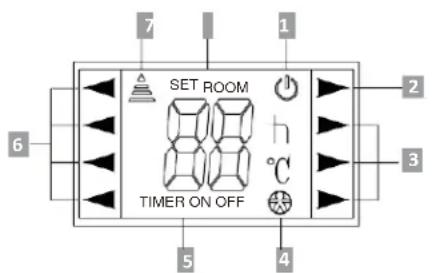
-
On/off
-
Timer
-
Running mode
-
Running mode
-
Speed
-
Transmit
-
Feeling
-
Digital
on/off display: When the remote controller is on the state, the LCD will be display or not.
digital display: Under the state of normal working, it displays setting temperature. While the feeling function is start, it will display room temperature, and under the state of timer mode, it will display setting timer.
usage
fix batteries
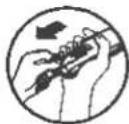
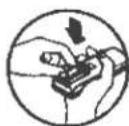
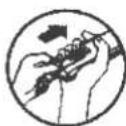
- Slide open the cover according the direction indicated by arrowhead.
- Put into two brand new batteries (7#), position the batteries to right electric poles (+ & -).
- Put back the cover.
automatic operation mode
- Press the "mode" button, select the automatic operation mode.
- Press the "speed" button, you can select fan speed. You can select fan speed from LOW, MID, HIGH, AUTO.
- Press the "on/off" button, the operation indicator is on, the air-conditioner starts to operate the automatic mode. Press the button again, the air-conditioner stops.
cooling/Heating operation mode (cold wind type has no heating function)
- Press the "mode" button, select the "cooling" or "heating" operation mode.
- Press the "Δ or " ▼button, set the temperature, temperature can be set at 1°C difference range from 16-32°C.
- Press the "speed" button, you can select fan speed. You can select fan speed from LOW, MID, HIGH, AUTO.
- Press the "on/off" button, the operation indicator is on, the air-conditioner starts to operate the automatic mode. Press the button again, the air-conditioner stops.
fan operation mode
- Press the "mode" button, select the Cooling or Heating
- operation mode. Press the "speed" button, you can select fan speed. You can select fan speed from LOW, MID, HIGH.
- Press the "on/off" button, the operation indicator is on, the air-conditioner starts to operate the automatic mode. Press the button again, the air-conditioner stops.
remark: In the circulation operation mode, to set the temperature is noneffective.
drying operation mode
- Press the "mode" button, select the Dry operation mode.
- Press the "Δ or " ▼button, set the temperature, temperature can be set at 1°C. difference range from 16-32°C.
- Press the "speed" button, you can select fan speed. You can select fan speed from LOW, MID, HIGH, AUTO.
- Press the "on/off" button, the operation indicator is on, the air-conditioner starts to operate the automatic mode. Press the button again, the air-conditioner stops.
night Luminous Function of Remote Controller(Only the remote controller with this function can be used)
For your convenient use of the remote controller in the darkness without any lighting, this remote controller has blue background light and luminous pushbuttons. No matter what you press on any of the pushbutton, the background light will immediately release soft light so that you are easy to operate the remote controller. If you do not operate the controller within 10 seconds, the background light will automatically disappear.
note:
All the figures above are the displays after being initially electrified or reelectrified after power off. Inactual operations, the remote controller-screen displays related items only.
This manual introduces function for all of the remote control, maybe you press one button without any reaction, well, the air-conditioner you bought hasn't this function.
attention
- Aim the remote controller towards the receiver on the air-conditioner.
- The remote controller should be within 8 meters away from the receiver.
- No obstacles between the remote controller and receiver.
- Do not drop or throw the remote controller.
- Do not put the remote controller under the forceful sunrays or heating facilities and other heating sources.
- Use two 7# batteries, do not use the electric batteries.
- Take the batteries out of remote controller before stop its using for long.
- When the noise of transmitting signal can t be heard indoor unit or the transmission symbol on the display screen doesn t flare, batteries need be replaced.
- If reset phenomenon occurs on pressing the button of the remote controller, the electric quantity is deficient and new batteries need to be substituted.
- The waste battery should be disposed properly.reemplazarse.
clean and care
WARNING:
- BEFORE THE CLEANING OF THE AIR CONDITIONER, IT MUST BE SHUT DOWN AND THE ELECTRICITY MUST BE CUT OFF MORE THAN 5 MINUTES, OTHERWISE THERE MIGHT BE THE RISK OF ELECTRIC SHOCKS.
- DO NOT WET THE AIR CONDITIONER, WHICH CAN CAUSE AN ELECTRIC SHOCK. MAKE SURE NOT TO RINSE THE AIR CONDITIONER WHITH WATER UNDER ANY CIRCUM-STANCES.
- VOLATILE LIQUIDS SUCH AS THINNER OR GASOLINE WILL DAMAGE THE AIR CONDITIONER HOUSING, THEREFORE PLEASE CLEAN THE HOUSING OF AIR CONDITIONER ONLY WITH SOFT DRY CLOTH AND DAMP CLOTH MOISTENED WITH NEUTRAL DETERGENT.
- IN THE COURSE OF THE USING, PAY ATTENTION TO CLEANING THE FILTER REGULARY, TO PREVENT THE COVERING OF DUST WHICH MAY AFFECT THE EFFECT. IF SERVICE ENVIROMENT OF THE AIR CONDITIONER IS DUSTY, CORRESPONDINGLY INCREASE THE NUMBER OF TIMES OF CLEANING. AFTER REMOVING THE FILTER, DO NOT TOUCH THE FINPART OF THE INDOOR UNIT WITH THE FINGER, SO AS TO AVOID SCRATCHING IT.
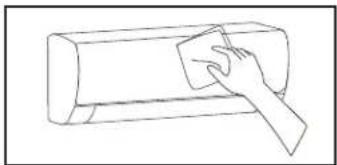
clean the panel
When the panel of the indoor unit is contaminated, clean it gently with a wrung towel using tepid water below 45^ C, and do not remove the panel while cleaning.
natural_image
Line drawing of a hand using a power tool to clean or brush the next page of a rectangular object (no text or symbols)clean the air filter
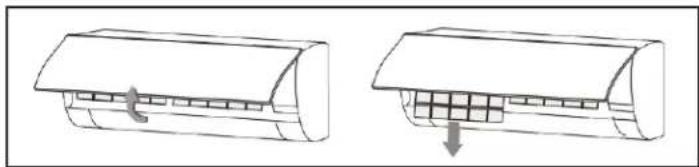
Remove the air filter
natural_image
Diagram showing two views of a car air conditioner unit with internal grid structure (no text or symbols)- Use both hands to open the panel for an angle from both ends of the panel in accordance with the direction of the arrow.
- Release the air filter from the slot and remove it.
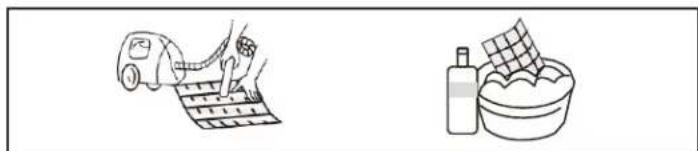
clean the air filter
natural_image
Illustration of a hand washing clothes next to a bag and a bowl (no text or symbols)Use a vacuum cleaner or water to rinse filter, and if the filter is very dirty (for example, with greasy dirt), clean it with warm water (below 45) with mild detergent dissolved in, and then put the filter in the shade to dry in the air.
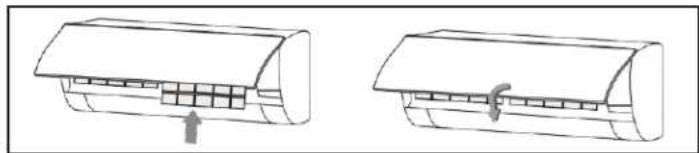
clean the air filter
natural_image
Two line drawings of a car air conditioner unit with internal compartments and cooling fins (no text or symbols)mount the filter Reinstall the dried filter in reverse order of removal, then cover and lock the panel.
check before use
- Check whether all the air inlets and outlets of the units are unblocked.
- Check whether there is blocking in the water outlet of the drain pipe, and immediately clean it up if any.
- Check the ground wire is reliably grounded.
- Check whether the remote control batteries are installed, and whether the power is sufficient.
- Check whether there is damage in the mounting bracket of the outdoor unit, and if any, please contact our local service center.
maintain after use
- Cut off the power source of the air conditioner, turn off the circuit breaker and remove the batteries from the remote control.
- Clean the filter and the unit body.
- Remove the dust and debris from the outdoor unit.
- Check whether there is damage in the mounting bracket of the outdoor unit, and ifany, please contact our local service center.
troubleshooting
CAUTION:
DO NOT REPAIR THE AIR CONDITIONER BY YOURSELF AS WRONG MAINTENANCE MAY CAUSE ELECTRIC SHOCK OR FIRE, PLEASE CONTACT THE AUTHORIZED SERVICE CENTER AND LET THE PROFESSIONALS CONDUCT THE MAINTENANCE, AND CHECKING THE FOLLOWING ITEMS PRIOR TO CONTACTING FOR MAINTENANCE CAN SAVE TIME AND MONEY.
troubleshooting
phenomenon troubleshooting
| air conditionercan not operateat all. | t Has the power been shut down?t Is the wiring loose?t Is voltage too high or too low ?(measured by professionals)t Does it reach the set time for start up?t Does the circuit protection device trip? |
| remotecontroller is notavailable. | t Is the remote controller out of effective distanceto the indoor unit?t Are there any obstructions between the controllerand the signal receptor?t Is the battery exhausted? |
| cooling (Heating)efficiency is notgood. | t Is the setting temperature suitable?t Are air filter dirty?t Is the air inlet or outlet obstructed?t Is indoor fan speed set at low speed?t Is there any heat source in your room? |
| indoor unit doesnot operateimmediatelywhen the airconditioner isrestarted. | If the air conditioner is turned on immediately afterit is turned off, the protective delay switch will delaythe operation for 3 to 5 minutes. |
| there is unusualsmell blowingfrom the outletafter operation isstarted. | The air conditioner itself does not have undesirableodor. If there is odor, it may be due to accumulationof the odor in the environment. Please clean the airfilter or activate the cleaning function. |
| there is sound ofrunning waterduring therunning of airconditioner. | Sometimes the "hissing" sound of running watercan be heard. This is the sound of the flow of therefrigerant, not a malfunction. |
| a slight "click"sound is heard atthe of start-up orshut-down. | Due to temperature changes, panel and otherparts will swell, causing the sound of friction. Thisis normal, not a fault. |
phenomenon troubleshooting
during the cooling operation, the indoor unit outlet sometimes will blow out mist.
This is because the indoor air is cooled rapidly. After it runs for some time, the indoor temperature and humidity will be reduced and the mist will disappear.
CAUTION:
INMEDIATELY STOP ALL OPERATIONS AND CUT OFF THE POWER SUPPLY, CONTACT OUR SERVICE CENTER LOCALLY IN FOLLOWING SITUATIONS.
tShrill sound is heard or Unpleasant odor is emitted during the operation.
tThere is an abnormal heat in power supply cord and power plug.
tAccidentally pour impurities or water into the machine or the remote control.
tAir switch or protection switch often breaks.
notices for installation
important Notices
WARNING:
- BEFORE INSTALLATING, PLEASE CONTACT WITH LOCAL AUTHORIZED MAINTENANCE CENTER, IF UNIT IS NOT INSTALLED BY THE AUTHORIZED MAINTENANCE CENTER, THE MALFUNCTION MAY NOT SOLVED, DUE TO DISCOMMODIOUS CONTACT.
- THE AIR CONDITIONER MUST BE INSTALLED BY PROFESSIONALS ACCORDING TO THE NATIONAL WIRING RULES THIS MANUAL.
- TO MOVE AND INSTALL AIR CONDITIONER TO ANOTHER PLACE, PLEASE CONTACT OUR LOCAL SPECIAL SERVICE CENTER.
requirements For Installation Position
- Avoid places of inflammable or explosive gas leakage or where there are strongly aggressive gases.
- Avoid places subject to strong artificial electric/magnetic fields.
- Avoid places subject to noise and resonance.
- Avoid severe natural conditions (e.g. heavy lampblack, strong sandy wind, direct sunshine or high temperature heat sources).
- Avoid places within the reach of children.
- Shorten the connection between the indoor and outdoor units.
- Select where it is easy to perform service and repair and where the ventilation good.
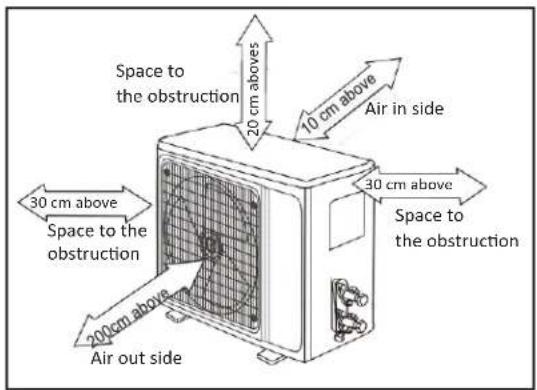
- The outdoor unit shall not be installed in any way that could occupy an aisle, stairway, exit, fire escape, catwalk or any other public area.
- The outdoor unit shall be installed as far as possible from the doors and windows of the neighbors as well as the green plants.
requirements of the mounting structure
- The mounting rack must meet the relevant national or industrial standards in terms of strength with welding and connection areas rustproofed.
- The mounting rack and its load carry surface shall be able to withstand 4 times or above the weight of the unit, or 200kg, whichever is heavier.
- The mounting rack of the outdoor unit shall be fastened with expansion bolt.
- Ensure the secure installation regardless of what type of wall on which it is installed, to prevent potential dropping that could hurt people.
electrical safety requirements
- Be sure to use the rated voltage and air conditioners dedicated circuit for the power supply, and the power cord diameter must meet the national requirements.
- When the maximum current of air conditioner is ≥ 16A, it must use the air switch or leakage protection switch equipped with protection devices.
- The normal operating range is 90%-110% of the local rated voltage.
- The minimum clearance between the air conditioner and the combustibles is 1.5 m.
- The power cable enables communication between the indoor and outdoor units. You must first choose the right cable size before preparing it for connection.
- Cable Types: Outdoor Power Cord: H07RN-F or H05RN-F; Power Cable: H07RN-F or H05RN-F;
- Minimum Cross-Sectional Area of Power and Power Cables
north america
| appliance amps(A)) | AWG |
| 10 | 18 |
| 13 | 16 |
| 18 | 14 |
| 25 12 | |
| 30 10 | |
| 40 8 |
other regions
| rated current of appliance(A) | nominal cross-sectional area( mm^2 ) |
| >3 y ≤ 6 | 0.75 |
| >6 y ≤ 10 | 1 |
| >10 y ≤ 16 | 1.5 |
| >16 y ≤ 25 2.5 | |
| >25 y ≤ 25 4 | |
| >32 y ≤ 40 6 |
- The size of the power cord, power cable, fuse, and switch needed is determined by the maximum current of the unit. The maximum current is indicated on the nameplate located on the side panel of the unit. Refer to this nameplate to choose the right cable, fuse, or switch.
note:
Core number of cable refer to the detailed wiring diagram adhered on the unit which you purchased.
requirements for operations at raised height
t When carrying out installation at 2m or higher above the base level, safety belts must be worn and ropes of sufficient strength be securely fasten to the outdoor unit, to prevent falling that could cause personal injury or death as well as property loss.
grounding requirements
t The air conditioner is the type I electrical appliance and must ensure a reliable grounding.
t Do not connect the grounding wire to a gas pipe, water pipe, lightning rod, telephone line, or a circuit poorly grounded to the
t earth.
The grounding wire is specially designed and shall not be used for other purpose, nor shall it be fastened with a common tapping screw.
others
tThe connection method of the air conditioner and the power cord and the interconnection method of each independent element shall be subject to the wiring diagram affixed to the machine. tThe model and rating value of the fuse shall be subject to the silkscreen on corresponding controller or fuse sleeve.
packing list
packing list of the indoor unit
| name | quantity | unit |
| Indoor Unit | 1 | Set |
| Remote Controller | 1 | Pc |
| Batteries(7#) 2 | Roll | |
| Instructions | 1 | Pc |
| Drain pipe | 1 | Packet |
packing list of the outdoor unit
| name | cantidad | unidad |
| Outdoor Unit | 1 | Set |
| Connecting pipe | 2 | Pc |
| Plastic Strap 1 | Roll | |
| Pipe Protection Ring 1 | Pc | |
| Luting (putty) 1 | Packet |
note:
All accessories shall be subject to actual packaging material, and if there is any difference, please understand.
install indoor unit
Dimension drawing of indoor unit installation.
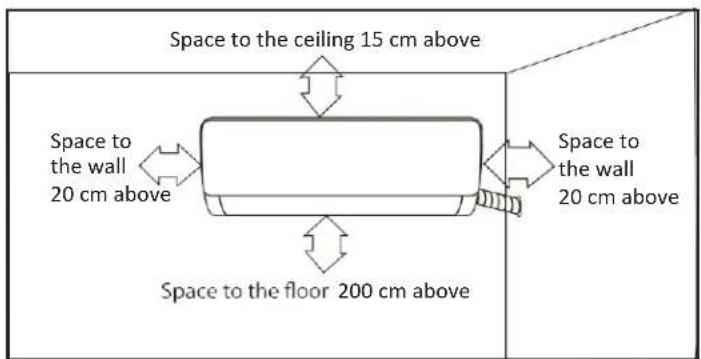
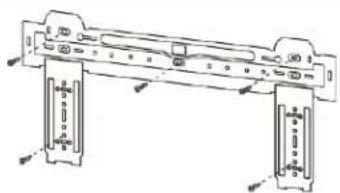
mounting plate
- The wall for installation of the indoor unit shall be hard and firm, so as to prevent vibration.
- Use the "+" type screw to fasten the peg board, horizontally mount the peg board on the wall, and ensure the lateral horizontal and longitudinal vertical.
- Pull the peg board by hand after the installation, to confirm whether it is solid.
natural_image
Technical line drawing of a mechanical assembly with mounting brackets and fasteners (no text or symbols)wall-through hole
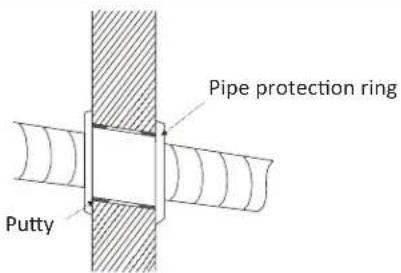
- Make a hole with an electric hammer or a water drill at the predetermined position on the wall for piping, which shall slant outwardly by 5^-10^ .
- To protect the piping and the cables from being damaged running through the wall, and from the rodents that may inhabit in the hollow wall, a pipe protecting ring shall be installed and sealed with putty.
note:
Usually, the wall hole is 60mm 80mm . Avoid pre-buried power wire and hard wall when making the hole.
route of pipeline
- Depending on the position of the unit, the piping may be routed sideways from the left or the right (Fig 1), or vertically from the back (Fig 2) (depending on the pipe length of the indoor unit). In the case of sideways routing, cut off the outlet cutting stock of the opposite side.
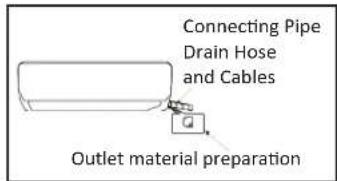
Fig 1
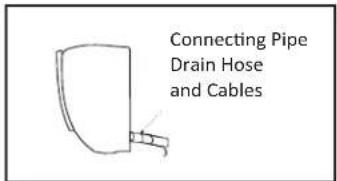
Fig 2
drain pipe connection
- Remove the mountings and pull the indoor unit pipe out of the housing.
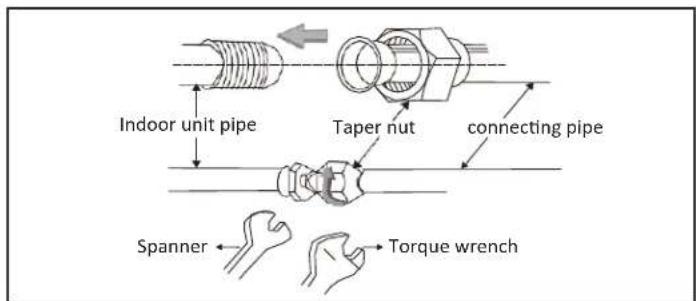
- Connect the connecting pipe to the indoor unit: Aim at the pipe center, tighten the T nut with fingers, and then tighten the Taper nut with fingers, and then Taper nut with a torque wrench, and the direction is shown in diagram on the right. The torque used is shown in the following table.
tightening torque table
| the size of pipe(mm) | torque(N·m) |
| Φ6/Φ6.35 | 15~25 |
| Φ9/Φ 9.52 | 25~40 |
| 012/0 12.7 | 45~60 |
| 015/0 15.88 | 73~78 |
| 019/0 19.05 | 75~80 |
wrap the piping
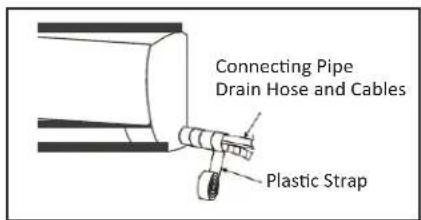
- Use the insulation sleeve to wrap the joint part the indoor unit and the connection pipe, and then use insulating material to pack and seal insulation pipe, to prevent generation of condensate water on the joint part.
- Connect the water outlet with drain pipes, and make the connection pipe, cables, and the drain hose straight.
- Use plastic cable ties to wrap the connecting pipes, cables and drain hose. Run the pipe sloping downward.
fixing the indoor unit
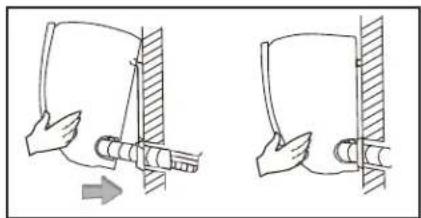
- Hang the indoor unit on the peg board, and move the unit from left to right to ensure that the hook is properly positioned in the peg board.
- Push toward the lower left side and the upper right side of the unit toward the peg board, until the hook is embedded in the slot and makes a "click" sound.
natural_image
Two diagrams showing a hand holding a cylindrical object with an arrow indicating direction, no text or symbols present.wiring diagram
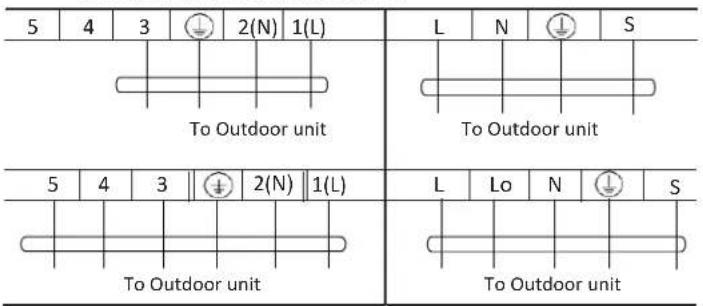
t If your air conditioner is provided with power cable, the wiring of the indoor unit is connected in the factory, there is no need of connection.
t If the power cable is not provided, connection is needed in accordance with the wiring diagram.
constant speed variable speed
Connector
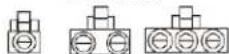
If there is a connector, connect it directly.
note:
t This manual is usually includes the wiring mode for the different kind of A/C. We cannot exclude the possibility that some special type of wiring diagrams are not included.
t The diagram are for reference only. If the entity is difference with this wiring diagram, please refer to the detailed wiring diagram adhered on the unit which you purchased.
install outdoor unit
dimension drawing of outdoor unit installation externa
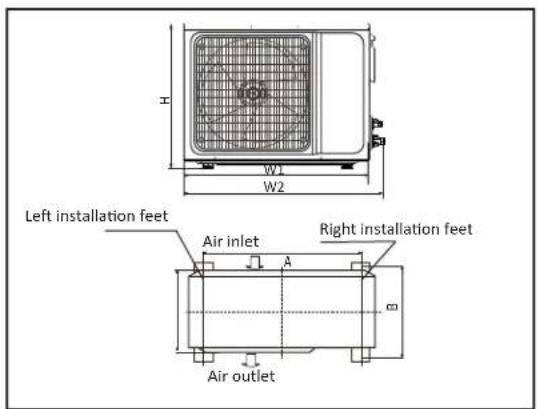
installation outdoor unit bolt
| outdoor unitsize of shape W1(W2)*H*D)(mm) | A(mm) | B(mm) |
| 665(710)×420×280 | 430 | 280 |
| 600(645)×485×260 | 400 | 290 |
| 660(710)×500×240 | 500 | 260 |
| 700(745)×500×255 | 460 | 260 |
| 730(780)×545×285 | 540 | 280 |
| 760(810)×545×285 | 540 | 280 |
| 790(840)×550×290 | 545 | 300 |
| 800(860)×545×315 | 545 | 315 |
| 00(850)×590(690)×310 | 540 | 325 |
| 825(880)×655×310 | 540 | 335 |
| 900(950)×700×350 | 630 | 350 |
| 900(950)×795×330 | 535 | 350 |
| 970(1044)×803×395 675 409 |
install the connection pipe
t Connect the Outdoor Unit with Connecting Pipe: Aim the counter-bore of the connecting pipe at the stop valve, and tighten the Taper nut with fingers. Then tighten the Taper nut with a torque wrench.
t
When prolonging the piping, extra amount of refrigerant must be added so that the operation and performance of the air conditioner
| piping length | amount of refrigerant to be added | |
| ≤5m | Not needed | |
| 5-15M | CC Š 12000Btu | 20 g/m |
| CC Š18000Btu | 30 g/m | |
nota:
-
Loosen the screws and remove E-parts cover from the unit.
-
Connect the cables respectively to the corresponding terminals of the terminal board of the outdoor unit (see the wiring diagram), and if there are signals connected to the plug, just conduct butt joint.
-
Ground wire: Remove the grounding screw out of the electric bracket, cover the grounding wire end onto the grounding screw and screw it into the grounding hole.
-
Fix the cable reliably with fasteners (Pressing board).
-
Put the E-parts cover back in its original place and fasten it with screws.
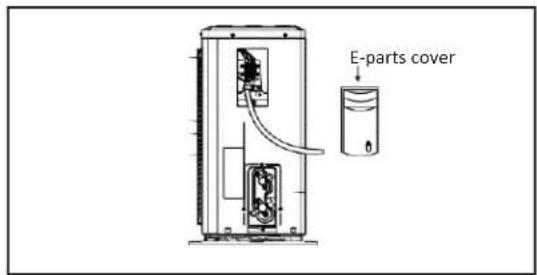
wiring diagram
constant speed variable speed
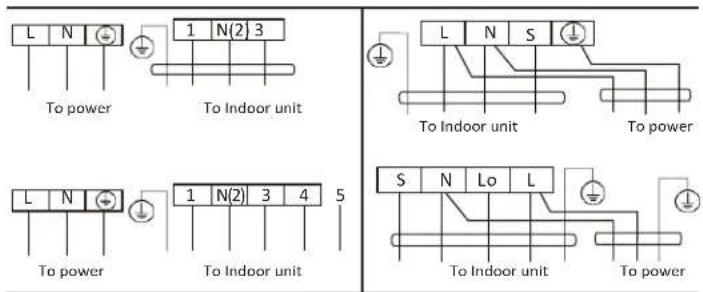
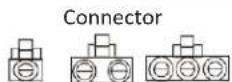
If there is a connector, connect it directly.
note:
t This manual is usually includes the wiring mode for the different kind of A/C.
We cannot exclude the possibility that some special type of wiring diagrams are not included.
The diagram are for reference only. If the entity is difference with this wiring diagram, please refer to the detailed wiring diagram adhered on the unit which you purchased.
expelling the air
t Outdoor unit refrigerant discharging method
After the pipe side connection is complete, proceed as follows.
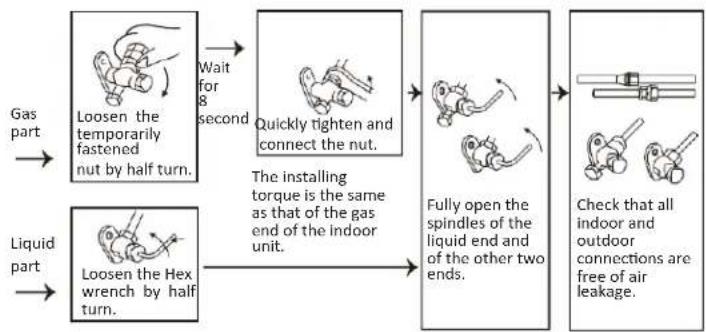
flowchart
graph LR
    A["Gas part"] --> B["Loosen the temporarily fastened nut by half turn."]
    C["Liquid part"] --> D["Loosen the Hex wrench by half turn."]
    B --> E["Wait for 8 seconds"]
    D --> F["The installing torque is the same as that of the gas end of the indoor unit."]
    E --> G["Quickly tighten and connect the nut."]
    F --> H["Fully open the spindles of the liquid end and of the other two ends."]
    G --> I["Check that all indoor and outdoor connections are free of air leakage."]
expelling the air
vacuum Pumping Method (R410A refrigerant evacuation must use the vacuum pumping method)
Before working on the air conditioner, remove the cover of the stop valve(gas and liquid valves)and be sure to retighten it afterward.(to prevent the potential air leakage)
- To prevent air leakage and spilling tighten all connecting nut of all flare tubes.
- Connect the stop valve, charge hose, manifold valve, and vacuum pump.
- Fully open the handle Lo of the manifold valve and apply vacuum for at least 15 minutes and check that the compound vacuum gauge reads -0.1MPa(-76cmHg).
- After applying vacuum, fully open the stop valve with a hex wrench.
- Check that both indoor and outdoor connections are free of air leakage.
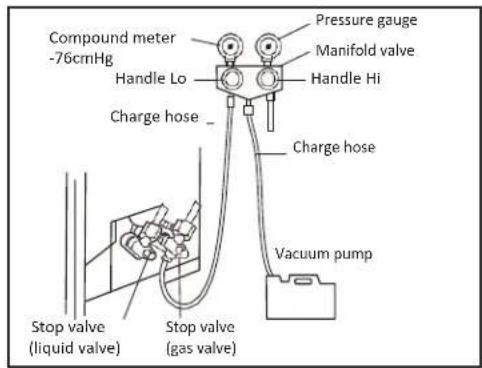
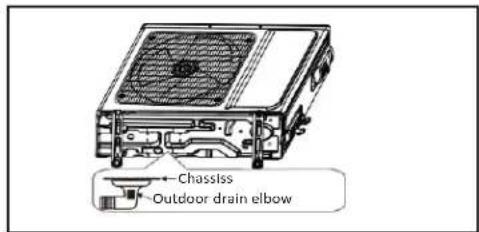
outdoor condensation drainage(Heat pump type only)
When the unit is heating, the condensing water and defrosting water can be out reliably through the drain house.
Installation:
Install the outdoor drain elbow in 25 hole on the base plate, and joint the drain hose to the elbow, so that the waste water formed in the outdoor unit can be drained out to a proper plate.
check after installation and test operation
check after installation
telectrical safety check
- If the supply voltage is as required.
- If there is any faulty or miss connection in each of the power, signal and grounding wires.
- If the grounding wire of the air conditioner is securely grounded.
t installation safety check
- If the installation is secure.
- If the water drain is smooth.
- If the wiring and piping are correctly installed.
- Check that no foreign matter or tools are left inside the unit.
t leak test of the refrigerant
Depending on the installation method, the following methods may be used to check for suspect leak, on areas such as the four connections of the outdoor unit and the cores of the cut-off valves and t-valves:
- Bubble method: Apply of spray a uniform layer of soap water over the suspected leak spot and observe carefully for bubble.
- Instrument method: Checking for leak by pointing the probe of the leak detector according to the instruction to the suspect points of leak.
test operation
test operation preparation:
tVerify that all piping and connection cables are well connected.
tConfirm that the values at the gas side the liquid-side are fully open.
tConnect the power cord to an independent power socket.
tInstall batteries in remote control.
test operation method:
- Turn on the power and push the ON/OFF switch button of the remote controller to start the air conditioner.
- Select COOL, HEAT (not available on cool-only models), SWING and other operation modes with the remote controller and see if the operation is ok.
technical specifications
Model MMI12CABWCAAXM8 MMI12CDBWCAAXM8
| Supply voltage 115 V ~ 220-230 V ~ | ||
| Power consumption | 1 500 W | 1 450 W |
| Current consumption | 13 A | 6,5 A |
| Frequency | 60 Hz | 60 Hz |
| Capacity | 12 000 BTU/h | 12 000 BTU/h |
| Protection rating outdoor unit | IPX4 | IPX4 |
| Protection rating indoor unit | IPX0 | IPX0 |
| Refrigerant/Charge | R410A/820 g | R410A/820 g |
Model MMI12HABWCAAXM8 MMI12HDBWCAAXM8
| Supply voltage 115 V ~ 220-230 V ~ | ||
| Power consumption | 1 500 W | 1 450 W |
| Current consumption | 13 A | 6,5 A |
| Frequency | 60 Hz | 60 Hz |
| Capacity | 12 000 BTU/h | 12 000 BTU/h |
| Protection rating outdoor unit | IPX4 | IPX4 |
| Protection rating indoor unit | IPX0 | IPX0 |
| Refrigerant/Charge | R410A/930 g | R410A/930 g |
Model MMI18CDBWCAAXM8 MMI18HDBWCAAXM8
| Supply voltage 220-230 V ~ 220-230 V ~ | ||
| Power consumption | 1950 W | 1950 W |
| Current consumption | 8 A | 8 A |
| Frequency | 60 Hz | 60 Hz |
| Capacity | 18000 BTU/h | 18000 BTU/h |
| Protection rating outdoor unit | IPX4 | IPX4 |
| Protection rating indoor unit | IPX0 | IPX0 |
| Refrigerant/Charge | R410A/1 100 g | R410A/1 360 g |
Model MMI24CDBWCAAXM8 MMI24HDBWCAAXM8
| Supply voltage 220-230 V ~ 220-230 V ~ | ||
| Power consumption | 2500 W | 2500 W |
| Current consumption | 11,5 A | 11,5 A |
| Frequency | 60 Hz | 60 Hz |
| Capacity | 24000 BTU/h | 24000 BTU/h |
| Protection rating outdoor unit | IPX4 | IPX4 |
| Protection rating indoor unit | IPX0 | IPX0 |
| Refrigerant/Charge | R410A/1420 g | R410A/1700 g |
| Model | MMT12CABWCAAXM8 | MMT12HABWCAAXM8 |
| Supply voltage 115 V ~ 115 V ~ | ||
| Power consumption 1 300 W 1 300 W | ||
| Current consumption | 12 A | 12 A |
| Frequency | 60 Hz | 60 Hz |
| Capacity | 12 000 BTU/h | 12 000 BTU/h |
| Protection rating outdoor unit | IPX4 | IPX4 |
| Protection rating indoor unit | IPX0 | IPX0 |
| Refrigerant/Charge | R410A/540 g | R410A/620 g |
| Model | MMT12CDBWCAAXM8 | MMT12HDBWCAAXM8 |
| Supply voltage 220-230 V ~ 220-230 V ~ | ||
| Power consumption 1 300 W 1 300 W | ||
| Current consumption | 5,9 A | 5,9 A |
| Frequency | 60 Hz | 60 Hz |
| Capacity | 12 000 BTU/h | 12 000 BTU/h |
| Protection rating outdoor unit | IPX4 | IPX4 |
| Protection rating indoor unit | IPX0 | IPX0 |
| Refrigerant/Charge | R410A/550 g | R410A/640 g |
| Model | MMT18HDBWCAAXM8 | MMT18CDBWCAAXM8 |
| Supply voltage 220-230 V ~ 220-230 V ~ | ||
| Power consumption | 1950 W | 1950 W |
| Current consumption | 9,2 A | 9,2 A |
| Frequency | 60 Hz | 60 Hz |
| Capacity | 18000 BTU/h | 18000 BTU/h |
| Protection rating outdoor unit | IPX4 | IPX4 |
| Protection rating indoor unit | IPX0 | IPX0 |
| Refrigerant/Charge | R410A/1050 g | R410A/910 g |
| Model | MMT24CDBWCAAXM8 | MMT24HDBWCAAXM8 |
| Supply voltage 220-230 V ~ 220-230 V ~ | ||
| Power consumption | 2 550 W | 2 550 W |
| Current consumption | 12,3 A | 12,3 A |
| Frequency | 60 Hz | 60 Hz |
| Capacity | 24 000 BTU/h | 24 000 BTU/h |
| Protection rating outdoor unit | IPX4 | IPX4 |
| Protection rating indoor unit | IPX0 | IPX0 |
| Refrigerant/Charge | R410A/1 120 g | R410A/1 450 g |
notas/notes
bar
| Category | Value | | -------- | ----- | | notas | 72 |notas/notes
servicio mabe
Chile: 123.0020.3143
Santiago de Chile: 2618.8346
www.serviciomabe.cl
Colombia: 01.800.518.3227
Bogotá: 1.508.7373 — Cali: 2.620.7363
www.serviciomabe.com.co
Ecuador: 1.800.00.0690
www.mabe.com.ec
Perú: 0800.78.188
Lima: 706.2952
www.mabe.com.pe
Venezuela: 0800.136.2631
Caracas: 212.335.7605
www.mabe.com.ve
R.F.C.: MAB911203RR7
Carrera 21 No. 74-100
Parque Industrial Alta Suiza Manizales, Caldas, Colombi
U A P #141 de la DIAN