
00939 - Kitchen scale AcuRite - Free user manual and instructions
Find the device manual for free 00939 AcuRite in PDF.


| Product Type | Kitchen Scale |
| Brand | AcuRite |
| Model | 00939 |
| Dimensions (Estimated) | 20 cm x 15 cm x 3 cm |
| Weight (Estimated) | 0.3 kg |
| Power Supply | 1 x 3V CR2032 lithium battery |
| Maximum Weight Capacity | 5 kg / 11 lb |
| Weighing Modes | Weight mode (solid), Volume mode (water, milk) |
| Unit Conversion | kg/g to lb/oz (press Unit Conversion button) |
| Zero and Tare Functions | Reset to zero; tare for items >4% capacity |
| Minus Function | Show weight of removed item |
| Auto Power Off | After 2 minutes of inactivity |
| Display | LCD screen |
| Storage | Flat surface or integrated hang hole |
| Care and Cleaning | Wipe with soft damp cloth; do not immerse |
| Safety Warnings | Contains button-cell battery; keep away from children |
| Spare Parts / Repairability | Replaceable CR2032 battery; no user-serviceable parts |
| Warranty / Support | Visit www.AcuRite.com or call (877) 221-1252 |
Frequently Asked Questions - 00939 AcuRite
User questions about 00939 AcuRite
0 question about this device. Answer the ones you know or ask your own.
Ask a new question about this device
Download the instructions for your Kitchen scale in PDF format for free! Find your manual 00939 - AcuRite and take your electronic device back in hand. On this page are published all the documents necessary for the use of your device. 00939 by AcuRite.
USER MANUAL 00939 AcuRite
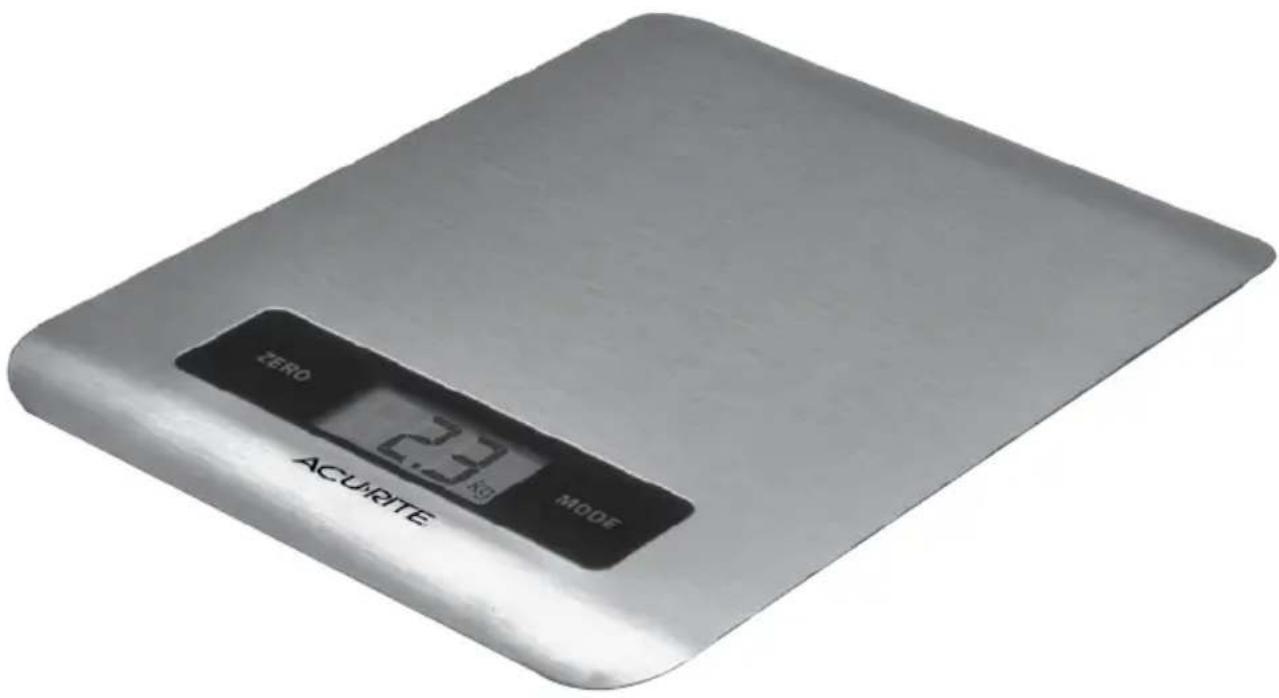
Digital Kitchen Scale
model 00939
CONTENTS
Package Contents ...... 2
Customer Support 2
Features & Benefits......3
Setup 4
Install or Replace Battery......4
Set the Measurement Units ..... 4
Using the Scale....5
Troubleshooting 7
Care & Maintenance......7
Specifications......7
Questions? Contact Customer Support at (877) 221-1252 or visit www.AcuRite.com.
SAVE THIS MANUAL FOR FUTURE REFERENCE.
ACURITE®
Congratulations on your new AcuRite product. To ensure the best possible product performance, please read this manual in its entirety and retain it for future reference.
Package Contents
- Scale
- Instruction Manual
Customer Support
AcuRite customer support is committed to providing you with best-in-class service. For assistance, please have the model number of this product available and contact us in any of the following ways:

) 221-1252
info@chaney-inst.com
24/7 support at www.AcuRite.com
▶ Installation Videos ▶ Register your Product
▶ Instruction Manuals ▶ Support User Forum
▶ Replacement Parts ▶ Submit Feedback & Ideas
Features & Benefits
WEIGHT MODE
FRONT
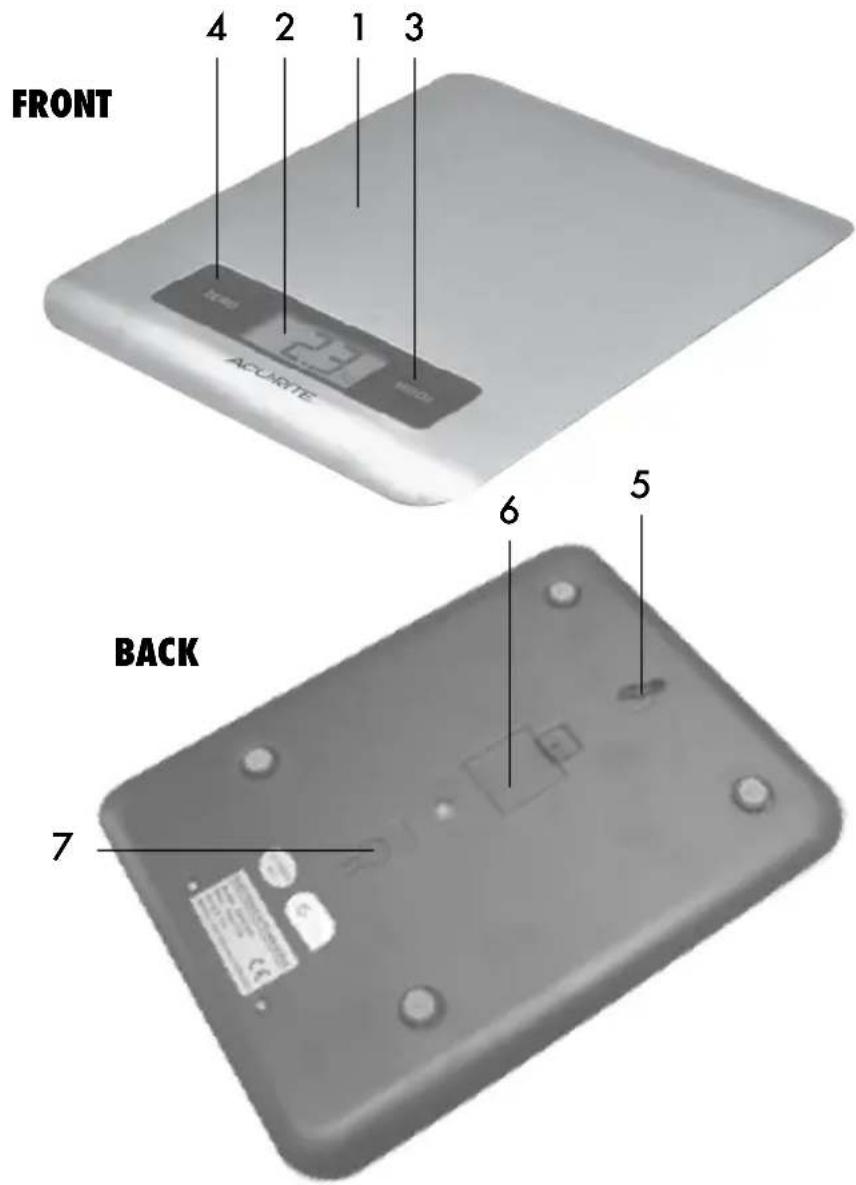
- Weighing Area
- Display
- MODE Button
- ZERO & ON/OFF Button
BACK
-
Integrated Hang Hole
for wall mount storage. -
Battery Compartment
-
Unit Conversion Button
WEIGHT MODE
-
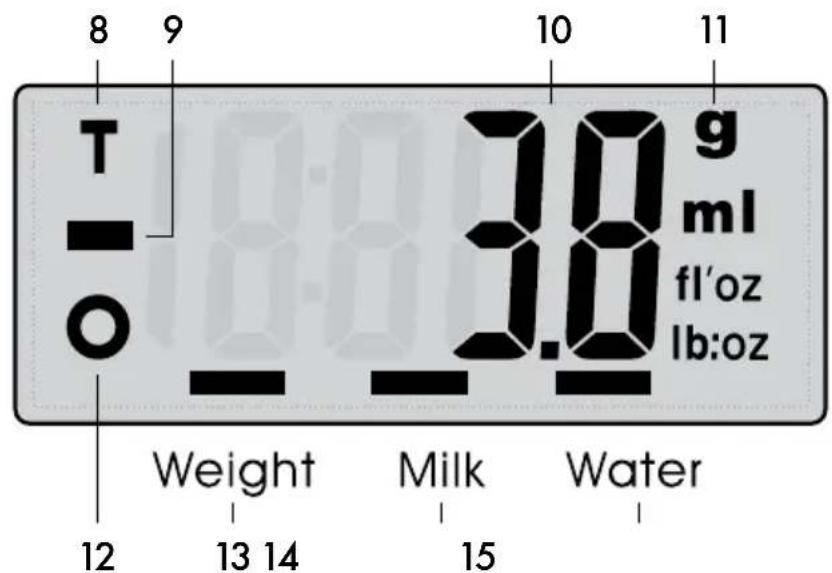
Tare Indicator
-
Minus Indicator Indicates weight of item(s) removed from the scale.
-
Current Weight
-
Weight Units
-
Zero Indicator
-
Weight Mode Indicator
-
Milk Mode Indicator
-
Water Mode Indicator
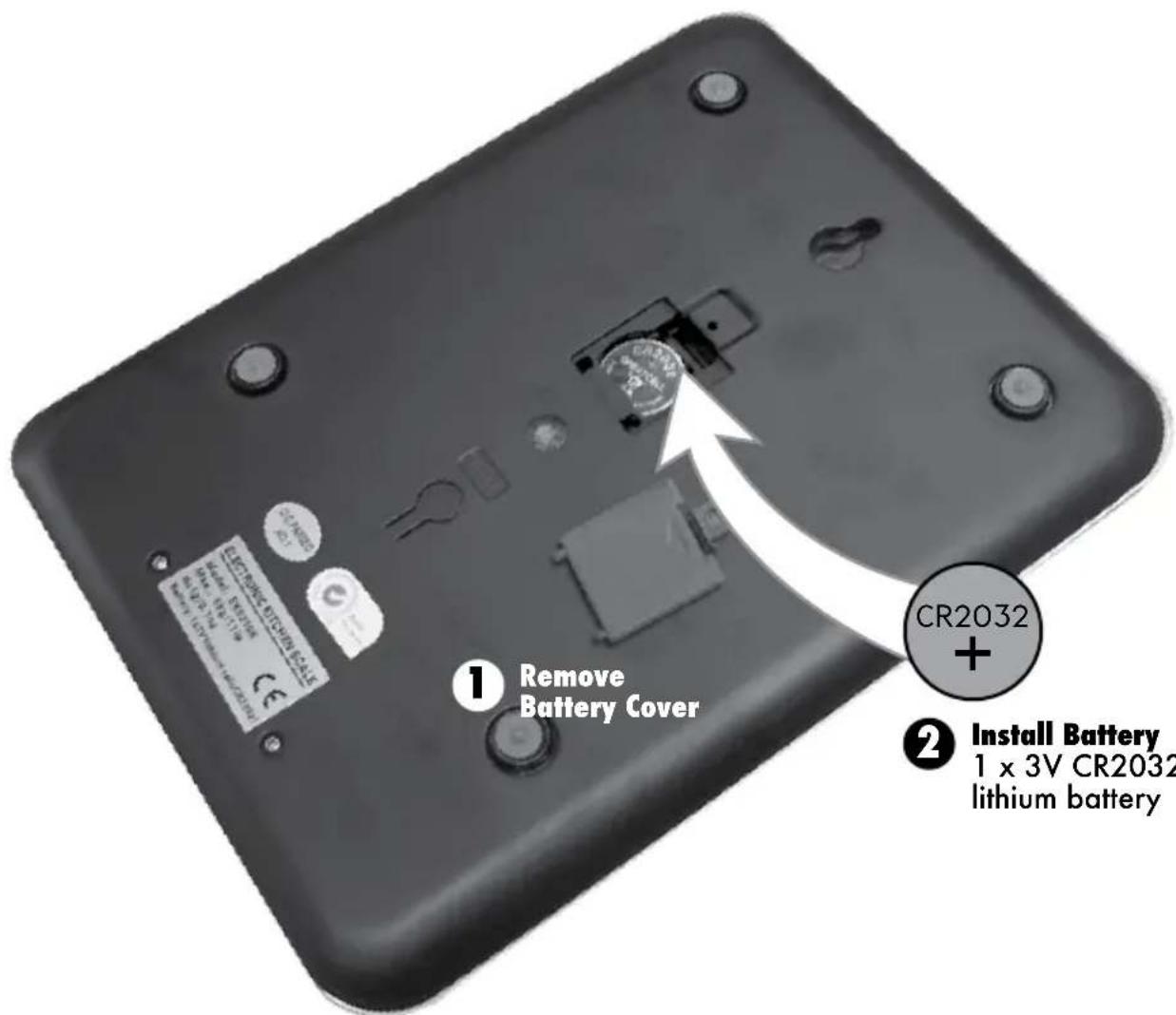
Install or Replace Battery
- Remove the battery compartment cover.
- Insert 1 x 3V CR2032 lithium battery into the battery compartment, as shown. Follow the polarity (+/-) diagram in the battery compartment.
- Replace the battery cover.
Set the Measurement Units
When you are in Weight Mode, press the Unit Conversion button, located on the back of the scale, to toggle between kg/g and lb/oz.

WARNING: THIS PRODUCT CONTAINS A BUTTON-CELL BATTERY. IF SWALLOWED, IT COULD CAUSE SEVERE INJURY OR DEATH IN JUST 2 HOURS. SEEK MEDICAL ATTENTION IMMEDIATELY IF INGESTED.

Using the Scale
Measure Weight
The scale's default mode is set to weigh solid items. Volume Mode, used for weighing liquids, allows you to choose between WATER or MILK modes because milk is denser than water.
Weight Mode
- Place the scale on a flat, stable surface.
- Gently touch the center of the scale.
- Wait for the display to show display.
- Make sure scale is in Weight Mode. If not, use MODE to select Weight Mode.
- Place ingredients to be weighed onto the surface of the scale (see Care and Maintenance section below for more specifics regarding placing food on the scale).
- Weight will be shown on the display.
Volume Mode
- Place the scale on a flat, stable surface.
- Gently touch the center of the scale.
- Wait for the display to show 0, then press the MODE button until MODE indicator is on for Milk or Water.
- Place a container on the scale.
- Press ZERO to reset display to 0.
- Pour liquid into the container. Display will show liquid volume.
- To view the weight of the liquid, press MODE until Weight Mode indicator is on.
Zero & Tare Functions
To measure items as they are added, use the Zero and Tare Functions. If the weight of the items being measured is below 4% of the scale's capacity (less than 0.2kg/0.4lb), the Zero function is used. If the weight of the items exceeds 4% of the scale's capacity, the Tare function is used.
- Place the first item(s) within the center of the Weighing Area of the scale to take a measurement.
- Without removing the item(s), press ZERO button to reset the display to 0.
-
Depending on the weight of the item(s), you will see the Zero indicator "O" or the Tare indicator "T" on the display.
-
With the first item(s) still in place, add the next item to the surface of the scale. The display will now show the weight of that item.
- Press ZERO to see the combined weight of the two items.
- Press ZERO again to reset the display to 0.
- Repeat these steps until all items have been added.
Note: Adhere to the maximum weight capacity of the scale.
Minus Function
If you add multiple items to the scale at one time to get a total weight, you can identify the value of a single item or ingredient by using the Minus Function:
- Add item(s) to the scale; display shows total weight.
- Press ZERO to reset display to 0.
- Remove an item.
- Display shows the weight of the removed item with the Minus Function indicator (negative value is shown on the display).
- Press ZERO to view the cumulative weight of any remaining items.
- Repeat steps as needed.
Warning Messages

Replace battery (see page 4).

Maximum capacity has been exceeded. Remove items to prevent damage.
Power the Unit ON/OFF
The scale will automatically power off when the display shows 0 or the same weight for 2 minutes. Press ZERO to power the scale on. To power off manually, press ZERO when the LCD is showing 0, or press and hold ZERO for 3 seconds if a weight is shown on the display.
Storage
The scale can stored on a level surface or can be hung by using the integrated hang hole.
Troubleshooting
| Problem Possible | Solution |
| Display screen not working | • Check that the batteries are installed correctly. Batteries may need to be replaced. |
If your AcuRite product does not operate properly after trying the troubleshooting steps, visit www.AcuRite.com or call (877) 221-1252 for assistance.
Care & Maintenance
Store in a dry location at room temperature. Clean with a soft, damp cloth. DO NOT immerse in water or use caustic cleaners or abrasives. All parts should be wiped clean immediately after direct contact with foods. Avoid contact with acids and citrus juices. Use the scale on a hard, flat surface. DO NOT strike, shake or drop the scale. Scale is not designed for commercial use.
Specifications
| MAX WEIGHT CAPACITY | 5kg / 11lbs |
| POWER | 3V CR2032 lithium battery |
ACU▶RITE®

Weather Stations

Temperature & Humidity

Weather
Alert Radio

Kitchen
Thermometers
& Timers

Clocks
It's more than accurate, it's ACU-RITE.
AcuRite offers an extensive assortment of precision instruments, designed to provide you with information you can depend on to Plan your day with confidence™.
www.AcuRite.com
- Digital Kitchen Scale
- CONTENTS
- ACURITE®
- Package Contents
- Customer Support
- 24/7 support at www.AcuRite.com
- FRONT
- BACK
- WEIGHT MODE
- Install or Replace Battery
- Set the Measurement Units
- Using the Scale
- Measure Weight
- Volume Mode
- Zero & Tare Functions
- Minus Function
- Warning Messages
- Power the Unit ON/OFF
- Storage
- Troubleshooting
- Care & Maintenance
- Specifications
- ACU▶RITE®
- It's more than accurate, it's ACU-RITE.
Brand : AcuRite
Model : 00939
Category : Kitchen scale