BLEUZ 2 - Headphones AFTERSHOKZ - Free user manual and instructions
Find the device manual for free BLEUZ 2 AFTERSHOKZ in PDF.


| Product Type | Wireless Bone Conduction Headphones |
| Brand | AfterShokz |
| Model | BLEUZ 2 |
| Dimensions | 130 x 100 x 50 mm (approx.) |
| Weight | 30 g |
| Battery Life | Up to 6 hours |
| Charging Port | Micro USB |
| Connectivity | Bluetooth 5.0 |
| Water Resistance | IP55 (sweat and water resistant) |
| Driver Type | Bone Conduction Transducer |
| Microphone | Dual noise-canceling microphones |
| Audio Codec | SBC, AAC |
| Controls | Multifunction button, volume +/-, power |
| Compatible Devices | Smartphones, tablets, computers with Bluetooth |
| Included Accessories | Charging cable, user manual |
| Safety Features | Open-ear design for situational awareness |
| Cleaning Instructions | Wipe with a soft, dry cloth. Do not use liquids or abrasives. |
Frequently Asked Questions - BLEUZ 2 AFTERSHOKZ
User questions about BLEUZ 2 AFTERSHOKZ
0 question about this device. Answer the ones you know or ask your own.
Ask a new question about this device
Download the instructions for your Headphones in PDF format for free! Find your manual BLEUZ 2 - AFTERSHOKZ and take your electronic device back in hand. On this page are published all the documents necessary for the use of your device. BLEUZ 2 by AFTERSHOKZ.
USER MANUAL BLEUZ 2 AFTERSHOKZ
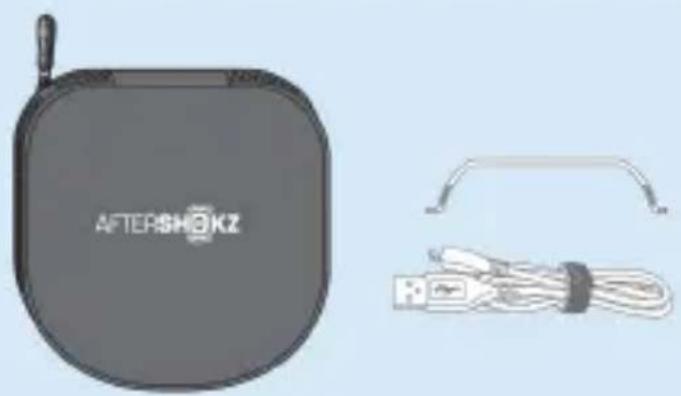
Accessories
natural_image
Product image of Aftershokz brand phone case with attached cable and connector (no text or symbols on device body)| Adjustable tension band |
| Micro-USB charging cable |
| Breathable storage pouch |
| Peace of mind |
| Warranty register card |
What's special
OpenFit™ offers unmatched ambient sound awareness and extended comfort
Stereo Bluetooth headphones with wireless phone and music functions
Sweat resistant design blocks out moisture and precipitation
How to wear
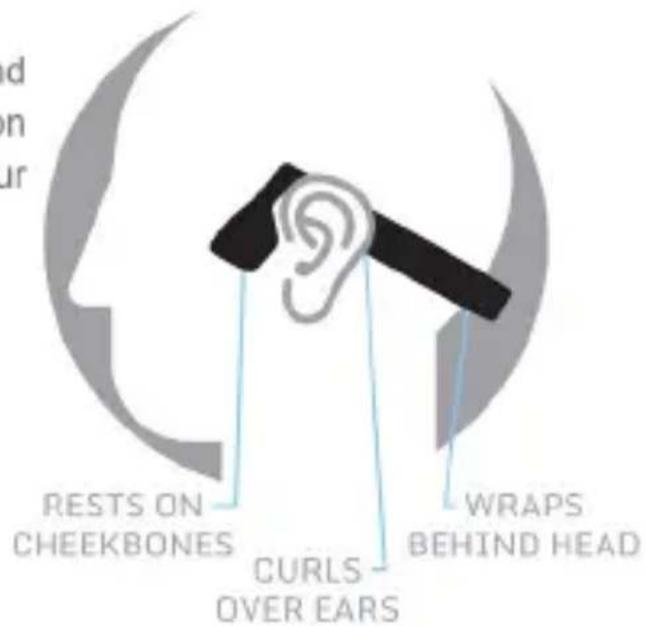
Place the wraparound headband behind your neck with the transducer resting on the bone in front of your ears, not on your ears.
Note:
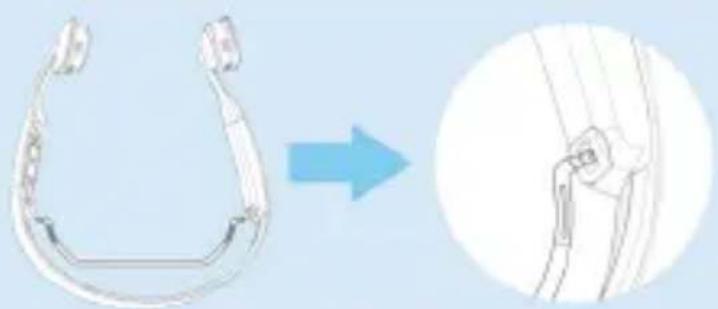
The adjustable (and removable) Tension Band on Bluez 2 is recommended for those who have a small head or feel Bluez 2 is not secure on their heads. Adjust to fit or remove the Tension Band as needed.
natural_image
Diagram showing a mechanical component transforming into a simplified view of its internal structure (no text or symbols present)How to charge
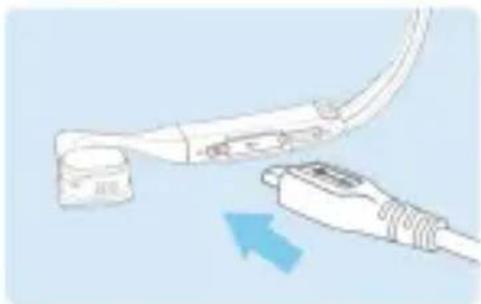
Connect Bluez 2 to a standard USB port on your PC or a wall charger via the Micro-USB charging cable. Bluez will fully charge within 2 hours. The LED Indicator will show solid red when charging, and will turn solid blue when charging is completed.
natural_image
Illustration of a medical or surgical device with attached cable and connector (no text or symbols)Note:
It's recommended to charge Bluez 2 before using for the first time.
How to Pair
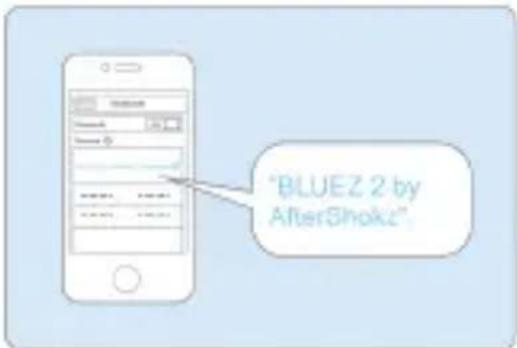
- Turn off Bluez 2. Press & hold the Power Button for more than 5 seconds until you see alternating red/blue flash and a voice prompt "pairing".
- Locate the Bluetooth menu on the device and select "BLUEZ 2 by AfterShokz". Enter "0000" if password is required.
Note:
If power button is pressed & held for 2 seconds and then released, Bluez 2 will turn on and automatically reconnect the previously paired device in 10 seconds.
If out of range (more than 33 feet/10 meters) while connected to a device, Bluez 2 will disconnect from the device. Once back within range, it will automatically reconnect. If Bluez 2 is disconnected for a long time(more than 3 minutes), you may need to press MFB button on the headphones to reconnect the device.
LED indicator
| Color | Status |
| Red(slow flash) | Low battery |
| Red(solid) | Charging |
| Blue(solid) | Charging complete |
| Blue and Red(flash) | Pairing |
| Blue(quick flash) | Incoming call/outgoing call |
Actions
Music
| Actions | Control | Voice prompt |
| Play/Pause song | Press MFB once | Single beep |
| Skip to next song | Press MFB twice | Single beep |
| Change music EQ setting | Hold MFB for 2 seconds | Two notes |
Call
| Actions | Control | Voice prompt |
| Answer a call | Press MFB | Two notes |
| End a call | Press MFB | Single beep |
| Reject a coming call | Hold MFB for 2 seconds | Two notes |
| Mute/Unmute a call | Hold Volume + and - for 2 seconds | "Mute on"/ "Mute off" |
| Redial last call | Press MFB twice | "Last number redial" |
| Voice dial | Hold MFB for 2 seconds | "Voice dial" |
| Volume control | Press Volume Control | / |
| Answer second incoming call and hang up current call | Press and hold the MFB button for 2 seconds. | Single beep |
| answer second incoming call while hold on current call | Press the MFB button once. Press again to switch to previous phone call. | Single beep |
Function
| Actions | Control | Voice prompt |
| Power on | Hold Power Button for 2 seconds | Four notes (ascending) |
| Power off | Hold Power Button for 2 seconds | Four notes (descending) |
| Bluetooth disconnected | / | Single beep |
| Bluetooth connected | / | "Connected" |
| Battery indicator | Press Volume +/- | "Battery high/ medium/low/ charge me" |
| Low battery | / | "Charge me" |
| Reset headset | Enter pairing mode, then press and hold MFB button, volume up and volume down buttons for 3 seconds. | Two notes |
| Adjust EQ setting | When music is playing, press and hold MFB button for 2 seconds | Two notes |
Note:
EQ setting will reset to default setting if Bluez 2 is re-paired.
- Double-click the MFB to redial is only valid after the music stops playing for 5 seconds.
Volume control is only valid when Bluez 2 is playing music or in the call. Only when Bluez2 is not playing music or a call, you can press the volume button and hear battery status.
• Some features are phone/network dependent
- Reset erases all paired devices stored in your headset.
Trouble shooting
| Issue | Possible problem | Resolution |
| Does not turn on | Check if the battery is fully charged | Charge the battery |
| Does not reconnect automatically | Bluez 2 is in standby mode | Press MFB to reconnect manually |
| Unable to pair | Bluez 2 doesn't enter pairing mode | Turn off Bluez 2. Press & hold the Power Button for more than 5 seconds until you see alternating red/blue flash and a voice prompt "pairing". |
Specs
| Frequency range | 20Hz - 20kHz |
| Playback time | Up to 6 hours |
| Charging time | 2 hours |
| Standby time | Up to 10 days |
| Wireless Range | 10 m / 33 ft |
| Bluetooth | 2.1 +EDR |
| Compatible Bluetooth Profiles | A2DP, AVRCP, HSP, HFP |
| Speaker type | Bone conduction transducers |
| Speaker sensitivity | 100 ± 3dB |
| Microphone type | Noise canceling microphone |
| Microphone sensitivity | -40dB ± 3dB |
| Weight | 41 g / 1.45 ounces |
Storage and maintenance
Store the headset in cool and dry place. The working temperature should be 0\~45°C (32\~113°F). Working in cold/hot environment or highly humid area will reduce the life of battery.
After storage for a long period, please charge the headset before using again.
The headset is water resistant, but is NOT waterproof. Please DON'T put the headset into water. Clean it with soft cloth if necessary.
Clean the headset with a soft dry cloth.
Do not bring the headset into contact with any sharp object.
Do not leave the headset to extremely high or low temperature.
Do not charge right after exercising, in case there's sweat inside the charging port, which could lead to circuit burning while charging. Keep the charging port dry before connecting to charger will reduce the risk.
Note:
Design and specifications are subject to change without notice.
For more information on the product, please visit www.AfterShokz.com
FCC Caution:
Any changes or modifications not expressly approved by the party responsible for compliance could void the user's authority to operate this equipment.
This device complies with Part 15 of the FCC Rules. Operation is subject to the following two conditions:
(1) This device may not cause harmful interference, and (2) this device must accept any interference received, including interference that may cause undesired operation.
This device and its antenna(s) must not be co-located or operating in conjunction with any other antenna or transmitter.
This equipment should be installed and operated with minimum distance 20cm between the radiator and your body.
Note:
This equipment has been tested and found to comply with the limits for a Class B digital device, pursuant to Part 15 of the FCC Rules. These limits are designed to provide reasonable protection against harmful interference in a residential installation. This equipment generates, uses and can radiate radio frequency energy and, if not installed and used in accordance with the instructions, may cause harmful interference to radio communications. However, there is no guarantee that interference
will not occur in a particular installation. If this equipment does cause harmful interference to radio or television reception, which can be determined by turning the equipment off and on, the user is encouraged to try to correct the interference by one or more of the following measures:
-- Reorient or relocate the receiving antenna.
-- Increase the separation between the equipment and receiver.
-- Connect the equipment into an outlet on a circuit different from that to which the receiver is connected.
-- Consult the dealer or an experienced radio/TV technician for help.
Declaration of Conformity of Industry Canada
This device complies with Industry Canada licence-exempt RSS standard(s). Operation is subject to the following two conditions: (1) this device may not cause interference, and (2) this device must accept any interference, including interference that may cause undesired operation of the device.
This Class [B] digital apparatus complies with Canadian ICES-003.
How to contact us?
AfterShokz, LLC
6311 Fly Road
Suite 106
East Syracuse, NY 13057
sales@aftershokz.com
www.aftershokz.com
Note:
If you need to return your product for repair, replacement, or warranty service, please contact the AfterShokz Customer Support Center at: 1-315-218-0308 (United States).