Bluez - Headphones AFTERSHOKZ - Free user manual and instructions
Find the device manual for free Bluez AFTERSHOKZ in PDF.


User questions about Bluez AFTERSHOKZ
0 question about this device. Answer the ones you know or ask your own.
Ask a new question about this device
Download the instructions for your Headphones in PDF format for free! Find your manual Bluez - AFTERSHOKZ and take your electronic device back in hand. On this page are published all the documents necessary for the use of your device. Bluez by AFTERSHOKZ.
USER MANUAL Bluez AFTERSHOKZ
BLUEZ Bone Conduction Headset Keep ears open, be aware of surroundings
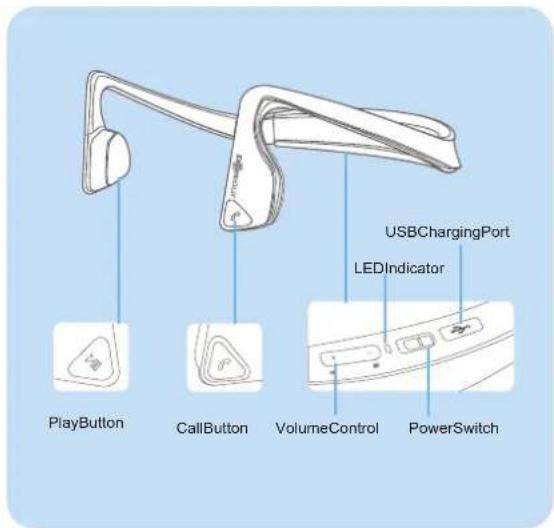
Part description
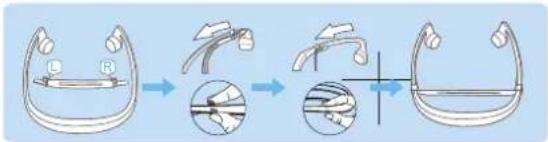
Note:
Theadjustable(andremoveable)TensionBandonBluezisrecommended forthosewhohaveasmallheaderorfeelBluezisnotsecureontheirhead. Adjust to fit or remove the Tension Band as needed.
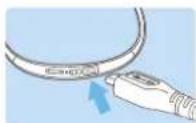
How to charge
ConnectBlueztoastandardUSBporton yourPCorawallchargerviatheUSB chargingcable.Bluezwillfullychargein3 hours.TheLEDIndicatorwillshowsolidred whencharging,andwillturnsolidbluewhen chargingiscompleted.
Note:
It's recommended to charge Bluez before using for the first time. Bluez is not functional while charging.
How to pair
- Slide the Power Switch □□ on Bluez to the "ON" position.(green)
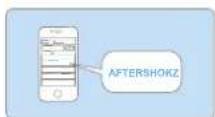
- LocatetheBluetoothmenuonthedeviceandselect " AfterShokz".
-IfBluezispairingwithadeviceforthefirsttime,itwillenterthe pairingmodeautomatically.TheLEDindicatorwillflashblue/red, - Bluez will automatically reconnect with a device that was previously paired in approximately 5 seconds. The LED indicator will be flash blue.
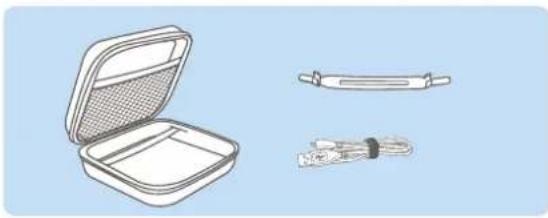
Accessories
natural_image
Illustration of a closed open case with a grid-patterned lid, and two separate tool packages (no text or symbols)| Item | Quantity |
| USBtomicroUSBChargingCable | 1 |
| TensionBand(withinstructionsheet) | 1 |
| WarrantyRegistrationCard | 1 |
Features
OpenEardesigntokeepawareofsurroundings.
- StereoBluetoothheadsetwithwirelessphoneandmusicfunctions
- Morecomfortableandstableforextendeduse.
How to wear
Placethewraparoundheadbandbehindyoumeckwiththetransducers restingontheboneinfr ontofyourears,notonyourears.
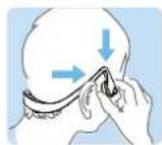
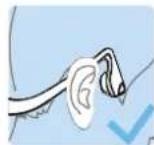
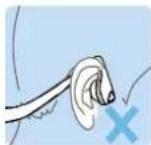
- To pair with another phone or re-pair with a device, press the Play Button and hold for 18 seconds to enter manual pairing. The LED indication will flashquicklyblue/red.
Note:
Ifoutofrangewhileconnectedtoadevice (morethan33feet/10meters),Bluezwill disconnectfromthedevice.OnceBluezis backwithinrange,itwillautomatically reconnect.However,ifBluezisdisconnected
foralongtime(morethan3minutes),youmayneedtopressanybuttononthe headset,toreconnectthedevice.
If the device is tumed off while connected to Bluez, Bluez will disconnect from it. When you turn the device e again just press any button on Bluez to reconnect manually.
LED indication
| ColorStatus | |
| Red(quickflash) | Lowbattery |
| Red(solid)Charging | |
| Blue(solid)Chargingcomplete | |
| Red(quickflashfourtimeswhenshuttingdownBluez) | Lessthan2hoursworkingtime |
| BlueandRed(flash) | Pairing |
| Blue(quickdoubleflash)Discoverableforpairing | |
| Blue(slowdoubleflash) | Bluezandapairedmobilephonearenotconnected.Oneofthemisnotturnedon,orthetwoaremorethan33feet(10m)apart. |
| Blue(slowflash) | Connected,makingacall ,streamingaudio |
| Blue(quickflash) | Receivingacall |