SMFX-200 - Blender Citronic - Free user manual and instructions
Find the device manual for free SMFX-200 Citronic in PDF.


| Product Type | Blender |
| Brand | Citronic |
| Model | SMFX-200 |
| Power Consumption | 500 W |
| Capacity | 1.5 L |
| Speed Settings | 2 speeds + pulse |
| Material | Plastic body, glass jug |
| Dimensions (W x D x H) | 18 cm x 18 cm x 40 cm |
| Weight | 2.5 kg |
| Power Supply | 220-240 V, 50/60 Hz |
| Safety Features | Overload protection, non-slip feet |
| Cleaning | Removable jug, dishwasher safe parts |
| Maintenance | Wipe with damp cloth, dry thoroughly |
| Spare Parts Availability | Jug, lid, blade assembly |
| Repairability | Modular design for easy repair |
| Usage Instructions | Included manual with recipes |
| Warranty | 1 year |
Frequently Asked Questions - SMFX-200 Citronic
User questions about SMFX-200 Citronic
0 question about this device. Answer the ones you know or ask your own.
Ask a new question about this device
Download the instructions for your Blender in PDF format for free! Find your manual SMFX-200 - Citronic and take your electronic device back in hand. On this page are published all the documents necessary for the use of your device. SMFX-200 by Citronic.
USER MANUAL SMFX-200 Citronic
IMPORTANT SAFETY INSTRUCTIONS
- Read these Instructions.
- Keep these Instructions.
- Heed all Warnings.
- Follow all Instructions.
- Do not use this apparatus near water.
-
Clean only with a dry cloth.
-
Do not block any of the ventilation openings. Install in accordance with the manufacture's instructions.
-
Do not install near nay heat sources such as radiators, heat registers, stoves, or other apparatus (including amplifiers) that produce heat.
-
Do not defeat the safety purpose of the polarized plug. The wide blade is provided for your safety. If the provided plug does not fit into your outlet, consult an electrician for replacement of the obsolete outlet.
-
Protect the power cord from being walked on or pinched particularly at plug, convenience receptacles, and point where they exit from the apparatus.
-
Only use attachments/accessories specified by the manufacturer.
-
Use only with a cart, stand, tripod, bracket, or table specified by the manufacturer, or sold with the apparatus. When a cart is used, use caution when moving the cart/apparatus combination to avoid injury from tip-over

-
Unplug this apparatus during lighting storms or when unused for long periods of time.
-
Refer all servicing to qualified service personnel. Serving is required when the apparatus has been damaged in any way, such as power-supply cord or plug is damaged, liquid has been spilled or objects have fallen into the apparatus, the apparatus has been exposed to rain or moisture, does not operate normally, or has been dropped.
WARNING
To reduce the risk of the fire or electric shock, do not expose this apparatus to rain or moisture. The apparatus shall not be exposed to dripping or splashing and that no objects filled with liquids, such as vases, shall be placed on the apparatus.
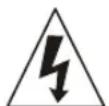
CAUTION
RISK OF ELECTRIC SHOCK DO NOT OPEN

CAUTION: To reduce the risk of electric shock, do not remove any cover. No user-serviceable parts inside. Refer servicing to qualified service personnel only.

The lightning flash with arrowhead symbol within the equilateral triangle is intended to alert the use to the presence of un-insulated “dangerous voltage” within the product’s enclosure that may be of sufficient magnitude to constitute a risk of electric shock.
IMPORTANT SAFETY INSTRUCTIONS

The exclamation point within the equilateral triangle is intended to alert the user to the presence of important operation and maintenance (servicing) instructions in the literature accompanying this appliance.
CAUTION
To prevent electric shock, do not use this polarized plug with an extension cord, receptacle or other outlet unless the blades can be fully inserted to prevent blade exposure
FEATURES
- 8 digital effects, 3 digital effects for crossfader
• Big LCD with Back light - Send/Return function
• 2 USB Jacks for PC Playback and Recording
• 3 Kind of channel fader Curve mode
- Channel and Crossfader Start function
• 3 Band Kill EQ for each channel
• VCA Controlled channel and crossfader
text_image
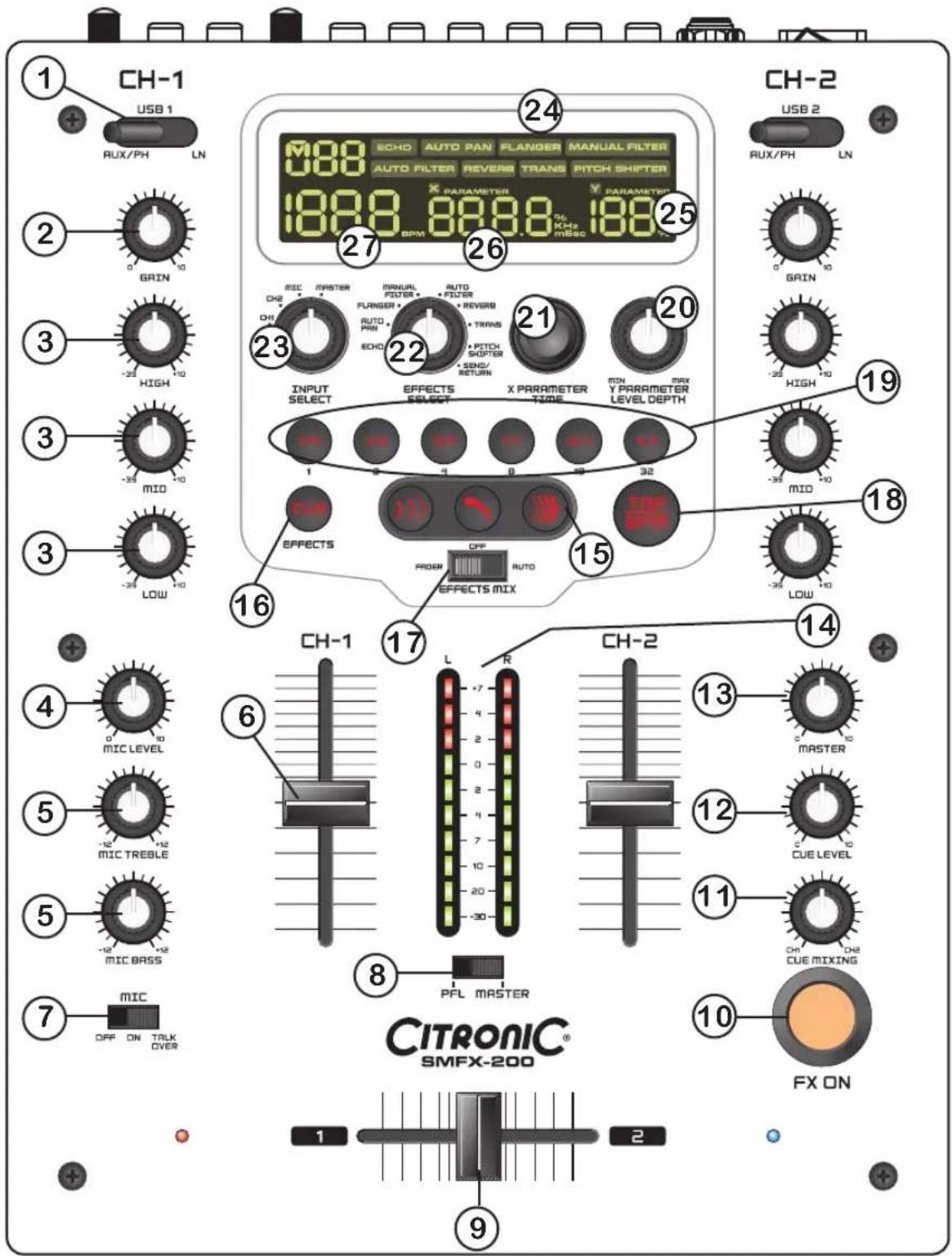
CH-1 USB 1 RUX/PH LN 2 GRIN 3 HIGH 3 MID 3 LOW 4 MIC LEVEL 5 -12 MIC TREBLE 5 -12 MIC BASS 7 MIC OFF ON TALK OVER 16 CH-1 L R CH-2 13 MASTER 12 CUE LEVEL 11 OH CH2 CUE MIXING 10 FX ON 9 1888 8888 1888 25 ECHO AUTO PAN FLANGER MANUAL FILTER AUTO FILTER REVERB TRANS PITCH SHIFTER X PARAMETER PARAMETER BPM RPM MESC 27 26 25 24 23 22 21 20 INPUT SELECT EFFECTS X PARAMETER SELECT TYPE MON Y PARAMETER LEVEL DEPTH 1 2 3 4 5 6 7 8 9 10 11 12 13 14 EFFECTS OFF AUTO EFFECTS MIX THO SPN MAX HIGH -10 -25 -35 -35 -35 -35 -35 -35 -35 -35 -35 -35 -35 -35 -35 -35 -35 -35 -35 -35 -35 -35 -35 -35 -35 -35 -35 -35 -35 -35 -35 -35 -35 -35 -35 -36 CH-2 USB 2 RUX/PH LN 1PART NAMES AND FUNCTIONS
-
Source input selector switch - These switches are used to select the input source assigned to each channel. Each channel may only be assigned one input source at a time.
-
Input gain - These knobs are used to adjust the audio source signal input gain for a channel. Never use the gain control to adjust a channels output volume. Setting the gain level properly will ensure a clean output signal.
-
Channel EQ control - These knobs are used to adjust the high, mid and low range levels of a channel allowing for a maximum midrange gain of 10dB or maximum decrease of -35dB. Turning the knob in a counterclockwise direction will decrease the amount of high/mid/low range applied to a channel signal, turning the knob in a clockwise direction will increase the amount of high/mid/low applied to a channel signal.
-
Mic level - Adjusts microphone level.
-
Mic treble/bass EQ - These knobs are used to adjust the treble (or bass) levels of the microphone with a maximum signal gain of 12dB or maximum signal decrease of -12dB. Turning the knob in a counterclockwise direction will decrease the amount of treble (or bass) applied to the microphone signal, turning the knob in a clockwise direction will increase the amount of treble (or bass) applied to microphone signal.
-
Channel fader - Adjusts the volume for CH1 and CH2.
- Mic ON/OFF/Talkover switch - To set mic on and off, when switch at the talkover position, the mic on, the sound level for everything other than mic will decrease to around 14dB.
- PFL/Master switch - The position of this switch will determine the level meter mode. In the "Master" position, the meter will detail the out level of the left and right channels. In the "PFL" position, the left side of the meter will indicate monaural level of the PGM.
- Crossfader - Used to mix the signals from the 2 channels.
- FX ON button - This button functions as an effect Master on/off button and is used to activate and deactivate the effects.
- Cue mixing - Used to preview channel audio to your headphones. Listen here before bringing up channel faders or moving the crossfader.
- Cue level - This knob is used to adjust the headphone output level.
-
Master knob - Adjust the level of the master output.
-
Level meter - The dual LED's indicators are used to detail either the master output level, a combination of the master output level or the PGM monaural level.
-
Effect select knobs - Used to select the type of effect mix desired, 3 functions (Echo, Zip and Roll) can be chosen.
-
Effects cue - Used to select the beat effects to be monitored with headphones.
-
Effects mode switch - Used to select the desired crossover effect mode.
- Fader : In this mode you can use the crossfader to control the crossover effects and perform start/stop (recue) functions.
- Off : Crossover effects are disabled.
- Auto : In this mode you don't have to use the crossfader : simply push one of the buttons and the mix will be done automatically in full beat sync!
-
TAP/BPM button - Tap this button to switch TAP/BPM function.
-
Effect beat selector buttons - To select different beat (also change the time parameter) according to the measured BPM of the effector.
-
Depth feedback (parameter Y) - Used to adjust the value of the parameter Y (mix ratio or resonance or feedback) of the effector.
-
Time array (parameter X) - Used to adjust the value of the parameter X (time) of the effector.
-
Effects selector - Used to select desired effects.
-
Input selector - Used to select the source to be effected.
-
Effects indicator - When any of the effects are in use, these indicators will grow to match any of the effects that may be functioning.
-
Depth feedback display - The depth feedback digital display will indicate the parameter ratio percentage.
-
Time array display - This display will signify the pitch percentage speed. Any adjustments will be based on this default setting.
-
BPM display - This meter will display the source BPMs to be effected.
text_image
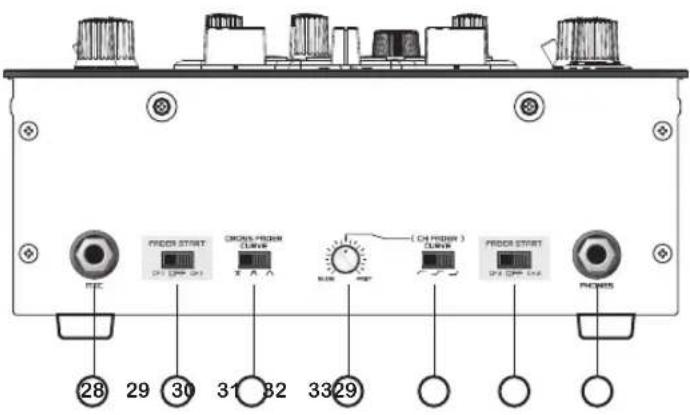
FROOD START (CH DOWN) ON FROOD START (CH DOWN) ON FROOD START (CH DOWN) ON FROOD START (CH DOWN) ON 28 29 30 31 32 33 29-
Mic input jack - This jack will accept a standard 1/4" male plug.
-
Fader start switch - When the unit has been connected with a control cable to a CD player, this is the ON/OFF switch for the function to automatically start playing and stop (back cue) of the CD player using the channel fader or crossfader.
-
Crossfader curve switch - Used to select the rising curve patterns for the crossfader function.
-
Channel fader curve control - Adjusts the curve of the channel faders between quick, normal, or long fade.
-
Channel fader curve mode switch - Used to select the channel fader curve desired.
-
Headphones jack - Used to connect your headphones to the mixer.
-
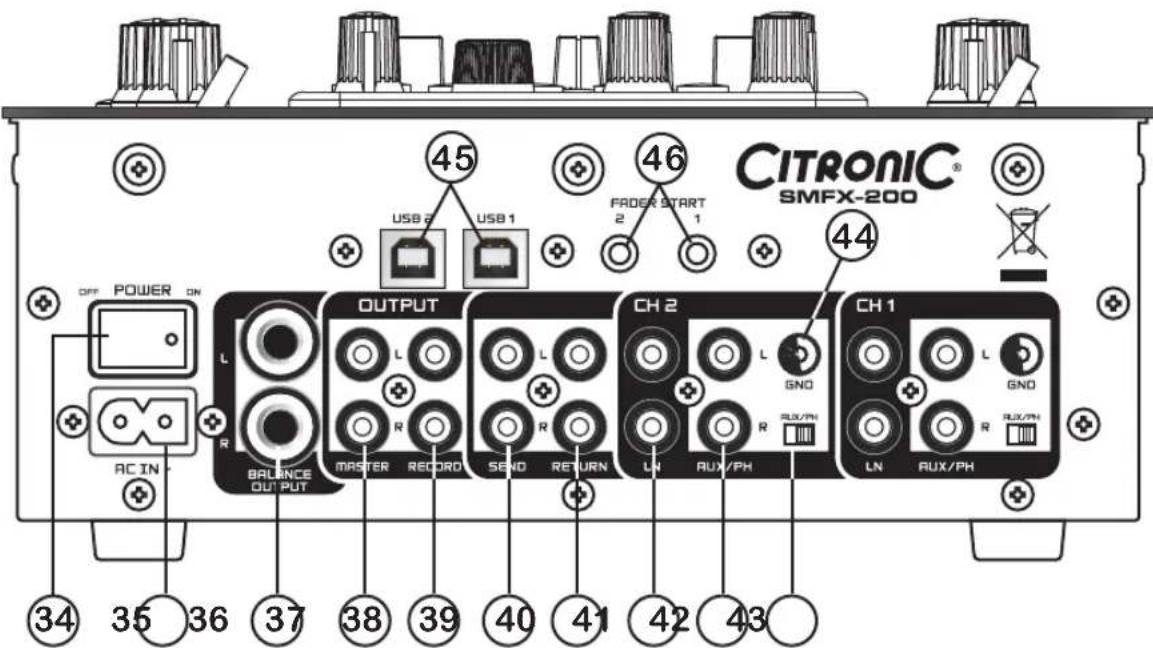
Power switch - Turn this unit power ON/OFF.
-
AC inlet - Use the accessory power cord to connect to an AC power outlet.
-
Master balanced output - These 1/4" TRS jacks provide a balanced line level output.
-
Master outputs - Left & Right line level unbalanced RCA.
-
Rec out - The record out level is dictated by the channel and cross fader level, it is not influenced by the master volume control.
-
Send out jack - Connects to the input of an outboard signal processor.
-
Return input jack - Connects to the output of the outboard signal processor to create an effect loop.
-
Line input jacks - These jacks are inputs for any line level device.
-
Ph/Aux input jacks - These jacks are inputs for a phono (RIAA) stage for magnetic (MM) cartridge or a line level device.
Rear Panel
- Aux/Phono selector switches - These switches are used to change the mode of phono input jacks. When connecting turntable to these jacks be sure the switch is in the phono position, and when using line level input devices select AUX. Always be sure main power is shut off before change the position of the Aux/Phone selector switch.
- GND terminals - Connect each of your turntable ground leads to either of the two ground terminals.
- USB socket - Use the accessory USB cord to connect to a PC.
- Fader start control jacks - Connect these jacks to the fader input jacks of the CD player using the 3.5mm stereo mini cord.
text_image
CITRONIC® SMFX-200 45 USB 2 USB 1 FADER START 2 1 46 44 OUTPUT L R AC IN BALANCE OUTPUT MASTER RECORD SEND RETURN CH 2 LN AUX/PH CH 1 LN AUX/PH 34 35 36 37 38 39 40 41 42 43QUICK SETUP DIAGRAM
Study this setup diagram. Make sure all faders are at "zero" and all devices are off. First, connect all input sources and processors. Next, connect your microphone and monitor headphones. Finally, connect the stereo outputs to the power amplifier(s) and/or audio receivers such as tape decks. Plug your mixer into AC power. Now you are ready to switch everything on.
IMPORTANT: Always switch on your audio input sources such as turntables or CD players first, then your mixer, and finally any amplifiers. When turning off, always reverse this operation by turning off amplifiers, then your mixer, and then input devices.
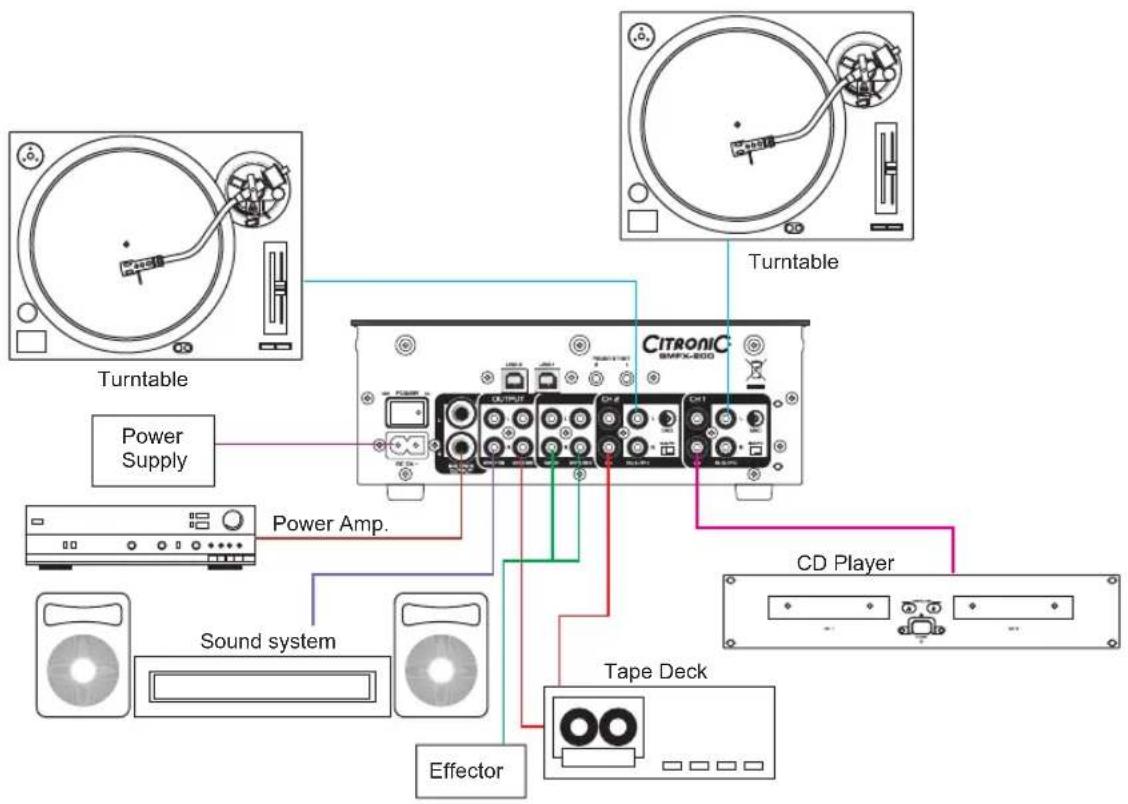
text_image
Turntable Power Supply Power Amp. Sound system Effector Tape Deck CD Player CITRONIC SMPX-800 TurntableSPECIFICATIONS
Model SMFX200 2ch DJ mixer
Power AC 100\~240V, 60/50Hz, 14 Watts
Dimensions 223 (W) x 296.7 (D) x 105.9 (H)mm
Weight ca.6 kg
Input/output impedance & sensitivity: (EQ flat, maximum gain, FX OFF, load=100K ohm)
Input impedance and reference level:
Line 10K ohm /-14dBV +/-0.1dB (200mV)
Aux 47K ohm /-14dBV +/-0.1dB (200mV)
Phono 47K ohm /-50dBV +/-0.1dB (2mV)
Mic 10K ohm /-54dBV +/-0.1dB (2mV)
Return 20K ohm /-10dBV +/-0.1dB (316mV)
Output impedance and level:
Send 2.2K OHM /-10dBV (316mV) +/-2dB
Rec 2.4K OHM /-10dBV (316mV) +/-2dB
Master unbal. 1K OHM /0dB (1V) +/-2dB
Master bal. (load=600 ohm) 600 OHM/+4dBm (1.23V) +/-2dB
Phones (load=32 ohm) 33 OHM /0dBV (1V) +/-2dB
Frequency response: (EQ flat, maximum gain, FX OFF, master output, load=100K ohm)
Line, Aux 25-20KHz +/-2dB
Phono 25-20KHz +2/-3dB (RIAA)
Mic 25-20KHz +2/-3dB
THD + N: (EQ flat, maximum gain, FX OFF, W/20KHz LPF, master output, load=100K ohm)
Line, Aux Less than 0.04% 20-20KHz
Phono Less than 0.15% @ 1KHz (A-weighted)
Mic Less than 0.15% @ 1KHz (A-weighted)
Maximum input: (1KHz, master output, THD=1%, EQ flat, FX OFF, maximum gain)
Line, Aux +4dBV
Phono -36dBV
Mic -36dBV
Return +8dBV
Maximum output: (EQ flat, maximum gain, FX OFF, THD=1%, load=100K ohm)
Send More than +8dBV (2.5V)
Master More than +18dBV (8.0V)
Rec More than +8dBV (2.5V)
Phones More than +4dBV (1.6V) load=32 ohm
S/N ratio: (Maximum gain EQ Flat, W/20KHz LPF, A-weighted, FX OFF, master output)
Line, Aux More than 80dB
Phono More than 69dB
Mic More than 64dB
Crosstalk: (Maximum gain, EQ flat, FX OFF, W/20KHz LPF, A-weighted, master output)
Line, Aux, Phono: More than 70dB @1KHz between L and R channel
More than 70dB @1KHz between channels
SPECIFICATIONS
EQ
Mic 12 +/-2dB, -12 +/-2dB at 100Hz
12 +/-2dB, -12 +/-2dB at 10KHz
Channel 10 +/-2dB, below -32dB at 70Hz
10 +/-2dB, below -32dB at 1KHz
10 +/-2dB, below -32dB at 13KHz
Channel balance Within 3dB from 0 to -40dB
Fader kill More than 80dB at 1KHz for channel fader and crossfader
Mic talkover -14 +/-2dB
USB section: (EQ flat, FX OFF, W/20KHz LPF, master output, load=100K ohm)
Playback
Output 0dBV (1V) +/-2dB (-20dBfs, 1KHz, Maximum gain)
THD+N Less than 0.04% (0dBfs, 1KHz, gain at 3 position, master= 0dBV out)
Frequency
31-20KHz +/- 2dB (Gain at center)
response
S/N ratio More than 80dB (A-weighted, gain at center)
CH separation More than 70dB at 1KHz (0dBfs, A-weighted, gain at center)
Recording and playback: (Line 1KHz,-14dBV input, gain maximum)
Output
4dBV (1.6V) +/-2dB
THD+N Less than 0.15%