PRO-2 MKII - Blender Citronic - Free user manual and instructions
Find the device manual for free PRO-2 MKII Citronic in PDF.


| Product Type | 2 Channel DJ Mixer |
| Brand | Citronic |
| Model | PRO-2 MKII |
| Power Supply | 12Vac, 500mA (external PSU included) |
| Dimensions (W x D x H) | 228 x 265 x 87 mm (6U) |
| Weight | 2.8 kg |
| Frequency Response (Line) | 20-20kHz ±2dB |
| Frequency Response (Phono) | 50-20kHz ±1dB |
| Frequency Response (Mic) | 20-20kHz +2/-3dB (RIAA) |
| EQ Line Hi | +10/-30dB @ 10kHz |
| EQ Line Low | +10/-30dB @ 100Hz |
| EQ Mic Hi | +12/-12dB @ 10kHz |
| EQ Mic Low | +12/-12dB @ 100Hz |
| Total Harmonic Distortion | >0.2% |
| Input Impedance (Line) | 47k ohms, -13dB |
| Input Impedance (Phono) | 47k ohms, -48dB |
| Input Impedance (Mic) | 6k ohms, -53dB |
| Output (Master RCA) | 0dB, 47k ohms |
| Output (Headphone) | -3dB/33 ohms, +5dB |
| Headphone Output Level | 32 ohms, 1.8V |
| Input Connectors | 2x RCA (Phono), 2x RCA (Line), 1x 6.3mm Jack (Mic) |
| Output Connectors | 2x RCA (Master), 1x 6.3mm Jack (Headphone) |
| Controls | Channel faders, crossfader, gain, EQ, mic level, master volume, cue level, cue mix, input selectors |
| Included Accessories | External PSU, instruction manual |
| Maintenance | Clean with dry/damp lint-free cloth; crossfader replaceable |
| Safety | No user serviceable parts; refer to qualified service personnel |
Frequently Asked Questions - PRO-2 MKII Citronic
User questions about PRO-2 MKII Citronic
0 question about this device. Answer the ones you know or ask your own.
Ask a new question about this device
Download the instructions for your Blender in PDF format for free! Find your manual PRO-2 MKII - Citronic and take your electronic device back in hand. On this page are published all the documents necessary for the use of your device. PRO-2 MKII by Citronic.
USER MANUAL PRO-2 MKII Citronic
Citronic 2 Channel DJ Mixer
Order ref: 172.752UK
User Manual
Introduction
Thank you for purchasing the Citronic PRO-2 MKII 2 Channel DJ Mixer.
This product is intended to give long term, reliable service in normal usage.
Please read these instructions before use to avoid incorrect operation and to help outline the functions and controls.
Maintenance
There are no user serviceable parts inside, refer all servicing issues to qualified service personnel. Clean with a lint-free dry or damp cloth. To replace crossfader, disconnect mains and undo the 2 securing screws slightly, lift the crossfader and disconnect from the in-line connector (noting the correct orientation). Connect the new crossfader, reposition and secure with the 2 screws.
Packing Contents
• 12Vac, 500mA external PSU
• PRO 2 MKII 2 Channel DJ Mixer
- Instruction Manual
Controls:
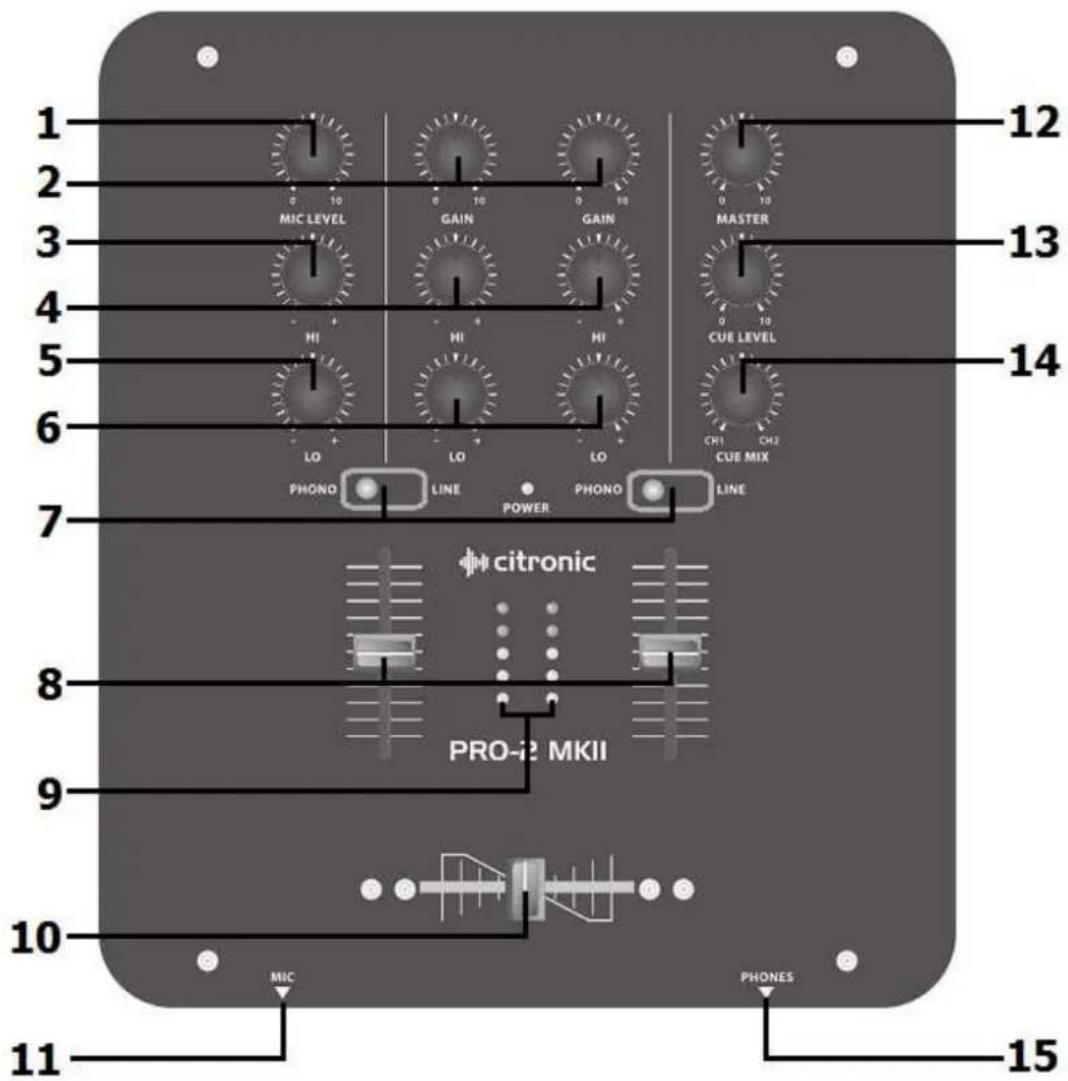
- MICROPHONE LEVEL – Individual level for DJ microphone.
- CHANNEL GAIN – Trim control for stereo inputs.
- MICROPHONE HI EQ – Hi frequency cut/boost for mic inputs.
- CHANNEL Hi EQ – High frequency cut/boost for each stereo channel.
- MICROPHONE LO EQ – Lo frequency cut/boost for mic inputs.
- CHANNEL LO EQ – Lo frequency cut/boost for each stereo channel.
-
CHANNEL PHONO/LINE – Input selector for channel 1/2 phono or line input.
-
CHANNEL FADER – Individual volume fader for each stereo channel.
- VU METER: Volume unit's LED's to indicate status of output signal.
- CROSSFADER – Allows seamless fading between channels 1 & 2.
- MICROPHONE INPUT - 6.3mm JACK input for a DJ microphone.
- MASTER VOLUME – Sets the overall output level to the amplifier
- CUE LEVEL – Set the CUE volume level for the headphones
- CUE MIX – Rotate to mix between CH1 and CH2 in the headphones.
- HEADPHONE INPUT - 6.3mm JACK OUTPUT for DJ headphones
Rear Section:
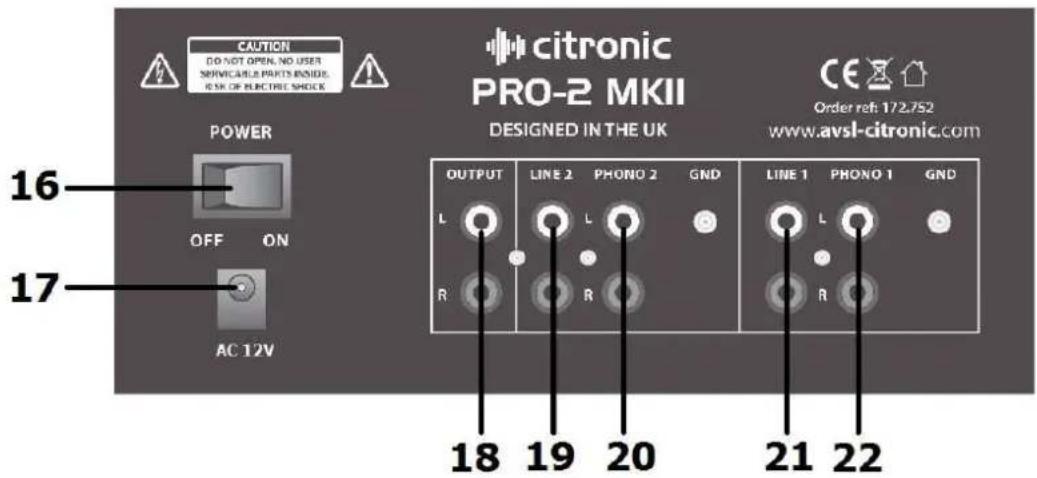
- POWER ON/OFF – Turns the mixer on or off when the power supply is connected.
- POWER CONNECTION – Connected the supplied power supply here.
- MASTER OUTPUT - Unbalanced RCA main mix outputs.
- LINE IN – Channel 2 RCA L+R inputs for line level source (CD, DVD, MP3, PC etc.)
- PHONO IN - Channel 2 RCA L+R phono inputs for turntable.
- LINE IN – Channel 1 RCA L+R inputs for line level source (CD, DVD, MP3, PC etc.)
- PHONO IN - Channel 1 RCA L+R phono inputs for turntable.
Connection Guide:
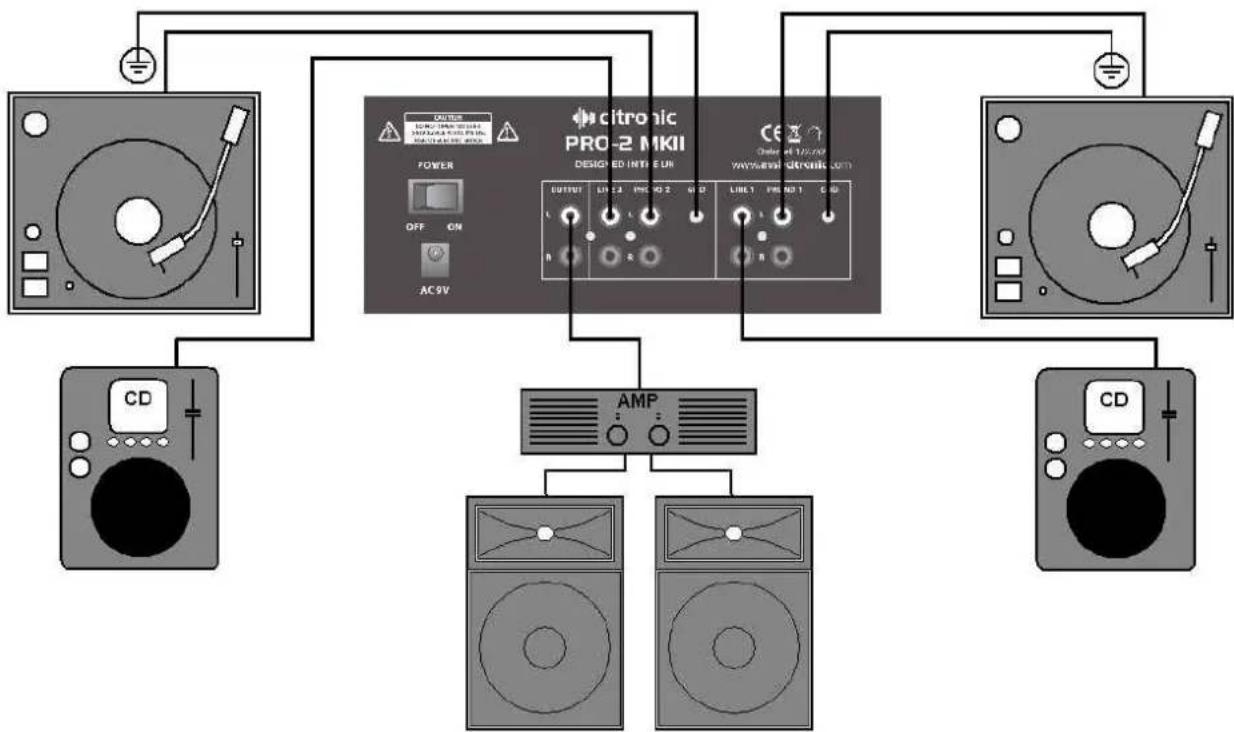
flowchart
graph TD
    A["CD"] --> B["Power"]
    B --> C["AC 9V"]
    C --> D["AMP"]
    D --> E["CD"]
    D --> F["DV Output"]
    G["Power"] --> H["AC 9V"]
    H --> I["AMP"]
    I --> J["CD"]
    I --> K["DV Output"]
Operation:
• Only use the supplied power supply.
- Connect any turntables to the RCA PHONO inputs on ch.1 and ch.2.
- Earth turntables (unless they are self-grounded) to the case grounding point on the rear panel
- Connect CD, CD+G, laptop, TV decoder, DVD or MP3 players to LINE inputs.
- Connect DJ mic and headphones at the front.
- With MASTER LEVEL, MICROPHONE LEVEL, CHANNEL FADERS and GAINS Turned down, switch the power on.
• Gradually increase the GAIN, MASTER LEVEL and CHANNEL FADERS and check the output level on the VU indicator. Set the levels so that the first red lights light up intermittently.
- Be aware that the CROSSFADER also operates across channels 1 & 2.
• To use CROSSFADER move left and right to seamlessly blend between these 2 channels.
• Gradually increase the microphone channel levels to check microphone signals.
- Monitor each stereo channel via headphones. Rotate the CUE MIX knob to monitor between ch1 and CH2.
- Adjust Hi, and Lo EQ settings to set the desired tonal effect
- Adjust MICROPHONE LEVEL Hi and Lo EQ to set the tone to suit.
- When not being used, turn down the Vocal mic levels to avoid unwanted noise.
Troubleshooting:
NO OUTPUT -
Check power switch is on
Check leads and connections
Check MASTER LEVEL and mic or channel fader is turned up
Check CROSSFADER position
Check your sound source is playing
Check if the input switch is set to LINE or PHONO
DISTORTED OUTPUT -
Check line input isn't connected to PHONO
Check GAIN input levels
Check channel and MASTER faders are not too high
Check volume control of amplifier, active speakers or recording equipment
MICROPHONE FEEDBACK & OUTPUT
Eliminate "line-of-sight" between mic(s) and speakers
Check DELAY is not set too high
Adjust Hi or Lo EQ and/or level controls
No output – check if mic switched off
TOO QUIET -
Check turntable is not connected to line input
Check channel and MASTER VOLUME is not set to low
Check the Gain levels on each channel
Check for volume control on sound source
Specification:
| Power supply 12Vac, 500mA | |
| Headphone output 32 ohms, 1.8V (>5dB) | |
| Input : Line -13dB, 47k ohms (±2dB) | |
| Input : Phono -48dB, 47k ohms (±2dB) | |
| Input : DJ Mic -53dB, 6k ohms (±1dB) | |
| Output : Master RCA 0dB, 47k ohms (±2dB) | |
| Output : Headphone -3dB/33 ohms +5dB, ±2dB | |
| Frequency response : Line 20-20KHz ±2dB | |
| Frequency response: Mic 20-20KHz +2, -3dB (RIAA) | |
| Frequency response : Phono 50-20KHz ±1dB dB | |
| EQ Line: Hi +10/-30dB +2/-2dB @ 10KHz | |
| EQ Line: Low +10/-30dB +2/-2dB @ 100Hz | |
| EQ Mic: Hi +12/-12dB +2/-2dB @ 10KHz | |
| EQ Mic: Low +12/-12dB +2/-2dB @ 100Hz | |
| THD >0.2% | |
| Weight | 2.8kg |
| Dimensions | 228 x 265 x 87mm (6U) |
Copyright Protected Citronic Ltd 2012
www.citronic.com
Brand : Citronic
Model : PRO-2 MKII
Category : Blender