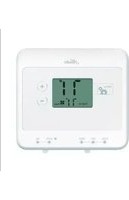
42123 - Thermostat HUNTER - Free user manual and instructions
Find the device manual for free 42123 HUNTER in PDF.


| Product Type | Programmable Thermostat |
| Brand | Hunter |
| Model | 42123 |
| Dimensions (Approx.) | 4.5 x 4.5 x 1.2 inches |
| Weight | 0.5 lbs |
| Power Supply | 2 AA alkaline batteries or 24 VAC |
| Display Type | LCD with backlight |
| Temperature Range | 45°F to 90°F (7°C to 32°C) |
| Programming Options | 7-day, 5+2, or 1-week programmable |
| Number of Periods per Day | 4 (Wake, Leave, Return, Sleep) |
| Compatibility | Most 24V gas, oil, or electric systems |
| Stages | 1 Heat / 1 Cool |
| Fan Control | Auto / On |
| Filter Change Reminder | Yes |
| Low Battery Indicator | Yes |
| Keypad Lock | Yes |
| Mounting | Wallplate included |
| Warranty | 1 year limited |
| Certifications | UL, CSA |
| Cleaning Instructions | Wipe with dry, soft cloth |
Frequently Asked Questions - 42123 HUNTER
User questions about 42123 HUNTER
0 question about this device. Answer the ones you know or ask your own.
Ask a new question about this device
Download the instructions for your Thermostat in PDF format for free! Find your manual 42123 - HUNTER and take your electronic device back in hand. On this page are published all the documents necessary for the use of your device. 42123 by HUNTER.
USER MANUAL 42123 HUNTER
Hunter Owner's Manual
5 MINUTE
INSTALLATION
natural_image
Abstract circular graphic with segmented segments and a central dot, no text or symbols present.


Models
42122
42123
42177
Non Programmable
Form# 44047-01
20120618
©2012 Hunter Fan Co.
Table of Contents
At A Glance
Know Your Thermostat .... 3
Setup
Setting Temperature 10
Features
Alerts 12
Menu Options....16
Additional Features 20
Thermostat Assistance
Troubleshooting and Support....21
Technical Support....23
Warranty
1 Year Limited Warranty ....24
Know Your Thermostat
Read this manual thoroughly. The following notes should help you with getting around your thermostat:
- The thermostat temperature can be set in increments of 1^ (1°C).
- After 15 minutes without a key press, the thermostat will return to the home display screen and save any changes you have made.
If you need any assistance with installation or setup of your new Hunter Thermostat, please call us, our technical support staff is ready to help!
USA: 1-888-830-1326 Canada: 1-866-268-1936
Hours of operation are from 7:00 am to 7:00 pm Monday - Friday and 8:00 am to 5:00 pm on Saturday, Central Time. You may also contact us over the Internet at:
www.HunterFan.com
Know Your Thermostat
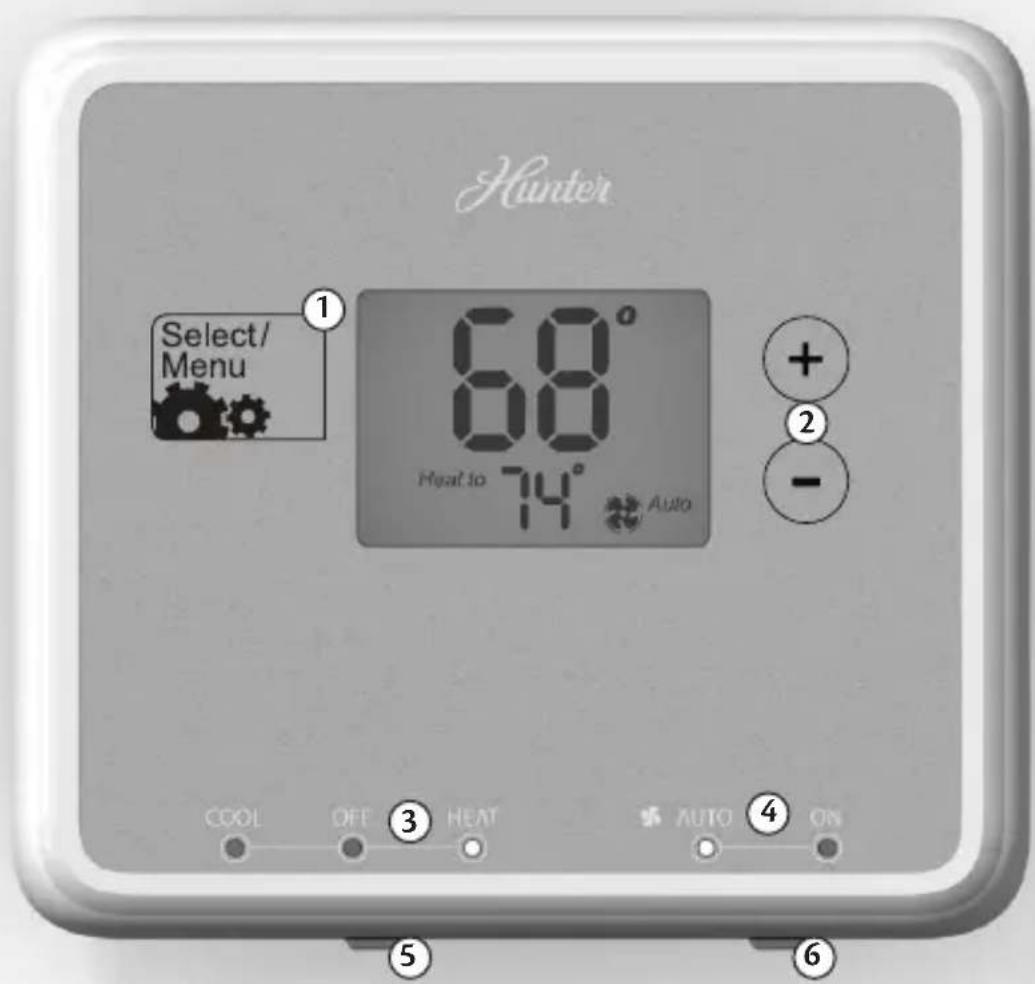
- Allows access to the advanced features of the thermostat and saves changes to the menu options.
- Adjusts time and temperature settings as well as moving up or down menu lists.
- Indicates whether the system is set to Heat, Cool, or Off.
- Indicates if the fan is set to Auto or On modes.
- Allows you to switch between Heat, Cool, and Off modes.
- Allows you to switch between fan Auto and On modes.
Know Your Thermostat
Know Your Thermostat
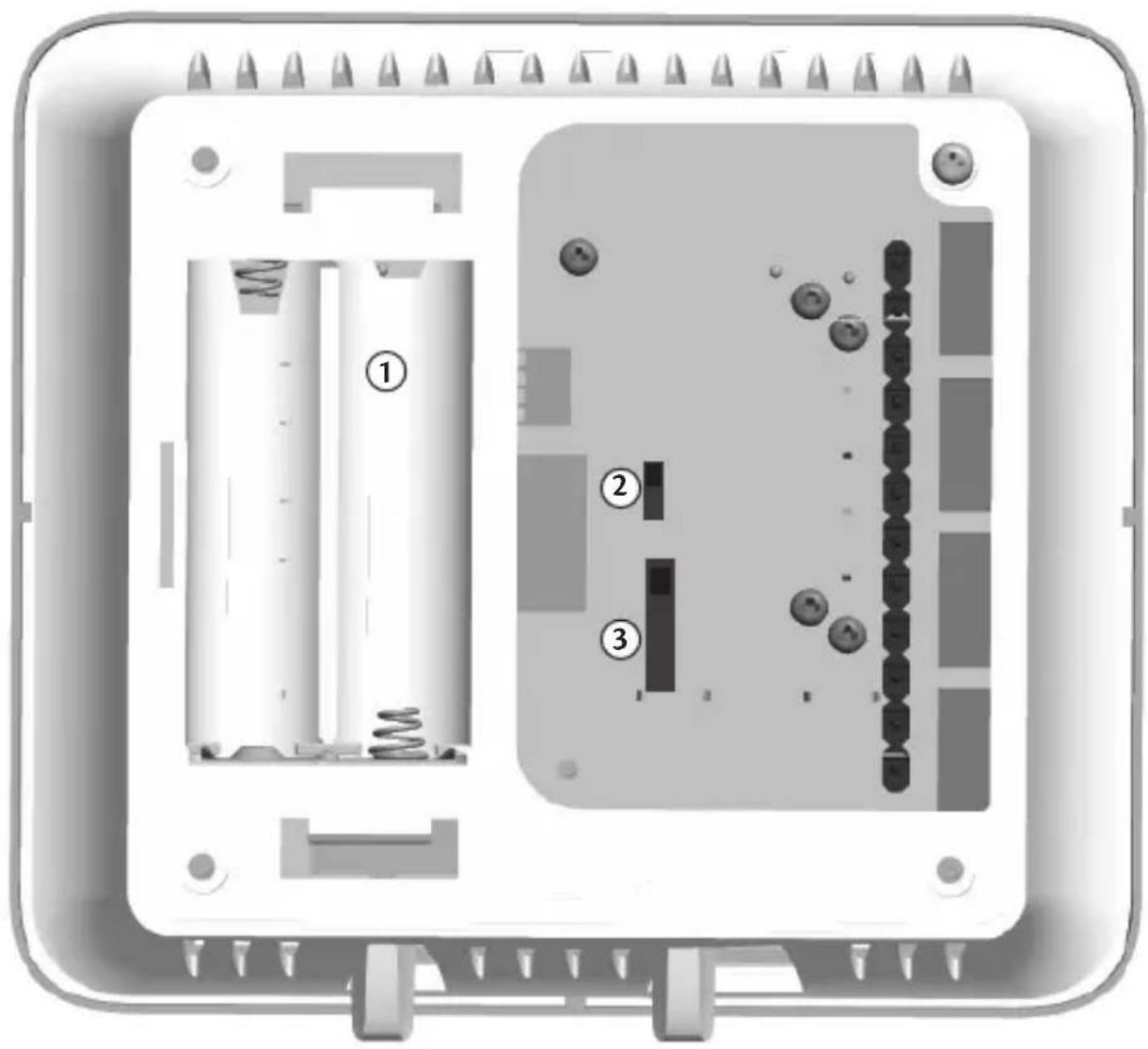
- Holds 2 "AA" Batteries.
- HE/HG Switch - allows you to set your furnace to Gas/Oil or Electric, based on the type of system you have.
- Allows your thermostat to operate your HVAC system* properly by indicating the system type that you have.
*Conventional System: Uses a condensing unit for cooling and a separate furnace system for heating.
*Heat Pump System: Uses the condensing unit for both heating and cooling.
NOTE: If you are unsure of your system type it may be necessary to contact our technical support department at 1-888-830-1326, your HVAC manufacturer, or a local HVAC technician to determine this. Improper selection of your system type could cause the thermostat to not operate your system properly.
Know Your Thermostat
Know Your Thermostat
- Indicates the current room temperature.
- C will display when in Celsius mode. Nothing will display when set to Fahrenheit.
- Low battery warning, replace the batteries in the thermostat.
- Will show when your heat pump or system is reporting a problem to the thermostat.
- Flashes when the furnace filter should be checked for replacement.
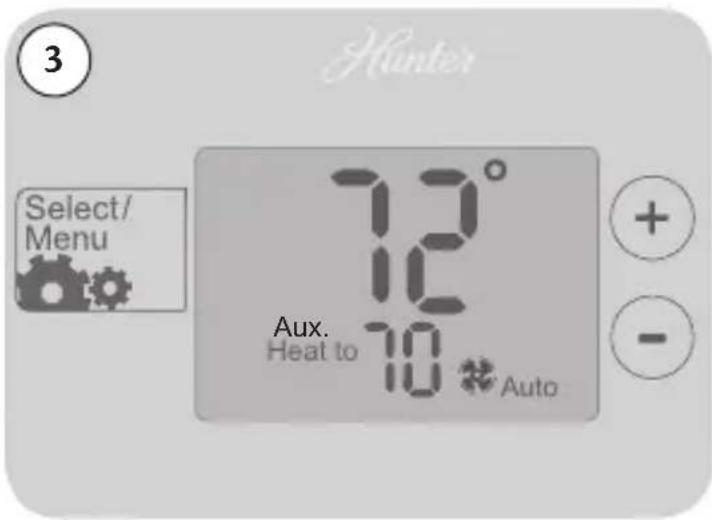
- Indicates auxiliary heat on a heat pump is running.
- Current operating mode, heat or cool.
- Current Set temperature the thermostat is scheduled to run.
- Indicates the fan is running when displayed.
- Shows the current mode of the fan, Auto or On.
Know Your Thermostat

Setting Temperature
Once you install the batteries, the thermostat will display the home screen.
- Set the system switch to Heat or Cool depending on your season.
- Use the +or button to activate the thermostat.
- Press the +or buttons again to adjust your set temperature.
- Press when finished. The thermostat will show "Updated!" to confirm your settings are saved.
NOTE: Follow this process anytime you need to make a change to your temperature.
Setting Temperature


Alerts
This chapter will outline the various alerts the thermostat will report to you and how to respond to them.
- Low Battery: This icon will appear when your batteries are starting to run low on power and should be changed to avoid system interruptions, (Figure 1) Change the batteries by gripping the sides of the thermostat firmly and pulling straight back, (Figure 1a). The batteries are located on the backside of the thermostat. The thermostat requires 2 (AA) batteries to operate. If you do not replace the batteries in a timely manner, the screen will go blank except for the low battery warning, (Figure 1b). Your system will shut down and will not operate until you replace the batteries. Replacing the batteries will clear this alert.
NOTE: Settings will not be lost while replacing the batteries. They are stored in the thermostat's memory.
- Filter Change: When this icon appears on the screen, it indicates you should check your furnace filter to see if it needs to be replaced. To reset this counter see page 16.
Alerts


Alerts
-
Auxiliary Heat: On multi-stage heat pumps this alert indicates your second stage heat is running.
-
Check System: Some heat pump systems are equipped with the ability to check system performance, indicated by the presence of an "L" wire attached to the backplate. This icon will flash on screen to alert the user that the heat pump is reporting a problem with the system. It may be necessary to have the heat pump checked or serviced by an HVAC technician.
Alerts

Menu Options
Under your menu options you have the ability to reset your filter counter, span settings, and temperature measurement. After making changes to each menu option, the thermostat will show "Updated!", save your changes, and move you back to the home screen.
To access these options:
-
Press the button.
-
Once in the menu options list, use the +or buttons to scroll through the menu items. The button will take you into the selected menu item. To escape menu options, select a menu item by pressing then press again.
-
RESET FILTER: If the filter indicator is flashing on the home screen you can reset it here. Use the +or buttons to select "Filter" and press The screen will flash "Updated!" and return to the home screen.
-
SPAN 1: The next menu option is to set your thermostats primary span. Use the +or buttons to adjust between 1, 2, or, 3 degrees. Press the screen will flash "Updated!" and return to the home screen. The span setting regulates when and how long your system will run. The span has been set at the factory to 2 which will allow the system to turn on 1°F (.05°C) above or below the set temperature and run for 1°F (.05°C) above or below the set temperature.
Menu Options


Menu Options
Example: If your thermostat is set to turn on at 72^ in heat mode, with a span setting of 2, your thermostat will activate your furnace at 71^ and shut it down when it reaches 73^ . For cooling at 72^ with a span of 2, your air conditioner will activate at 73^ and shut down at 71^ . This setting can be changed to 1, 2, or 3. 1 will shorten your running time while 3 will lengthen it.
-
SPAN 2: Unless you have a multi-stage conventional or heat pump system, there is no need to change the second stage span. If you do, use the +or buttons to adjust between 1, 2, or, 3 degrees. Press once this has been changed or if you need to make no changes. Second stage span acts the same as your primary, but it determines when and how long your second stage heat runs.
-
TEMP F/C: The thermostat can change your temperature reading between Fahrenheit and Celsius. Use the +or buttons to switch between Fahrenheit (F) and Celsius (C) press the screen will flash "Updated" and return to the home screen.
Menu Options


Additional Features
Power Failure Protection
In the event that power is lost, the batteries will act as backup, saving your settings and programs.
System Protection
To protect your system from cycling, system turning on and off rapidly, your thermostat will prevent your system from turning back on for up to 3 minutes after it has been shut down.
Reset
In situations where your thermostat may not seem to be operating properly or if you just want to reset and start over, press and hold the + and - buttons for 5 seconds until the screen flashes "Updated!". This will restore the thermostat to factory condition.
Troubleshooting and Support
Problem:
No display.
Solution:
- Check battery position and battery life.
Problem:
Auto / Fan does not turn on.
Solution:
- Move HG/HE switch to opposite position.
- Check the fan setting and make sure that it is not set to off.
Problem:
Fan runs continuously.
Solution:
- Check fan setting to see if it is set to on.
- Move HG/HE switch to opposite position.
Troubleshooting and Support
Problem:
Heating or cooling does not turn on or off.
Solution:
- Check the system is in the right mode (heat or cool).
- Be sure to wait up to 4 minutes for system protection if your system was just on.
- Check breakers to make sure power is getting to your system.
- Replace the batteries.
Problem:
Backlight does not come on.
Solution:
- Replace the batteries.
Technical Support
If you need any assistance with installation or setup of your new Hunter thermostat, please call us. Our technical support staff is ready to help!
USA: 1-888-830-1326
Canada: 1-866-268-1936
Hours of operation are from 7:00 am to 7:00 pm Monday - Friday and 8:00 am to 5:00 pm on Saturday, Central Time. You may also contact us over the Internet at www.HunterFan.com.
Limited Warranty
Hunter Fan Company
Thermostats
LIMITED WARRANTY
The Hunter Fan Company warrants your Hunter Thermostat to be free from defects in material or workmanship for a period of one year from the date of sale to the original user or consumer purchaser. If your Hunter Thermostat malfunctions or fails within the warranty period because of a defect in material or workmanship, we will replace it.
THIS WARRANTY IS IN LIEU OF ALL OTHER EXPRESS WARRANTIES. THE DURATION OF ANY IMPLIED WARRANTY, INCLUDING, BUT NOT LIMITED TO, ANY IMPLIED WARRANTY OF MERCHANTABILITY OR FITNESS FOR A PARTICULAR PURPOSE, IN RESPECT TO YOUR HUNTER THERMOSTAT IS LIMITED TO THE PERIOD OF THE EXPRESS WARRANTY SET FORTH ABOVE.
This warranty is voided if your Hunter Thermostat is not purchased and used in the USA. This warranty excludes and does not cover defects, malfunctions or failures or your Hunter Thermostat which were caused by repairs by persons not authorized by us, mishandling, improper installation, modifications or damage to the Hunter Thermostat while in your possession, or unreasonable use, including failure to provide reasonable and necessary maintenance.
Limited Warranty
This warranty neither applies to batteries nor to deterioration of, nor damage to the product caused by the use of faulty batteries. Return your product, along with proof of purchase to Hunter Fan Company Service Department, 7130 Goodlett Farms Pkwy Suite 400, Memphis, TN 38016. You will be responsible for all insurance and freight or other transportation charges to our factory. We will return your Hunter Thermostat freight prepaid. Your Hunter Thermostat should be properly packed to avoid damage in transit since we will not be responsible for any such damage. Proof of purchase is required when requesting warranty service.
IN NO EVENT SHALL HUNTER FAN COMPANY BE LIABLE FOR CONSEQUENTIAL OR INCIDENTAL DAMAGES.
SOME STATES DO NOT ALLOW LIMITATIONS ON HOW LONG AN IMPLIED WARRANTY LASTS OR THE EXCLUSION OR LIMITATION OF INCIDENTAL OR CONSEQUENTIAL DAMAGES SO THE ABOVE LIMITATION MAY NOT APPLY TO YOU.
THE WARRANTY GIVES YOU SPECIFIC LEGAL RIGHTS AND YOU MAY ALSO HAVE OTHER RIGHTS WHICH VARY FROM STATE TO STATE.



- Hunter Owner's Manual
- Table of Contents
- At A Glance
- Setup
- Features
- Thermostat Assistance
- Warranty
- Know Your Thermostat
- Setting Temperature
- Alerts
- Menu Options
- Additional Features
- Power Failure Protection
- System Protection
- Reset
- Troubleshooting and Support
- Problem:
- Solution:
- Technical Support
- Limited Warranty
Brand : HUNTER
Model : 42123
Category : Thermostat