RAPOO 3920P - Mouse

3920P - Mouse RAPOO - Free user manual and instructions

Find the device manual for free 3920P RAPOO in PDF.

📄 2 pages English EN Download 💬 AI Question 10 questions ⚙️ Specs
Notice RAPOO 3920P - page 1
Pick your language and provide your email: we'll send you a specifically translated version.
Product TypeWireless Laser Mouse
BrandRapoo
Model3920P
Connectivity2.4 GHz Wireless
Sensor TypeLaser
Number of Buttons3 (Left, Right, Scroll Wheel)
ScrollingScroll wheel with middle button
Resolution1000 DPI (typical)
Power Source1 x AA battery (not included)
Battery LifeUp to 12 months
Wireless RangeUp to 10 meters
CompatibilityWindows, Mac OS, Linux
Dimensions (L x W x H)105 x 60 x 38 mm
Weight (with battery)70 g
IncludesMouse, USB receiver, Quick start guide
Warranty2 years limited hardware warranty
CleaningUse a dry cloth; do not use liquids
Safety PrecautionsDo not open or repair; do not use in damp environment
CertificationsCE, RoHS, IEC 60950-1

Frequently Asked Questions - 3920P RAPOO

How do I connect the Rapoo 3920P mouse to my computer?
Insert the USB receiver into an available USB port on your computer. Turn on the mouse using the power switch (usually on the bottom). The mouse should automatically connect. If not, press the connect button on the receiver and then on the mouse.
What battery does the Rapoo 3920P use and how do I replace it?
The mouse uses one AA battery. To replace, open the battery compartment cover on the bottom, remove the old battery, and insert a new one with correct polarity.
Can I adjust the DPI sensitivity on this mouse?
The Rapoo 3920P typically has a fixed DPI of 1000. It does not feature on-the-fly DPI adjustment buttons. For software-based changes, check Rapoo's website for drivers.
Is the Rapoo 3920P compatible with macOS or Linux?
Yes, the mouse works with Windows, macOS, and most Linux distributions. Basic functions are supported without additional drivers. Advanced features may require software from Rapoo's website.
How do I clean the Rapoo 3920P mouse?
Use a soft, dry cloth to wipe the exterior. For stubborn dirt, slightly dampen the cloth with water (not wet). Do not use alcohol or abrasive cleaners. Avoid getting moisture into openings.
What is the wireless range of this mouse?
The Rapoo 3920P has a wireless range of up to 10 meters (33 feet) in open space. Walls and interference may reduce range.
Does the mouse have a warranty?
Yes, the Rapoo 3920P comes with a 2-year limited hardware warranty from the date of purchase. For details, visit www.rapoo.com.
What should I do if the mouse is not working?
First, check the battery and ensure it is installed correctly. Try a different USB port. Make sure the mouse is turned on. If using a USB hub, connect directly to the computer. Visit Rapoo's website for troubleshooting.
Can I use the mouse without the included USB receiver?
No, the Rapoo 3920P uses a dedicated USB receiver for wireless communication. If lost, you may need a replacement receiver from Rapoo, but compatibility is not guaranteed.
Is there software to customize the mouse buttons?
Rapoo may offer software for customization on their website. However, the 3920P is a basic model, so button remapping might not be supported. Check the support page for drivers.

User questions about 3920P RAPOO

0 question about this device. Answer the ones you know or ask your own.

Ask a new question about this device

The email remains private: it is only used to notify you if someone responds to your question.

No questions yet. Be the first to ask one.

Download the instructions for your Mouse in PDF format for free! Find your manual 3920P - RAPOO and take your electronic device back in hand. On this page are published all the documents necessary for the use of your device. 3920P by RAPOO.

USER MANUAL 3920P RAPOO

USB rapoo

rapoo ON OFF

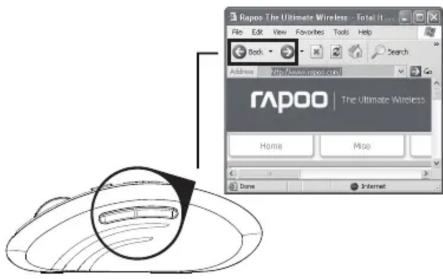
Rapoo The Ultimate Wireless - Total It File Edit View Favorites Tools Help Back Address 201-300-0000000000000000000000000000000000000000000000000000000000000000000000000000000 rapoo The Ultimate Wireless Home Mise Dave Internet

Rapoo The Ultimate Wireless - Total It ... File Edit View Favorites Tools Help Back Search Address http://www.rapoo.com/ rapoo The Ultimate Wireless Home Mice Done Internet

1650 DPI 880 DPI

Troubleshooting

See www.rapoo.com for latest FAQs, drivers and quick start guide. For extensive service, register at www.rapoo.com.

It is forbidden to reproduce any part of this quick start guide without the permission of Rapoo Technology Co., Ltd.

Safety instructions

Do not open or repair this device. Do not use the device in a damp environment. Clean the device with a dry cloth.

Warranty

The device is provided with two-year limited hardware warranty from the purchase day. Please see www.rapoo.com for more information.

Feilsøking

Declaration of Conformity

We, the manufacturer

Shenzhen Rapoo Technology Ltd., Co.

Fax: +66-0766-2858 8000

Product Name Wireless Laser Mouse

Model No

Complies with the following norms of

IEC 60950-1:2005(2nd Edition)+A1:2009

EN 60950-1:2006+AI:2009+EN 67478-2019

EN 301 489-1 V

EN 301 489-3 V1.4.1 (2002-08)

EN 300 400-1 V1.5.1 (2010-08)

EN 300 400-2 V1.4.1 (2010-08)

The product is in compliance with the essential requirements of

Council Directives 2006/95/EC and 99/5/EC, and the ROHS European directives 2002/95/EC dated on January 27th 2003 amended by directive 2005/818/EC dated on August 18th 2005.

Manufacturer/Authorised representative

RAPOO 3920P - Declaration of Conformity - 1

Charles Tsou, Manager R&D Department Date of Issue: Oct.15, 2012

For France only

Manual assistant
Powered by Anthropic
Waiting for your message
Product information

Brand : RAPOO

Model : 3920P

Category : Mouse