
T300P - Mouse RAPOO - Free user manual and instructions
Find the device manual for free T300P RAPOO in PDF.


| Product Type | Wireless Touchpad |
| Brand | Rapoo |
| Model | T300P |
| Connectivity | Wireless (2.4 GHz) |
| Power Source | 2x AAA batteries |
| Battery Life | Up to 12 months |
| Operating Range | 10 m |
| Dimensions (approx.) | 130 x 80 x 20 mm |
| Weight (approx.) | 100 g |
| Compatibility | Windows 8 and later |
| Gesture - Cursor Movement | Single finger swipe |
| Gesture - Left Click | Single finger click |
| Gesture - Right Click | Two finger click |
| Gesture - Middle Click | Three finger click |
| Gesture - Drag | Double click and drag |
| Gesture - Show/Hide Desktop | Three finger swipe down/up |
| Gesture - Backward/Forward | Three finger swipe left/right |
| Gesture - Minimize/Maximize | Four finger swipe down/up |
| Gesture - Windows 8 Start Menu | Three finger swipe up |
| Warranty | 2 years limited hardware warranty |
| Maintenance | Clean with a dry, soft cloth |
| Safety Precautions | Do not open or repair; avoid damp environments |
Frequently Asked Questions - T300P RAPOO
User questions about T300P RAPOO
0 question about this device. Answer the ones you know or ask your own.
Ask a new question about this device
Download the instructions for your Mouse in PDF format for free! Find your manual T300P - RAPOO and take your electronic device back in hand. On this page are published all the documents necessary for the use of your device. T300P by RAPOO.
USER MANUAL T300P RAPOO
Quick Start Guide(A.1)
Schnurloses Touchpad
5

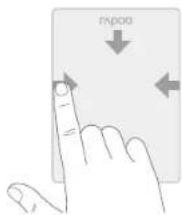
Swipe cursor: Move using a single finger
Left click: Click using a single finger
Drag: Double click and drag a finger on the touchpad
Click on it trate ####: fast clis on un sole
Return Windows 8 "Start" menu: Swipe up using three fingers ShowHide desktop: Swipe down using three fingers
Backward/Forward: Swipe left/right using three fingers
Right click: Click using two fingers
Minimize/Maximize windows: Swipe down/up using four fingers
Middle click: Click using three fingers
See www.rapoo.com for latest FAQs, drivers and quick start guide. For extensive service register at www.rapoo.com.
Copyright
It is forbidden to reproduce any part of this quick start guide without the permission of Rapoo Technology Co., Ltd.
Safety instructions
Do not open or repair this device. Do not use the device in a damp environment. Clean the device with a dry cloth.
Warranty
The device is provided with two-year limited hardware warranty from the purchase day. Please see www.rapco.com for more information.
Feijeking
www.rapoo.com/warranty
Declaration of Conformity
Wu, the manufacturer Shenzhen: Do
Fax: 486-0716-2858 粘品
are that the product Product Name
Model No T3009
Complete with the following
EC 6000-1200(2nd Edition)-A1200 EN 6000-1200=48000=A1200
EN 6247932010
EN 301 4882 V
EN 200-495-1 V1,5.1 (2018-08)
EN 200 408-2 V1,4.5 (2013-08)
The product is a compliance with the essential requirements of
Couna Libbiotis 2005/19/20 and WJEC, and the ROHS European Banken 2002/19/20 dated on January 27th 2003 amended by directive 2005/01/VEG dated on August 18th 2005.
Manufacturer/Authorised representative
Charles Tsou
Other non-managers R&D Department, Unit of Insurance 1, 2013
For France only


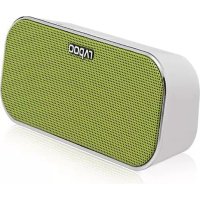
Brand : RAPOO
Model : T300P
Category : Mouse