BX-15 - Uncategorized Soundstream - Free user manual and instructions
Find the device manual for free BX-15 Soundstream in PDF.


| Product Type | Subwoofer |
| Brand | Soundstream |
| Model | BX-15 |
| Speaker Size | 15 inches |
| Impedance | 4 ohms |
| RMS Power | 500 watts |
| Peak Power | 1000 watts |
| Frequency Response | 20 Hz - 200 Hz |
| Sensitivity | 90 dB |
| Dimensions (W x H x D) | 450 x 450 x 450 mm |
| Weight | 20 kg |
| Cone Material | Polypropylene |
| Magnet Type | Ferrite |
| Voice Coil | Dual 4 ohms |
| Protective Grill | Included |
| Input Type | Screw terminals |
| Power Source | Passive (requires external amplifier) |
| Main Functions | Low-frequency reproduction, suitable for car or home audio |
| Maintenance and Cleaning | Wipe with dry cloth, avoid moisture |
| Safety | Do not expose to water, do not overload |
| Spare Parts and Repairability | Cone, suspension, voice coil available; repairable by authorized centers |
| General Information | 1-year warranty |
Frequently Asked Questions - BX-15 Soundstream
User questions about BX-15 Soundstream
0 question about this device. Answer the ones you know or ask your own.
Ask a new question about this device
Download the instructions for your Uncategorized in PDF format for free! Find your manual BX-15 - Soundstream and take your electronic device back in hand. On this page are published all the documents necessary for the use of your device. BX-15 by Soundstream.
USER MANUAL BX-15 Soundstream
Digital Bass Reconstruction Processor
Owner's Manual & Installation Guide
Congratulations on purchasing the SOUNDSTREAM BX. You are now the proud owner of the most refined and most accurate bass enhancing & restoration system available.
Whether your interest is in Beethoven's kettle drums, in Miles Davis' trumpet, or the percussion of Rap music, the BX will restore those long-lost missing bass with fantastic accuracy and clarity.
There's a dash-mounted level control unit that permits instant adjustments, whether it's because your passenger is not as much a "bass-head" as you are or, for whatever reason, you want to turn it down a bit; this handy knob does the trick.
- Model & Serial Number ____
- Authorized Dealer Name ____
- Date of Purchase ____
Four Factors affect the Bass Response:
- The acoustics of the vehicle
- The locations of the speakers
- The music in which how it's recorded
- Speakers and speaker enclosure types.
Because of the variations in the recording process, we developed Soundstream's BX to help restore any low frequencies lost during the recording process. However, the acoustics of various environments are different.
The Sweep control allows you to select a center frequency [ the frequency most affected] between 27 and 63 Hz. The Width control then you can control the shape of the filter centered around the Sweep frequency.
Product Features
Bass Restoration: The BX contains a Bass Restoration circuit that accurately injects Low-frequency information back into the signal path. What that means in simple terms is that the BX will give more bass impact to your collection of music.
Bass Equalization Circuit: The BX has a unique equalization circuit that contours the restored bass to your speaker systems.
Dash Mount Remote Control: The BX comes with Dash Mountable Remote Control allow you to enjoy the effects of the BX without leaving the driver's seat. The Dash Mount Control has a LED indicator; this LED will grow brighter as you add more bass or dim when you decrease the gain knob.
Bass Maximizer Indicator: Not only does the BX provide great music to your ears, but it gives you the same visual enjoyment as well. On the Chassis of the BX, three LED indicators flash when the bass maximization circuit is activated.
Connections
Power Connection
(+12V) Battery/Constant +12 Volt
(Remote) Connect to amplifier Turn-On - Behind Radio or True Ignition Source
[GND] Connect to Vehicle Chassis [-]
RCA Connection
(Balanced Input) - Connect your Low-Level signal from your vehicle's source unit or input converter if you are not using an aftermarket radio. Designed to handle extreme signals!
(Output) - This should be connected to your bass amplifiers; this kit does not come with any RCA's cables. Make sure and measure and purchase separately to complete the installation
(Dash Remote) - This is your knob, wait... you know what we mean?! Connect provide dash level controller and provided cable to install somewhere in drivers reach for adjustments.
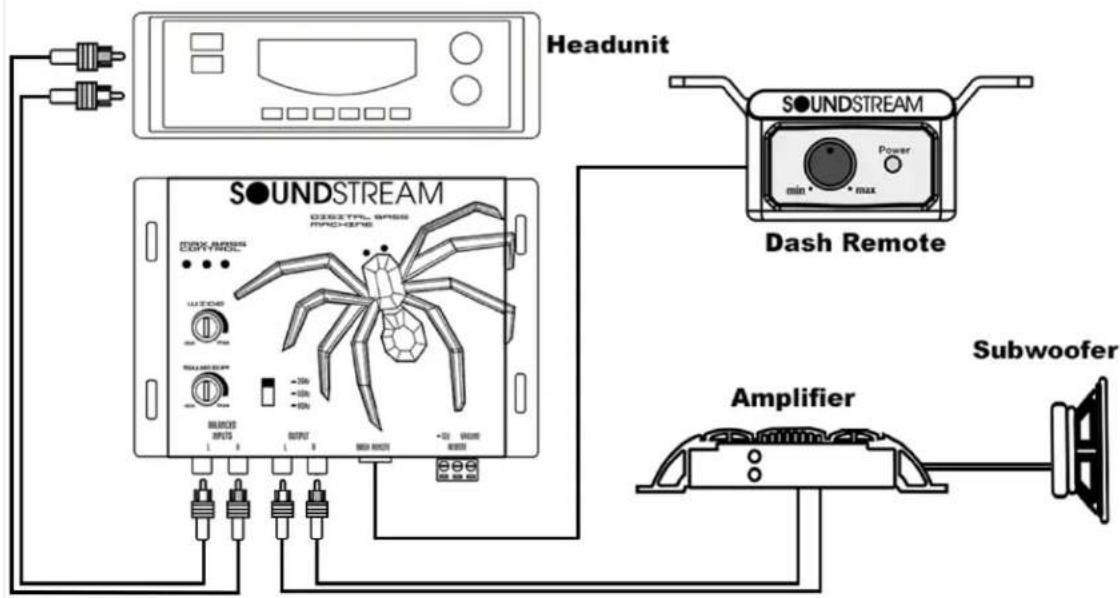
** Picture to help illustrate input and outputs
Setting the Bass Output Control
The BX is a powerful bass component. This device is equipped with several different Bass Output selections. If you should need to change the settings, please use the chart below for guidance. It is recommended: listen using the factory setting before changing your Bass Output settings.
| Settings | Amplifier Input Voltage | Minimum Speaker Size |
| 2.5 Volts | 3V or Less 8” Subwoofers | |
| 5.0 Volts | 5V or Less | 10” Subwoofers |
| 7.5 Volts | 7V or Less | 12” Subwoofers |
| 10 Volts | OH MY GOSH!!!!!!! | SPL Type Subwoofers |
Product Specifications
Maximum Input Level. 15V rms
Maximum Output Level ____ 13.5V peak
Frequency Response 10Hz - 100KHz; +/-1dB
Total Harmonic Distortion 0.003%
Signal to Noise Ratio ____ -130dB
Balanced Input Noise Rejection ____ >60dB
Input Impedance 10K Ohm
Output Impedance 150 Ohm
Power Supply ____ High headroom PWM
Power Draw 150mA
Fuse Rating ____ 1 Amp (Included)
Product Functions
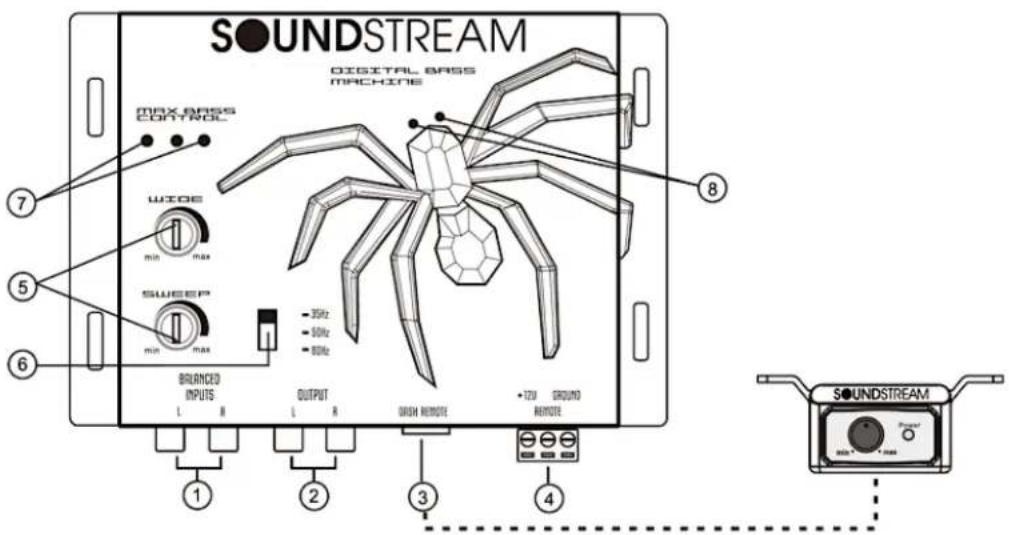
1.) Input: The inputs of the BX use a balanced input to help minimize induced noise. They are also designed to handle very high signal voltages up to 15 volts.
2.) Outputs: These RCA connectors should be connected to the next component after the BX, such as crossover, equalizer, or amplifier.
3.) Dash Remote Control
4.) Power Connector
5.) Para-Bass Controls: These two knobs control the Para-Bass functions of the BX. The SWEEP knob allows you to pick the center frequency that you want the BX bass restoration circuit to maximize. The WIDE knob adjusts how wide of a frequency range the BX will affect.
6.) The PFM Subsonic Filter Switch: The BX utilizes a PFM Subsonic Filter Switch, which will help with speaker control and amplifier power management. This PFM Subsonic Filter Switch comes with three frequency selections 35Hz / 50Hz / 80Hz. On most systems, setting the switch at 33Hz is fine. If you want to protect your speaker system even more, you should try a higher frequency. Often a higher frequency sounds louder and cleaner.
7.) Bass Maximizer Indicator: These three LED indicators flash when the bass maximization circuit is activated.
8.) Power-On LED.
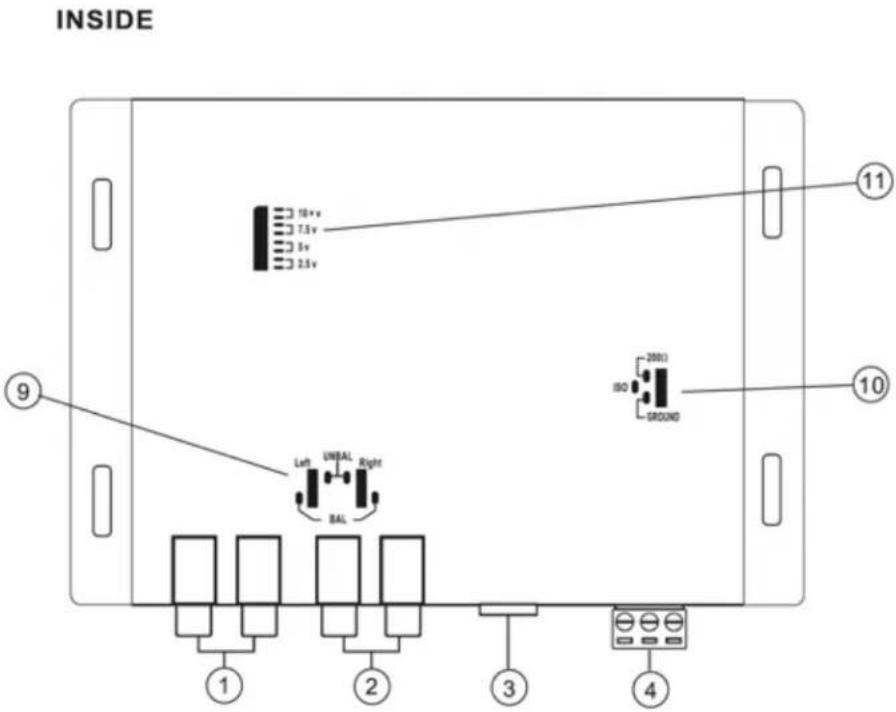
9.) Input Ground: For the Most system, you can leave this jumper set in the BALANCE position. In some scenarios, the source unit may look for ground through the RCA connectors; even you should change the jumpers to the UNBALANCE position.
10.) Ground Isolation Jumper: Occasionally, an alternator whine may appear in a system because the source units and amplifiers have different grounds. To help this situation, we have provided alternative ground connections; make sure your system is of before making this change.
11.) Bass Output Control Jumpers: Not all systems are designed the same; some systems are designed strictly for SPL (Sound Pressure Level) while others a little tamer. The Bass Maximizer circuit can either increase or decrease the signal voltage to your liking. You may change these jumpers to higher or lower settings to maximize your bass output and protect your speakers. Factory settings usually work just fine; we recommend you try that first.
Troubleshooting Guide
If the unit does not turn on and the power indicator LED is NOT illuminated, start with this:
- Check and make sure that B+ and GND are not reversed
- Check power wire is correctly connected and have the appropriate potential (11-16 volts)
- Check that the fuse is functioning correctly.
If you experience high audible distortion or low output volume:
- Check that the input and output levels are set correctly. Input should match the source, and output should match the sensitivity of the host.
- Check the crossover settings; make sure they are correct; for high "Q" system s, set the crossover half an octave above the desired point and for low "Q" systems, put it 1 octave or more above.
If you experience whining or engine noise:
- Verify that the GND connection is secure; the conductor (wire) is not too thin and unnecessarily long.
- Check that the +12V wire is not too thin and unduly long.
- Change the power source; try connecting a different power source.
Still, having trouble? Contact our Tech-Support
(800) 832-4647 or
Tech-Support@Soundstream.com
Soundstream Technologies warrants this product to be free from defects in materials and workmanship under everyday use and conditions for one year if installed professionally by an authorized dealer or for one year if self-installed from the original purchase date. Should any service be required for any reason due to a manufacturing defect or malfunction during the warranty period, we will repair or replace at our discretion the defective merchandise at no charge upon delivery of the product to the address shown below with a copy of the proof of purchase if it is within its warranty period as stated above.
- Enclose with your defective product a brief description of the problem with your name and daytime phone number so we may contact you with any questions or concerns regarding your return.
- Enclose a copy of your original sales receipt for proof of purchase and installation.
- Enclose a \$25.00 US certified check or money order to cover shipping and handling for the return of your product. Do not include cash.
- Carefully pack your product to protect it from damage during shipping and send it prepaid to:
Soundstream Technologies c/o Customer Service
1550 S. Maple Ave.
Montebello, CA 90640
Please note your warranty will not cover the following:
- Any units that have been misused or physically damaged.
- Any units that have been previously opened or repaired by a service center that is not authorized.
Any applicable and implied warranties, including the warranty of the merchant's ability, are limited to a maximum of one year from the original date of purchase at retail, and no warranties, whether expressed or implied, shall apply to this product after that. Under no circumstance shall be liable for any damage, direct or consequential, arising out of the use of or inability to use this product. Some states do not allow for limitations of implied warranties or exclusions of significant damage; therefore, these restrictions may not apply to you. To receive the benefit of this warranty, fill out the attached warranty card and mail it to the address on the lower reverse side.
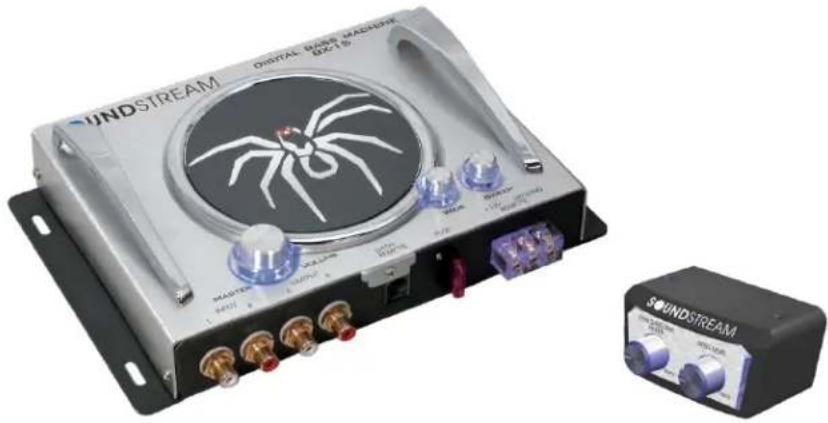
natural_image
Exterior view of a Soundstream digital audio workstation (no signage or text on main body)SOUNDSTREAM
TECHNOLOGIES
1550 S. Maple Ave
Montebello, CA 90640
Direct (800) 832-4647