
TLE1027 - Tablet PHILIPS - Free user manual and instructions
Find the device manual for free TLE1027 PHILIPS in PDF.


Pick your language and provide your email: we'll send you a specifically translated version.
| Product Type | Tablet |
| Brand | Philips |
| Model | TLE1027 |
| Display Size | 10.1 inches IPS LCD |
| Resolution | 1280 x 800 pixels |
| Processor | Quad-core 1.3 GHz |
| RAM | 2 GB |
| Internal Storage | 32 GB (expandable via microSD) |
| Operating System | Android |
| Battery Capacity | 5000 mAh Lithium-ion |
| Charging | DC 5V/2A via micro USB |
| Connectivity | Wi-Fi 802.11 b/g/n, Bluetooth 4.0 |
| Camera | Front 2 MP, Rear 5 MP |
| Dimensions | 240 x 160 x 8 mm |
| Weight | 500 g |
| Main Functions | Web browsing, media playback, e-reading, apps |
| Care & Cleaning | Wipe with a soft, dry cloth; avoid liquids |
| Safety | Keep away from water and heat sources |
| Spare Parts & Repairability | Contact Philips support for replacement parts |
| General Information | User manual available for download at notice-facile.com |
Frequently Asked Questions - TLE1027 PHILIPS
How do I turn on the Philips TLE1027 tablet?
Press and hold the power button located on the side of the tablet for about 3 seconds until the screen lights up.
How can I charge the tablet?
Connect the provided micro USB cable to the tablet's charging port and plug the adapter into a power outlet. The charging indicator will show when connected.
How do I connect to Wi-Fi?
Go to Settings > Wi-Fi, toggle it on, select your network from the list, and enter the password if required.
How do I take a screenshot?
Press and hold the power button and volume down button simultaneously for 2 seconds. The screen will flash and the screenshot will be saved to the gallery.
How can I perform a factory reset?
Go to Settings > Backup & Reset > Factory data reset. Confirm the action. This will erase all data, so back up important files first.
Does the tablet have a SIM card slot?
No, the Philips TLE1027 is a Wi-Fi-only model and does not support cellular connectivity or a SIM card.
How do I update the software?
Go to Settings > About tablet > System updates. If an update is available, follow the on-screen instructions to download and install.
How can I extend battery life?
Reduce screen brightness, turn off Wi-Fi and Bluetooth when not in use, close unused apps, and enable battery saver mode in Settings.
How do I clean the screen safely?
Turn off the tablet and unplug it. Use a soft, lint-free microfiber cloth slightly dampened with water (not wet) to gently wipe the screen. Avoid abrasive cleaners.
How do I use the camera?
Open the Camera app from the home screen. Tap the shutter button to take a photo, or switch to video mode by sliding the option. Use the front/rear camera toggle to switch.
User questions about TLE1027 PHILIPS
0 question about this device. Answer the ones you know or ask your own.
Ask a new question about this device
No questions yet. Be the first to ask one.
Download the instructions for your Tablet in PDF format for free! Find your manual TLE1027 - PHILIPS and take your electronic device back in hand. On this page are published all the documents necessary for the use of your device. TLE1027 by PHILIPS.
USER MANUAL TLE1027 PHILIPS

Tip:
Send
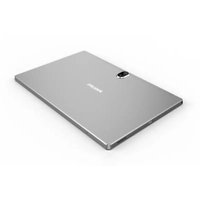


Table of contents
Click a title to access it
Manual assistant
Powered by Anthropic
Waiting for your message
Product information
Brand : PHILIPS
Model : TLE1027
Category : Tablet