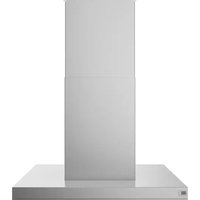
UVI1036SRSS - Range hood Café - Free user manual and instructions
Find the device manual for free UVI1036SRSS Café in PDF.


| Product Type | Range Hood |
| Brand | Café |
| Model | UVI1036SRSS |
| Dimensions (W x D x H) | 90 x 50 x 130 cm |
| Net Weight | 15 kg |
| Power Supply | 220-240 V, 50 Hz |
| Motor Power | 250 W |
| Number of Speeds | 3 speeds + intensive |
| Control Type | Touch Electronic |
| Lighting | 2 LED lamps 3 W |
| Evacuation Mode | Extraction or recirculation (optional charcoal) |
| Max Airflow | 650 m³/h |
| Max Noise Level | 65 dB(A) |
| Grease Filter | Dishwasher-safe metal filter |
| Charcoal Filter | Activated charcoal filter (optional) |
| Maintenance and Cleaning | Clean the grease filter every month, replace the charcoal filter every 3-6 months |
| Safety | Automatic shut-off after 24h, backflow protection |
| Spare Parts and Repairability | Filters, lamps, motor available – repairable by a professional |
| Warranty | 2 years |
| Color | Brushed stainless steel |
Frequently Asked Questions - UVI1036SRSS Café
User questions about UVI1036SRSS Café
0 question about this device. Answer the ones you know or ask your own.
Ask a new question about this device
Download the instructions for your Range hood in PDF format for free! Find your manual UVI1036SRSS - Café and take your electronic device back in hand. On this page are published all the documents necessary for the use of your device. UVI1036SRSS by Café.
USER MANUAL UVI1036SRSS Café
SAFETY INFORMATION......3
USING THE HOOD
Hood Controls 4
Wi-Fi Connect 4
Chef Connect 4
CARE AND CLEANING
For Your Safety 5
Filters 5
Hood Surfaces 5
Lights 5
TROUBLESHOOTING TIPS ..... 6
LIMITED WARRANTY 7
CONSUMER SUPPORT 8
Write the model and serial numbers here:
Model # ____
Serial # ____
You can find them on a label on the side trim or on the front of the oven behind the oven door.
OWNER'S MANUAL
UVI1036
ENGLISH / FRANÇAIS / ESPAÑOL
THANK YOU FOR MAKING GE APPLIANCES A PART OF YOUR HOME.
Whether you grew up with GE Appliances, or this is your first, we're happy to have you in the family.
We take pride in the craftsmanship, innovation and design that goes into every GE Appliances product, and we think you will too. Among other things, registration of your appliance ensures that we can deliver important product information and warranty details when you need them.
Register your GE appliance now online. Helpful websites and phone numbers are available in the Consumer Support section of this Owner's Manual. You may also mail in the pre-printed registration card included in the packing material.

GE APPLIANCES
IMPORTANT SAFETY INFORMATION READ ALL INSTRUCTIONS BEFORE USING THE APPLIANCE
WARNING
TO REDUCE THE RISK OF FIRE, ELECTRIC SHOCK OR INJURY TO PERSONS, OBSERVE THE FOLLOWING:
A. Use this unit only in the manner intended by the manufacturer. If you have questions, contact the manufacturer.
B. Before servicing or cleaning unit, switch power off at service panel and lock the service disconnecting means to prevent power from being switched on accidentally. When the service disconnecting means cannot be locked, securely fasten a prominent warning device, such as a tag, to the service panel.
C. Do not use this unit with any solid-state speed control device.
D. This unit must be grounded.
E. Do not use replacement parts that have not been recommended by the manufacturer (e.g. parts made at home using a 3D printer).
F. People who are not physically or mentally capable (including children), or who lack experience and knowledge, should not use this device unless they are supervised or instructed in its use by someone responsible for their safety.
G. Children must be supervised to ensure they do not treat this device as a toy.
H. Do not flambé under the range hood.
CAUTION
FOR GENERAL VENTILATING USE ONLY. DO NOT USE TO EXHAUST HAZARDOUS OR EXPLOSIVE MATERIALS AND VAPORS.
CAUTION
LIGHTS AND OTHER ACCESSIBLE PARTS MAY BECOME HOT DURING USE. ALLOW LIGHTS TO COOL BEFORE TOUCHING.
WARNING
TO REDUCE THE RISK OF A RANGE TOP GREASE FIRE:
A. Never leave surface units unattended at high settings. Boil overs cause smoking and greasy spillovers that may ignite. Heat oils slowly on low or medium settings.
B. Always turn hood ON when cooking on high heat or when flambéing food (i.e. Crepes Suzette, Cherries Jubilee, Peppercorn Beef Flambé).
C. Clean ventilating fans frequently. Grease should not be allowed to accumulate on fan or filter.
D. Use proper pan size. Always use cookware appropriate for the size of the surface element.
WARNING
TO REDUCE THE RISK OF INJURY TO PERSONS IN THE EVENT OF A RANGE TOP GREASE FIRE, OBSERVE THE FOLLOWING*:
A. SMOTHER FLAMES with a close-fitting lid, cookie sheet or metal tray, then turn off the burner. BE CAREFUL TO PREVENT BURNS. If the flames do not go out immediately, EVACUATE AND CALL THE FIRE DEPARTMENT.
B. NEVER PICK UP A FLAMING PAN—You may be burned.
C. DO NOT USE WATER, including wet dishcloths or towels—a violent steam explosion will result.
D. Use an extinguisher ONLY if:
- You know you have a Class ABC extinguisher, and you already know how to operate it.
- The fire is small and contained in the area where it started.
- The fire department is being called.
- You can fight the fire with your back to an exit.
* Based on "Kitchen Fire Safety Tips" published by NFPA.
READ AND SAVE THESE INSTRUCTIONS
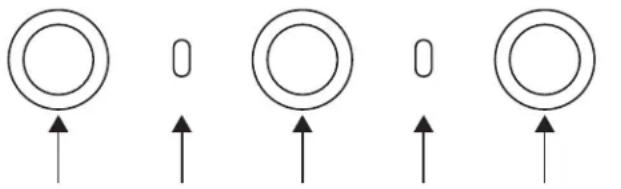
Hood Controls
CONTROLS
- Power. Turns fan on and off.
- Wifi Indicator.
- Fan. Toggles through low, medium, high, and boost.
- Chef Connect Indicator.
- Light. Toggles through High, Medium, Low
- Indoor Air Quality (IAQ) LED Indicator.
Changes color as indoor air quality changes. Unit must be commissioned to Wi-Fi for IAQ sensor to become operational.

natural_image
Four circular diagrams with upward arrows, no text or symbols present54321
DISCLAIMER
Limitations on Indoor Air Quality Monitoring: The hood is intended to be used only to provide a general awareness of changes of levels of certain components of indoor air quality near the hood rather than absolute measurements of any given component and/or measurement against any given standard. Variations in readings may occur due to any number of factors, including ventilation conditions, environmental influences, cooking activities, and sensor limitations. Any observations or readings provided by this product are for informational purposes only and may not be utilized as a substitute for or in the development of any professional advice, assessment, or diagnosis of any type.
WI-FI CONNECT
CONNECTING YOUR WI-FI ENABLED HOOD
Your hood is designed to provide you with two-way communication between your appliance and smart devices. By using the SmartHQ™ mobile app, you will be able to control hood operations such as fan speed, light intensity, and night light scheduling using your smartphone or tablet*.
For the best experience, prior to beginning:
- Download the SmartHQ™ app and sign in or create an account.
NOTE: New users must verify their email address to
complete the sign in process.
- Have your home Wi-Fi network password available.
To connect your range to Wi-Fi, touch and hold the FAN button for 3 seconds. The Wi-Fi indicator light will start flashing. Once your hood is connected, launch the SmartHQ™ app and tap on your hood to explore.
Apply all software upgrades if prompted to ensure your hood has the latest features. If you have issues with the connection process, please call 800.220.6899 and ask for assistance with wireless connectivity.
* Compatible Apple or Android devices and home Wi-Fi network required.
CHEF CONNECT
To pair with another device:
Press and hold the Light button for 3 seconds. The indicator light will blink until the hood is paired with the range or other device. If the pairing is successful, the Bluetooth® indicator will turn on and become solid. It will time out after 2 minutes if the pairing is not completed, after which the pairing sequence will need to be restarted.
To cancel pairing:
Hold the Light button down for 3 seconds and the indicator light will stop blinking.
Changing the Default Sync Settings:
The factory Default Sync Settings for the light will be
the brightest and the setting for the fan will be OFF. The user can change the settings by pressing and holding the Light button for 10 seconds. This will enter the Default Settings Mode. Once in this mode, the backlights for all buttons will blink on/off indefinitely and the fan and light will switch to the current settings, so the user knows what the current default value is. At this time, set the light and fan to the desired default levels using the Light and Fan buttons. Once satisfied with the selection, press and hold the Power button for 10 seconds, which will exit this mode. At that time the backlights will stop blinking and the state of the fan and light will change back to their prior state before entering the Default Settings Mode.
Care and Cleaning
FOR YOUR SAFETY
Before servicing or cleaning the unit, switch power off at the service panel and lock the service panel to prevent power from being switched on accidentally.
If the service panel cannot be locked, fasten a tag or prominent warning label to the panel.
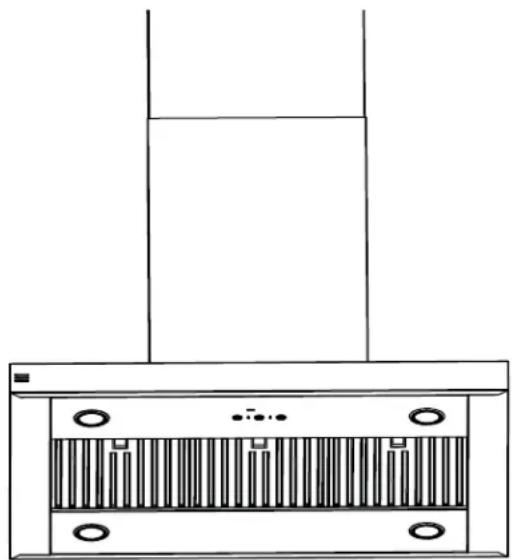
METAL GREASE FILTER
The metal filter traps grease released by foods on the cooktop. The filter also helps prevent flames (from food, grease) from damaging the inside of the hood.
For this reason, the filter must ALWAYS be in place when the hood is used. The grease filter should be cleaned every 6 months, or as needed.
To remove:
Grasp the filter lock and pivot it open to release. Pull the filter down and out.
To replace:
- Place the two tabs on the filter edge into the locating slots in the left or right side of the hood opening.
- Push the filter up, open the filter lock and snap it into place in the hood.
To clean, swish the filter in hot soapy water and rinse in clean water or wash it in the dishwasher. Do not use abrasive cleansers.
natural_image
Line drawing of a kitchen chimney with ventilation grilles and mounting holes (no text or symbols)CHARCOAL FILTER (optional accessory)
If the model is not vented to the outside, the air will be recirculated through a disposable charcoal filter that helps remove smoke and odors.
The charcoal filter should be replaced when it is noticeably dirty or discolored (usually after 6 to 12 months, depending on hood usage).
The charcoal filters are NOT included with the unit.
To reduce the risk of fire and shock, when used in recirculation mode, use only charcoal filter UXCF91.
NOTE: DO NOT rinse, or put charcoal filter in an automatic dishwasher.
The charcoal filter cannot be cleaned. It must be replaced.
To inquire about purchasing replacement charcoal filters or to find the location of a dealer nearest you, please visit GEAppliances.com/ge/parts

STAINLESS STEEL HOOD SURFACES
Do not use a steel wool pad; it will scratch the surface.
To clean the stainless steel surface, use warm sudsy water or a stainless steel cleaner or polish. Always wipe the surface in the direction of the grain. Follow
the cleaner instructions for cleaning the stainless steel surface. To inquire about purchasing stainless steel appliance cleaner or polish, or to find the location of a dealer nearest you, visit GEAppliances.com
LIGHTS
To change the LED lamps, schedule a service appointment. See Consumer Support page for a list of
websites and contact information.
TROUBLESHOOTING
Save time and money! Review the charts on the following pages first and you may not need to call for service.
| Problem Possible Causes What To Do | ||
| Fan does not operate when the On/Off button is pushed | A fuse may be blown or a circuit breaker tripped. | Replace fuse or reset circuit breaker. |
| Fan keeps going off and on | The motor is probably overheating and turning itself off. This can be harmful to the motor. | Check to be sure the filter is clean. If off and on cycling continues, call for service.Visit bodewell.com/schedule-repair-service for available makeup air solutions. |
| Fan does not operate when fan On/Off button is pressed or when + or - button is pressed | The blower connector is loose or not plugged into its mating connector. | Disconnect power to the unit. Lift the lower duct cover and look at the blower connector plug. If the blower connector plug is loose, plug it in securely. See the Installation Instructions for the plug location and how to plug in the connector. |
| Loud or abnormal airflow noise | Wrong size duct used in installation. | This hood requires 8" ducting and a maximum duct length of 150 equivalent feet to perform optimally. Using smaller duct pipe or longer equivalent lengths of duct pipe will cause improper venting.GEAppliances service technicians cannot correct this issue if installed improperly. |
| Fan fails to circulate air or moves air slower than normal and/or fan is making loud or abnormal airflow noise | Obstructions in duct work. Make sure | nothing is blocking the vent.Make sure your wall or roof cap has a blade or door. |
| Damper blade on wall or roof cap may not be open. | Make sure damper swings freely. Damper blades may flip over and will not fully open when this happens. Adjust to original position. | |
| Metal grease filter and charcoal filter (if present) may be dirty. | Clean the metal grease filter and replace charcoal filter (if present). See Care and Cleaning. | |
| Sufficient makeup (replacement) air is required for exhausting appliances to operate to rating. | Check with local building codes, which may require or strongly advise the use of makeup air. | |
| The hood controls are not operating correctly | Control logic confused. Disconnect power to the hood by resetting the circuit breaker. Wait 30 seconds to allow controls to reset. | |
| IAQ sensor not working Unit is | not connected to cloud or calibrating. | Commission unit to router using app. |
| IAQ sensor changing when not cooking | Other sources of VOC and PM in kitchen (i.e. candles, wine). | Turn fan on if undesired smell in kitchen otherwise no action required. |
GEAppliances.com
All warranty service is provided by our Factory Service Centers, or an authorized Customer Care® technician. To schedule service online, visit us at bodewell.com/schedule-repair-service, or call GE Appliances at 833-4BODEWELL (833-426-3393). Please have your serial number and your model number available when calling for service.
Servicing your appliance may require the use of the onboard data port for diagnostics. This gives a GE Appliances factory service technician the ability to quickly diagnose any issues with your appliance and helps GE Appliances improve its products by providing GE Appliances with information on your appliance. If you do not want your appliance data to be sent to GE Appliances, please advise your technician not to submit the data to GE Appliances at the time of service.
| For the period of GE | Appliances will replace |
| One yearFrom the date of the original purchase | Any part of the cooking product which fails due to a defect in materials or workmanship. During this limited one-year warranty, GE Appliances will provide, free of charge, all labor and related service costs to replace the defective part. |
What GE Appliances will not cover:
■ Service trips to your home to teach you how to use the product.
■ Improper installation, delivery, or maintenance.
■ Failure of the product if it is abused, misused, modified, or used for other than the intended purpose or used commercially.
■ Replacement of house fuses or resetting of circuit breakers.
■ Damage to the product caused by accident, fire, floods, or acts of God.
■ Damage to finish, such as surface rust, tarnish, or small blemishes not reported within 48 hours of delivery.
■ Incidental or consequential damage caused by possible defects with this appliance.
■ Damage caused after delivery.
■ Product not accessible to provide required service.
■ Service to repair or replace light bulbs, except for LED lamps.
EXCLUSION OF IMPLIED WARRANTIES
Your sole and exclusive remedy is product repair as provided in this Limited Warranty. Any implied warranties, including the implied warranties of merchantability or fitness for a particular purpose, are limited to one year or the shortest period allowed by law.
This limited warranty is extended to the original purchaser and any succeeding owner for products purchased for home use within the USA. If the product is located in an area where service by a GE Appliances Authorized Servicer is not available, you may be responsible for a trip charge or you may be required to bring the product to an Authorized GE Appliances Service location for service. In Alaska, the limited warranty excludes the cost of shipping or service calls to your home.
Some states do not allow the exclusion or limitation of incidental or consequential damages. This limited warranty gives you specific legal rights, and you may also have other rights which vary from state to state. To know what your legal rights are, consult your local or state consumer affairs office or your state's Attorney General.
Warrantor: GE Appliances, a Haier company, Louisville KY, 40225
In Canada (including the province of Québec):
This limited warranty is extended to the original purchaser and any succeeding owner for products purchased in Canada including Québec for home use within Canada including Québec. If the product is located in an area where service by a GE Appliances Authorized Servicer is not available, you may be responsible for a trip charge or you may be required to bring the product to an Authorized GE Appliances Service location.
Some provinces including Québec do not allow the exclusion or limitation of incidental or consequential damages. This limited warranty gives you specific legal rights, and you may also have other rights which vary from province to province including Québec. To know what your legal rights are, consult your local or provincial consumer affairs office.
For Québec consumers only - Notice on the warranty of availability of spare parts, repair services and information necessary for repair or maintenance (s. 39 of the Consumer Protection Act):
Please be advised that MC Commercial Inc. ("MC Commercial") does not guarantee, within the meaning of section 39 of the Consumer Protection Act, CQLR, c. P-40.1 and sections 79.18 to 79.20 of the Regulation respecting the application of the Consumer Protection Act, CQLR, c P-40.1, r. 3, the availability of replacement parts, repair services, or the information necessary for the maintenance or repair of goods manufactured, imported, advertised, or sold by MC Commercial.
Please note that MC Commercial Inc. continues to offer the manufacturer's limited warranty as stated in the Owner's Manual or Quick Guide, and that this limited warranty is distinct from the statutory warranty of availability provided for under section 39 of the Consumer Protection Act.
Warrantor: MC Commercial Inc., Burlington, ON, L7L 6B2
Extended Warranties: Purchase a GE Appliances extended warranty and learn about special discounts that are available while your warranty is still in effect. You can purchase it online anytime at
bodewellcareplan.com
GE Appliances Service will still be there after your warranty expires.
Consumer Support
GE Appliances Website
Have a question or need assistance with your appliance? Try the GE Appliances Website 24 hours a day, any day of the year! You can also shop for more great GE Appliances products and take advantage of all our on-line support services designed for your convenience. GEAppliances.com.
Register Your Appliance
Register your new appliance on-line at your convenience! Timely product registration will allow for enhanced communication and prompt service under the terms of your warranty, should the need arise. You may also mail in the pre-printed registration card included in the packing material. GEAppliances.com/register.
Schedule Service
Expert GE Appliances repair service is only one step away from your door. Get on-line and schedule your service at your convenience any day of the year. bodewell.com/schedule-repair-service or call 833-4BODEWELL (833-426-3393) during normal business hours.
Extended Warranties
Purchase a GE Appliances extended warranty and learn about special discounts that are available while your warranty is still in effect. You can purchase it on-line anytime. GE Appliances Services will still be there after your warranty expires. bodewellcareplan.com or call 800.626.2224 during normal business hours.
Remote Connectivity
For assistance with wireless network connectivity (for models with remote enable), visit our website at GEAppliances.com/connect or call 800.220.6899.
Parts and Accessories
Individuals qualified to service their own appliances can have parts or accessories sent directly to their homes (VISA, MasterCard and Discover cards are accepted). Order on-line today 24 hours every day.
GEApplianceparts.com or by phone at 877.959.8688 during normal business hours.
Instructions contained in this manual cover procedures to be performed by any user. Other servicing generally should be referred to qualified service personnel. Caution must be exercised, since improper servicing may cause unsafe operation.
Contact Us
If you are not satisfied with the service you receive from GE Appliances, contact us on our Website with all the details including your phone number, or write to:
General Manager, Customer Relations | GE Appliances, Appliance Park | Louisville, KY 40225
GEAppliances.com/contact or call 800.626.2000
INFORMATIONS
DE SÉCURITÉ.... 3
UTILISATION DE LA HOTTE
natural_image
Four circular diagrams with upward arrows, no text or symbols present54321
AVIS DE NON-RESPONSABILITÉ
natural_image
Line drawing of a kitchen chimney with ventilation grilles and mounting holes (no text or symbols)Garant : GE Appliances, a Haier company, Louisville, KY 40225
Garant : MC Commercial Inc., Burlington, ON, L7L 6B2
GEAppliances.com/contact
Au Canada : Director, Consumer Relations, Mabe Canada Inc. | 1100 Burloak Dr. Suite 601 | Burlington, ON L7L 6B2 electromenagersge.ca/contactez-nous
CAMPANA EXTRACTORA
de Acero Inoxidable
INFORMACIÓN DE
SEGURIDAD 3
USO DE LA CAMPANA
Controles de la Campana .... 4
Conexión Wi-Fi 4
Chef Connect 4
CUIDADO Y LIMPIEZA
Para Su Seguridad 5
Filtros 5
Superficies de la Campana 5
Luz 5
CONSEJOS PARA LA
natural_image
Line drawing of a kitchen air conditioner unit with ventilation grilles and mounting holes (no text or symbols)Garante: MC Commercial Inc., Burlington, ON, L7L 6B2
General Manager, Customer Relations | GE Appliances, Appliance Park | Louisville, KY 40225
GEAppliances.com/contact o comuníquese al 800.626.2000

- SAFETY INFORMATION......3
- USING THE HOOD
- CARE AND CLEANING
- TROUBLESHOOTING TIPS ..... 6
- LIMITED WARRANTY 7
- CONSUMER SUPPORT 8
- OWNER'S MANUAL
- ENGLISH / FRANÇAIS / ESPAÑOL
- THANK YOU FOR MAKING GE APPLIANCES A PART OF YOUR HOME.
- IMPORTANT SAFETY INFORMATION READ ALL INSTRUCTIONS BEFORE USING THE APPLIANCE
- WARNING
- CAUTION
- READ AND SAVE THESE INSTRUCTIONS
- Hood Controls
- CONTROLS
- DISCLAIMER
- WI-FI CONNECT
- CONNECTING YOUR WI-FI ENABLED HOOD
- CHEF CONNECT
- To pair with another device:
- To cancel pairing:
- Changing the Default Sync Settings:
- FOR YOUR SAFETY
- METAL GREASE FILTER
- To remove:
- To replace:
- CHARCOAL FILTER (optional accessory)
- STAINLESS STEEL HOOD SURFACES
- LIGHTS
- TROUBLESHOOTING
- GEAppliances.com
- What GE Appliances will not cover:
- EXCLUSION OF IMPLIED WARRANTIES
- In Canada (including the province of Québec):
- Consumer Support
- GE Appliances Website
- Register Your Appliance
- Schedule Service
- Extended Warranties
- Remote Connectivity
- Parts and Accessories
- Contact Us
- INFORMATIONS
- UTILISATION DE LA HOTTE
- AVIS DE NON-RESPONSABILITÉ
- CAMPANA EXTRACTORA
- INFORMACIÓN DE
- USO DE LA CAMPANA
- CUIDADO Y LIMPIEZA
- CONSEJOS PARA LA
Brand : Café
Model : UVI1036SRSS
Category : Range hood