
ASX18XB32N - Air conditioner BOSCH - Free user manual and instructions
Find the device manual for free ASX18XB32N BOSCH in PDF.


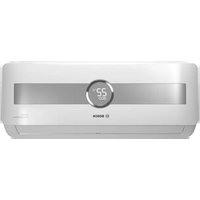
| Product type | Split air conditioner |
| Brand | Bosch |
| Model | ASX18XB32N |
| Cooling capacity (BTU/h) | 18000 |
| Cooling capacity (kW) | 5.3 |
| Refrigerant | R32 |
| Power supply | 220-240 V ~ 50 Hz |
| Indoor unit dimensions (W x H x D) | 940 x 310 x 260 mm |
| Indoor unit weight | 14 kg |
| Outdoor unit dimensions (W x H x D) | 850 x 550 x 300 mm |
| Outdoor unit weight | 35 kg |
| Noise level indoor (dB(A)) | 31-44 |
| Smart connectivity | Wi-Fi via Smart Kit (EU-ODZ106) |
| Home Connect app compatible | Yes |
| Remote control | Included |
| Timer function | Yes |
| Sleep mode | Yes |
| Auto restart | Yes |
| Dehumidification | Yes |
| Washable filter | Yes |
Frequently Asked Questions - ASX18XB32N BOSCH
User questions about ASX18XB32N BOSCH
0 question about this device. Answer the ones you know or ask your own.
Ask a new question about this device
Download the instructions for your Air conditioner in PDF format for free! Find your manual ASX18XB32N - BOSCH and take your electronic device back in hand. On this page are published all the documents necessary for the use of your device. ASX18XB32N by BOSCH.
USER MANUAL ASX18XB32N BOSCH
USER MANUAL OF SMART KIT
ASI09VW32N-ASO09VW32N
ASI12VW32N-ASO12VW32N
ASI18VW32N-ASO18VW32N
ASI24VW32N-ASO24VW32N
ASI12XB32N-ASO12XB32N
ASI18XB32N-ASO18XB32N
ASI12AW42N-ASO12AW42N
ASI18AW32N-ASO18AW32N
IMPORTANT NOTE:
Read the manual carefully before installing or connecting your Smart kit (Wireless module). Make sure to save this manual for future reference.
CONTENTS
① SPECIFICATION....1 ② PRECAUTIONS ...... 1 ③ INSTALL THE SMART KIT.... 2 ④ HOME CONNECT .... 3
DECLARATION OF CONFORMITY
Hereby, we declare that this Smart kit is in compliance with the essential requirements and other relevant provisions of Directive 2014/53/EU. A copy of the full DoC is attached. (European Union products only)
1 SPECIFICATION
Model: EU-ODZ106
Antenna Type: Printed PCB Antenna
Frequency Band: 2400-2483.5MHz
Operation Temperature: -20°C to +85°C / -4°F to 185°F
Operation Humidity: 10% to 85%
Power Input: DC 5V/500mA
Maximum TX Power: <20dBm
2 PRECAUTIONS
• Applicable system: iOS, Android. - Please keep your APP up to date with the latest version. - Due to special situations that may occur, we explicitly claim the following: Not all Android and iOS systems are compatible with the APP. We will not be responsible for any issues resulting from incompatibility.
• Wireless safety strategy
Smart kit only supports WPA-PSK/WPA2-PSK/WPA3-SAE encryption and no encryption.
WPA-PSK/WPA2-PSK/WPA3-SAE encryption is recommended.
- Cautions
- Due to different network situations, the control process may sometimes return a timeout. If this occurs, the display between the board and the App may not be the same, so please do not be confused.
A smartphone camera with a resolution of at least 5 megapixels is required to ensure proper QR code scanning.
- Due to varying network conditions, request timeouts may occasionally occur. In such cases, it is necessary to reconfigure the network settings.
- The app system is subject to updates without prior notice for product improvement. The actual network configuration process may differ slightly from the manual; the actual process shall prevail.
- Please check the service website for more information.
3
INSTALL THE SMART KIT (WIRELESS MODULE)
① Remove the protective cap from the smart kit (wireless module). ② Open the front panel and insert the smart kit (wireless module) into the reserved interface.

WARNING: This interface is only compatible with the SMART KIT (wireless module) provided by the manufacturer.

HOME CONNECT
This appliance is network-capable. Connect your appliance to a mobile device to control its functions via the Home Connect app.
The Home Connect services are not available in every country. The availability of the Home Connect function depends on the availability of Home Connect services in your country. You can find information about this at: www.home-connect.com.
To be able to use Home Connect, you must first set up the connection to the WLAN home network and to the Home Connect app.
→ "Connecting the appliance to WLAN home network"
The Home Connect app guides you through the entire login process. Follow the instructions in the Home Connect app to configure the settings.
Tips
- Please consult the documents supplied by Home Connect.
- Please also follow the instructions in the Home Connect app.
■ 4.1 Home Connect quick start
Connect your appliance to a mobile device quickly and easily.
Installing app
- Install the Home Connect app on your mobile device.


- Start the app and set up access for Home Connect. The Home Connect app guides you through the entire login process.
Connecting the appliance to WLAN home network Requirements
- Home Connect app is installed on your mobile device. ● Network on the router is activated.
- The appliance receives signals from the WLAN home network at its installation location.
- With the help of Home Connect app scan the QR code.

- Follow the instructions in the Home Connect app.
■ 4.2 Home Connect settings
Adapt Home Connect to your needs. You can find the Home Connect settings in the basic settings for your appliance.
4.3 Remote Start
You can use the Home Connect app to start the appliance with your mobile device.
Requirements
- The appliance is connected to your WLAN home network.
- The appliance is connected to the Home Connect app.
- A program and related options are selected.
4.4 Software update
You can use this function to update the software of your appliance, e.g. for optimization, troubleshooting or safety-relevant updating.
The Home Connect app informs you about available software updates.
4.5 Data protection
Please see the information on data protection.
The first time your appliance is registered on a home network connected to the Internet, your appliance will transmit the following types of data to the Home Connect server (initial registration):
- Unique appliance identification (consisting of appliance codes as well as the MAC address of the network communication module installed).
- Security certificate of the network communication module (to ensure a secure data connection).
- The current software and hardware version of your appliance.
- Status of any previous reset to factory settings.
The initial registration prepares the Home Connect functions for use and is only required when you want to use the Home Connect functions for the first time.
Note: Please note that the Home Connect functions can only be used with the Home Connect app. Information on data protection can be retrieved in the Home Connect app.
Declaration of Conformity
BSH Ev Aletleri Sanayi ve Ticaret A.Ş. hereby declares that the appliance with wifi module (Smart kit) functionality meets the essential requirements and the other relevant provisions of Directive 2014/53/EU. A detailed RED
Declaration of Conformity can be found online at https://www.bosch-home.com.tr/ among the additional documents on the product page for your appliance.
The company will not be liable for any issues and problems caused by the Internet, Wireless Router, and Smart Devices. Please contact the original provider to get further help.

BOSCH
SMART KİT USER MANUAL
ASI09VW32N-ASO09VW32N
ASI12VW32N-ASO12VW32N
ASI18VW32N-ASO18VW32N
ASI24VW32N-ASO24VW32N
ASI12XB32N-ASO12XB32N
ASI18XB32N-ASO18XB32N
ASI12AW42N-ASO12AW42N
ASI18AW32N-ASO18AW32N
IMPORTANT NOTE:

- USER MANUAL OF SMART KIT
- IMPORTANT NOTE
- CONTENTS
- DECLARATION OF CONFORMITY
- SPECIFICATION
- PRECAUTIONS
- INSTALL THE SMART KIT (WIRELESS MODULE)
- HOME CONNECT
- TIPS
- HOME CONNECT QUICK START
- INSTALLING APP
- CONNECTING THE APPLIANCE TO WLAN HOME NETWORK REQUIREMENTS
- HOME CONNECT SETTINGS
- REMOTE START
- REQUIREMENTS
- SOFTWARE UPDATE
- DATA PROTECTION
- BOSCH
- SMART KİT USER MANUAL
Brand : BOSCH
Model : ASX18XB32N
Category : Air conditioner