
VS-GWM401G - Network Equipment OpenVox - Free user manual and instructions
Find the device manual for free VS-GWM401G OpenVox in PDF.


| Product Type | VoIP Gateway Module |
| Brand | OpenVox |
| Model | VS-GWM401G |
| Compatibility | SWG2008 Chassis (2nd slot) |
| Default IP Address | 172.16.98.2 |
| Default Subnet Mask | 255.255.0.0 |
| Default Gateway | 172.16.98.1 (Chassis) |
| Default Username | admin |
| Default Password | admin |
| Reset Button | Yes, on module (RST button near PWR LED) |
| Chassis Reset Button | Red RST button on chassis |
| Interfaces | 4x FXS/FXO (typical for GWM series) |
| LED Indicators | PWR LED |
| Power Source | From SWG2008 chassis (backplane) |
| Power Consumption | Approximately 10W (typical) |
| Dimensions | Typical module: 120 x 75 x 25 mm (approx) |
| Weight | Approximately 200g |
| Operating Temperature | 0°C to 40°C (typical) |
| Protocol Support | SIP, IAX2 (typical) |
| Maintenance | Clean with dry cloth; avoid liquids |
| Safety | Install in well-ventilated chassis; use only with compatible OpenVox chassis |
| Spare Parts & Repairability | Contact OpenVox support; module not user-serviceable |
Frequently Asked Questions - VS-GWM401G OpenVox
User questions about VS-GWM401G OpenVox
0 question about this device. Answer the ones you know or ask your own.
Ask a new question about this device
Download the instructions for your Network Equipment in PDF format for free! Find your manual VS-GWM401G - OpenVox and take your electronic device back in hand. On this page are published all the documents necessary for the use of your device. VS-GWM401G by OpenVox.
USER MANUAL VS-GWM401G OpenVox
VS-GWM401G used in SW2008 case
The default ip of SWG2008 is 172.16.98.1 (User: admin / Password: admin) the default ip of VS-GWM401G in 2nd slot is 172.16.98.2 (the upper one is 2nd slot)

natural_image
Close-up of a green printed circuit board with various electronic components and connectors (no visible text or symbols)
When insert the VS-GWM401G to second slot of SWG2008, can ping the 401G ip at web page of SWG2008 (picture below)
![Wireless Gateway SYTEM SWG-2008 LAN Settings NETWORK GSM IP: 172.16.98.1 172.16.98.2 Ping google.com Traceroute Channel Recording Interface: eth0 Source host: Destination host: Port: Protocol: All Start Report PNG 172.16.98.2 (172.16.98.2) from 172.16.98.1: 56 data bytes 64 bytes from 172.16.98.2: seq=0 tfi=64 time=2.776 ms 64 bytes from 172.16.98.2: seq=1 tfi=64 time=1.470 ms 64 bytes from 172.16.98.2: seq=2 tfi=64 time=1.312 ms 64 bytes from 172.16.98.2: seq=3 tfi=64 time=1.382 ms --- 172.16.98.2 ping statistics --- 4 packets transmitted, 4 packets received, 0% packet loss round-trp min/avg/max = 1.312/1.735/2.776 ms Successfully ping [ 172.16.98.2 ]](/content/2026/05/1045264/images/f2767dcc798b5d7cc61d98dcdc6f8990ade3460e79e7b34d7c214c934fd004e5.jpg)

IP address (PC): 172.16.98.22
Subnet: 255.255.0.0
Gateway (Chassie): 172.16.98.1
IP address of VS-GWM401G: 172.16.98.2 (the upper one is 2nd slot).
Note:
The Chassie IP address must first be changed before the 1st slot (172.16.98.1) can be used.
Reset GWM401G:
GWM401G has a reset button directly on the module, to the on the right of the PWR LED there is an RST button.
Reset Chassie:
RST red reset button press
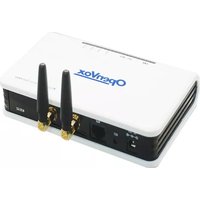



Brand : OpenVox
Model : VS-GWM401G
Category : Network Equipment