D-05u - Media player LUXMAN - Free user manual and instructions
Find the device manual for free D-05u LUXMAN in PDF.


User questions about D-05u LUXMAN
0 question about this device. Answer the ones you know or ask your own.
Ask a new question about this device
Download the instructions for your Media player in PDF format for free! Find your manual D-05u - LUXMAN and take your electronic device back in hand. On this page are published all the documents necessary for the use of your device. D-05u by LUXMAN.
USER MANUAL D-05u LUXMAN
Features of This Unit 3
Discs This Unit Can Play Back....7
Before Use 9
Names and Functions....11
Connections 21
How to Play Back Discs 23
Stop/pause the Playback 25
Skip/Fast-forward/Rewind 27
Direct search/repeated playback 29
Program Playback 31
Random playback/disc information/zoom 33
Detailed Settings 35
Block Diagram 41
Specifications 42
Before Asking for Repair 43
Precautions
DO NOT move this unit during playback.
During playback, the disc is rotating at high speed. Do not lift or move this unit as the disc may be damaged. Otherwise, the disc may be damaged.
When moving this unit
You must remove the disc and close the disc tray when moving this unit. Then, press the OPERATION switch, and after "-STANDBY-" disappears from the display, unplug the power cord from the AC outlet. If the unit is moved with a disc remaining inside, it can cause a malfunction.
Installation place
- Choose a stable place near the stereo system that is to be used in combination with this unit.
- Do not install this unit near a television or color monitor. Keep this unit away from such devices as cassette decks that are subject to magnetism.
• Install this unit onto a level place when possible.
Avoid the following locations for installation.
- Locations exposed to direct sunlight
- Places subject to humidity and with limited ventilation
- Places where are extremely hot or cold
- Places subject to strong vibration
- Places subject to dust
- Places subject to oil, steam, and heat (such as kitchens)
Do not put articles.
Do not put any articles on this unit.
Batteries
Caution:
Batteries used for the remote control shall not be exposed to excessive heat such as sunshine, fire or the like.
To avoid heat emission
Do not place this unit on such device as an amplifier that emits heat. If the unit is installed on a rack, install the unit below the rack where the amplifier is installed so as to avoid heat emission from the amplifier and other audio devices.
Notice when this unit is installed in a rack with glass doors
While the glass doors are closed, do not open the disc tray by pressing the open/close (▲) button of the remote control. Disc tray performance will be blocked, which may result in a malfunction.
Power off this unit when it is not used.
Depending on the condition of radio waves emitted during television broadcasting, interference fringes may appear on the television monitor, but that is not a malfunction. In such a case, power off the unit. There may also be a case where noises are heard on the radio due to radio wave interference.
Dew condensation
In winter, be careful when carrying this unit from a cold place to a warm place or if the room temperature is suddenly raised by a heater or the like. The unit interior (operating blocks and lens) will have dew condensation on it. In such a condition, this unit cannot work properly and playback is impossible. Depending on the condition of dew condensation, if you leave the unit alone for one to two hours after turning it on in room temperature, the condensation becomes dry and playback will be possible.
Even in summer, dew condensation may occur if this unit is directly exposed to cool air from an air conditioner. In such a case, the installation place should be changed.
How to handle discs
- Do not use any deficient disc (with cracks, warp, etc.).
- Do not damage the signal surface of the disc or grime it.
- Do not place paper or a sticker on the disc. This can warp the disc and playback may become impossible. In many cases, rental discs carry labels and paste may protrude from under the label. Before use, check that the disc is free from protruding paste or the like.
- Do not play two discs at the same time.
How to store discs
- Always put your discs in cases, and store them vertically. Conditions such as high temperature, high humidity, exposure to direct sunlight, extremely low temperature are not suitable for storing discs.
- Read the caution notes carefully that are attached to discs.
Disc cleaning
- If a disc is dirty from fingerprints or dust, the sound quality may be deteriorated. Lightly wipe the disc with soft cloth, from the inside to outer periphery. (Refrain from wiping it along the circumference.)
- Do not use a volatile chemical such as benzine or thinner. Record spray, anti-static agents, and other such materials cannot be used either.
- When the disc seems to be very dirty, dip soft cloth in water, wring it well, and remove contaminants. Then, remove the moisture with dry cloth.
Odd-shaped disc
This unit cannot play back discs in specific shapes (heart-shaped, hexagonal, etc.). Do not use such discs as that may cause malfunctions.
Lens cleaning
If the lens is dusty, sound skips may occur. Please ask your dealer for cleaning the lens. Do not use any cleaning substance for discs available on the market because they may hurt the lens.
Notice in handling optical digital cables
- Do not fold the cables at an acute angle. When storing cables, wind each cable to make a coil whose diameter is approx. 15 cm or larger.
- For connection, insert the cable connectors firmly into the terminals of this unit and the other device.
- Use the cables whose each length is 3 m or less.
- When the cable connectors are dusty, wipe the dust away with a dry soft cloth before inserting into the terminals.
Cleaning
- Usually, wipe the unit with a dry soft cloth. When the dirt is hard to remove, dip soft cloth in detergent diluted 5 or 6 times with water, wring it well, and remove contaminants. Then, remove the moisture with dry cloth.
- Do not use a solvent like alcohol, benzine, thinner, or pesticide because such a substance may damage the exterior. In addition, do not let this unit contact a rubber or plastic form for a long time. That may damage the cabinet surface of the unit.
- When using a chemical cloth for cleaning, read the caution attached with the chemical cloth product.
- Before cleaning, unplug the power cord from the AC outlet.
Features of This Unit - 2-channel Super Audio CD/
CD Compatible Player
LxDTM - LuXman original Disc
Transport Mechanism —
The unit's solid transport chassis doubles as the side walls of LxDTM.
This transport block is high-rigidity structured (SSB: Stabilized Support Block).
The suede-finish aluminum die-cast disc tray controls vibration and resonance.
QLL (Quiet Linear Loader) makes opening and closing of the disc tray quiet and smooth.
Analog circuit
There are independent monaural D/A converters for each channels (L/R).
There differential outputs are driven by high quality full-balanced amplifier circuit.
USB input supports 192 kHz / 32 bit
B-type USB input terminal is installed and makes it possible to input USB digital audio signal from a PC/Mac.
The sampling frequency of up to 192 kHz and 32-bit quantization are supported.
USB input supports DSD
DSD format data can be entered from PC/Mac, or the like.
Sampling frequencies of 2.8224 MHz/5.6448 MHz is supported.
Asynchronous communication supported
By asynchronous communication and PLL, for the USB input, USB dedicated IC reduced jitter.
Jitter-reduction circuit
This unit is equipped with a circuit to reduce the jitter in the system clock.
Low phase noise crystal oscillators
Oscillators with low noise near the oscillating frequency are equipped.
The oscillators provide clocks with reduced jitter.
Disc layer switchover function
By pressing SACD/CD button of the remote control, the CD layer and the HD layer of Hybrid Super Audio CD can be switched over.
Zoom function
When the ZOOM switch is pressed on the remote control, the track number and time information can be displayed enlarged.
4 playback modes
Playback mode can be selected from regular playback, program playback, random playback, and repeated playback.
*1 Mac and Mac OS are trademarks of Apple Inc., registered in the U.S. and other countries.
*2 Windows is a registered trademark of Microsoft Corporation in the United States and/or other countries.
*3 DSD is a trademark.
*4 The described company names and product names are trademarks or registered trademarks of each company.
Features of This Unit
Digital input terminals
This unit is equipped with a coaxial input terminal and an optical input terminal.
S/PDIF format signals between 32 kHz and 192 kHz are supported.
Digital inputs (S/PDIF) with low jitter has been achieved with PCM9211 PLL manufactured by Burr-Brown.
It is possible to play back the digital audio signal that is output from another audio device via the circuit of this unit that improves the sound quality.
DD converter function
Input of 192 kHz 24 bit or less including USB input can be digitally output by the S/PDIF format.
Last memory function
Built-in flash memory can memorize settings such as digital input, Super Audio CD/CD, digital filter.
Dimmer function
The brightness of display can be switched over in 4 steps.
Digital output OFF
The digital audio output can be deactivated to improve the quality of analog audio output.
Analog output terminals
Introduction of an 18 mm pitch RCA terminal with gold plating and a high-grade XLR terminal manufactured by Neutrik allows even a high-performance line cable with large plug to be connected.
Analog output phase switching
Both balanced output and unbalanced output are phase switchable.
PCM1795 manufactured by Burr-Brown
For the DAC chip, this unit uses PCM1795 manufactured by Burr-Brown with the right and left independent monaural configuration.
Original technologies
Our traditional round pattern board, OFC internal wiring, and original custom-made parts are fully and luxuriously used.
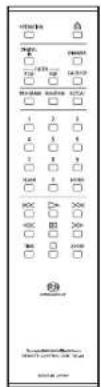
Remote control (RD-21)
The remote control is encased in aluminum. Tactile switches will provide a “click” feel.
High-inertia power supply
High-inertia power supply circuit that combines a large-capacity OI-core-type power transformer with original 3,300 F × 6 capacitor blocks.
Schottky barrier diode
Application of schottky barrier diode manufactured by Nihon Inter Electronics Corporation that has less switching noises and higher conversion efficiency to the DC voltage for the power supply rectifier circuit.
LUXMAN's original OFC wires
Our original OFC wires are used in the internal wiring to achieve smooth signal transmission thanks to the non-plating process on the core wire.
Discs This Unit Can Play Back
Types of discs that can be played
The following marks are printed on disc labels, packages, or CD jackets.
| Marks for types of discs this unit can play back | ||
| SACD | ||
 | CD-RCD  CD-RW CD-RW  | |
This unit can play back 8 cm CDs without using an adapter. Do not use an adapter for 8 cm CDs.
- CD-R/CD-RW discs that have been written by a recorder or PC (personal computer) may not be played back.
(Due to characteristics of discs, scratches, dirt on the lens of the unit, or dew condensation) - Discs written by a PC may not be played back depending on the application settings or environment.
Write the discs in a proper format. (Refer to the provider of the application for details.) - Time information may not be displayed when an unfinalized CD-R/CD-RW disc is played back.
- Refer to the precautions of discs for details on how to handle CD-R/CD-R discs.
Super Audio CD
- 3 types of discs -
- Single-layer CD
Dummy layer
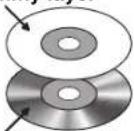
HD layer
This is a disc which has a single Super Audio CD layer.
- Dual-layer CD
HD layer
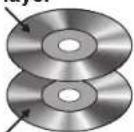
HD layer
This is a CD which has a dual Super Audio CD layer that supports long-time recordings.
- Hybrid-layer CD
CD layer
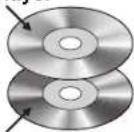
HD layer
This is a CD which has both a standard CD layer and Super Audio CD layer.
When the disc is played back on a Super Audio CD player, it is possible to enjoy sounds of improved quality on the HD layer. When the disc is played back on a CD player, it is possible to play back sounds on the CD layer.
HD layer: Super Audio CD layer
CD layer: Existing CD layer
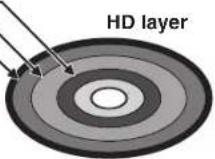
HD layer has the following areas.
• 2-channel stereo area
- Multi-channel area
- Extra data area
(For future expansion)
Comparison of Super Audio CDs with CDs
| Item Super Audio | CD CD | |
| Disc diameter (cm) 12 12 | ||
| Disc thickness (mm) 1.2 1.2 | ||
| Coding method 1-bit direct stream | digital (DSD) 16-bit linear PCM | |
| Sampling frequency 2.8224 MHz (64 times to CDs) 44.1 kHz | ||
| Maximum recordable time 109 min | utes for 2ch only. 60 to 70 minutes for 2-channel stereo area + multi-channel area *1 | 74 minutes |
| Number of channels 2, 3, 3.1, 4, 4 | 1, 5, 5.1 2 | |
| Maximum number of tracks 255 99 | ||
| Maximum number of indexes 255 99 | ||
| Playback frequency range | DC to 100 kHz | 5 to 20 kHz |
| Dynamic range * | 120 dB or more (audible range) | 96 dB |
*1 This is the maximum recordable time for a single-layer CD. Depending on the compression rate of DST (Direct Stream Transfer) ^3 , the maximum recordable time may vary.
*2 Theoretical value
*3 Lossless compression method that applies a variable bit rate for DSD signals. The method has been developed, focused on the DSD signal characteristics.
Before Use
Check the accessories.
After unpacking, check if the following accessories are not missing.
- Power cable
- Remote control (RD-21)
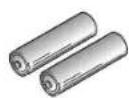
- "AAA" batteries (2 pieces)
- Safety cautions
- Owner's Manual (This document)
• Install software (CD-R) - Windows-ready USB driver installation manual
How to Use Remote Control
Insert batteries into the remote control
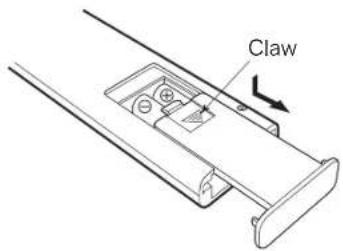
- Remove the battery cover on the rear of the remote control. Put your finger on the battery cover claw and slide the cover downward to remove the cover.
- Put 2 AAA batteries in the battery case as shown in the illustration on the battery case in consideration of the polarity ( and ).
- In the reverse order of battery cover removal, put the battery cover back to the opening of the remote control and slide the cover upward until it clicks.
- Do not use a new battery and an old one together.
- There may be a case in which the voltages are different between two batteries even though their shapes are the same. Do not use the batteries of different kinds together.
- If the remote control is not used for a long time (more than 1 month), the batteries shall be removed from the case. If the battery liquid is leaking, wipe away the liquid from the case before inserting new batteries.
- To discard used batteries, follow the instructions of each local authority.
Remote control's range
The remote control can be used by pointing at the remote control infrared receiver on the front panel of main unit. The effective distance is approx. 5 m from the main unit and 30° on both sides from the control infrared receiver.
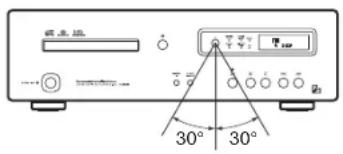
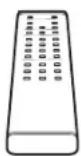
Effective distance: approx. 5 meters
Do not expose the remote control infrared receiver to direct sunlight or strong light sources. That may cause malfunction.
Names and Functions
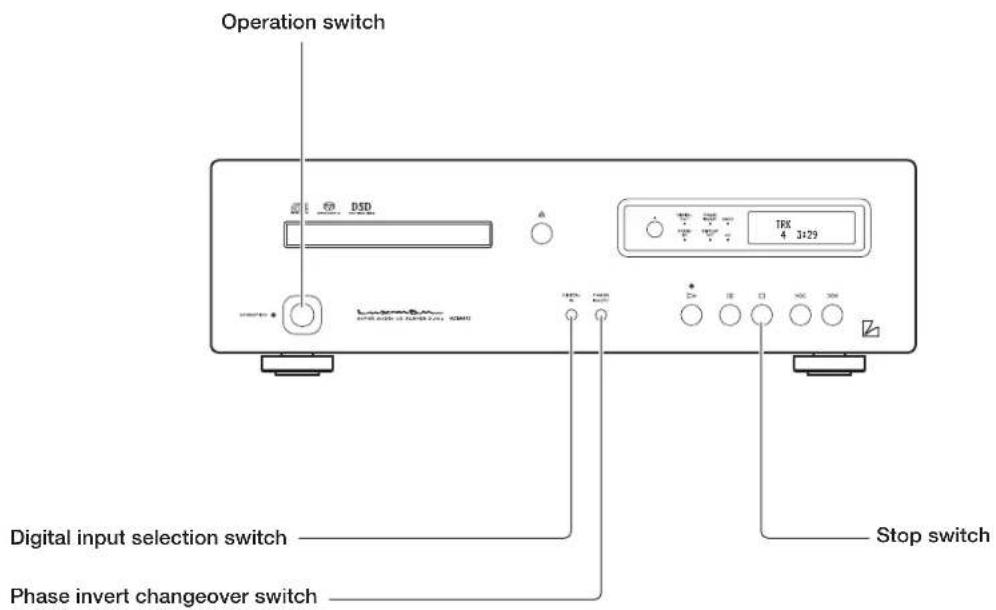
Front panel
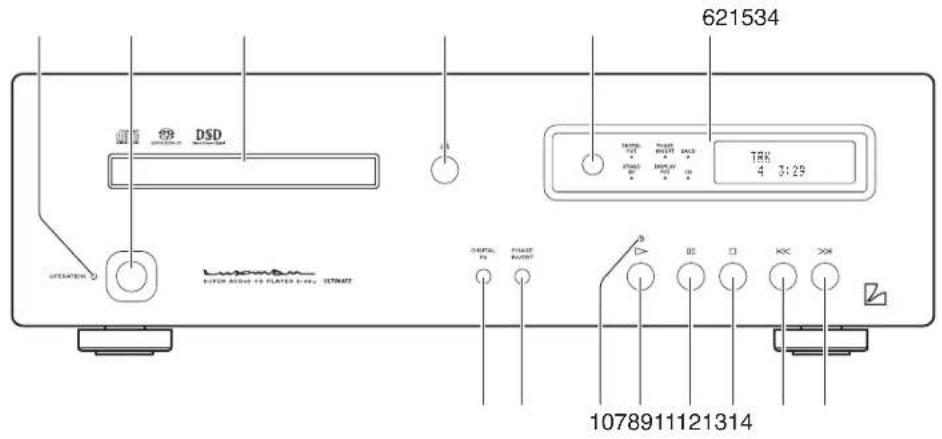
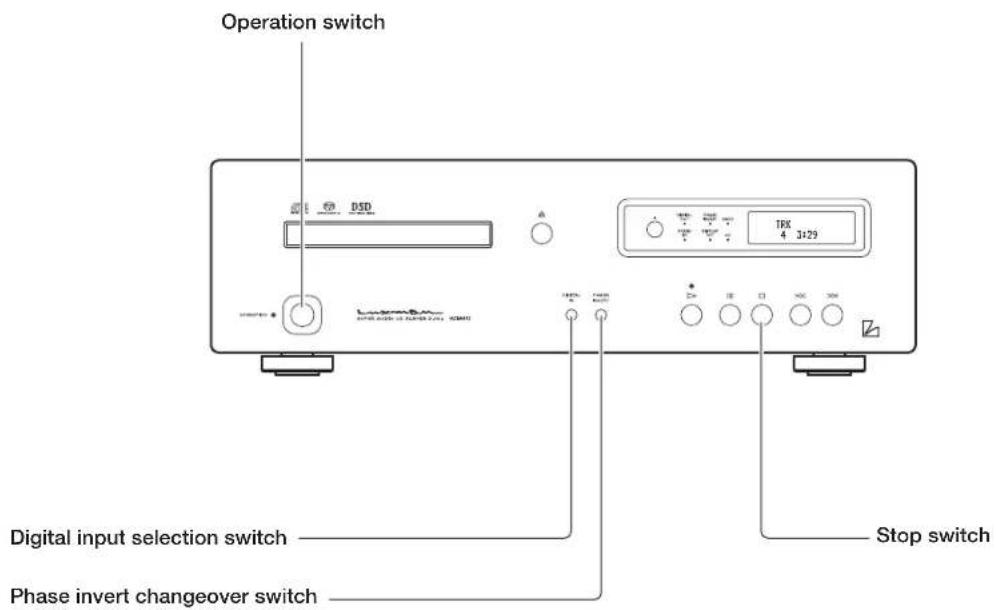
1. Operation switch (OPERATION)
Turns this unit from the standby state to operation state. When the main power switch on the rear panel is turned on to set this unit to the standby state and this switch is turned on, this unit is set to the operation state.
2. Operation indicator (OPERATION)
Blinks during warm-up when the operation switch is turned on and lights up when the operation state is activated afterward.
3. Disc tray
When inserting or removing a disc, this tray is opened or closed by pressing the open/close switch (△).
4. Open/close switch (△)
Pressing this switch will open or close the disc tray.
5. Remote control infrared receiver (R)
Receives signals from the accessory remote control.
6. Display window
Displays the operation status.
This display is composed of 6 indicators and display tube.
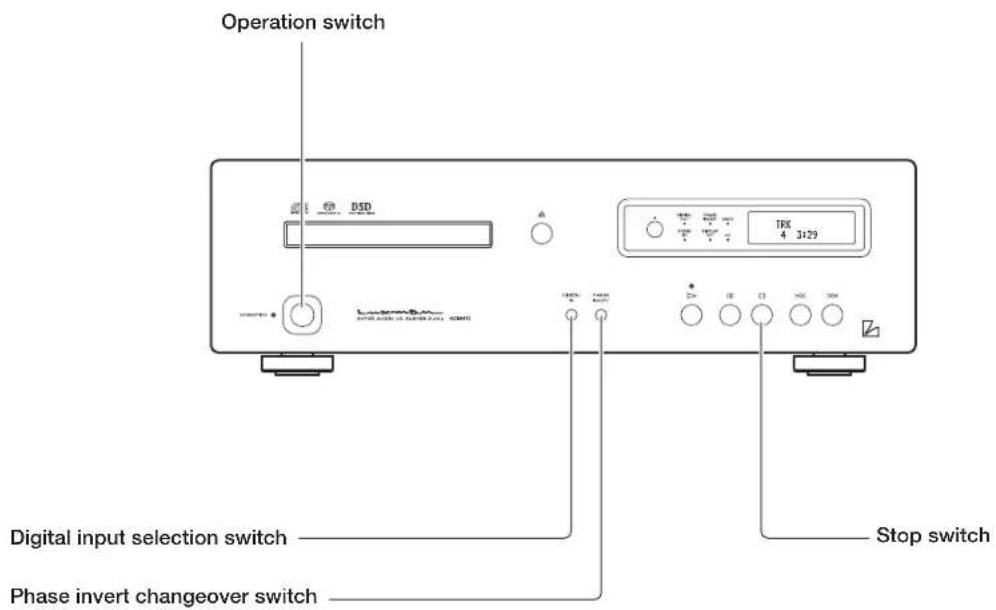
7. Digital input selection switch (DIGITAL IN)
Press this switch when using this unit as a D/A converter. Switchover is performed among coaxial, optical, USB, and internal player.
Holding down this switch toggles the digital output on and off.
8. Phase invert changeover switch (PHASE INVERT)
The phase of the analog output on the rear panel is inverted. Both the balanced output and unbalanced output are inverted.
This setting is stored on the flash memory even when the power is turned off.
Every time this switch is pressed, the balanced phase changes as follows: NORMAL→INVERT→NORMAL→INVERT ...
[Normal Position]
Lights up while a disc is being played back. Blinks while playback is paused.
11. Pause switch (☐)
When this switch is pressed during playback, the playback stops. When this switch is pressed again, the playback starts again. During pause, the play indicator blinks.
12. Stop switch (☐)
This switch is pressed to stop playback.
13. Previous switch (✗)
Pressing this switch makes the playback return to the beginning of track. When this switch is pressed twice, the playback returns to the beginning of previous track.
14. Next switch (>)
When this switch is pressed, the playback jumps to the beginning of next track.
Names and Functions
Display window
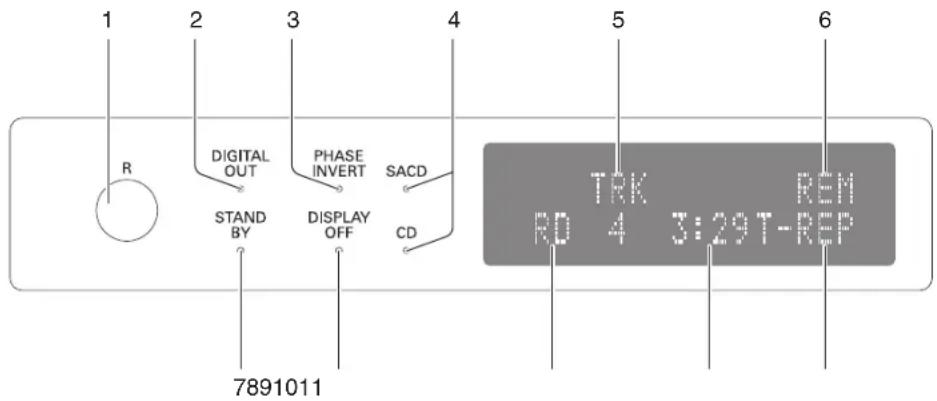
1. Remote control infrared receiver (R)
Receives the infrared signals from the remote control.
2. Digital output indicator (DIGITAL OUT)
Lights up when digital audio output is ON. This indicator does not light up when playing back the HD layer of Super Audio CD because the digital audio signal cannot be output. To toggle the digital output on and off, hold down the digital input selection switch (DIGITAL IN) on the main unit.
3. Phase invert indicator (PHASE INVERT)
Lights up when the analog output phase is inverted, which is caused by pressing the phase invert changeover switch.
[Normal Position]
- GROUND
- COLD (-)
- HOT (+)
[Invert Position]
SACD indicator lights up when playing back the HD (or SACD) layer of Hybrid Super Audio CD
CD indicator lights up when playing back the CD layer of Hybrid Super Audio CD.
5. Track number (TRK)
"TRK" is indicated on the upper side, and the track number is indicated on the lower side when these display area shows the track number.
6. Time display mode
The display mode of time is displayed. "REM" is displayed when showing the remaining time of current track. "T-REM" is displayed when showing the total remaining time of the disc. This display area does not light up when showing the elapsed time of track.
7. Standby indicator (STAND BY)
Lights up when the main power switch on the rear panel is turned on and the operation switch is turned off. When the operation switch is turned on or when the main power switch is turned off, this indicator turns off.
8. Display off indicator (DISPLAY OFF)
Lights up when the VFD (vacuum fluorescent display) in the main unit display window is turned off.
9. Playback mode
"RD" is displayed during random playback. "PG" is displayed during program playback. This display area does not light up during regular playback.
10. Time
Displays the elapsed time of current track, remaining time of the current track, or remaining time of the disc. Time display is switched over according to time display mode.
11. Repeat mode
Displays the mode for repeated playback. There are two types of repeated playback: track repeat (T-REP) and all repeat (A-REP).
Names and Functions
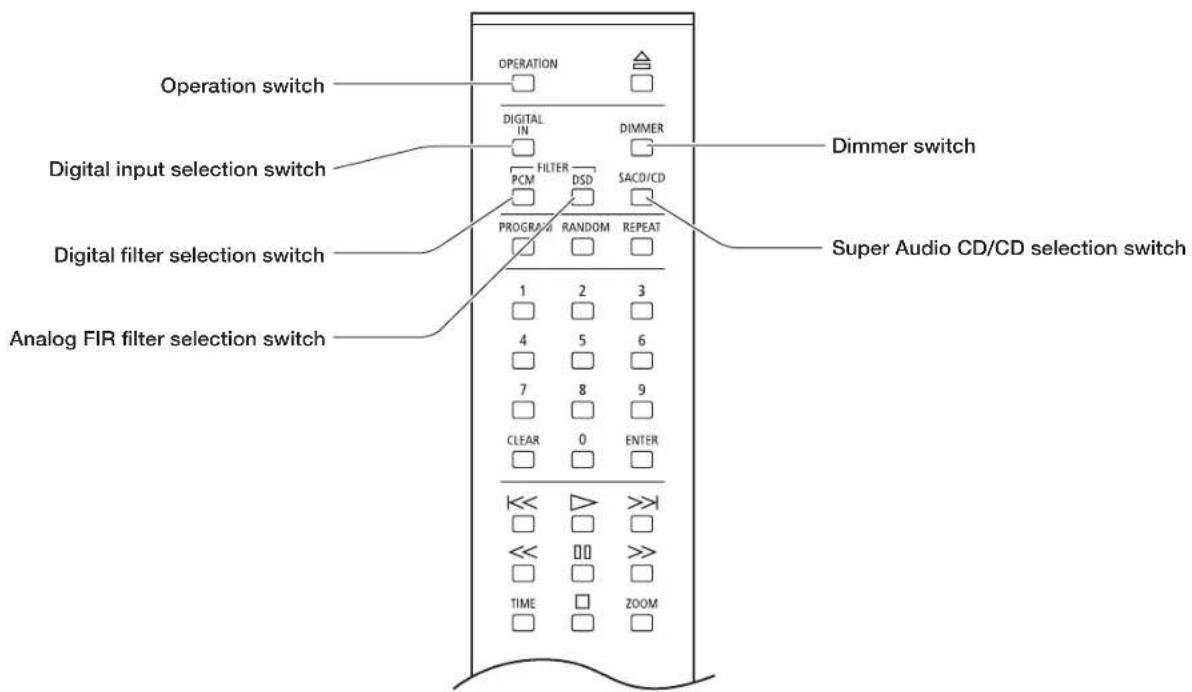
Remote control
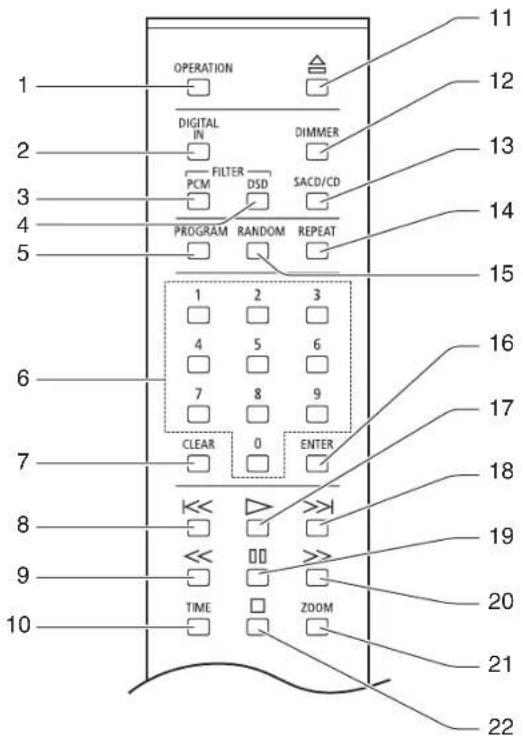
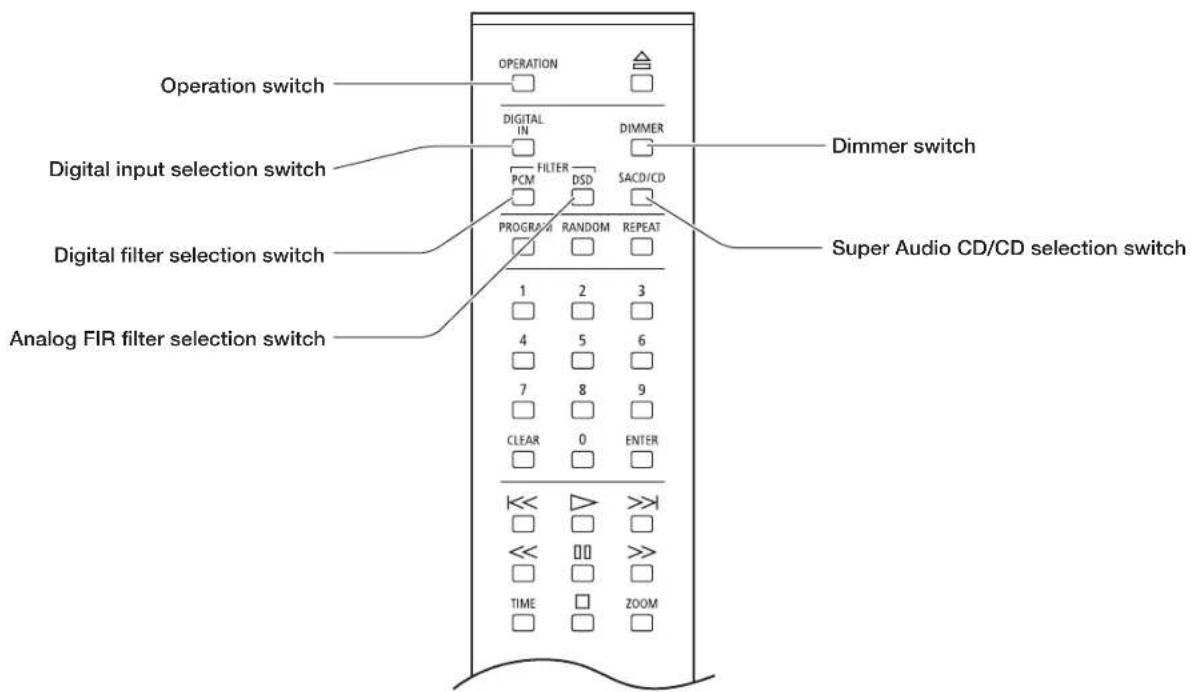
1. Operation switch (OPERATION)
Turns this unit to the operating state after turning off the standby indicator at the standby state. Pressing this switch again at the operating state turns the unit to the standby state.
2. Digital input selection switch (DIGITAL IN)
Press this switch when using this unit as a D/A converter. Switchover can be made among coaxial, optical, USB, and internal player.
Holding down DIGITAL IN switch for a few seconds does not switch over digital output's ON/OFF.
3. Digital filter selection switch (FILTER PCM)
This switch changes the interpolation function of the 32 bit digital filter while a CD or PCM data is played back.
Select a filter depending on your taste. The sound quality can be changed.
There are 2 types of filters, P-1 and P-2.
Pressing this switch displays the current setting data (P-1, P-2) on the display window. When pressing this switch again while the setting data is displayed, the next setting data will be displayed. Pressing the enter switch (ENTER) while the setting data is displayed determines the setting data. If the enter switch is not pressed, the digital filter is not changed.
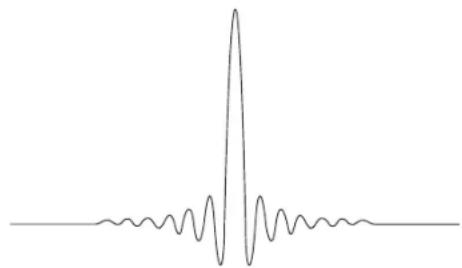
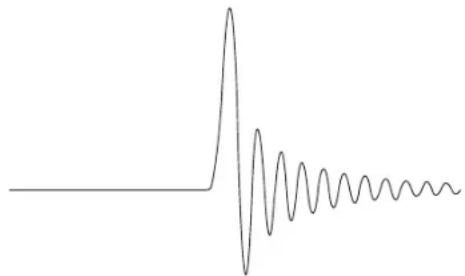
The impulse response of the interpolation function shows the waveform shown in the right page.
This setting is stored on the flash memory even when the power is turned off.
P-1 (normal FIR filter)
natural_image
Simple line drawing of a waveform with a central sharp peak and surrounding smaller oscillations (no text or symbols)P-2 (low latency IIR filter)
natural_image
Simple line drawing of a waveform with an initial peak followed by decaying oscillations (no text or symbols)4. Analog FIR filter selection switch (FILTER DSD)
This switch changes the analog FIR filter while a Super Audio CD (HD layer) or a DSD file is reproduced.
Select a filter depending on your taste. The sound quality can be changed. There are 2 types of filters, D-1 and D-2.
Pressing this switch displays the current setting data (D-1, D-2) on the display window.
Pressing this switch again while the setting data is displayed displays the next setting data.
Pressing the enter switch (ENTER) while the setting data is displayed determines the setting data.
If the enter switch is not pressed, the filter is not changed.
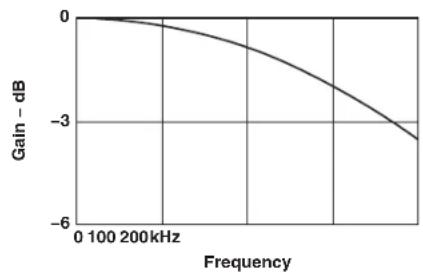
The analog FIR filter features the following:
D-1 (normal analog FIR filter)
line
| Frequency | Gain - dB | | --------- | --------- | | 0 | 0 | | 100 | -1 | | 200 | -3 | | 300 | -5 | | 400 | -7 | | 500 | -9 | | 600 | -11 | | 700 | -13 | | 800 | -15 | | 900 | -17 | | 1000 | -19 | | 1100 | -21 | | 1200 | -23 | | 1300 | -25 | | 1400 | -27 | | 1500 | -29 | | 1600 | -31 | | 1700 | -33 | | 1800 | -35 | | 1900 | -37 | | 2000 | -39 |D-2 (high attenuation analog FIR filter)
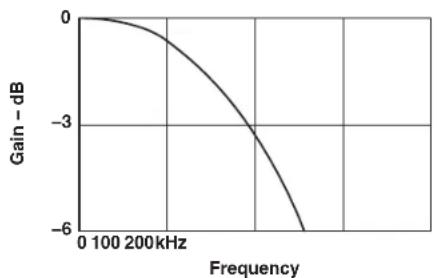
line
| Frequency | Gain - dB | | --------- | --------- | | 0 | 0 | | 100 | -1 | | 200 | -3 | | 300 | -5 | | 400 | -7 | | 500 | -8 |Depending on the filter selection, there is a difference in sound volume. When D-1 is selected, the output voltage is 2.3 Vrms. When D-2 is selected, the output voltage is 1.7 Vrms.
Names and Functions
Remote control

5. Program switch (PROGRAM)
Programs the track numbers to play back in a desired order.
6. Numeric keys (1, 2, 3, 4, 5, 6, 7, 8, 9, 0)
These keys are pressed to specify the track numbers for direct search or program.
7. Clear switch (CLEAR)
This switch is pressed to cancel the program settings.
8. Previous switch ( k )
When this switch is pressed, the playback returns to the beginning of track. When this switch is pressed twice, the playback returns to the beginning of previous track.
9. Rewind switch ( )
When this switch is pressed during playback, audio signal is rewound.
10. Time display switch (TIME)
Switches the time display. Switches the elapsed time of current track, remaining time of current track, or remaining time of disc.
11. Open/close switch (A)
Pressing this switch opens or closes the disc tray.
12. Dimmer switch (DIMMER)
Adjusts the brightness of the main unit display. The brightness can be adjusted in 4 steps from normal light to light off.
13. Super Audio CD/CD selection switch (SACD/CD)
When playing back a Hybrid Super Audio CD, press this switch to switch over the playback layer between the HD (or SACD) layer and CD layer.
14. Repeat switch (REPEAT)
This switch is pressed to perform repeated playback. There are two types of repeated playback: track repeat (T-REP) and all repeat (A-REP).
15. Random switch (RANDOM)
This switch is pressed to perform random playback.
16. Enter switch (ENTER)
This switch is pressed to execute the set or selected items.
17. Play switch (▶)
This switch is pressed to play back a disc.
18. Next switch (>)
When this switch is pressed, the playback jumps to the beginning of next track.
19. Pause switch (☐)
When this switch is pressed during playback, the playback stops. When this switch is pressed again, the playback starts again. During pause, the play indicator blinks.
20. Fast-forward switch (>)
When this switch is pressed during playback, audio is fast-forwarded.
21. Zoom switch (ZOOM)
When this switch is pressed during playback, the track number and time are displayed enlarged.
22. Stop switch (☐)
This switch is pressed to stop playback.
Names and Functions
Rear panel
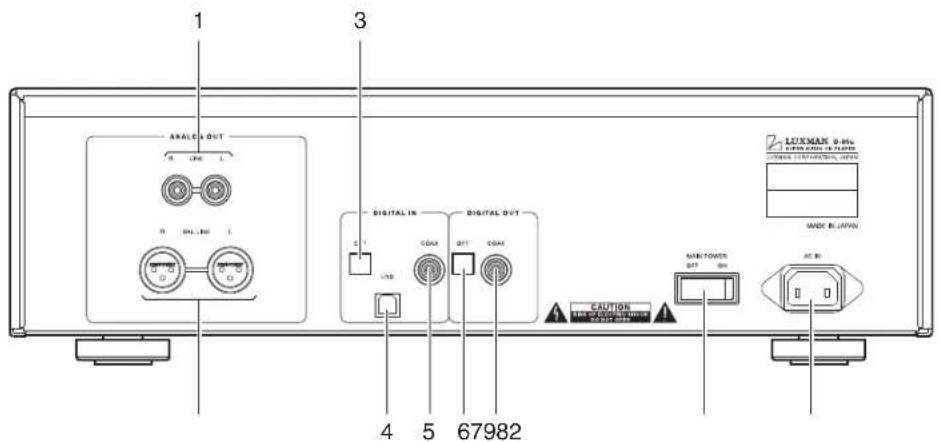
1. Analog unbalance output terminals (LINE)
RCA terminals to output unbalanced playback signals of this unit.
Connect these terminals to an unbalanced input of such device as a control amplifier with a pin cable.
The phase can be switched with the analog output phase selection switch (PHASE INVERT) on the front panel.
2. Analog balance output terminals (BAL LINE)
XLR connector terminal to output balanced playback signals from this unit.
Connect these terminals to a balanced input of an output device such device as a control amplifier with a balanced cable.
The following are the phases of the output terminals of this unit:
[Normal Position]
-
GROUND
-
COLD (-)
-
HOT (+)
[Invert Position]
-
GROUND
-
HOT (+)
-
COLD (-)
3. Optical digital input terminal (OPT)
When using this unit as a D/A converter, digital signals from a CD player or the like that has a digital output terminal is transmitted to this unit using an optical digital cable.
The terminal supports the following signals.
Sampling frequency : 32kHz, 44.1kHz, 48kHz,
88.2kHz, 96kHz, 176.4kHz,
192kHz
Number of quantization bits : 16bit, 20bit, 24bit
This terminal is a shutter type. Direct the cable connector correctly when inserting the cable into the terminal. If the cable connector is inserted forcibly with the wrong direction, the terminal may be deformed, and the shutter may not be able to close even after cable disconnection.
4. USB digital input terminal (USB)
USB (B-type) input terminal used for the digital input signal from such device as a PC/Mac using a USB cable.
The terminal supports the following signals.
- PCM signal
Sampling frequency : 32kHz, 44.1kHz, 48kHz,
88.2kHz, 96kHz, 176.4kHz, 192kHz
Number of quantization bits : 16bit, 24bit, 32bit
• DSD signal
Sampling frequency : 2.8224MHz, 5.6448MHz
Number of quantization bits : 1bit
When the OS is Windows, the dedicated driver software needs to be installed.
Read the separate software installation manual.
5. Coaxial digital input terminal (COAX)
When using this unit as a D/A converter, digital signals from a CD player or the like that has a digital output terminal is transmitted to this unit using a coaxial digital cable.
The terminal supports the following signals.
Sampling frequency : 32kHz, 44.1kHz, 48kHz,
88.2kHz, 96kHz, 176.4kHz,
192kHz
Number of quantization bits : 16bit, 20bit, 24bit
6. Optical digital output terminal (OPT)
Connect this terminal to such device as an amplifier that has a digital input terminal using an optical digital cable.
When a Super Audio CD (HD layer selected) or a DSD file is played back, a digital audio output cannot be not provided.
When the PCM data of 32 kHz sampling frequency is played back, a digital audio output cannot be provided.
This terminal is a shutter type. Direct the cable connector correctly when inserting the cable into the terminal. If the cable connector is inserted forcibly with the wrong direction, the terminal may be deformed, and the shutter may not be able to close even after cable disconnection.
7. Coaxial digital output terminal (COAX)
Connect this terminal to such device as an amplifier that has a digital input terminal using an coaxial digital cable.
When a Super Audio CD (HD layer selected) or a DSD file is played back, a digital audio output cannot be not provided.
When the PCM data of 32 kHz sampling frequency is played back, a digital audio output cannot be provided.
8. Main power switch (MAIN POWER)
Turns this unit to the standby state.
When this switch is set to ON, the standby indicator on the front panel lights up to show that this unit turns to the standby state.
When this switch is set to OFF, the standby indicator on the front panel turns off to show that the main power is turned off.
9. Power cable terminal (AC IN)
Connect the accessory power cable to supply the power from the AC outlet on the wall.
Connections
flowchart
graph TD
    A["InTEGRATED AMP"] -->|RL RL RL| B["PC/Mac"]
    B -->|When the OS is Windows, the dedicated driver software needs to be installed.| C["DVD PLAYER"]
    C -->|(C)| D["PC/Mac"]
    D -->|(A)| E["CD/SACD PLAYER"]
    E -->|(B)| F["CD/ACD PLAYER"]
    F -->|(F)| G["D/A CONVERTER"]
    G -->|(E)| H["CONTROL AMP"]
    H -->|(D)| I["INTEGRATED AMP"]
    I -->|RL RL RL| J["PC/Mac"]
    J -->|(A)| K["CD/ACD PLAYER"]
    K -->|(B)| L["CD/ACD PLAYER"]
    L -->|(F)| M["INTEGRATED AMP"]
    M -->|(E)| N["CONTROL AMP"]
    N -->|(F)| O["CD/ACD PLAYER"]
    O -->|(E)| P["INTEGRATED AMP"]
    P -->|(D)| Q["PC/Mac"]
    Q -->|(A)| R["CD/ACD PLAYER"]
Before Connecting
Before connecting other devices, connect the jack side of the accessory power cable to the AC inlet of this unit.
When connecting, turn off the power supply of this unit and the power supplies of auxiliary devices to prevent unexpected accidents that may be caused by noise.
How to connect power supply
Use the accessory power cable to insert the AC plug in an outlet on the wall in the listening room.
How to connect input devices
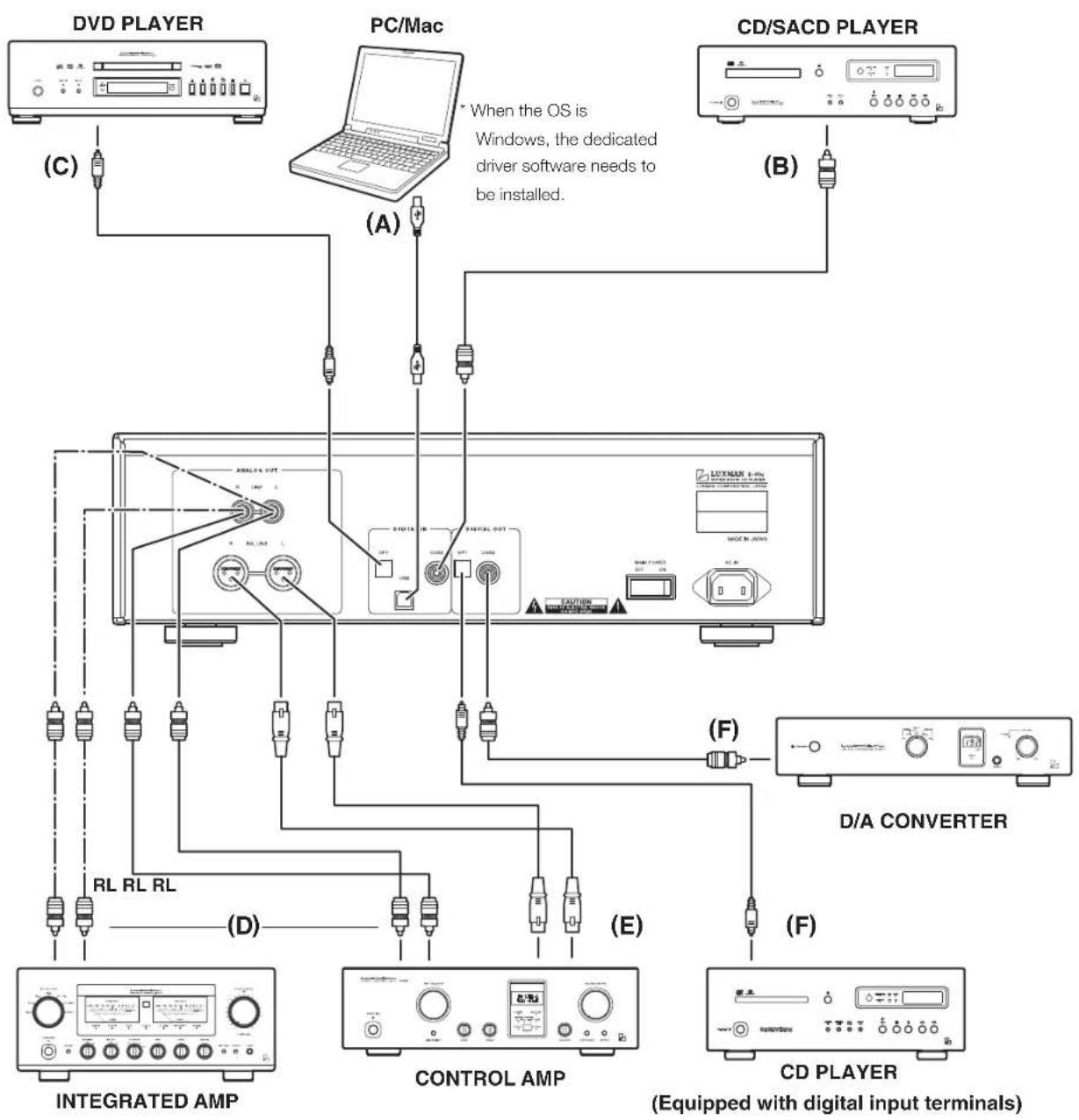
1. Digital connection from a PC/Mac (Refer to "A" in the connection diagram.)
Connect between the USB terminal (A-type) of the PC/Mac and the USB terminal (B-type) of this unit with a USB cable. When the OS is Windows, this unit is not automatically recognized. The dedicated driver software needs to be installed. Read the software installation manual provided with this unit. With Mac, this unit is automatically recognized.
2. Digital connection from such device as a CD player (Refer to "B" and "C" in the connection diagram.)
Connect between the (coaxial or optical) digital output terminal of a CD player, an SACD player, a DVD player, and other such devices and the digital input terminal (COAX/OPT) of this unit with a coaxial digital cable and an optical digital cable.
This terminal is a shutter type. Direct the cable connector correctly when inserting the cable into the terminal. If the cable connector is inserted forcibly with the wrong direction, the terminal may be deformed, and the shutter may not be able to close even after cable disconnection.
Upper side

Lower side
Direction of the optical terminal
How to connect output devices
1. Unbalanced connection with such device as an integrated amplifier (Refer to "D" in the connection diagram.)
Connect between the analog unbalance output terminals (LINE) of this unit and the unbalance input terminals of such device as an integrated amplifier with 2 (R and L) pin-plug cables.
2. Balanced connection with such device as a control amplifier (Refer to "E" in the connection diagram.)
Connect between the analog balance output terminals (BAL LINE) of this unit and the balance input terminals of such device as a control amplifier with 2 (R and L) XLR balanced cables.
3. Digital output to such device as another D/A converter (Refer to "F" in the connection diagram.)
Connect between digital output terminal (COAX/OPT) of this unit and such devices as a D/A converter and a CD player equipped with digital input terminals with a coaxial digital cable or an optical digital cable.
How to Play Back Discs
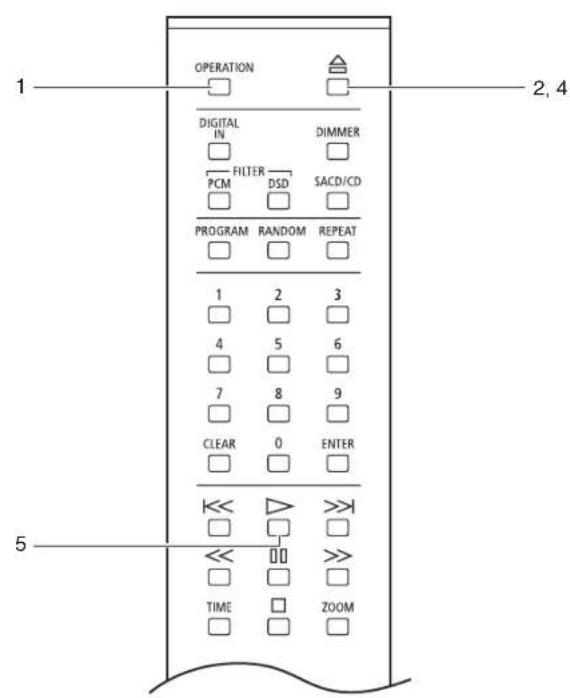
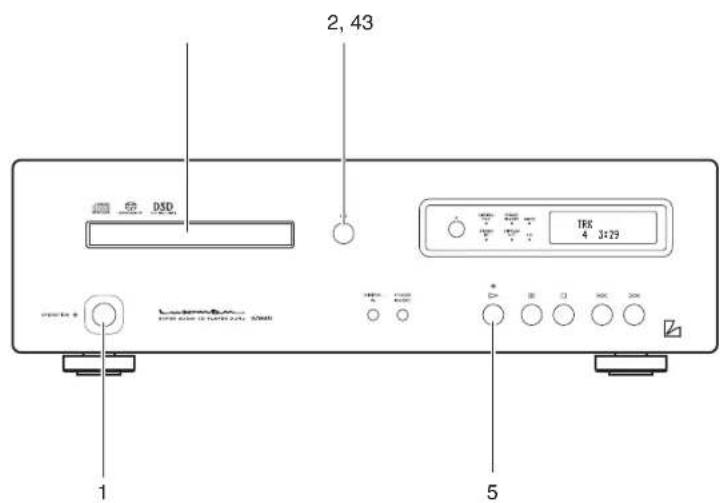
Playback a disc
1. Press the OPERATION switch.
"-OPERATION-" appears on the display. When it disappears, the unit becomes operable.
2. Press the open/close (△ switch.
The disc tray opens.
3. Put the disc on the disc tray according to the guide on the tray.
4. Press the open/close (△) switch.
The disc tray closes and the disc is loaded.
To start playback quickly, press the play (▷) switch without pressing the open/close (△) switch.
Or select a track by pressing a numeric key without pressing the open/close (△) switch, and press the ENTER switch or play (▷) switch.
Operation switches and numeric keys are not functional during the period from disc loading to displaying of disc type. Specifying the next operation, for example specifying the number of tracks beforehand, can shorten the time before playback starts.
5. Press the play (▷ switch.
Stop/pause the Playback
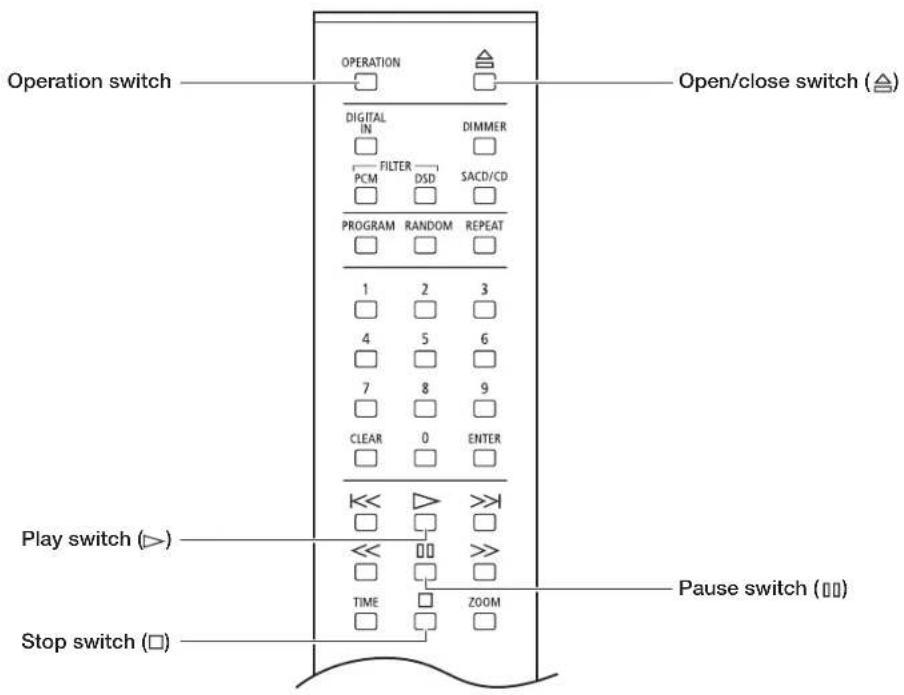
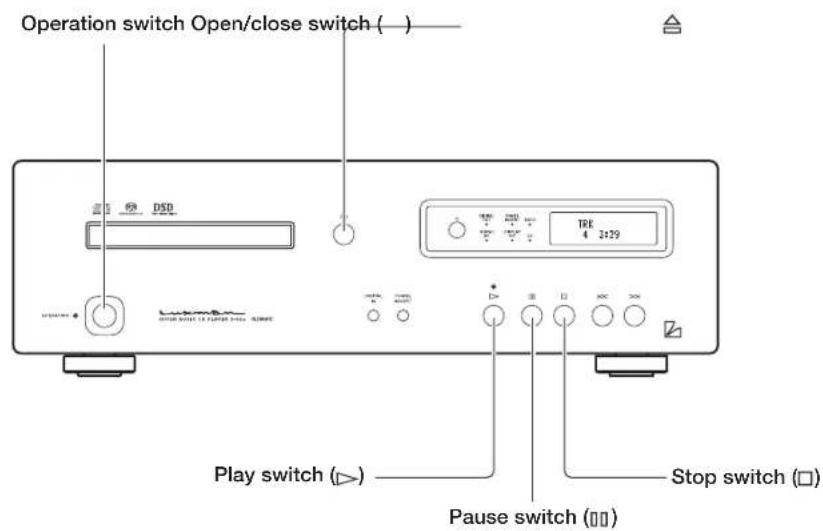
Pause/stop the playback of the disc
Pause playback
1. Press the pause (☐) switch
During pause, the play indicator blinks.
Resume the regular playback
2. During pause, press the play (☐)or pause (☐)switch.
Stop the playback
During playback, press the stop ☐ switch.
This unit retrieves the disc information and then displays the track number and time information at the first stop of disc playback to shorten the time between disc loading and playback start. The CD indicator or SACD indicator is blinking while this unit retrieves the disc information.
Thus, key operation cannot be accepted for several seconds only at the 1st stop of disc playback. In such a case, wait for a while before key operation.
Eject a disc
Press the open/close () switch
The disc tray opens.
Power off the unit
(Turn the unit to the standby state.)
Press the OPERATION switch
"-STANDBY-" appears on the display, and the STANDBY indicator lights up.
To turn off the power completely, the main power switch on the rear panel needs to be turned off.
Skip/Fast-forward/Rewind
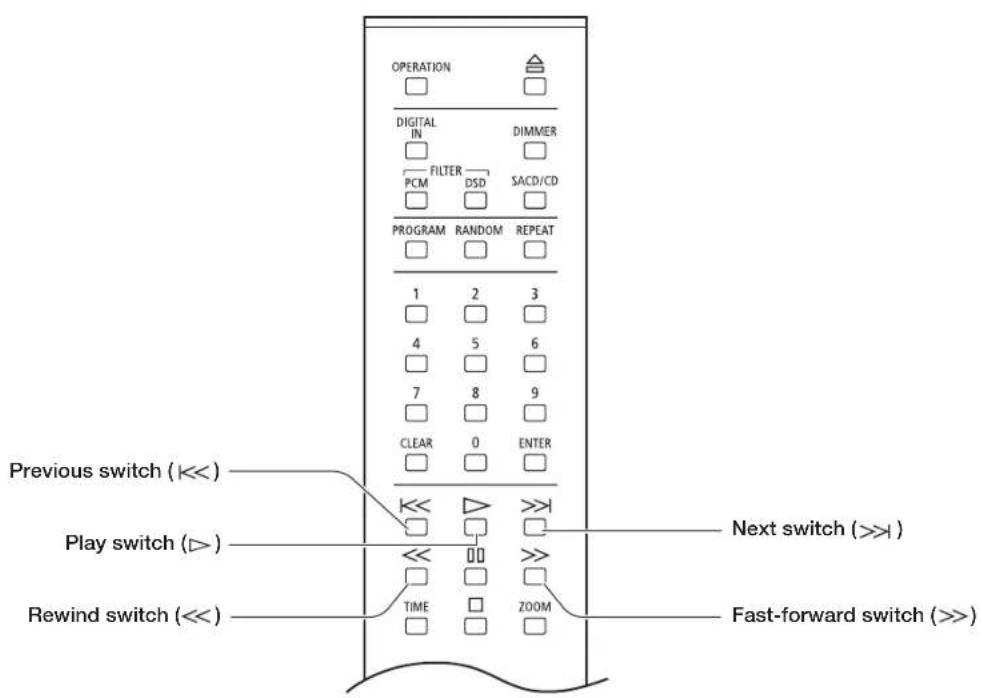
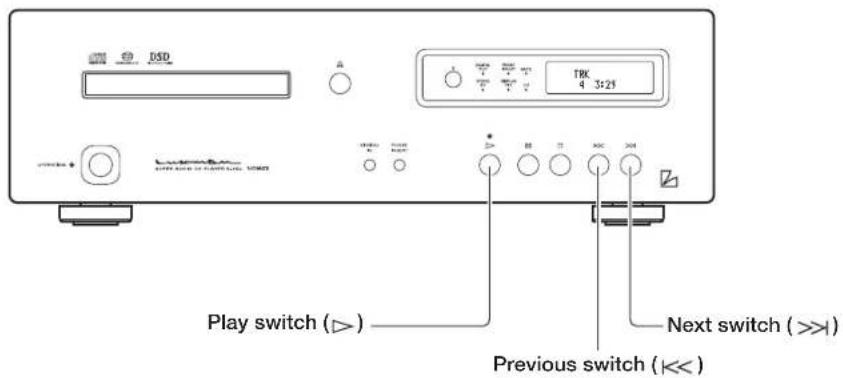
Skip to the desired track (Skip playback)
Skip playback
Skip to the track to play back.
To skip to the track to play back, press the next switch (▶) repeatedly until the desired track is displayed.
Go back to the track to play back.
To go back to the track to play back, press the previous switch ( ) repeatedly until the desired track is displayed. When this switch is pressed once, the playback returns to the beginning of current track. When this switch is pressed twice, the playback returns to the beginning of previous track.
Fast-forward/rewind the playback. (Scan)

Fast-forward the playback
1. During playback, press the fast-forward ( ≥ switch.
Each time the switch is pressed, the rewind speed can be changed in 4 steps.
1, >>2, >>3, >>4" appears on the display to indicate the fast-forward state and speed.
2. To resume the regular playback, press the play (I) switch.
Rewind the playback
1. During playback, press the rewind (<<) switch.
Each time the switch is pressed, the rewind speed can be changed in 4 steps.
"<<1, <<2, <<3, <<4" appears on the display to indicate the rewind state and speed.
2. To resume the regular playback, press the play (I) switch.
When a set of tracks are composed of two or more SACDs, the first track may not be Track 1.
Direct search/repeated playback
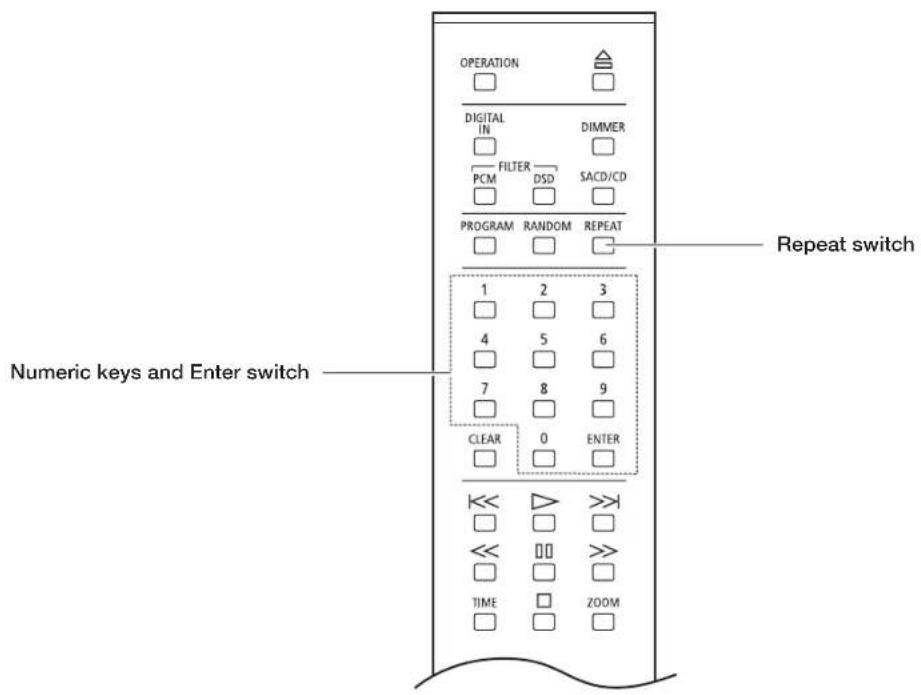
Specify the desired track for playback
Remote control
1. Enter a track number by pressing numeric keys.
For example, when selecting the 15th track, press the "1" key, and then "5".
2. Press the ENTER or play switch.
Playback will start automatically even without pressing the ENTER switch after the elapse of approx. 4 seconds. The maximum number of tracks is 255 for a Super Audio CD, and it may take longer time to enter a 3-digit track number. For this reason, approx 4 seconds are given to Super Audio CDs before auto jump.
Repeat the playback (Repeated playback)
Remote control
There are two types of repeated playback: track repeat (T-REP) and all repeat (A-REP).
Track repeat (T-REP)
- During playback, press the REPEAT switch once.
- "T-REP" appears on the display to indicate the track repeat.
- When this switch is pressed twice again, the track repeat is canceled.
All repeat is also canceled when the disc is stopped.
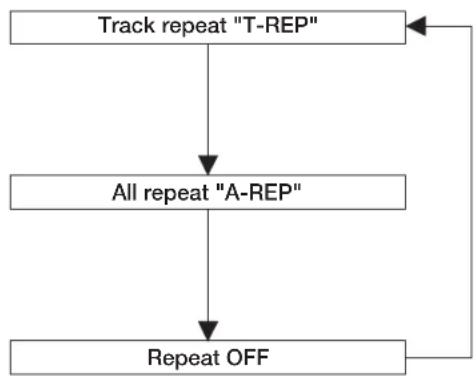
flowchart
graph TD
    A["Track repeat "T-REP""] --> B["All repeat "A-REP""]
    B --> C["Repeat OFF"]
    C --> A
All repeat (A-REP)
- During playback, press the REPEAT switch twice.
- "A-REP" appears on the display to indicate the all repeat.
- When this switch is pressed once again, the track repeat is canceled.
All repeat is also canceled when the disc is stopped.
Program Playback
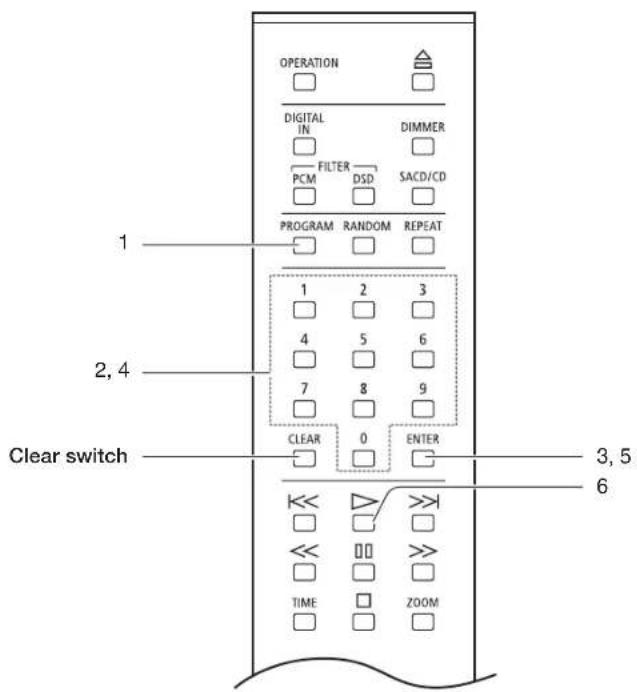
Play back the tracks in a programmed order (Program playback)
Remote control
It is possible to program up to 24 tracks in the desired order
- During stop, press the PROGRAM switch.
The following indication appears on the display.
| T-TIME | |
| PG 00 | 00:00 |
- Enter a desired track number by pressing numeric keys of the remote control.
For example, when selecting the 5th track, press the "5" key.
| PG 01 | 5 |
- Press the ENTER switch.
The order of the track is determined, and then track number and total time appear on the display.
| T-TIME | |
| PG 01 | 01:23 |
4. Enter the track number to program next.
For example, when selecting the 15th track, press the "1" key, and then "5".
| P0 02 | 15 |
5. Press the ENTER switch.
The order of the track is determined, and then track number and total time appear on the display.
| T-TIME | |
| PG 02 | 02:01 |
Program the desired tracks by repeating Step 2 and 3.
6. Press the play (▷) switch.
| TRK | ||
| PG | 5 | 1:25 |
- When pressing the CLEAR switch during stop, all the program is deleted.
- When pressing the PROGRAM switch, and then the CLEAR switch during stop, the tracks will be deleted in the reverse order.
- It is impossible to program pause.
- When pressing the REPEAT switch during program playback, programmed all repeat is performed.
- Track repeat is not available during program playback.
- When pressing the next (>>) switch during program playback, the playback jumps to the track programmed next.
- To perform the program playback again, press the PROGRAM switch during stop, and then the play (▷) switch.
Procedure
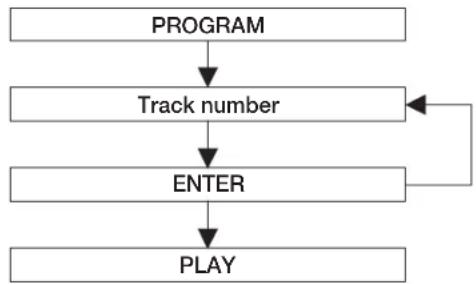
flowchart
graph TD
    A["PROGRAM"] --> B["Track number"]
    B --> C["ENTER"]
    C --> D["PLAY"]
    C --> E["Feedback Loop"]
Random playback/disc information/zoom
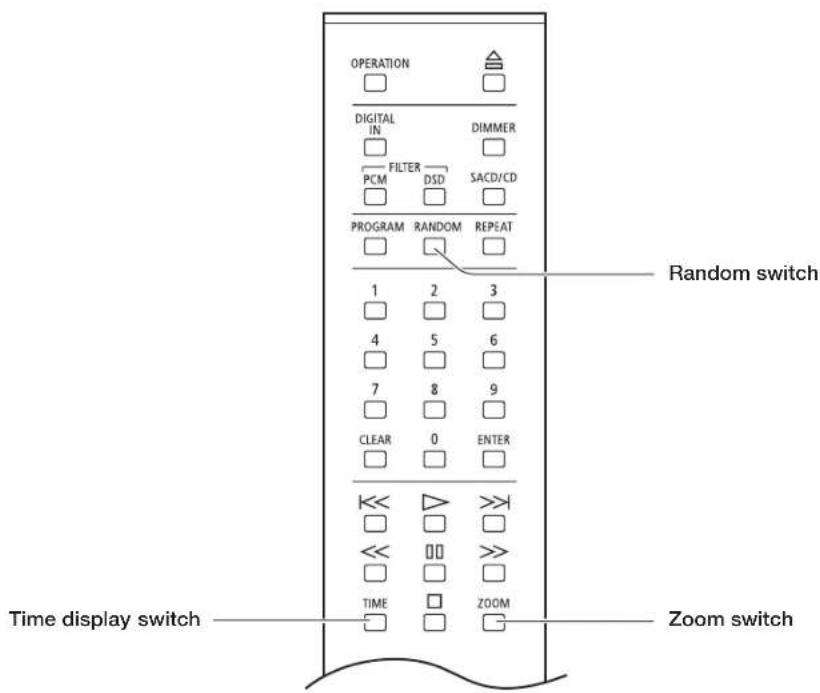
Play back the tracks in a random order (Random playback)
Remote control
Each track is selected from all the tracks and is played back once.
-
Press the RANDOM switch.
-
"RD" appears on the display to indicate the random playback. The playback stops automatically after all the tracks are played back.
Random playback stops when a disc is stopped or the RANDOM switch is pressed once again. When pressing the next (>>) switch during random playback, the next track is randomly selected and played back. When pressing the previous (<<) switch, the playback returns to the beginning of current track.
Disc information
Remote control
Switch the time display during playback
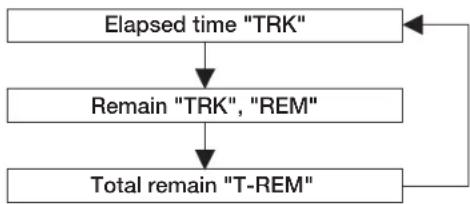
Each time the TIME switch is pressed during playback, the display changes as follows.
- The current track number and the elapsed time of the track (In the default setting)
"TRK" will appear on the display.
- The current track number and the remaining time of the track (Remain)
"TRK" and "REM" will appear on the display.
- The total remaining time of the disc (Total remain):
"T-REM" will appear on the display.
flowchart
graph TD
    A["Elapsed time "TRK""] --> B["Remain "TRK", "REM""]
    B --> C["Total remain "T-REM""]
    C --> A
Zoomed display
Remote control
Enlargement of displayed characters
-
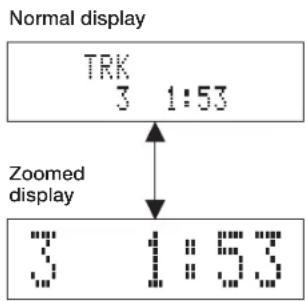
When the ZOOM switch is pressed, the track number and time will be displayed enlarged.
-
When the ZOOM switch is pressed once again, the display returns to the normal state.
Detailed Settings
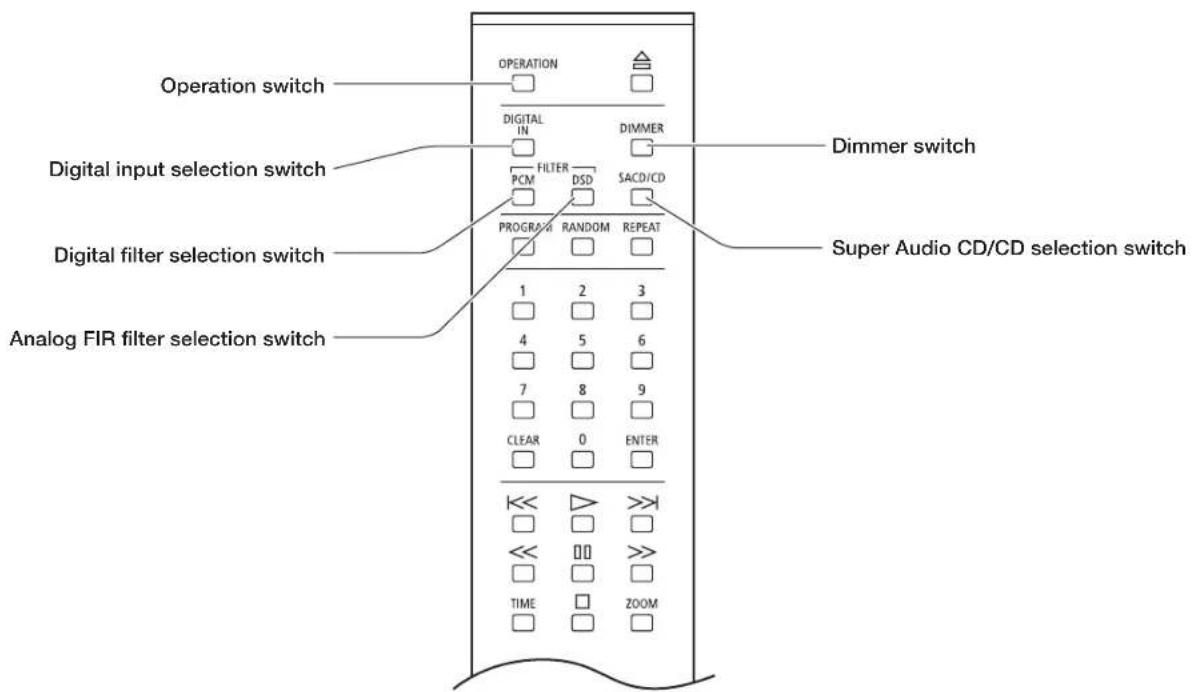
Dimmer switch (DIMMER)
Remote control
The brightness of the main unit display can be adjusted. The brightness can be adjusted in 4 steps from light off to normal light.
Each time the DIMMER switch is pressed, the display changes as follows. Normal light → dim → very dim → light off → Normal light ...
Selection of no light displays "DISPLAY OFF" for 1 second and the sign turns off.
The brightness of LED indicators such as "SACD" and "DIGITAL OUT" cannot be changed.
Super Audio CD/CD selection switch (SACD/CD)
Remote control
When playing back a Hybrid Super Audio CD, press this switch to switch over the playback layer between the HD (or SACD) layer and CD layer.
During stop, press the SACD/CD switch.
Each time this switch is pressed, the playback layer is switched over between the HD (or SACD) layer and CD layer. When the HD layer is selected, the Super Audio CD (SACD) indicator lights up on the main unit display.
When the CD layer is selected, the CD indicator lights up on the main unit display.
- This setting is activated even when another Hybrid Super Audio CD is loaded.
- When a single-layer CD or dual-layer CD is loaded, the HD layer is automatically selected.
• This unit does not support SACD multi-channel areas.
Detailed Settings
Digital input selection switch (DIGITAL IN)
Press this switch when using this unit as a D/A converter.
1. Each time the DIGITAL IN switch is pressed, the display changes as follows. COAXIAL→OPTICAL→USB→INTERNAL (Internal player)
The coaxial and optical inputs support the following signals.
Sampling frequency : 32kHz, 44.1kHz, 48kHz,
88.2kHz, 96kHz, 176.4kHz,
192kHz
Number of quantization bits : 16bit, 20bit, 24bit
The USB input supports to the following signals.
- PCM signal
Sampling frequency : 32kHz, 44.1kHz, 48kHz,
88.2kHz, 96kHz, 176.4kHz,
192kHz
Number of quantization bits : 16bit, 24bit, 32bit
• DSD signal
Sampling frequency : 2.8224MHz, 5.6448MHz
Number of quantization bits : 1bit
When the OS is Windows, the dedicated driver software needs to be installed.
Read the software installation manual provided with this unit.
2. The selected input type and sampling status are displayed on the main unit display window.
This sampling frequency and bit count of the digital signal are displayed, which is connected to the input terminal (COAX/OPT/USB) selected with the digital input selection switch. When one of COAX/OPTICAL/USB is selected by the digital input selection switch and the digital signal from each digital device and this unit are synchronized, the sampling frequency and bit count of the digital signal are displayed.
When a digital signal input is not provided or the signal is not synchronized even if the signal input is provided, "UNLOCK" is displayed.
When USB is selected, only the sampling frequency is displayed. The bit count is not displayed.
- The bit count (word length) indicates the contents of the word length data included in the channel status which is specified in IEC60958-3 (digital audio interface - Part 3: consumer applications).
Some output devices may provide channel status data (word length data) whose content is different from the actual word length. In such a case, the contents of the channel status data are indicated on the display instead of the actual bit count.
Alternatively, some devices or sources may provide the data that states "the word length is not specified". In such a case, the bit count is not displayed.
- There may be a case where the display indicates "LOCK" shortly, and then "UNLOCK". (The reverse case is also possible.) That is because the former state (LOCK/UNLOCK) is indicated for approx. 0.5 seconds since an input signal is changed until the circuit gets stable.
Detailed Settings
Digital output selection function

To toggle the digital audio output on and off, hold down the digital input selection switch on the main unit. Each time the switch is held down, the output can be toggled on and off.
When the HD layer of a Super Audio CD or a DSD file is played back, a digital audio output cannot be provided. At this time, the DIGITAL OUT indicator turns off. It is possible to turn on or off the digital audio output when playing back the CD layer of Hybrid Super Audio CD. When the PCM data of 32 kHz sampling frequency is played back, a digital audio output cannot be provided. Holding down DIGITAL IN switch for a few seconds does not switch over digital output's ON/OFF.
Phase invert changeover switch (PHASE INVERT)

The phase of the analog output on the rear panel is inverted. Both the balanced output and unbalanced output are inverted.
This setting is stored on the flash memory even when the power is turned off.
Every time this switch is pressed, the balanced phase changes as follows: NORMAL→INVERT→NORMAL→INVERT...
[Normal Position]
Restore all the settings to the factory defaults.
All the settings will be restored to the factory defaults.
- Turn this unit to the standby state.
- Press the OPERATION switch on the main unit while pressing the stop (☐) switch on the main unit.
All the settings are restored to the factory defaults.
| Item Default | |
| Digital input selection INTERNAL (Internal player) | |
| Digital output selection ON | |
| Super Audio CD/CD selection | Super Audio CD (SACD) |
| Phase invert changeover Normal | |
| Dimmer adjustment Normal | |
| Digital filter PCM P-1 | |
| Analog FIR filter DSD D-1 | |
| Zoomed display Normal | |
Last memory function (Memorization of each setting)
The following are the setting items to be memorized on the flash memory.
When the power is turned off immediately after setting change, the setting data may not be successfully memorized.
| Item Default | |
| Digital input selection | INTERNAL (Internal player), COAXIAL, OPTICAL, USB |
| Digital output selection ON, | OFF |
| Super Audio CD/CD selection | Super Audio CD (SACD), CD |
| Phase invert changeover Normal/Invert | |
| Dimmer adjustment | Normal, dim, very dim, light off |
| Digital filter PCM P-1, P-2 | |
| Analog FIR filter DSD D-1, D-2 | |
| Zoomed display Zoomed, Normal | |
Block Diagram
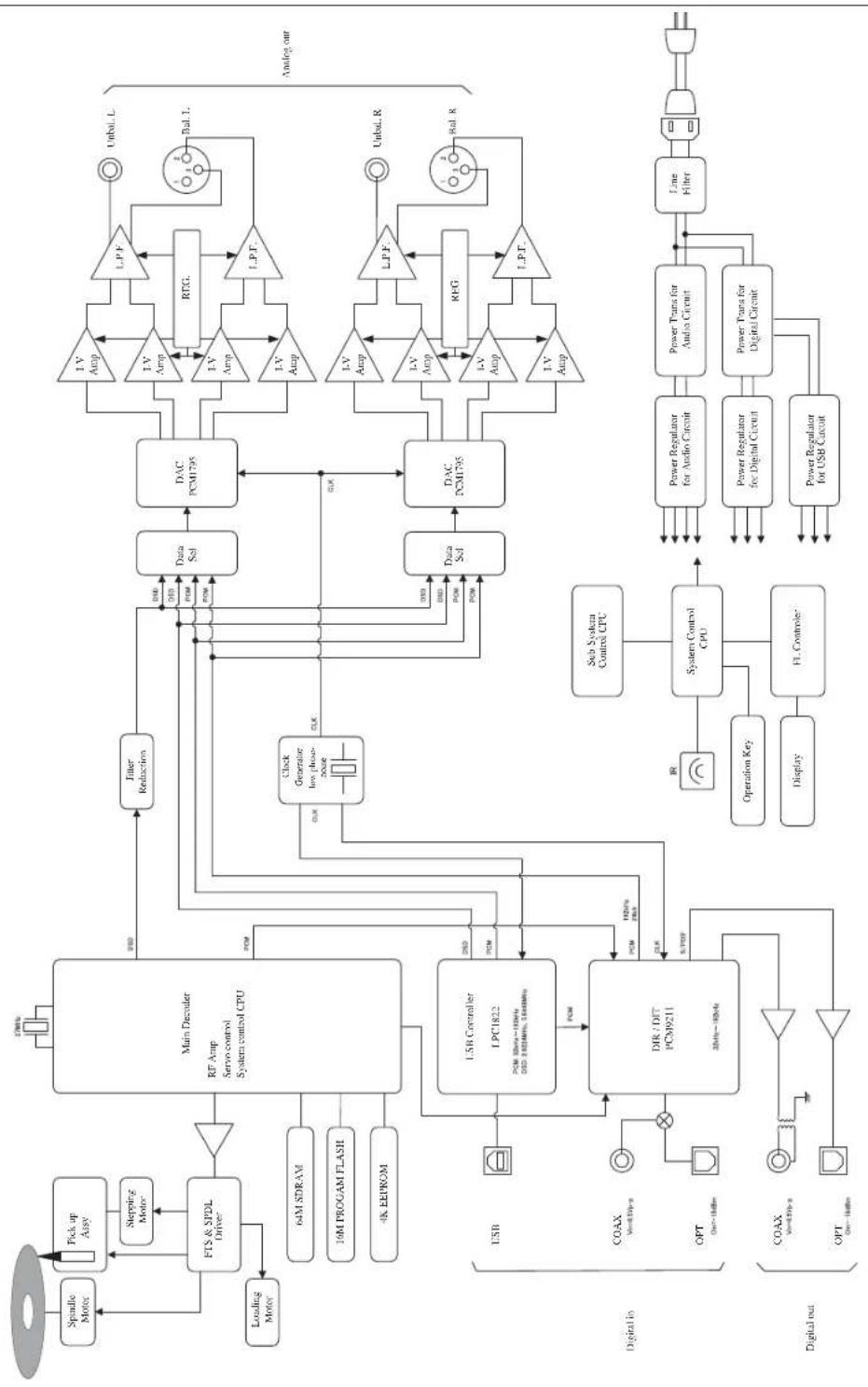
flowchart
graph TD
    A["Spindle Motor"] --> B["FTS & SPDL Driver"]
    C["Pick up Assy"] --> B
    D["Stepping Motor"] --> B
    E["Loading Motor"] --> B
    F["64M SDRAM"] --> G["Main Decoder RF Amp Servo-control System control CPU"]
    H["16M PROGAM FLASH"] --> G
    I["4K EEPROM"] --> G
    J["USB"] --> K["LSB Controller LPC1822 PCM 30Hz~100Hz DSP 340MHz, 540MHz"]
    L["COAX 5x40Hz"] --> M["DIR / DIT PCM9211 20Hz~100Hz"]
    N["OPT 0x100Hz"] --> M
    O["COAX 5x40Hz"] --> P["Sub System Control CPU"]
    Q["OPT 0x100Hz"] --> P
    R["Power Regulator for Audio Circuit"] --> S["Power Trans for Audio Circuit"]
    T["Power Regulator for Digital Circuit"] --> U["Power Trans for Digital Circuit"]
    V["Power Regulator for USB Circuit"] --> W["Power Regulator for USB Circuit"]
    X["CLK"] --> Y["Clock Generator Low phase-noise"]
    Z["CLK"] --> Y
    AA["CLK"] --> Y
    AB["Data Sel"] --> AC["DAC PCM1795"]
    AD["Data Sel"] --> AE["DAC PCM1795"]
    AF["Power Trans"] --> AG["I-V Amp"]
    AH["I-V Amp"] --> AI["I-V Amp"]
    AJ["I-V Amp"] --> AK["I-V Amp"]
    AL["I-V Amp"] --> AM["I-V Amp"]
    AN["I-V Amp"] --> AO["I-V Amp"]
    AP["LT.P.F."] --> AQ["LT.P.F."]
    AR["RTG."] --> AS["RTG."]
    AT["L.P.P.F."] --> AU["L.P.P.F."]
    AV["Bal. L."] --> AW["Bal. L."]
    AX["Unbal. R."] --> AY["Unbal. R."]
    AZ["Rat. R."] --> BA["Rat. R."]
    BB["Line Filter"] --> BC["Line Filter"]
    BD["Analog out"] --> BE["Analog out"]
    BF["Splastic Motor"] --> BG["Main Decoder RF Amp Servo-control System control CPU"]
    BH["Poleaking Motor"] --> BG
    BI["Loading Motor"] --> BG
Format 2-channel Super Audio CD, CD
| Power supply 230 V ~ (50 Hz) | ||
| Power consumption 26 W | ||
| 1 W (at standby) | ||
| Weight 14.8 kg (main unit only) | ||
| Max. external dimensions 440 (W) x 133 (H) x 410 (D) mm(front side knob of 2 mm and rear side terminal of 8 mm included in depth) | ||
| Ambient operating temperature / Ambient operating humidity | +5 °C to +35 °C / 5 % to 85 % (non condensing) | |
| Audio output characteristics | Output voltage / output impedance: | LINE (RCA terminal) 2.4 Vrms/300ΩBAL LINE (XLR terminal) 2.4 Vrms/600ΩFor SACD/DSD 2.3 Vrms (D-1)1.7 Vrms (D-2) Refer to the page 16. |
| Frequency response: CD, SACD 5 Hz to 20 kHz (+0, -0.5 dB)SACD/USB 5 Hz to 50 kHz (+0, -3 dB) | ||
| Total harmonic distortion: CD 0.0015 %SACD 0.0015 %COAX/OPT 0.0009 % (96kHzSF)USB 0.0009 % (96kHzSF) | ||
| S/N ratio: | CD 122 dBSACD 102 dBCOAX/OPT 123 dUSB 123 dB | |
| Dynamic range: | CD 100 dBSACD 104 dBCOAX/OPT 123 dUSB 123 dB | |
| Channel separation: | CD 114 dBSACD 103 dBCOAX/OPT 124 dUSB 124 dB | |
| Digital input | Coaxial digital input: | 0.2 to 2.5 Vp-p |
| Optical digital input: | -14.5 to -21 dBm | |
| USB input: (Applicable OS) | Microsoft Windows Vista or later, Mac OS X10.7 or later | |
| Sampling frequency: | COAX/OPT : 32 kHz, 44.1 kHz, 48 kHz, 88.2 kHz96 kHz, 176.4 kHz, 192 kHz(16 bit, 20 bit, 24 bit)USB input : 32 kHz, 44.1 kHz, 48 kHz, 88.2 kHz96 kHz, 176.4 kHz, 192 kHz(16 bit, 24 bit, 32 bit)2.8224 MHz, 5.6448 MHz (1 bit) | |
| Digital output | Coaxial digital output: | RCA terminal 0.5 Vp-p/75Ω |
| Optical digital output: | Optical digital terminal -15 to -21 dBm | |
* Specifications and appearance are subject to change without notice.
Before Asking for Repair
While the unit is used, an unusual phenomenon may be confused as a malfunction for a certain reason. Prior to asking our official sole distributor of your country for repair services, please check the table below and read the operating instructions for the subsidiary devices. If the cause of the malfunction cannot be identified, please contact your dealer. When we have once accepted your request for repair services, inspection fees and traveling expenses may be claimed even though the unit is found to be normal.
Problem Cause/Solution Ref. page
| No power is supplied even though the main power switch is pressed.The standby indicator does not light. | ·Connect the power cable to the AC inlet and the AC outlet firmly. 22 | |
| The disc tray comes out even after the tray is closed. | ·Set the disc on the disc tray correctly. 24 | |
| ·Clean the disc to remove dirt. 2 | ||
| Playback cannot be performed. · | Clean the disc to remove dirt. 2 | |
| ·Set the disc on the disc tray correctly. 24 | ||
| ·Remove dew condensation from the interior of this unit. 1 | ||
| ·Put the disc on the tray with the label facing upwards. (label face upward) | ||
| No sound is generated. / Sound volume is too low. (Digital input) | ·Connect digital cables correctly. 21 - 22 | |
| ·If the USB is selected as an input source, select this unit (D-05u) as the output destination by configuring the sound setting of a PC/Mac. | Refer to the in-struction manual of the PC/Mac or the software in use. | |
| ·If the unit (D-05u) cannot be selected even when trying the solution above, reconnect the USB cable. | ||
| ·If the USB is selected as an input source, adjust the sound volume by configuring the sound setting of a PC/Mac. | ||
| ·If the USB is selected as an input source, adjust the sound volume on a player software of a PC/Mac. | ||
| ·Confirm that the sampling frequency and the number of quantization bits of the played back digital signal are applicable to this unit. | 19 - 20 | |
| ·Check to see whether "UNLOCK" of the digital input is displayed or not. (When the digital signal from the digital device is not synchronized with this unit, the source may not be played back.) | ||
| The remote control cannot be operated. | ·Operate the remote control within the specified operating range. 10 | |
| ·Replace the remote control battery with a new one. 9 | ||
| ·The remote control infrared receiver is exposed to direct sunlight or strong light sources (such as inverter fluorescent lights). Change the installation place or angle to avoid the exposure to light sources. | 10 | |
| An electronic device such as a television malfunctions. | ·Some devices equipped with a wireless remote control receiver may malfunction when the remote control of this unit is operated. Keep this unit away from such devices. |
Problem Cause/Solution Ref. page
| No sound is generated from the speakers, or sound is distorted. | · Confirm that the connections of audio cables are correct. 21 - 22 | |
| · If a digital output device is connected to this unit, set [Digital output] to [On]. | 40 | |
| · Clean the disc to remove dirt. 2 | ||
| · When the output level of an amplifier, etc. is minimum, adjust the volume. | ||
| · Confirm that the cable connectors are connected and firmly inserted into the terminals of the unit. | 21 - 22 | |
| · Clean the cable connectors and terminals by using a plain dry cloth or a cloth dipped in a small amount of dehydrated alcohol. | ||
| Digital audio signals cannot be output digitally. | · Set [Digital output] to [On]. 40 | |
| · When the HD layer of a Super Audio CD, a DSD file, or a PCM file with sampling frequency of 32 kHz is played back, a digital audio output cannot be provided. | 20 | |
| The output levels of SACD and CD are quite different. | · This is due to the difference in recording format. | |
This unit may not work normally when the unit is subject to external influence such as static electricity. In such a case, normal operation may resume by turning off the power once and turning on the power again after several tens of seconds or returning the unit to the factory setting. If the problem is not solved, please contact your dealer or our service center.


LUXMAN CORPORATION, JAPAN
AG00987E44A
Printed in China
