
D-08 - Media player LUXMAN - Free user manual and instructions
Find the device manual for free D-08 LUXMAN in PDF.


| Product Type | Super Audio CD / CD Player |
| Model Number | D-08 |
| Disc Compatibility | Super Audio CD (Single/Dual/Hybrid), CD, CD-R, CD-RW, 8cm CD |
| Playback Modes | Regular, Program, Random, Repeat (Track/All) |
| Transport Mechanism | LxDTM (Luxman Original Disc Transport), SSB Chassis, QLL (Quiet Linear Loader), Dust Proof Shutter |
| Analog Audio Output | Unbalanced (RCA): 2.5Vrms/300Ω; Balanced (XLR): 2.5Vrms/600Ω |
| Digital Audio Inputs | 1x Coaxial, 2x Optical; Supports 32-96kHz, 16-24bit PCM |
| Digital Audio Outputs | 1x Coaxial, 1x Optical |
| Frequency Response | CD: 5Hz-20kHz (+0, -0.4dB); SACD: 5Hz-50kHz (+0, -3dB) |
| Total Harmonic Distortion | CD: 0.0013%; SACD/DSD: 0.0017%; SACD/PCM: 0.0006% |
| Signal-to-Noise Ratio | CD: 124dB; SACD/DSD: 104dB; SACD/PCM: 120dB |
| Dynamic Range | CD: 101dB; SACD/DSD: 104dB; SACD/PCM: 118dB |
| Channel Separation | CD: 124dB; SACD/DSD: 104dB; SACD/PCM: 116dB |
| Power Supply | AC 230V, 50Hz |
| Power Consumption | 32W (Standby: 1W) |
| Dimensions (W x H x D) | 440 x 154 x 413 mm |
| Weight | 22.5 kg |
| Remote Control | Aluminum case, tactile switches (model RD-14) |
| Additional Features | ODNF Ver.3.0 analog circuit, DSD to PCM conversion, jitter reduction, disc layer switch, zoom display, bit length extension (16→24), dimmer (4 steps), last memory, digital output off, gold-plated RCA, Neutrik XLR, gradient cast-iron legs |
| Cleaning Instructions | Wipe with dry soft cloth; use diluted detergent for stubborn dirt; avoid solvents like alcohol, benzine, thinner |
| Safety Precautions | Do not move during playback; avoid dew condensation; keep away from heat, humidity, direct sunlight; use only on level surface |
Frequently Asked Questions - D-08 LUXMAN
User questions about D-08 LUXMAN
0 question about this device. Answer the ones you know or ask your own.
Ask a new question about this device
Download the instructions for your Media player in PDF format for free! Find your manual D-08 - LUXMAN and take your electronic device back in hand. On this page are published all the documents necessary for the use of your device. D-08 by LUXMAN.
USER MANUAL D-08 LUXMAN
Skip/Fast-forward/Rewind27
DirectSearch29
RepeatPlayback31
ProgramPlayback 33
RandomPlayback 37
DisclInformation/Zoom 39
DetailedSettings 41
BLOCKDIAGRAM 47
Specifications 48
Before You Ask For Repair Services 49
Precautions
DONOTmovethisunitduringplayback.
During playback, the discisrotating at high speed. Donottrytoliftormovethisunitasthe discmaybedamaged.
Whenmovingthisunit
Youmustremovethediscandclosethedisctray whenmovingthisunit.
Then, presstheOPERATIONswitch, andafter
"-STANDBY-"disappearsfromthedisplay,unplug thepowercordfromtheACoutlet.
If the unitism moved with discrete remaining inside, this can cause amalfunction.
Locationforinstallation
- Chooseastableplacenearthestereosystem thatistobeusedincombinationwiththisunit.
- Donotinstallthisunitnearatelevisiono monitor. Keep this unit away from such devices as cassettecksthataresubjecttomagnetism.
•Installthisunitontoalevelplacewhenpossible.
Avoidthefollowinglocationsfor installation.
- Locationsexposedtodirectsunlight
- Placessubjecttohumidityandwithlessventilation
-Placeswhereareextremelyhotorcold
•Placessubjecttostrongvibration - Placessubjecttodust
- Placessubjecttooil,steam,andheat(suchas kitchens)
Donotputarticles.
Donotputarticlesonthisunit.
Toavoidheatemission
Donotplacethisunitonsuchdeviceasanamplifierthatmayemitheat.Iftheunitisinstalledona rack,installtheunitbelowtherackwherethe amplifierisinstalledsoastoavoidheatemission fromtheamplifierandotheraudiodevices.
Noticewhenthisunitisinstalledina rackwithglassdoors
While the glass doors are closed, donot open the discray bypassing the open/close( ) button of theremote control. Discray performance will be blocked, and that may result in an malfunction.
Poweroffthisunitwhenitisnotused.
Depending on the condition of radiowaves emitted during television broadcasting, interference
fringesmayappearonthetelevisionmonitor,but thatisnotamalfunction.Insuchacase,power off the unit. There may also be a case where noisesareheardontheradioduetoradiowave interference.
Dewcondensation
Inwinter, be careful when carrying this unit from acold placeto awarmplace or if the room temperature is suddenly raised by a heater or the likewise this unit is installed. The unit interior (operating blocks and lens) will have dew condensation on it. Insucha condition, this unit cannot work normally and playback is impossible. This depends on the state of dew condensation, but you will be able to enjoy them music if the unit is left untouched for one to two hours after it has been turned on and the temperature of this unit is maintained at room temperature until the condensation dries.
Eveninsummer,dewcondensationcanoccurif
thisunitisdirectlyexposedtocoolairfromanair conditioner.Insuchacase,theinstallationplace shouldbechanged.
Batteries
Caution:
Batteriesusedforremotecontrollershallnotbe exposedtoexcessiveheatsuchassunshine,fire orthelike.
Howtohandlediscs
- Donotuseanydeficientdisc(withcracks, warp, etc).
- Donotdamagethesignalsurfaceofthediscormakeitdirty.
- Donotplacepaperorastickeronthedisc.Such awkwardhandlingcanwarpthediscandplay-backmaybecomeimpossible.Inmanycases, rentaldiscscarrylabelsandpastemayprotrude fromunderthelabel.Beforeuse,checkthatthe discisfreefromprotrudingpasteorthelike.
- Donotplaywithtwodiscsinastack.
Howtostorediscs
- Alwaysputyourdiscsinacase.Storethemverticallywherehightemperature,highhumidity, anddirectexposuretosunlightarenotprevalent. Placeswithextremelylowtemperatureshould alsobeavoided.
- Readthecautionnotescarefullythatareattachedtodiscs.
Disccleaning
- Ifadiscisdirtyfromfingerprintsordusty, the soundqualitymaybelowered. Lightlywipethe discwithsoftcloth, fromtheinsidetoouterperiphery. (Don'twipeitalongthecircumference.)
- Donotuseavolatilechemicalsuchasbenzine orthinner. Recordspray, anti-staticagents, and othersuchmaterialscannotbeusedeither.
- Where the disc seems to be very dirty, dip soft clothinwater, wringitwell, and remove contaminants. Lastly, removethemoisture with drycloth.
Discinaspecificshape
This unit cannot accept discs inspecific shapes (heart-shaped, hexagonal, etc.) for playback. Never uses such discs asthey can cause malfunctions.
Noticewhenhandlingopticaldigitalcables
- Donotfold thecables. For storage, windeachcable to make a coil whose diameter is approx. 15 cmor larger.
- For connection, insert the cable connectors firmlyintotheterminalsofthisunitandtheother device.
- Use the cables whose each length is 3 m or less.
- Whenthecableconnectorsgetdusty, wipethe dustawaywithadrysoftclothbeforeinserting intotheterminals.
Cleaning
- Usually, wipetheunitwithadrysoftcloth. When the dirtishardtoremove, dipsoftclothindetergentdiluted5or6timeswithwater, wringit well, and remove contaminants. Then, remove themoisturewithdrycloth.
- Do not use a solvent like alcohol, benzine, thinner, orpesticide because such as substance and damage the exterior. In addition, donotlet this unit contactarubber or plastic form for along time. That may damage the cabinets surface of the unit.
- When using a chemical cloth for cleaning, read the caution provided with the chemical cloth product.
•Beforecleaning,unplugthepowercordfromthe ACoutlet.
FeaturesOfThisUnit
—2-channel-specificSuperAudioCD/CDCompatiblePlayer
LxDTM—LuXmanoriginalDisc TransportMechanism—
Thisunitisequippedwitharobusttransportblock. Thetransportblockfeatureshighrigiditystructure SSB(StabilizedSupportBlock)thatdoublesasa chassis.
Thesuede-finishaluminumdie-castdisctraycan controlvibrationandresonance.
QLL(QuietLinearLoader)isappliedtoopenor closethedisctrayquietlyandsmoothly.
DustProofShutter(DPS)
DustProofShuttem(DR) is misintegrated into the disk tray section of the front panel to enhance dust prevention and reduce noise pollution.
Analogcircuit
Fouridenticallyconfiguredfullydiscretebalanced amplifiersequippedwiththeODNFVer.3.0(Only DistortionNegative Feedback)circuit, hasbeen incorporatedintouourdigitalmusicplayerforthe firsttime.
DSD → PCMconversion
DSDsignal, which is output from the transport during a SuperAudioCD playback, is converted to a PCM signal before it is input to a D/A converter.
When this function is not used, the DSD signal will be directly input to the D/A converter.
Jitter-reductionfunction
Thisunitisequippedwithacircuittoreducethe clockjitterinthesystemclock.
Disclayerswitchoverfunction
Bypassingaswitchonthemainunitorremote control,theCDlayerandtheHDlayerofHybrid SuperAudioCDcanbeswitchedover.
Zoomfunction
WhentheZOOMswitchispressedontheremote controlduringadiscplayback,thetracknumber andtimeinformationcanbezoomedonthedis-play.
4playbackmodes
Playbackmodecanbeselectedfromregular playback,program playback,random playback, and repeat playback.
Digitalinputterminals
This unit is equipped with a coaxial input terminal and an optical (1,2) input terminal.
TheunitiscompatiblewithSPDIFformatsignals between32kHzand96kHz.
Itispossibletoplaybackthedigitalaudiosignal thatisoutputfromanotheraudiodeviceviathe circuitoftheunitthatimprovesthesoundquality.
Lastmemoryfunction
Built-inflashmemorycanmemorizesettingssuch asdigitalinput, SuperAudioCD/CDswitchover, and DSD/PCMswitchover.
Dimmerfunction
Thebrightnessofdisplay(timeinformation,etc.) canbeswitchedoverin4steps.
DigitaloutputOFF
Thedigitalaudiooutputcanbedeactivatedto improvethequalityofanalogaudiooutput.
Analogoutputterminals
Introductionofahigh-gradeRCA terminalwithgold platingandhigh-gradeXLRterminalmanufactured byNeutrikallowsevenahigh-performanceline cablewith largeplugtobe connected.
Peel oatPCB/Roundpatternboard
Aftercarefulconsiderationofdelicateaudiosignal flow,aroundpattern,goldplatedsignaltraceshas been applied to achieve smooth signal transmission.
Legs
Thisunithasthegradationcast-ironlegs.
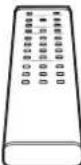
Remotecontrol(RD-14)
Theremote control is encased in aluminum. Tactileswitches will satisfy users with solid click feeling.
Bitlengthextension
Thisunitfeaturesthefunctiontoextendthebit lengthofaudiodata.
Byconvertingthe16-bitdatato24-bitone,fluid anddelicatesoundcanbereproducedwithminimalsignaloutput.
Energy-savingdesign
Thisunithasbeendesignedtosaveenergyby reducingstandbypowerconsumptionto1W.

AboutDiscsThisUnitCanPlayBack
Typesofdiscsthatcanbeplayed
The following marks are printed on dislabels, packages, or CDjackets.
| Marksfortypesofdiscsthisunitcanplayback | ||
 | ||
| %3S%%38 | ||
 |  |  |
Thisunitcanplayback8cmCDswithoutusingan adapter.
Donotuseanadapterfor8cmCDs.
- CD-R/CD-RWdiscsthathavebeenwrittenbyarecorder orPC(personalcomputer)maynotbeplayedback. (Duetocharacteristicsofdiscs,scratches,dirtonthe lensoftheunit,ordewcondensation)
- DiscswrittenbyaPCmaynotbeplayedbackdepending ontheapplicationsettingsorenvironment. Writethediscsinaproperformat.(Refertothedistributor ofapplicationfordetails).
- Timeinformationmaynot bedisplayedwhen an unfinalizedCD-R/CD-RWdiscisplayedback.
•Refertotheprecautionsfordiscsfordetailsonhowto handleCD-R/CD-Rdiscs.
SuperAudioCD
—3typesofdiscs—
•Single-layerCD
Dummylayer
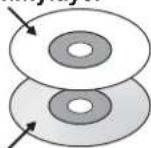
HDlayer
Thisisadiscwhichhasasingle SuperAudioCDlayer
•Dual-layerCD
HDlayer
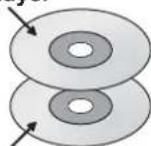
HDlayer
Thisisa CDwhichhas adual SuperAudioCDlayerthatsupportslong-timerecording
•Hybrid-layerCD
CDlayer
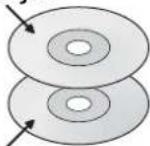
HDlayer
ThisisaCD which has both a standard CD layer and Super AudioCD layer.
Whenthedisplayedbackon a Super Audio CD player, it is possibletoenjoysoundsofimprovedqualityontheHDlayer. Whenthedisplayedbackon anexistingCDplayer, itispossibletoplaybacksoundsontheCDlayer.
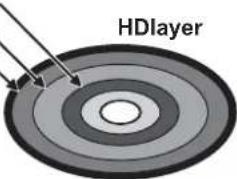
Hdlayer:SuperAudioCDlayer
CDlayer:ExistingCDlayer
HDlayerhasthefollowingareas.
•2-channelstereoarea
•Multi-channelarea
•Extradataarea
(Forfutureexpansion)
ComparisonofSuperAudioCDswithCDs
| ItemSuperAudio | CDCD | |
| Discdiameter(cm) | 1212 | |
| Discthickness(mm)1.21.2 | ||
| Codingmethod1-bitdirectstream | digital(DSD)16-bitlinearPCM | |
| Samplingfrequency2.8224MHz(64timestoCDs)44.1kHz | ||
| Maximumrecordabletime109min | utesfor2chonly. 60to70minutesfor2-channel stereoarea+multi-channelarea* ^1 | 74minutes |
| Numberofchannels | 2,3,3.1,4,4.1,5,5.1 | 2 |
| Maximumnumberoftracks | 255 | 99 |
| Maximumnumberofindexes | 255 | 99 |
| Playbackfrequencyrange | DCto100kHz | 5to20kHz |
| Dynamicrange* ^2 | 120dBormore(Audiblefrequencyrange) | 96dB |
*1 Thisisthemaximumrecordabletimeforasingle-layerCD.DependingonthecompressionrateofDST(Direct Stream Transfer), the maximum recordable time may vary.*3
*2 Theoreticalvalue.
*3 Lossless compression method that applies a variable bit rate for DSD signals. The method has been developed, focused on the DSD signal characteristics.
BeforeUse
Checktheaccessories.
Afterunpacking, checkifthefollowingaccessoriesarenotmissing.
•Powercable
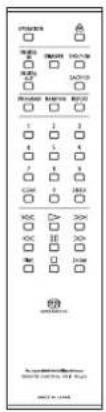
•Remotecontrol(RD-14)
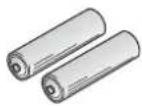
- "AAA" batteries(2pieces)
•Safetycautions
- Owner'sManual(Thisdocument)
HowtoUseRemoteControl
Insertbatteriesintotheremotecon- trol.
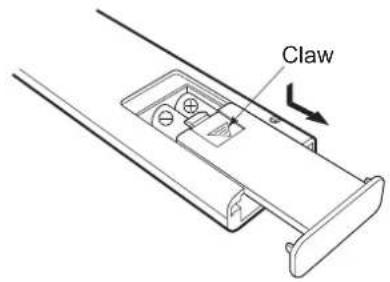
1 Removethebatterycoverontherearoftheremotecontrol.
Putyourfingeronthebatterycoverclawand slidethecoverdownwardtoremovethecover.
2Put2AAAbatteriesinthebatterycaseas shownintheillustrationonthebatterycasein considerationofthepolarity(+and-)
3Inthereverseorderofbatterycoverremoval, putthebatterycoverbacktotheopeningofthe remotecontrolandslidethecoverupwarduntil itclicks.
- Donotuseanewbatteryandanoldonetogether.
•Theremaybeacaseinwhichthevoltagesaredifferent betweenwobatteries even though theirshapes are thesame.Donotusethebatteriesofdifferenttypes together.
- Iftheremotecontrolisnotusedforalongtime(more than1month),thebatteriesshallberemovedfromthe case.Ifthebatteryliquidisleaking,wipeawaytheliquid fromthecasebeforeinsertingnewbatteries.
Remotecontrol'srange
Theremotecontrolcanbeusedbypointingatthe remotecontrolinfraredreceiveronthefrontpanel ofmainunit.Theeffectivedistanceisapprox.5m fromthemainunitand30°onbothsidesfromthe controlinfraredreceiver.
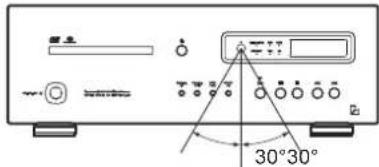
Effectivedistance:approx.5m
Donotexposetheremotecontrolinfraredreceiverto directsunlightorstronglightsources. Thatmaycausemalfunction.
NamesandFunctionsofPart
Frontsideofmainunit
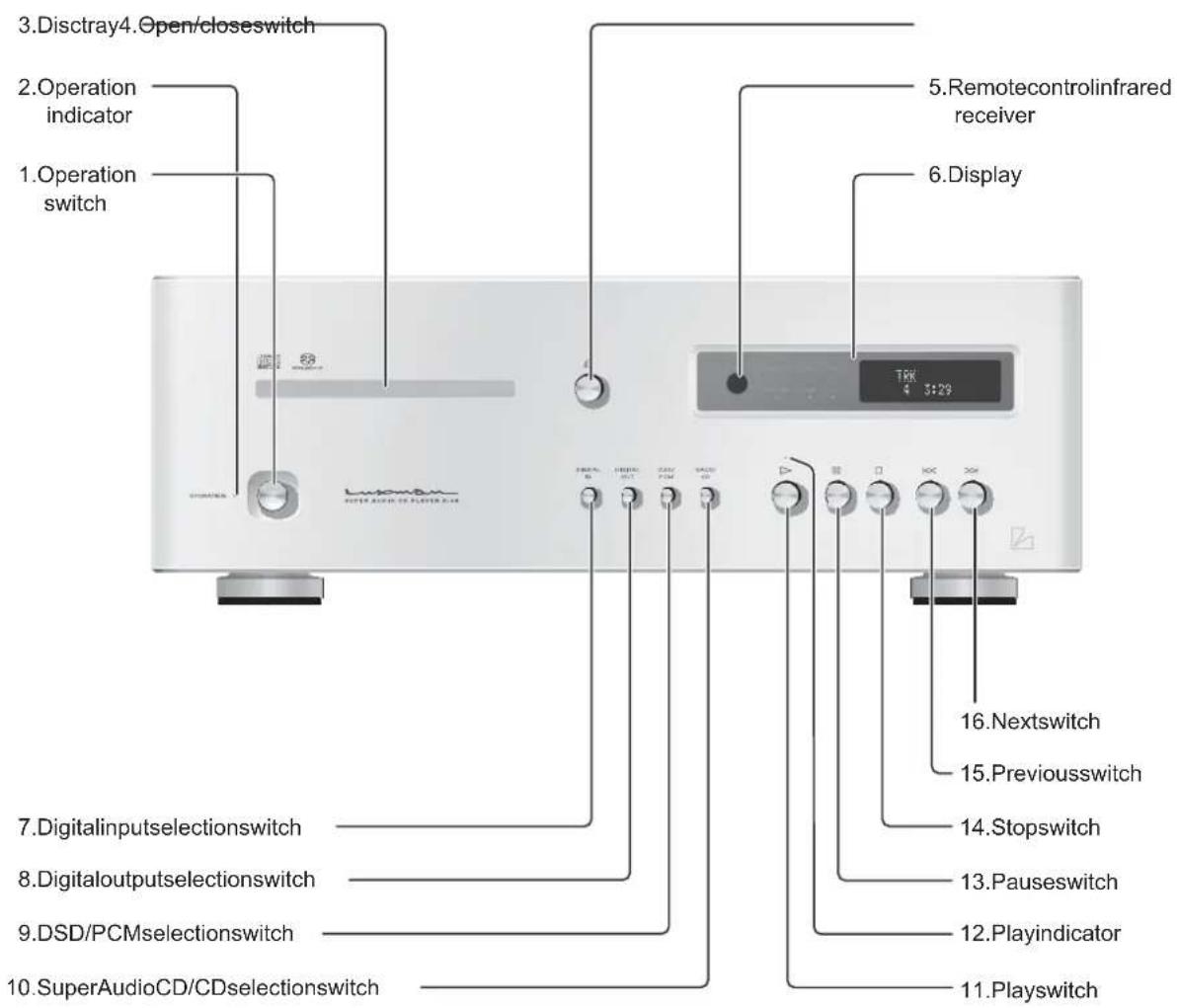
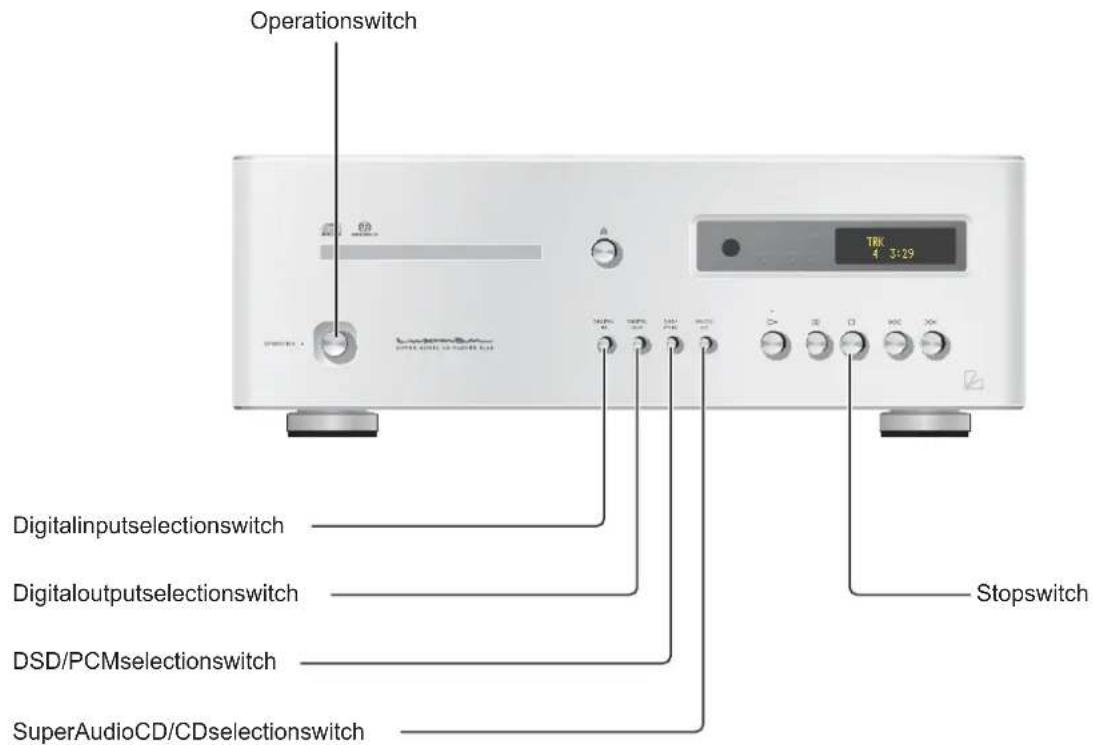
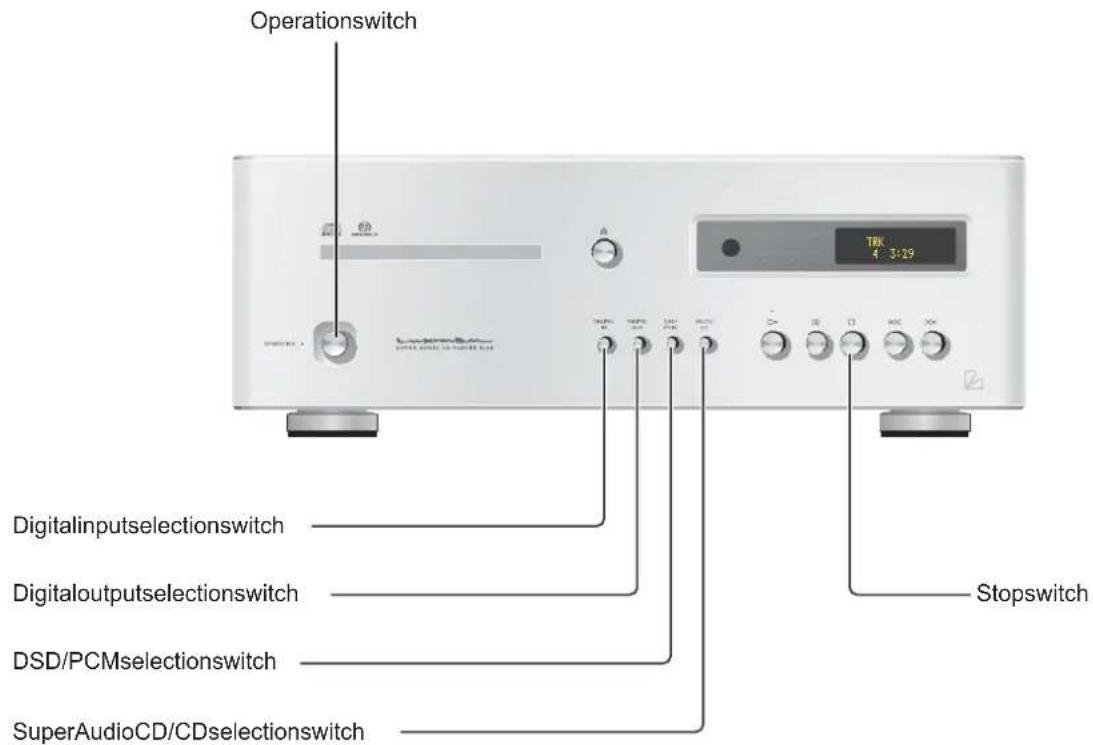
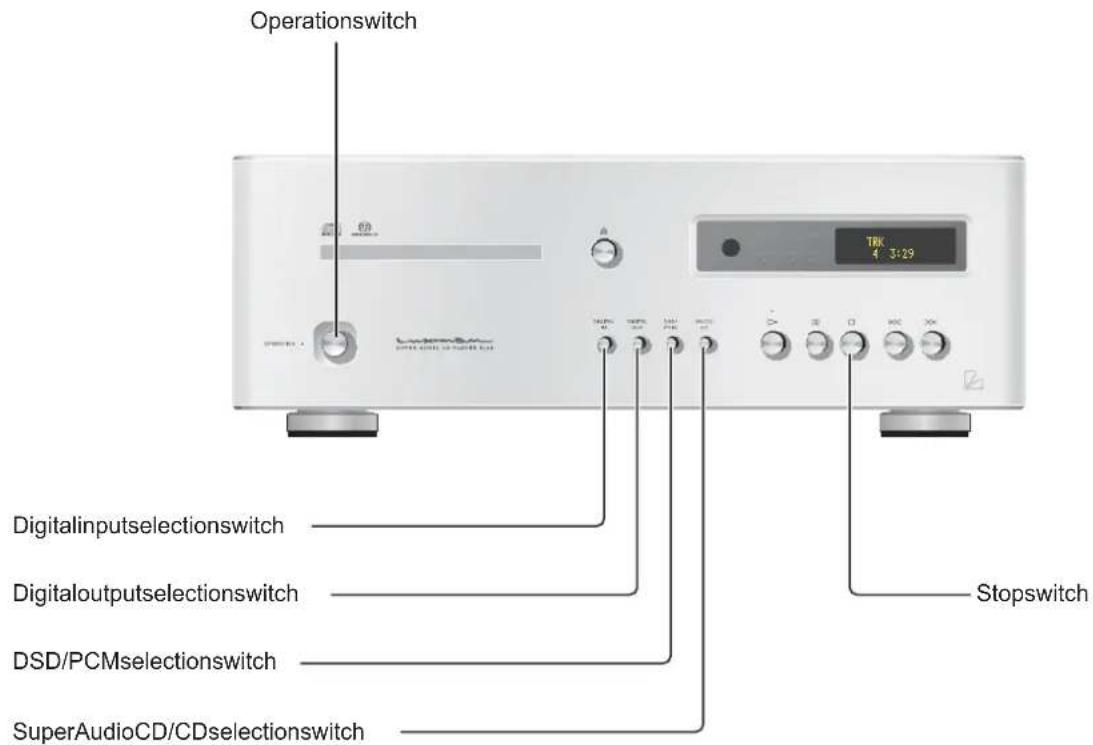
1. Operationswitch/OPERATION
Turnsthisunittotheoperatingstateafterturningoffthestandbyindicatoratthestandbystate. Pressingthisswitchagainattheoperatingstate turnstheunittothestandbystate.
2. Operationindicator/OPERATION
Lightsupandshowsthattheunitisintheoperatingstatewhentheoperationswitchispressed atthestandbystate. Pressingtheoperationswitchagainintheoperatingstateturnsoffthisindicatorandlightsup thestandbyindicator.
3. Disctray
Wheninsertingorremovingadisc, thistrayis openedorclosedbypressingtheopen/close switch()
4. Open/closeswitch/() ▲
This switch is pressed when opening or closing the disctray.
5. Remotecontrolinfraredreceiver/R
Receivestheinfraredsignalsfromtheremote control.
6. Display
Displaystheoperationstatusofthisunit. This displayiscomposedof6indicatorsanddisplay tube.
NamesandFunctionsofPart
Frontsideofmainunit
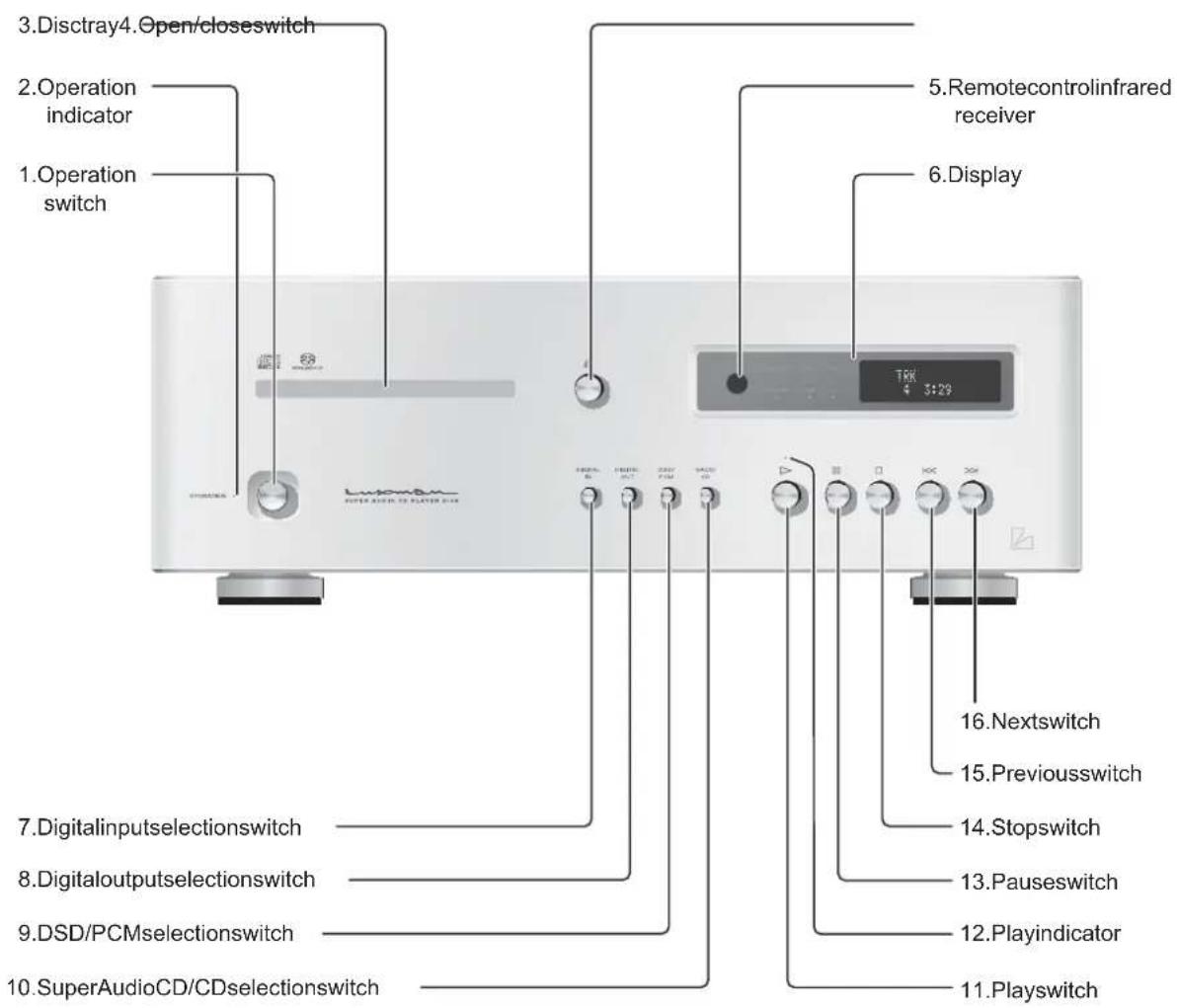
7. Digitalinputselectionswitch/DIGITALIN
This switch is pressed when using this unit as a D/A converter.
The inputs source is switched over a long coaxial or optical (1, 2) input, or internal player of this unit.
8. Digitaloutputselectionswitch/DIGITALOUT
This switch is pressed when turning on or off the digital audio output.
Eachtimetheswitchispressed, the output can be turnedonoroff.
Itisimpossibletooutputthedigitalaudiosignal whenplayingbacktheHDlayerofSuperAudio CD.
9. DSD/PCMselectionswitch/DSD/PCM
WhenplayingbacktheHD(orSACD)layerof SuperAudioCD, this switch is pressed to determine whether to input DSD signals from the disc directly to the D/A converter ICortoconvert DSD signals into PCM signals before inputting to the D/A converter IC.
10. SuperAudioCD/CDselection switch/SACD/CD
WhenplayingbackaHybridSuperAudioCD, thisswitchispressedtoselectthe playback layerbetweentheHD(orSACD)layerandCD layer.
11. Playswitch/() ▶
This switch is pressed to playback adisc.
12. Playindicator
Lightsupwhileadiscisbeingplayedback Blinkswhileplaybackisbeingpaused.
13. Pauseswitch/()
Whenthisswitchispressedduring playback, the playbackstops.
Whenthisswitchispressedagain, the playback starts again.
Duringpause, theplayindicatorblinks.
14. Stopswitch/() ■
This switch is pressed to stop playback.
When this switch is pressed, the playback return to the beginning of track.
Whenthisswitchispressedtwice, the playback returnstothebeginningofprevioustrack.
16. Nextswitch/()
Whenthisswitchispressed, the playback jumps to the beginning of next track.
NamesandFunctionsofPart
Display
flowchart
graph TD
    A["1. RemotecontrolInfraredreceiver"] --> B["2. Digitaloutputindicator"]
    B --> C["3. DSD/PCMindicator"]
    C --> D["4. SuperAudioCD/CDindicator"]
    D --> E["5. Tracknumber"]
    E --> F["6. Timedisplaymode"]
    F --> G["7. Standbyindicator"]
    G --> H["8. Playbackmode"]
    H --> I["9. Time"]
    I --> J["10. Repeatmode"]
    J --> K["TRK RD 4 3:29T-REP"]
    K --> L["STAND BY"]
    L --> M["DIGITAL OUT"]
    M --> N["SACD"]
    N --> O["PCM"]
    O --> P["CD"]
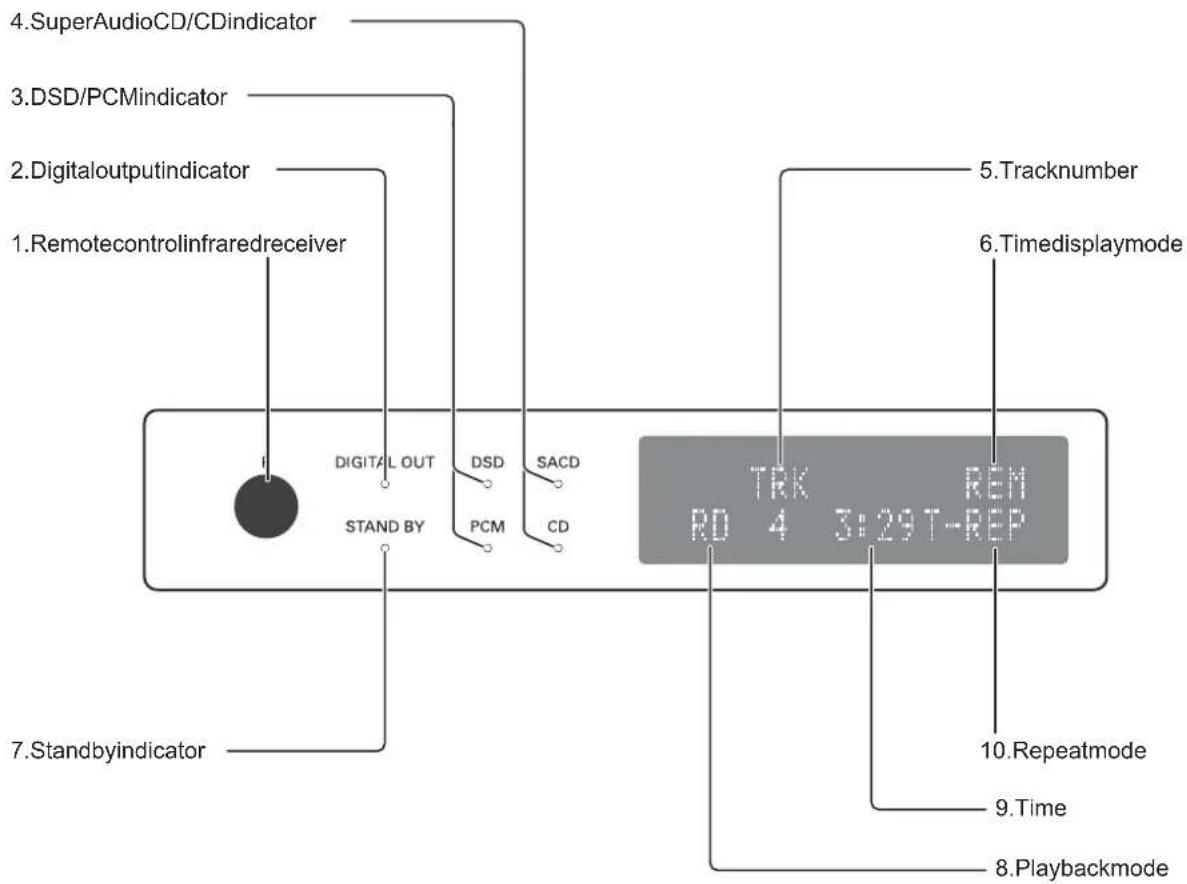
1. Remotecontrolinfraredreceiver/R
Receivestheinfraredsignalsfromtheremote control.
2. Digitaloutputindicator/ DIGITALOUT
LightsupwhendigitalaudiooutputisON. This indicator does not lightup when playing back the HD layer of SuperAudioCD because the digital audio signal cannot be output.
3. DSD/PCMindicator/DSD/PCM
DSDindicatorlightsupwhenplayingbackthe HD(orSACD)layerofSuperAudioCDand wheninputtingDSDsignalsfromthediscdirectlytotheD/AconverterIC. PCMindicatorlightsupwhenconvertingDSD signalsintoPCMsignalsbeforeinputtingtothe D/AconverterIC.
4. SuperAudioCD/CDindicator/SACD/CD
SACDindicatorlightsupwhenplayingbackthe HD(orSACD)layerofHybridSuperAudioCD. CDindicatorlightsupwhenplayingbacktheCD layerofHybridSuperAudioCD.
5. Tracknumber/TRK
"TRK"isindicatedontheupperside,and the tracknumberisindicatedonthelowerside whenthesedisplayareashowsthetracknumber.
6. Timedisplaymode
Thedisplaymodeoftimeisdisplayed"REM" isdisplayedwhenshowingtheremainingtime ofcurrenttrack"T-REM"isdisplayedwhen showingthetotalremainingtimeofdisc.This displayareadoesnotlightupwhenshowingthe elapsedtimeof track.
7. Standbyindicator/STANDBY
Lightsupwhenthisunitisinthestandbystate.
8. Playbackmode
"RD"isdisplayedduringrandom playback. "PG" isdisplayedduringprogram playback. This display are adoes not lightup during regular playback.
9. Time
Displays the elapsed time of current track, remaining time of current track, or remaining time of disc. Timedisplay is switched over according to time display mode.
10.Repeatmode
Displaysthemodeforrepeat playback. Therearetwotypesofrepeat playback:track repeat(T-REP)andallrepeat(A-REP).
NamesandFunctionsofPart
Remotecontrol
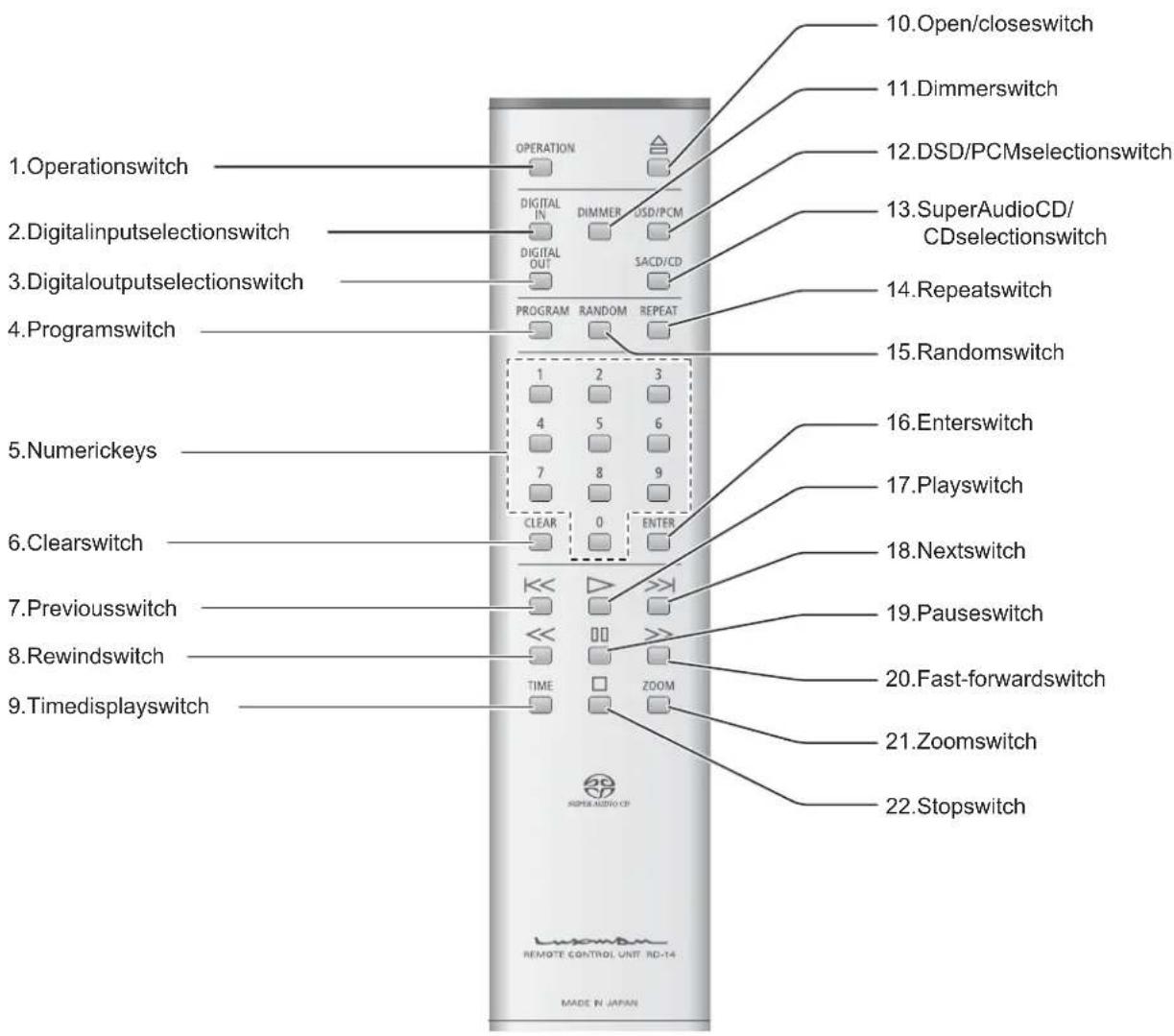
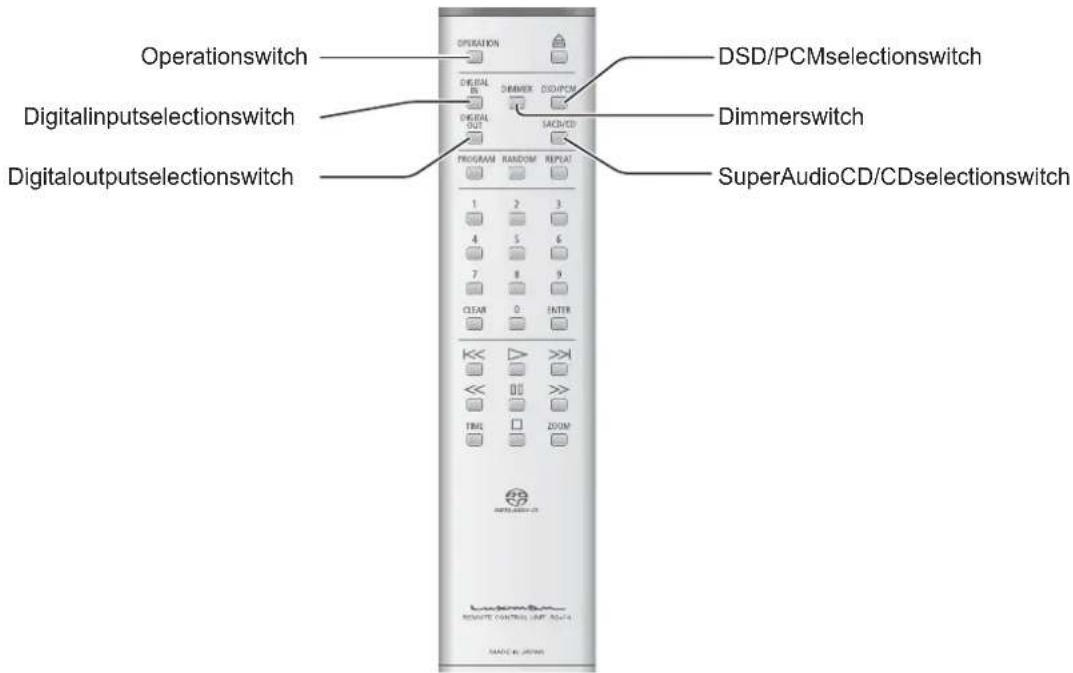
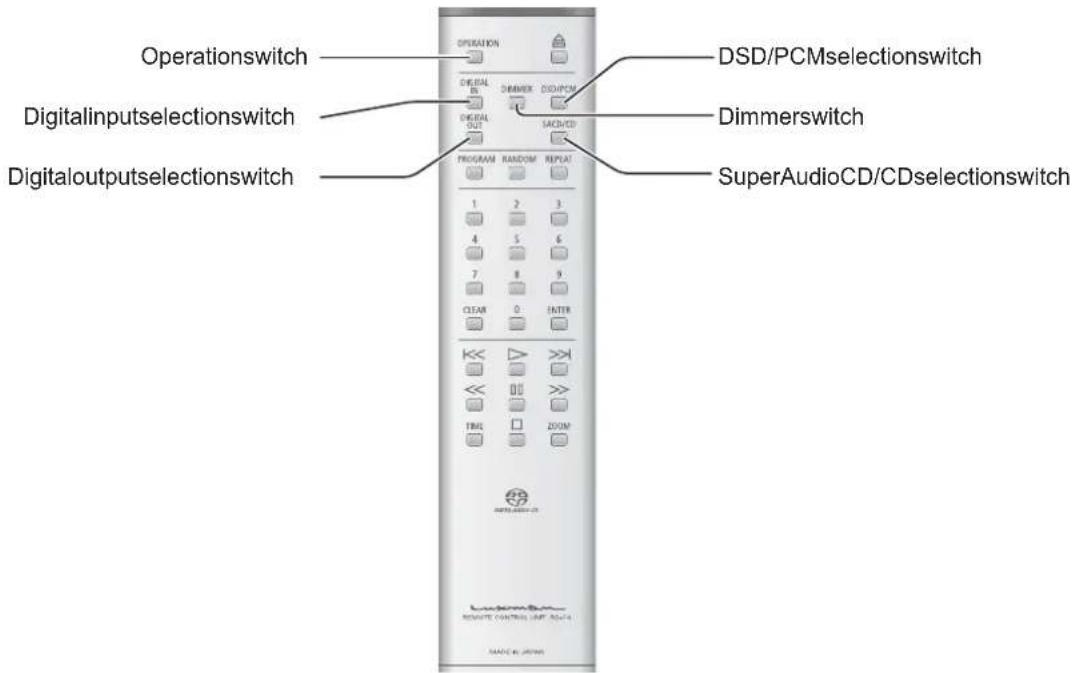
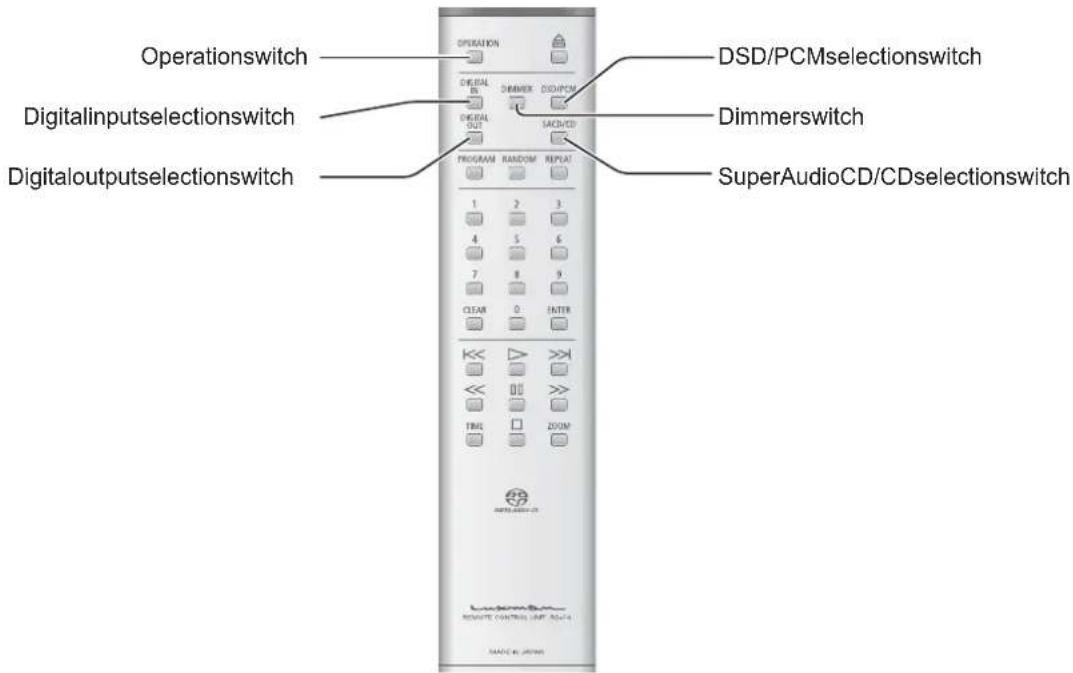
1. Operationswitch/OPERATION
Turnsthisunittotheoperatingstateafterturningoffthestandbyindicatoratthestandbystate. Pressingthisswitchagainattheoperatingstate turnstheunittothestandbystate.
2. Digitalinputselectionswitch/DIGITALIN
This switch is pressed when using this unit as a D/A converter.
The input source is switched over among coaxial or optical (1, 2) input, or internal player of this unit.
3. Digitaloutputselectionswitch/DIGITALOUT
This switch is pressed when turning on or off the digital audio output.
Eachtimetheswitchispressed, the output can be turnedonoroff.
Thedigitalaudiosignalcannotbeoutputwhen playingbacktheHDlayerofSuperAudioCD.
4. Programswitch/PROGRAM
Programsthetracknumberstopplaybackina desiredorder.
5. Numerickeys/1,2,3,4,5,6,7,8,9,0
Thesekeysarepressedtospecifythetrack numbersfordirectsearchorprogram.
6. Clearswitch/CLEAR
This switch is pressed to cancel the program settings.
When this switch is pressed, the playback return to the beginning of track.
Whenthisswitchispressedtwice, the playback returnstothebeginningofprevioustrack.
8. Rewindswitch/()
Whenthisswitchisplayedduring playback, audioisrewound.
9. Timedisplayswitch/TIME
Switchesthetimedisplay.
Switches the elapsed time of current track, remaining time of current track, or remaining time of disc.
NamesandFunctionsofPart
Remotecontrol
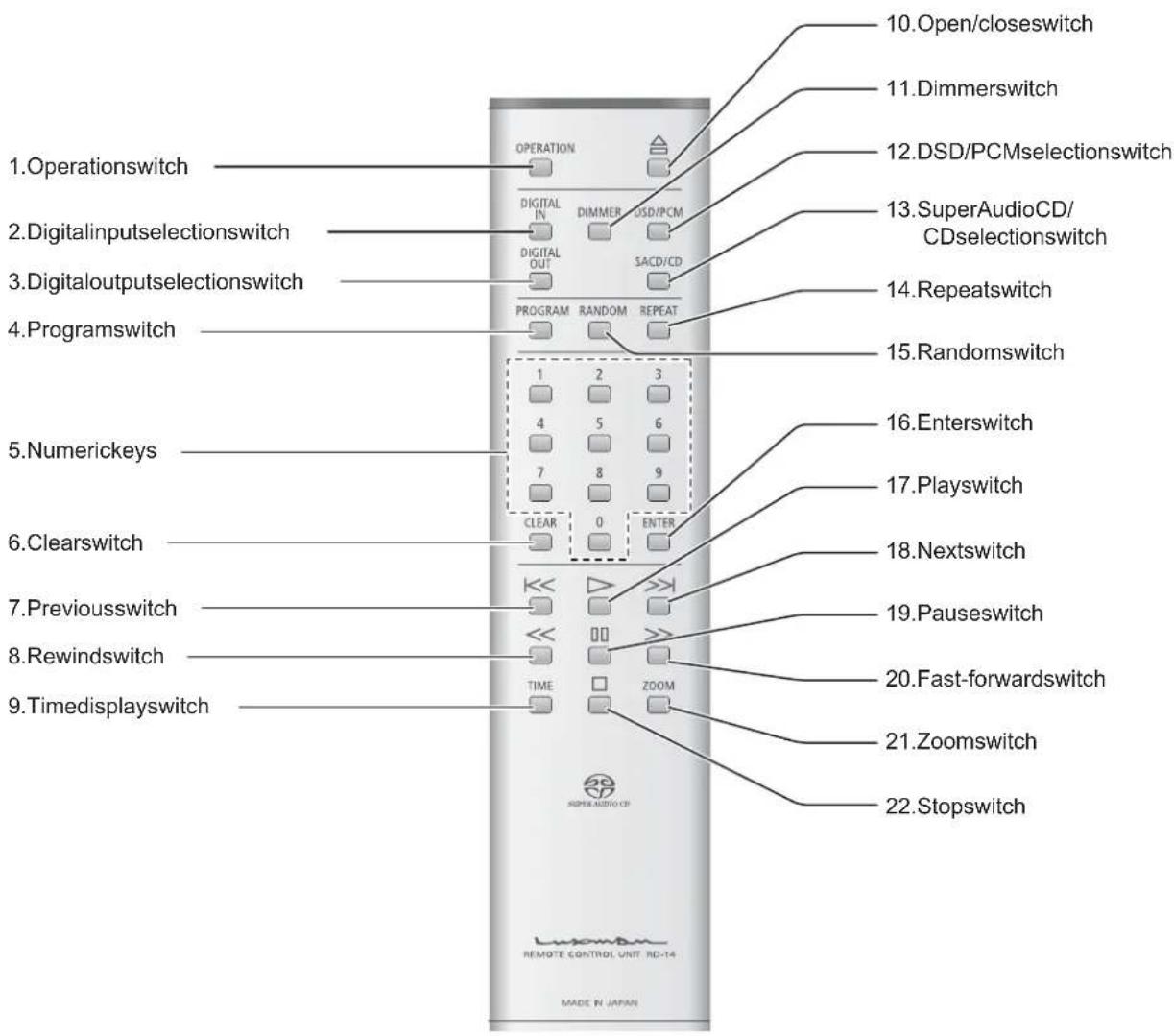
10.Open/closeswitch/() ▲
This switch is pressed when opening or closing the disctray.
11. Dimmerswitch/DIMMER
Adjuststhebrightnessofthemainunitdisplay. Thebrightnesscanbeadjustedin4stepsfrom nolighttonormallighting.
12. DSD/PCMselectionswitch/DSD/PCM
WhenplayingbacktheHD(orSACD)layerof SuperAudioCD, this switch is pressed to determine whether input DSD signals from the disc directly to the D/A converter into Corteconvert DSD signals into PCM signals before inputting to the D/A converter IC.
DSD: Direct Stream Digital
PCM: Pulse Code Modulation
13. SuperAudioCD/CDselection switch/SACD/CD
WhenplayingbackaHybridSuperAudioCD, thisswitchispressedtoswitchovertheplay-backlayerbetweentheHD(orSACD)layerand CDlayer.
14. Repeatswitch/REPEAT
Thisswitchispressedtoperformrepeatplay-back. Therearetwotypesofrepeat playback:track repeat(T-REP)andallrepeat(A-REP).
15. Randomswitch/RANDOM
This switch is pressed to perform random play-back.
16. Enterswitch/ENTER
This switch is pressed to execute the set or selected items.
17. Playswitch/()
Thisswitchispressedtoplaybackadisc.
18. Nextswitch/()

Whenthisswitchispressed, the playback jumps to the beginning of next track.
19. Pauseswitch/()
Whenthisswitchispressedduring playback, the playbackstops. Whenthisswitchispressedagain,the playback startsagain. Duringpause,theplayindicatorblinks.
20. Fast-forwardswitch/(▶)
Whenthisswitchisplayedduring playback, audioisfast-forwarded.
21. Zoomswitch/ZOOM
Whenthisswitchispressedduring playback, thetracknumberandtimearezoomedonthe display.
22. Stopswitch/(

Thisswitchispressedtostopplayback.
NamesandFunctionsofPart
Rearsideofmainunit
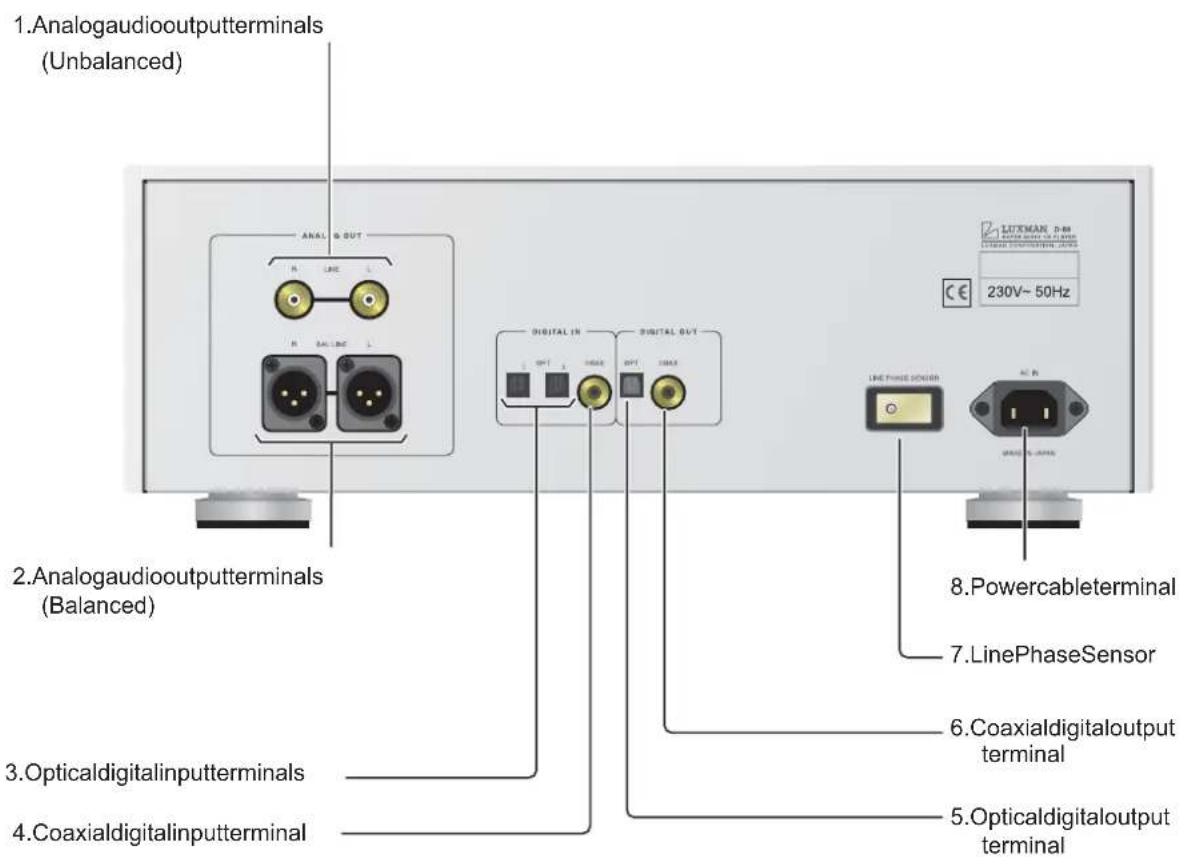
1. Analogaudiooutputterminals (Unbalanced)/LINE
Connecttheseterminalstoanunbalancedinput ofsuchdeviceasapreamplifierwithapin-plug cable.
2. Analogaudiooutputterminals (Balanced)/BALLINE
Connect theseterminalstoabalancedinput of an output devices such device as apreamplifier with abalanced cable.
The following are the polarities of analog audio output terminals.
- GROUND
2.COLD(-)
3.HOT(+)
3. Opticaldigitalinputterminals/OPT1, OPT2
When using this unit as a D/A converter, connect the terminal to such device as a recorder that has a digital output terminal using an optical digital cable.
The following sampling frequencies are supported: 32kHz, 44.1kHz, 48kHz, 88.2kHz, 96kHz.
Thisterminalhasashutter.Directthecableconnectorcorrectlywheninsertingthecableinto theterminal.Ifthecableconnectorisinserted forciblywiththewrongdirection,theterminal maybeformed,andtheshuttermaynotbe abletocloseevenaftercabledisconnection.
4. Coaxialdigitalinputterminal/COAX
When using this unitasaD/Aconverter, connect thisterminal to such device as are corder that has adigital output terminal using a coaxial digital cable.
The following sampling frequencies are supported: 32kHz, 44.1kHz, 48kHz, 88.2kHz, 96kHz.
5. Opticaldigitaloutputterminal/OPT
Connectthisterminaltosuchdeviceasan amplifierthathasadigitalinputterminalusing anopticaldigitalcable.Itisimpossibletooutput thedigitalaudiosignalwhenplayingbackthe HDlayerofSuperAudioCD.
Thisterminalhasashutter.Directthecableconnectorcorrectlywheninsertingthecableintotheterminal.Ifthecableconnectorisinserted forciblywiththewrongdirection,theterminal maybeformed,andtheshuttermaynotbe abletocloseevenaftercabledisconnection.
6. Coaxialdigitaloutputterminal/COAX
Connect this terminal to such device as an amplifierthathasadigitalinputterminalusinga coaxialdigitalcable.Itisimpossibletooutputthe digitalaudiosignalwhenplayingbacktheHD layerofSuperAudioCD.
7.LinePhaseSensor
Notfunctionalformodelswhosepowersources AC230V.
8. Powercableterminal/ACIN
Connecttheaccessorypowercabletosupply thepowerfromtheACoutletonthewall.
Connections
flowchart
graph TD
    A["CONTROLAMPLIFIER DIGITAL RECORDER"] --> B["Analog OUT Device"]
    A --> C["Digital Inverter"]
    A --> D["Digital Amp"]
    A --> E["Cigital Amp"]
    B --> F["LITTMAN 8.4M 230V~50Hz"]
    C --> G["LINE FINE SENSOR"]
    D --> H["DIGITALAMP DIGITALAMP"]
    E --> I["Monitor"]
BeforeConnecting
1. Connect the accessory powercable to an AC outlet.
Connections
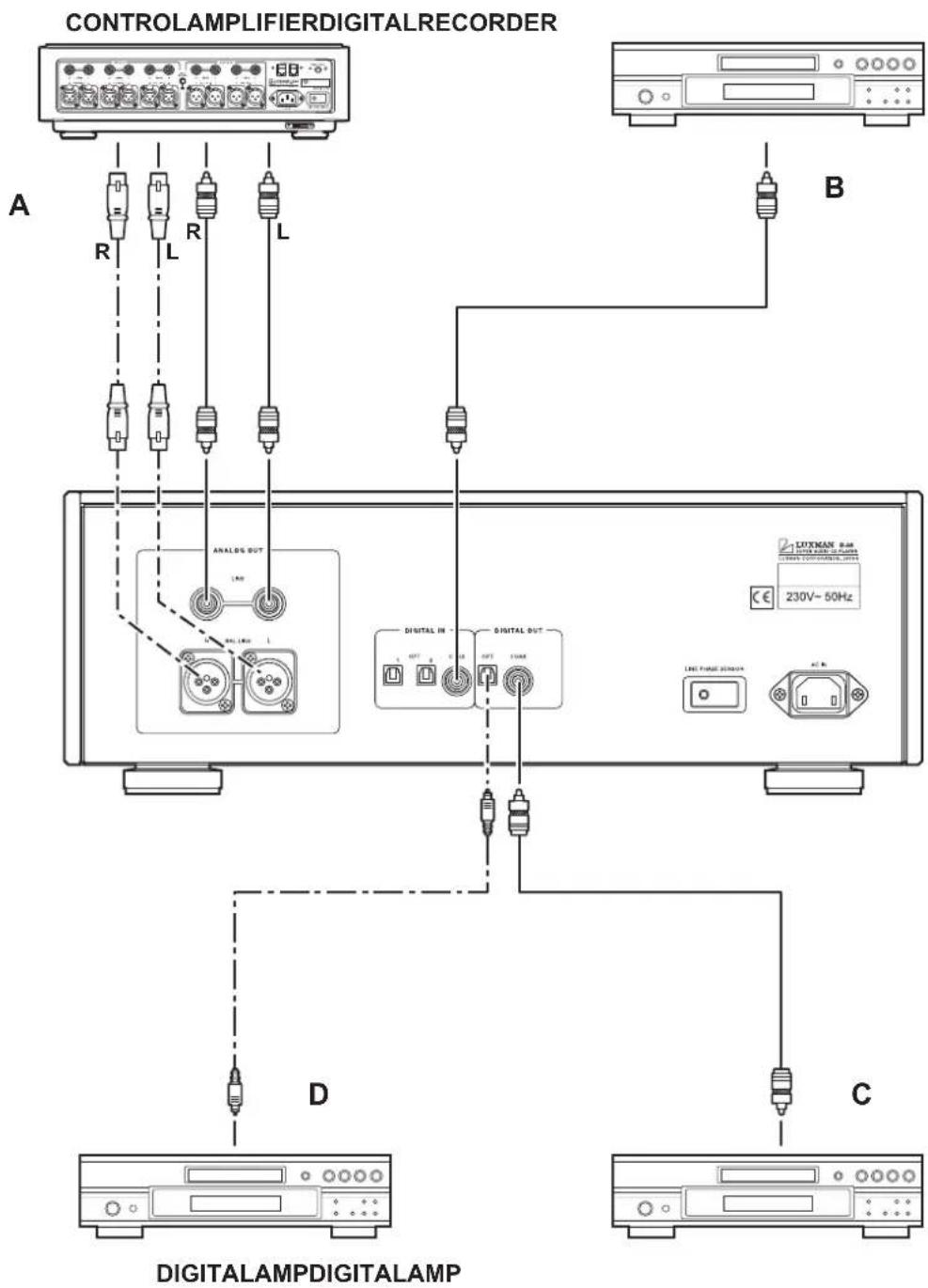
2. Connecttheaudiocables.
(Referto“A”intheillustrationon thepreviouspage.)
Whenapplyingunbalancedconnections, connecttheterminalstoanunbalancedinputof suchdeviceasapreamplifierwithapin-plug cable. Whenapplyingbalancedconnections, connecttheterminalstoabalancedinputof suchdeviceasapreamplifierwithapin-plug cable.
Atthismoment, exercise extracarenotto con-duct wrong connection between theright and left channels. Iftherightandleftchannels are connected reversely, the localization of sound images is deteriorated, thus failing innormal stereoplayback.
Ifpin-plugcablesareused, inadequate connection of the grounding of the cables may generate noises including hum, resulting in an adverse S/N ratio. Surely insert the connection plug.
Beforeconnectingdevicesorchangingtheconfiguration, besuretopowerofftheunit, and disconnect the power cable from the ACinlet (powercableterminal/ACIN) of the unit.
3. WhenusingthisunitasaD/Aconverter(Referto“B”intheillustrationonthepreviouspage.)
When connecting thisterminal to such device as are corder that has a digital output terminal, use an optical digital cable or digital cable.
Thisterminalhasashutter.
Directthecableconnectorcorrectlywheninsertingthe cableintotheterminal.
If the cable connector is inserted forcibly with the wrong direction, the terminal may be deformed, and the shutter may not be able to close even after cable disconnection.
Upperside
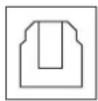
Lowerside
Theopticalterminalsaredirected asillustrated
4. When connecting to such device as an amplifier that has a digital input terminal
(Referto“C”and“D”inthe illustrationonthepreviouspage.)
Connect this terminal to such device as an amplifierorrecorderthathasadigitalinputterminalusinganopticaldigitalcable(C)oracoaxialdigitalcable(D).
Itisimpossibletooutputthedigitalaudiosignal whenplayingbacktheHDlayerofSuperAudio CD.
Thisterminalhasashutter.
Directthecableconnectorcorrectlywheninsertingthe cableintotheterminal.
If the cable connector is inserted forcibly with the wrong direction, the terminal may be deformed, and the shutter may not be able to close even after cable disconnection.
HowtoPlayBackDiscs
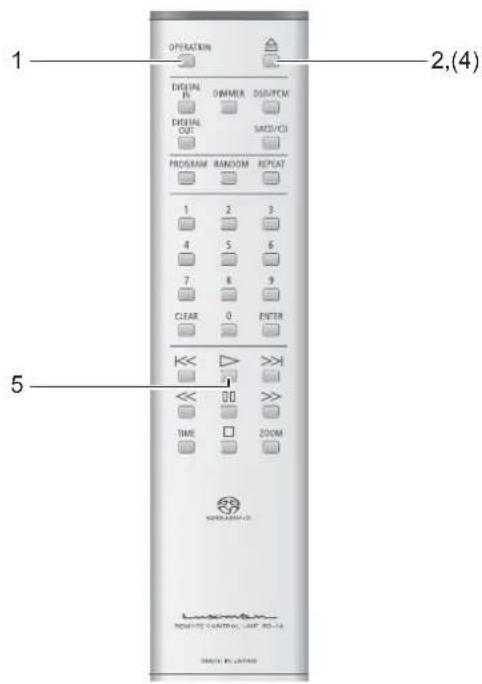
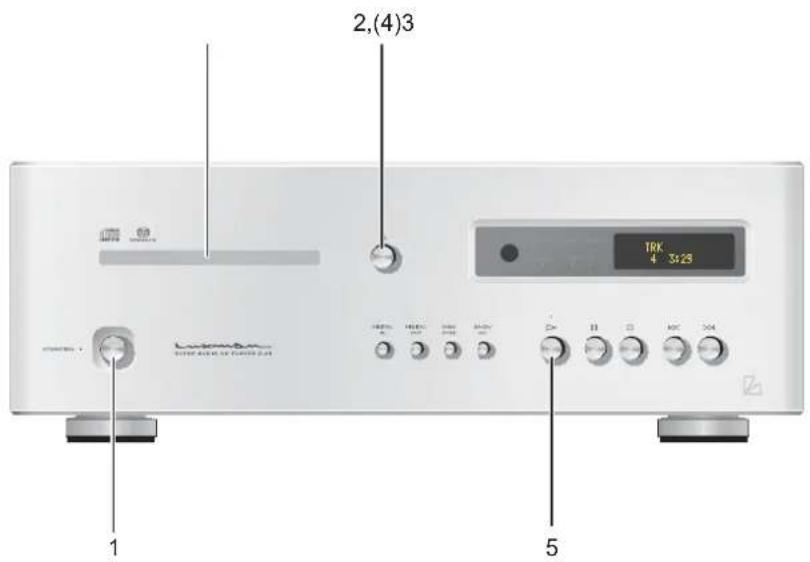
Playbackadisc.
Remotecontrol

1. PresstheOPERATIONswitch.
"-OPERATION-"appearsonthedisplay. When "-OPERATION-"disappears,theunitbecomes operable.
2. Presstheopen/close() switch.
Thedisctrayopens.
3. Putthedisconthedisctray accordingtotheguideonthetray.
4.Presstheopen/close()switch.
Thedisctrayclosesandthediscisloaded.
Tostartplaybackmorequickly,presstheplay (switchwithoutpressingtheopen/close() switch.
Orselectatrackbypassinganumerickey withoutpressingtheopen/close()switch,and presstheENTERorplay()switch.
Operationswitchesandnumerickeysarenot functionaluntiladiscisloaded,disctypeisdisplayed,andthenthenumberoftracksandtotal recordingtimearedisplayed.Itispossibleto shortenthetimeuntilplaybackstartsbyspecifyingthenextoperationinadvance.
5. Presstheplay() switch.
Stop/PausethePlayback
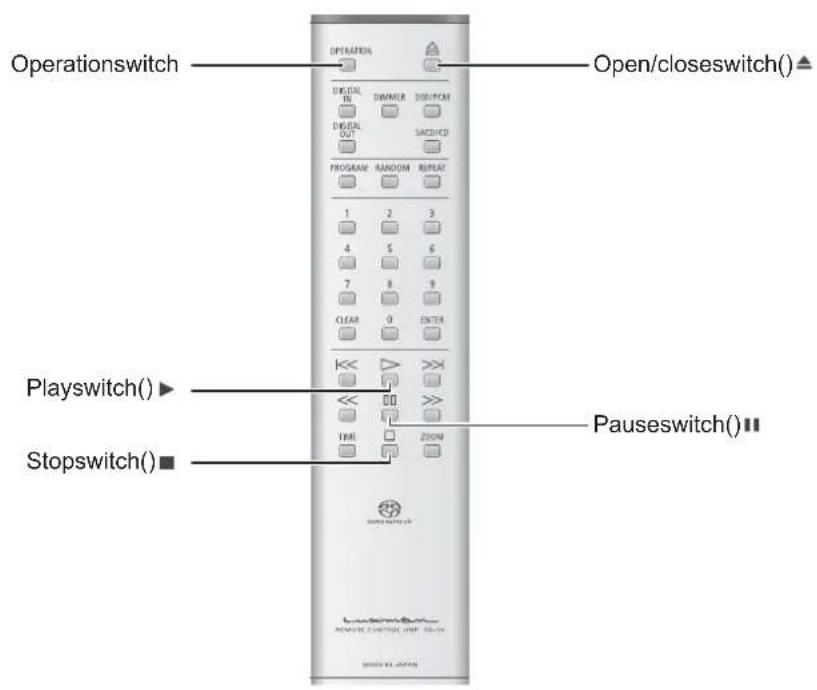
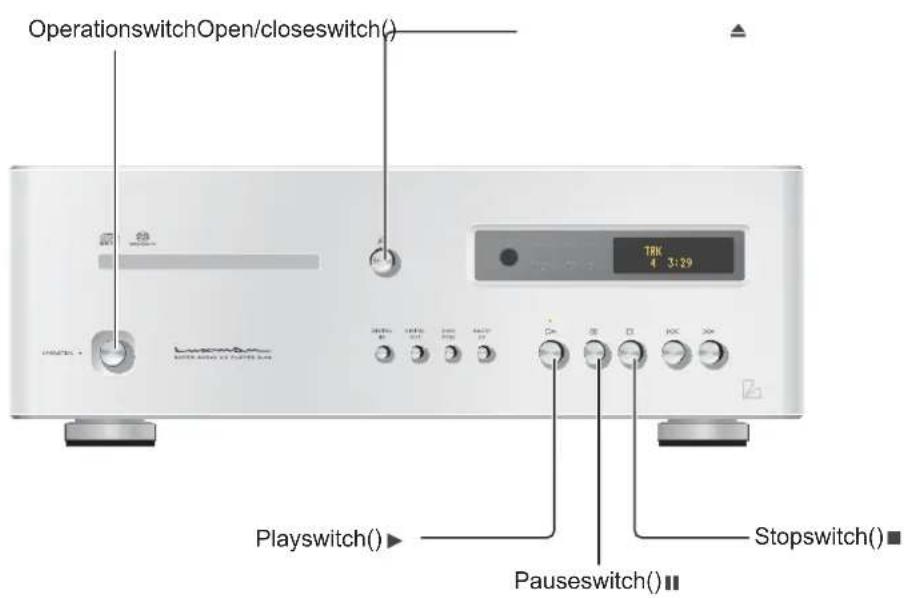
Pausetheplaybackofadisc.

Pause playback.
1.Pressthepause()switch.
Duringpause, the play indicator blinks.
Resumetheregularplayback.
2. Duringpause, presstheplay() or pause() switch.
Stoptheplayback.
During playback, pressthestop() switch.
Ejectadisc.
Presstheopen/close() switch.
Thedisctrayopens.
Powerofftheunit.(Turntheunittothe standbystate.)
PresstheOPERATIONswitch.
"-OPERATION-"appearsonthedisplay, and the
STANDBYindicatorlightsup.
Topowerofftheunitcompletely, itisrequired
todisconnectthepowerplugfromtheACwall
outlet.
Skip/Fast-forward/Rewind
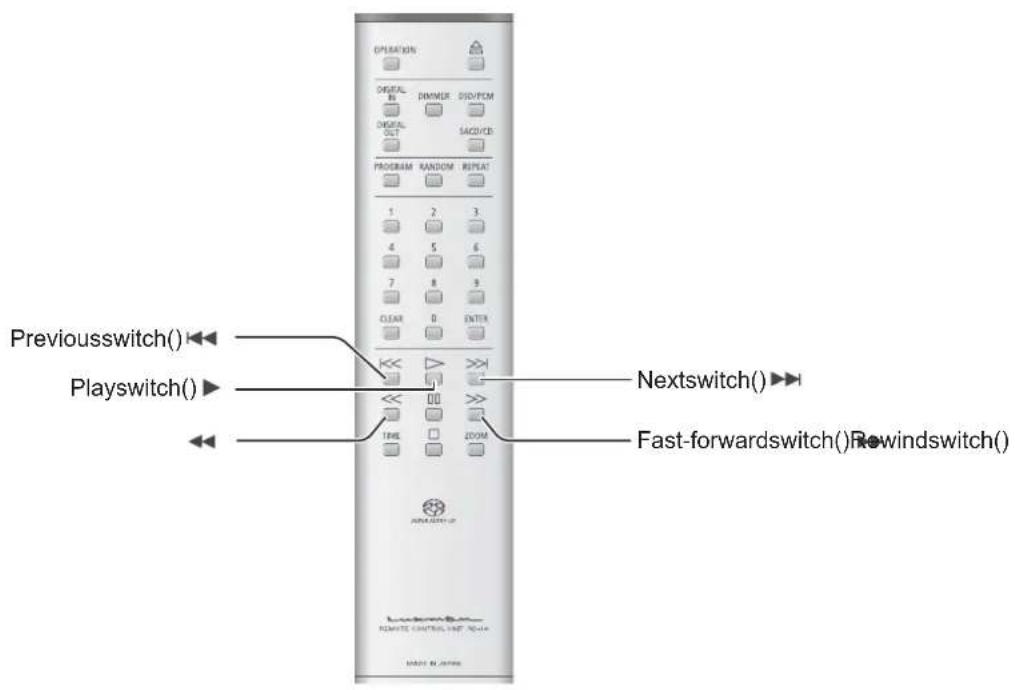
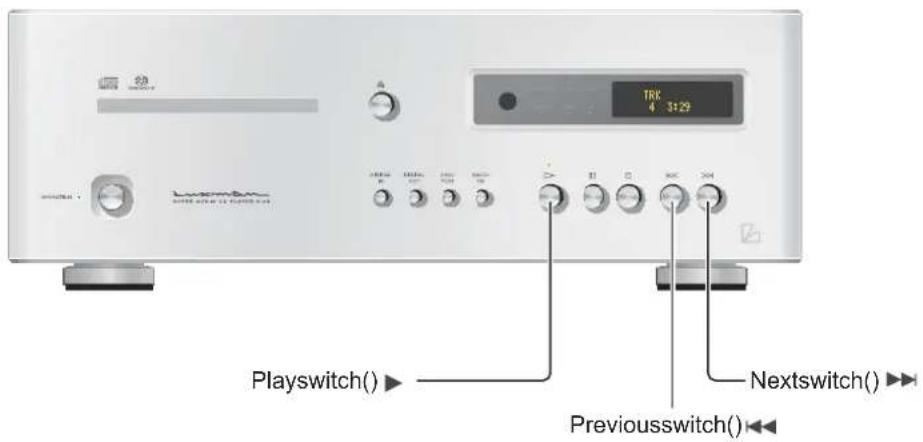
Skipstothedesiredtrack. (Skipplayback)
Remotecontrol • 1.1ainunit
Skips(Skipplayback) Skiptothetracktoplayback.
Toskiptothetracktoplayback, pressthenext switch() repeatedly until the desired track is displayed.
Gobacktothetracktoplayback.
Togobacktothetracktoplayback,pressthe previoussswitch()repeatedlyuntilthedesired trackisdisplayed.
Whenthisswitchispressedonce, theplay-backreturnstothebeginningofcurrenttrack.
Whenthisswitchispressedtwice, the playback returnstothebeginningofprevioustrack.
Fast-forward/rewindthe playback. (Scan)
Remotecontrol
Fast-forwardtheplayback.
1. During playback, press the fast-forward() switch.
Eachtimetheswitchispressed, thefast-forward speedcanbechangedin4steps.
“>>1,>>2,>>3,>>4”appearsonthedisplayto indicate the fast-forward state and speed.
2. Toresumetheregular playback, presstheplay() switch.
Rewindtheplayback.
1. During playback, presstherewind () switch.
Eachtimetheswitchispressed, therewind speedcanbechangedin4steps.
“<<1,<<2,<<3,<<4”appearsonthedisplayto indicate therewindstateandspeed.
2. Toresumetheregular playback, presstheplay() switch.
Whenasetoftracksarecomposedoftwoormore Super AudioCDs, thefirsttrackmaynotbeTrack1.
DirectSearch
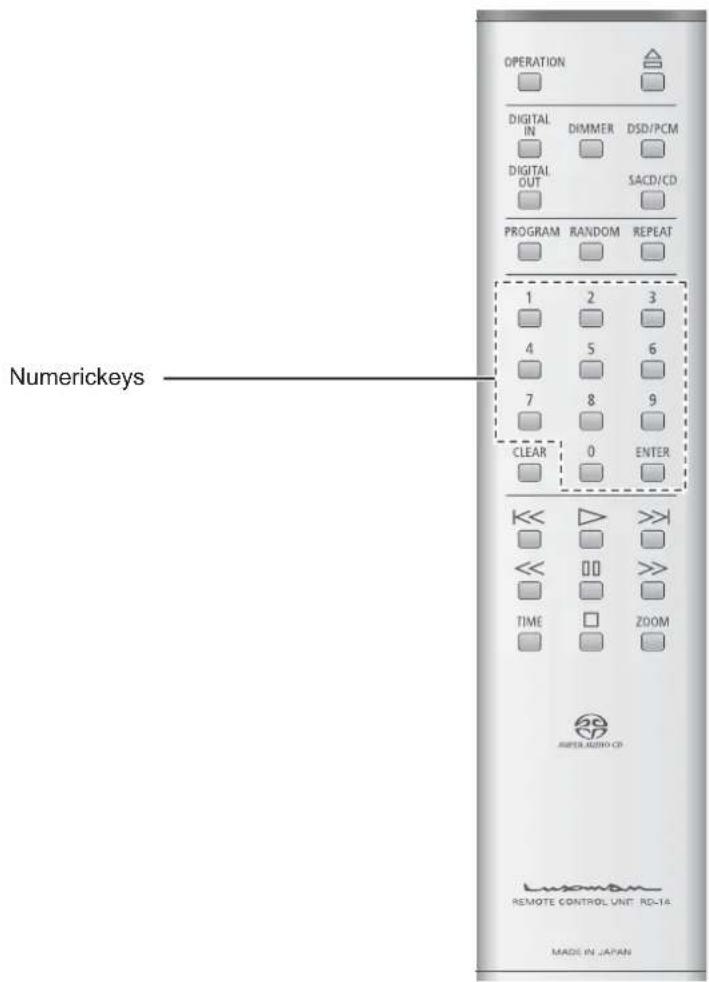
Specifythedesiredtrackforplayback
Remotecontrol
1. Enteratracknumberbypassing numerickeys.
Forexample,whenselectingthe15thtrack, pressthe"1"key,andthen"5".
2. PresstheENTERorplayswitch.
Playbackisstartedautomaticallyevenwithout pressingtheENTERkeyaftertheelapse of approx.4seconds.
Themaximumnumberoftracksis255fora SuperAudioCD, anditmaytakelongertime toentera3-digittracknumber. For this reason, approx4secondsaregiventoSuperAudioCDs beforeautojump.
RepeatPlayback
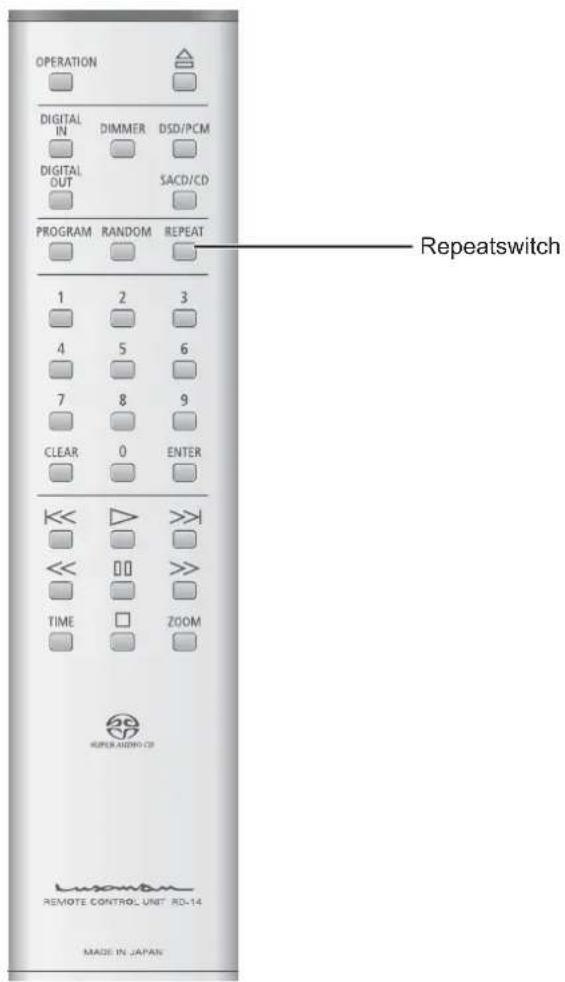
Repeat the playback. (Repeat playback)
Remotecontrol
Therearetwotypesofrepeatplay-back:trackrepeat(T-REP)andall repeat(A-REP).
Trackrepeat(T-REP)
- During playback, press the REPEAT switch once.
- "T-REP" appears on the display to indicate track repeat.
- When the REPEAT switch is pressed twice, track repeataber- celed.
Trackrepeatsalsocanceledwhenthediscis stopped.
Allrepeat(A-REP)
- During playback, press the REPEAT switch twice.
- "A-REP" appears on the display to indicate all repeat.
- Whenthisswitchispressedonce again, allrepeatiscanceled.
Allrepeatisalsocanceledwhenthediscis stopped.
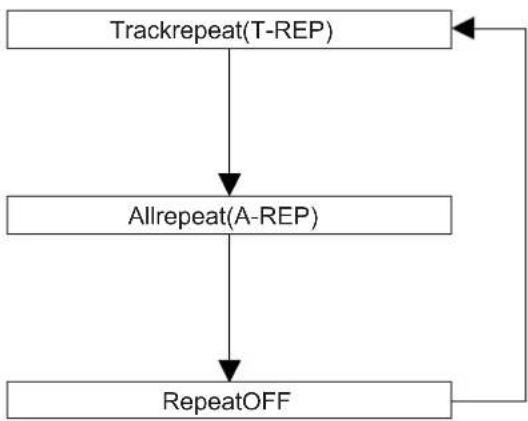
flowchart
graph TD
    A["Trackrepeat(T-REP)"] --> B["Allrepeat(A-REP)"]
    B --> C["RepeatOFF"]
    C --> A
ProgramPlayback
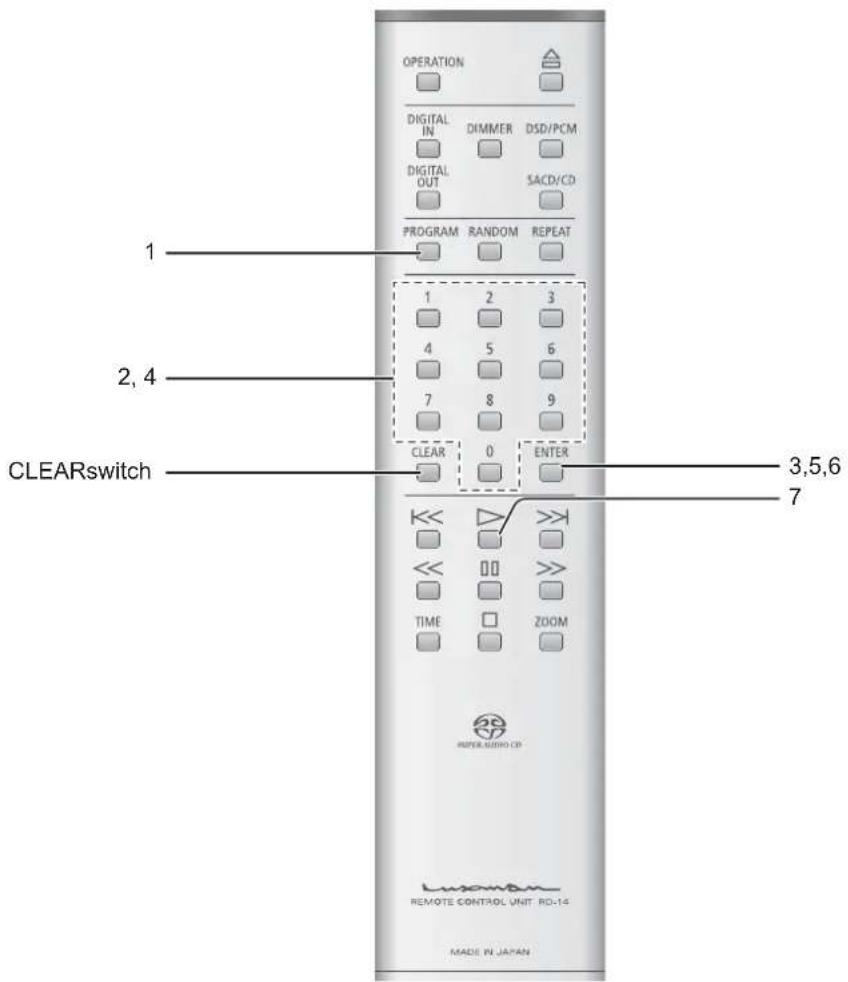
Playbackthetracksinaprogrammed order.
(Program playback)
Remotecontrol
Itispossibletoprogramupto24 tracksinthedesiredorder.
- Duringstop, press the PROGRAM switch.
The following appears on the display.
| T-TIME | |
| PG 00 | 00:00 |
- Enteradesiredtracknumberby pressingnumerickeysofthe remotecontrol.
Forexample,whenselectingthe5thtrack,press the"5"key.
| PG 01 | 5 |
3.PresstheENTERswitch.
Theorderofthetrackisdetermined, and then tracknumberandtotaltimeappearonthedisplay.
| T-TIME | |
| PG 01 | 01:28 |
4.Enterthetracknumbertoprogram next.
Forexample,whenselectingthe15thtrack, pressthe"1"key,andthen"5".
| FG 02 | 15 |
5.PresstheENTERswitch.
Theorderofthetrackisdetermined, and then tracknumberandtotaltimeappearonthedisplay.
| T-TIME | |
| PG 02 | 02:01 |
ProgramPlayback
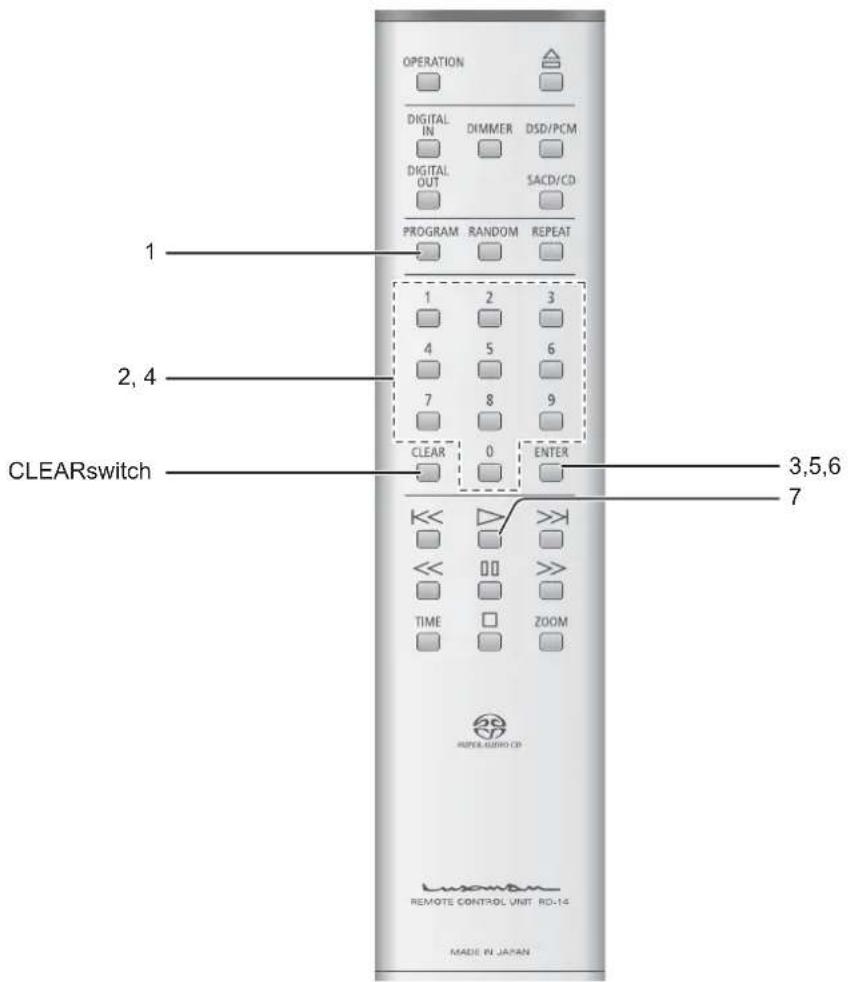
6.PresstheENTERswitch.
ProgramthedesiredtracksbyrepeatingStep2 and3.
7. Presstheplay(s) switch.
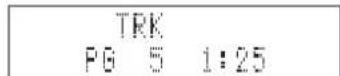
- WhenpressingtheCLEARswitchduringstop,allthe programisdeleted.
- WhenpressingthePROGRAMswitch,andthenthe CLEARswitchduringstop,thetrackswillbedeleted inthereverseorder.
- Itisimpossibletoprogrampause.
- WhenpressingtheREPEATswitchduringprogram playback, all repeatisperformed in the programmed order.
- Trackrepeatisimpossibleduringprogramplayback.
- Whenpressingthenext()switchduringprogram playback,theplaybackjumpstothenexttrackinthe programmedorder.
- Toperformtheprogramplaybackagain, pressthe PROGRAMswitchduringstop, and thentheplay() switch.
Procedure
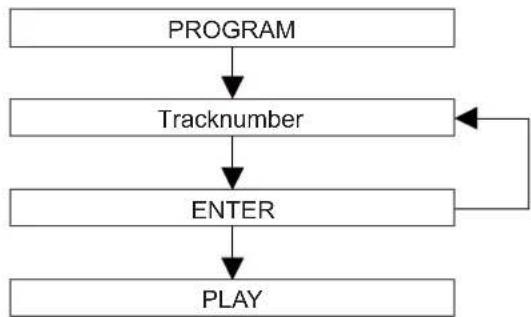
flowchart
graph TD
    A["PROGRAM"] --> B["Tracknumber"]
    B --> C["ENTER"]
    C --> D["PLAY"]
    C --> E["Feedback Loop"]
RandomPlayback
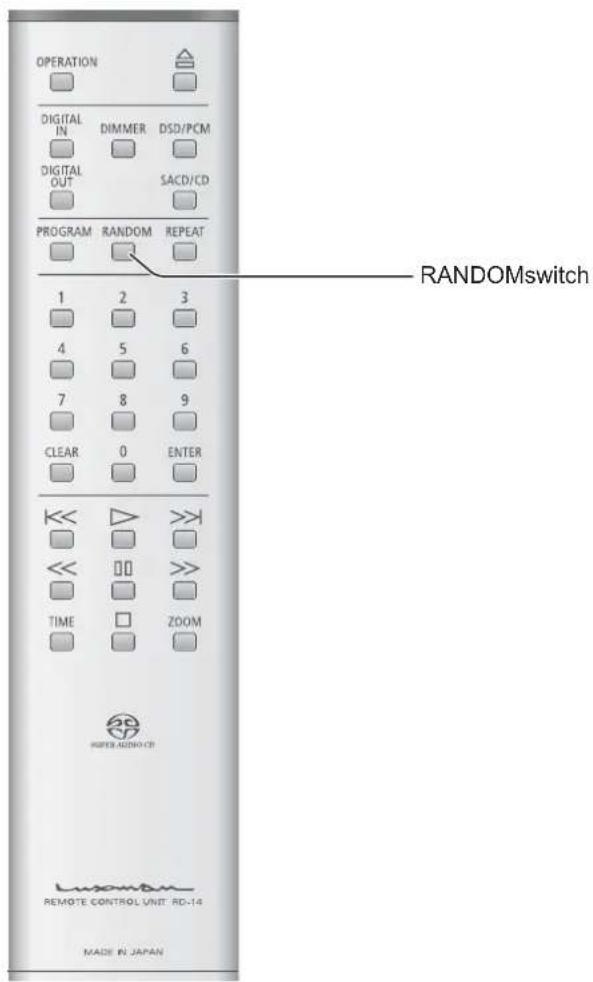
Playbackthetracksinarandomorder. (Random playback)
Remotecontrol
Eachtrackisrandomlyselectedfrom allthetrackstobeplayedbackonce.
- PresstheRANDOMswitch.
- "RD" appearsonthedisplayto indicaterandom playback. The play-backstopsautomatically after all the tracks are played back.
Random playback stops when adiscis stopped or the RANDOM switch is pressed once again.
When pressing then next() switch during random playback, then next track is randomly selected to be played back.
Whenpressingtheprevious()switch,the playbackreturnstothebeginningofcurrent track.
DiscInformation/Zoom
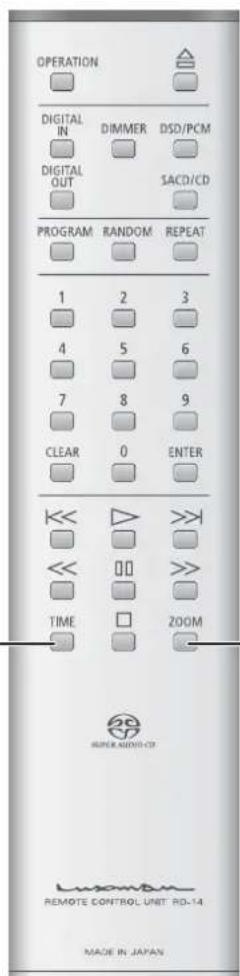
ZOOMswitchTIMEswitch
Discinformation
Remotecontrol
Thetimedisplaycanbeswitchedover during playback.
EachtimetheTIMEswitchispressedduring playback, thedisplaychangesasfollows.
1. Thecurrenttracknumberandthe elapsedtimeofthetrack(Inthe defaultsetting):
"TRK"willappearonthedisplay.
2. The current track number and the remaining time of the track (Remain):
"TRK" and "REM" will appear on the display.
3. Thetotalremainingtimeofthedisc (Totalremain):
"T-REM"willappearonthedisplay.
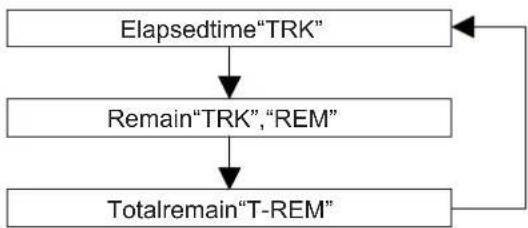
flowchart
graph TD
    A["Elapsedtime"TRK""] --> B["Remain"TRK", "REM""]
    B --> C["Totalremain"T-REM""]
    C --> A
Zoom
Remotecontrol
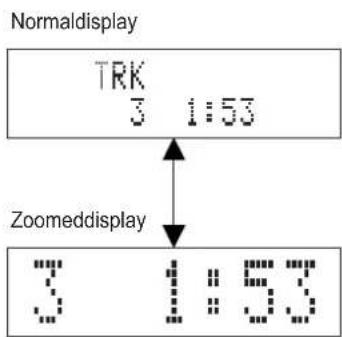
1. When pressing the ZOOM switch on theremote controlduring play-back, the track number and time are zoomed.
Itisimpossibletozoomotherdisplayareas.
2. WhenpressingtheZOOMswitch onceagain, the display return to thenormalstate.
DetailedSettings
Dimmerswitch/DIMMER
Remotecontrol
Thebrightnessofthemainunitdisplaycanbeadjusted.Thebrightness canbeadjustedin4stepsfromno lighttonormallighting.ItisimpossibletochangethebrightnessofLED suchas"SACD"and"PCM".
EachtimetheDIMMERswitchispressed,the displaychangesasfollowsNormallight→ Darker → Significantly darker → No light → Normallight...→ Selectionofnolightdisplays"DISPLAYOFF"for 1secondandthesignturnsoff.
SuperAudioCD/CDselectionswitch/SACD/CD
Remotecontrol

WhenplayingbackaHybridSuper AudioCD, this switch is pressed to switch over the playback back layer between the HD (or SACD) layer and CD layer.
1. Duringstop, presstheSACD/CD switch.
Eachtimethisswitchispressed, the playback layer is switched over between the HD (or SACD) layer and CD layer.
2. WhentheHDlayerisselected, the SuperAudioCD(SACD)indicator lightsuponthemainunitdisplay.
When the CD layer is selected, the CD indicator lights up on them in main unit display.
- ThissettingisactivatedevenwhenanotherHybrid SuperAudioCDisloaded.
- Whenasingle-layerCDordual-layerCDisloaded, theHDlayerisautomaticallyselected.
- This unit does not support SACD multi-channel areas.
DetailedSettings
Digitalinputselectionswitch/ DIGITALIN
Remotecontrol

This switch is pressed when using this unit as a D/A converter.
1. EachtimetheDIGITALINswitchis pressed, the display changes as follows. COAXIAL → OPTICAL1 → OPTICAL2 → INTERNAL (Internal player)
The following sampling frequencies are supported for digital inputs: 32kHz, 44.1kHz, 48kHz, 88.2kHz, 96kHz.
2. Theselectedinputtypeandsamplingfrequenciesappearonthe mainunitdisplay.
- Thedisplayindicatesthecontentofsampling frequencydataincludedinthechannelstatuswhich IEC60958-3(Digitalaudiointerface-Part3:Consumer applications)specifies.
Someoutputdevicesmayoutputchannelstatusdata whosecontentisdifferentfromtheactualsampling frequency. Insuchacase, thecontentsofchannel statusdata are indicatedonthedisplayinsteadofthe actualsamplingfrequency.
Orsomedevicesorsourcesmayoutputthesampling frequencydatawhichmeans"Nottoindicate the sampling frequency". In such a case, "UNKOWN" appearsonthedisplay. - Theremaybeacasewherethedisplayindicates "LOCK" shortly, and then "UNLOCK". (The reverse caseisalsopossible).
Thatisbecausetheformerstate(LOCK/UNLOCK)is indicated for approx. 0.5 seconds since an input signal ischangeduntilthecircuitgetsstable.
Digitaloutputselectionswitch/ DIGITALOUT
Remotecontrol

Thisswitchispressedwhenturnon oroffthedigitalaudiooutput. Eachtimetheswitchispressed, the outputcanbeturnedonoroff.
Itisimpossibletooutputthedigitalaudiosignal whenplayingbacktheHDlayerofSuperAudio CD.
At this time, the DIGITAL OUT indicator turns off.
It is possible to turn on or off the digital audio outputwhenplayingbacktheCDlayerofHybrid SuperAudioCD.
DSD/PCMselectionswitch/DSD/PCM
Remotecontrol

WhenplayingbacktheHD(orSACD) layerofSuperAudioCD, this switch is pressed to select whether to input DSD signals from the disdirectly to the D/A converter into Cortoconvert DSD signals into PCM signals before inputting to the D/A converter.
DSD/PCM selection is not functional under the following conditions
- WhenplayingbackaCD
- WhenplayingbacktheCDlayerofHybrid SuperAudioCD
- Whenadigitalinputisselected
DetailedSettings
Restoreallthesettingstothefactory defaults.
Allthesettingsarerestoredtothefactorydefaults.
- Turnthisunittothestandbystate.
- PresstheOPERATIONswitchonthemainunit whilepressingthestop()switchonthemain unit.
Allthesettingsarerestoredtothefactorydefaults.
| ItemSettingvalue | |
| Digitalinputselection | INTERNAL(Internalplayer) |
| DigitaloutputselectionOn | |
| SuperAudioCD/CD selection | SuperAudioCD(SACD) |
| DSD/PCMselectionDSD | |
| DimmeradjustmentNormal | |
Lastmemoryfunction(Memorization ofeachsetting)
The following are the setting item to be memorized on the flash memory when the unit turns from the operating state to the stand by state. When power is turned off before the unit turns from the operating state to the stand by state, it is regarded as abnormal and. These setting items are restored to the factory default when the unit turns the operating state next time.
| ItemSettingvalue | |
| Digitalinputselection | INTERNAL(Internalplayer),COAXIAL,OPTICAL1,OPTICAL2 |
| DigitaloutputselectionON,OFF | |
| SuperAudioCD/CD selection | SuperAudioCD(SACD),CD |
| DSD/PCMselectionDSD,PCM | |
| Dimmeradjustment | Normal,Darker,Significantlydarker,Nolight |
BLOCKDIAGRAM
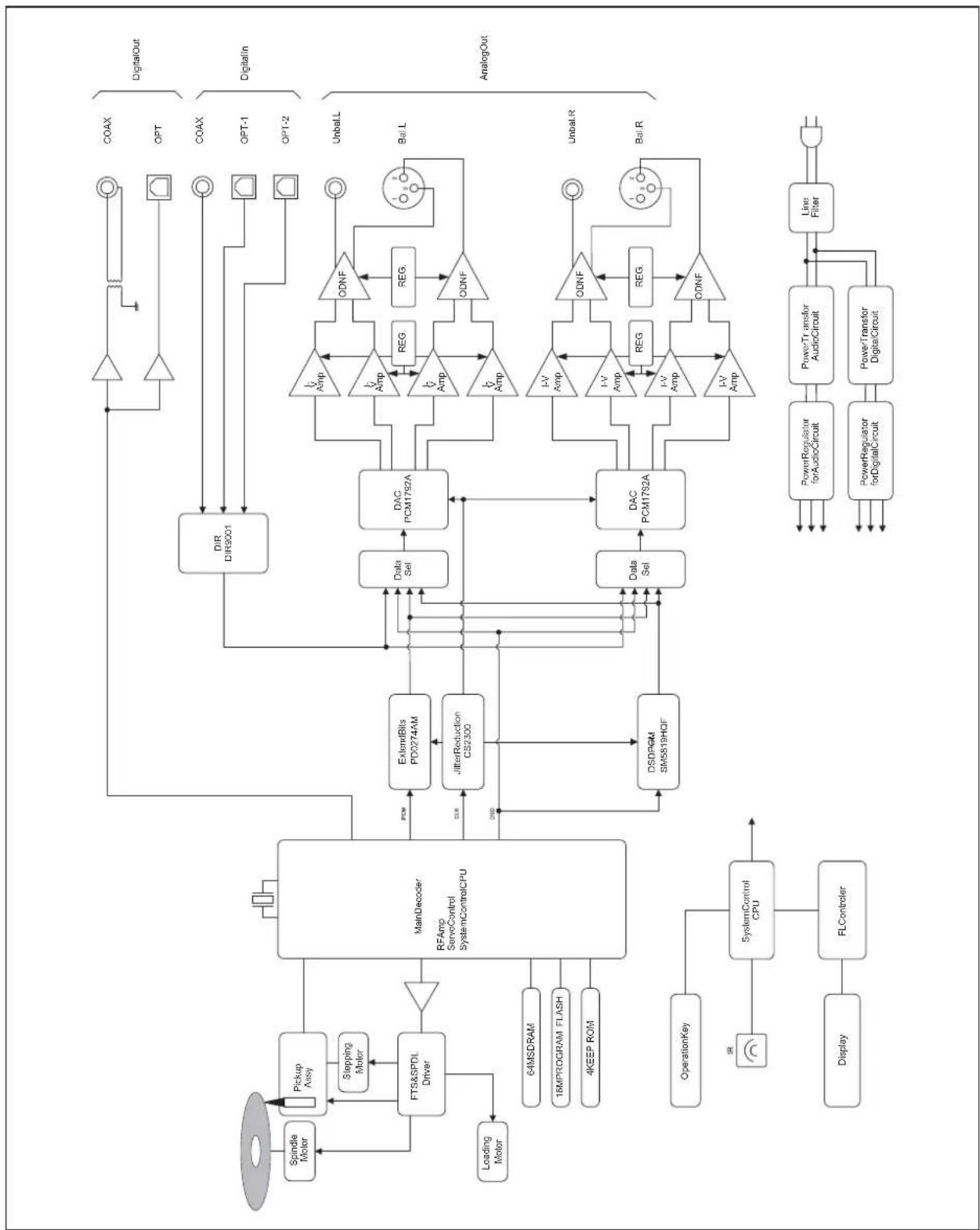
flowchart
graph TD
    A["Spindle Motor"] --> B["Pickup Assy"]
    B --> C["Stepping Motor"]
    C --> D["FTS&SPDL Driver"]
    D --> E["MainDecoder: RFamp ServoControl SystemControlCPU"]
    E --> F["PCI"]
    F --> G["ExtendBits PD0274AM"]
    G --> H["JitterReduction CS2300"]
    H --> I["DSDP6M SM5819HOF"]
    I --> J["Data Sel"]
    J --> K["DAC PCM1792A"]
    K --> L["ODNF"]
    L --> M["COAX"]
    L --> N["OPT"]
    L --> O["COAX"]
    L --> P["OPT-1"]
    L --> Q["OPT-2"]
    L --> R["Unbal.L"]
    L --> S["Bal.L"]
    L --> T["AnalogOut"]
    U["Loading Motor"] --> D
    V["OperationKey"] --> W["SystemControl CPU"]
    W --> X["Display"]
    Y["Display"] --> Z["FLController"]
    Z --> W
    K --> AA["I-V Amp"]
    K --> AB["I-V Amp"]
    K --> AC["I-V Amp"]
    K --> AD["I-V Amp"]
    K --> AE["I-V Amp"]
    K --> AF["ODNF"]
    K --> AG["ODNF"]
    K --> AH["REG."]
    K --> AI["REG."]
    K --> AJ["Line Filter"]
    K --> AK["PowerRegulator forAudioCircuit"]
    K --> AL["PowerTransfer forDigitalCircuit"]
    K --> AM["PowerTransfor AudioCircuit"]
    K --> AN["PowerTransfer DigitalCircuit"]
Specifications
| Format2-channelSuperAudioCD,CD | ||
| PowersourceAC230V,50Hz | ||
| Powerconsumption | 32 W1W(atstandby) | |
| Weight(Mainunit)22.5kg | ||
| Dimensions440(W)×154(H)×413(D)mm | ||
| Ambientoperatingtemperature/Ambientoperatinghumidity | +5°Cto+35°C/5%to85%(noncondensing) | |
| Audiooutput characteristics | Outputvoltage/outputimpedance: | UNBALANCEterminal(RCAterminal)2.5Vrms/300ΩBALANCEterminal(XLRterminal)2.5Vrms/600ΩForSACD/DSD(-05dB)2.35Vrms |
| Frequencyresponse:CD,SACD5Hzto20kHz(+0,-0.4dB)SACD5Hzto50kHz(+0,-3dB) | ||
| Totalharmonic distortion: | CD0.0013%SACD/DSD0.0017%SACD/PCM DIGITALIN 0.0006%0.0007% | |
| S/Nratio: | CD124dBSACD/DSD104dBSACD/PCM DIGITALIN 120dB122dB | |
| Dynamicrange: | CD101dBSACD/DSD104dBSACD/PCM DIGITALIN 118dB117dB | |
| Channelseparation: | CD124dBSACD/DSD104dBSACD/PCM DIGITALIN 116dB122dB | |
| Digitalinput | Coaxialdigitalinput: | 0.2to2.5Vp-p |
| Opticaldigitalinput: | -14.5to-24dBm | |
| Samplingfrequency: | 32kHz,44.1kHz,48kHz,88.2kHz,96kHz(16to24bit2chPCMateachfrequency) | |
| Digitaloutput | Opticaldigitaloutput: | Opticaldigitalterminal -15to-21dBm |
| Coaxialdigitaloutput: | RCA 05Vp-p/75 Ω | |
* Design and specifications are subject to change without notice
BeforeYouAskForRepairServices
While the unit is used, an unusual phenomenon maybe confused as a malfunction for certain reason.
Priortoaskingusforrepairservices,pleasecheckthetablebelowandreadtheinstructionmanualforthesubsidiarydevices.
If the cause of malfunction cannot be identified, please make queryiesto the purchasing store.
ProblemCause/SolutionRef.page
| Powerisnotturnedon:ConnectthepowercabletotheACinlet(ACIN)andthe ACoutlet firmly. | 22 | |
| Thedisctraycomesouteven afterthetrayisclosed. | ·Setthedisconthedisctraycorrectly. 24 | |
| ·Cleanthedisctoremovedirt. | ||
| Playback cannot be performed. | ·Clean the disc to remove dirt. | 2 |
| ·Setthedisconthedisctraycorrectly. | ||
| ·Removedewcondensationfromtheinteriorofthisunit. | ||
| ·Putthedisconthetraywiththelabelfacingupwards. | ||
| Settings have been erased. | ·Settings may be erased when electric power failure 46happensorwhenpowersupplyisshutdownduetopower cabledisconnection.Besuretounplugthepowercableafterpressingthe OPERATION switch and the “-STANDBY-” disappears fromthedisplay. | |
| Theremotecontrolcannotbe operated. | ·Operate the remote control within the specified operating range. | 8 |
| ·Replacetheremotecontrolbatterywithanewone. | ||
| ·The remote control infrared receiver is exposed to directsunlightorstronglightsources(suchasinverter fluorescentlights).Change the installation place or angle to avoid the exposuretolightsources. | 8 | |
| Anelectronicdevicesuchasa televisionmalfunctions. | ·Some devices equipped with a wireless remote control receivermaymalfunctionwhentheremotecontrolofthis unit is operated. Keep this unit away from such devices. | 8 |
24
1
7
ProblemCause/SolutionRef.page
| Nosoundisgeneratedfromthe speakers,orsoundisdistorted. | · Confirm that the connection of audiocables are correct. 22 |
| · If a digital output device is connected to this unit22 set the setting of digital outputtoON. | |
| · Clean the disctore movedirt. 2 | |
| · When the output level of an amplifier, etc is minimum, adjustthe volume. | |
| · Confirm that the cable connectors are connected and firmly inserted into the terminalsoftheunit. | |
| · Clean the cable connectors and terminals by using alcohol,etc. | |
| Digitalaudiosignals cannot be outputdigitally. | · Set the setting of digital outputtoON. |
| · It is impossible to output the digital audio signal when playing back the HD layer of Super Audio CD. SelecttheCDlayer. 44 | |
| TheoutputlevelsofSACDand CDarequitedifferent. | · This is due to the difference in recording format. |
This unit may not work normally when the unit is subject to external influence such as static electricity. Insuchacase, the unit can work normally by unplugging the power cable once and plugging it again.
- Precautions
- DONOTmovethisunitduringplayback.
- Whenmovingthisunit
- Locationforinstallation
- Avoidthefollowinglocationsfor installation.
- Donotputarticles.
- Toavoidheatemission
- Noticewhenthisunitisinstalledina rackwithglassdoors
- Poweroffthisunitwhenitisnotused.
- Dewcondensation
- Batteries
- Caution:
- Howtohandlediscs
- Howtostorediscs
- Disccleaning
- Discinaspecificshape
- Noticewhenhandlingopticaldigitalcables
- Cleaning
- FeaturesOfThisUnit
- —2-channel-specificSuperAudioCD/CDCompatiblePlayer
- LxDTM—LuXmanoriginalDisc TransportMechanism—
- DustProofShutter(DPS)
- Analogcircuit
- DSD → PCMconversion
- Jitter-reductionfunction
- Disclayerswitchoverfunction
- Zoomfunction
- 4playbackmodes
- Digitalinputterminals
- Lastmemoryfunction
- Dimmerfunction
- DigitaloutputOFF
- Analogoutputterminals
- Peel oatPCB/Roundpatternboard
- Legs
- Remotecontrol(RD-14)
- Bitlengthextension
- Energy-savingdesign
- AboutDiscsThisUnitCanPlayBack
- Typesofdiscsthatcanbeplayed
- SuperAudioCD
- —3typesofdiscs—
- •Dual-layerCD
- •Hybrid-layerCD
- BeforeUse
- Checktheaccessories.
- HowtoUseRemoteControl
- Insertbatteriesintotheremotecon- trol.
- Remotecontrol'srange
- NamesandFunctionsofPart
- Frontsideofmainunit
- Operationswitch/OPERATION
- Operationindicator/OPERATION
- Disctray
- Open/closeswitch/() ▲
- Remotecontrolinfraredreceiver/R
- Display
- Digitalinputselectionswitch/DIGITALIN
- Digitaloutputselectionswitch/DIGITALOUT
- DSD/PCMselectionswitch/DSD/PCM
- SuperAudioCD/CDselection switch/SACD/CD
- Playswitch/() ▶
- Playindicator
- Pauseswitch/()
- Stopswitch/() ■
- Nextswitch/()
- Display
- Remotecontrolinfraredreceiver/R
- Digitaloutputindicator/ DIGITALOUT
- DSD/PCMindicator/DSD/PCM
- SuperAudioCD/CDindicator/SACD/CD
- Tracknumber/TRK
- Timedisplaymode
- Standbyindicator/STANDBY
- Playbackmode
- Time
- 10.Repeatmode
- Remotecontrol
- Digitalinputselectionswitch/DIGITALIN
- Digitaloutputselectionswitch/DIGITALOUT
- Programswitch/PROGRAM
- Numerickeys/1,2,3,4,5,6,7,8,9,0
- Clearswitch/CLEAR
- Rewindswitch/()
- Timedisplayswitch/TIME
- 10.Open/closeswitch/() ▲
- Dimmerswitch/DIMMER
- DSD/PCMselectionswitch/DSD/PCM
- SuperAudioCD/CDselection switch/SACD/CD
- Repeatswitch/REPEAT
- Randomswitch/RANDOM
- Enterswitch/ENTER
- Playswitch/()
- Nextswitch/()
- Pauseswitch/()
- Fast-forwardswitch/(▶)
- Zoomswitch/ZOOM
- Stopswitch/(
- Rearsideofmainunit
- Analogaudiooutputterminals (Unbalanced)/LINE
- Analogaudiooutputterminals (Balanced)/BALLINE
- Opticaldigitalinputterminals/OPT1, OPT2
- Coaxialdigitalinputterminal/COAX
- Opticaldigitaloutputterminal/OPT
- Coaxialdigitaloutputterminal/COAX
- 7.LinePhaseSensor
- Powercableterminal/ACIN
- Connections
- BeforeConnecting
- Connect the accessory powercable to an AC outlet.
- Connecttheaudiocables.
- (Referto“A”intheillustrationon thepreviouspage.)
- WhenusingthisunitasaD/Aconverter(Referto“B”intheillustrationonthepreviouspage.)
- Upperside
- When connecting to such device as an amplifier that has a digital input terminal
- (Referto“C”and“D”inthe illustrationonthepreviouspage.)
- HowtoPlayBackDiscs
- Playbackadisc.
- PresstheOPERATIONswitch.
- Presstheopen/close() switch.
- Putthedisconthedisctray accordingtotheguideonthetray.
- 4.Presstheopen/close()switch.
- Presstheplay() switch.
- Stop/PausethePlayback
- Pausetheplaybackofadisc.
- Pause playback.
- 1.Pressthepause()switch.
- Resumetheregularplayback.
- Duringpause, presstheplay() or pause() switch.
- Stoptheplayback.
- Ejectadisc.
- Powerofftheunit.(Turntheunittothe standbystate.)
- Skip/Fast-forward/Rewind
- Skipstothedesiredtrack. (Skipplayback)
- Skips(Skipplayback) Skiptothetracktoplayback.
- Gobacktothetracktoplayback.
- Fast-forward/rewindthe playback. (Scan)
- Fast-forwardtheplayback.
- During playback, press the fast-forward() switch.
- Toresumetheregular playback, presstheplay() switch.
- Rewindtheplayback.
- During playback, presstherewind () switch.
- DirectSearch
- Specifythedesiredtrackforplayback
- Enteratracknumberbypassing numerickeys.
- PresstheENTERorplayswitch.
- RepeatPlayback
- Repeat the playback. (Repeat playback)
- Trackrepeat(T-REP)
- Allrepeat(A-REP)
- ProgramPlayback
- 6.PresstheENTERswitch.
- Presstheplay(s) switch.
- RandomPlayback
- Playbackthetracksinarandomorder. (Random playback)
- DiscInformation/Zoom
- Discinformation
- Thetimedisplaycanbeswitchedover during playback.
- Thecurrenttracknumberandthe elapsedtimeofthetrack(Inthe defaultsetting):
- The current track number and the remaining time of the track (Remain):
- Thetotalremainingtimeofthedisc (Totalremain):
- Zoom
- When pressing the ZOOM switch on theremote controlduring play-back, the track number and time are zoomed.
- WhenpressingtheZOOMswitch onceagain, the display return to thenormalstate.
- DetailedSettings
- Dimmerswitch/DIMMER
- SuperAudioCD/CDselectionswitch/SACD/CD
- Duringstop, presstheSACD/CD switch.
- WhentheHDlayerisselected, the SuperAudioCD(SACD)indicator lightsuponthemainunitdisplay.
- Digitalinputselectionswitch/ DIGITALIN
- This switch is pressed when using this unit as a D/A converter.
- EachtimetheDIGITALINswitchis pressed, the display changes as follows. COAXIAL → OPTICAL1 → OPTICAL2 → INTERNAL (Internal player)
- Theselectedinputtypeandsamplingfrequenciesappearonthe mainunitdisplay.
- Digitaloutputselectionswitch/ DIGITALOUT
- Thisswitchispressedwhenturnon oroffthedigitalaudiooutput. Eachtimetheswitchispressed, the outputcanbeturnedonoroff.
- DSD/PCMselectionswitch/DSD/PCM
- WhenplayingbacktheHD(orSACD) layerofSuperAudioCD, this switch is pressed to select whether to input DSD signals from the disdirectly to the D/A converter into Cortoconvert DSD signals into PCM signals before inputting to the D/A converter.
- Restoreallthesettingstothefactory defaults.
- Lastmemoryfunction(Memorization ofeachsetting)
- BLOCKDIAGRAM
- BeforeYouAskForRepairServices
Brand : LUXMAN
Model : D-08
Category : Media player