Jager - Mouse Volcano - Free user manual and instructions
Find the device manual for free Jager Volcano in PDF.


| Product Type | Optical Mouse |
| Connection Type | Wired USB |
| Dimensions (L x W x H) | 125 x 70 x 40 mm |
| Weight | 100 g |
| Cable Length | 1.8 m |
| Power Supply | USB powered (5V DC) |
| Resolution | 800 / 1200 / 1600 DPI switchable |
| Number of Buttons | 6 (left, right, scroll wheel, forward, backward, DPI switch) |
| Scroll Wheel | Yes, with middle button |
| Compatible Operating Systems | Windows, macOS, Linux |
| Interface | USB 2.0 / 3.0 |
| Sensor Type | Optical LED |
| Ergonomic Design | Ambidextrous |
| Cleaning Instructions | Wipe with a soft, dry cloth. Do not use liquids or solvents. |
| Safety Precautions | Avoid exposure to moisture, extreme temperatures, and direct sunlight. Do not disassemble. |
| Spare Parts Availability | Replacement USB cables available, contact support. |
| Repairability | Basic cleaning and cable replacement possible; internal components not user-serviceable. |
| General Information | Brand: Volcano, Model: Jager. Designed for everyday computing. |
Frequently Asked Questions - Jager Volcano
User questions about Jager Volcano
0 question about this device. Answer the ones you know or ask your own.
Ask a new question about this device
Download the instructions for your Mouse in PDF format for free! Find your manual Jager - Volcano and take your electronic device back in hand. On this page are published all the documents necessary for the use of your device. Jager by Volcano.
USER MANUAL Jager Volcano
natural_image
Black and yellow computer mouse with a triangular logo on the front wheel, set against a solid red background (no text or symbols visible)VOLCANO
MODECOM
1 BACK COVER DETACHABLE INSTRUCTIONS.
INSTRUKCJA ZDEJMOWANIA TYLNEJ CZĘŚCI KORPUSU MYSZY.
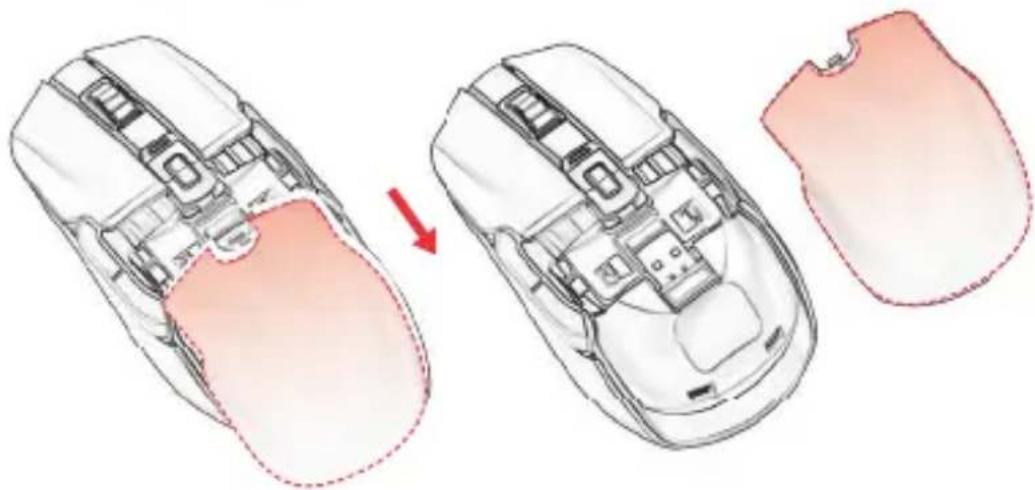
natural_image
Diagram showing a computer mouse with internal components before and after disassembly, illustrating the process (no text or labels present)natural_image
Top-down schematic of a computer mouse with red arrows pointing to internal components (no text or labels)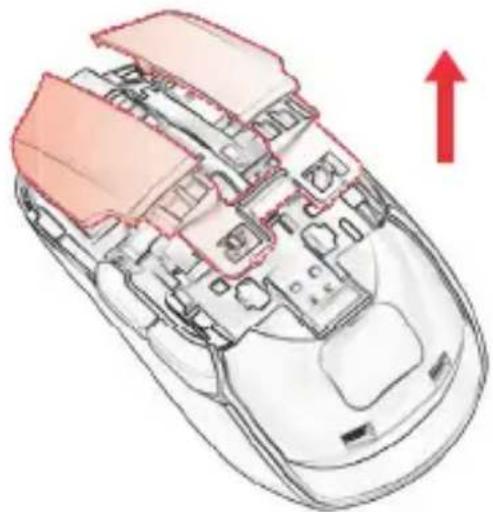
natural_image
Cross-sectional diagram of a computer mouse showing internal components and a red upward arrow (no text or symbols)natural_image
Technical line drawing of two computer mouse head plans showing internal circuitry and adjustment arrows (no text or symbols)Two fingers clasp the switch, gently pull up.
Align front buckle with mouse, then press buckle into right position.
Front-end buckle position.
Back-end buckle position.
Front-end buckle position.
- Align front and back buckle with mouse.
- Push forward gently to install the back cover.
This device was designed and made of high-quality reusable materials and components. If the device, its packaging, user's manual, etc. are marked with crossed waste container, it means they are subject to segregated household waste collection in compliance with the Directive 2012/19/UE of the European Parliament and of the Council. This marking informs that electric and electronic equipment shall not be thrown away together with household waste after it's been utilised. The user is obliged to bring the utilised equipment to electric and electronic waste collection point. Those running such collection points, including local collection points, shops or commune units, provide convenient system enabling to scrap such equipment. Appropriate waste management aids in avoiding consequences which are harmful for people and environment and result from dangerous materials used in the device, as well as improper storage and processing. Segregated household waste collection aids recycle materials and components of which the device was made. A household plays crucial role in contributing to recycling and reusing the waste equipment. This is the stage where the basics are shaped which largely influence the environment being our common good. Households are also one of the biggest users of small electrical equipment. Reasonable management at this stage aids and favours recycling. In the case of improper waste management, fixed penalties may be imposed in accordance with national legal regulations.