5600 - Kitchen sink Waterstone - Free user manual and instructions
Find the device manual for free 5600 Waterstone in PDF.


User questions about 5600 Waterstone
0 question about this device. Answer the ones you know or ask your own.
Ask a new question about this device
Download the instructions for your Kitchen sink in PDF format for free! Find your manual 5600 - Waterstone and take your electronic device back in hand. On this page are published all the documents necessary for the use of your device. 5600 by Waterstone.
USER MANUAL 5600 Waterstone
TRADITIONAL PLP PULLDOWN FAUCET INSTALLATION INSTRUCTIONS
Model #s:
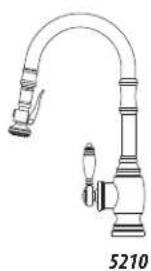
5500, 5600, 5610, 5200, 5210

natural_image
Modern stainless steel kitchen faucet with curved glass end and side handle (no text or symbols visible)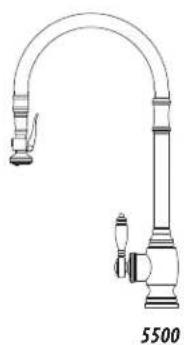
natural_image
Line drawing of a kitchen faucet with a curved handle and side-mounted legs (no text or symbols)
natural_image
Line drawing of a kitchen faucet with handle and valve (no text or symbols)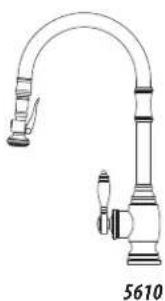
natural_image
Line drawing of a kitchen faucet with handle and valve (no text or symbols)
natural_image
Line drawing of a kitchen faucet with handle and valve (no text or symbols)BEFORE YOU BEGIN YOUR INSTALLATION:
1

Turn off water supply. Observe all local

plumbing codes.

natural_image
Black and white icon of a pipe with water droplets, symbolizing water pollution or drainage (no text or symbols)Inspect plumbing for signs of damage. Replace as necessary.

text_image
Prohibition sign with a black droplet and diagonal line, indicating no pollution or water release.DO NOT use petroleum based products on this faucet.
REQUIRED TOOLS:

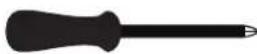
Phillips ScrewdriverAdjustable Wrench

Channel Locks
HANDLE POSITION
Waterstone faucets are designed to be installed in 3 different faucet positions. Choose to have the handle on left, front or right. Your faucet is factory configured for the most common positions - a front and right side installation. To reverse this and have the handle positioned on the left, connect the hose for cold water to the hot supply and the hose for hot water to the cold supply. This will maintain the relationship of pulling the handle for hot water or pushing for cold water.

natural_image
Technical line drawing of a mechanical valve or pump assembly (no text or symbols)
natural_image
Technical line drawing of a mechanical component with cylindrical body and base (no text or symbols)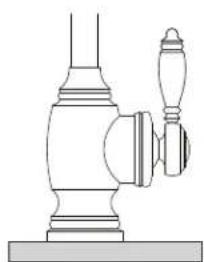
natural_image
Line drawing of a mechanical device with a handle and base (no text or symbols)HANDLE ON LEFT HANDLE IN FRONT HANDLE ON RIGHT
PULLDOWN FAUCET INSTALLATION
text_image
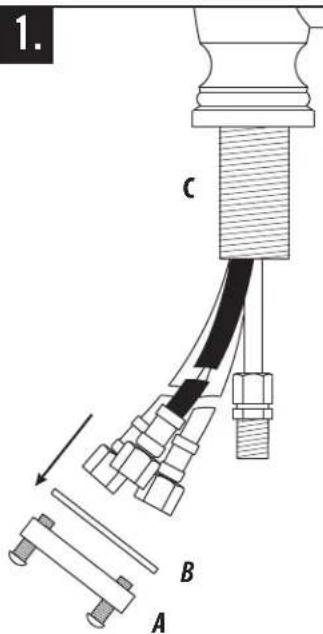
1. C B ARemove the clamp nut (A) and washer (B) from the threaded shroud (C).

text_image
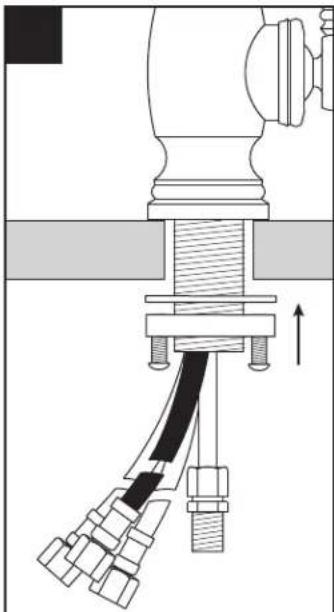
2. COUNTER OR SINK D EFit flexible hoses (D) and spray connection tube (E) through hole on counter or sink. (No plumbers putty is required. O-ring seals base).
natural_image
Mechanical assembly diagram showing a piston-cranked actuator with multiple levers and a directional arrow (no text or labels)Slide washer and thread the clamp nut onto threaded shroud. Tighten nut snug to underside of sink or counter.
natural_image
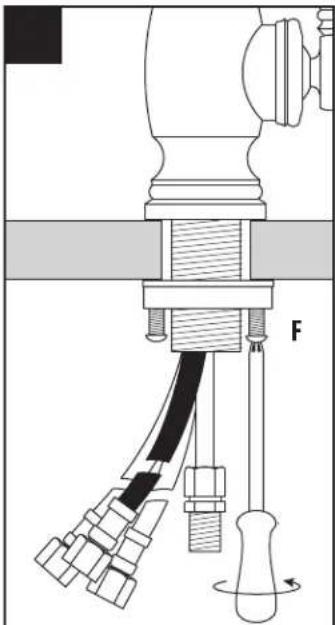
Mechanical assembly diagram showing a lever mechanism with multiple components and a force indicator (F), no readable text or symbols present.Turn faucet to the desired handle position. Securely tighten clamp screws (F).
HOW TO ADJUST HANDLE POSITION AND HANDLE TENSION
natural_image
Technical diagram of a mechanical assembly with directional arrows indicating motion (no text or symbols)natural_image
Technical diagram of a mechanical component with directional arrows indicating motion (no text or symbols)NEW ADJUSTED POSITION CLEARS BACKSPLASH
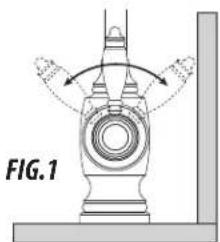
On some kitchen countertops, the handle may hit the backsplash when the faucet handle is positioned to the left or right (Fig. 1). Waterstone gives you the option of adjusting the handle 45 degrees to avoid hitting backsplash.
Place a small standard screwdriver in slot at bottom of metal ring that surrounds handle button (A). Gently pry button from handle (B). Unscrew and remove holding screw (C) and washer (D). Hold handle in a vertical position. Wiggle and pull straight off faucet. Rotate handle away from backsplash 45 degrees then slide handle back onto valve stem (E). Insert holding screw with washer and tighten. Snap handle cap back into place. To adjust handle tension, turn ring (F) clockwise to increase or counterclockwise to decrease handle tension.

text_image
and remove handle in a at off faucet. A B C D F ECONNECTING SUPPLY HOSES
Before connecting supply hoses, flush supply stops to clear any debris. Place a bucket underneath stops and run water for 5 to 10 seconds. Turn water off. Carefully position hot and cold supplies so they will not interfere with other hoses. Connect supply hoses (A) to supply stops (B). DO NOT use teflon tape or plumbers putty. Turn water back on and check for leaks.

text_image
A BOPTIONAL DECORATIVE BUTTONS
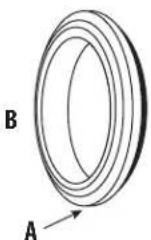
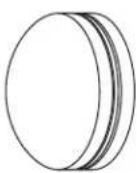
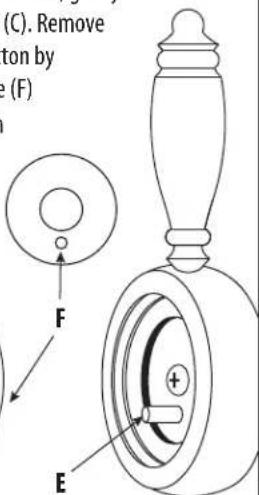
To change button, find theslot (A) at bottom of retainer ring (B). With a small standard screwdriver, gently pry retainer ring from faucet handle (C). Remove button assembly (D). Insert new button by lining up pin (E) on handle with hole (F) on bottom of button assembly. With slot facing down, press the button retainer ring firmly back into place.
D
text_image
(C). Remove ton by e (F) F EC
CONNECT THE PULLDOWN SPRAY HOSE

natural_image
Diagram of a mechanical device with labeled parts A and C, showing hoses and a central shaft (no text or symbols beyond labels)Connect spray hose (A) to spray connection hose tube (B).
NOTE – make sure spray hose (A) and counter balance (C) are free to slide up and down and are not in conflict with any plumbing components or items under sink.

text_image
Technical diagram showing a mechanical or electrical assembly with labeled component B and connecting wires.CLEANING DEBRIS SCREEN

text_image
1. Turn off water supplies underneath sink and remove any water pressure by opening the faucet handle. 2. Unscrew sprayer (A) from spray hose by holding knurled swivel (B). 3. Inspect, remove and clean debris screen (C) in sprayer. Once cleaned, replace debris screen and reattach to swivel. 4. Close faucet handle and turn on water supplies. Make sure sprayer is secure and sealed by running faucet.CLEANING AERATOR

text_image
1. A
text_image
B C D
text_image
4.- Gently unscrew and remove spray face (A) by hand.
- To remove O-ring (B), aerator (C) and spray face insert (D), push with finger from bottom.
- Thoroughly rinse aerator with water until all debris is removed.
- Place spray face insert back into spray face and spin until it clicks into place. Next, place aerator and 0-ring into spray face. Gently screw spray face, by hand, snuggly back onto sprayer.
INSTALL SOAP/LOTION DISPENSER (OPTIONAL)
text_image
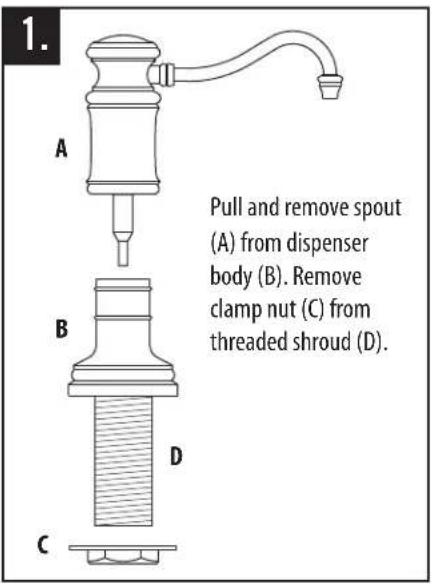
1. A B C Pull and remove spout (A) from dispenser body (B). Remove clamp nut (C) from threaded shroud (D).
text_image
2. 1-3/8" HOLE COUNTER OR SINK Fit dispenser body through 1-3/8" hole on counter or sink. (No plumbers putty is required. O-ring seals base). Screw clamp nut onto shroud and tighten snug.
text_image
3. Fill plastic bottle with soap or lotion. Thread bottle (E) into bottom of dispenser shroud.
text_image
4. G F Slide red tubing (F) into tube fitting (G) at bottom of spout.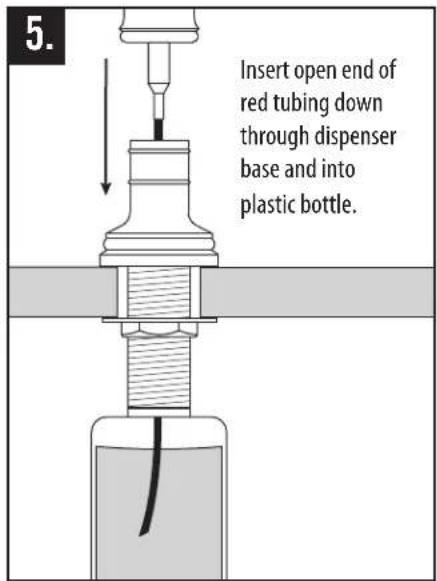
text_image
5. Insert open end of red tubing down through dispenser base and into plastic bottle.
text_image
6. Push down on spout to secure over white 0-rings. Pump spout a few times to get soap or lotion flowing.INSTALL AIR SWITCH (OPTIONAL)

text_image
1. EXPOSE THREADS A Before inserting air switch into hole, loosen switch base (A) until threads are exposed.
text_image
2. Slide clear tubing (B) into tube fitting (C) at bottom of air switch shroud. C B
text_image
3. 1-1/2" HOLE COUNTER OR SINK Fit air switch and tubing through 1-1/2" hole on counter or sink. (No plumbers putty is required. O-ring seals base).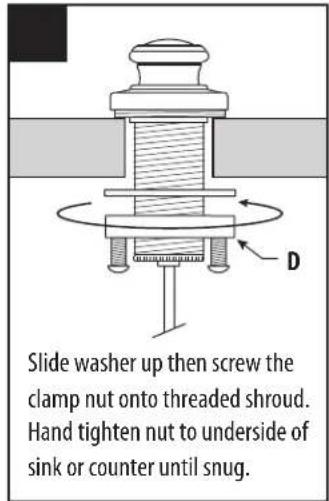
text_image
Slide washer up then screw the clamp nut onto threaded shroud. Hand tighten nut to underside of sink or counter until snug.CONTINUED FROM PREVIOUS PAGE

text_image
5. E Tighten clamp screws (E) securely with screwdriver.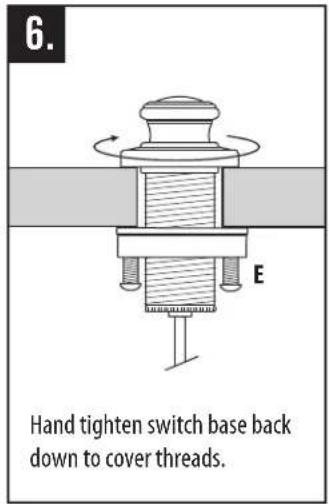
text_image
6. E Hand tighten switch base back down to cover threads.
text_image
7. Slide other end of tubing (F) into tube fitting at bottom of control box (G). G F
text_image
GARBAGE DISPOSAL Plug control box into undersink electrical outlet. Plug garbage disposal into either dual outlet.INSTALL SINGLE PORT AIR GAP (OPTIONAL)
text_image
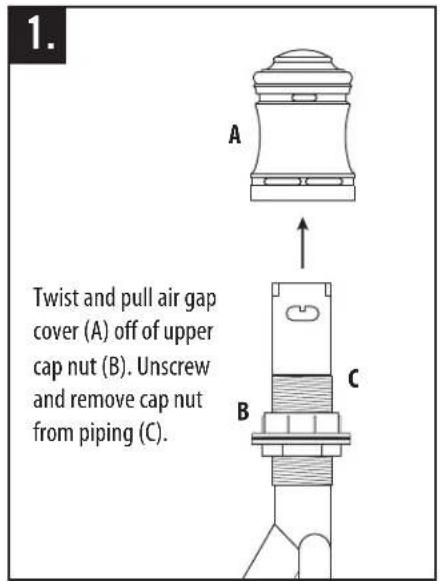
1. A Twist and pull air gap cover (A) off of upper cap nut (B). Unscrew and remove cap nut from piping (C). B C
text_image
2. Unscrew and remove top clamp nut (D) from both threadings on piping. Slide gasket (E) off piping and remove.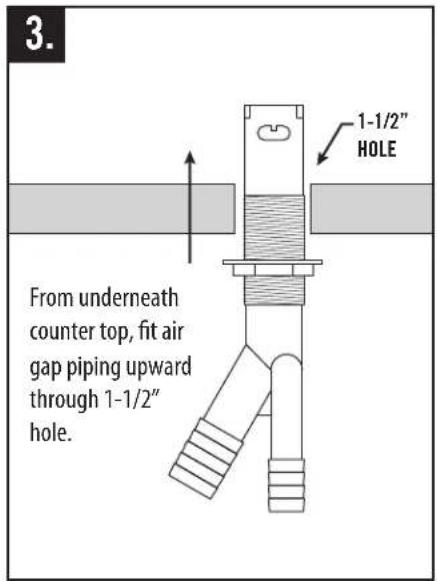
text_image
3. 1-1/2" HOLE From underneath counter top, fit air gap piping upward through 1-1/2" hole.
text_image
Slide gasket down and screw top clamp nut back onto piping. Adjust the two clamp nuts to fit countertop thickness. (No plumbers putty is required).
text_image
5. F Screw cap nut back onto top of piping until snug. Slide air gap over cap nut and top clamp nut. Be sure to have overflow holes (F) facing sink.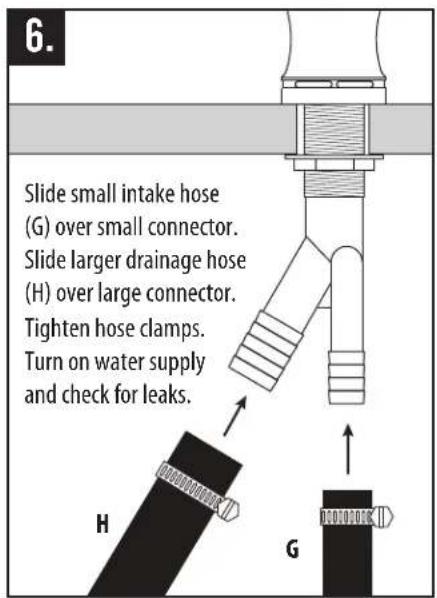
text_image
Slide small intake hose (G) over small connector. Slide larger drainage hose (H) over large connector. Tighten hose clamps. Turn on water supply and check for leaks.INSTALL DUAL PORT AIR GAP (OPTIONAL)
text_image
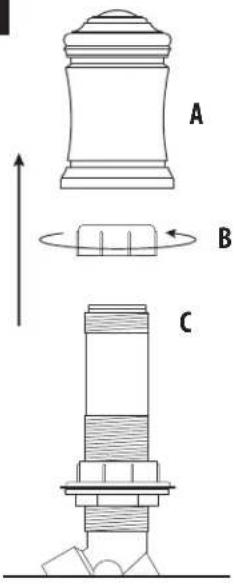
A B CPull air gap (A) off of upper cap nut (B). Unscrew and remove cap nut from piping (C).

text_image
Technical diagram of a mechanical assembly with labeled components D and E, showing directional arrows and layered structure.Unscrew and remove top clamp nut (D) from both threadings on piping. Slide gasket (E) off piping and remove.
text_image
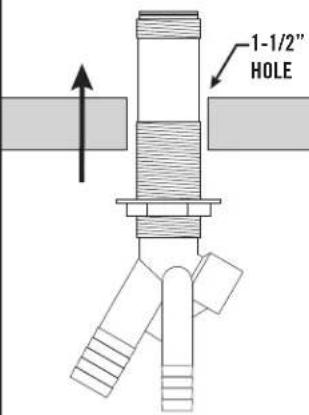
1-1/2" HOLEFrom underneath counter top, fit air gap piping upward through 1-1/2" hole.
The image is too blurry to recognize any text content.
natural_image
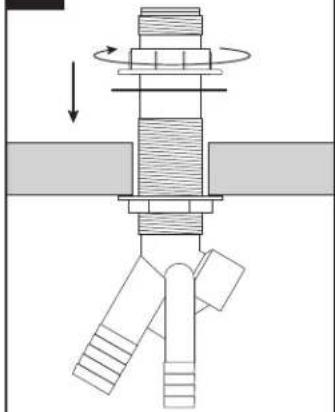
Mechanical assembly diagram showing a rotating shaft and connecting pipe (no text or labels)Slide gasket down and screw top clamp nut back onto piping. Adjust the two clamp nuts to fit countertop thickness. (No plumbers putty is required).

text_image
FScrew cap nut back onto top of piping until snug. Slide air gap over cap nut and top clamp nut. Be sure to have overflow holes (F) facing sink.
text_image
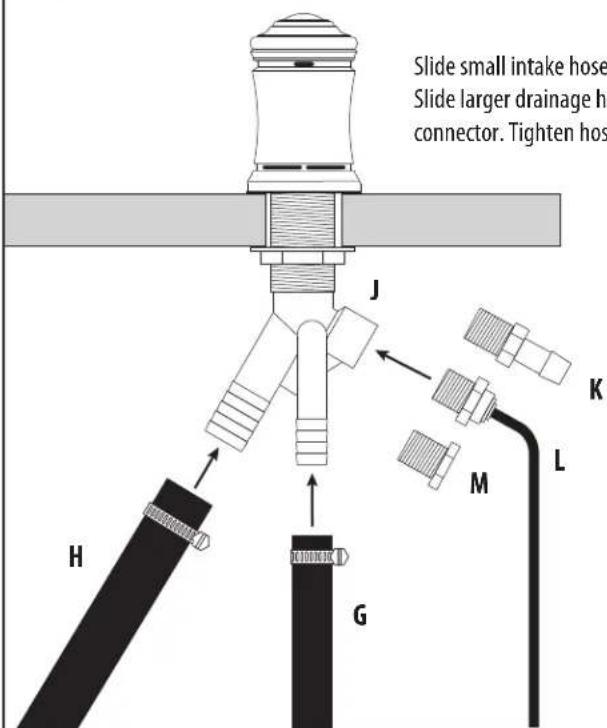
Slide small intake hose Slide larger drainage ho connector. Tighten hos J K M L H GSlide small intake hose (G) over small connector. Slide larger drainage hose (H) over large connector. Tighten hose clamps.
Third intake hole (J) has 3 options. Use hose connector (K) for additional dishwasher, use filtration hose connector (L) for reverse osmosis unit, or use solid cap (M) to plug third hole.